
Serveur MCP Plumb
Commit 10 nov. 2026Fournit aux agents de codage une intelligence sémantique basée sur LSP, des modifications de fichiers transactionnelles et une coordination multi-agents via un démon partagé.
Aussi connu sous plumbkit/plumb
- Étoiles
- 4
- Outils
- —
- Téléchargements, 30 jours
- —
- Dernière version
- 0.27.0
- Dernier commit
- 10 nov. 2026
- Licence
- MIT
Qu'est-ce que Plumb MCP ?
Plumb est un serveur MCP. Fournit aux agents de codage une intelligence sémantique basée sur LSP, des modifications de fichiers transactionnelles et une coordination multi-agents via un démon partagé.
Résumé généré à partir du README du projet
À propos du MCP server Plumb
Plumb offre aux agents de codage l'intelligence sémantique que l'on trouve habituellement dans un IDE. Il fonctionne comme un MCP server qui utilise le Language Server Protocol (LSP) et tree-sitter pour donner aux agents l'accès aux définitions de symboles, aux références et aux hiérarchies de code. Cela permet aux agents de comprendre la structure du code plutôt que de simplement lire des fichiers texte bruts, ce qui améliore l'efficacité du contexte et la précision.
Le système fonctionne via un binaire unique qui exécute un démon en arrière-plan. Ce démon agit comme une couche de coordination partagée pour plusieurs agents, leur permettant de voir les sessions de travail actives des autres et de communiquer via un système de boîte de réception. Comme le démon est partagé, il peut gérer le verrouillage par chemin pour éviter les conflits d'écriture concurrents et fournir des transactions multi-fichiers atomiques avec des capacités de rollback pour garantir l'intégrité des fichiers.
Les développeurs peuvent connecter divers clients comme Claude Code, Cursor ou Gemini en utilisant la commande 'plumb setup'. Le serveur propose une intégration de premier ordre pour Go et Python, tout en offrant une navigation basée sur tree-sitter pour plus de 30 autres langages. Il inclut des fonctionnalités de sécurité telles que l'accès au système de fichiers par périmètre et un filtrage git par paliers pour protéger les dépôts lors du travail autonome des agents.
Ce que vous pouvez faire avec
- 1Coordonner plusieurs agentsUn développeur peut avoir différents agents travaillant sur le même projet sans qu'ils ne dupliquent les tâches ou ne s'écrasent mutuellement.
- 2Exécuter des modifications multi-fichiers atomiquesVous pouvez ordonner à un agent d'appliquer des changements sur de nombreux fichiers avec la garantie que l'opération entière sera annulée si une partie échoue.
- 3Réduire la consommation de tokens avec des lectures sémantiquesAu lieu de lire des fichiers entiers, un agent peut demander des symboles spécifiques ou des plages de lignes pour économiser l'espace de la fenêtre de contexte.
Extrait du README du projet. Chaque cas d'utilisation est vérifié par rapport à une citation du document.
Vérifications automatisées
Exécuté le 14 nov. 2026Rapport complet →Pas encore vérifié. Un serveur nécessite un score de 80, aucune faille sérieuse et suffisamment de données pour que nous puissions effectuer les vérifications. Fonctionnement des vérifications · Ce qu'il faut corriger pour gagner des points

- Dépôt source lié et accessibleplumbkit/plumb is public and reachablegithub.com/plumbkit/plumb ↗Réussi
- Le nom du package correspond au dépôt sourceNon vérifié
- Provenance du build (attestation Sigstore)Non vérifié
- Licence open source (OSI)MITspdx.org/licenses/MIT.html ↗Réussi
- Commit ou version publiée au cours de l'année écouléeLast commit or release 2026-11-10github.com/plumbkit/plumb ↗Réussi
- OpenSSF ScorecardNon vérifié
- Nom du package non proche d'un package populaireNon vérifié
- Aucun avis critique dans le package ou ses dépendancesNon vérifié
- Aucune instruction cachée destinée au modèle0 tool descriptions and the README read; no override phrases, credential paths or hidden charactersRéussi
- Les outils destructifs sont étiquetésNon vérifié
- Le point de terminaison distant répond à la poignée de main MCPNon vérifié
README
Voir sur GitHub


IDE intelligence for agents — guardrails for unattended work, coordination for fleets.
Plumb is an MCP server that gives a coding agent the intelligence layer of an IDE — LSP-backed semantics, a tree-sitter code index, and project memory — inside guardrails: atomic, lock-serialised writes with transactional rollback, scoped filesystem and git access, and a daemon that survives its own crashes. And because every agent you run shares that one daemon, plumb is also the coordination layer between them: peers see the writes others made, message each other, and hand off work instead of duplicating it. A single binary; nothing else to install.
Why Plumb
LLM agents usually work by reading whole files into the context window — token-heavy, lossy at scale, blind to symbol semantics, and unsafe to let loose on a real repo. Plumb is built on four pillars, in priority order.
1. Reliability & write-safety
Leaving an agent to edit a codebase for an hour is only viable if writes can't corrupt files and a crash can't wedge your session.
- Atomic I/O — every write is staged in a temp file and renamed into place. No partial writes, ever. Symlink-aware, CRLF-tolerant.
- Per-path locking — the daemon serialises concurrent writes to the same file across every session and chat window. No races.
- Multi-file transactions — apply edits across dozens of files with guaranteed atomic rollback if any step fails.
- Crash-resilient daemon —
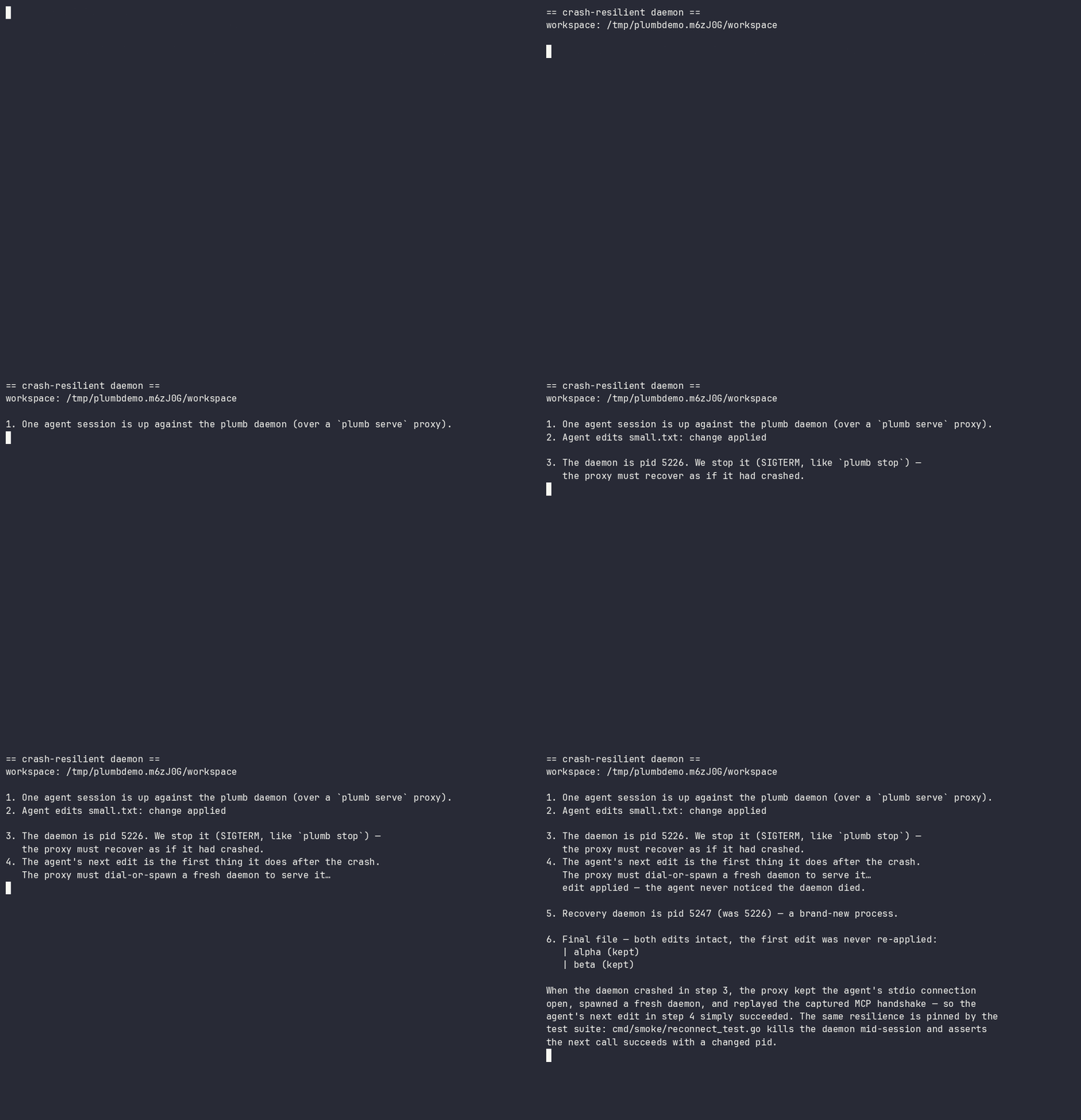
plumb serveis a reconnecting proxy. If the daemon crashes or hangs, it respawns one and replays the handshake; the agent never notices. In-flight writes are never silently re-run. - Optimistic concurrency — mtime/sha guards catch stale edits before they clobber newer changes.
See it run: docs/demos/ — two-agents-one-file.sh (a stale write is refused, nothing is lost) and daemon-respawn.sh (below — the daemon is killed mid-session; the agent's next edit still succeeds):
2. Multi-agent coordination
One daemon serves every agent you run — which makes it the natural place for agents to see and talk to each other, not merely avoid each other's writes. Locks stop two agents corrupting a file; coordination stops them duplicating a task, rebasing onto a function signature a peer is mid-rewrite of, or shipping a change a peer's in-flight work is about to invalidate.
- Peer awareness (on by default) —
workspace_sessionsnames every active session and the writes it made, as the daemon recorded them. Recorded activity, not another agent's say-so: an agent about to start a task can see that a peer is already in those files. (Read-only operations never appear, and a write that failed or was refused is kept but marked[failed — no change applied]— so "a peer is working here" and "this landed" are distinguishable at a glance.) - An agent-to-agent mailbox (on by default, same workspace) —
leave_note/check_messagesgive sessions a threaded channel: hand a change to the peer already rewriting those files, or ask a peer to measure a behaviour instead of assuming it. Messages ride on ordinary tool results, so a working agent receives them without polling. - Advisory intents (opt-in:
[collab] intents) —share_intentdeclares what an agent is working on; a peer whose write touches a claimed path gets a hint at the moment of the would-be collision. Intents are deliberately labelled as unverified claims, kept distinct from the daemon-recorded activity feed, and never block anything. - Durable findings (opt-in:
[collab] knowledge_handoff) —share_findingsturns what an agent just learned into a searchable, secret-scrubbed project memory immediately, so the knowledge outlives the session that produced it.
Coordination is advisory by design — the write-safety above never depends on agents cooperating. Reference: Cross-agent sharing in the tool docs and the [collab] config section.
3. Semantic intelligence
The same primitives your editor has, exposed as structured tools:
- LSP-backed refactors —
rename_symbol,replace_symbol_body,safe_delete_symbolunderstand scope, types, and references. - Real diagnostics inline — actual
gopls/pyrightoutput is appended to every write, so the agent learns it broke the build immediately. - Symbol search — scoped to your code, no stdlib or dependency noise.
4. Context efficiency & safety controls
- Read only what you need — symbols or line ranges, not 2,000-line files.
- Scoped access you control — a per-connection path allowlist (read-only vs read-write roots) plus tiered git gating (destructive and network operations are off by default and need explicit confirmation). See SECURITY.md.
- One-round-trip bootstrap —
session_startreturns workspace, branch, recent commits, diagnostics, and project memory.
See the measured, reproducible numbers behind this: docs/use-cases.md — reading one function is 2.9×–33.4× less context than the whole file (the ratio is how much of the file you didn't need), and find_references returns the real call sites where a text search is 60% noise. The page publishes the losses too: read_multiple_files costs 1.31× more payload than reading the files natively (down from 1.32×, but still a loss — see Scenario 10 for why it isn't smaller). Every figure is regenerated by scripts/measure-use-cases.py.
Get started
Plumb is a single binary — from zero to your first answer:
1. Install
# Homebrew (macOS + Linux) — recommended
brew install plumbkit/plumb/plumb

# or with Go
go install github.com/plumbkit/plumb/cmd/plumb@latest

# or grab a prebuilt binary: https://github.com/plumbkit/plumb/releases
macOS note: prebuilt binaries are not yet notarised — on first run you may need
xattr -d com.apple.quarantine ./plumb, or right-click → Open. Homebrew installs avoid this.
2. Connect your agent
plumb setup claude-code # also: claude-desktop, codex, gemini, cursor, …
plumb setup writes the MCP config for you — no hand-editing JSON.
3. Open your project and try it
Make sure the language server you need is on your $PATH (gopls for Go,
pyright for Python, …), then point your agent at a real question. In Claude
Code:
cd your/project
claude "Use plumb to orient in this repo (session_start), then show me
everywhere <Handler> is called and what would break if I changed its signature."
Plumb resolves the workspace and runs session_start for orientation, then
answers with real LSP and topology data — actual call sites and blast radius —
instead of guessing from file dumps. It's read-only; nothing is modified. (Any
connected agent works — just paste the prompt.)
No
go.mod/pyproject.tomland not a git repo? Runplumb initonce to pin the workspace root (it also seeds.plumb/context.mdand project config).
Full walkthrough → docs/getting-started.md.
Language support (honest version)
Plumb negotiates LSP capabilities per language and also ships a built-in tree-sitter index for search and navigation with no language server. Support comes in tiers — we'd rather be precise than claim a big number.
| Tier | Languages | What you get |
|---|---|---|
| First-class (CI-tested, real-binary integration) | Go (gopls), Python (pyright) | Full LSP: definitions, references, rename, diagnostics, hierarchies + all write tools |
| Validated | Java (jdtls), Rust (rust-analyzer), Swift (sourcekit-lsp), TypeScript/JS (typescript-language-server), Zig (zls), Kotlin (kotlin-lsp), HTML (vscode-html-language-server) | Full LSP; just put the server on $PATH and it activates automatically (exclude any language with [lsp.<lang>] enabled = false). HTML carries one caveat: that server has no filesystem access, so it answers only from documents already opened |
| Search & navigation (tree-sitter, no LSP needed) | 31+ incl. JS/TS/TSX, Ruby, C, C#, Elixir, Scala, PHP, JSON, CSS, SCSS, XML, Lua, C++, Objective-C, Dart, Bash, SQL, HCL, Dockerfile, TOML, YAML, Markdown | Ranked symbol search, outlines, graph exploration via the Topology index |
Real-binary validation has been exercised on macOS and Linux — as of 2026-08-21, all nine adapters pass their integration tests against real server binaries on both. Details, including three toolchain traps that look like adapter bugs, are in docs/adding-an-lsp.md. Windows is tracked but not yet supported — the daemon's Unix-socket architecture needs a port.
How it works
plumb serve is a thin, reconnecting stdio proxy. The real work happens in one shared background daemon, so language servers stay warm across chats.
flowchart TD
    A1["Claude"] --> S1["plumb serve *"]
    A2["Codex"] --> S2["plumb serve *"]
    A3["Gemini"] --> S3["plumb serve *"]
    S1 --> K["plumb.sock"]
    S2 --> K
    S3 --> K
    K --> D["plumb daemon **"]
    D --> SDB[("stats.db ***<br/>global — all projects")]
    D --> G["gopls → /projects/foo"]
    D --> P["pyright → /projects/bar"]
    G --> F1[("/projects/foo/.plumb/ ***<br/>topology.db · memory.db")]
    P --> F2[("/projects/bar/.plumb/ ***<br/>topology.db · memory.db")]
* plumb serve is a reconnecting proxy — if the daemon crashes or hangs it respawns one and replays the handshake, so your session survives without the agent noticing.
** one shared process, reused across every conversation.
*** SQLite. One global stats.db (tool stats + episodic summaries); two per-project indexes under each workspace's .plumb/ — topology.db (the code graph) and memory.db (memory search). Schema details → docs/architecture.md.
Servers stay warm across chats, per-path locks are shared across every connection, and symbol indexes update live after each write. Full architecture → docs/architecture.md.
Monitoring (TUI)
Run plumb with no arguments for a live dashboard — see what your agent is doing in real time: every tool call as it happens, daemon health, per-tool stats, and streaming logs you can follow and filter. The fastest way to catch a runaway loop or confirm an edit landed.
Core capabilities
Plumb exposes 61 tools. The ones you'll use constantly:
session_start · workspace_symbols · get_definition · find_references · rename_symbol · edit_file · transaction_apply · diagnostics
The rest cover filesystem reads/writes, LSP hierarchies, tiered git, an optional local Topology index (ranked search + blast-radius/route analysis, no language server needed), durable per-project memory, and cross-agent coordination (peer sessions, an agent mailbox, opt-in intents and knowledge handoff). Full API reference: docs/tools.md.
Configuration
Global or per-project config.toml, or environment variables. Run plumb config show to see the resolved config with provenance.
[edits]
strict = true                  # require read_file before edit_file
rate_limit_per_minute = 30     # bound runaway agent loops

[git]
allow_destructive = false      # reset/checkout/rebase off by default
allow_push = false             # push/fetch/pull off by default
Full settings reference: docs/configuration.md.
The hard part
Agents can already read code well enough; writing it unsupervised — concurrently, transactionally, recoverably — is what's still unsolved. Plumb is the bet that this is the half worth getting right first. It's early, and the language coverage says so: a small validated core, the rest clearly marked experimental.
Roadmap
Plumb is pre-1.0. The core — write-safety, the resilient daemon, the topology index, and project memory — is in daily use. The road to 1.0 is mostly about proving it beyond the validated core and smoothing distribution. Issues and ideas welcome.
Shipped
- Concurrency-safe, atomic, transactional writes with rollback
- Crash-resilient reconnecting daemon
- Tree-sitter topology index + per-project memory
- Cross-agent coordination: peer awareness + agent mailbox (default on), intents + knowledge handoff (opt-in)
- Go and Python LSP adapters validated (real-binary)
Getting to 1.0. Rather than jump from 0.9 straight to 1.0, Plumb ships a series of focused minor releases — 0.10 through 0.19 — each with one coherent theme. 0.19.x is the last 0.x release; 1.0 follows it as a deliberate stability commitment. Native Windows support is intentionally a post-1.0 (1.1) item, not a 1.0 gate. The themed plan:
- 0.10 — distribution + honest claims (Homebrew, semantic re-rank → GA)
- 0.11 — validate the experimental LSP adapters on real binaries (zls ✓ validated; Kotlin ✓ validated on JetBrains' kotlin-lsp)
- 0.12 — Swift on Xcode via Build Server Protocol guidance
- 0.13 — daemon robustness (git-write crash safety, liveness probe)
- 0.14 — agent ergonomics + tool surface
- 0.15 — honesty + full config surface
- 0.16 — stabilisation + cross-platform proving
- 0.17 — distribution + discoverability (registries)
- 0.18 — proof + docs
- 0.19 — soak + feedback, the last 0.x (rolling patches, not a formal RC)
- 1.0 — general availability: the stability + validated-core promise
Full detail, rationale, and the post-1.0 items (Windows, tree-sitter cleanup) are in docs/roadmap.md.
Contributing
See CONTRIBUTING.md and AGENTS.md for architecture and code style. We follow Australian English in all prose. By contributing you agree to the Code of Conduct.
License
MIT — see LICENSE.
Questions sur Plumb MCP
Comment Plumb garantit-il la sécurité des écritures lors des modifications de code ?
Il utilise des E/S atomiques où les écritures sont préparées dans des fichiers temporaires, un verrouillage par chemin pour éviter les conditions de concurrence, et des transactions multi-fichiers avec rollback garanti.
Plusieurs agents peuvent-ils travailler simultanément sur la même base de code ?
Oui, Plumb agit comme une couche de coordination où les agents peuvent voir les sessions actives des autres, échanger des messages via une boîte de réception et partager leurs découvertes.
Que se passe-t-il si le démon Plumb plante pendant une session ?
Le proxy 'plumb serve' est résilient aux plantages ; il relancera le démon et rejouera le handshake afin que l'agent ne remarque pas l'interruption.
Plumb prend-il en charge différents langages de programmation ?
Oui, il prend en charge les langages via LSP (comme Go et Python) ou via un index tree-sitter intégré pour plus de 31 langages, dont JavaScript, Ruby et C++.