
Serveur MCP MCPlex
Commit 22 oct. 2026Une passerelle basée sur Rust qui assure le routage sémantique des outils, des garde-fous de sécurité et une observabilité en temps réel pour les agents IA utilisant MCP.
Aussi connu sous ModernOps888/mcplex
- Étoiles
- 13
- Outils
- 6
- Téléchargements, 30 jours
- —
- Dernière version
- —
- Dernier commit
- 22 oct. 2026
- Licence
- MIT
Qu'est-ce que MCPlex MCP ?
MCPlex est un serveur MCP. Une passerelle basée sur Rust qui assure le routage sémantique des outils, des garde-fous de sécurité et une observabilité en temps réel pour les agents IA utilisant MCP. Il expose 6 outils, comme mcplex_find_tools, mcplex_call_tool, mcplex_list_categories.
Résumé généré à partir du README du projet
À propos du MCP server MCPlex
Gérer des dizaines de MCP servers peut saturer la fenêtre de contexte d'un agent IA avec des définitions d'outils massives. MCPlex agit comme une passerelle Rust en binaire unique située entre votre agent et vos différents MCP servers pour résoudre ce problème grâce au routage sémantique des outils. En sélectionnant intelligemment uniquement les outils nécessaires à une tâche spécifique, il peut réduire la consommation de tokens de 70 % à 90 %.
Les développeurs peuvent connecter des agents utilisant Claude Desktop, Claude Code ou VS Code via un pont stdio fourni, tandis que les clients compatibles HTTP comme Cursor ou des agents Python personnalisés peuvent se connecter directement à la passerelle. Le système prend en charge à la fois le transport stdio persistant pour les serveurs locaux et le streamable HTTP sans état pour les connexions à distance. Il fournit une couche de gestion centralisée incluant le RBAC, l'authentification par clé API et des journaux d'audit pour sécuriser l'accès aux outils.
Au-delà du routage, la passerelle offre une observabilité en temps réel via un tableau de bord et des métriques Prometheus. Elle inclut des fonctionnalités telles que la mise en cache des réponses pour les opérations en lecture seule et le rechargement à chaud de la configuration pour éviter les redémarrages en production. Cela en fait un hub central pour orchestrer des systèmes multi-agents complexes tout en maintenant la sécurité et la visibilité.
Ce que vous pouvez faire avec
- 1Réduire l'encombrement de la fenêtre de contexteUn agent IA peut utiliser le routage sémantique pour éviter de charger des milliers de définitions d'outils inutiles dans sa mémoire.
- 2Sécuriser l'accès aux outils en environnement multi-tenantLes développeurs peuvent implémenter un contrôle d'accès basé sur les rôles et une authentification par clé API pour gérer quels agents peuvent utiliser des outils spécifiques.
- 3Surveiller les performances et les coûts des agentsLes équipes opérationnelles peuvent suivre la latence, l'utilisation des tokens et les erreurs de sélection d'outils via un tableau de bord en temps réel.
Extrait du README du projet. Chaque cas d'utilisation est vérifié par rapport à une citation du document.
Outils MCP MCPlex 6
Détectés depuis le READMEmcplex_find_toolsmcplex_call_toolmcplex_list_categoriessemantickeywordpassthrough
| mcplex_find_tools | — | |
| mcplex_call_tool | — | |
| mcplex_list_categories | — | |
| semantic | — | |
| keyword | — | |
| passthrough | — |
Configuration
MCPLEX_GATEWAY
| Nom | Description | Type |
|---|---|---|
| MCPLEX_GATEWAY | — |
Vérifications automatisées
Exécuté le 13 nov. 2026Rapport complet →Pas encore vérifié. Un serveur nécessite un score de 80, aucune faille sérieuse et suffisamment de données pour que nous puissions effectuer les vérifications. Fonctionnement des vérifications · Ce qu'il faut corriger pour gagner des points

- Dépôt source lié et accessiblemodernops888/mcplex is public and reachablegithub.com/modernops888/mcplex ↗Réussi
- Le nom du package correspond au dépôt sourceNon vérifié
- Provenance du build (attestation Sigstore)Non vérifié
- Licence open source (OSI)MITspdx.org/licenses/MIT.html ↗Réussi
- Commit ou version publiée au cours de l'année écouléeLast commit or release 2026-10-22github.com/modernops888/mcplex ↗Réussi
- OpenSSF ScorecardNon vérifié
- Nom du package non proche d'un package populaireNon vérifié
- Aucun avis critique dans le package ou ses dépendancesNon vérifié
- Aucune instruction cachée destinée au modèle6 tool descriptions and the README read; no override phrases, credential paths or hidden charactersRéussi
- Les outils destructifs sont étiquetésNo tool named like delete, drop or execRéussi
- Le point de terminaison distant répond à la poignée de main MCPNon vérifié
README
Voir sur GitHub🚀 MCPlex — The MCP Smart Gateway
Semantic tool routing • Security guardrails • Real-time observability


Stop dumping 50k tokens of tool definitions into your LLM's context window. MCPlex intelligently routes only the tools your agent actually needs.
The Problem
Every developer building multi-agent AI systems with MCP hits the same wall:
| Pain Point | Impact |
|---|---|
| 🧠 Context Bloat | 20+ MCP servers = 50k+ tokens of tool definitions consuming your context window |
| 🔓 No Security | No RBAC, no audit trails, tool poisoning vulnerabilities |
| 👁️ Blind Operations | Can't track costs, latency, or debug wrong tool selection |
| 🔄 Restart Required | Config changes require full restart in production |
| 🕸️ N×M Complexity | Orchestrating dozens of servers is an integration nightmare |
The Solution
MCPlex is a single-binary Rust gateway that sits between your AI agent and MCP servers:
Your Agent ──→ MCPlex Gateway ──→ GitHub MCP     (stdio — persistent)
                    │           ──→ Slack MCP      (stdio — persistent)
                    │           ──→ Database MCP   (HTTP)
                    │           ──→ Filesystem MCP  (stdio — persistent)
                    ▼
            🧠 Smart Routing (70-90% token savings)
            🔒 RBAC + Audit Logs + API Key Auth
            📊 Real-time Dashboard + Prometheus
            📦 Response Caching (auto-detect read-only)
            🔑 Multi-Tenant (API key → role mapping)
            🔥 Hot-reload Config
Transport Support
MCPlex supports both MCP transport types as a first-class citizen:
| Transport | Discovery | Runtime Calls | Connection Model |
|---|---|---|---|
| Stdio | ✅ Full MCP handshake | ✅ Multiplexed JSON-RPC | Persistent child process (long-lived) |
| Streamable HTTP | ✅ Full MCP handshake | ✅ Standard HTTP POST | Stateless (connection pooling) |
Stdio servers are spawned at startup and kept alive for the gateway's lifetime. The MCP handshake (initialize → notifications/initialized) runs once, then all subsequent tools/call, resources/read, and prompts/get requests are multiplexed over the same stdin/stdout pipe using JSON-RPC ID correlation.
⚡ Quick Start
1. Install (Pre-built Binary)
Download the latest release from GitHub Releases:
# Linux / macOS
curl -LO https://github.com/ModernOps888/mcplex/releases/latest/download/mcplex-linux-x86_64
chmod +x mcplex-linux-x86_64
sudo mv mcplex-linux-x86_64 /usr/local/bin/mcplex
2. Build from Source
git clone https://github.com/modernops888/mcplex.git
cd mcplex
cargo build --release
3. Configure
cp mcplex.toml my-config.toml
# Edit my-config.toml with your MCP servers
Minimal config for stdio servers:
[gateway]
listen = "127.0.0.1:3100"
dashboard = "127.0.0.1:9090"

[router]
strategy = "semantic"

[[servers]]
name = "filesystem"
command = "npx"
args = ["-y", "@modelcontextprotocol/server-filesystem", "/tmp"]

[[servers]]
name = "memory"
command = "npx"
args = ["-y", "@modelcontextprotocol/server-memory"]
4. Run
./target/release/mcplex --config my-config.toml

# Expected output:
# 🔌 Spawning stdio server 'filesystem': npx ["-y", "@modelcontextprotocol/server-filesystem", "/tmp"]
# 🤝 MCP handshake complete for 'filesystem'
# 📡 Server 'filesystem': 11 tools, 0 resources, 0 prompts
# 🔌 Spawning stdio server 'memory': npx ["-y", "@modelcontextprotocol/server-memory"]
# 🤝 MCP handshake complete for 'memory'
# 📡 Server 'memory': 3 tools, 0 resources, 0 prompts
# ⚡ MCPlex gateway listening on 127.0.0.1:3100
5. Connect Your Agent
Point your MCP client to http://127.0.0.1:3100/mcp and open the dashboard at http://127.0.0.1:9090.
🚀 Running as a Service (Deployment)
For persistent environments, run MCPlex as a background service to ensure it starts automatically on boot and restarts if it crashes.
Linux (systemd)
Create a systemd unit file at /etc/systemd/system/mcplex.service:
[Unit]
Description=MCPlex Gateway
After=network.target

[Service]
Type=simple
User=your_user
WorkingDirectory=/path/to/mcplex
ExecStart=/usr/local/bin/mcplex --config /path/to/mcplex/mcplex.toml
Restart=always
RestartSec=3

[Install]
WantedBy=multi-user.target
Enable and start the service:
sudo systemctl daemon-reload
sudo systemctl enable mcplex
sudo systemctl start mcplex
sudo systemctl status mcplex
macOS (launchd)
Create a launchd plist file at ~/Library/LaunchAgents/com.modernops.mcplex.plist:
<?xml version="1.0" encoding="UTF-8"?>
<!DOCTYPE plist PUBLIC "-//Apple//DTD PLIST 1.0//EN" "http://www.apple.com/DTDs/PropertyList-1.0.dtd">
<plist version="1.0">
<dict>
    <key>Label</key>
    <string>com.modernops.mcplex</string>
    <key>ProgramArguments</key>
    <array>
        <string>/usr/local/bin/mcplex</string>
        <string>--config</string>
        <string>/path/to/mcplex.toml</string>
    </array>
    <key>RunAtLoad</key>
    <true/>
    <key>KeepAlive</key>
    <true/>
    <key>StandardOutPath</key>
    <string>/tmp/mcplex.log</string>
    <key>StandardErrorPath</key>
    <string>/tmp/mcplex-error.log</string>
    <key>EnvironmentVariables</key>
    <dict>
        <key>PATH</key>
        <string>/usr/local/bin:/usr/bin:/bin:/usr/sbin:/sbin</string>
    </dict>
</dict>
</plist>
Load and start the service:
launchctl load ~/Library/LaunchAgents/com.modernops.mcplex.plist
launchctl start com.modernops.mcplex
Log Rotation
When running as a service, ensure you implement log rotation to prevent infinite log growth. For macOS, add an entry to /etc/newsyslog.conf; for Linux, use logrotate. MCPlex also has built-in audit log rotation configured via max_log_size_mb.
Service Troubleshooting
| Issue | Resolution |
|---|---|
| Service fails to start immediately | Check your configuration file syntax by running mcplex --check --config <path> manually. |
| Port already in use | Verify no other service is bound to the listen port. Change gateway.listen in your config. |
launchd permission errors |
Ensure the ProgramArguments path is absolute and executable by the user. |
| Server respawn loop | Check the StandardErrorPath log for fatal bootstrap errors or missing dependencies (e.g., Node.js for npx servers). |
🔌 How to Connect Your Agent
MCPlex is a transparent MCP proxy — any MCP client that supports Streamable HTTP can connect to it. Your agent talks to MCPlex as if it were a single MCP server, and MCPlex handles multiplexing, routing, and security behind the scenes.
Claude Code / Claude Desktop (Recommended — stdio bridge)
Claude Code and Claude Desktop use stdio transport. MCPlex ships a cross-platform bridge (bridge.mjs) that translates stdio ↔ HTTP. Works on macOS, Windows, and Linux.
Add a .mcp.json to your project root (Claude Code auto-discovers it):
{
  "mcpServers": {
    "mcplex": {
      "command": "node",
      "args": ["/path/to/mcplex/bridge.mjs"],
      "env": {
        "MCPLEX_GATEWAY": "http://127.0.0.1:3100/mcp"
      }
    }
  }
}
For Claude Desktop, add the same config to claude_desktop_config.json.
VS Code / GitHub Copilot (agent mode)
VS Code supports MCP servers natively. Add a .vscode/mcp.json to your workspace (or run MCP: Add Server from the Command Palette) pointing at the MCPlex bridge:
{
  "servers": {
    "mcplex": {
      "type": "stdio",
      "command": "node",
      "args": ["/path/to/mcplex/bridge.mjs"],
      "env": {
        "MCPLEX_GATEWAY": "http://127.0.0.1:3100/mcp"
      }
    }
  }
}
A ready-to-copy template lives at examples/vscode-mcp.json.
With the default meta-tool mode, Copilot's agent sees just 3 gateway tools (~200 tokens) instead of every tool definition from every connected server — the same 70–90% context savings apply inside your IDE session. Tool discovery happens on demand via mcplex_find_tools, and every call is still routed through RBAC, allowlists, audit logging, and the response cache.
Cursor / Windsurf / HTTP-capable MCP Clients
Clients that support streamable HTTP can connect directly:
{
  "mcpServers": {
    "mcplex-gateway": {
      "url": "http://127.0.0.1:3100/mcp"
    }
  }
}
Custom Python Agent
import requests

GATEWAY = "http://127.0.0.1:3100/mcp"
HEADERS = {"Authorization": "Bearer YOUR_API_KEY"}  # Optional

# Initialize
resp = requests.post(GATEWAY, json={
    "jsonrpc": "2.0", "id": 1, "method": "initialize",
    "params": {"protocolVersion": "2025-11-25", "capabilities": {},
               "clientInfo": {"name": "my-agent", "version": "1.0"}}
}, headers=HEADERS)

# List all tools (MCPlex aggregates from all servers)
resp = requests.post(GATEWAY, json={
    "jsonrpc": "2.0", "id": 2, "method": "tools/list"
}, headers=HEADERS)
tools = resp.json()["result"]["tools"]

# Call a tool (MCPlex routes to the right server automatically)
resp = requests.post(GATEWAY, json={
    "jsonrpc": "2.0", "id": 3, "method": "tools/call",
    "params": {"name": "create_issue", "arguments": {"repo": "my-repo", "title": "Bug fix"}}
}, headers=HEADERS)
How It Catches Your Agent's Calls
MCPlex acts as a man-in-the-middle proxy for all MCP traffic:
Your Agent ──POST /mcp──→ MCPlex Gateway ──→ Upstream MCP Server
                              │                (persistent stdio or HTTP)
                              ├─ ✅ Auth check (constant-time API key compare)
                              ├─ 🚦 Rate limit check
                              ├─ 🧪 Input validation (name charset, 64KB / depth-16 args cap)
                              ├─ 🔒 RBAC + allowlist/blocklist (role bound to API key)
                              ├─ 📝 Audit log (every call)
                              └─ 📊 Metrics (latency, tokens, security events)
Every tools/call goes through the security engine and is logged. Every tools/list goes through the semantic router. There's no way to bypass it — if your agent uses MCPlex as its MCP endpoint, all calls are intercepted, checked, and logged.
🤖 Compatible AI Models
MCPlex is model-agnostic — it routes any MCP-compliant client traffic regardless of which LLM is driving it. These are the frontier models actively tested and validated with MCPlex:
| Model | Provider | Context | MCP Client | Best For |
|---|---|---|---|---|
| GPT-6 Astra | OpenAI | 1M / 1.05M | ChatGPT Work, custom | Flagship reasoning + autonomous agentic tasks |
| GPT-6.1 Sol | OpenAI | 1M / 1.05M | ChatGPT Work, custom | High-precision coding + system architecture |
| GPT-5 | OpenAI | 400K | ChatGPT Work, custom | Balanced performance / cost |
| o3 / o3-mini | OpenAI | 200K | Custom, Cursor, IDEs | Deep math, logic & low-latency reasoning |
| Claude Opus 5.5 | Anthropic | 500K | Claude Code, Claude Desktop | Frontier multi-step agent workflows & deep code |
| Claude Sonnet 5.5 | Anthropic | 400K | Claude Code, Cursor, Windsurf | High-speed coding + everyday agentic tasks |
| Claude Haiku 5.5 | Anthropic | 200K | Claude Code, custom | Ultra-low-latency tool routing & subagents |
| Claude Fable 5.1 | Anthropic | 1M | Claude Code, Claude Desktop | Long-horizon extended reasoning |
| Gemini 4 Argon | Google DeepMind | 2M | Gemini Spark, custom | Frontier multimodal + massive-context synthesis |
| Gemini 3.8 Pro | Google DeepMind | 2M | Gemini Spark, custom | Multimodal + enterprise Workspace integration |
| Gemini 3.8 Flash | Google DeepMind | 1M | Gemini Spark, custom | High-throughput, cost-efficient agent loops |
| DeepSeek V3 / R1 | DeepSeek | 128K | Custom, Open-WebUI, Ollama | Open frontier reasoning, cost efficiency |
| Grok 4.7 | xAI | 256K | Custom / open-weight stacks | Real-time reasoning, competitive coding |
| Llama 3.3 70B | Meta | 128K | Ollama, vLLM, local stacks | Self-hosted open-weights tool execution |
The meta-tool pattern (3 gateway tools, ~200 tokens) is particularly effective with models that have smaller default context budgets — MCPlex's token savings become more impactful as model costs rise.
Context savings scale with model pricing. With GPT-6 Astra and Claude Opus 5.5 at frontier pricing, eliminating 40k tokens of tool definitions per request translates to measurable cost reduction at scale.
🧠 Semantic Tool Routing
The killer feature. Instead of dumping all tool definitions into your LLM's context, MCPlex uses a meta-tool pattern that works with every standard MCP client — no custom extensions needed:
| Scenario | Without MCPlex | With MCPlex | Savings |
|---|---|---|---|
| 5 servers, 50 tools | ~10,000 tokens | ~200 tokens | 98% |
| 10 servers, 100 tools | ~20,000 tokens | ~200 tokens | 99% |
| 20 servers, 200 tools | ~40,000 tokens | ~200 tokens | 99.5% |
How It Works
When your agent calls tools/list, MCPlex returns 3 lightweight meta-tools (~200 tokens) instead of all real tools:
Agent                        MCPlex Gateway
  │                               │
  ├──tools/list──────────────────►│  Returns: mcplex_find_tools, mcplex_call_tool,
  │                               │           mcplex_list_categories (~200 tokens)
  │                               │
  ├──mcplex_find_tools────────────►│  "store a memory"
  │◄──────────────────────────────┤  → [{name: "create_memory", desc: "...", inputSchema: {...}},
  │                               │     {name: "save_note", desc: "...", inputSchema: {...}}]
  │                               │
  ├──mcplex_call_tool─────────────►│  {name: "create_memory", arguments: {...}}
  │◄──────────────────────────────┤  → tool result (routed through security + cache + audit)
mcplex_find_tools(query)— Search for tools by natural language intent. Returns matching tools with full schemas.mcplex_call_tool(name, arguments)— Execute a discovered tool. Routes through the full security/audit/cache pipeline.mcplex_list_categories()— Browse available tool categories (server groups) with tool counts.
This works with Claude Code, Claude Desktop, Cursor, Windsurf, and any other MCP client — no custom extensions or client-side plugins required.
Routing Mode
MCPlex supports three routing modes via router.mode:
| Mode | Behavior | Client Compatibility |
|---|---|---|
metatool (default) |
Returns 3 gateway meta-tools; agent discovers real tools via mcplex_find_tools |
✅ All standard MCP clients |
passthrough |
Returns all real tools directly (no routing indirection) | ✅ All standard MCP clients |
legacy |
Uses _mcplex_query param extension for filtering |
❌ Custom clients only |
Routing Strategy
Within metatool and legacy modes, MCPlex uses a routing strategy to rank tools:
semantic— Character n-gram embeddings with cosine similarity (recommended)keyword— TF-IDF keyword matching (zero ML dependency)passthrough— No filtering (baseline)
[router]
mode = "metatool"            # "metatool", "passthrough", or "legacy"
strategy = "semantic"        # "semantic", "keyword", or "passthrough"
top_k = 5                    # Return top 5 most relevant tools
similarity_threshold = 0.3   # Minimum relevance score
cache_embeddings = true       # Cache for faster repeated queries
🔒 Security Engine
Role-Based Access Control (RBAC)
[security]
enable_rbac = true

[roles.developer]
allowed_tools = ["github/*", "database/query_*"]

[roles.admin]
allowed_tools = ["*"]

[roles.readonly]
allowed_tools = ["*/list_*", "*/get_*"]
blocked_tools = ["*/delete_*", "*/drop_*"]
Role trust boundary: a caller's role is only ever established server-side, from a verified
api_key/api_keysmatch — never from anything a client sends in the request body. Whenenable_rbac = trueand noapi_key/api_keysare configured, every tool call is denied by default (no role can be established), and the gateway logs a startup warning so this isn't mistaken for a bug.
Per-Server Tool Blocklists
[[servers]]
name = "database"
url = "http://localhost:8080/mcp"
blocked_tools = ["drop_table", "delete_*", "truncate_*"]
Structured Audit Logging
Every tool invocation is logged as JSON Lines:
{"timestamp":"2026-04-10T10:00:00Z","event":"tool_call","tool_name":"github/create_issue","server_name":"github","duration_ms":342,"trace_id":"a1b2c3d4"}
{"timestamp":"2026-04-10T10:00:01Z","event":"tool_blocked","tool_name":"database/drop_table","reason":"security_policy","trace_id":"e5f6g7h8"}
📊 Real-time Dashboard
Built-in observability dashboard at http://localhost:9090:
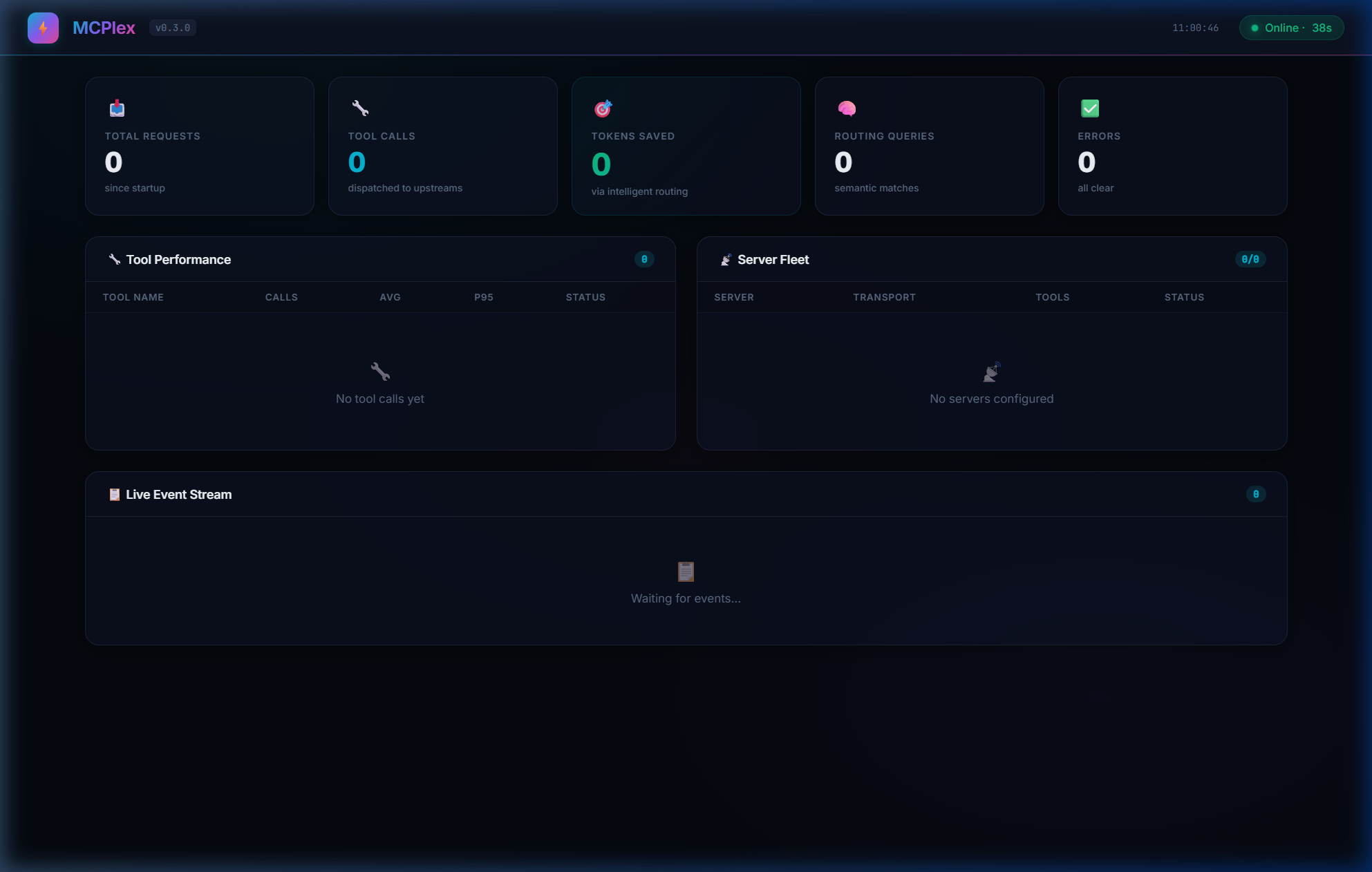
- Global Metrics — Total requests, tool calls, errors, tokens saved
- Per-Tool Stats — Invocation count, avg/p50/p95/p99 latency
- Server Fleet — Connected servers, transport type, tool/resource/prompt counts
- Live Event Stream — Real-time feed of all gateway activity with latency tags
Glassmorphism design with animated gradients. Auto-refreshes every 3 seconds. Zero configuration.
By default the dashboard's /api/* routes are unauthenticated — fine for 127.0.0.1-only binds, but if you expose the dashboard beyond localhost, set gateway.dashboard_api_key so requests need an Authorization: Bearer <key> (or X-API-Key) header:
[gateway]
dashboard_api_key = "${MCPLEX_DASHBOARD_API_KEY}"
📦 Response Caching
Avoid redundant upstream calls for read-only tools:
[cache]
enabled = true
ttl_seconds = 300     # 5 minute TTL
max_entries = 1000    # Max cached responses
Cached responses are partitioned by caller role, so a cache entry from one role/tenant is never served to another. MCPlex auto-detects read-only tools by prefix (list_*, get_*, search_*, query_*, describe_*, show_*). You can override with custom patterns:
[cache]
patterns = ["my_custom_tool", "expensive_*"]
Write operations (create_*, update_*, delete_*) are never cached by default.
🔑 Multi-Tenant API Keys
Map API keys to RBAC roles for team-based access:
[api_keys."sk-dev-team-abc123"]
role = "developer"
description = "Dev team key"

[api_keys."sk-admin-xyz789"]
role = "admin"
description = "Admin key"
When a request comes in with Authorization: Bearer sk-dev-team-abc123, MCPlex automatically applies the developer role's RBAC policies.
🔥 Hot-Reload Configuration
Config changes apply instantly — no restart needed:
# Edit config while MCPlex is running
vim mcplex.toml

# MCPlex automatically detects changes:
# 🔄 Config file changed, reloading...
# ✅ Configuration reloaded successfully
📖 Full MCP Capability Support
MCPlex aggregates and forwards all three MCP capability types from upstream servers:
| Capability | List | Execute/Read | Routing |
|---|---|---|---|
| Tools | tools/list → aggregated |
tools/call → routed to owner |
✅ Semantic / Keyword |
| Resources | resources/list → aggregated |
resources/read → routed by URI |
Direct routing |
| Prompts | prompts/list → aggregated |
prompts/get → routed by name |
Direct routing |
Configuration Reference
[gateway]
| Key | Type | Default | Description |
|---|---|---|---|
listen |
string | 127.0.0.1:3100 |
MCP client connection address |
dashboard |
string | — | Dashboard address (disabled if not set) |
hot_reload |
bool | true |
Auto-reload config on file change |
name |
string | mcplex |
Gateway instance name |
api_key |
string | — | API key for client auth (supports ${ENV}) |
dashboard_api_key |
string | — | API key for the dashboard /api/* routes (supports ${ENV}). If unset, the dashboard is unauthenticated — bind it to 127.0.0.1 in that case. |
rate_limit_rps |
int | 0 |
Max requests/sec per client (0 = unlimited) |
[router]
| Key | Type | Default | Description |
|---|---|---|---|
mode |
string | metatool |
metatool, passthrough, or legacy |
strategy |
string | keyword |
semantic, keyword, or passthrough |
top_k |
int | 5 |
Maximum tools returned per query |
similarity_threshold |
float | 0.3 |
Minimum relevance score (0.0-1.0) |
cache_embeddings |
bool | true |
Cache tool embeddings |
[security]
| Key | Type | Default | Description |
|---|---|---|---|
enable_rbac |
bool | false |
Enable role-based access control |
enable_audit_log |
bool | false |
Enable structured audit logging |
audit_log_path |
string | ./logs/audit.jsonl |
Audit log file path |
max_log_size_mb |
int | 100 |
Max log file size before rotation (keeps 5 backups) |
circuit_breaker_max_crashes |
int | 5 |
Max crashes within the window before respawns are blocked |
circuit_breaker_window_secs |
int | 60 |
Sliding window (seconds) for crash counting |
request_timeout_secs |
int | 30 |
Steady-state per-request timeout for HTTP and stdio upstream calls, once connected (0 = no timeout) |
default_handshake_timeout_secs |
int | 30 |
Default timeout for the initial stdio MCP handshake (initialize), before a server is considered failed and enters the respawn loop. Overridable per server — see servers[].handshake_timeout_secs below. (0 = no timeout) |
Questions sur MCPlex MCP
Quels outils MCPlex MCP fournit-il ?
Il expose 6 outils, dont mcplex_find_tools, mcplex_call_tool, mcplex_list_categories, semantic, keyword.
Prend-il en charge des fonctionnalités de sécurité ?
Oui, il inclut le RBAC, des journaux d'audit, l'authentification par clé API et la validation des entrées.