
Serveur MCP Candor UI
Commit 14 nov. 2026Fournit de la documentation et des suggestions de composants pour créer des interfaces utilisateur honnêtes pour les agents avec shadcn/ui.
Aussi connu sous MethodicDev/candor, candor
- Étoiles
- 0
- Outils
- —
- Téléchargements, 30 jours
- —
- Dernière version
- 6.1.3
- Dernier commit
- 14 nov. 2026
- Licence
- MIT
Qu'est-ce que Candor UI MCP ?
Candor UI est un serveur MCP. Fournit de la documentation et des suggestions de composants pour créer des interfaces utilisateur honnêtes pour les agents avec shadcn/ui.
Résumé généré à partir du README du projet
À propos du MCP server Candor UI
Candor UI propose un ensemble spécialisé de composants d'interface et de documentation conçus pour créer des interfaces utilisateur honnêtes pour les agents IA. Il est conçu pour les développeurs utilisant shadcn/ui et offre des composants tels que des fils de discussion (chat threads), des appels d'outils (tool calls), des affichages de raisonnement et des demandes de permission. Ces éléments sont élaborés pour respecter des règles d'honnêteté spécifiques, comme s'assurer que les boutons de décision tels que autoriser et refuser ne présentent aucune option pré-sélectionnée, et garantir que les données inconnues soient marquées comme non mesurées plutôt que comme étant égales à zéro.
Les développeurs peuvent intégrer ces outils dans leurs projets via la CLI candor-ui ou en installant le package @candor-ui/react depuis npm. Le serveur fonctionne comme un outil MCP en lecture seule qui fournit de la documentation et des suggestions de composants sans nécessiter de clé API ou de compte payant. Il est compatible avec divers frameworks et inclut des adaptateurs pour le Vercel AI SDK, le Claude Agent SDK et AG-UI. Le système comprend également une suite d'outils CLI pour le linting, l'audit et la vérification de la conformité de votre interface avec les principes d'honnêteté établis.
Ce que vous pouvez faire avec
- 1Suggérer des composants d'interface honnêtesUn agent IA peut utiliser ce serveur pour trouver le composant approprié pour une tâche spécifique tout en respectant les règles d'honnêteté.
- 2Auditer l'honnêteté de l'interfaceUn développeur peut exécuter une commande pour vérifier si son application en cours de fonctionnement respecte les principes de conception requis.
Extrait du README du projet. Chaque cas d'utilisation est vérifié par rapport à une citation du document.
Comment installer Candor UI MCP
Formats vérifiés le 10 nov. 2026Ajouter à CursorAjouter à GooseInstaller Candor UI MCP dans Claude Code
$ claude mcp add --transport http candor https://candor.themethodic.com/mcpInstaller Candor UI MCP dans Cursor
~/.cursor/mcp.json
{
  "mcpServers": {
    "candor": {
      "url": "https://candor.themethodic.com/mcp"
    }
  }
}Installer Candor UI MCP dans VS Code
.vscode/mcp.json
{
  "servers": {
    "candor": {
      "type": "http",
      "url": "https://candor.themethodic.com/mcp"
    }
  }
}Installer Candor UI MCP dans VS Code CLI
$ code --add-mcp '{"name":"candor","type":"http","url":"https://candor.themethodic.com/mcp"}'Installer Candor UI MCP dans Codex
$ codex mcp add candor --url https://candor.themethodic.com/mcpInstaller Candor UI MCP dans Codex config.toml
~/.codex/config.toml
[mcp_servers.candor]
url = "https://candor.themethodic.com/mcp"
Installer Candor UI MCP dans Gemini CLI
$ gemini mcp add -s user --transport http candor https://candor.themethodic.com/mcpInstaller Candor UI MCP dans Gemini settings.json
~/.gemini/settings.json
{
  "mcpServers": {
    "candor": {
      "url": "https://candor.themethodic.com/mcp",
      "type": "http"
    }
  }
}Vérifications automatisées
Exécuté le 15 nov. 2026Rapport complet →Pas encore vérifié. Un serveur nécessite un score de 80, aucune faille sérieuse et suffisamment de données pour que nous puissions effectuer les vérifications. Fonctionnement des vérifications · Ce qu'il faut corriger pour gagner des points

- Dépôt source lié et accessiblemethodicdev/candor is public and reachablegithub.com/methodicdev/candor ↗Réussi
- Le nom du package correspond au dépôt sourceNon vérifié
- Provenance du build (attestation Sigstore)Non vérifié
- Licence open source (OSI)MITspdx.org/licenses/MIT.html ↗Réussi
- Commit ou version publiée au cours de l'année écouléeLast commit or release 2026-11-14github.com/methodicdev/candor ↗Réussi
- OpenSSF ScorecardNon vérifié
- Nom du package non proche d'un package populaireNon vérifié
- Aucun avis critique dans le package ou ses dépendancesNon vérifié
- Aucune instruction cachée destinée au modèle0 tool descriptions and the README read; no override phrases, credential paths or hidden charactersRéussi
- Les outils destructifs sont étiquetésNon vérifié
- Le point de terminaison distant répond à la poignée de main MCPinitialize answered with protocol 2025-06-18 in 124 msRéussi
README
Voir sur GitHubCandor UI: the free tier
Honest agent UI for shadcn/ui: chat, tool calls and permission prompts that never overstate what an agent did. MIT.




Try the app demo · Honest against typical, side by side · Docs · Changelog
Interface components for agent apps: a thread, messages, a composer, tool calls, reasoning and citations, the
building blocks under them, a light, dark and high-contrast theme, and adapters for the Vercel AI SDK, the Claude
Agent SDK and AG-UI. For shadcn/ui projects, installed with the candor-ui CLI or shadcn's own, MIT licensed.
This repo is the source of Candor UI's 73 free items (version 4.0.2), the skill and plugins for coding agents and 3 starter apps. Docs and live examples: https://candor.themethodic.com.
The same free items are on npm as @candor-ui/react, for people who
would rather npm install than copy code in. That package changes only when a free item changes, so its version can be
behind the kit's after a release that changed only Pro items; the CLI, candor-ui, has a version of its own. The
changelog says which release changed what.
Try it in a minute, no key
npx degit MethodicDev/candor/starter-vite-ag-ui my-app
cd my-app
npm install
npm run dev
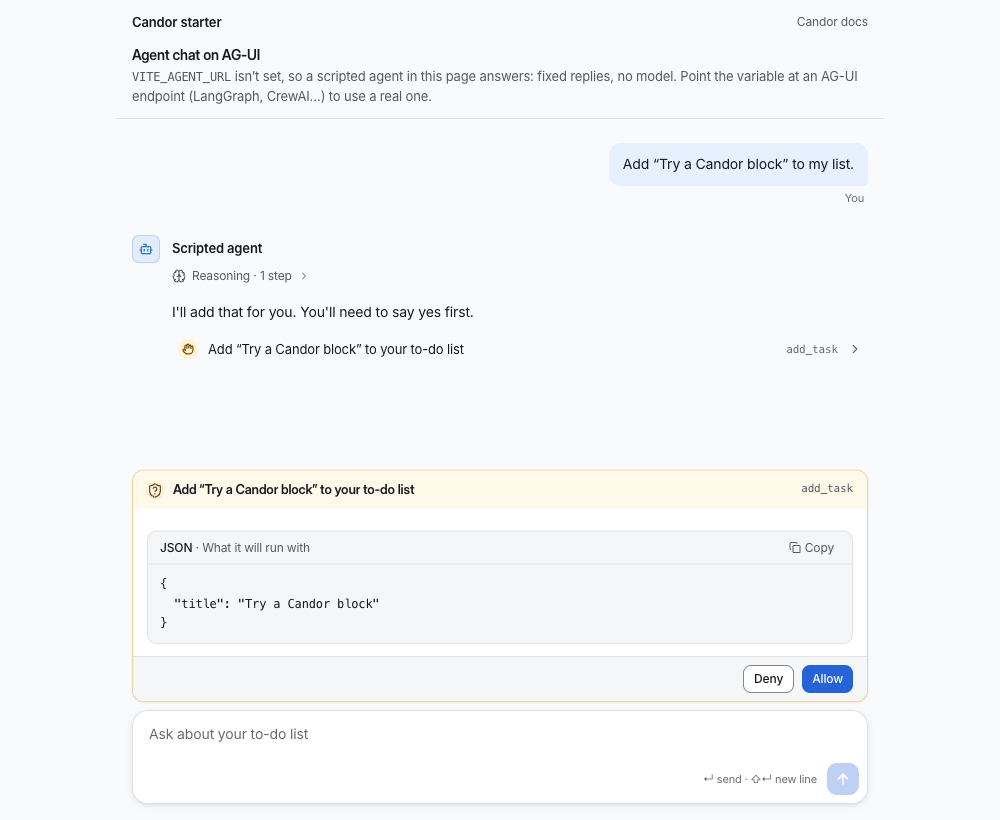
Open the address it prints. A scripted agent answers in the page: fixed replies, no model, no server and no API key,
and the page says so. Ask it to add "Try a Candor block" to your list and you'll see a line of its reasoning, a tool
call marked "Needs you", and a permission prompt that shows what it will run, with Deny and Allow and neither
chosen for you. That is what the image above shows. Point VITE_AGENT_URL at an AG-UI agent (LangGraph, CrewAI…)
when you want a real one.
Why Candor
An agent that acts on real systems can mislead without saying anything false: a spinner nobody has heard from, a total that treats a missing cost as zero, an approval that now applies to a different change. Candor's components keep these 9 rules. Where Honest against typical has a moment that shows one, the link goes to its Typical and Honest switch; the others go to Principles.
- Model output is text, never markup: Adapters read what a model writes as a small safe subset of markdown; a link becomes plain text with its address beside it.
- Unknown stays unknown: A cost or duration the service didn't report reads “not measured”, not zero, and an estimate says it is one.
- A control that can't be used says why: A control that can't be used carries its reason, on hover and focus and to screen readers.
- Nothing is pre-selected in a decision: Approve and reject, allow and deny start with neither chosen.
- Approve the exact change: A decision is tied to a hash of the change that was asked about; a change that moved since is refused.
- Reasoning is believed, not verified: Reasoning is shown as the model's own account and marked as unchecked; evidence is shown as evidence.
- The agent is always named, by the app: Every agent message names its agent from the app's data, never from model output.
- Say what can and can't be undone: Destructive actions say what they remove and whether it can be brought back.
- Motion follows the outcome: A success mark is drawn after the result settles; motion reports a change and never predicts one.
Install
npx candor-ui@latest init
npx candor-ui add thread message composer
candor-ui init adds the @candor registry to components.json and the theme to your CSS; in a project without
shadcn yet it runs shadcn's setup first (--yes sets it up with Base UI and shadcn's nova preset, no questions). Or add the registry by
hand: "@candor": "https://candor.themethodic.com/r/{name}.json". If shadcn asks to overwrite a primitive such as
ui/button.tsx, answer yes: Candor's button styles locked actions; without a terminal, pass --overwrite.
Or from npm
npm install @candor-ui/react
import { Thread, Message, Composer } from "@candor-ui/react"
Then @import "@candor-ui/react/styles.css" after Tailwind. The package holds the free tier only, and its version can be
behind the kit's; its README has the adapters and the entry points.
Tools
candor-ui also checks what you build, from the CLI's own docs:
lintchecks your.tsx,.ts,.jsxand.jsfiles against Candor's honesty rules and printspath:line:col rule messagefor each finding; it exits 1 on an error.auditislintplus a look at a running page:npx candor-ui audit http://localhost:3000runs axe and the honesty rules on it and writesAUDIT.md.updatemoves installed items to the latest version and keeps your changes: a file you edited gets a three-way merge, and where you and we changed the same lines it writes conflict markers.verifyis for CI: it checkscandor-lock.jsonagainst the registry's versioned snapshots and the files on disk.theme checkchecks your theme's colour contrast and its motion and sound values, and changes nothing.
candor-ui doctor explains an install that looks wrong. Every command is in the
CLI's README.
For coding agents
llms-install.md tells an agent how to set Candor up in a project by itself: the CLI, the docs MCP server, the skill
and the honesty rules to keep. The skill alone:
npx skills add MethodicDev/candor
installs two skills: skills/candor-ui (which component fits which job, the adapters, and the rules the components
keep, with a design-system reference read from the shipped CSS) and skills/candor-agent-ui (design fundamentals for
screens where an AI agent acts, with a review checklist to run after each screen; it works with or without Candor).
The plugins install the skill and the docs MCP server together. Claude Code: claude plugin marketplace add MethodicDev/candor, then claude plugin install candor-ui@candor (or, in a session,
/plugin install candor-ui --marketplace MethodicDev/candor). GitHub Copilot CLI: copilot plugin marketplace add MethodicDev/candor, then copilot plugin install candor-ui@candor. VS Code installs candor-ui from this repo's URL;
Cursor reads .cursor-plugin/marketplace.json; the Codex package is plugins/codex/candor-ui.
The MCP server at https://candor.themethodic.com/mcp serves docs and component suggestions only: read-only, no key,
never paid source. .mcp/server.json describes it for the MCP registry. Agents can also read
https://candor.themethodic.com/llms.txt.
Starters
Starter apps with a working agent chat built from these components (3 of them). Each installs and builds on its own:
| Folder | Stack | Agent |
|---|---|---|
starter-vite-ag-ui/ |
Vite and React, no server | a scripted one in the page (no key; see above), or any AG-UI agent (LangGraph, CrewAI…) |
starter/ |
Next.js 16 | Vercel AI SDK at /, Claude Agent SDK at /claude (needs an Anthropic API key) |
starter-tanstack-start-claude/ |
TanStack Start | Claude Agent SDK (needs an Anthropic API key) |
npx degit MethodicDev/candor/starter-vite-ag-ui my-agent-app
npx degit MethodicDev/candor/starter my-agent-app
npx degit MethodicDev/candor/starter-tanstack-start-claude my-agent-app
What's here
73 free items, each with a docs page that has its props and live examples. Install any of them by name:
npx candor-ui add <name>.
| Area | What it's for | Items |
|---|---|---|
| Chat (20) | A conversation with an agent: messages, the composer, tool calls, reasoning, citations. | agent-avatar, ai-disclosure, attachment-preview, card-registry, citation, composer, context-meter, entity-chip, folded-turns, message-actions, message-content, message, payload, permission-prompt, prompt-suggestions, reasoning, thread-divider, thread-event, thread, tool-call |
| Adapters (7) | Map an agent SDK's messages onto Candor's data: the Vercel AI SDK, the Claude Agent SDK and AG-UI. | ag-ui, ai-sdk, claude-agent-sdk, claude-agent-server, use-ag-ui, use-candor-chat, use-claude-agent |
| Building blocks (7) | Small pieces every screen uses: locked controls, status dots, step lists, relative times. | copy-field, degraded-panel, relative-time, status-dot, step-list, streaming-text, surface |
| App shell (2) | The app around the agent: layout, sidebar, command menu, sessions, notices. | page-header, page-state |
| Primitives (13) | The shadcn/ui primitives Candor's components are built on. | accordion, alert, button, checkbox, collapsible, label, locked, popover, progress, skeleton, slider, switch, tooltip |
| Themes (6) | The default theme and 5 gallery themes: colours, type, radius and motion as CSS variables, in light, dark and high contrast. | tokens, theme, theme-slate, theme-paper, theme-console, theme-signal |
Shared types and helpers (15): Types and pure functions the components share.
chat, fill-strings, format-elapsed, highlight, know, layer, locale, mcp-input, motion, safe-markdown, sound, status, use-copy, use-shortcut, use-virtual-list
Fonts (3): Self-hosted, and optional: without one the theme uses the system font.
font-inter, font-source-sans, font-ibm-plex
Pro, Premium and Team
One-time prices, no subscription. A licence includes every version Candor UI publishes, major ones included. You can ask for a full refund within 30 days of buying. The free tier here is MIT.
| Tier | Price | What's in it | Support |
|---|---|---|---|
| Free (this repo) | $0, MIT | 73 items: the chat core, building blocks, themes, adapters; 3 starters; the skill and plugins | public issues here |
| Pro | $149, one person | All 293 items, the free ones included: the app shell, plans, approvals, diffs, runs, evals and admin | none; the docs and examples |
| Premium | $249, one person | Pro, plus 11 full-stack blocks and 4 templates, each for the Vercel AI SDK and the Claude Agent SDK | email, best effort |
| Team | $999, up to 10 people in one company | Premium | email, a first reply within 2 business days |
Buy at https://candor.themethodic.com/#pricing. The terms are the Candor UI Commercial Licence; SUPPORT.md repeats the support each tier includes. Your key arrives in Polar's receipt email and customer portal; https://candor.themethodic.com/licence-key says where, and what a refund does to it. Then, in your project:
npx candor-ui key <your licence key>   # saves it to .env.local, checks it, and has the registry send it
npx candor-ui add approval-request     # a Pro item, installed like any other
In CI, set CANDOR_LICENSE_KEY as a secret, so installs and npx candor-ui verify can read paid items. Installed code
needs no key to run; the key is only for installing and updating. Never put a key in an issue, a pull request or a
repository.
How this repository works
- The source of truth is private. Candor UI's main repository holds the free items and the paid tiers together. This repository is generated from it on each release, so a change made here by hand would be overwritten.
- From 2.6.2, each release is a commit, a tag and a GitHub Release. The commit
Candor X.Y.Z, the tagvX.Y.Zand the release all carry that version's changelog section. - Issues are read. Use the forms. There is no promised reply time for the free tier; the support each paid tier includes is in SUPPORT.md. A vulnerability goes to SECURITY.md, not to an issue.
- A pull request isn't merged here. If it is accepted, it is applied upstream by hand, credited in that release's changelog entry, and closed with a link to the release that holds it. CONTRIBUTING.md has the rest.
- Every release is reviewed over its full diff by a separate review session that had no part in writing it, before the owner approves the merge. Most of the code is written with AI coding assistants, and the commits here say so in a Co-Authored-By line.
Licence
MIT, © Methodic LLC. See LICENSE. It covers this repository's free items; Candor UI's paid items are under the
Candor UI Commercial Licence.
Questions sur Candor UI MCP
Comment ajouter Candor UI MCP à Claude Code ?
Exécutez claude mcp add --transport http candor https://candor.themethodic.com/mcp dans votre terminal. Ajoutez --scope user pour le rendre disponible dans tous les projets.
Comment ajouter Candor UI MCP à Cursor ?
Ouvrez ~/.cursor/mcp.json et ajoutez le serveur sous mcpServers, avec la configuration Cursor indiquée dans la section d'installation ci-dessus.
Que propose le MCP server Candor UI ?
Le MCP server fournit de la documentation et des suggestions de composants pour la bibliothèque Candor UI.
Puis-je utiliser Candor UI avec mon projet shadcn/ui existant ?
Oui, vous pouvez installer les composants Candor UI dans des projets shadcn/ui en utilisant la CLI candor-ui.