
Serveur MCP webhooks-cc
Commit 14 nov. 2026Permettez à vos agents IA de gérer des points de terminaison de webhooks, d'inspecter les requêtes entrantes, de rejouer des payloads et de partager des sites locaux via le langage naturel.
Aussi connu sous kroqdotdev/webhooks-cc, @webhooks-cc/mcp
- Étoiles
- 3
- Outils
- —
- Téléchargements, 30 jours
- —
- Dernière version
- —
- Dernier commit
- 14 nov. 2026
- Licence
- AGPL-3.0
Qu'est-ce que webhooks-cc MCP ?
webhooks-cc est un serveur MCP. Permettez à vos agents IA de gérer des points de terminaison de webhooks, d'inspecter les requêtes entrantes, de rejouer des payloads et de partager des sites locaux via le langage naturel.
Résumé généré à partir du README du projet
À propos du MCP server webhooks-cc
La gestion des points de terminaison de webhooks et l'inspection des requêtes entrantes par langage naturel est ce que ce MCP server permet aux développeurs utilisant des agents de codage IA. En se connectant à des outils comme Claude Code, Cursor ou VS Code, un agent peut créer de nouveaux endpoints, envoyer des payloads de test et rejouer des requêtes capturées vers un serveur local. Il offre un pont entre votre assistant IA et l'infrastructure de webhooks.cc, permettant un débogage en temps réel sans navigation manuelle dans un tableau de bord.
Les utilisateurs configurent le serveur en fournissant une clé API via la variable d'environnement WHK_API_KEY. Le serveur expose 57 outils qui permettent à un agent de gérer le cycle de vie complet d'un webhook, de sa création initiale au partage d'un site local via un lien public. Cette configuration est particulièrement utile pour tester des intégrations de paiement ou des hooks CI/CD où vous devez voir les headers, les corps de message et les signatures exacts de fournisseurs comme Stripe ou GitHub.
Ce que vous pouvez faire avec
- 1Tester des intégrations de paiementUn agent IA peut créer un endpoint spécifique pour inspecter la structure du payload d'un événement Stripe.
- 2Déboguer des workflows CI/CDVous pouvez demander à un agent de surveiller exactement les données que GitHub envoie lors d'un déploiement ou d'une pull request.
- 3Simuler la gestion d'erreursUn agent peut configurer un endpoint pour renvoyer des codes d'erreur spécifiques afin de tester la manière dont votre application gère les tentatives de réexécution.
- 4Rejouer des requêtes vers un environnement de développement localVous pouvez donner l'instruction à une IA de prendre un webhook capturé et de l'envoyer directement vers votre serveur local pour effectuer des tests.
Extrait du README du projet. Chaque cas d'utilisation est vérifié par rapport à une citation du document.
Comment installer webhooks-cc MCP
Formats vérifiés le 10 nov. 2026Ajouter à CursorAjouter à GooseInstaller webhooks-cc MCP dans Claude Code
$ claude mcp add webhooks-cc -- npx -y @webhooks-cc/mcpInstaller webhooks-cc MCP dans Cursor
~/.cursor/mcp.json
{
  "mcpServers": {
    "webhooks-cc": {
      "command": "npx",
      "args": [
        "-y",
        "@webhooks-cc/mcp"
      ]
    }
  }
}Installer webhooks-cc MCP dans VS Code
.vscode/mcp.json
{
  "servers": {
    "webhooks-cc": {
      "type": "stdio",
      "command": "npx",
      "args": [
        "-y",
        "@webhooks-cc/mcp"
      ]
    }
  }
}Installer webhooks-cc MCP dans VS Code CLI
$ code --add-mcp '{"name":"webhooks-cc","type":"stdio","command":"npx","args":["-y","@webhooks-cc/mcp"]}'Installer webhooks-cc MCP dans Claude Desktop
claude_desktop_config.json
{
  "mcpServers": {
    "webhooks-cc": {
      "command": "npx",
      "args": [
        "-y",
        "@webhooks-cc/mcp"
      ]
    }
  }
}Installer webhooks-cc MCP dans Codex
$ codex mcp add webhooks-cc -- npx -y @webhooks-cc/mcpInstaller webhooks-cc MCP dans Codex config.toml
~/.codex/config.toml
[mcp_servers.webhooks-cc]
command = "npx"
args = ["-y", "@webhooks-cc/mcp"]
Installer webhooks-cc MCP dans Gemini CLI
$ gemini mcp add -s user webhooks-cc npx -- -y @webhooks-cc/mcpInstaller webhooks-cc MCP dans Gemini settings.json
~/.gemini/settings.json
{
  "mcpServers": {
    "webhooks-cc": {
      "command": "npx",
      "args": [
        "-y",
        "@webhooks-cc/mcp"
      ]
    }
  }
}Vérifications automatisées
Exécuté le 14 nov. 2026Rapport complet →Pas encore vérifié. Un serveur nécessite un score de 80, aucune faille sérieuse et suffisamment de données pour que nous puissions effectuer les vérifications. Fonctionnement des vérifications · Ce qu'il faut corriger pour gagner des points

- Dépôt source lié et accessiblekroqdotdev/webhooks-cc is public and reachablegithub.com/kroqdotdev/webhooks-cc ↗Réussi
- Le nom du package correspond au dépôt source@webhooks-cc/mcp names kroqdotdev/webhooks-cc as sourcenpmjs.com/package/@webhooks-cc/mcp ↗Réussi
- Provenance du build (attestation Sigstore)No build attestation published for this releaseNon vérifié
- Licence open source (OSI)AGPL-3.0spdx.org/licenses/AGPL-3.0.html ↗Réussi
- Commit ou version publiée au cours de l'année écouléeLast commit or release 2026-11-14github.com/kroqdotdev/webhooks-cc ↗Réussi
- OpenSSF ScorecardNon vérifié
- Nom du package non proche d'un package populaireNo popular package one edit away from @webhooks-cc/mcpRéussi
- Aucun avis critique dans le package ou ses dépendancesNon vérifié
- Aucune instruction cachée destinée au modèle0 tool descriptions and the README read; no override phrases, credential paths or hidden charactersRéussi
- Les outils destructifs sont étiquetésNon vérifié
- Le point de terminaison distant répond à la poignée de main MCPNon vérifié
README
Voir sur GitHubwebhooks.cc
Inspect and debug webhooks and email without deploying to production.
Get a unique URL, point your webhook there, and see every request in real time. No signup required. Every endpoint also has an email address at mailhooks.cc that captures mail the same way.
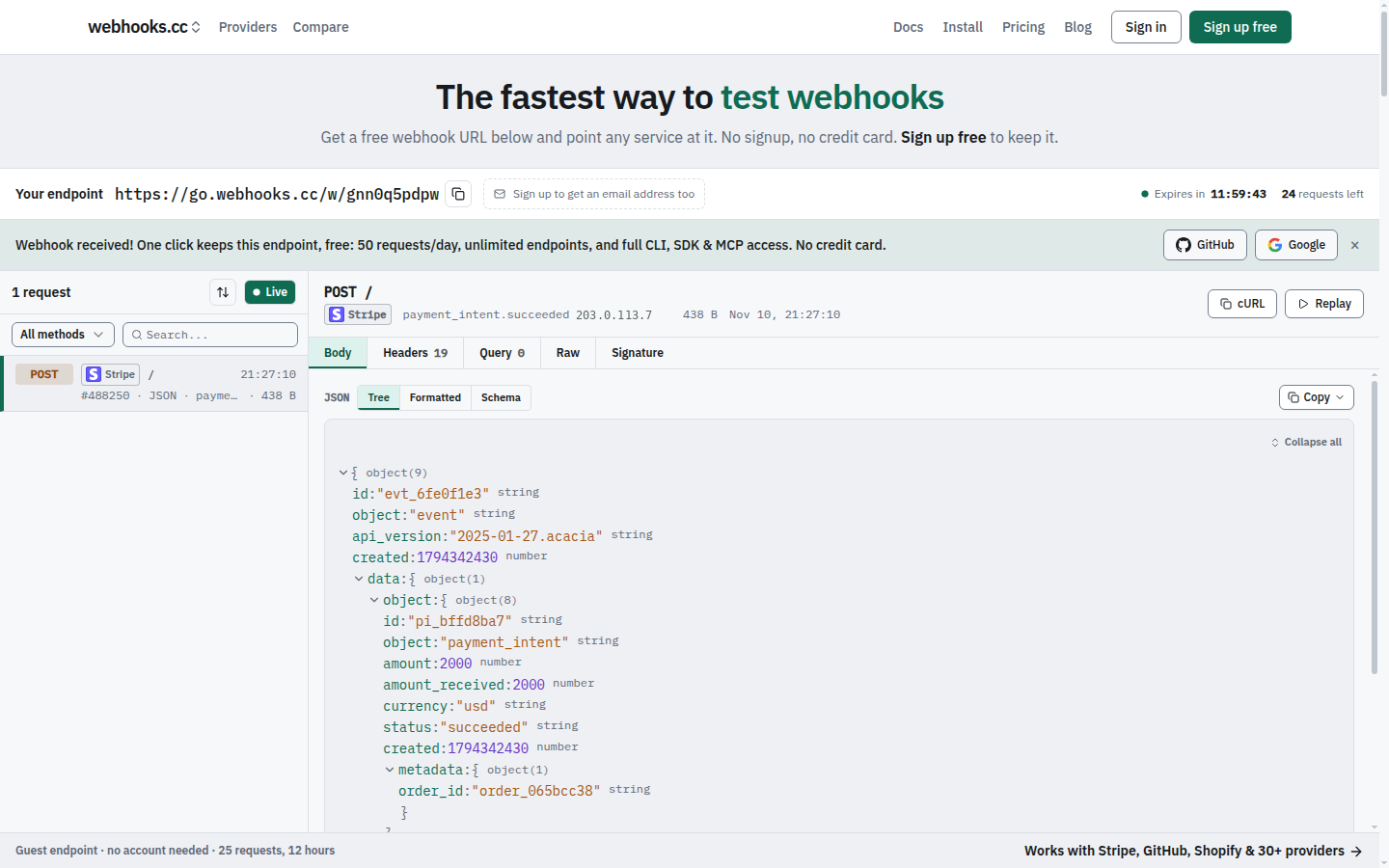
Getting Started
- Visit webhooks.cc
- Copy your unique webhook URL
- Send a test request:
curl -X POST https://go.webhooks.cc/w/<slug> -d '{"test": true}' - Watch it appear in the dashboard
Features
- Capture requests: store incoming webhooks with headers, body, query parameters and metadata
- Capture email: every endpoint receives mail at
{slug}@mailhooks.cc, with parsed fields, attachments and authentication results - Inspect in real time: see requests the moment they arrive
- Configure responses: return custom status codes, headers and bodies, chosen by rules, to test error paths
- Verify signatures: check provider signatures (Stripe, GitHub, Shopify and more) on captured requests
- Forward: tunnel webhooks to localhost during development (with
--live, the sender gets your local app's answer), or forward them to other URLs, chat and file drops - Share localhost: put the site on your machine at a public link on sharehooks.cc with
whk share - CLI with interactive TUI: manage endpoints, tunnel and stream requests from your terminal
- SDKs for TypeScript, Python and Go: wait for and assert on webhooks in tests and CI, and share a local port from code
- MCP server: connect AI coding agents (Claude Code, Cursor, VS Code, Codex) to your webhooks
Use Cases
Testing payment integrations: point Stripe's test webhooks at your endpoint. Inspect the payload structure before writing handlers.
Debugging CI/CD hooks: see exactly what GitHub sends when a push, PR, or deployment occurs.
Developing locally: forward production-like webhooks to localhost without exposing your machine to the internet.
Mocking failure scenarios: configure your endpoint to return 500 errors and test your retry logic.
Pricing
Free: 50 requests a day, 7-day retention. Enough for development and testing.
Pro ($8/month): 100,000 requests a month, 31-day retention.
Business ($29/month): 250,000 requests a month, 90-day retention, attachment parsing, custom inbound domains and file drops.
Teams share endpoints under a per-seat subscription. See plans and limits for details.
Install
CLI
curl -fsSL https://webhooks.cc/install.sh | sh
# or
brew install kroqdotdev/tap/whk
# without root: any directory you can write to (created when missing)
curl -fsSL https://webhooks.cc/install.sh | WHK_INSTALL_DIR="$HOME/.local/bin" sh
With WHK_INSTALL_DIR, put that directory on your PATH (the installer prints the line to add) before running whk.
Then launch interactive terminal:
whk
SDK
npm install @webhooks-cc/sdk
MCP server
# Claude Code
claude mcp add -s user webhooks-cc -e WHK_API_KEY=whcc_... -- npx -y @webhooks-cc/mcp

# Cursor, VS Code, Devin Desktop (formerly Windsurf), Claude Desktop
npx @webhooks-cc/mcp setup cursor --api-key whcc_...
See webhooks.cc/installation for all install methods, one-click buttons, and setup guides.
CLI
Run whk to launch the interactive TUI:
$ whk

  webhooks.cc

  ● Logged in as you@example.com

  ▸ Tunnel    Forward webhooks to localhost
    Listen    Stream incoming requests
    Create    Create a new endpoint
    Endpoints Manage your endpoints
    Auth      Login / logout
    Update    Check for updates
All commands also work directly from the command line:
whk tunnel 8080                       # Forward webhooks to localhost:8080
whk share 3000                        # Share localhost:3000 at https://<name>.sharehooks.cc
whk listen <slug>                     # Stream incoming requests
whk create my-endpoint                # Create a new endpoint
whk list                              # List your endpoints
whk replay <request-id> --to :3000    # Replay a captured request
Pass --nogui or set WHK_NOGUI=1 to skip the TUI and print help.
SDK
import { WebhooksCC, matchMethod, matchHeader, matchAll } from "@webhooks-cc/sdk";

const client = new WebhooksCC({ apiKey: "whcc_..." });

const endpoint = await client.endpoints.create({ name: "my-webhook" });
console.log(endpoint.url);

// Wait for a matching request with human-readable timeout
const req = await client.requests.waitFor(endpoint.slug, {
  timeout: "30s",
  match: matchAll(matchMethod("POST"), matchHeader("stripe-signature")),
});

// Replay captured requests to your local server
await client.requests.replay(req.id, "http://localhost:3000/webhooks");
MCP server
The @webhooks-cc/mcp package exposes 57 tools (54 on the remote server) that let AI agents manage endpoints, inspect webhooks, send test payloads, replay requests, and share a local site at a public link through natural language.
You: "Create a webhook endpoint for testing Stripe"
Agent: Created endpoint "stripe-test" at https://go.webhooks.cc/w/abc123

You: "Send a test checkout.session.completed event"
Agent: Sent POST to stripe-test

You: "Replay that to my local server"
Agent: Replayed to http://localhost:3000/webhooks: 200 OK
See packages/mcp/README.md for full setup and tool reference.
Why the code is public
webhooks.cc holds other people's webhooks and email, so the code that handles them should be open to inspection. You can read exactly how a request is captured, stored, forwarded and deleted, and check that the service does what it says. The repository is also where security scanning, dependency updates and bug reports happen in the open.
webhooks.cc is built and run by one developer. The hosted service at webhooks.cc is the product; the repository is not a community project.
Issues and contributions
- Bugs and feature requests are welcome as issues.
- Questions about your account, billing or data go to webhooks.cc/support, never to a public issue.
- Security vulnerabilities are reported privately, see SECURITY.md.
- Pull requests are accepted only from people who have signed the Contributor License Agreement. Open an issue first: most changes are made in-house, and a pull request may be closed or reimplemented. See CONTRIBUTING.md.
License
This project uses a split license:
- AGPL-3.0: the web app, receiver, email-capture SMTP host, tunnel edge, attachment parser and database schema (
apps/web/,apps/receiver-rs/,apps/mx-rs/,apps/edge-rs/,apps/parser-rs/,supabase/). See LICENSE. - MIT: the CLI and its tunnel protocol crate, the TypeScript, Python and Go SDKs, the MCP server, the Zapier and Make apps, and the Claude Code plugin (
apps/cli-rs/,crates/tunnel/,packages/sdk/,packages/sdk-python/,packages/sdk-go/,packages/mcp/,packages/zapier-app/,packages/make-app/,plugins/). See theLICENSEfile in each directory.
The CLI, SDKs and MCP server are MIT so you can use them freely in your own projects, open or closed.
Questions sur webhooks-cc MCP
Comment ajouter webhooks-cc MCP à Claude Code ?
Exécutez claude mcp add webhooks-cc -- npx -y @webhooks-cc/mcp dans votre terminal. Ajoutez --scope user pour le rendre disponible dans tous les projets.
Comment ajouter webhooks-cc MCP à Cursor ?
Ouvrez ~/.cursor/mcp.json et ajoutez le serveur sous mcpServers, avec la configuration Cursor indiquée dans la section d'installation ci-dessus.
Que peut faire le MCP server ?
Il permet aux agents IA de gérer des endpoints, d'inspecter des webhooks, d'envoyer des payloads de test, de rejouer des requêtes et de partager des sites locaux par langage naturel.
Puis-je tester les requêtes email entrantes ?
Oui, chaque endpoint possède une adresse email correspondante sur mailhooks.cc qui capture les mails avec des champs analysés et des pièces jointes.