
Serveur MCP ContextQuant
Commit 9 nov. 2026Un proxy MCP qui réduit la taille des résultats JSON des outils jusqu'à 90 % et fournit aux agents des outils pour récupérer les données omises.
Aussi connu sous khankaif/ContextQuant
- Étoiles
- 5
- Outils
- —
- Téléchargements, 30 jours
- —
- Dernière version
- —
- Dernier commit
- 9 nov. 2026
- Licence
- MIT
Qu'est-ce que ContextQuant MCP ?
ContextQuant est un serveur MCP. Un proxy MCP qui réduit la taille des résultats JSON des outils jusqu'à 90 % et fournit aux agents des outils pour récupérer les données omises.
Résumé généré à partir du README du projet
À propos du MCP server ContextQuant
ContextQuant permet de réduire la taille des résultats volumineux des outils JSON pour les agents IA. Il agit comme un proxy situé entre un client MCP, tel que Claude Code, et n'importe quel MCP server existant comme GitHub, Jira ou une base de données. Lorsqu'un outil renvoie une charge utile massive, le proxy réduit les données en sélectionnant les champs essentiels, en supprimant les textes longs et en consolidant les valeurs répétées dans un en-tête unique. Ce processus peut réduire l'utilisation de tokens jusqu'à 90 %.
Contrairement à une simple troncature, ce proxy déclare explicitement ce qui a été supprimé afin que l'agent n'ait pas à deviner les informations manquantes. Il fournit un outil spécifique nommé contextquant_more qui permet à l'agent de récupérer les données omises ou des champs spécifiques à l'aide d'un handle. Cette configuration est idéale pour les développeurs utilisant des applications de chat ou des agents hébergés qui ne disposent pas d'un shell pour exécuter des commandes comme jq. Les utilisateurs peuvent configurer des budgets de tokens, des limites de caractères pour le texte et des exigences de champs spécifiques via un fichier de configuration ou des arguments en ligne de commande.
Ce que vous pouvez faire avec
- 1Triage de tickets GitHub ou JiraUn agent peut rapidement scanner des dizaines de tickets pour trouver des labels ou des responsables spécifiques sans épuiser la fenêtre de contexte.
- 2Filtrage de données de profil CRMLes développeurs peuvent utiliser le proxy pour extraire quelques champs clés à partir de réponses API massives contenant des dizaines d'attributs de profil.
- 3Requêtes sur de grandes bases de données ou des logsLe proxy gère les résultats de type SELECT où la plupart des colonnes sont soit répétitives, soit vides sur de nombreux enregistrements.
- 4Support pour les agents sans exécution de codeLes utilisateurs d'applications de chat ne pouvant pas exécuter jq peuvent toujours accéder à des jeux de données complets grâce à l'outil de récupération.
Extrait du README du projet. Chaque cas d'utilisation est vérifié par rapport à une citation du document.
Vérifications automatisées
Exécuté le 15 nov. 2026Rapport complet →Pas encore vérifié. Un serveur nécessite un score de 80, aucune faille sérieuse et suffisamment de données pour que nous puissions effectuer les vérifications. Fonctionnement des vérifications · Ce qu'il faut corriger pour gagner des points

- Dépôt source lié et accessiblekhankaif/contextquant is public and reachablegithub.com/khankaif/contextquant ↗Réussi
- Le nom du package correspond au dépôt sourceNon vérifié
- Provenance du build (attestation Sigstore)Non vérifié
- Licence open source (OSI)MITspdx.org/licenses/MIT.html ↗Réussi
- Commit ou version publiée au cours de l'année écouléeLast commit or release 2026-11-09github.com/khankaif/contextquant ↗Réussi
- OpenSSF ScorecardNon vérifié
- Nom du package non proche d'un package populaireNon vérifié
- Aucun avis critique dans le package ou ses dépendancesNon vérifié
- Aucune instruction cachée destinée au modèle0 tool descriptions and the README read; no override phrases, credential paths or hidden charactersRéussi
- Les outils destructifs sont étiquetésNon vérifié
- Le point de terminaison distant répond à la poignée de main MCPNon vérifié
README
Voir sur GitHubContextQuant
An MCP proxy that shrinks large JSON tool results before they reach an AI agent. It tells the agent exactly what it cut, and gives it a tool to get the cut parts back.
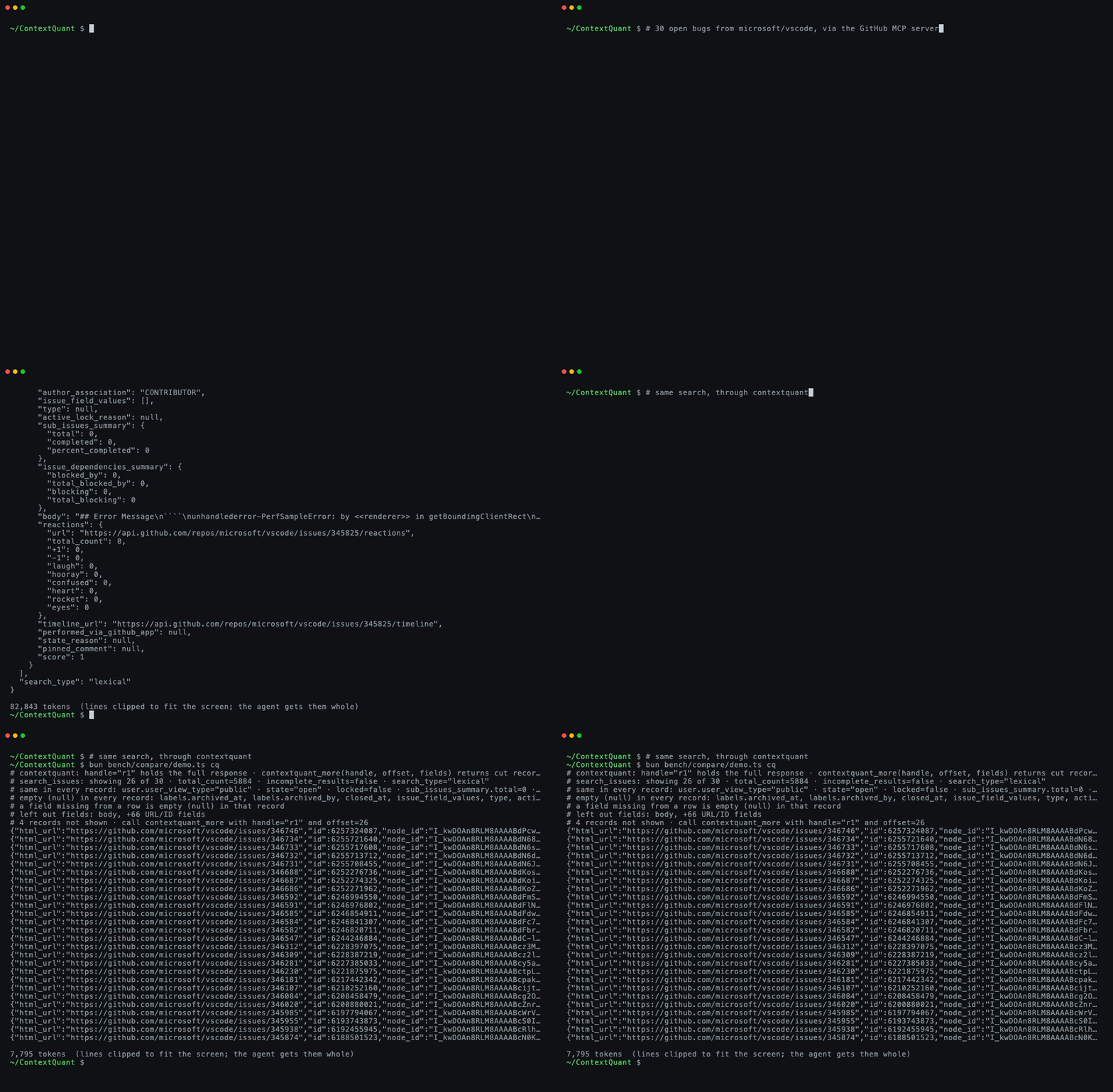
Real GitHub data, recorded with vhs from media/demo.tape.
The problem
MCP tools often return far more than the agent needs. One GitHub search_issues call for 30 issues is
about 70,000 tokens: every issue body, about 60 API links per issue, and the same author metadata
repeated 30 times. To answer "which open auth bugs are unassigned?" the agent needs four fields:
number, title, labels and assignee.
Clients deal with oversized results in one of three ways, and all three hurt:
| What the client does | What goes wrong |
|---|---|
| Puts the whole result in context | Fills the context window; every later turn re-reads it |
| Truncates it, or keeps only some fields | The agent can't tell what's missing, so it guesses or searches again |
| Saves it to a file | Fine if the agent can run code (jq); otherwise it never sees the data |
ContextQuant takes a fourth approach: cut the result down, and declare every cut.
How it works
ContextQuant sits between the agent and any MCP server. Tool calls pass through unchanged; only the results are rewritten.
agent (Claude Code, any MCP client)
   │   tool call ──────────────► passes through unchanged
   ▼
ContextQuant proxy ──────────────► wrapped MCP server (GitHub, Jira, a database…)
   │   ◄─────────────────────────  70k-token JSON result
   │
   │   1. find the list of records in the JSON
   │   2. pick the fields worth keeping (short values stay; long text and API links go)
   │   3. print fields that are the same in every record once, not 30 times
   │   4. fit as many records as the token budget allows (default 8,000)
   │   5. write a header saying what was left out and how to get it
   │   6. keep the original in memory under a handle, e.g. "r1"
   ▼
agent reads ~6k tokens, and can call contextquant_more("r1", …) for anything cut
What the agent reads for 18 GitHub issues (37,903 tokens raw, 5,556 through ContextQuant):
# contextquant: handle="r1" holds the full response · contextquant_more(handle, offset, fields) returns cut records or left-out fields
# search_issues: showing 18 of 18 · total_count=18 · incomplete_results=false
# same in every record: user.type="User" · state="open" · locked=false · …
# empty (null) in every record: closed_at, milestone, …
# left out fields: body, +66 URL/ID fields
{"html_url":"https://github.com/modelcontextprotocol/typescript-sdk/issues/2510","number":2510,"title":"Mid-session re-auth after refresh-token expiry dead-ends: …","labels":[{"name":"bug",…}],…}
…
Each header line tells the agent something it would otherwise have to guess:
| Line | What it tells the agent |
|---|---|
showing 18 of 18 |
How many records came back and how many are shown |
same in every record: … |
Values shared by all records, printed once; nothing is missing |
empty (null) in every record: … |
Fields that exist but are empty, so "nobody is assigned" is an answer, not a gap |
left out fields: body, … |
Fields removed from the rows; contextquant_more(handle, fields=["number","body"]) returns them |
12 records not shown · call contextquant_more with handle="r1" and offset=18 |
Records cut to fit the budget, with the exact call for the next page |
Why declaring the cuts matters. A model that can't see a field and isn't told it was removed tends to fill the gap with something plausible. In testing, a model asked for a person's "headline" answered with their job title every time when the field had been dropped silently, and said "not shown" when the cut was declared. The header turns a silent gap into a known one.
Results that aren't a list of records (plain text, single objects, errors), results that wouldn't get smaller, and results with a declared output schema pass through untouched.
Use cases
It fits any tool that returns many records when the agent needs a few fields from each:
- Issue and ticket triage. GitHub, Jira, Linear or Sentry searches: "which open bugs are unassigned?"
- CRM and people search. HubSpot or enrichment APIs return 50+ fields per profile; the agent filters on five.
- Database and log queries.
SELECT *-style results where most columns repeat or are empty. - Agents that can't run code. Chat apps, connectors and hosted agents can't
jqa saved file. This is where ContextQuant measured best (see Results).
It doesn't fit:
- Prose, code or logs. It only works on JSON lists of records.
- Coding agents with a shell, if cost is the goal. Raw results saved to a file plus
jqwere as accurate and about 2× cheaper. ContextQuant was faster there, but not cheaper. - Tools whose every field is needed every time. Mark them
skipin the config.
Quick start
Needs Node 20+. Put ContextQuant in front of any MCP server's own command:
claude mcp add --env GITHUB_PERSONAL_ACCESS_TOKEN=ghp_... github-cq \
  -- npx -y contextquant proxy -- npx -y @modelcontextprotocol/server-github
Any MCP client works the same way: npx -y contextquant proxy -- <the server's command>.
Remote (HTTP) servers use --url:
npx -y contextquant proxy --url https://api.githubcopilot.com/mcp/ --header "Authorization: Bearer ghp_..."
Environment variables (API tokens) pass through to the wrapped server. Each shaped call logs its
saving to stderr, e.g. contextquant search_issues: 37903 → 5556 tokens (o200k).
Configuration (optional)
npx -y contextquant proxy --budget 8000 --config contextquant.json -- <server command>
{
  "budget_tokens": 8000,
  "long_text_chars": 200,
  "keep_responses": 50,
  "timeout_seconds": 600,
  "tools": {
    "search_issues": { "fields": ["number", "title", "labels.name", "assignee.login"], "counts": ["labels.name"] },
    "get_file_contents": { "skip": true }
  }
}
| Key | Meaning (values above are the defaults) |
|---|---|
budget_tokens |
Max tokens per result. 8,000 keeps it under Claude Code's 10,000-token warning |
long_text_chars |
Text fields averaging more characters than this are left out |
keep_responses |
How many original responses contextquant_more can still reach |
tools.<name>.fields |
Fields to keep for that tool, replacing the automatic choice |
tools.<name>.counts |
Adds value counts over all records, so the agent reads counts instead of counting rows |
tools.<name>.skip |
Pass that tool's results through unchanged |
Results
Token counts use a real tokenizer (o200k). All data is live GitHub results, captured once and replayed byte for byte so every option sees the same input.
Size. Five searches of 30 issues each (MCP SDK, bun, vscode, rust, next.js):
| Tokens | Facts visible to the agent | |
|---|---|---|
| Raw JSON | 373,363 | 100% |
| ContextQuant | 37,883 (−90%) | 90%; the rest declared and one call away |
| mcp-trunc-proxy | 9,165 | ~3%; the rest behind its grep tool |
| headroom | 312,290 | 99%; compressed 2 of the 5 |
Accuracy. 12 questions about two of those searches, graded in code, 3 runs each, on Claude Haiku,
Claude Sonnet and Gemini 3.8 Flash (eval/github-agent.ts, results in eval/results/).
Agent with only the MCP tool (no shell):
| Correct | Confidently wrong | |
|---|---|---|
| Raw JSON | 19/108 | 0 (the client saved the result to a file the agent couldn't read) |
| ContextQuant | 105/108 | 0 |
| mcp-trunc-proxy | 93/108 | 6 (its grep returns JSON lines without saying which record they belong to) |
Agent with a read-only shell (jq, grep, head…), Claude only:
| Correct | Turns (Sonnet) | Cost, all runs | |
|---|---|---|---|
| Raw JSON | 71/72 | 3.9 | $1.22 |
| ContextQuant | 71/72 | 2.7 | $2.97 |
| mcp-trunc-proxy | 71/72 | 7.0 | $2.41 |
With a shell, raw is cheapest: the big result stays in a file and jq pulls out only what's needed,
while ContextQuant's ~8k tokens sit in the context and are re-read every turn. A smaller budget didn't
fix that. Small sample (my own 12 questions); full numbers and caveats in notes/findings.md.
Compared to other tools
| What it reduces | How | |
|---|---|---|
| ContextQuant | JSON tool results from any MCP server | Picks fields, prints shared values once, declares every cut, recovery tool |
| mcp-trunc-proxy | Large MCP tool results | Stores them, returns head/tail lines and a grep tool |
| headroom | All agent context: JSON, code, logs, history | Content-aware compressors, originals retrievable |
| rtk | Shell command output | Per-command filters |
| TOON | JSON in prompts | A more compact notation for the same data |
Code map
src/
  proxy.ts      MCP proxy: wraps a server, shapes each result, serves contextquant_more
  shape.ts      the core: records → kept fields → budget → header + rows
  auto.ts       automatic field choice (what counts as long text or a machine link)
  ids.ts        shortens opaque IDs (UUIDs, hashes) to aliases like @1
  tokens.ts     token counting (o200k / cl100k)
  cli.ts        command line: proxy, gateway, shape, bench
  gateway/      a built-in MCP server with hand-tuned GitHub, Jira and HubSpot tools
  adapters/     per-API rendering for the gateway (Jira and HubSpot tested against fixtures only)
bench/compare/  capture live GitHub results, replay them, compare tools by tokens
eval/           agent accuracy eval on the replayed results
notes/          measurements, research and what failed
Also usable as a library: shape(responseText, { fields: "auto", maxTokens: 4000 }) from src/index.ts.
Development
Needs Bun 1.1+.
bun install
bun test                     # unit, stress and end-to-end proxy tests
bunx tsc --noEmit -p .
bun run bench                # token comparison on a synthetic people fixture
bun bench/compare/capture.ts && bun bench/compare/compare.ts   # live GitHub comparison
Status
Finished at v0.3.1. The question it set out to answer (does declaring cuts beat sending everything or cutting silently?) has an answer: yes for agents that can't run code, no for cost when they can. See notes/next.md for what a restart would pick up.
The first version was a C dictionary compressor (only-c branch).
Measured with real tokenizers it saved nothing, because rare symbols cost more tokens than the words
they replaced. That is why this version removes fields instead of compressing text.
License
MIT
Questions sur ContextQuant MCP
Que fait ContextQuant avec les résultats JSON volumineux ?
Il réduit la taille des résultats en sélectionnant les champs essentiels, en dédupliquant les valeurs communes et en déclarant précisément ce qui a été coupé pour que l'agent puisse le demander ultérieurement.
Comment un agent peut-il récupérer les données qui ont été supprimées ?
L'agent peut utiliser l'outil contextquant_more en passant le handle du résultat, un offset et les champs spécifiques pour récupérer les informations manquantes.
Est-ce que cela fonctionne avec n'importe quel MCP server ?
Oui, il agit comme un proxy situé entre l'agent et n'importe quel MCP server, en enveloppant la commande du serveur.
Y a-t-il une limite au nombre de tokens traités ?
Oui, il dispose d'un budget de tokens configurable, qui est par défaut de 8 000 tokens par résultat.