
Serveur MCP CloudPing
Commit 15 oct. 2026Permet à un client IA d'exécuter des tests de ping, traceroute, DNS et HTTP via des agents mondiaux distribués et de diffuser les résultats au format JSON.
Aussi connu sous internetworklab/cloudping
- Étoiles
- 24
- Outils
- —
- Téléchargements, 30 jours
- —
- Dernière version
- —
- Dernier commit
- 15 oct. 2026
- Licence
- MIT
Qu'est-ce que CloudPing MCP ?
CloudPing est un serveur MCP. Permet à un client IA d'exécuter des tests de ping, traceroute, DNS et HTTP via des agents mondiaux distribués et de diffuser les résultats au format JSON.
Résumé généré à partir du README du projet
À propos du MCP server CloudPing
Les ingénieurs réseau et les développeurs peuvent effectuer des diagnostics de connectivité mondiale directement depuis un client IA en utilisant CloudPing. Cet outil vous permet d'exécuter des sondes réseau distribuées, incluant des tests de ping, traceroute, DNS et HTTP, depuis diverses zones géographiques. Grâce à l'interface du MCP server, le système diffuse les résultats vers votre client dans un format JSON structuré, ce qui permet à une IA d'interpréter facilement la latence réseau et les chemins de routage.
L'architecture repose sur un modèle hub-and-agent où des agents distribués effectuent les mesures réelles. Vous pouvez lancer des tests sur l'internet public ou au sein du réseau DN42. Le serveur prend en charge divers types de sondes tels que le TCP ping, le traceroute UDP ou ICMP, et des tests DNS couvrant les protocoles DoT et DoH. Il fournit également des sondes HTTP pour HTTP/1.1, HTTP/2 et HTTP/3. Pour utiliser le service, le MCP server utilise StreamableHTTP et l'authentification JWT afin de garantir une communication sécurisée entre votre client et le hub central.
Ce que vous pouvez faire avec
- 1Diagnostiquer les problèmes de latence mondialeDemandez à l'IA d'exécuter un test de ping depuis plusieurs localisations mondiales pour identifier l'origine des délais réseau.
- 2Tracer les chemins de routage réseauDemandez un traceroute pour visualiser les détails de chaque saut (hop-by-hop), les pairs et la latence pour une destination spécifique.
- 3Vérifier la disponibilité DNS et HTTPUtilisez le client pour sonder des enregistrements DNS spécifiques ou vérifier la réactivité d'un endpoint HTTP/3.
- 4Analyser les données de routage BGPEffectuez une recherche de route BGP pour comprendre comment les préfixes IP sont annoncés.
Extrait du README du projet. Chaque cas d'utilisation est vérifié par rapport à une citation du document.
Configuration
DN42_ASNDN42_ISPEXACT_LOCATION_LAT_LONJWT_TOKENNODE_NAMESUBNET_OVERRIDE
| Nom | Description | Type |
|---|---|---|
| DN42_ASN | — | |
| DN42_ISP | — | |
| EXACT_LOCATION_LAT_LON | — | |
| JWT_TOKEN | — | |
| NODE_NAME | — | |
| SUBNET_OVERRIDE | — |
Vérifications automatisées
Exécuté le 14 nov. 2026Rapport complet →Pas encore vérifié. Un serveur nécessite un score de 80, aucune faille sérieuse et suffisamment de données pour que nous puissions effectuer les vérifications. Fonctionnement des vérifications · Ce qu'il faut corriger pour gagner des points

- Dépôt source lié et accessibleinternetworklab/cloudping is public and reachablegithub.com/internetworklab/cloudping ↗Réussi
- Le nom du package correspond au dépôt sourceNon vérifié
- Provenance du build (attestation Sigstore)Non vérifié
- Licence open source (OSI)MITspdx.org/licenses/MIT.html ↗Réussi
- Commit ou version publiée au cours de l'année écouléeLast commit or release 2026-10-15github.com/internetworklab/cloudping ↗Réussi
- OpenSSF ScorecardNon vérifié
- Nom du package non proche d'un package populaireNon vérifié
- Aucun avis critique dans le package ou ses dépendancesNon vérifié
- Aucune instruction cachée destinée au modèle0 tool descriptions and the README read; no override phrases, credential paths or hidden charactersRéussi
- Les outils destructifs sont étiquetésNon vérifié
- Le point de terminaison distant répond à la poignée de main MCPNon vérifié
README
Voir sur GitHubCloudPing

CloudPing is a web-based ping and traceroute tool that provides an easy-to-use interface, giving users an intuitive view of network information such as how IP packets are routed and what the round-trip latency looks like. We believe that making these network tracing and diagnostic capabilities available via the cloud is a great idea — hence the name "CloudPing".
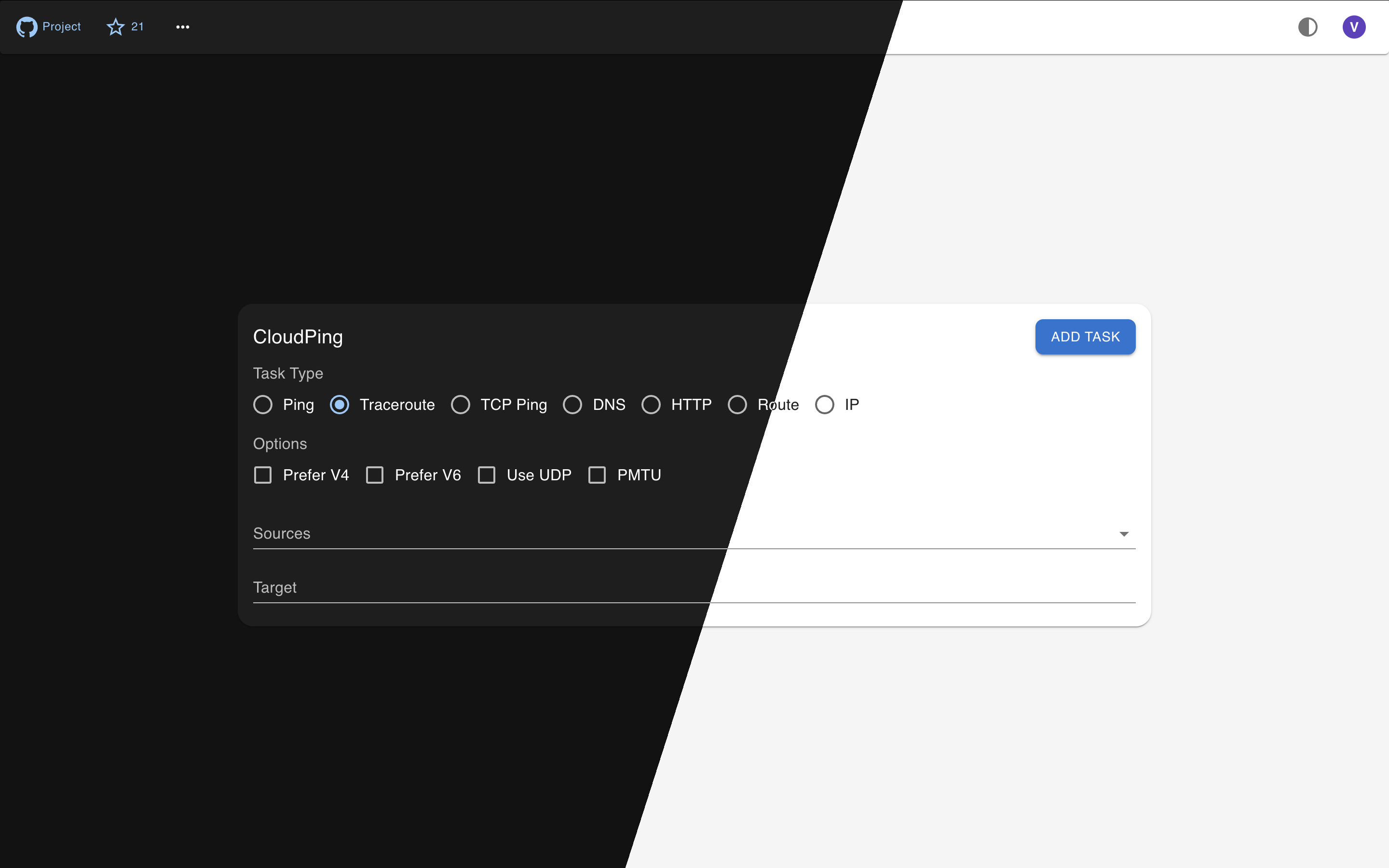
Features
- Ping, Traceroute (UDP flavor or ICMP flavor)
- TCP Ping
- DNS Probe (UDP, TCP, RFC7858 DoT, RFC8484 DoH)
- HTTP Probe (HTTP/1.1, HTTP/2 and HTTP/3)
- DN42 Dual Stack support, Internet support
- Displaying IP information of many aspects, like ASN, Org name, City, Country, and probably Lat Lon
- QUIC for hub-agent communication support and NAT-traversal
- JWT authentication with multi-provider SSO login (GitHub, Google, Microsoft Entra ID, Generic OIDC, and guest/visitor)
- Telegram Bot (Currently supporting:
/ping,/traceroute, and/probe) - Email Interface (Interact via Email)
- MCP Server (StreamableHTTP + JWT)
- Multiple GeoIP/IPInfo provider support: IPInfo.io, IP2Location.io, IPRegistry.co, and MaxMind MMDB
- BGP Route Lookup via MRT data
- Prometheus Metrics
Architecture
CloudPing is designed with a three-layer architecture that separates user-facing interfaces, control logic, and actual probe execution.
┌───────────────────────────────────────────────────────────────────────────────┐
│                           Access Layer                                        │
│  ┌──────────────┐  ┌──────────────┐  ┌──────────────┐  ┌───────────────────┐  │
│  │  Web Client  │  │ Telegram Bot │  │ Email Client │  │    MCP Server     │  │
│  │  (Next.js)   │  │   (@bot)     │  │ (SMTP/IMAP)  │  │ (Streamable HTTP) │  │
│  └──────┬───────┘  └──────┬───────┘  └──────┬───────┘  └──────┬────────────┘  │
└─────────┼─────────────────┼─────────────────┼─────────────────┼───────────────┘
          │                 │                 │                 │
          │                 │                 ▼                 │
          │                 │      ┌────────────────────┐       │
          │                 │      │   Email Gateway    │       │
          │                 │      │(Cloudflare Email)  │       │
          │                 │      └─────────┬──────────┘       │
          ▼                 ▼                ▼                  ▼
┌─────────────────────────────────────────────────────────────────────────────┐
│                           Control Layer                                     │
│  ┌─────────────────────────────────────────────────────────────────────┐    │
│  │                              Hub                                    │    │
│  │   (HTTP API, WebSocket/QUIC for agents, JWT Auth, Request Routing)  │    │
│  └─────────────────────────────────────────────────────────────────────┘    │
└─────────────────────────────────────────────────────────────────────────────┘
          │
          │  QUIC / mTLS / WebSocket / HTTP(s)
          ▼
┌─────────────────────────────────────────────────────────────────────────────┐
│                         Execution Layer                                     │
│  ┌─────────┐  ┌─────────┐  ┌─────────┐  ┌─────────┐  ┌──────────────┐       │
│  │ Agent 1 │  │ Agent 2 │  │   ...   │  │ Agent N │  │ MRT Query    │       │
│  │(at-vie1)│  │(us-nyc1)│  │         │  │(jp-tyo1)│  │ Service      │       │
│  └─────────┘  └─────────┘  └─────────┘  └─────────┘  └──────────────┘       │
│      Ping, Traceroute, DNS Probe, HTTP Probe, TCP Ping, BGP Route Lookup    │
└─────────────────────────────────────────────────────────────────────────────┘
- Access Layer: End-user interfaces including the web UI, Telegram bot, email interface, and MCP server.
- Email Gateway: Sits between the Email Client and the Hub. Currently, the only supported email gateway is Cloudflare Email Service.
- Control Layer: The Hub acts as the central coordinator — it exposes the public API, authenticates requests, and routes probe tasks to the appropriate agents.
- Execution Layer: Distributed agents at various geographical locations performing network measurements (ping, traceroute, DNS, HTTP probes), plus the MRT Query Service for BGP route lookup.
Try
If you are in a hurry, just go straight to try our deployed instance at here, or here(DN42). Which is ready to use, and doesn't require you to build or install anything.
Telegram Bot service is available via @as4242421771_bot.
Build
Make sure golang of newer version is already installed, if not, go visit go.dev/doc/install to download and un-tar a tarball, and make sure that $GOPATH/bin, and /usr/local/go/bin are in the $PATH.
git clone https://github.com/internetworklab/cloudping
cd cloudping
./buildversion.sh # to generate version metadata dependence
go build -o bin/globalping ./cmd/globalping
Now the binary bin/globalping can serve as an agent or a hub depending on the CLI arguments provided.
Optionally, to embed the web frontend assets into the binary (so that globalping web can serve the web UI without an external static file server such as nginx), build the frontend static export first:
cd web
npm ci && npm run build # generates web/out
cd -
go build -o bin/globalping ./cmd/globalping
Debugging
For how to generate self-signed certs (and CA) for testing, see Notes.md.
After the binary is built, to see how it goes, try launch a testing purpose localhost agent:
Open a terminal window, launch the testing hub in foreground:
scripts/launch_example_clustered_hub.sh
Then open one or more terminal winodws, launch the testing agent(s) in foreground:
scripts/launch_example_clustered_agent_1.sh # ls scripts/*.sh to see all
It binds on 127.0.0.1:8084, listens for plaintext HTTP requests, you can call the API with whaever HTTP client you like, for example:
curl --url-query targets=1.1.1.1 --url-query count=3 localhost:8084/simpleping
Doing so cause it send out 3 icmp echo request packets to the destination specified, 1.1.1.1, and the response will be stream to stdout in realtime in JSON line format.
It's better to use the web UI directly, since it has much richer feature set as well as easier to use UI.
Screenshots
Currently the UI is still rugged, but we are actively iterating it.
| Traceroute | Ping Matrix | MRT Route Query Service |
|---|---|---|
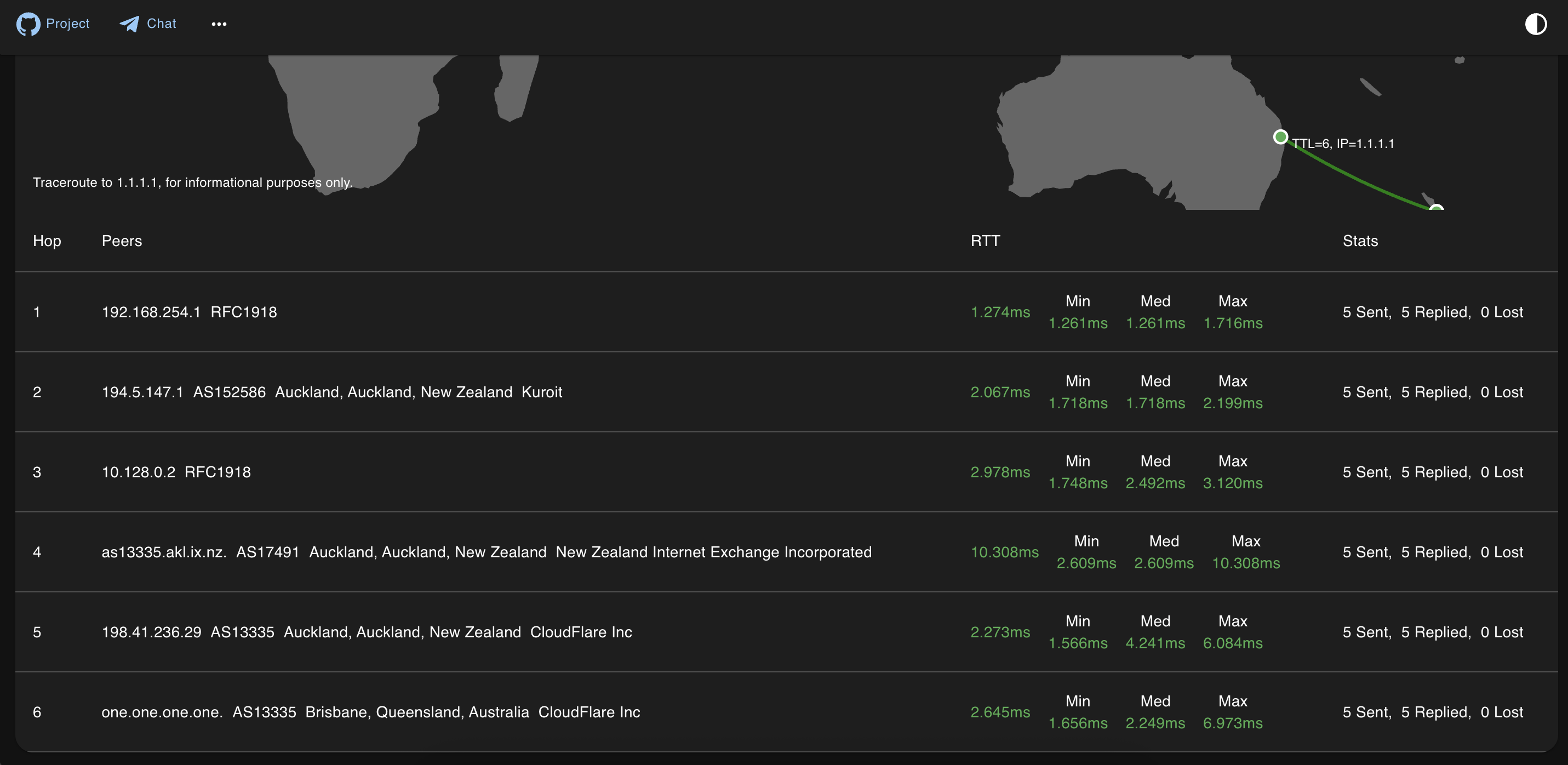 |
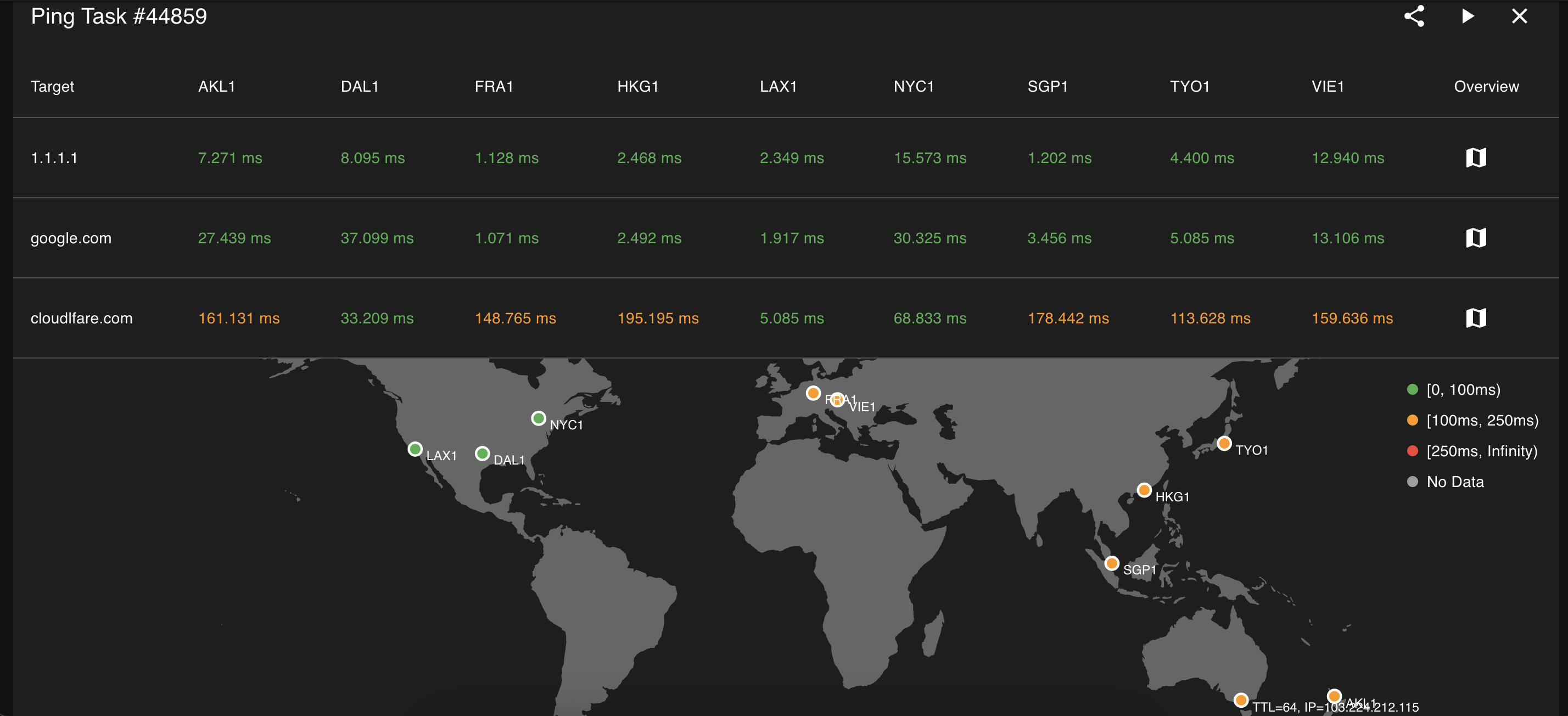 |
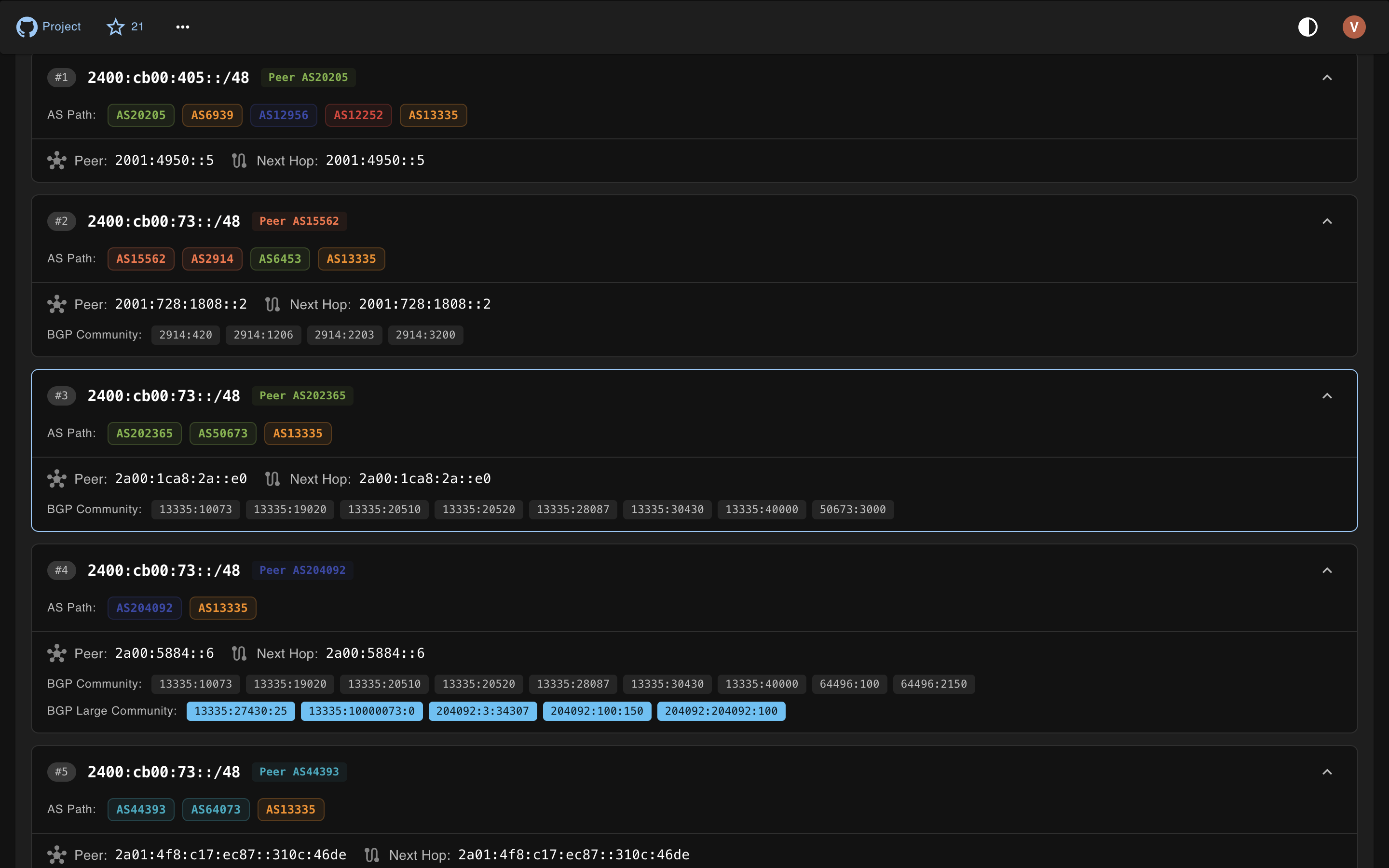 |
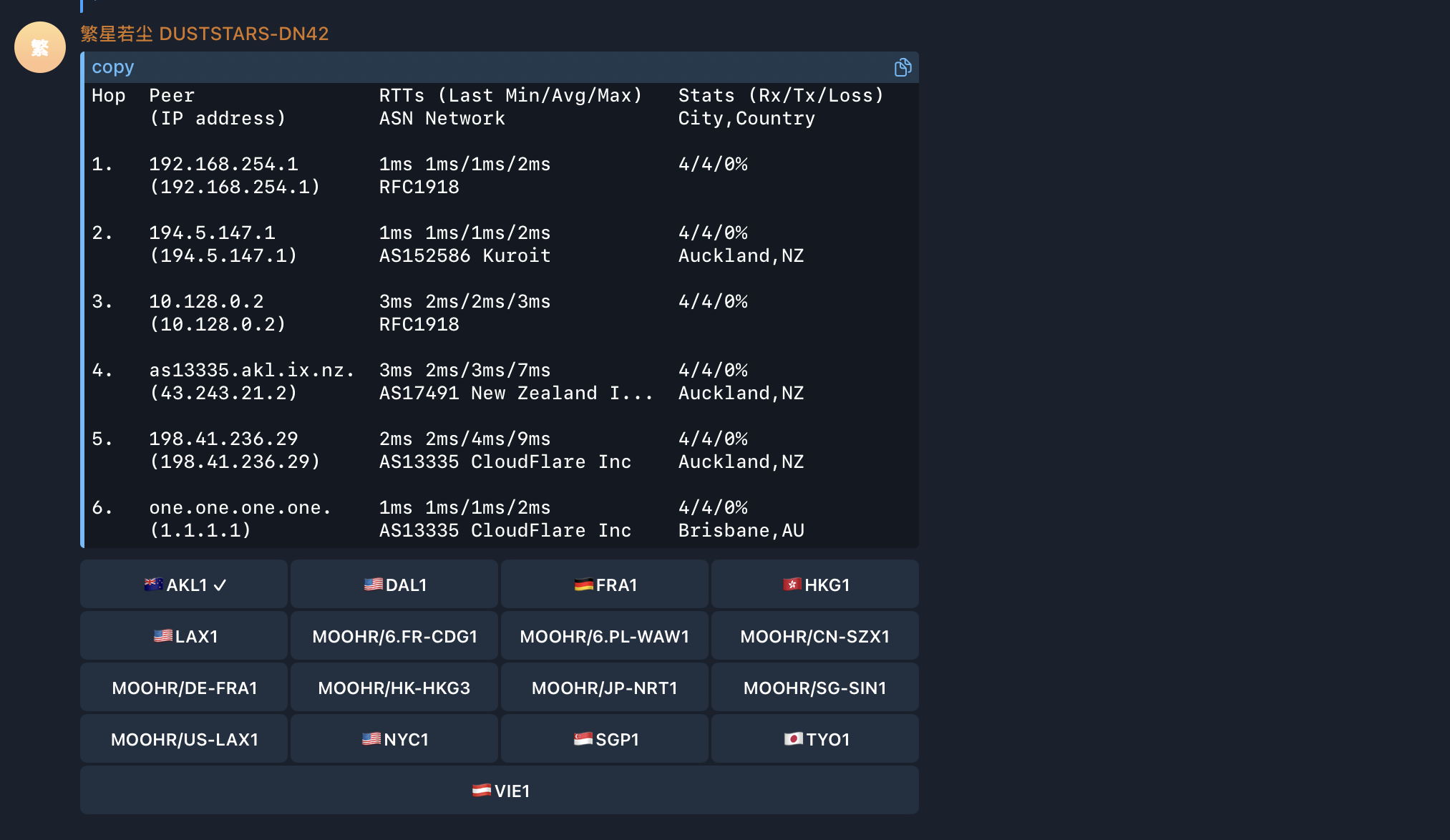
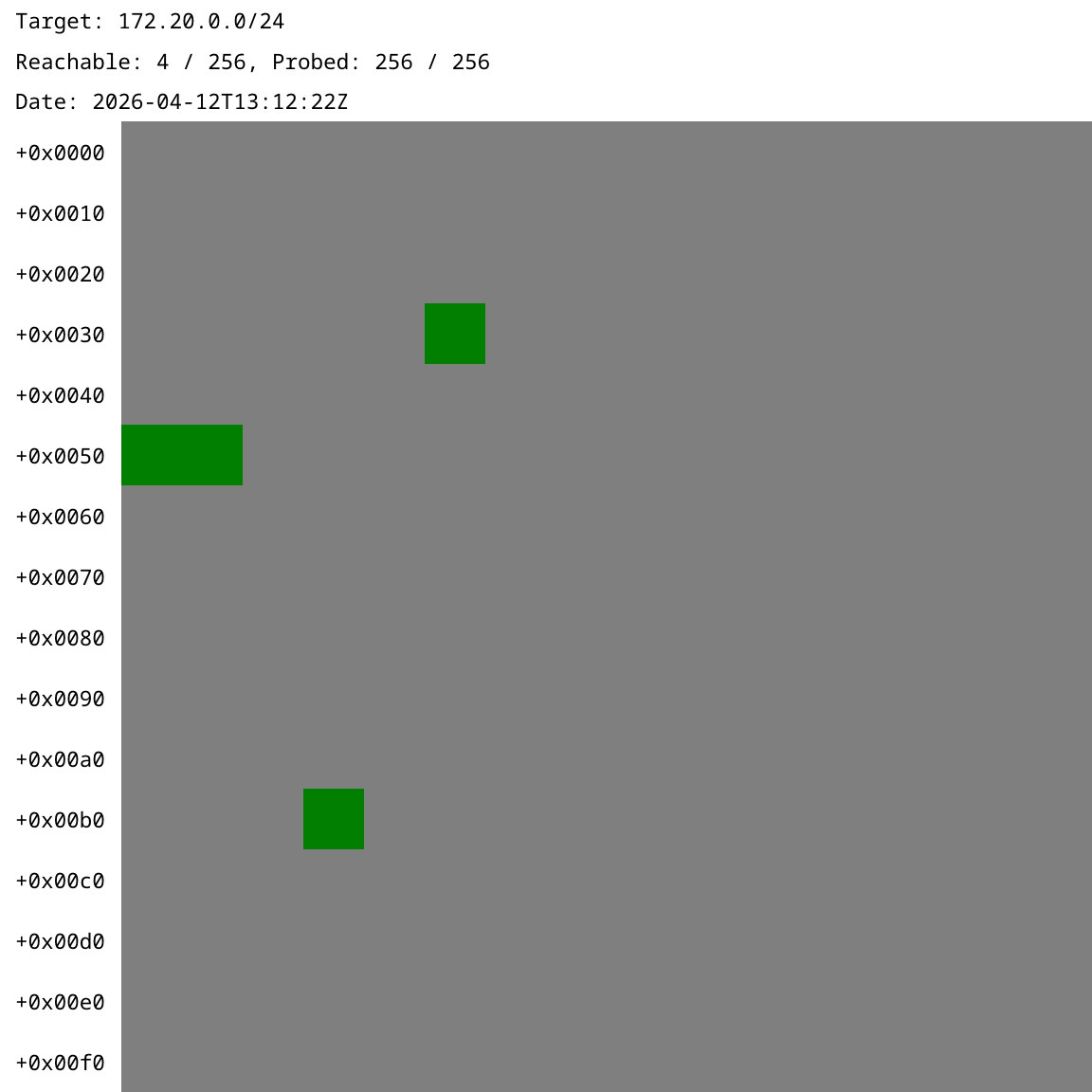
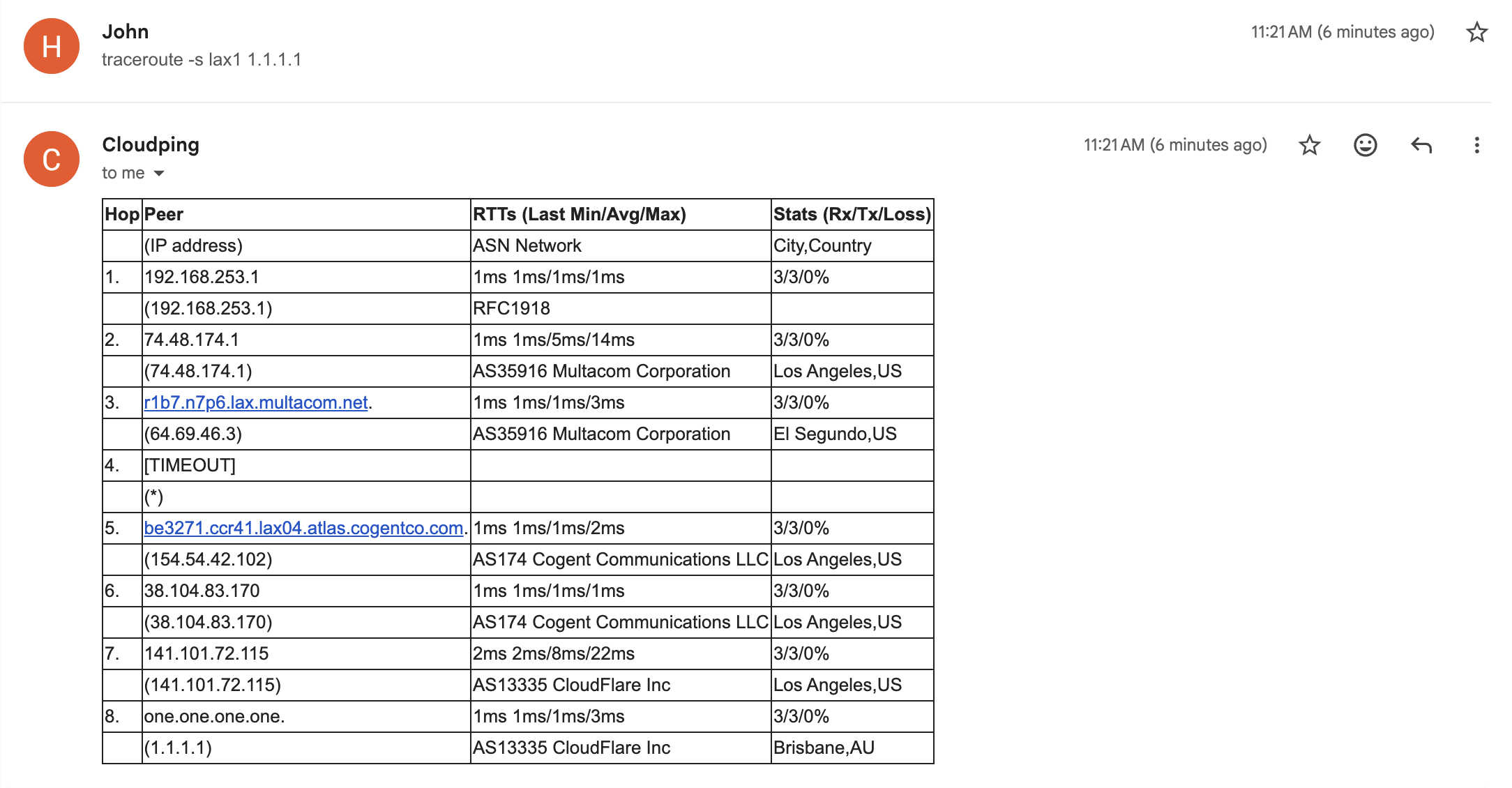
| Telegram Bot — Traceroute | Telegram Bot — Probe | Email — Traceroute |
|---|---|---|
 |
 |
 |
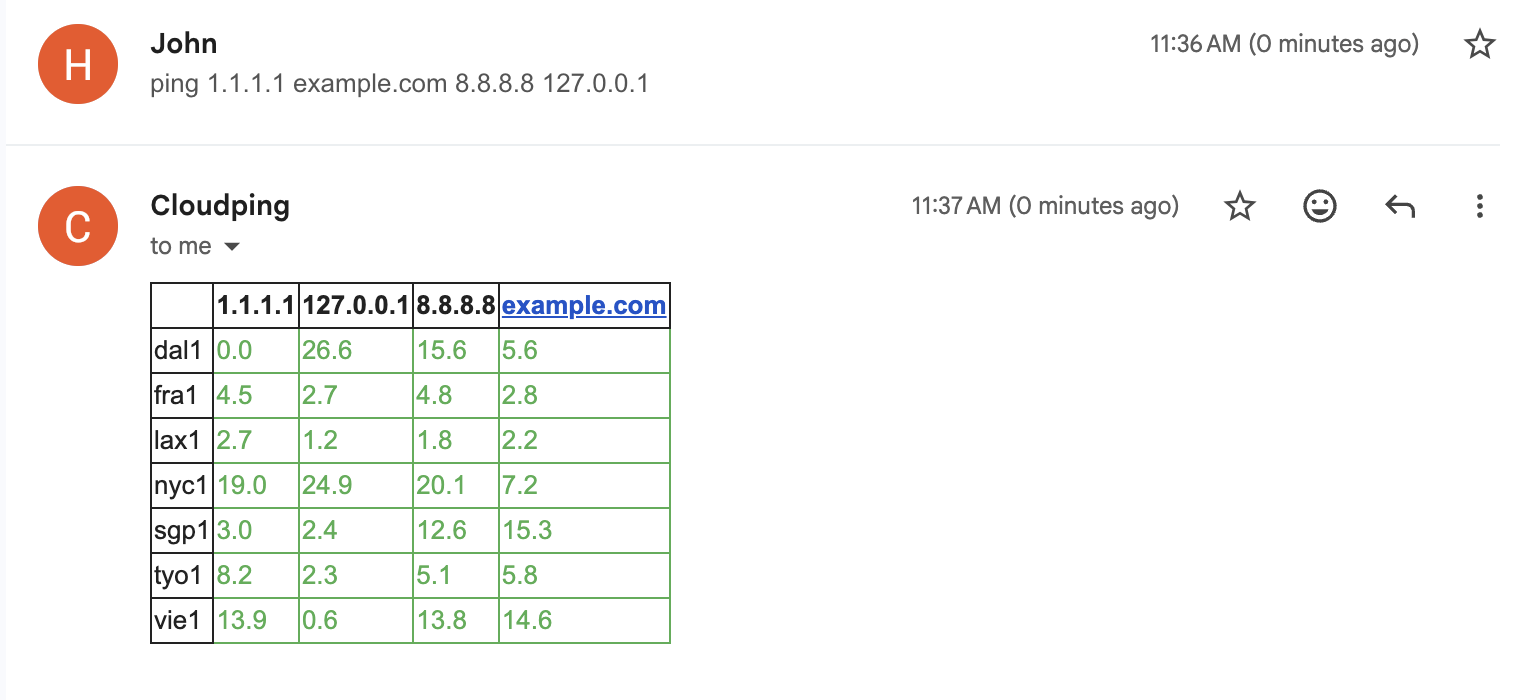
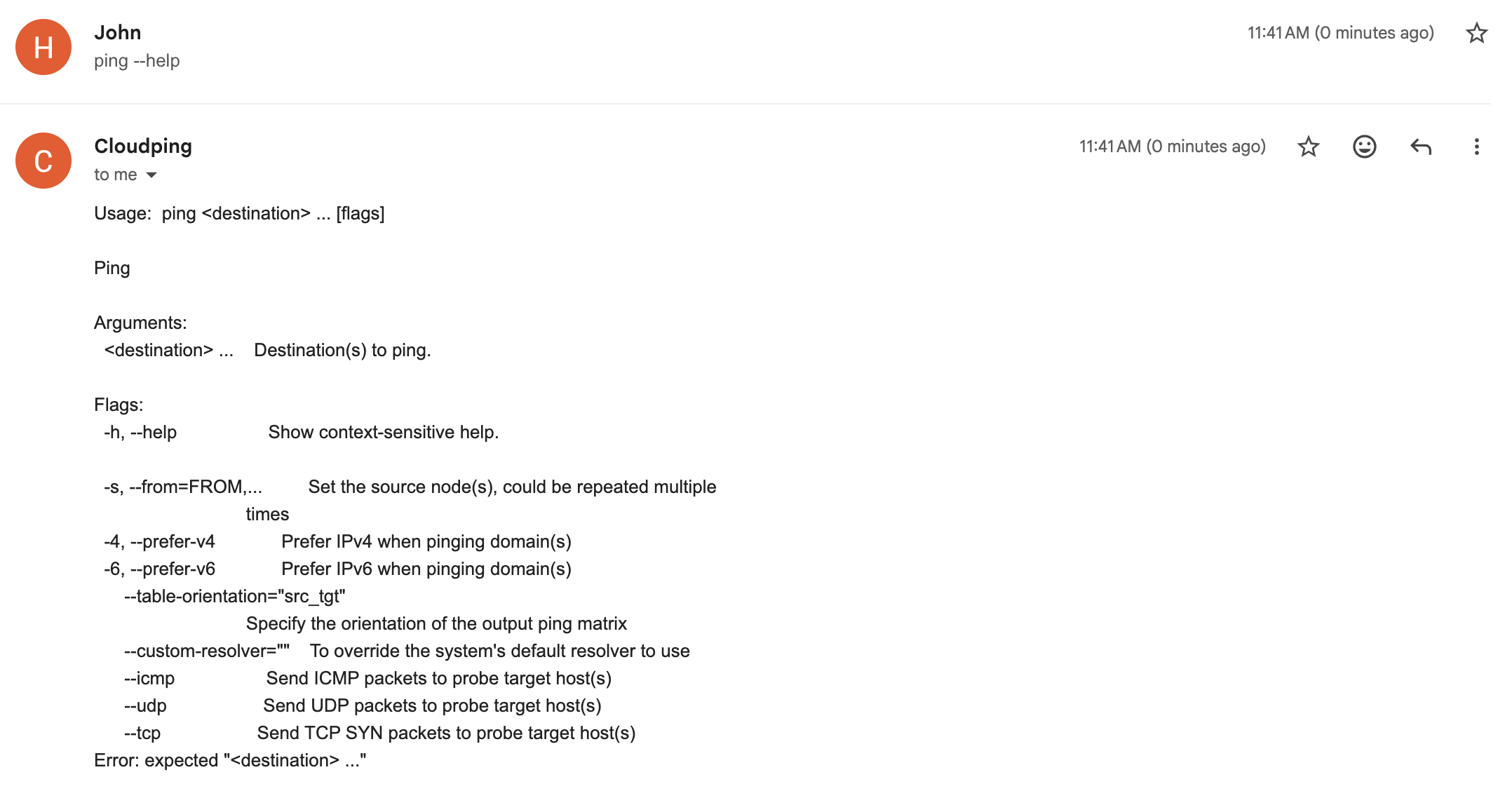
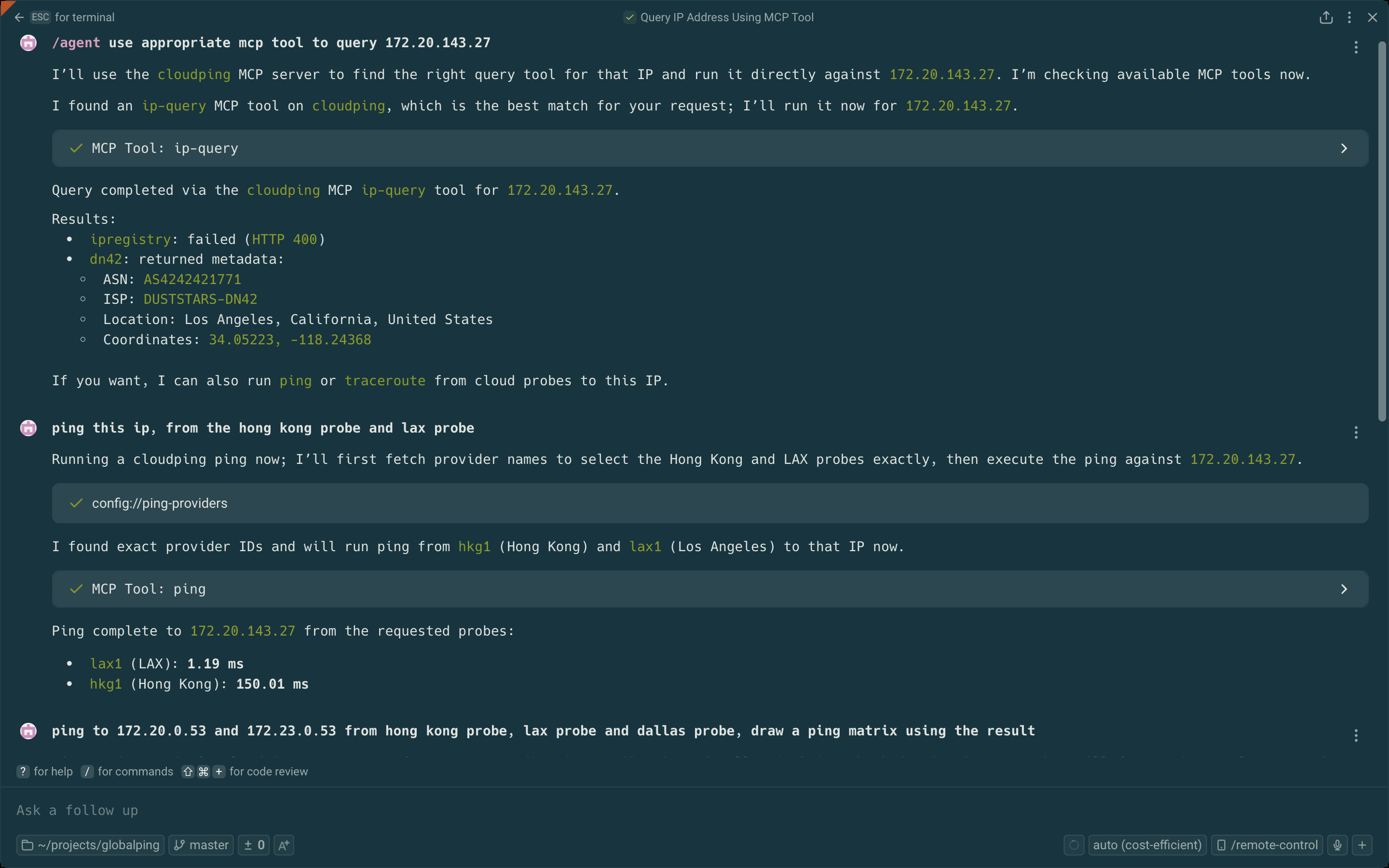
| Email — Ping Matrix | Email — Help Reply | MCP Server Tools |
|---|---|---|
 |
 |
 |
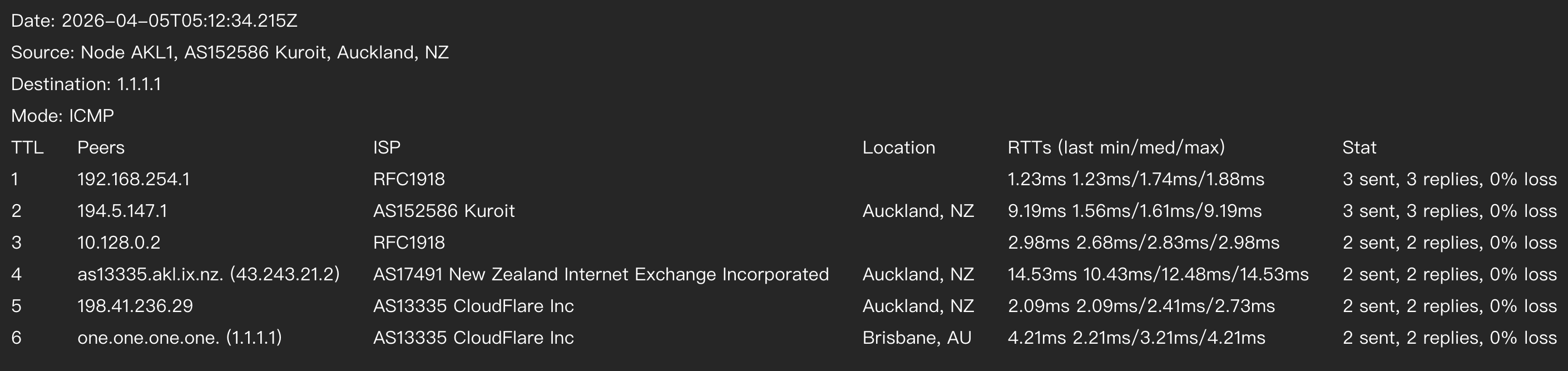
| Traceroute Canvas Export | ||
|---|---|---|
 |
API Design
Endpoints Overview
| Component | Endpoint | Method | Target Parameter | Targets Supported |
|---|---|---|---|---|
| Agent | /simpleping |
GET | destination |
Single target |
| Hub | /ping |
GET | targets |
Multiple (comma-separated) |
Port numbers are configured via command-line arguments.
Request Format
Parameters are encoded as URL search params. For available parameters and their effects, see:
- pkg/pinger/request.go - Supported parameters
- pkg/pinger/ping.go - Parameter effects
Example (curl):
Bring up the testing hub and agent(s) as described in the Debugging section
# Agent
curl --url-query targets=1.1.1.1 --url-query count=3 localhost:8085/simpleping

# Hub
curl --url-query from=us-lax1 --url-query targets=1.1.1.1 --url-query count=3 localhost:8084/ping
Note:
--url-queryis curl syntax sugar for encoding URL search params.
Prometheus Metrics:
Agents can expose Prometheus metrics by setting --metrics-listen-address (e.g. :2112). The metrics path defaults to /metrics.
# Agent (requires --metrics-listen-address to be set when launching the agent)
curl localhost:2112/metrics
Response Format
Both endpoints return a stream of JSON lines. Use line feed (\n) as the delimiter.
Developer Note
These APIs are intended for developers only. End users should use the Web UI.
MRT Query Service
The MRT Query Service provides BGP route lookup by streaming MRT (RFC6396, Multi-threaded Routing Toolkit Routing Information Export Format) data entries. Results are delivered as newline-delimited JSON (ndjson) streams, supporting queries by origin ASN, neighbor ASN, AS path segments, and IP/CIDR prefix.
For the data format specification and the reference implementation, see internetworklab/mrtparse-stream. The reference implementation uses GoBGP to parse MRT files and PostgreSQL to store and index the resulting entries.
Bot Interface
Currently, only Telegram Bot is supported.
| Command | Description | Example |
|---|---|---|
/ping |
Ping a destination with real-time streaming statistics. Supports IPv4/IPv6 preference and interactive location switching. | /ping -c 3 example.com |
/traceroute |
Traceroute to a destination with hop-by-hop peer and latency details. Supports IPv4/IPv6 preference and packet count. | /traceroute -6 example.com |
/probe |
Probe a CIDR subnet and generate a bitmap visualization. Requires a source node. | /probe -s us-lax1 172.23.0.0/24 |
/list |
List all available probe nodes with their network (ASN/ISP) and location information. | /list |
/version |
Show build version information as a JSON payload. | /version |
For how to deploy your own bot, see the docker-compose.yaml file in example1 or the dev scripts in scripts/.
Email Interface
Send email to cli at ping2.sh to interact with it. To display the help, send --help or [subcommand] --help (e.g. traceroute --help, no backtick).
| Command | Description | Example |
|---|---|---|
list |
List all available probe nodes with their network (ASN/ISP) and location information. | list |
ping |
Ping one or more destinations from specified source nodes. Supports IPv4/IPv6 preference and protocol selection (ICMP/UDP/TCP). | ping example.com |
traceroute |
Traceroute to a destination from a specified source node with hop-by-hop latency details. Supports IPv4/IPv6 preference and packet count. | traceroute -s lax1 -c example.com |
Connect to the MCP server
First, grab a JWT token by sending a /token command to the bot @as4242421771_bot.
Our MCP server: https://mcp.ping2.sh/mcp .
Authentication: JWT.
Example MCP server config on Warp.dev terminal's MCP server setting page:
{
  "cloudping": {
    "headers": {
      "Authorization": "bearer the_token_here"
    },
    "url": "https://mcp.ping2.sh/mcp"
  }
}
And the MCP client have to be able to use StreamableHTTP as transport.
Deployment
Web (frontend)
The Web UI is built with Next.js and supports the following build-time environment variables:
| Variable | Description | Default (Example) |
|---|---|---|
NEXT_PUBLIC_API_ENDPOINT |
API endpoint to use (prefix prepended to every request path) | /api |
NEXT_PUBLIC_GITHUB_REPO |
Link to the repository website | internetworklab/cloudping |
NEXT_PUBLIC_REPO_OWNER |
For display count of stargazers of the repo in the page | internetworklab |
NEXT_PUBLIC_REPO_NAME |
For display count of stargazers of the repo in the page | cloudping |
NEXT_PUBLIC_SITE_NAME |
WebUI title for self-hosted deployments | CloudPing |
NEXT_PUBLIC_DEFAULT_RESOLVER |
Resolver to specify in every probe request send to backend | 127.0.0.11:53 |
NEXT_PUBLIC_<NAME>_LOGIN_URL |
URL of oauth login page | /login/as/<name>/start |
These variables are evaluated at build time and embedded into the frontend bundle.
For 3rd-parth OAuth2 Login, currently we supports: Github, Google, Microsoft Entra ID, iEdon, Kioubit, Visitor, available env variables are: NEXT_PUBLIC_GITHUB_LOGIN_URL, NEXT_PUBLIC_GOOGLE_LOGIN_URL, NEXT_PUBLIC_ENTRA_LOGIN_URL, NEXT_PUBLIC_IEDON_LOGIN_URL, NEXT_PUBLIC_KIOUBIT_LOGIN_URL, NEXT_PUBLIC_VISITOR_LOGIN_URL.
Full Deployment (Docker Compose)
A complete self-hosted deployment example is available under docker/example1/. It includes a docker-compose.yaml that brings up all components — web frontend (Caddy), hub, Telegram bot, probe agents, and a Cloudflare Tunnel (cloudflared) for public ingress — along with setup scripts for provisioning tunnels, DNS records, and self-signed mTLS certificates for securing hub-to-agent's bidirectional communication.
Note: This is intended as a hands-on demonstration, not a production-ready setup, for a production setup, the agents should be deployed at where they actually are.
For step-by-step instructions, see docker/example1/README.md.
Join Agent
To run your cloudping agent and join our cluster, prepare three files:
docker-compose.yaml:
networks:
  globalping:
    name: globalping
    enable_ipv6: false
    ipam:
      driver: default
      config:
        - subnet: "${SUBNET_OVERRIDE}"
services:
  agent:
    container_name: globalping-agent
    pull_policy: always
    image: ghcr.io/internetworklab/cloudping:${VERSION}
    working_dir: /app/globalping
    networks:
      - globalping
    volumes:
      - "./.env.inside:/app/globalping/.env:ro" # .env.inside has some sensitive data, such as apikeys for invoking third-party services.
    command:
      - "/usr/local/bin/globalping"
      - "agent"
      - "--node-name=${NODE_NAME}"
      - "--exact-location-lat-lon=${EXACT_LOCATION_LAT_LON}"
      - "--country-code=${ALPHA2}"
      - "--city-name=${CITY}"
      - "--asn=${ASN}"
      - "--isp=${ISP}"
      - "--dn42-asn=${DN42_ASN}"
      - "--dn42-isp=${DN42_ISP}"
    mem_limit: 256m
.env:
NODE_NAME=nickname-nue1
SUBNET_OVERRIDE=192.168.253.0/30
EXACT_LOCATION_LAT_LON=48.1952,16.3503
VERSION=latest
ALPHA2=DE
CITY=Nuremberg
ASN=AS197540
ISP=netcup GmbH
DN42_ASN=AS4242421234
DN42_ISP=YOUR-DN42-AS
Just don't forget to replace the informations in .env with that of yours, such as node name (node name must not be conflict with current node names), locations and ASNs.
.env.inside:
JWT_TOKEN=<jwt_token>
Grab the JWT token from bot @as4242421771_bot, with command /token.
Credits
Thanks the following GeoIP datasources, in no particular order:
Todos
- introduce text-based cross-session AI memories (like personal-site), and design-doc (like personal-site)
- improve planar worldmap to allow infinite panning and infinite zooming
- add 3d globe / 2d plannar worldmap toggle
- add dnssec switch toggle
- add supportness of more dns query types, e.g.: NAPTR
Questions sur CloudPing MCP
Quels types de tests CloudPing peut-il exécuter ?
Il prend en charge le ping, le traceroute (UDP ou ICMP), le TCP ping, les tests DNS, les tests HTTP via HTTP/1.1, HTTP/2 et HTTP/3, ainsi que la recherche de routes BGP via les données MRT.
Comment le MCP server de CloudPing authentifie-t-il les clients ?
Le MCP server utilise StreamableHTTP avec une authentification JWT.
Quel format utilisent les réponses de l'API CloudPing ?
Les réponses sont diffusées sous forme de lignes JSON délimitées par des sauts de ligne (newline-delimited JSON).
Puis-je utiliser une instance CloudPing déjà déployée au lieu de la construire ?
Oui, une instance publique est disponible sur ping2.sh, ainsi qu'une instance DN42 sur ping.dn42. Rien n'a besoin d'être construit ou installé.
CloudPing prend-il en charge la recherche de routes BGP ?
Oui, il propose la recherche de routes BGP via les données MRT, interrogeable par ASN d'origine, ASN voisin, segments de chemin AS et préfixe IP/CIDR.