
Serveur MCP Onlyboxes
Commit 26 oct. 2026Permet à un client IA d'exécuter du code Python, d'utiliser des sessions de terminal avec état et de lire des images générées dans un sandbox auto-hébergé.
Aussi connu sous Coooolfan/onlyboxes
- Étoiles
- 54
- Outils
- —
- Téléchargements, 30 jours
- —
- Dernière version
- —
- Dernier commit
- 26 oct. 2026
- Licence
- AGPL-3.0
Qu'est-ce que Onlyboxes MCP ?
Onlyboxes est un serveur MCP. Permet à un client IA d'exécuter du code Python, d'utiliser des sessions de terminal avec état et de lire des images générées dans un sandbox auto-hébergé.
Résumé généré à partir du README du projet
À propos du MCP server Onlyboxes
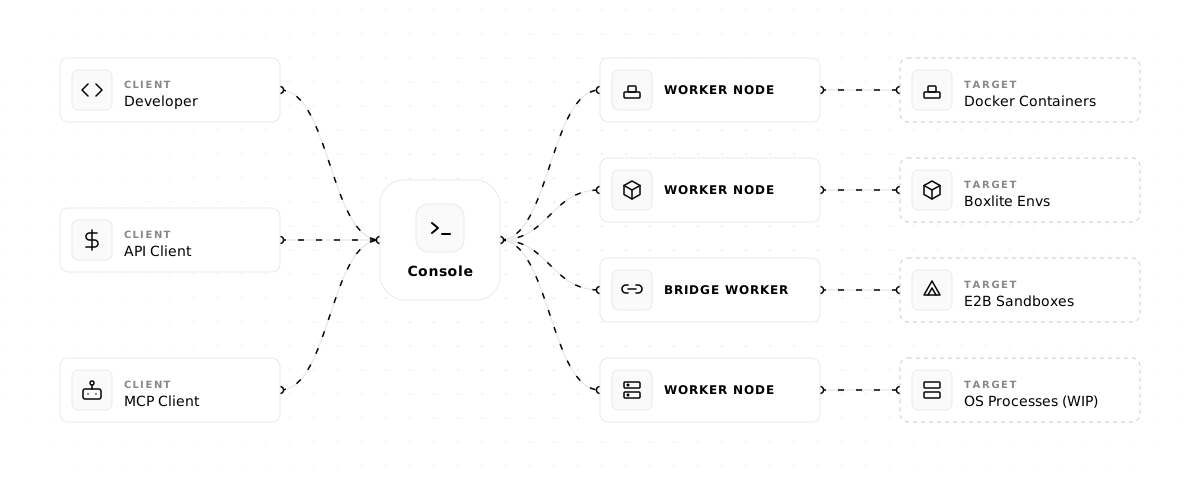
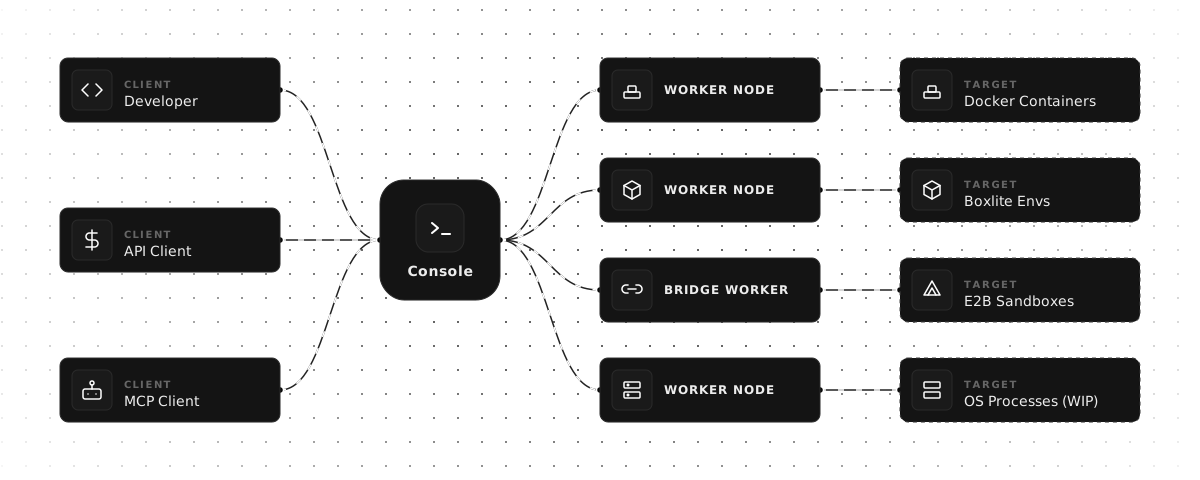
Onlyboxes permet aux particuliers et aux petites équipes de disposer d'un sandbox auto-hébergé pour l'exécution de code. Il utilise une architecture divisée composée d'une console de contrôle et de nœuds worker évolutifs pour gérer les tâches. Les utilisateurs peuvent déployer le système sur Linux en utilisant Docker et systemd, en connectant un client IA au point de terminaison MCP pour effectuer des tâches de calcul complexes.
Les développeurs utilisent les outils MCP spécifiques pythonExec pour exécuter du code Python, terminalExec pour gérer des sessions de terminal avec état, et readImage pour permettre aux modèles de visualiser les sorties visuelles générées. La plateforme garantit l'isolation des ressources entre les différents comptes grâce à des conteneurs avec état. Comme le système est auto-hébergé, vous gardez le contrôle sur l'environnement d'exécution et les données traitées au sein des nœuds worker.
La configuration de l'environnement nécessite un nœud console et au moins un nœud worker, tel que l'implémentation worker-docker. Pour connecter un client de chat LLM, vous devez générer un jeton d'accès depuis le tableau de bord web et fournir l'URL du point de terminaison MCP. Pour des raisons de sécurité, il est recommandé de placer les ports HTTP et gRPC derrière un reverse proxy afin d'appliquer le TLS.
Ce que vous pouvez faire avec
- 1Passage à l'échelle des ressources d'exécutionLes équipes peuvent étendre leur capacité de calcul en ajoutant davantage de nœuds worker à l'architecture.
Extrait du README du projet. Chaque cas d'utilisation est vérifié par rapport à une citation du document.
Configuration
WORKER_CONSOLE_GRPC_TARGETWORKER_CONSOLE_INSECUREWORKER_IDWORKER_SECRET
| Nom | Description | Type |
|---|---|---|
| WORKER_CONSOLE_GRPC_TARGET | — | |
| WORKER_CONSOLE_INSECURE | — | |
| WORKER_ID | — | |
| WORKER_SECRET | — |
Vérifications automatisées
Exécuté le 14 nov. 2026Rapport complet →Pas encore vérifié. Un serveur nécessite un score de 80, aucune faille sérieuse et suffisamment de données pour que nous puissions effectuer les vérifications. Fonctionnement des vérifications · Ce qu'il faut corriger pour gagner des points

- Dépôt source lié et accessiblecoooolfan/onlyboxes is public and reachablegithub.com/coooolfan/onlyboxes ↗Réussi
- Le nom du package correspond au dépôt sourceNon vérifié
- Provenance du build (attestation Sigstore)Non vérifié
- Licence open source (OSI)AGPL-3.0spdx.org/licenses/AGPL-3.0.html ↗Réussi
- Commit ou version publiée au cours de l'année écouléeLast commit or release 2026-10-26github.com/coooolfan/onlyboxes ↗Réussi
- OpenSSF ScorecardNon vérifié
- Nom du package non proche d'un package populaireNon vérifié
- Aucun avis critique dans le package ou ses dépendancesNon vérifié
- Aucune instruction cachée destinée au modèle0 tool descriptions and the README read; no override phrases, credential paths or hidden charactersRéussi
- Les outils destructifs sont étiquetésNon vérifié
- Le point de terminaison distant répond à la poignée de main MCPNon vérifié
README
Voir sur GitHubOnlyboxes
Onlyboxes is a self-hosted code execution sandbox platform for individuals and small teams.
It uses a control-plane (console) and execution-plane (worker) architecture, and exposes both REST APIs and MCP tools.
Key Features
- Self-hosted all components: control node (
console) + worker nodes (worker) - Separated control and execution planes:
- Workers support horizontal scaling
- Workers support multi-language heterogeneous implementations
- Workers support multiple runtimes
- Full account system: resource isolation (stateful containers, sessions) between accounts
- MCP tools:
pythonExec: Python code executionterminalExec: stateful terminal sessionsreadImage: model-readable images
- REST API: all MCP tools also available via HTTP + async task API
[!WARNING]
In the current release, console (gRPC + HTTP) does not provide built-in TLS/mTLS.
workerrejects insecure console endpoints by default; plaintext is allowed only whenWORKER_CONSOLE_INSECURE=trueis explicitly set.Put both console HTTP (
:8089) and gRPC (:50051) endpoints behind your reverse proxy/gateway and enforce TLS for external traffic.
Architecture
One-Click Installer (Linux)
For a single-machine deployment of console + worker-docker, run:
curl -fsSL https://onlybox.es/install.sh | bash
The installer will:
- Check the environment (Linux, Docker, Docker Compose v2, systemd)
- Download and render the compose template with auto-generated credentials
- Start the console via
docker compose up -d - Create a
normalworker - Download the architecture-matched
worker-dockerrelease binary for the default latest version, or your--tagoverride - Generate and enable a systemd service for the worker
- Poll until the worker comes online and print a result summary
Available options:
| Flag | Default | Description |
|---|---|---|
--tag |
latest published release | Optional release version override |
--workdir |
$PWD/onlyboxes |
Working directory |
--yes / -y |
false |
Non-interactive mode, skip confirmations |
--console-http-port |
8089 |
Console HTTP port (host side) |
--console-grpc-port |
50051 |
Console gRPC port (host side) |
--service-name |
onlyboxes-worker-docker |
systemd service name |
Requirements: Linux, systemd, Docker Engine, Docker Compose v2, Python 3.
Quick Start (Manual)
1) Prerequisites
- Control node:
- Docker Engine (binaries are also available in releases — no Docker needed if deploying via binary)
- Worker node:
- Docker Engine (required by
worker-docker)
- Docker Engine (required by
2) Start the console service
-
Create a working directory and a
docker-compose.ymlfile in it:mkdir -p onlyboxes-console && cd onlyboxes-consoleservices: console: image: coolfan1024/onlyboxes:latest container_name: onlyboxes-console restart: unless-stopped environment: CONSOLE_HASH_KEY: "replace-with-long-random-key" CONSOLE_ENABLE_REGISTRATION: "true" CONSOLE_DASHBOARD_USERNAME: "admin" # only for first run CONSOLE_DASHBOARD_PASSWORD: "change-me" # only for first run ports: - "8089:8089" - "50051:50051" volumes: - ./db:/app/db -
Replace at least:
CONSOLE_HASH_KEYCONSOLE_DASHBOARD_PASSWORD
-
Start console:
docker compose up -d
Default endpoints:
- Console Web UI / HTTP REST API / MCP endpoint:
http://127.0.0.1:8089 - gRPC:
127.0.0.1:50051
3) Sign in and create an access token
- Open
http://127.0.0.1:8089in your browser. - Sign in with the initialized admin account.
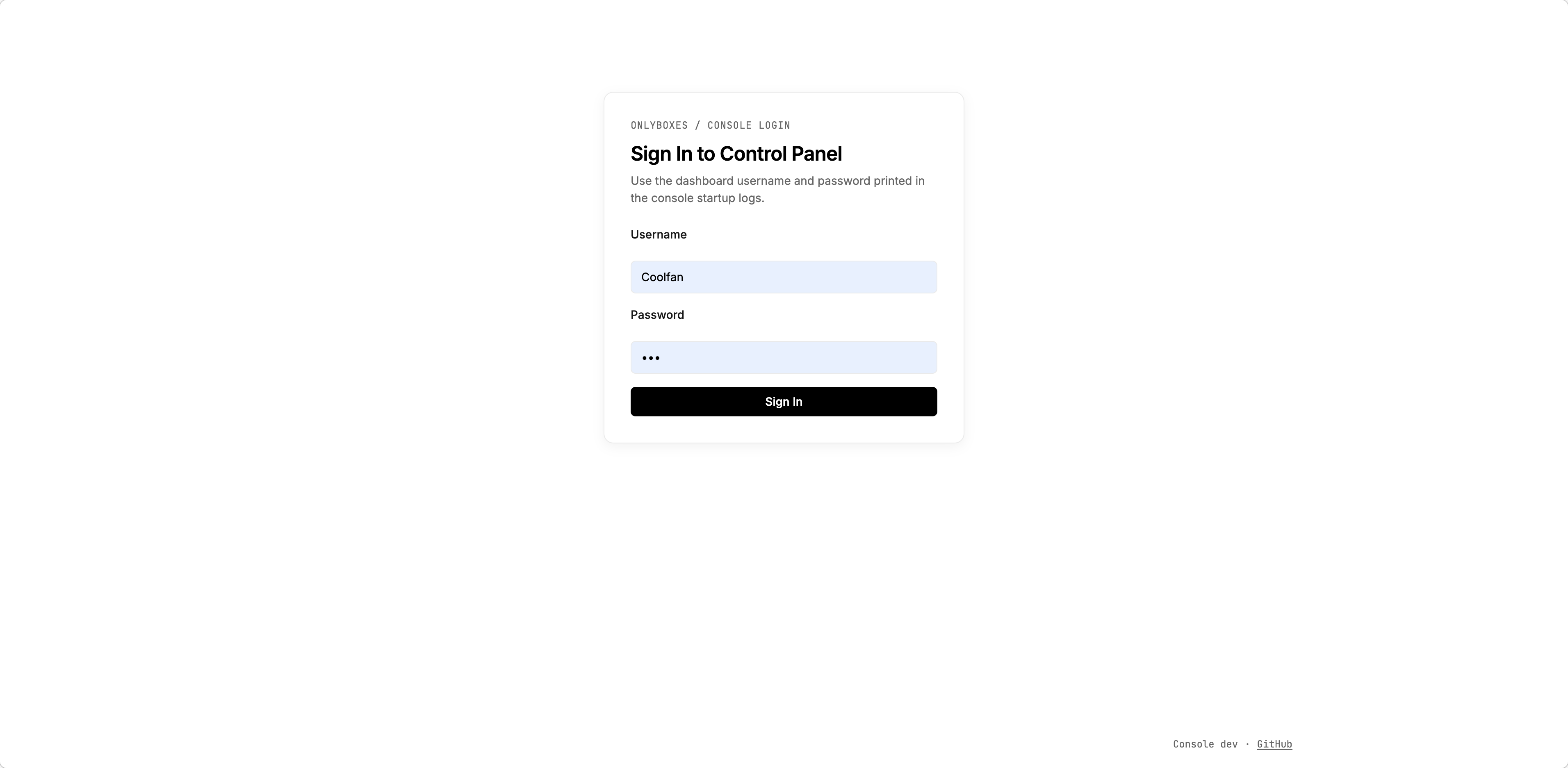
- Go to the token management page and create an access token.
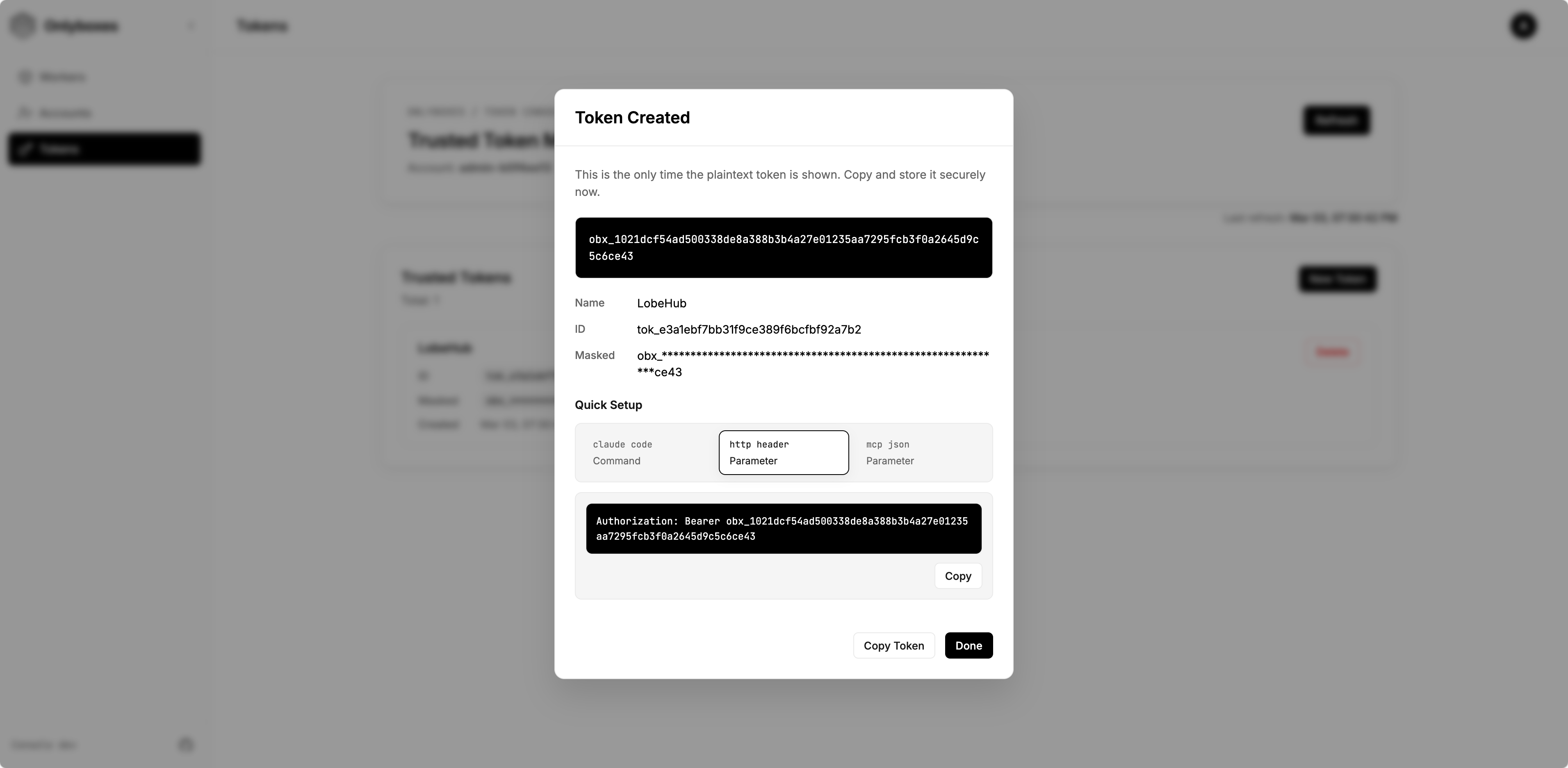
- Save the plaintext token immediately (it is returned only once).
4) Create a worker
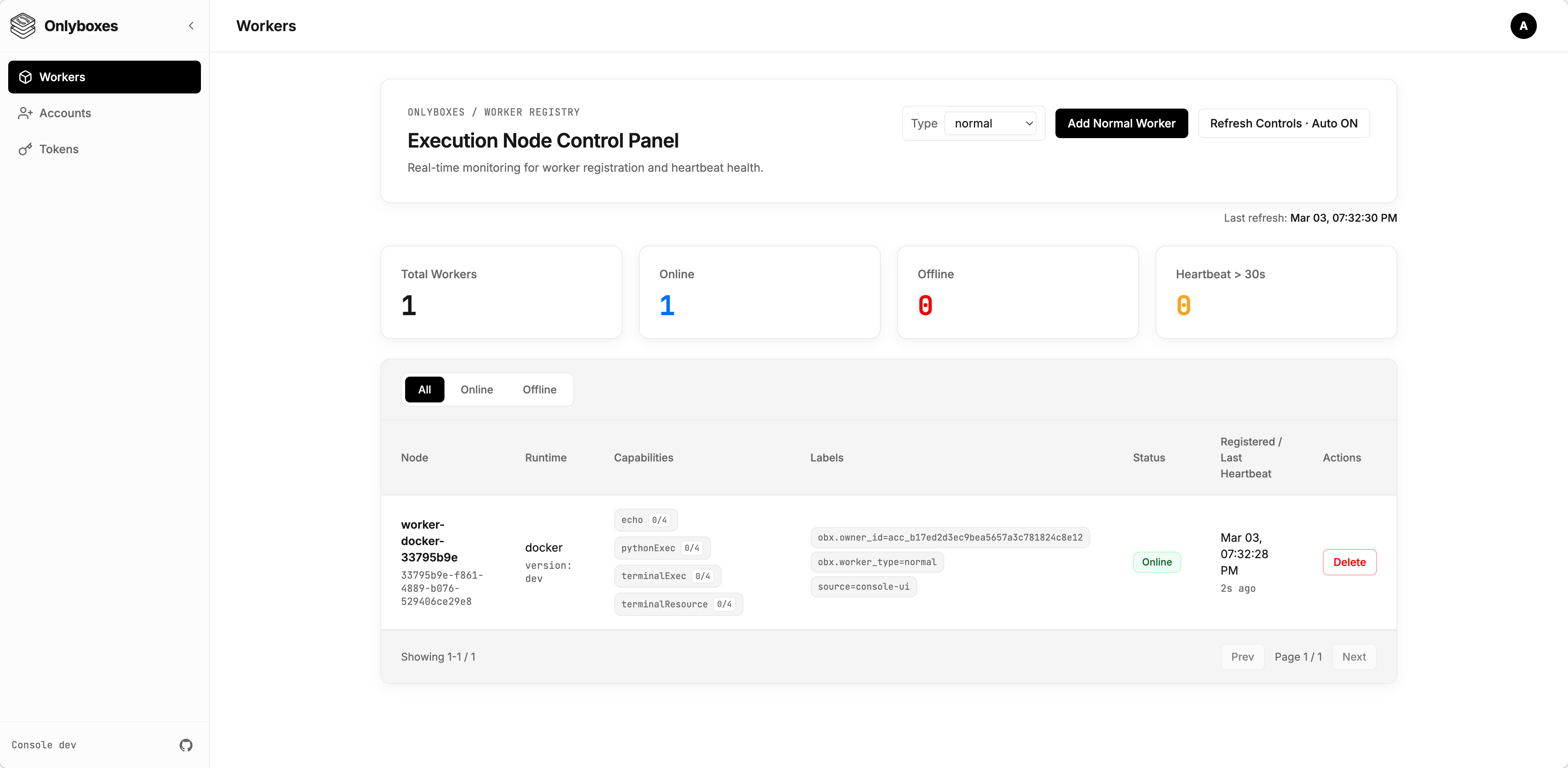
- Go to Workers page and create a worker.
- Copy and securely store the startup command from the creation dialog (
WORKER_SECRETis one-time visible).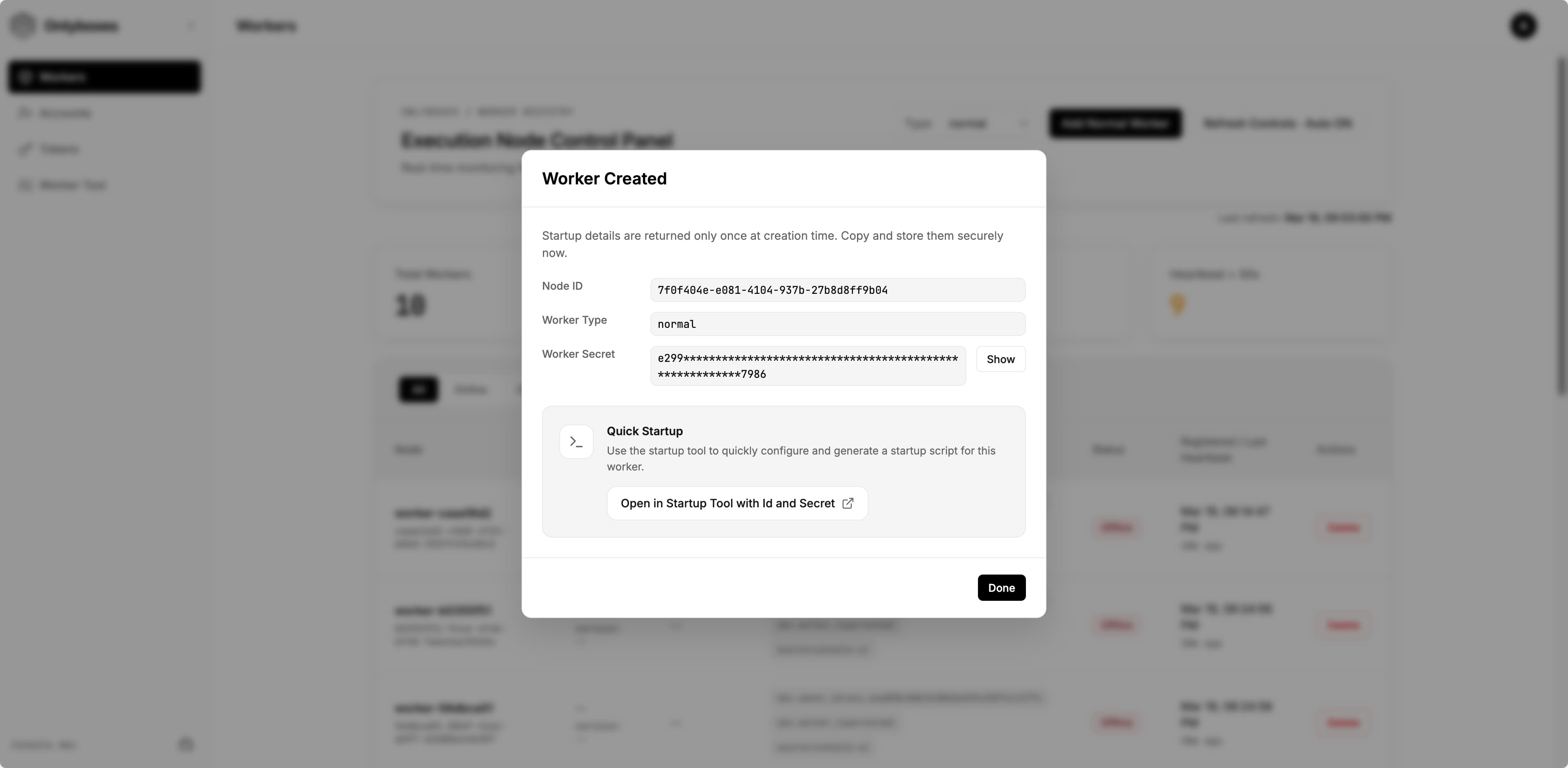
- (Optional) Click
Open in Startup Tool with Id and Secretto open the startup command builder with the worker id and secret pre-filled.- On the opened page, you can edit all available options. The generated startup command appears at the bottom of the page — copy and save it.
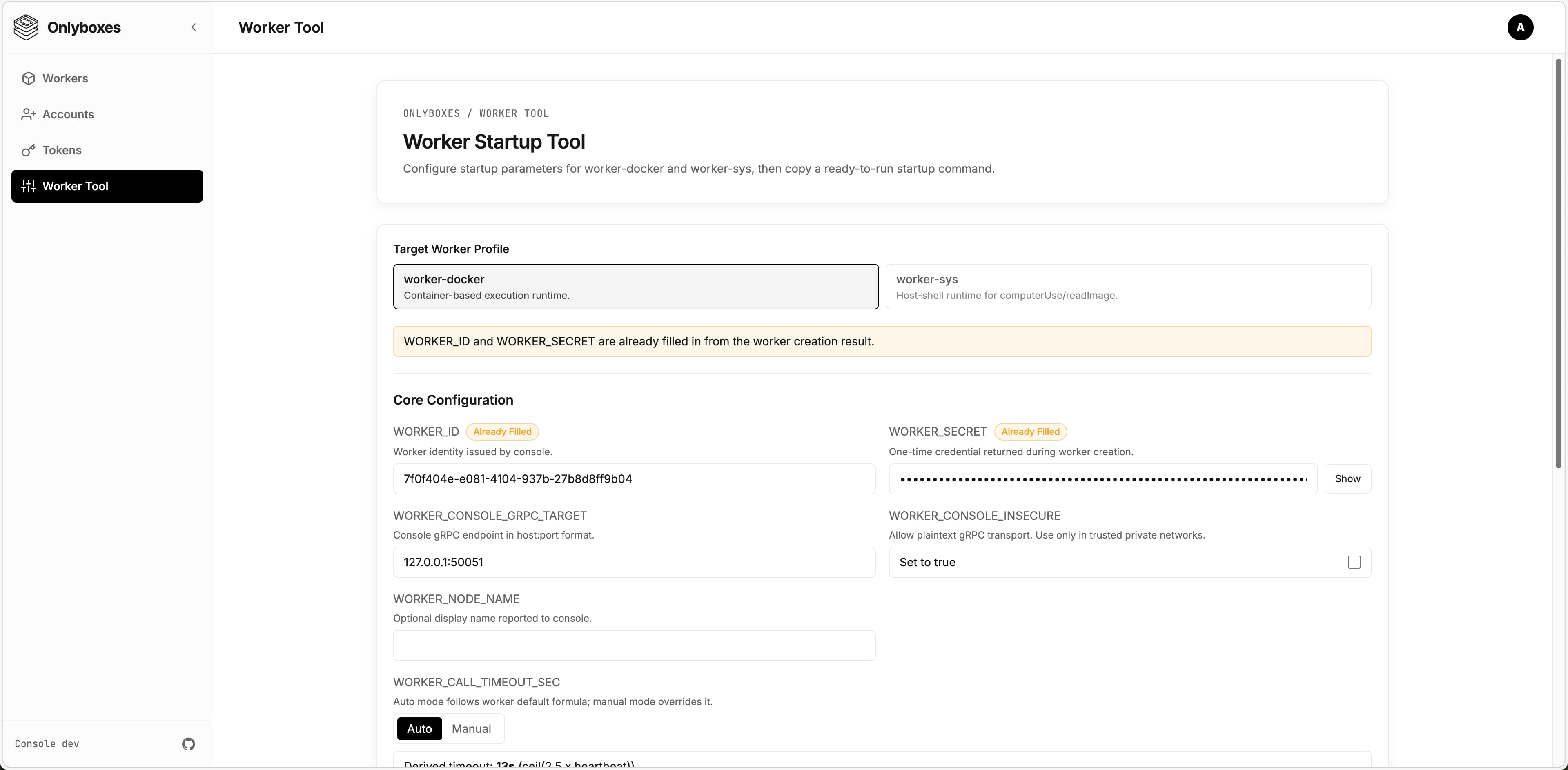
- On the opened page, you can edit all available options. The generated startup command appears at the bottom of the page — copy and save it.
5) Run worker
[!WARNING] Workers support different runtimes and environments. The current release only provides
worker-docker. This section uses the Docker runtime as an example.
-
Log in to the machine where the worker will be deployed.
- Ensure Docker Engine is installed.
- Ensure the worker can reach the console gRPC endpoint.
-
Download the latest
worker-dockerbinary from GitHub Releases:https://github.com/onlyboxes/onlyboxes/releases/latest
-
Use the startup command values from the dashboard, and replace the executable path on the last line with your downloaded binary.
- Workers reject insecure console endpoints by default; set
WORKER_CONSOLE_INSECURE=trueonly to allow plaintext connections.
# Example WORKER_CONSOLE_INSECURE=true \ WORKER_CONSOLE_GRPC_TARGET=127.0.0.1:50051 \ WORKER_ID=<worker_id> \ WORKER_SECRET=<worker_secret> \ /path/to/onlyboxes-worker-docker - Workers reject insecure console endpoints by default; set
6) Verify readiness
- Confirm the worker is
onlineon the dashboard Workers page. - For REST API request examples, see
docs/API.md. - If no tokens are configured,
/mcpand execution APIs return401by design. - Add the MCP endpoint
http://127.0.0.1:8089/mcpin any LLM Chat Client, set the token, and verify it works correctly.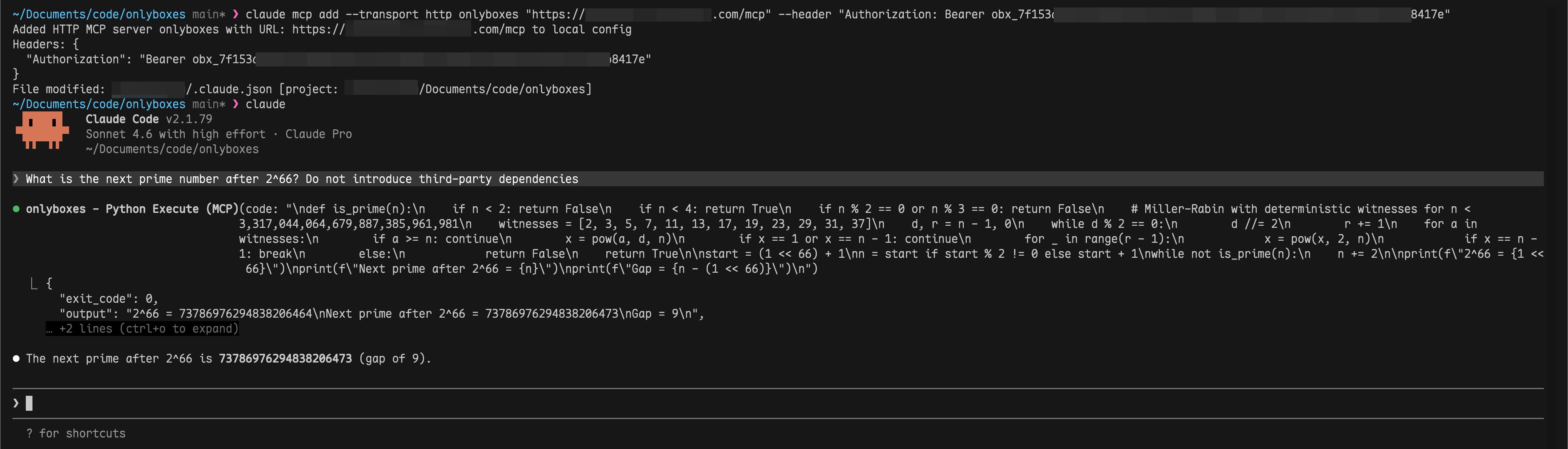
FAQ
-
Q: Worker stays
offlineafter starting? A: Check thatWORKER_CONSOLE_GRPC_TARGETpoints to the correct console gRPC address and verify network connectivity. -
Q: Can a worker be deployed on the same machine as the console? A: Yes.
-
Q: Can a worker run inside Docker? A: In theory, yes. However, it is not recommended because the worker needs access to the host Docker daemon. You would need to handle Docker-in-Docker yourself.
Production Checklist
- Replace all default credentials.
- Use a reverse proxy to enforce TLS for
:8089and:50051. - Persist and back up the SQLite data directory (
CONSOLE_DB_PATH). - Run workers on isolated hosts to avoid sharing the Docker daemon with the console.
- Read the
Configuration Referencebelow for all available options and adjust as needed.
Configuration Reference
Console (console)
| Environment Variable | Default | Notes |
|---|---|---|
CONSOLE_HTTP_ADDR |
:8089 |
Dashboard + REST API listen address |
CONSOLE_GRPC_ADDR |
:50051 |
Worker registry gRPC listen address |
CONSOLE_WORKER_CONNECTION_CONFLICT_POLICY |
REPLACE |
Duplicate Worker connection policy: REPLACE disconnects the existing connection; REJECT rejects the new connection |
CONSOLE_HASH_KEY |
(required) | HMAC key for hashing worker secrets and access tokens |
CONSOLE_DB_PATH |
./db/onlyboxes-console.db |
SQLite database path |
CONSOLE_DB_BUSY_TIMEOUT_MS |
5000 |
SQLite busy timeout |
CONSOLE_TASK_RETENTION_DAYS |
30 |
Retention for completed task records |
CONSOLE_ENABLE_REGISTRATION |
false |
Allow admin to register non-admin accounts |
CONSOLE_DASHBOARD_USERNAME |
(empty) | Used only for first admin initialization |
CONSOLE_DASHBOARD_PASSWORD |
(empty) | Used only for first admin initialization |
Worker (worker-docker)
| Environment Variable | Default | Notes |
|---|---|---|
WORKER_ID |
(required) | Issued by POST /api/v1/workers |
WORKER_SECRET |
(required) | Issued once by POST /api/v1/workers |
WORKER_CONSOLE_GRPC_TARGET |
127.0.0.1:50051 |
Console gRPC target |
WORKER_CONSOLE_INSECURE |
false |
false enforces TLS endpoint; set true only to allow plaintext console gRPC |
WORKER_HEARTBEAT_INTERVAL_SEC |
5 |
Worker heartbeat interval |
WORKER_HEARTBEAT_JITTER_PCT |
20 |
Heartbeat jitter percent |
WORKER_PYTHON_EXEC_DOCKER_IMAGE |
ghcr.io/astral-sh/uv:python3.12-bookworm-slim |
Runtime image for pythonExec |
WORKER_TERMINAL_EXEC_DOCKER_IMAGE |
coolfan1024/onlyboxes-runtime:default |
Runtime image for terminalExec |
WORKER_TERMINAL_OUTPUT_LIMIT_BYTES |
1048576 |
Per-stream output limit |
API Surfaces
- Authentication:
/api/v1/auth/* - Resource management:
/api/v1/accounts*,/api/v1/api-keys*,/api/v1/tokens*,/api/v1/sessions*,/api/v1/workers*,/api/v1/proxy-routes* - Command execution:
/api/v1/commands/* - Task execution:
/api/v1/tasks* - MCP (Streamable HTTP):
POST /mcp
Development
Local dev orchestration
scripts/dev.sh runs console / web / website in a tmux session. Every subcommand returns immediately, and logs land in scripts/.dev/<svc>.log.
scripts/dev.sh start              # start all three
scripts/dev.sh start console web  # console + web only
scripts/dev.sh status             # session, port listeners, window state
scripts/dev.sh logs console       # last 200 log lines
scripts/dev.sh creds              # console admin credentials
scripts/dev.sh stop               # stop everything
Web dev URL defaults to http://127.0.0.1:5178 and proxies /api/* and /mcp to http://127.0.0.1:8089.
Workers are not orchestrated — their startup arguments vary per implementation, so start them manually. Full usage: scripts/README.md.
Useful docs
- Unified API reference:
docs/API.md - Console internals:
console/README.md - Worker internals:
worker/worker-docker/README.md - API/proto guide:
api/README/proto.md - Web app guide:
web/README.md
Release & Images
- GitHub workflow:
.github/workflows/package-release.yml— run it manually from the Actions tab, pick the branch and enter the version (e.g.0.7.2); the tag is created from that branch. Turn offlatestwhen patching an older line so the newest release keeps the label - Website-only deploy:
.github/workflows/deploy-website.yml— manual, independent of a release - Console Docker image:
coolfan1024/onlyboxes:<version>andcoolfan1024/onlyboxes:latest - Terminal runtime images:
coolfan1024/onlyboxes-runtime:<version>-default,<version>-default-cn, and<version>-lobehub; stable aliases aredefault,default-cn,lobehub, andlatest(same asdefault) - Console binary includes embedded web assets
Security and Operational Notes
- Console does not provide built-in TLS/mTLS in this release;
worker-dockerrequires explicitWORKER_CONSOLE_INSECURE=trueto connect over plaintext. - Put console HTTP (
:8089) and gRPC (:50051) behind a reverse proxy/gateway and enforce TLS on public/external links. WORKER_SECRETand access token plaintext values are returned only at creation time.- Dashboard login sessions are in-memory and are invalidated when
consolerestarts.
Links
License
Questions sur Onlyboxes MCP
Quels outils MCP Onlyboxes propose-t-il ?
Il expose pythonExec pour l'exécution de code Python, terminalExec pour des sessions de terminal avec état, et readImage pour permettre aux modèles de lire des images.
Pourquoi mon worker reste-t-il hors ligne après le démarrage ?
Vérifiez que WORKER_CONSOLE_GRPC_TARGET pointe vers la bonne adresse gRPC de la console et vérifiez la connectivité réseau.
Un worker peut-il être déployé sur la même machine que la console ?
Oui, un worker peut fonctionner sur la même machine que la console, bien que les recommandations de production préconisent des hôtes isolés.
Onlyboxes fournit-il le TLS par défaut ?
Non, la version actuelle ne dispose pas de TLS/mTLS intégré sur la console. Placez les points de terminaison HTTP et gRPC de la console derrière un reverse proxy ou une passerelle pour appliquer le TLS.