
Serveur MCP codiluce
Commit 12 nov. 2026Fournit une carte visuelle 2D et 3D zoomable de votre dépôt pour suivre les flux de code, l'historique Git et l'activité des agents en temps réel.
Aussi connu sous codiluce/codiluce
- Étoiles
- 22
- Outils
- —
- Téléchargements, 30 jours
- —
- Dernière version
- —
- Dernier commit
- 12 nov. 2026
- Licence
- MIT
Qu'est-ce que codiluce MCP ?
codiluce est un serveur MCP. Fournit une carte visuelle 2D et 3D zoomable de votre dépôt pour suivre les flux de code, l'historique Git et l'activité des agents en temps réel.
Résumé généré à partir du README du projet
À propos du MCP server codiluce
Visualiser des bases de code complexes et suivre l'activité des agents en temps réel est ce que Codiluce permet aux développeurs travaillant avec des assistants de codage IA. Il crée une carte 2D ou 3D zoomable de votre dépôt, affichant les connexions entre les fonctions, les requêtes et les tables. En lançant un serveur local via npx, vous pouvez visualiser la structure de votre code dans un navigateur et observer les agents de codage naviguer à travers vos fichiers pendant qu'ils travaillent.
Cet outil est conçu pour combler le fossé de compréhension créé par les changements rapides pilotés par l'IA. Il permet de connecter divers environnements comme Claude Code, Cursor, GitHub Copilot et Windsurf. Une fois connectés, les agents peuvent expliquer le code directement sur la carte, avec des liens qui mettent en évidence les symboles et fichiers spécifiques faisant l'objet de la discussion. Le système permet également de rejouer les sessions d'agents terminées étape par étape pour comprendre leur logique.
L'installation nécessite Node.js 22.12 ou une version ultérieure. Vous pouvez connecter des agents via un MCP server ou utiliser des adaptateurs spécifiques pour injecter les données d'activité dans la carte. Bien que la cartographie principale soit locale, vous pouvez fournir des clés API Anthropic ou OpenAI pour activer des fonctionnalités optionnelles de modèles de langage afin de poser des questions directement dans l'interface.
Ce que vous pouvez faire avec
- 1Visualiser l'architecture du dépôtGénérez une carte 3D ou 2D zoomable pour voir comment les différents fichiers, fonctions et requêtes sont connectés à travers l'ensemble de votre projet.
- 2Auditer les explications des agentsDemandez à un agent d'expliquer un flux de travail spécifique et vérifiez la réponse en cliquant sur les liens de code mis en évidence sur la carte.
- 3Rejouer des sessions de codage passéesRévisez les étapes exactes qu'un agent a suivies lors d'une tâche précédente en rejouant sa transcription enregistrée sur la carte visuelle.
Extrait du README du projet. Chaque cas d'utilisation est vérifié par rapport à une citation du document.
Vérifications automatisées
Exécuté le 14 nov. 2026Rapport complet →Pas encore vérifié. Un serveur nécessite un score de 80, aucune faille sérieuse et suffisamment de données pour que nous puissions effectuer les vérifications. Fonctionnement des vérifications · Ce qu'il faut corriger pour gagner des points

- Dépôt source lié et accessiblecodiluce/codiluce is public and reachablegithub.com/codiluce/codiluce ↗Réussi
- Le nom du package correspond au dépôt sourceNon vérifié
- Provenance du build (attestation Sigstore)Non vérifié
- Licence open source (OSI)MITspdx.org/licenses/MIT.html ↗Réussi
- Commit ou version publiée au cours de l'année écouléeLast commit or release 2026-11-12github.com/codiluce/codiluce ↗Réussi
- OpenSSF ScorecardNon vérifié
- Nom du package non proche d'un package populaireNon vérifié
- Aucun avis critique dans le package ou ses dépendancesNon vérifié
- Aucune instruction cachée destinée au modèle0 tool descriptions and the README read; no override phrases, credential paths or hidden charactersRéussi
- Les outils destructifs sont étiquetésNon vérifié
- Le point de terminaison distant répond à la poignée de main MCPNon vérifié
README
Voir sur GitHub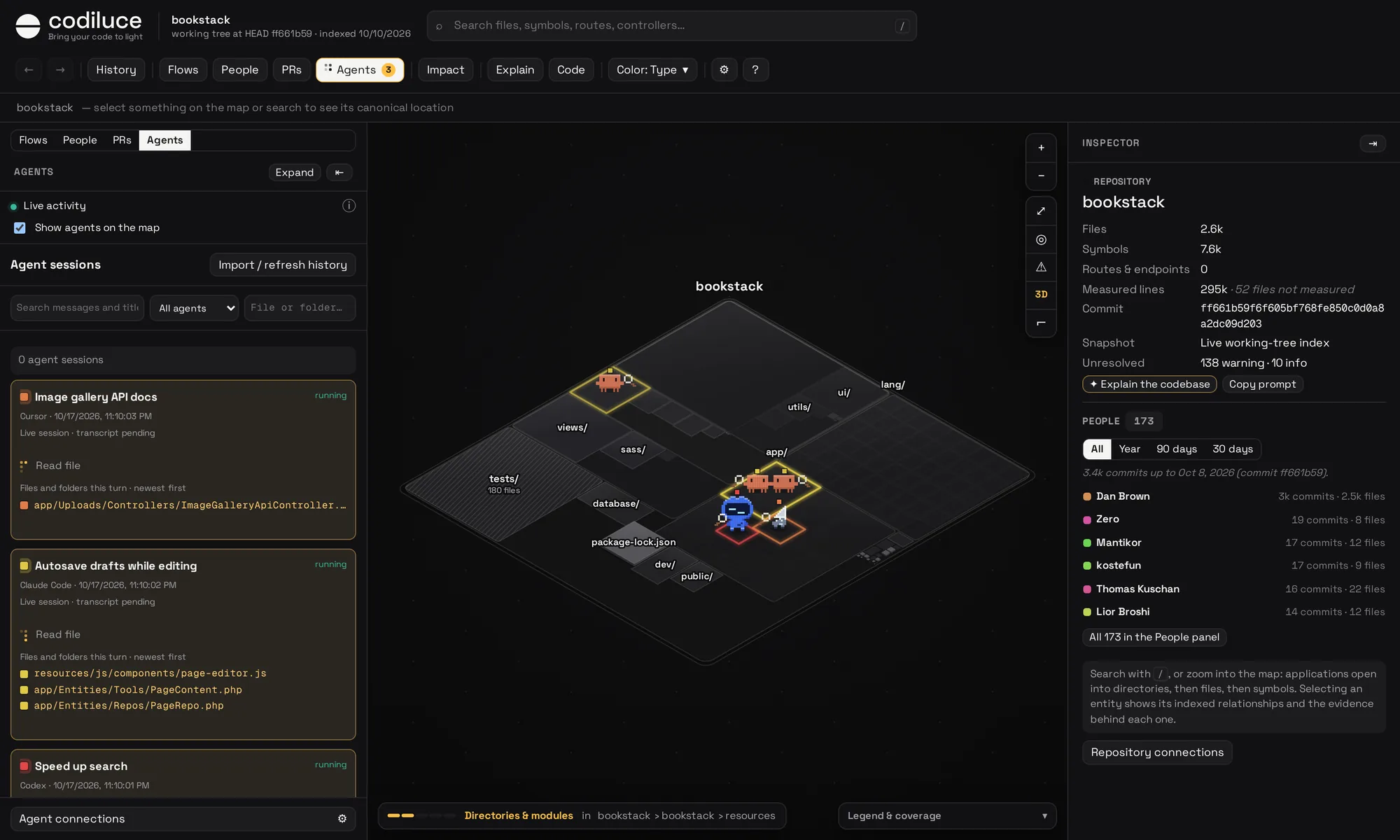
Why Codiluce?
The comprehension gap is widening. More people and more agents are writing code, and every change is bigger than the last. Reading the diff no longer tells a team what the system does, which flows a change touches, or what it can break.
Codiluce keeps understanding in step with the code. It reads your repository and draws it as a map you can zoom, search and replay, in 3D or as a flat 2D plan, where every link between pages, requests, functions and tables comes with the evidence behind it. Your agents explain the code on that map, and you watch each of them walk through the files it touches while it works.
Multilingual compatibility milestone
The initial multilingual compatibility milestone is closed with documented limitations on main.
The roadmap closure records the delivered
language/import/framework subsets, existing correctness evidence and deferred follow-ups. The completed
Flask comparison shows a 15.1% slowdown, above the unchanged 10% target; production performance,
complete memory budgets, broader syntax/version coverage and native Windows/macOS qualification remain
unqualified. Benchmarking and further optimization have stopped. See the
capability/version matrix for the supported static subsets.
Quick start
Run it inside the repository you want to see:
npx codiluce@latest start .
Codiluce indexes the code, starts a local server and opens the map in your browser. You need Node.js 22.12 or newer.
Keep the command running while using the map. After restarting it, finish any setup questions and open the printed URL; a browser tab left open while the server is stopped cannot load agent activity or explanations.
The first time, it asks whether to precompute architecture snapshots (optional; Git file evolution is available
immediately), which API keys to use for the optional language-model features, and which coding agents to connect. Enter keeps the defaults; codiluce setup asks again. The analysis lives in .codiluce/,
which hides itself from Git.
On your first visit, the map offers a two-minute tour. It follows one of your files across the map, its code, the flow it is part of, what depends on it and its history. Take it again, or one of its chapters, from Help at the foot of the rail.
Want it always at hand? Run npm install --global codiluce, then codiluce start . in any repository.
Work with your agents
Codiluce is made for code that agents write. Connect Claude Code, Codex, OpenCode, Pi or another supported harness: they explain the code on your map, and Agents shows you what every session is touching while it works.
Twelve harness families have adapters, including Cursor, GitHub Copilot, Gemini CLI, Cline, Antigravity, Windsurf / Devin Desktop, OpenClaw and Hermes. New adapters are experimental and expose separate MCP, activity and history capabilities. See the connection guide for exact runtime profiles and limitations.
npx codiluce@latest harness setup --agent opencode          # preview MCP and activity files
npx codiluce@latest harness setup --agent opencode --apply  # merge the configuration
npx codiluce@latest harness setup --agent pi --apply
Ask your agent, read the answer on the map
Connect your agent to Codiluce's MCP server, from the repository:
claude mcp add codiluce -- npx -y codiluce@latest mcp
Keep @latest (or a version): with a bare codiluce, npx starts any global install or cached copy first, which
can be older than your map.
codiluce setup (also offered on the first start) detects installed harnesses and connects their MCP server, and
their activity hooks for this repository, so their work also shows in Agents. Then ask in your own words, for example
"Use Codiluce to explain how checkout works, and publish it." Its tools read the index (flows, blast radius, history,
source), so the agent starts from what the code provably does instead of guessing from file names.
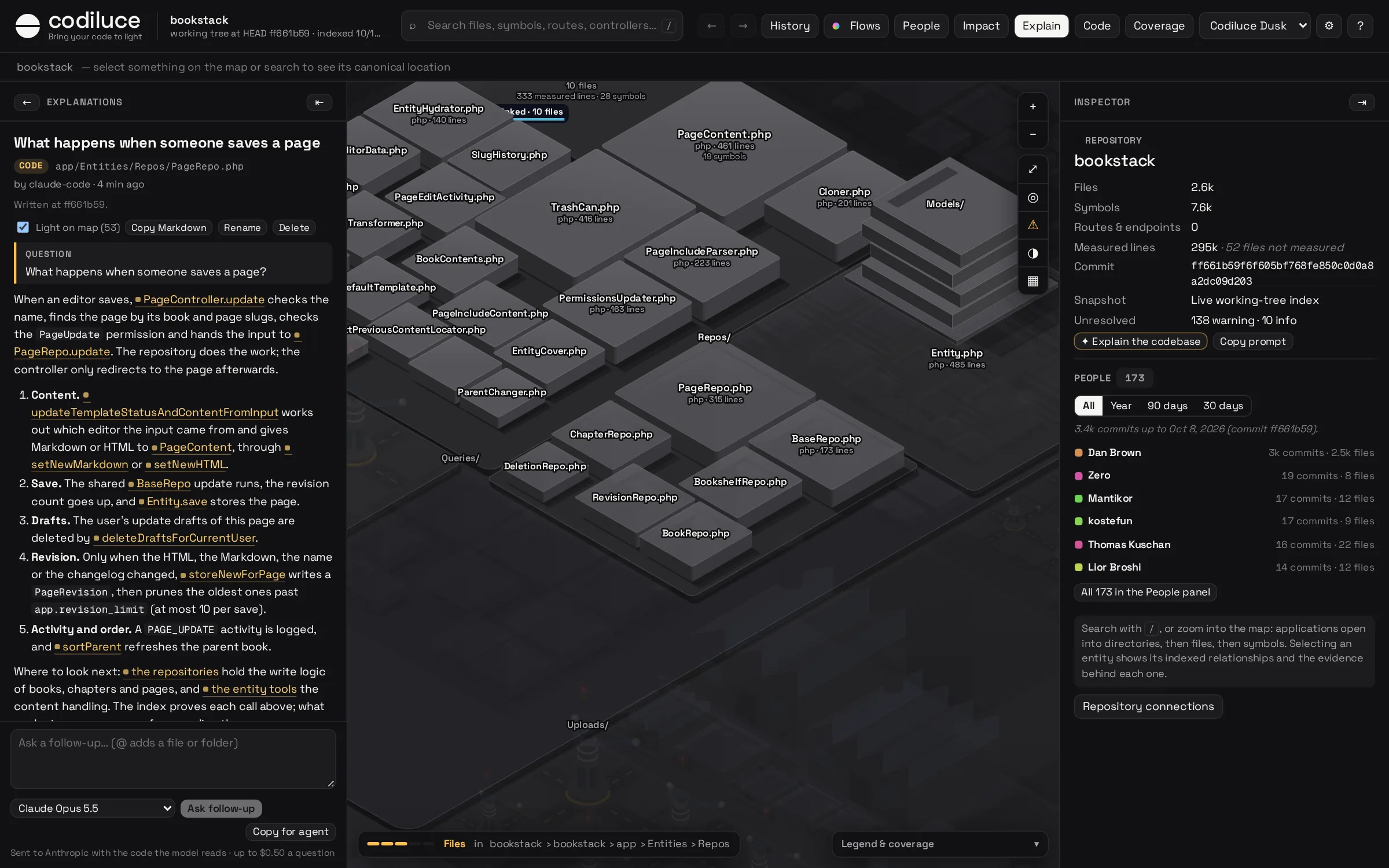
- Watch it explain. While the agent works, the map's Explain column shows a card with what it is explaining, your question and each tool it calls.
- Every link checked.
publish_explanationchecks that every file, symbol and flow the answer names exists, then saves it in the column. Point at a link and that code lights up on the map; click it to open it. - Never silently stale. Each explanation is pinned to the commit it was written against and says when the code it links changes.
- No agent at hand? With an Anthropic or OpenAI key, ask in the column itself, with files and folders attached by
@. - Start from a template. Open Templates in Explain, or type
/in an empty question. Search common questions, fill their placeholders, then ask in the map or copy the question for your agent. MCP clients also expose them as prompts.
Watch your agents work
Every connected session is a little pixel character on the map, in 3D or in the 2D plan. It hops quickly to each file it reads, edits or searches and stays there at least a second, so you can follow it, with a short label saying what it does: "reading crew.ts", "editing store.ts", "searching "login"". Between files it waits in a queue at the right of the map, in the order the sessions started (idle ones keep their place), to think, write its reply, run commands or wait for your permission. Files worked on at the same time split it: parallel reads send a copy to each file, and the copies come back when their calls complete. A small square in the session's color floats over its characters and marks the same session in the Agents list, so you always know who is where.
- Open a session to keep only its characters on the map; point at a session in the list to dim the others.
- A running session lists the files of its current turn, with its square beside those it stands on now. Click a path to reveal the file, even one added since the last analysis.
- Replay a finished session from its saved transcript, alone on the map: play or pause it, step back or forward, drag to any step and change the speed (0.5× to 8×). The player says what the agent does in each step, with full paths.
- The map stays as it is: nothing is dimmed or relabelled while agents work.
Agents report their activity through hooks. codiluce setup adds them when it connects your agent, in the
repository's own agent settings (.claude/settings.local.json, .codex/hooks.json…), kept out of Git through
.git/info/exclude; Codex runs new hooks once you trust them in /hooks. The harness command above, or Agents →
Agent connections in the map, sets up one harness at a time. Only what the hooks report is shown; Codiluce does not watch the file system or guess who
changed what, so an agent that reads fifty files from one script is one command, not fifty reads. It keeps paths,
searches, tool names and session titles, in memory, and never prompts, file contents or command output. More in
Agents and the design notes.
Search agent sessions
Open Agents → Import / refresh history to import available local Codex and Claude Code transcripts for
this repository, plus native Pi, Copilot CLI, Gemini CLI and repository-scoped OpenClaw sessions. Other supported
harnesses can use explicit session exports. Search messages and titles, filter by agent or by a file/folder read, edited or added in a tool
call, and open the original discussion beside the map, or expand Agents for reading. Replay on the map plays a
finished session again from its transcript (its latest 1,000 messages and tool calls), step by step. Live sessions appear in the
same list, with a highlighted activity card, observed files and one replacing public progress or response line.
The three session filters share one row; Codex setup instructions are hidden in the reader. Recently observed sessions refresh every ten seconds
while Agents is open, without moving your reading position. Public live updates use a bounded transcript tail every
three seconds and do not require a full history import. Refresh imports new messages without duplicating earlier ones. Failed and
unconfirmed calls are labelled; scripts and dynamic paths are not assigned guessed file activity.
Session summaries stay cached when Agents closes. The first page also survives browser reloads, scoped to this
project's archive, while a background check retrieves changes. Unchanged lists reuse the cache; imports remain
incremental. Open the list directly with #sessions=list; older #conversation= links still work.
Running agents use a clockwise six-dot indicator beside the Agents menu label and current public update.
Live hook observations provide status and map activity; transcript imports save messages and tool outputs
locally in <state>/conversations.db. System instructions and reasoning are excluded; tool outputs over
100,000 characters are shortened and labelled. Provider retention and transcript-format changes can affect what
is available. Rebuilding the code index does not erase imported history.
What you can do
- Ask, and read the answer on the map. Explanations from your agent, or from the chat in the map, link the code they talk about: every link lights its code, and stale answers say what changed. Longer answers play as tours, with scenes on the map and diagrams that rise from it.
- Watch your agents work. Each session is a character that hops to the files it reads and edits as it happens, says what it is doing, splits to read several at once, waits in a queue between files, and replays step by step when it is done.
- Zoom from the whole repository to a single line. Applications, folders, files and symbols nest inside each other, sized by their code, in 3D or as a flat 2D plan where names never overlap. Building shapes per kind of file are a setting.
- Follow a flow end to end. From a page or a command, through the request, to the handler and the tables it reads and writes.
- Replay your Git history. Setup loads all first-parent commits and file changes automatically. Browse and play file additions, edits, moves and deletions directly from Git, with source diffs and author activity. Generate a full architecture snapshot for a selected commit when needed, then compare cached snapshots. Bulk snapshot generation is optional.
- See the blast radius. Pick anything, or your uncommitted changes, and see what depends on it, hop by hop.
- Inspect dependencies. Open Dependencies to see what a selection uses and what uses it, with direction and relationship filters, arrows on the map and the evidence behind each link.
- Review pull requests on the map. Open and merged pull requests, and branches not merged yet, light the files they change, with their commits, people and blast radius.
- Color the map by what matters. Flow coverage, who changed the code most, complexity, recent changes or hotspots.
- Check the evidence. Every link opens the file and line that proves it. What cannot be proven shows up as a finding, never as a guess.
- Add descriptions, if you like. A language model can describe files, flows and commits, with the cost estimated and capped first.
Hide paths from the map
Select a file or folder and choose Hide from map in the Inspector, or right-click it on the map. The map reclaims its space while its source, search results and connections stay indexed. Use the Hidden paths button in the toolbar to restore paths, or Undo to reverse the last change. Hidden search results offer Reveal on map, which shows that path without restoring its whole folder.
Local choices are saved in .codiluce/map-visibility.json (or your configured state directory).
For shared defaults, commit a .codiluceignore file at the repository root with Git-style patterns:
# Hide the root documentation folder from the map
/docs/
# Hide example folders anywhere
examples/
Restoring a shared rule in the UI saves a local override and leaves .codiluceignore unchanged.
These rules apply to the live map, history comparisons and playback. The existing ignore setting
in .codiluce/config.yml separately excludes files from analysis.
Private by design
Codiluce runs on your machine. It reads your code but never runs it, never installs its dependencies and never writes to your checkout. Nothing leaves your computer unless you ask for AI descriptions, ask a question in the map's chat or ask for GitHub pull request data. Your agent reads the index through Codiluce's MCP server, and reports its activity through hooks, both on your machine.
Questions sur codiluce MCP
Puis-je connecter mes agents de codage existants à Codiluce ?
Oui, vous pouvez connecter des environnements pris en charge comme Claude Code, Cursor, GitHub Copilot et d'autres pour visualiser leur activité sur la carte.
Quelle est la configuration système requise pour exécuter Codiluce ?
Vous devez avoir Node.js version 22.12 ou plus récente installé sur votre système.
Comment Codiluce gère-t-il la visualisation de l'activité des agents ?
Chaque session d'agent est représentée par un personnage en pixel sur la carte, qui se déplace vers les fichiers qu'il lit, modifie ou recherche en temps réel.