
Создавайте и редактируйте блок-схемы, интеллект-карты, варфреймы и документацию прямо в вашем рабочем пространстве Whimsical с помощью AI-клиента.
Также известен как WhimsicalCode/mcp-server-guide, mcp-server-guide
- Звёзды
- 11
- Инструменты
- 14
- Загрузки, 30 дней
- —
- Последняя версия
- 1.1.0
- Последний коммит
- 14 окт. 2026 г.
- Лицензия
- MIT
Что такое Whimsical MCP?
Whimsical — это MCP server. Создавайте и редактируйте блок-схемы, интеллект-карты, варфреймы и документацию прямо в вашем рабочем пространстве Whimsical с помощью AI-клиента. Он предоставляет 14 инструментов, например search, fetch, file_tree.
Сводка сгенерирована из README проекта
О Whimsical MCP server
Этот официальный Whimsical MCP server позволяет генерировать редактируемые блок-схемы, интеллект-карты и варфреймы на основе текстовых запросов. Вместо статических изображений пользователи получают полноценные интерактивные файлы в своем рабочем пространстве Whimsical, которые члены команды могут открывать, редактировать и комментировать. Инструмент работает с различными AI-клиентами, включая Claude, ChatGPT, Cursor и VS Code с GitHub Copilot, подключаясь к удаленному эндпоинту, хостящемуся Whimsical.
Разработчики и дизайнеры могут использовать его для построения сложных архитектурных схем, диаграмм последовательности и технической документации. Помимо создания контента, сервер может искать по существующим рабочим пространствам, читать доски, перемещать файлы между папками и управлять ветками комментариев. Для аутентификации используется OAuth 2.1 с PKCE, что избавляет от необходимости ручного управления API keys. Бесплатный план позволяет создавать до 50 объектов на досках в месяц, а платные планы предлагают неограниченное создание объектов.
Что вы можете с ним делать
- 1Визуализация процессов аутентификации пользователейПопросите ваш AI-клиент создать подробную блок-схему процесса входа в систему с узлами принятия решений и подписанными связями.
- 2Проектирование интерактивных UI варфреймовДайте агенту команду построить макет страницы настроек, используя контейнеры, поля ввода и кнопки, соответствующие структуре flexbox.
- 3Мозговой штурм функций проектаИспользуйте сервер для создания структурированной интеллект-карты, чтобы распределить функции мобильного приложения по конкретным ветвям.
- 4Управление контентом в рабочем пространствеПопросите AI найти конкретную информацию на ваших текущих досках и обобщить результаты.
Взято из README проекта. Каждый вариант использования проверен на соответствие цитате из него.
Как установить Whimsical MCP
Форматы проверены 10 ноя 2026Добавить в CursorДобавить в GooseУстановка Whimsical MCP в Claude Code
$ claude mcp add --transport http mcp-server-guide https://mcp.whimsical.com/mcpУстановка Whimsical MCP в Cursor
~/.cursor/mcp.json
{
  "mcpServers": {
    "mcp-server-guide": {
      "url": "https://mcp.whimsical.com/mcp"
    }
  }
}Установка Whimsical MCP в VS Code
.vscode/mcp.json
{
  "servers": {
    "mcp-server-guide": {
      "type": "http",
      "url": "https://mcp.whimsical.com/mcp"
    }
  }
}Установка Whimsical MCP в VS Code CLI
$ code --add-mcp '{"name":"mcp-server-guide","type":"http","url":"https://mcp.whimsical.com/mcp"}'Установка Whimsical MCP в Codex
$ codex mcp add mcp-server-guide --url https://mcp.whimsical.com/mcpУстановка Whimsical MCP в Codex config.toml
~/.codex/config.toml
[mcp_servers.mcp-server-guide]
url = "https://mcp.whimsical.com/mcp"
Установка Whimsical MCP в Gemini CLI
$ gemini mcp add -s user --transport http mcp-server-guide https://mcp.whimsical.com/mcpУстановка Whimsical MCP в Gemini settings.json
~/.gemini/settings.json
{
  "mcpServers": {
    "mcp-server-guide": {
      "url": "https://mcp.whimsical.com/mcp",
      "type": "http"
    }
  }
}Инструменты Whimsical MCP 14
Определено из READMEsearchfetchfile_treehow_tocreate_fileadd_board_contentadd_doc_contenteditwireframe_editauto_layoutdeletemove
| search | — | |
| fetch | — | |
| file_tree | — | |
| how_to | — | |
| create_file | — | |
| add_board_content | — | |
| add_doc_content | — | |
| edit | — | |
| wireframe_edit | — | |
| auto_layout | — | |
| delete | — | |
| move | — |
Показать все 14 инструментовПоказать меньше инструментов
comment_readcomment_edit
| comment_read | — | |
| comment_edit | — |
Автоматические проверки
Запущено 13 нояб. 2026 г.Полный отчёт →Прошло наши автоматизированные проверки. Это не аудит безопасности: изучите код и предоставьте серверу минимально необходимый доступ. Как работают проверки

- Связанный и доступный исходный репозиторийПройдено
- Open source лицензия (OSI)Пройдено
- Коммит или релиз за последний годПройдено
- Имя пакета не похоже на популярный пакетНе проверялось
- Удаленная конечная точка использует HTTPSПройдено
- Деструктивные инструменты помеченыНе проверялось
- Нет скрытых инструкций для моделиПройдено
- Нет критических предупреждений в пакете или его зависимостяхНе проверялось
README
Открыть на GitHubWhimsical MCP Server
The official Whimsical MCP server. Ask Claude, ChatGPT, Cursor or any MCP client for a flowchart, mind map, sequence diagram, wireframe or architecture diagram, and it builds an editable Whimsical board in your workspace. You get a real file your team can open, edit and comment on, not a static image. The server can also search, read, edit and comment on the boards and docs you already have.
- Endpoint:
https://mcp.whimsical.com/mcp(hosted by Whimsical, Streamable HTTP, nothing to install) - Authentication: OAuth 2.1 with PKCE. There's no API key to manage.
- Plan: every tool works on the free plan, which includes up to 50 board objects a month. Paid plans have no object limit.
- Clients: Claude, Claude Code, ChatGPT, Cursor, VS Code with GitHub Copilot, Grok, Codex, and any client that supports remote MCP servers.

Quick start
In Claude Code:
claude mcp add --transport http whimsical https://mcp.whimsical.com/mcp
In other clients that support remote MCP servers, add a server with this URL and sign in to Whimsical when prompted:
https://mcp.whimsical.com/mcp
Then try: "Create a flowchart in Whimsical of our user signup flow." Setup steps for each client are below.
What you can build
Each example below is a prompt you can try. The agent creates the file in your Whimsical workspace and replies with a link. Clients that support it also show a preview in the chat.
Flowcharts
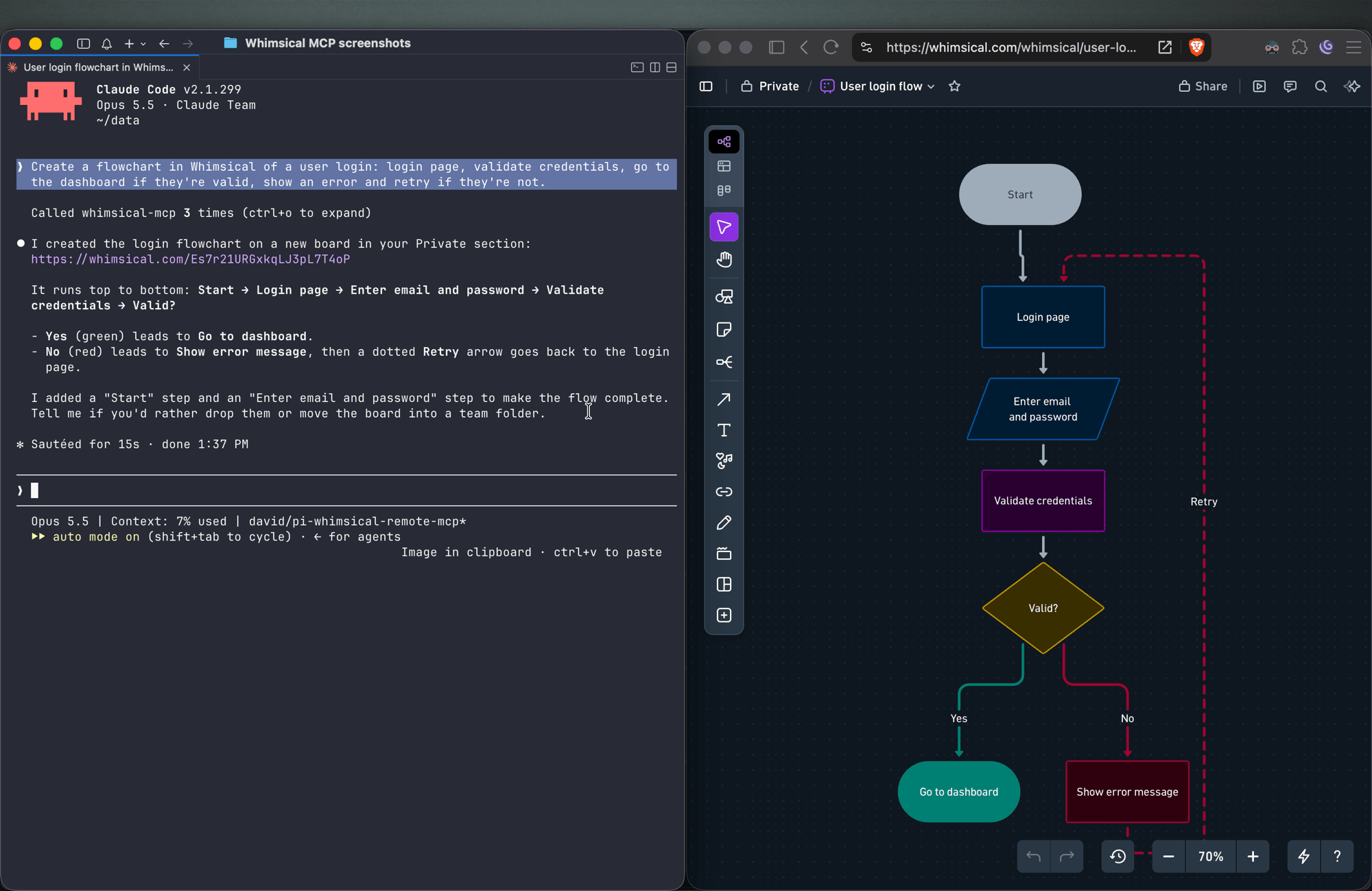
Create a flowchart in Whimsical of a user login: login page, validate credentials, go to the dashboard if they're valid, show an error and retry if they're not.
You get an auto-laid-out flowchart with decision nodes, labeled connectors and a clean top-to-bottom layout. Ask for left-to-right and the agent re-runs the layout.
Sequence diagrams
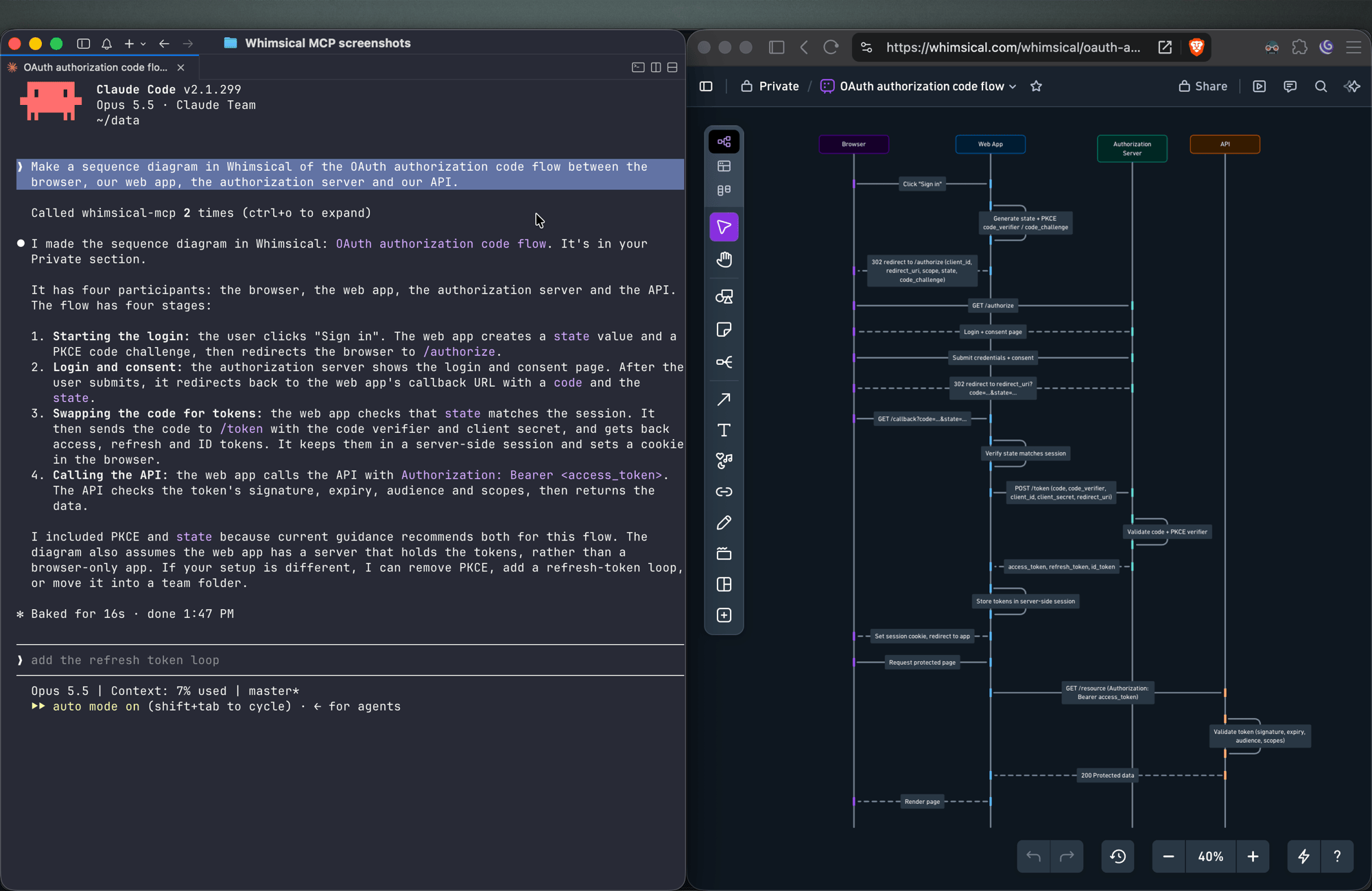
Make a sequence diagram in Whimsical of the OAuth authorization code flow between the browser, our web app, the authorization server and our API.
The agent creates a sequence diagram with one lifeline per actor and the messages between them in order.
Architecture diagrams
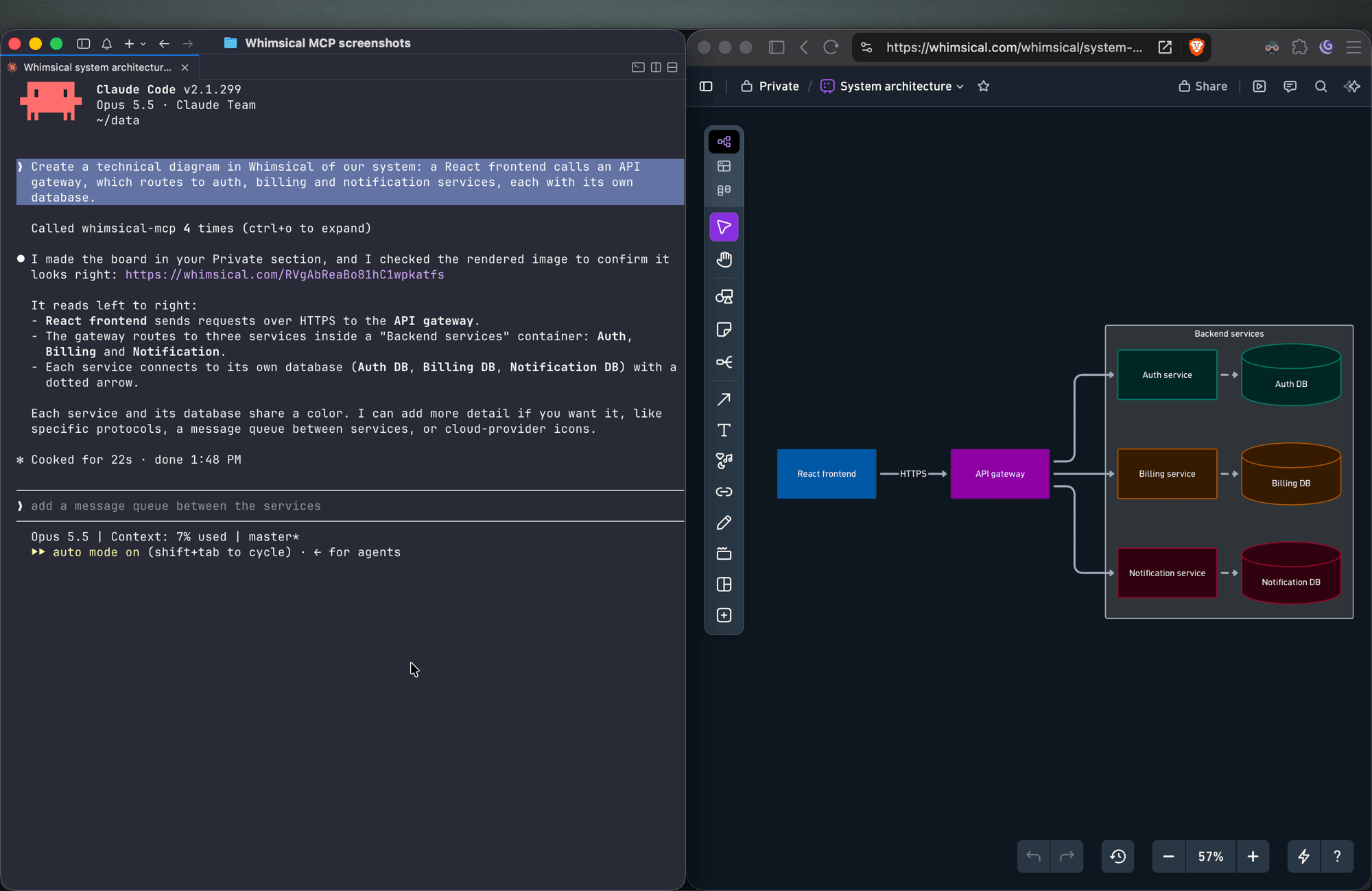
Create a technical diagram in Whimsical of our system: a React frontend calls an API gateway, which routes to auth, billing and notification services, each with its own database.
The agent lays out the components on a board with service boundaries and connectors showing how requests and data move between them.
Mind maps
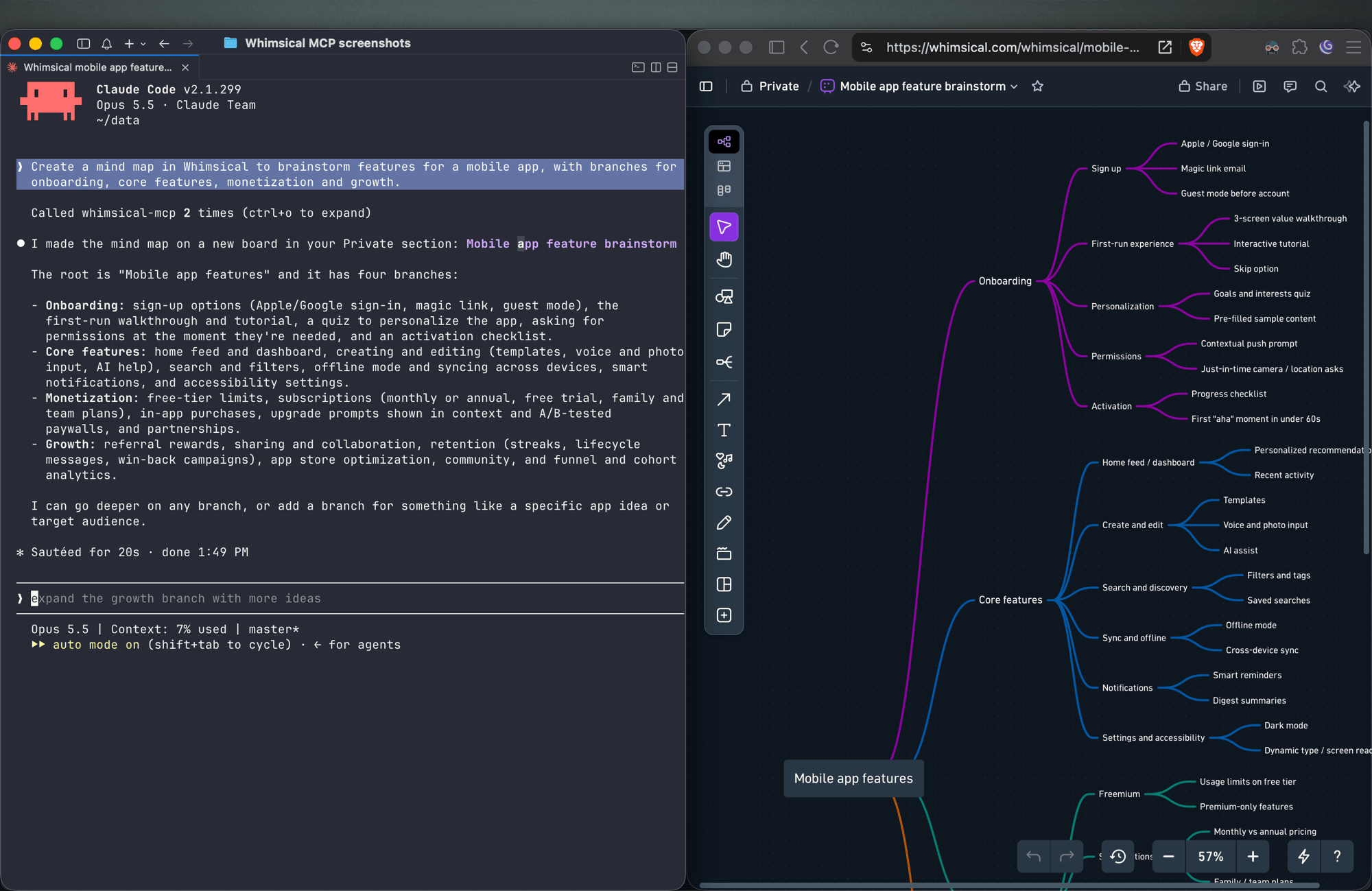
Create a mind map in Whimsical to brainstorm features for a mobile app, with branches for onboarding, core features, monetization and growth.
You get a mind map with the central topic and its branches, laid out horizontally. Ask for a vertical layout to get a top-down tree.
Wireframes
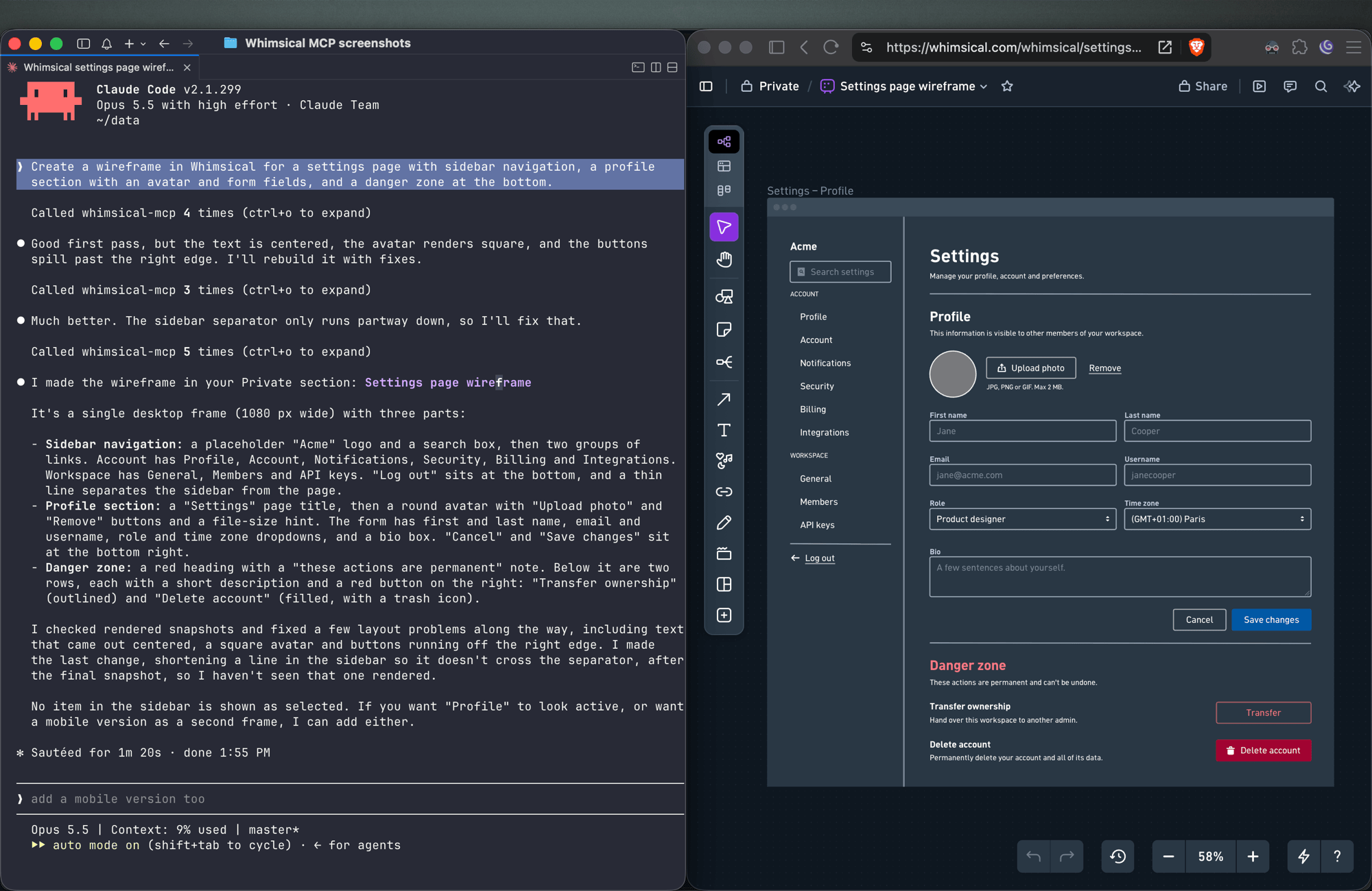
Create a wireframe in Whimsical for a settings page with sidebar navigation, a profile section with an avatar and form fields, and a danger zone at the bottom.
The agent builds the screen from wireframe elements (containers, inputs, buttons, icons) with a flexbox layout, so follow-ups like "make the primary button full width" keep everything aligned.
Sticky notes
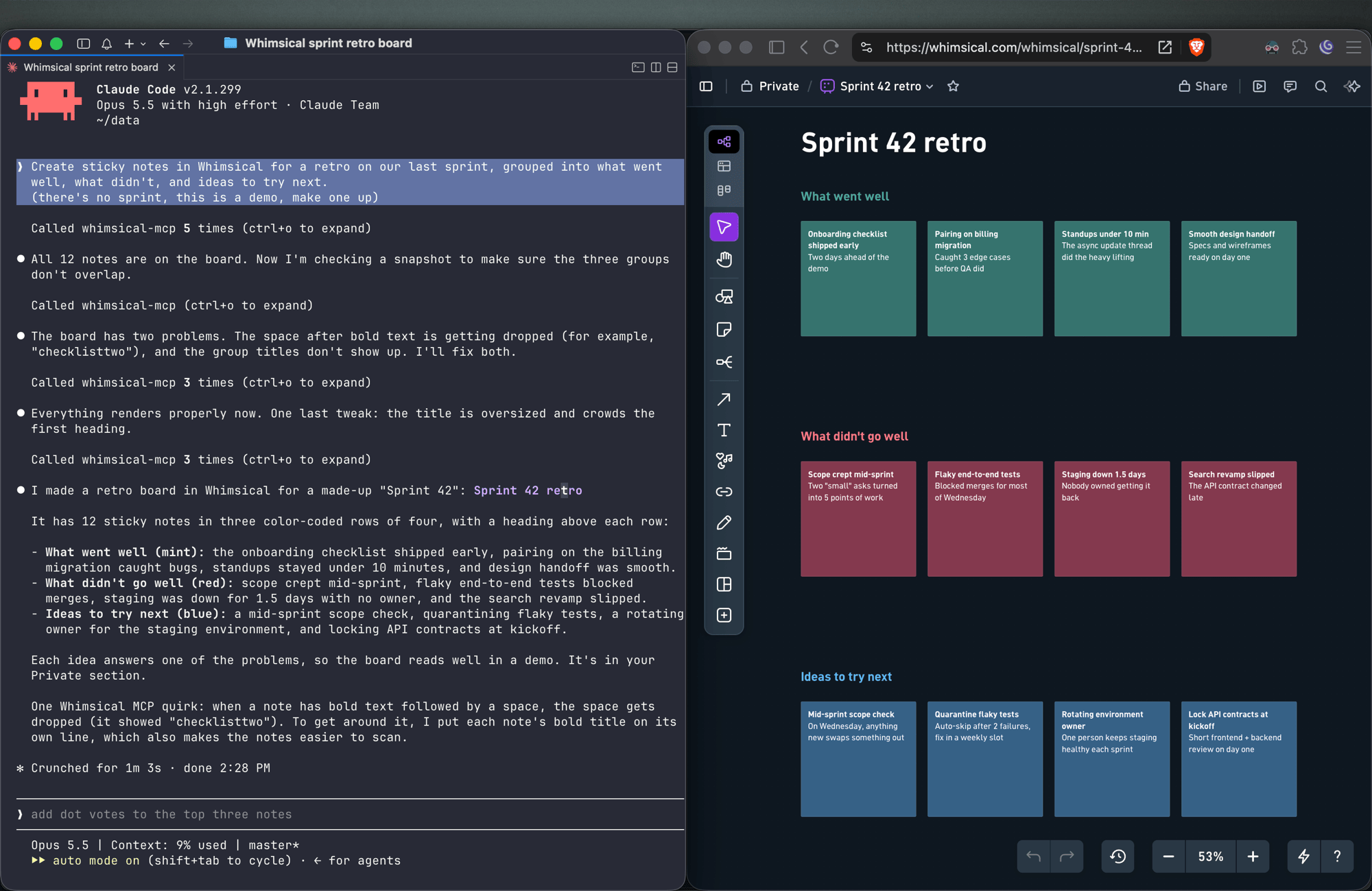
Create sticky notes in Whimsical for a retro on our last sprint, grouped into what went well, what didn't, and ideas to try next.
You get sticky notes on a board, grouped into the clusters you asked for and laid out automatically, ready for your team to add to and vote on.
Docs and tables
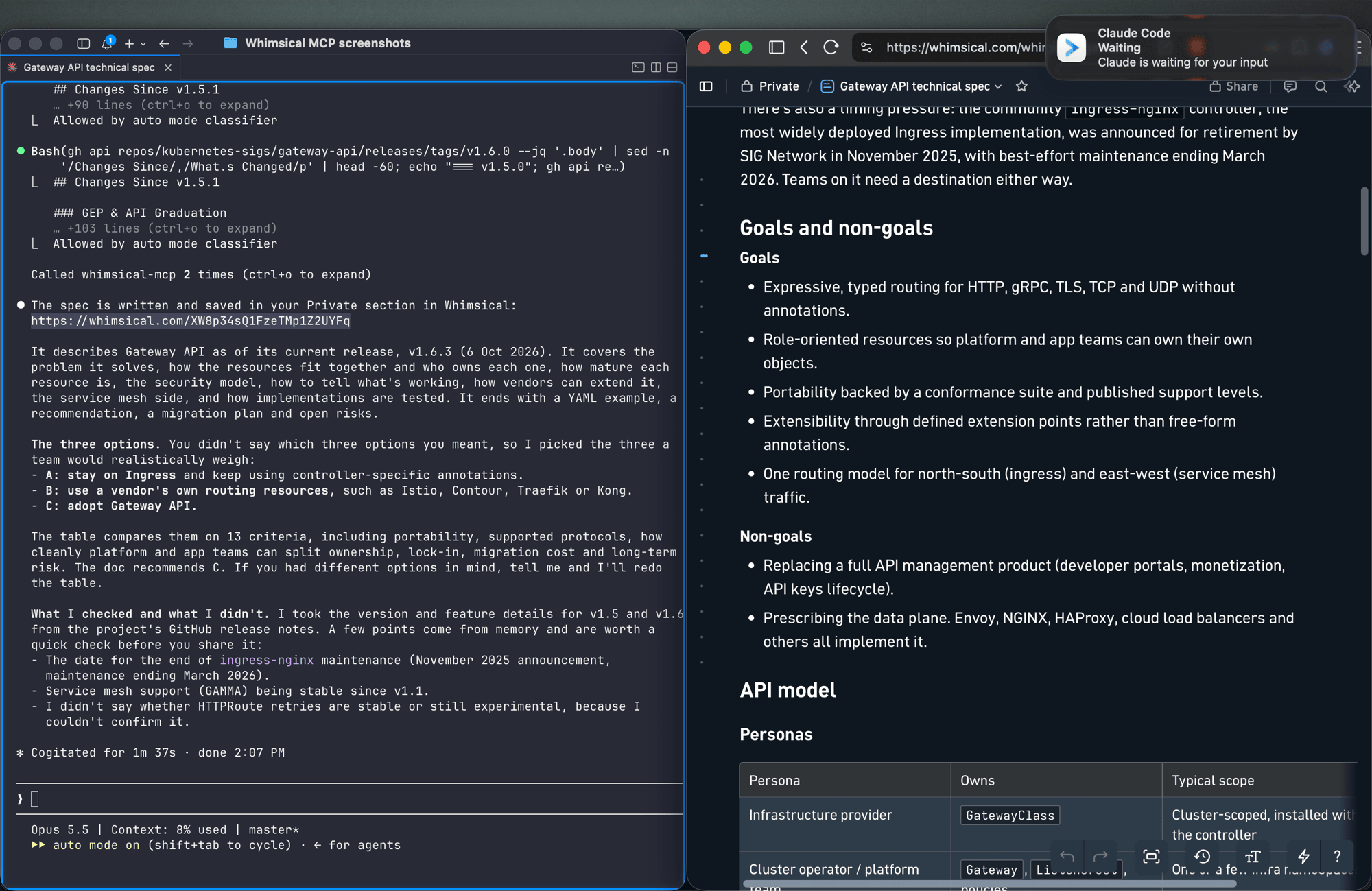
Write up the technical spec for the new API as a Whimsical doc, with a table comparing the three options we discussed.
Docs support headings, lists, links, code blocks and tables. Tables can also go on a board.
Work with what's already in your workspace
Search my Whimsical workspace for anything about "API design" and summarize what you find.
Add a rate limiting step to the API flow diagram, then leave a comment asking the team to review it.
The agent can search your workspace, read boards and docs (including a PNG snapshot of a board), edit existing diagrams, move files between folders, and read, write and resolve comment threads.
Tools
| Tool | What it does |
|---|---|
search |
Search the workspace by text, creation date or update date |
fetch |
Read a board, doc or folder by ID, or get a PNG snapshot of a board |
file_tree |
Browse the Private, Shared and team sections and the folders inside them |
how_to |
Look up Whimsical syntax guides before creating flowcharts or wireframes (agents call this on their own) |
create_file |
Create a board, doc or folder, in your Private section unless you choose a folder |
add_board_content |
Add a flowchart, mind map, sequence diagram, sticky notes, table or wireframe to a board |
add_doc_content |
Append markdown to a doc |
edit |
Add, update or delete shapes, text and connectors on a board, edit mind map and sequence diagram nodes, or change blocks in a doc |
wireframe_edit |
Reflow or edit the elements of a wireframe |
auto_layout |
Re-run automatic layout on a flowchart, top to bottom, left to right or other directions |
delete |
Move a file, folder or doc to the trash |
move |
Move a file, folder or doc into another folder |
comment_read |
Read comment threads on a board or doc |
comment_edit |
Create, reply to, edit, resolve, reopen or delete comments |
See the tool reference for details and more example prompts.
Setup
Claude
Whimsical is a verified connector in Claude's connector directory. Open the Whimsical connector, click Connect and sign in to Whimsical.
Claude Code
claude mcp add --transport http whimsical https://mcp.whimsical.com/mcp
Run /mcp in Claude Code to sign in.
ChatGPT
Use the Whimsical app for ChatGPT:
- In ChatGPT, open Settings → Plugins.
- Search for Whimsical, or use the link above.
- Click Connect and complete the authorization.
Then type @Whimsical in any chat. See the ChatGPT guide for more.
Cursor
Or install the Whimsical plugin from Cursor's plugin directory, or add it by hand: open Cursor → Settings → Cursor Settings → Tools & MCP, add a new MCP server, and save this configuration:
{
  "mcpServers": {
    "whimsical": {
      "url": "https://mcp.whimsical.com/mcp"
    }
  }
}
See Cursor's MCP documentation for more.
VS Code (GitHub Copilot)
- Press
⌘ Shift P(orCtrl Shift P) and runMCP: Add Server. - Select
HTTP. - Paste
https://mcp.whimsical.com/mcpand pressEnter. - When prompted for a server ID, enter
whimsical. - Choose whether to add the server globally or only for the current workspace.
Grok
- Go to grok.com/connectors.
- Click New Connector, then select Custom.
- Enter
https://mcp.whimsical.com/mcpand sign in to Whimsical.
See the Grok guide for more.
Other clients
Any client that supports remote MCP servers over Streamable HTTP can connect with this configuration:
{
  "mcpServers": {
    "whimsical": {
      "url": "https://mcp.whimsical.com/mcp"
    }
  }
}
Authentication
The server uses OAuth 2.1 with PKCE. The first time you connect, your client opens a browser window where you sign in to Whimsical and approve access to your workspace. The agent then works in Whimsical as you, using the access you approved.
Remote and desktop MCP
This repository covers the remote MCP server, which Whimsical hosts and recommends for most people. Whimsical also offers a desktop MCP server that runs inside the Whimsical desktop app and works on the file you have open. To set it up, contact support.
FAQ
Is this the official Whimsical MCP server?
Yes. Whimsical builds, hosts and maintains it, and it's listed in the official MCP Registry as com.whimsical/mcp. Community-built Whimsical MCP servers also exist; this is the one maintained by Whimsical.
Do I need to install or run anything?
No. The server runs at https://mcp.whimsical.com/mcp. You add the URL to your client and sign in.
Do I need an API key? No. Sign-in uses OAuth, so there are no keys to create, store or rotate.
Does it make images or editable diagrams?
Editable diagrams. Everything the agent creates is a normal Whimsical file in your workspace that you and your team can open, change and comment on. The fetch tool can also return a PNG snapshot of a board.
Can it read and update diagrams I already have? Yes. It can search your workspace, read boards and docs, edit them, re-run the layout and work with comments.
Troubleshooting
- Sign-in doesn't open or fails. Run
/mcpin Claude Code, or use your client's reconnect action, to sign in again. The browser redirects back to your client once you've signed in to Whimsical. - Tools don't appear after install. Run
/reload-pluginsin Claude Code, or restart your editor in other clients. 401or "Missing Bearer token". Your session has expired. Sign in again via/mcpor your client's reconnect action.- No Whimsical account. Create one for free at https://whimsical.com. The server signs you in to your existing workspace.
Links
- Overview: https://whimsical.com/mcp
- Setup guide: https://whimsical.com/learn/integrations/mcp
- Tool reference: https://whimsical.com/learn/ai/mcp-tools
- Support: help@whimsical.com
- Privacy policy: https://whimsical.com/terms/privacy
Вопросы о Whimsical MCP
Как добавить Whimsical MCP в Claude Code?
Выполните claude mcp add --transport http mcp-server-guide https://mcp.whimsical.com/mcp в терминале. Добавьте --scope user, чтобы сервер был доступен во всех проектах.
Как добавить Whimsical MCP в Cursor?
Откройте ~/.cursor/mcp.json и добавьте сервер в mcpServers, используя конфигурацию Cursor из раздела установки выше.
Какие инструменты предоставляет Whimsical MCP?
Он предоставляет 14 инструментов, включая search, fetch, file_tree, how_to, create_file.
Это официальный Whimsical MCP server?
Да, это официальный сервер, созданный, размещенный и поддерживаемый Whimsical.
Нужно ли что-то устанавливать или запускать?
Нет, сервер хостится Whimsical, вам нужно просто добавить URL в ваш MCP client.
Нужен ли мне API key?
Нет, сервер использует OAuth для аутентификации, поэтому управлять API keys не требуется.
Он создает изображения или редактируемые диаграммы?
Он создает редактируемые диаграммы, которые ваша команда может открывать, изменять и комментировать, а не статические изображения.
Может ли он читать и обновлять уже существующие диаграммы?
Да, сервер может искать по вашему рабочему пространству, читать существующие доски и документы, редактировать их и управлять комментариями.