
MCP server Webiny
Коммит 13 нояб. 2026 г.Предоставляет AI-агентам для разработки глубокий контекст для создания моделей контента, хуков жизненного цикла и расширений GraphQL для платформы Webiny CMS.
Также известен как webiny/webiny-js
- Звёзды
- 8 053
- Инструменты
- —
- Загрузки, 30 дней
- —
- Последняя версия
- —
- Последний коммит
- 13 нояб. 2026 г.
- Лицензия
- —
Что такое Webiny MCP?
Webiny — это MCP server. Предоставляет AI-агентам для разработки глубокий контекст для создания моделей контента, хуков жизненного цикла и расширений GraphQL для платформы Webiny CMS.
Сводка сгенерирована из README проекта
О Webiny MCP server
Этот MCP server позволяет разработчикам, использующим AI-агентов, создавать сложные модели контента и кастомную бизнес-логику для Webiny CMS. Запускаясь локально в вашем проекте Webiny, сервер предоставляет таким инструментам, как Claude Code или Cursor, глубокий архитектурный контекст и специфические паттерны фреймворка. Это позволяет AI генерировать код, который соответствует системе расширений на базе TypeScript, используемой в платформе, вместо того чтобы полагаться на общие догадки.
Разработчики используют этот сервер для автоматизации создания хуков жизненного цикла, расширений схемы GraphQL и компонентов интерфейса админ-панели. Он устраняет разрыв между AI-агентом и фреймворком Webiny, предоставляя реальные знания о точках расширения и системах типов. Это гарантирует, что сгенерированный код для расширений API, модификаций инфраструктуры через Pulumi или конфигураций мультиарендности будет точным и готовым к развертыванию в вашей среде AWS.
Что вы можете с ним делать
- 1Генерация моделей контентаПопросите AI-агента создать новые модели контента с определенными типами полей и правилами валидации.
- 2Разработка хуков жизненного циклаДайте AI инструкцию создать кастомные хуки жизненного цикла, которые запускают определенные действия при событиях контента.
- 3Расширение GraphQL APIПопросите AI-агента написать кастомные запросы и бизнес-логику для расширения существующей схемы GraphQL.
- 4Создание компонентов админ-панелиИспользуйте AI для создания новых React-компонентов для расширения интерфейса админ-панели.
Взято из README проекта. Каждый вариант использования проверен на соответствие цитате из него.
Автоматические проверки
Запущено 15 нояб. 2026 г.Полный отчёт →Еще не проверено. Для сервера требуется оценка 80, отсутствие серьезных проблем и достаточно данных для нашей проверки. Как работают проверки · Что исправить, чтобы получить больше баллов

- Связанный и доступный исходный репозиторийwebiny/webiny-js is public and reachablegithub.com/webiny/webiny-js ↗Пройдено
- Пакет указывает этот репозиторий как источникНе проверялось
- Происхождение сборки (аттестация Sigstore)Не проверялось
- Open source лицензия (OSI)No licenseПроблема
- Коммит или релиз за последний годLast commit or release 2026-11-13github.com/webiny/webiny-js ↗Пройдено
- OpenSSF ScorecardOpenSSF Scorecard 6.3 / 10; weakest: Code-Review 0, CII-Best-Practices 0, Token-Permissions 0scorecard.dev/viewer/?uri=github.com/webiny/webiny-js ↗Частично 9/15
- Имя пакета не похоже на популярный пакетНе проверялось
- Нет критических предупреждений в пакете или его зависимостяхНе проверялось
- Нет скрытых инструкций для модели0 tool descriptions and the README read; no override phrases, credential paths or hidden charactersПройдено
- Деструктивные инструменты помеченыНе проверялось
- Удалённая конечная точка отвечает на рукопожатие MCPНе проверялось
README
Открыть на GitHubAbout Webiny
Open-source content platform. Self-hosted on AWS serverless. Built as a TypeScript framework you extend with code, not a closed product you configure through a UI.
Runs on Lambda, DynamoDB, S3, and CloudFront inside your own AWS account. Scales automatically. No servers to manage. Infrastructure provisioned via IaC (Pulumi) in a single deploy command.
Used in production by teams managing hundreds of millions of content records, petabytes of assets, and thousands of editors — including Amazon, Emirates, Fortune 500 companies, government agencies, and SaaS platforms that white-label Webiny inside their own products.
Documentation · Learn Webiny Course · Community Slack
What's Inside

Headless CMS — Custom content models, GraphQL API, field-level permissions, localization, versioning. Models can be defined through the admin UI or in code via the framework.

Website Builder — Visual drag-and-drop page editor with a Next.js SDK. Render pages through your own frontend (Vercel, CloudFront, wherever). Create custom page elements with React components.
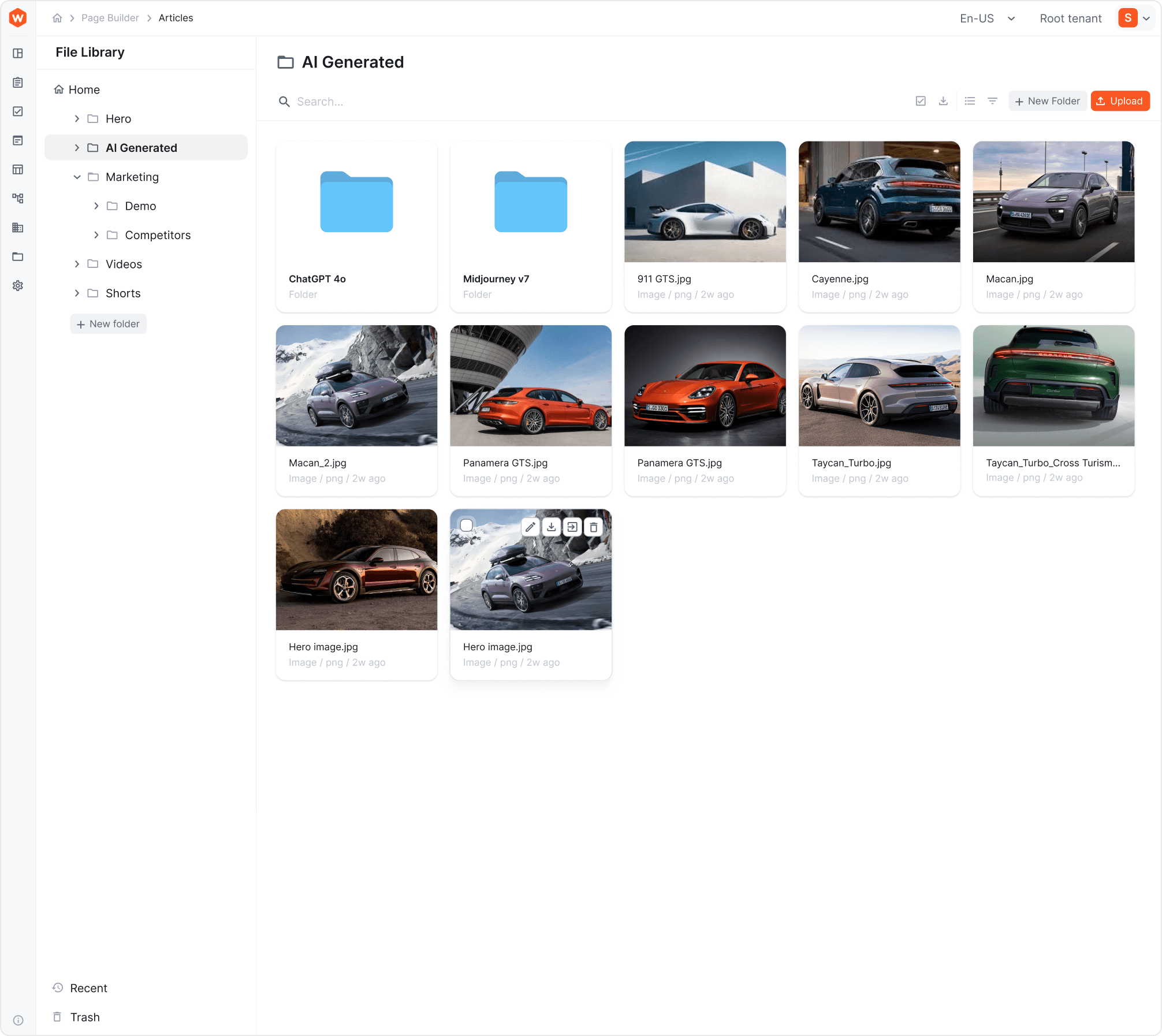 File Manager — Digital asset management with CDN delivery, folder structure, tagging, search. Integrated into CMS and Website Builder.
Publishing Workflows — Multi-step content approval with draft states, reviewer assignments, scheduled publishing, and audit trails.
Multi-Tenancy — Native tenant isolation (data, users, assets, permissions) from a single deployment. One instance can host thousands of tenants. Tenants are created and managed programmatically via GraphQL API. Supports hierarchical tenant structures (Root → Brand → Market, Root → Client → Site, etc.).
Webiny Framework — TypeScript framework with lifecycle hooks, dependency injection, GraphQL schema extensions, admin UI extension points, and infrastructure extensions. This is the core — it's what makes Webiny programmable rather than just configurable.
Architecture
┌─────────────────────────────────────────────────────┐
│                    Your AWS Account                  │
│                                                      │
│  ┌──────────┐  ┌──────────┐  ┌─────┐  ┌──────────┐ │
│  │  Lambda   │  │ DynamoDB │  │ S3  │  │CloudFront│ │
│  │ (API +   │  │ (Content │  │(Assets)│ │  (CDN)  │ │
│  │  business │  │  storage) │  │     │  │          │ │
│  │  logic)   │  │          │  │     │  │          │ │
│  └──────────┘  └──────────┘  └─────┘  └──────────┘ │
│                                                      │
│  Optional: OpenSearch (full-text search at scale)    │
│  Optional: VPC deployment, multi-AZ, custom config   │
│                                                      │
│  All provisioned automatically via Pulumi IaC         │
└─────────────────────────────────────────────────────┘
Stack: TypeScript, React, GraphQL, Node.js, Pulumi, AWS serverless services.
What you control: Everything. The IaC templates are open-source. Modify Lambda memory, add CloudWatch alarms, change VPC configuration, add custom AWS resources — it's your infrastructure.
What you don't manage: Servers. Patching. Scaling. Capacity planning. That's the point of serverless.
Quick Start
Prerequisites: Node.js 22+, Yarn, AWS account with programmatic access.
npx create-webiny-project my-project
cd my-project
yarn webiny deploy
First deploy takes 5–15 minutes (AWS provisioning). After that, you get an admin panel URL. Create your first admin account, and you're in.
Local development:
yarn webiny watch admin  # React dev server on localhost:3001
yarn webiny watch api    # Local Lambda execution environment
New team member onboarding:
git clone <your-repo>
yarn
# Ready to develop
AI-Assisted Development
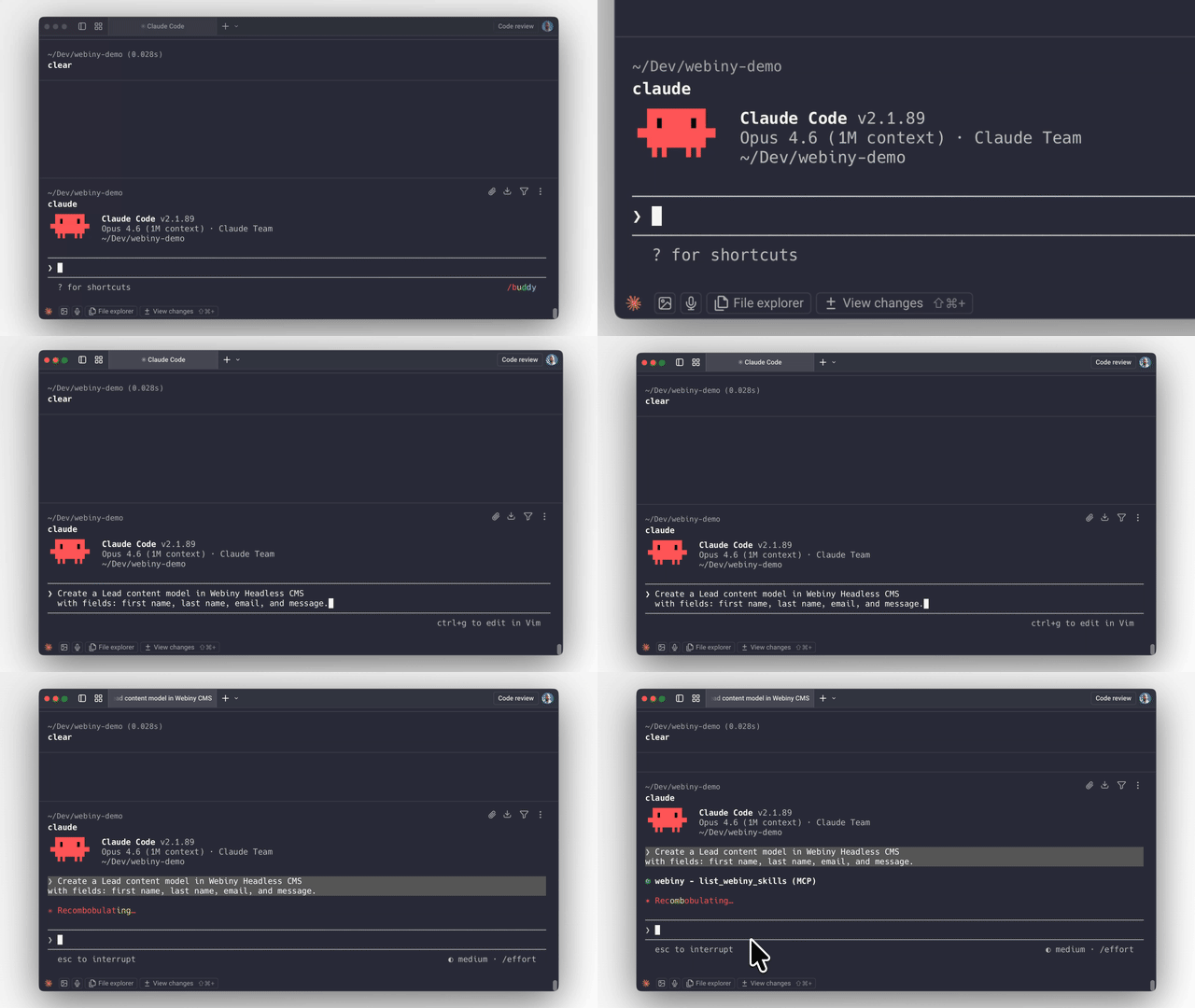
Webiny ships with an MCP server and AI skills that give AI coding agents (Claude Code, Cursor, Kiro, etc.) deep context about the platform's architecture, extension points, and patterns.
This means you can ask an AI agent to:
- Create content models with specific field types and validation
- Build lifecycle hooks that trigger on content events
- Extend the GraphQL API with custom queries and business logic
- Scaffold admin UI extensions with React components
- Wire integrations with external systems via lifecycle events
- Set up multi-tenant configurations programmatically
The AI produces code that follows Webiny's actual patterns because the MCP server gives it real knowledge of the framework — not generic guesses.
Why this works better on Webiny than most platforms: The framework is strongly typed with explicit extension points. AI-generated code either fits the type system or it doesn't compile. There's no ambiguous plugin API where the AI has to guess. Types enforce correctness.
Getting started with the MCP server:
# The MCP server runs locally inside your Webiny project
# Connect it to your AI coding tool of choice
# See docs for tool-specific setup instructions
→ AI-Assisted Development Guide
Extending Webiny
All customization happens in the extensions/ folder and is registered in webiny.config.tsx. Four extension types:
API Extensions — Custom GraphQL schemas, resolvers, lifecycle hooks, business logic.
// extensions/NotifyOnPublish.ts — Example: send Slack notification when content is published
class NotifyOnPublish implements CmsLifecycleHook.Interface {
  constructor(private slackService: SlackService.Interface) {}

  async afterPublish(params: AfterPublishParams): Promise<void> {
    await this.slackService.notify(`Content published: ${params.entry.title}`);
  }
}
Admin Extensions — Custom UI components, white-label branding, new views, tenant-specific themes. Standard React — use any patterns and libraries you already know.
Infrastructure Extensions — Modify AWS resources via Pulumi. Add Lambda functions, S3 buckets, CloudWatch alarms, or change existing resource configuration.
CLI Extensions — Custom commands for deployment workflows, data migrations, code generators.
When to Use Webiny
- You need a self-hosted CMS and don't want to run servers
- You need multi-tenancy as a first-class primitive, not a workaround
- You want to extend the CMS with real code (TypeScript), not just configuration
- You need to embed a CMS inside your own product (white-label)
- Data ownership and compliance requirements rule out SaaS CMS
- You want AI agents to be able to build on your content platform effectively
- You're on AWS (or planning to be)
When Not to Use Webiny
Be honest with yourself about these:
- Simple sites or blogs. Webiny is built for complex projects. If you need a blog with 10 pages, use something simpler.
- Not on AWS. Webiny only runs on AWS. No GCP, no Azure, no on-prem. If that's a dealbreaker, it's a dealbreaker.
- No TypeScript/React skills on the team. The entire extension model is TypeScript and React. If your team works in a different stack and doesn't want to adopt these, Webiny won't be a good fit.
- You want a no-code, plug-and-play SaaS CMS. Webiny is a platform for developers to build on. If you want zero development involvement, this isn't it.
Licensing
Community Edition — MIT license. Free forever. Includes Headless CMS, Website Builder, File Manager.
Business Edition — Commercial license starting at $79/mo. Adds RBAC, multi-tenancy, publishing workflows.
Enterprise Edition — Custom pricing. Adds SSO, audit logs, team management, priority support, managed hosting option.
All plans: unlimited content entries, pages, assets, API calls, roles, and workflows. No per-seat pricing traps. No API metering.
Project Structure
my-webiny-project/
  extensions/          # Your custom code lives here
  public/              # Admin app static assets
  webiny.config.tsx    # Project configuration (React components, type-safe)
  package.json
  tsconfig.json
Single package.json. Single tsconfig.json. Configuration in webiny.config.tsx uses React components for type safety and IDE auto-completion.
Key Commands
npx create-webiny-project <name>    # Create new project
yarn webiny deploy                   # Deploy to AWS
yarn webiny deploy core api          # Deploy specific apps
yarn webiny watch admin              # Local admin dev server
yarn webiny watch api                # Local Lambda dev environment
yarn webiny info                     # Show endpoints and URLs
yarn webiny destroy                  # Tear down all AWS resources
Resources
- Learn Webiny Course — Structured course covering architecture, extensions, deployment, and AI-assisted development
- Documentation — Full reference docs
- Community Slack — Community chat
- Website Builder Next.js Starter — Starter kit for rendering Webiny pages with Next.js
Contributing
We welcome contributions. See CONTRIBUTING.md for guidelines.
Before opening a PR, please check existing issues or start a discussion — it helps us give you better guidance and avoids duplicate work.
Вопросы о Webiny MCP
Что может делать AI-агент с помощью Webiny MCP server?
AI-агенты могут создавать модели контента, разрабатывать хуки жизненного цикла, расширять GraphQL API, генерировать расширения для админ-панели и настраивать конфигурации для мультиарендных (multi-tenant) сред.
Как MCP server улучшает генерируемый AI код?
MCP server предоставляет актуальные знания об архитектуре фреймворка и точках расширения, гарантируя, что код соответствует реальным паттернам, а не общим предположениям.
Где запускается MCP server?
MCP server запускается локально внутри вашего конкретного проекта Webiny.