
Генерирует структурированные диаграммы, такие как карты IBIS, концептуальные карты и диаграммы причинно-следственных связей, на основе текста на языке Vithanco Graph Language.
Также известен как Vithanco/VGraph, vgraph, @vithanco/vgraph-mcp
- Звёзды
- 0
- Инструменты
- —
- Загрузки, 30 дней
- —
- Последняя версия
- 1.0.9
- Последний коммит
- 13 нояб. 2026 г.
- Лицензия
- Apache-2.0
Что такое VGraph MCP?
VGraph — это MCP server. Генерирует структурированные диаграммы, такие как карты IBIS, концептуальные карты и диаграммы причинно-следственных связей, на основе текста на языке Vithanco Graph Language.
Сводка сгенерирована из README проекта
О VGraph MCP server
vgraph-mcp позволяет разработчикам и исследователям преобразовывать текст в структурированные визуальные диаграммы. Используя Vithanco Graph Language (VGL), пользователи могут определять типизированные сетевые графы, где каждый узел и ребро несут определенный смысл. Это позволяет создавать сложные инструменты для рассуждений, такие как карты IBIS, диаграммы причинно-следственных связей и модели C4, с помощью простого текстового формата.
Пользователи могут запускать этот сервер локально с помощью npx @vithanco/vgraph-mcp или подключаться к хостинговой версии. Движок рендерит эти определения в формат SVG, гарантируя единообразие диаграмм в различных средах. Он поддерживает множество встроенных нотаций, включая Impact Mapping, деревья решений, временные шкалы и деревья атак и защит, а также позволяет объявлять пользовательские нотации.
Что вы можете с ним делать
- 1Генерация карт принятия решенийСоздавайте карты IBIS для визуализации вопросов, ответов, аргументов «за» и «против» при принятии конкретных продуктовых решений.
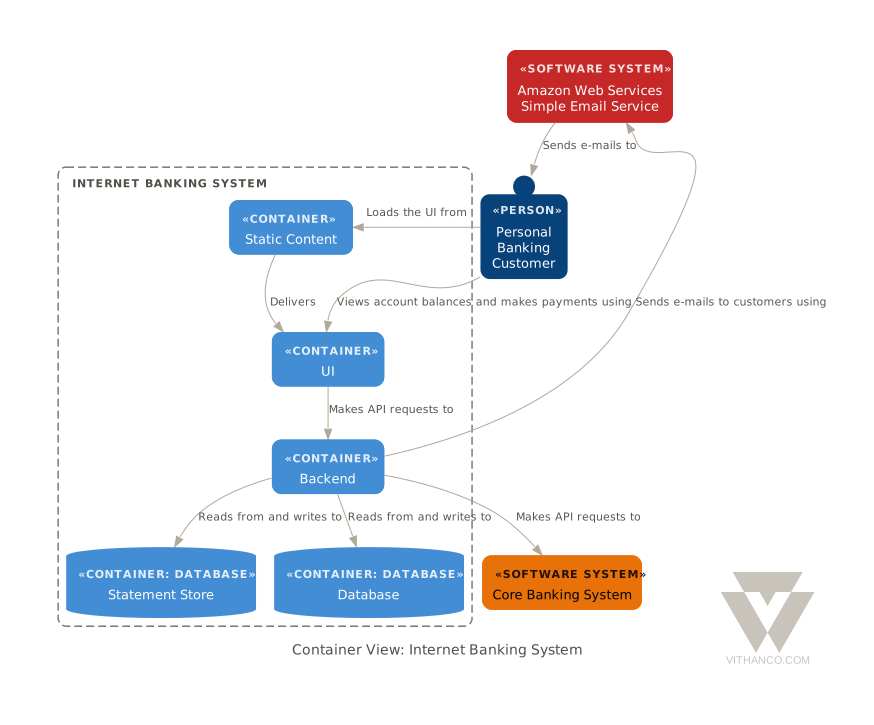
- 2Визуализация системной архитектурыПреобразуйте текстовые описания в диаграммы C4 для представления архитектуры программного обеспечения.
- 3Моделирование причинно-следственных связейОписывайте сложные петли обратной связи с помощью диаграмм причинно-следственных связей.
Взято из README проекта. Каждый вариант использования проверен на соответствие цитате из него.
Как установить VGraph MCP
Форматы проверены 10 ноя 2026Установка VGraph MCP в Claude Code
$ claude mcp add vgraph -- npx -y @vithanco/vgraph-mcpУстановка VGraph MCP в Cursor
~/.cursor/mcp.json
{
  "mcpServers": {
    "vgraph": {
      "command": "npx",
      "args": [
        "-y",
        "@vithanco/vgraph-mcp"
      ]
    }
  }
}Установка VGraph MCP в VS Code
.vscode/mcp.json
{
  "servers": {
    "vgraph": {
      "type": "stdio",
      "command": "npx",
      "args": [
        "-y",
        "@vithanco/vgraph-mcp"
      ]
    }
  }
}Установка VGraph MCP в Claude Desktop
claude_desktop_config.json
{
  "mcpServers": {
    "vgraph": {
      "command": "npx",
      "args": [
        "-y",
        "@vithanco/vgraph-mcp"
      ]
    }
  }
}Установка VGraph MCP в Codex
~/.codex/config.toml
[mcp_servers.vgraph]
command = "npx"
args = ["-y", "@vithanco/vgraph-mcp"]
Установка VGraph MCP в Gemini CLI
~/.gemini/settings.json
{
  "mcpServers": {
    "vgraph": {
      "command": "npx",
      "args": [
        "-y",
        "@vithanco/vgraph-mcp"
      ]
    }
  }
}Автоматические проверки
Запущено 14 нояб. 2026 г.Полный отчёт →Прошло наши автоматизированные проверки. Это не аудит безопасности: изучите код и предоставьте серверу минимально необходимый доступ. Как работают проверки

- Связанный и доступный исходный репозиторийvithanco/vgraph is public and reachablegithub.com/vithanco/vgraph ↗Пройдено
- Пакет указывает этот репозиторий как источник@vithanco/vgraph-mcp names vithanco/vgraph as sourcenpmjs.com/package/@vithanco/vgraph-mcp ↗Пройдено
- Происхождение сборки (аттестация Sigstore)No build attestation published for this releaseНе проверялось
- Open source лицензия (OSI)Apache-2.0spdx.org/licenses/Apache-2.0.html ↗Пройдено
- Коммит или релиз за последний годLast commit or release 2026-11-13github.com/vithanco/vgraph ↗Пройдено
- OpenSSF ScorecardНе проверялось
- Имя пакета не похоже на популярный пакетNo popular package one edit away from @vithanco/vgraph-mcpПройдено
- Нет критических уязвимостей в пакете и зависимостях101 resolved dependencies checked; no critical advisoryosv.dev ↗Пройдено
- Нет скрытых инструкций для модели0 tool descriptions and the README read; no override phrases, credential paths or hidden charactersПройдено
- Деструктивные инструменты помеченыНе проверялось
- Удалённый endpoint отвечает на MCP handshakeEndpoint did not answer initialize: HTTP 200Проблема
README
Открыть на GitHubVGraph
Vithanco stands for Visual Thinking and Communication. It helps you think in a structured way by drawing typed network graphs. In a typed graph every node and every edge has a meaning of its own: in an IBIS map a Question, an Answer, a Pro and a Con are different things, and the notation says how they may be connected. The drawing becomes a way of reasoning, and a way of explaining that reasoning to someone else.
VGraph is the open-source engine behind it. It lays a typed graph out and draws it as SVG. The Vithanco Graph Language (VGL) is only the how: a small text format in which these diagrams are written down, stored and shared. The same Swift code runs natively and, compiled to WebAssembly, in the browser, in Obsidian, in VS Code and behind an MCP server, so a diagram looks the same everywhere.
vgraph decision: IBIS "Should we ship the plugin?" {
  node q1: Question "Should we ship?";
  node a1: Answer "Yes, soon";
  node p1: Pro "Users have asked for it";
  node c1: Con "Docs are still thin";
  edge q1 -> a1;
  edge a1 -> p1;
  edge a1 -> c1;
}
A notation is the vocabulary of a diagram: it fixes the node and edge types and how they look. Every document names one. These ship with VGraph: IBIS, BBS, Impact Mapping, Concept Map, Current Reality Tree, Evaporating Cloud, Future Reality Tree, Prerequisite Tree, Transition Tree, Attack-Defense Tree, Goal Tree, Causal Loop Diagram, Decision Tree, Timeline, C4 and Arithmetic. A document can also declare notations of its own. The VGL guide has the whole language.
Ways to use it
| Web editor | vithanco.com/editor: write VGL, see the diagram, edit it on the canvas |
| Obsidian | obsidian-vithanco: a vgl code block becomes a diagram |
| VS Code | vscode-vithanco |
| MCP server | npx @vithanco/vgraph-mcp runs it locally; https://mcp.vithanco.com/mcp is hosted. Details |
| Command line | vgraph-cli, built from this repository |
| Swift package | the VGraph, VGLanguage and VGraphSVG libraries |
Building
Two tiers, so a parser fix does not send you through a toolchain install:
- Native only.
swift buildandswift testneed nothing but a Swift 6.4 toolchain. - With the wasm build.
just build,just test, the wasm smoke tests and the editor's browser tests also need Node,jq,binaryen,wabt,justand the Embedded Swift SDK that matches.swift-version.
Install the toolchain with swiftly, then
the SDK. One bundle holds both the plain and the -embedded SDK, and its version
must equal .swift-version. The checksum is per release; take it from
swift.org's WebAssembly guide.
V=$(cat .swift-version)
swiftly install "$V" && swiftly use "$V"
swift sdk install "https://download.swift.org/swift-$V-release/wasm-sdk/swift-$V-RELEASE/swift-$V-RELEASE_wasm.artifactbundle.tar.gz" \
    --checksum <checksum for $V from the guide>
just doctor lists what is missing; a missing SDK is reported but does not fail
it.
just build     # compile everything: wasm, command line, MCP server
just test      # build, then the full suite: Swift, wasm smoke tests, editor browser tests
just           # everything else
For most changes swift test is the quick loop. The Obsidian and VS Code
plugins are separate repositories; just plugins-setup clones them next to this
one, and the build and test recipes use them when they are there.
How it is organised
VGraph is built as hexagons: a pure domain at the centre, ports that name each conversation with the outside, and adapters at the edge. The parser, the SVG renderer and the Graphviz layout are separate targets that know only the core. Why it is shaped this way and where a change goes are written down, as are the decisions behind the design (ADRs) and the visual rules (design guide).
Contributing
Pull requests are welcome, and so are issues. Start with CONTRIBUTING.md.
Licence
Apache-2.0, see LICENSE. Third-party works, among them Graphviz and the DM Sans typeface, are listed in NOTICE. The Vithanco name and logo are not covered by the licence: the artwork is all rights reserved, and a fork should use a name and a logo of its own. See graphics/README.md for what is allowed.
Вопросы о VGraph MCP
Как добавить VGraph MCP в Claude Code?
Выполните claude mcp add vgraph -- npx -y @vithanco/vgraph-mcp в терминале. Добавьте --scope user, чтобы сервер был доступен во всех проектах.
Как добавить VGraph MCP в Cursor?
Откройте ~/.cursor/mcp.json и добавьте сервер в mcpServers, используя конфигурацию Cursor из раздела установки выше.
Какие типы диаграмм может создавать VGraph?
Он поддерживает широкий спектр нотаций, включая IBIS, концептуальные карты, диаграммы причинно-следственных связей, временные шкалы, C4 и деревья решений.
Как структурирован язык VGraph?
Vithanco Graph Language (VGL) — это компактный текстовый формат, используемый для написания, хранения и обмена диаграммами.
Можно ли запустить VGraph локально?
Да, вы можете запустить его локально через npx или использовать как инструмент командной строки.