
MCP server uidx
Коммит 14 нояб. 2026 г.Позволяет ИИ-агентам и людям совместно проектировать и редактировать визуальные рабочие пространства, используя JSX-файлы с поддержкой diff, которые хранятся непосредственно в репозитории проекта.
Также известен как uidxkit/uidx
- Звёзды
- 13
- Инструменты
- —
- Загрузки, 30 дней
- —
- Последняя версия
- —
- Последний коммит
- 14 нояб. 2026 г.
- Лицензия
- MIT
Что такое uidx MCP?
Позволяет ИИ-агентам и людям совместно проектировать и редактировать визуальные рабочие пространства, используя JSX-файлы с поддержкой diff, которые хранятся непосредственно в репозитории проекта.
Сводка сгенерирована из README проекта
О uidx MCP server
uidx позволяет разработчикам и ИИ-агентам проектировать визуальные рабочие пространства прямо внутри репозитория вашего приложения. Установив @uidxkit/uidx как локальную зависимость для разработки, вы сможете управлять дизайном через JSX-файлы с поддержкой diff, хранящиеся в папке .uidx. Такой подход позволяет версионировать дизайн-активы, шрифты и макеты вместе с кодом приложения с помощью Git.
Пользователи взаимодействуют с системой через локальный просмотрщик и холст, который синхронизируется с файлами в проекте. Вся среда работает на вашем устройстве и не требует облачных сервисов дизайна или LLM для синхронизации холста. Чтобы подключить ИИ-клиент, используйте сгенерированный файл .mcp.json для запуска скрипта uidx:mcp, который выступает в роли stdio bridge для запущенного сервера проекта. Это позволяет внешним инструментам просматривать и редактировать те же файлы дизайна, которые люди используют в визуальном инспекторе.
Что вы можете с ним делать
- 1Совместное редактирование дизайнаИИ-агент может изменять файлы дизайна в вашем репозитории для обновления макетов или стилей.
- 2Системы дизайна с контролем версийРазработчики могут управлять компонентами, вариантами и дизайн-токенами, используя стандартные рабочие процессы Git.
- 3Управление визуальным рабочим пространствомВы можете создавать новые страницы и настраивать макеты с помощью визуального холста и инспектора.
Взято из README проекта. Каждый вариант использования проверен на соответствие цитате из него.
Автоматические проверки
Запущено 14 нояб. 2026 г.Полный отчёт →Еще не проверено. Для сервера требуется оценка 80, отсутствие серьезных проблем и достаточно данных для нашей проверки. Как работают проверки · Что исправить, чтобы получить больше баллов

- Связанный и доступный исходный репозиторийuidxkit/uidx is public and reachablegithub.com/uidxkit/uidx ↗Пройдено
- Пакет указывает этот репозиторий как источникНе проверялось
- Происхождение сборки (аттестация Sigstore)Не проверялось
- Open source лицензия (OSI)MITspdx.org/licenses/MIT.html ↗Пройдено
- Коммит или релиз за последний годLast commit or release 2026-11-14github.com/uidxkit/uidx ↗Пройдено
- OpenSSF ScorecardНе проверялось
- Имя пакета не похоже на популярный пакетНе проверялось
- Нет критических предупреждений в пакете или его зависимостяхНе проверялось
- Нет скрытых инструкций для модели0 tool descriptions and the README read; no override phrases, credential paths or hidden charactersПройдено
- Деструктивные инструменты помеченыНе проверялось
- Удалённая конечная точка отвечает на рукопожатие MCPНе проверялось
README
Открыть на GitHub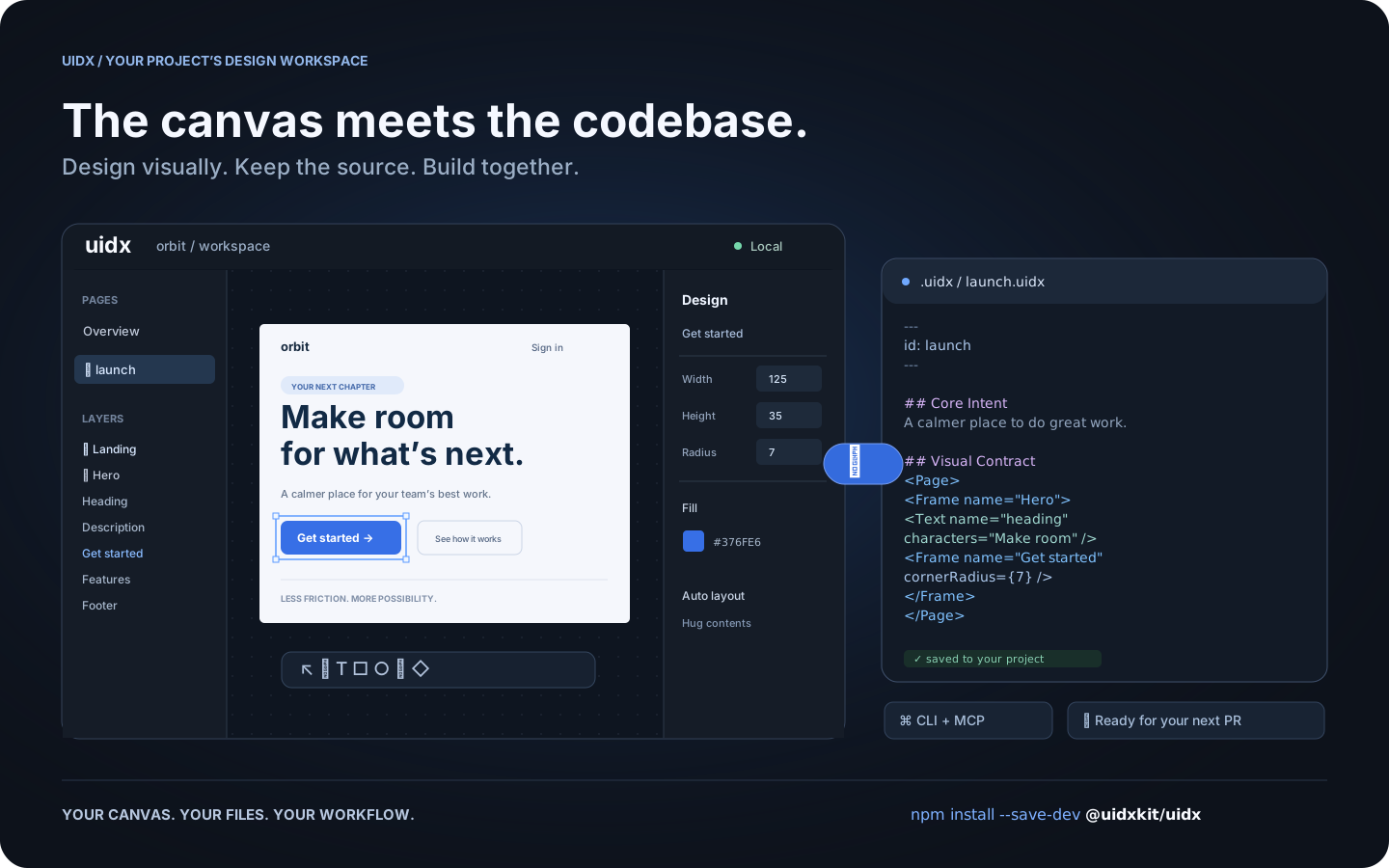
Workflow illustration: one design, shared by the canvas, your files, and your tools.
What is UIDX?
UIDX brings a design canvas into your application's repository. Install
@uidxkit/uidx as a local development dependency, run npm run uidx, and
work on designs stored in your project's .uidx/ folder.
A .uidx file combines Markdown describing a design's purpose with a declarative
node tree describing its appearance. Edit the canvas and the file updates. Edit
the file and the canvas follows. Changes produce focused text diffs you can
review in a pull request.
- A visual workspace. Create pages, draw shapes, edit text, and adjust layout and styling from the canvas and inspector.
- Reusable design systems. Components, instances, variants, slots, and design tokens share a document namespace.
- Your project owns the files. Keep designs, assets, and fonts next to your application and version them with Git.
- A shared workflow for people and agents. The CLI and MCP bridge let external tools inspect and edit the same files the viewer uses.
- Local by default. The viewer and project server run on your machine. Canvas synchronization does not require an LLM or a hosted design service.
UIDX is an early release. The file format and APIs may change before 1.0. It is a design workspace; it does not render your application's existing UI components as Storybook stories.
Install
Requires Node.js 22.19 or newer. Node 24 is recommended.
Run these commands inside your application's repository:
npm install --save-dev @uidxkit/uidx
npm run uidx
Installation adds the uidx and uidx:mcp scripts and creates .uidx/ when it
doesn't exist. Existing scripts, configuration, and designs are preserved.
The CLI, server, viewer, WASM, and bundled fonts live in your project's
node_modules; a global UIDX installation is not required.
Recent npm versions do not run a package's install script until you approve
it, and warn with install scripts not yet covered by allowScripts. Nothing is
lost: the first npx uidx dev performs the same setup itself and says so, or
approve the script with npm install-scripts approve @uidxkit/uidx and
reinstall. To set up explicitly, run npx --no-install uidx init. If your
project already uses a script named uidx, choose another with
npx --no-install uidx init --script design, then run npm run design.
Your design workspace
your-project/
├── package.json          # @uidxkit/uidx devDependency and npm scripts
├── .mcp.json             # connection for MCP clients
├── src/
└── .uidx/
    ├── config.json       # project settings
    ├── uidx.json         # document name, page patterns, and asset patterns
    ├── welcome.uidx      # initial page for a new workspace
    ├── assets/
    └── fonts/
Open the viewer, click New page, give it a name, and start designing. New
pages are saved in your design folder and appear in the overview. Commit your
project's .uidx/ files alongside application code.
Configuration
Set the shared viewer and MCP port in .uidx/config.json:
{
  "port": 4400
}
Restart npm run uidx after changing it. Use npm run uidx -- --port 4500 for a
one-time override. If the requested port is busy, UIDX tries the next available
one and reports its actual address. Configuration currently uses JSON.
The separate .uidx/uidx.json manifest controls which files belong to the document:
{
  "id": "my-project",
  "files": ["**/*.uidx"],
  "assets": ["assets/**"]
}
CLI and MCP
npm run uidx starts the local viewer, file synchronization server, and MCP HTTP
endpoint on one port. MCP clients use the generated .mcp.json to launch
npm run --silent uidx:mcp, a stdio bridge to that running project server.
npx --no-install uidx status
npx --no-install uidx check
npx --no-install uidx fmt --check
The CLI also supports reading, creating, editing, and rendering pages. See the CLI guide and agent architecture.
Documentation
- Drawing icons and custom graphics
- Fonts
- Property vocabulary
- Architecture decisions
- Release guide
- Changelog
Contributing and license
Bug reports, documentation improvements, and pull requests are welcome.
See Contributing for development setup and checks.
Follow the Code of Conduct and report vulnerabilities through
the security policy. Changes to main are merged by the owner.
UIDX is MIT licensed. Third-party code and fonts retain their respective licenses.
Вопросы о uidx MCP
Как установить UIDX в мой проект?
Установите его как локальную зависимость для разработки с помощью npm install --save-dev @uidxkit/uidx, а затем запустите npm run uidx.
Требуется ли для UIDX облачный сервис дизайна или LLM для синхронизации?
Нет, просмотрщик и сервер проекта работают локально на вашем устройстве и не требуют LLM или облачных сервисов для синхронизации холста.
Можно ли использовать UIDX с ИИ-агентами?
Да, MCP bridge позволяет внешним инструментам и агентам просматривать и редактировать те же файлы дизайна, которые используются в визуальном холсте.
Какие системные требования для UIDX?
Вам потребуется Node.js версии 22.19 или новее, хотя рекомендуется Node 24.