
MCP server word-aligner
Коммит 11 нояб. 2026 г.Создает доступные для совместного использования диаграммы выравнивания слов, которые визуально связывают слова между разными языками или уровнями перевода.
Также известен как tinygodsdev/bitext-word-alignment, bitext-word-alignment
- Звёзды
- 5
- Инструменты
- —
- Загрузки, 30 дней
- —
- Последняя версия
- 1.0.0
- Последний коммит
- 11 нояб. 2026 г.
- Лицензия
- MIT
Что такое word-aligner MCP?
word-aligner — это MCP server. Создает доступные для совместного использования диаграммы выравнивания слов, которые визуально связывают слова между разными языками или уровнями перевода.
Сводка сгенерирована из README проекта
О word-aligner MCP server
Word Aligner — это веб-инструмент, разработанный для изучающих языки, преподавателей, лингвистов и создателей конлангов, позволяющий создавать визуальные диаграммы пословного перевода. Он позволяет пользователям накладывать друг на друга несколько строк текста, таких как исходные предложения, переводы, IPA или глоссы, и вручную соединять слова изогнутыми линиями. Такой ручной подход гарантирует полный контроль над связями типа «один ко многим» или «многие к одному», что полезно для демонстрации сложного изменения порядка слов или грамматических сдвигов.
Разработчики могут интегрировать этот функционал через бесплатный HTTP API или MCP server, предоставляющий инструмент create_word_alignment. При использовании в качестве MCP server он работает через streamable HTTP без необходимости аутентификации. Сервер возвращает ссылку для совместного использования и изображение превью. Пользователи могут настраивать типографику, токенизацию и направление письма, включая поддержку языков с письмом справа налево и вертикальных систем, таких как японский tategaki. Готовые диаграммы можно экспортировать в форматах PNG, SVG, PDF или HTML.
Что вы можете с ним делать
- 1Визуализация перестановки словПоказывайте, как слова в исходном предложении соотносятся с целевым предложением, даже если их порядок изменился.
- 2Создание лингвистических глоссГенерируйте интерлинейные глоссы, включающие выравнивание морфем и аннотации IPA для академических исследований.
- 3Документирование конланговСопоставляйте искусственные языки с английским, используя кастомные шрифты для письменности и дополнительные уровни аннотаций.
- 4Автоматизация ссылок выравниванияПрограммно генерируйте доступные для совместного использования URL-адреса выравнивания с помощью POST-запроса к API.
Взято из README проекта. Каждый вариант использования проверен на соответствие цитате из него.
Как установить word-aligner MCP
Форматы проверены 10 ноя 2026Установка word-aligner MCP в Claude Code
$ claude mcp add --transport http bitext-word-alignment https://aligner.tinygods.dev/mcpУстановка word-aligner MCP в Cursor
~/.cursor/mcp.json
{
  "mcpServers": {
    "bitext-word-alignment": {
      "url": "https://aligner.tinygods.dev/mcp"
    }
  }
}Установка word-aligner MCP в VS Code
.vscode/mcp.json
{
  "servers": {
    "bitext-word-alignment": {
      "type": "http",
      "url": "https://aligner.tinygods.dev/mcp"
    }
  }
}Установка word-aligner MCP в Codex
~/.codex/config.toml
[mcp_servers.bitext-word-alignment]
url = "https://aligner.tinygods.dev/mcp"
Установка word-aligner MCP в Gemini CLI
~/.gemini/settings.json
{
  "mcpServers": {
    "bitext-word-alignment": {
      "httpUrl": "https://aligner.tinygods.dev/mcp"
    }
  }
}Автоматические проверки
Запущено 14 нояб. 2026 г.Полный отчёт →Еще не проверено. Для сервера требуется оценка 80, отсутствие серьезных проблем и достаточно данных для нашей проверки. Как работают проверки

- Связанный и доступный исходный репозиторийtinygodsdev/bitext-word-alignment is public and reachablegithub.com/tinygodsdev/bitext-word-alignment ↗Пройдено
- Пакет указывает этот репозиторий как источникНе проверялось
- Происхождение сборки (аттестация Sigstore)Не проверялось
- Open source лицензия (OSI)MITspdx.org/licenses/MIT.html ↗Пройдено
- Коммит или релиз за последний годLast commit or release 2026-11-11github.com/tinygodsdev/bitext-word-alignment ↗Пройдено
- OpenSSF ScorecardНе проверялось
- Имя пакета не похоже на популярный пакетНе проверялось
- Нет критических уязвимостей в пакете и зависимостяхНе проверялось
- Нет скрытых инструкций для модели0 tool descriptions and the README read; no override phrases, credential paths or hidden charactersПройдено
- Деструктивные инструменты помеченыНе проверялось
- Удалённый endpoint отвечает на MCP handshakeinitialize answered with protocol 2025-06-18 in 438 msПройдено
README
Открыть на GitHubAligner — word-by-word translation visualizer
Word Aligner is a free web tool that shows which word matches which across stacked lines of text. Type or paste a sentence and its translation, click a word and then its match on the line above or below, and curved connectors draw the alignment between them. Add extra rows for glosses or IPA, then export the diagram or share it with a link.
No accounts, no machine translation — you stay in control of every link. Great for lessons, social posts, grammar notes, and conlang documentation.
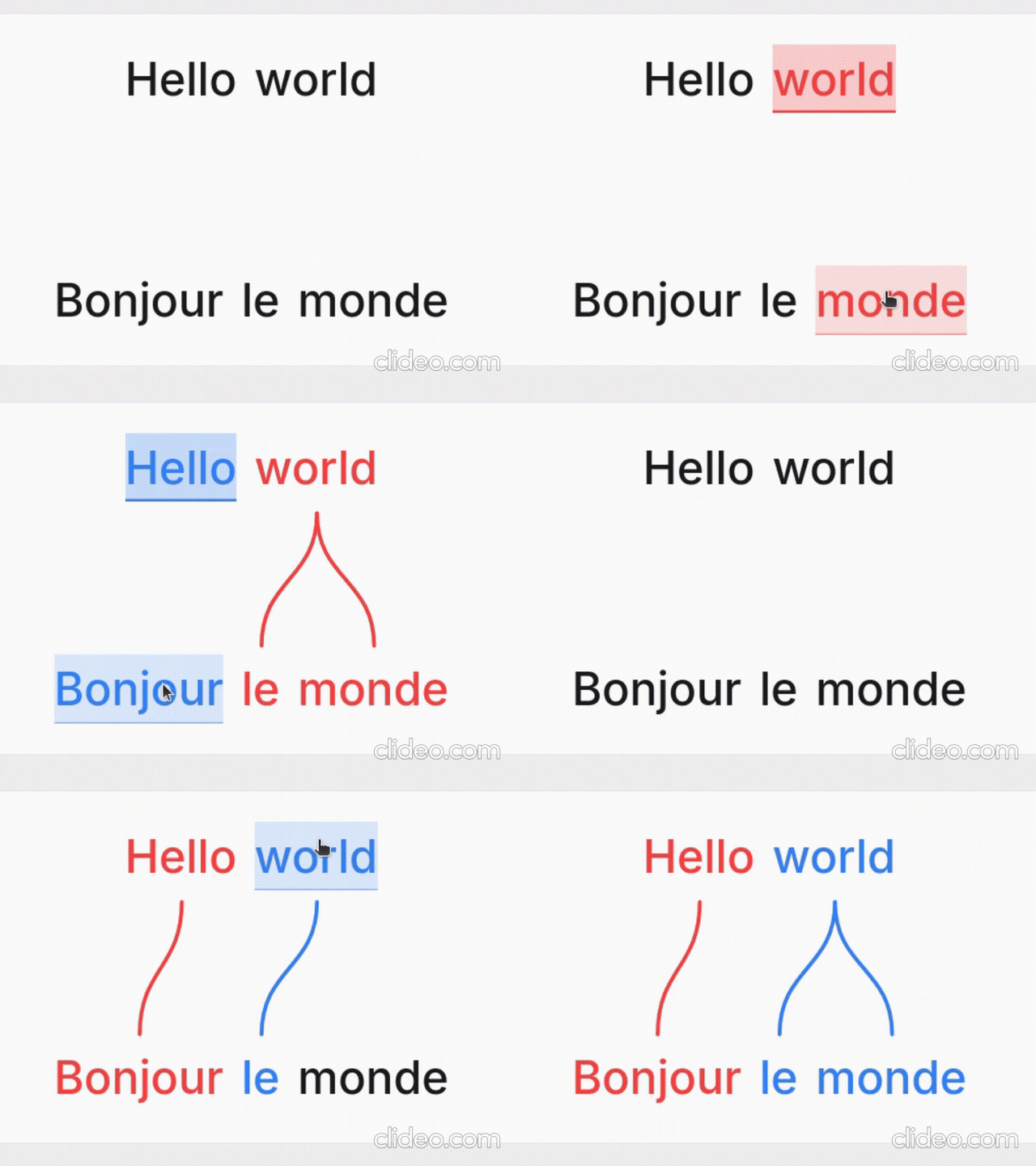
What it's for
- Language learners — see exactly why a translation says what it does: which source word became which target word, what gets dropped, and where word order changes.
- Teachers — build handouts, slides, and flashcards; export a clean PNG or SVG and drop it into a lesson without retyping anything.
- Linguists — produce Leipzig-style interlinear glosses with morpheme alignment, case/agreement tags, and free translations.
- Conlangers — show how a constructed language maps onto English, with custom script fonts, gloss rows, and IPA.
What it does
- Multi-line alignment — stack as many rows as you need (source, translation, gloss, IPA); links connect vertically adjacent lines.
- Manual word linking — click a word, then its match; supports one-to-many and many-to-one links and freely crossing connectors for reordered translations.
- Interlinear glosses & IPA — add annotation tiers above or below any line.
- Right-to-left scripts — Hebrew, Arabic, and mixed LTR/RTL layouts.
- Vertical writing systems — stand the whole diagram up as columns for Japanese tategaki, Chinese, or traditional Mongolian; characters stack or the line rotates, chosen per line, so a horizontal translation stays readable beside it.
- Tokenization control — choose how text splits into word boxes (split characters, a join marker for fixed expressions, optional punctuation handling).
- Per-line typography — font, size, spacing, and direction per line; custom and Google Fonts.
- Exports — PNG, SVG, PDF, and a self-contained HTML file; exports match the preview, including custom-font shaping.
- Shareable URLs — the whole alignment (text, links, and visual settings) is encoded in a
?data=link.
Examples
Browse ready-made examples — bilingual pairs, Turkish interlinear with IPA, RTL scripts, vertical Japanese and traditional Mongolian, Tagalog compounds, Japanese–Chinese–English word order, and more interlinear glosses — at aligner.tinygods.dev/examples. Open any one in the editor to adapt it.
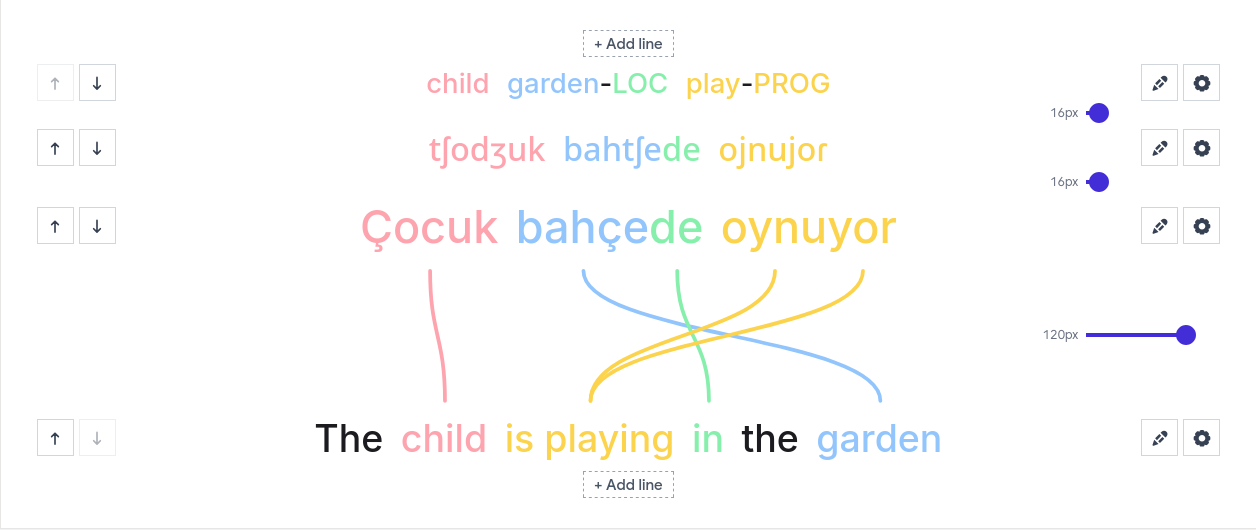
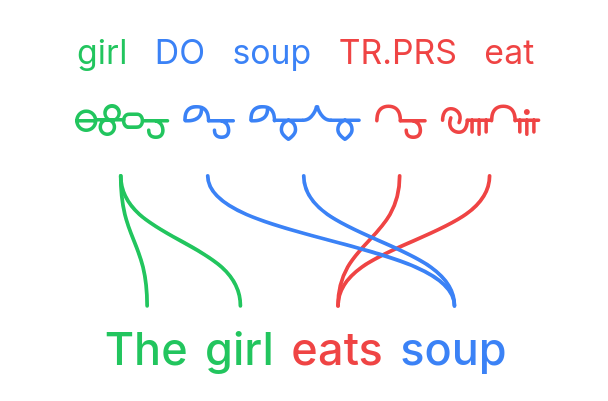
How it works
Edit your lines in the line editor, then link words in the preview.
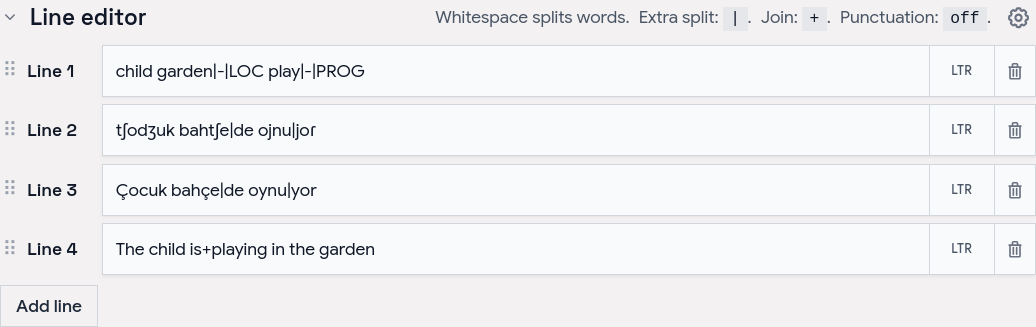
Tune colors, tokenization, and fonts in settings, then export or share.
Word alignment vs. interlinear vs. parallel text
- Interlinear translation places a gloss directly under each source word — compact, but it hides reordering. Aligner keeps both sentences on their own line and draws connectors, so reorderings, splits, and merges stay obvious.
- Parallel text is side-by-side bilingual reading for long-form study. Aligner focuses on one sentence pair at a time with explicit connectors showing which tokens correspond.
API
Word Aligner has a free HTTP API for generating alignment links programmatically.
POST https://aligner.tinygods.dev/api/align
Content-Type: application/json

{
  "lines": ["Hello world", "Bonjour le monde"],
  "alignments": [[0, 0, 1, 0], [0, 1, 1, 2]]
}
Returns { "url": "https://aligner.tinygods.dev/?data=..." }.
Supports per-line options (font, size, RTL), global visual settings (palette, line style, background), pair-level gap control, and multi-line stacks with selective connectors.
- API docs: aligner.tinygods.dev/api
- OpenAPI schema: aligner.tinygods.dev/api/align/openapi.json
Using Word Aligner as an AI agent tool
The word-aligner-skill/ directory is a ready-to-install skill that teaches AI assistants (Claude, ChatGPT, etc.) how to use the API. Once installed, it enables flows like:
"Translate 'я хочу спать' into English and show me the word alignment."
The agent translates, calls the API, and returns a shareable link.
- For Claude: point your Claude project at this repository or add the contents of
word-aligner-skill/SKILL.mdas a custom instruction. - For ChatGPT: zip
word-aligner-skill/and upload it as a custom Skill.
Install instructions and a downloadable archive are also on the site: aligner.tinygods.dev/skill.
MCP server
There is also an MCP server at https://aligner.tinygods.dev/mcp that exposes a single create_word_alignment tool. It returns a shareable link plus a preview image, and runs inside the same app over Streamable HTTP with no auth. Connect it in Claude:
claude mcp add --transport http word-aligner https://aligner.tinygods.dev/mcp
See docs/mcp-server.md for ChatGPT Developer Mode setup and the tool schema.
Learn more
- App: aligner.tinygods.dev
- About / documentation: aligner.tinygods.dev/about
- Privacy: aligner.tinygods.dev/privacy
Created by Dani Polani. See other tools for linguistics and conlanging.
Вопросы о word-aligner MCP
Как добавить word-aligner MCP в Claude Code?
Выполните claude mcp add --transport http bitext-word-alignment https://aligner.tinygods.dev/mcp в терминале. Добавьте --scope user, чтобы сервер был доступен во всех проектах.
Как добавить word-aligner MCP в Cursor?
Откройте ~/.cursor/mcp.json и добавьте сервер в mcpServers, используя конфигурацию Cursor из раздела установки выше.
Для чего можно использовать Word Aligner?
Его используют изучающие языки для поиска соответствий слов, преподаватели для создания раздаточных материалов, лингвисты для интерлинейных глосс, а создатели конлангов — для картирования искусственных языков.
Можно ли экспортировать диаграммы?
Да, вы можете экспортировать результаты выравнивания в форматах PNG, SVG, PDF или в виде автономного HTML-файла.
Как поделиться своей работой?
Вы можете поделиться выравниванием через ссылку, которая содержит в себе весь текст, ссылки и визуальные настройки.