
Анализирует текст на наличие стилистических проблем, таких как пассивный залог, слова-паразиты и паттерны, характерные для текстов, созданных ИИ, для улучшения качества письма.
Также известен как theserverlessdev/wsc, wsc, wsc-mcp
- Звёзды
- 9
- Инструменты
- 4
- Загрузки, 30 дней
- —
- Последняя версия
- 2.2.2
- Последний коммит
- 11 нояб. 2026 г.
- Лицензия
- MIT
Что такое Writing Style Checker MCP?
Writing Style Checker — это MCP server. Анализирует текст на наличие стилистических проблем, таких как пассивный залог, слова-паразиты и паттерны, характерные для текстов, созданных ИИ, для улучшения качества письма. Он предоставляет 4 инструмента, например check_text, fix_duplicates, list_word_lists.
Сводка сгенерирована из README проекта
О Writing Style Checker MCP server
Writing Style Checker работает как линтер текста, предназначенный для выявления специфических проблем и паттернов, часто встречающихся в текстах, созданных ИИ. Он помогает авторам повышать качество письма, помечая пассивный залог, слова-паразиты (weasel words), вводные наречия, хеджирование, номинализации и слишком длинные предложения. Также в него встроен специализированный детектор признаков ИИ, который находит конкретные слова и структурные паттерны, избыточно представленные в контенте, сгенерированном машиной.
Разработчики могут интегрировать этот сервис через удаленный MCP server, используя транспорт streamable HTTP, или установить локальный сервер на базе stdio через npm пакет wsc-mcp. Локальная версия предоставляет дополнительный инструмент check_file для анализа файлов напрямую с вашего диска. Пользователи могут настраивать правила обнаружения с помощью конфигурационного файла .wscrc.json, чтобы включать, отключать или изменять списки слов и пороги чувствительности.
Что вы можете с ним делать
- 1Обнаружение паттернов ИИ-текстовПопросите ассистента найти конкретные слова или структуры предложений, которые указывают на то, что текст был написан ИИ.
- 2Очистка от дублирующихся словДайте клиенту команду удалить повторяющиеся слова, стоящие рядом в блоке текста.
- 3Аудит локальных markdown-файловПопросите ИИ прочитать и проанализировать конкретный файл на вашем компьютере на предмет стилистических ошибок.
- 4Проверка общего качества текстаОтправьте абзац, чтобы проверить его на наличие пассивного залога, слов-паразитов и лишних наречий.
Взято из README проекта. Каждый вариант использования проверен на соответствие цитате из него.
Как установить Writing Style Checker MCP
Форматы проверены 10 ноя 2026Добавить в CursorДобавить в GooseУстановка Writing Style Checker MCP в Claude Code
$ claude mcp add wsc -- npx -y wsc-mcpУстановка Writing Style Checker MCP в Cursor
~/.cursor/mcp.json
{
  "mcpServers": {
    "wsc": {
      "command": "npx",
      "args": [
        "-y",
        "wsc-mcp"
      ]
    }
  }
}Установка Writing Style Checker MCP в VS Code
.vscode/mcp.json
{
  "servers": {
    "wsc": {
      "type": "stdio",
      "command": "npx",
      "args": [
        "-y",
        "wsc-mcp"
      ]
    }
  }
}Установка Writing Style Checker MCP в VS Code CLI
$ code --add-mcp '{"name":"wsc","type":"stdio","command":"npx","args":["-y","wsc-mcp"]}'Установка Writing Style Checker MCP в Claude Desktop
claude_desktop_config.json
{
  "mcpServers": {
    "wsc": {
      "command": "npx",
      "args": [
        "-y",
        "wsc-mcp"
      ]
    }
  }
}Установка Writing Style Checker MCP в Codex
$ codex mcp add wsc -- npx -y wsc-mcpУстановка Writing Style Checker MCP в Codex config.toml
~/.codex/config.toml
[mcp_servers.wsc]
command = "npx"
args = ["-y", "wsc-mcp"]
Установка Writing Style Checker MCP в Gemini CLI
$ gemini mcp add -s user wsc npx -- -y wsc-mcpУстановка Writing Style Checker MCP в Gemini settings.json
~/.gemini/settings.json
{
  "mcpServers": {
    "wsc": {
      "command": "npx",
      "args": [
        "-y",
        "wsc-mcp"
      ]
    }
  }
}Инструменты Writing Style Checker MCP 4
Определено из READMEcheck_textfix_duplicateslist_word_listscheck_file
| check_text | — | |
| fix_duplicates | — | |
| list_word_lists | — | |
| check_file | — |
Автоматические проверки
Запущено 12 нояб. 2026 г.Полный отчёт →Прошло наши автоматизированные проверки. Это не аудит безопасности: изучите код и предоставьте серверу минимально необходимый доступ. Как работают проверки

- Связанный и доступный исходный репозиторийПройдено
- Open source лицензия (OSI)Пройдено
- Коммит или релиз за последний годПройдено
- Имя пакета не похоже на популярный пакетПройдено
- Удаленная конечная точка использует HTTPSПройдено
- Деструктивные инструменты помеченыПройдено
- Нет скрытых инструкций для моделиПройдено
- Нет критических предупреждений в пакете или его зависимостяхПройдено
README
Открыть на GitHubWriting Style Checker


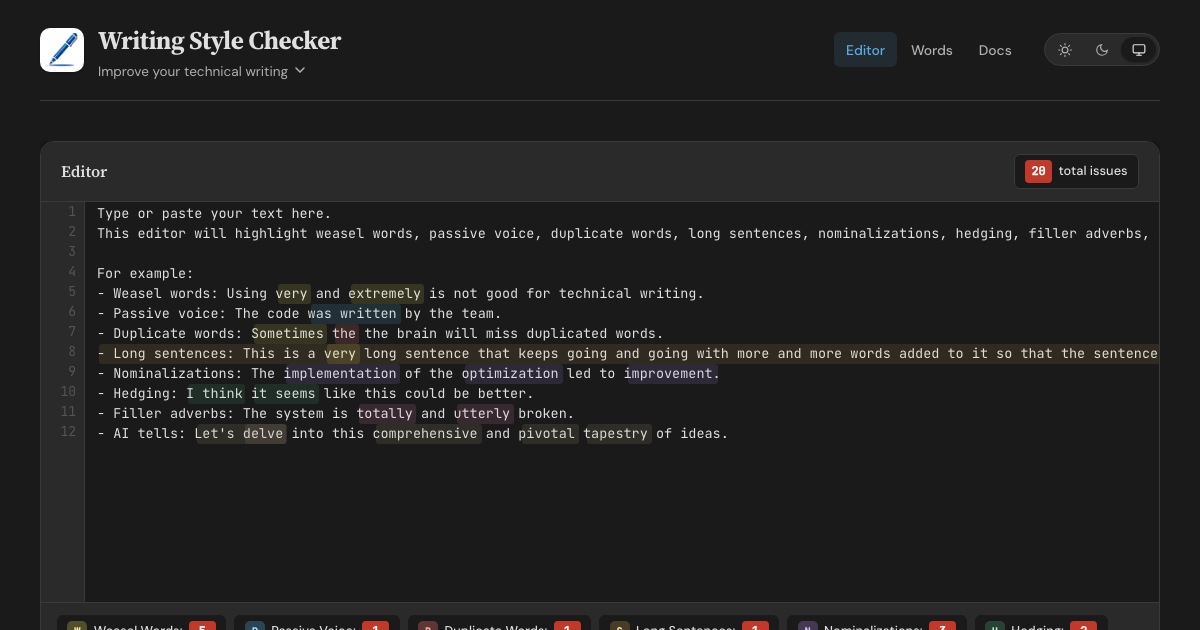
A prose linter and AI-slop detector. WSC finds AI tells — words, phrases, and sentence structures overrepresented in AI-generated text, each flag backed by a published corpus study. It also catches classic writing issues: weasel words, passive voice, duplicate words, long sentences, nominalizations, hedging, and filler adverbs. Available as a web editor, HTTP API, MCP server, CLI, and GitHub Action.
Features
- Web Editor - Real-time highlighting with inline fix buttons for all 8 detectors
- HTTP API - POST text with optional config, retrieve structured JSON responses
- MCP Server (Remote) - Connect AI assistants via Streamable HTTP transport
- MCP Server (Local) - Stdio-based server via
wsc-mcpon npm - CLI - Check files from the command line via
wsc-lint - GitHub Action - Run checks in CI with
::warningannotations - Configurable - Customize detectors with
.wscrc.jsonfiles
What WSC is (and isn't)
WSC flags patterns that research on AI-generated text finds overrepresented, and cites a source for every flag. It does not, and cannot, prove authorship. Classifier-based detectors carry a documented false-accusation risk: a Stanford study found that seven of them misflagged 61% of essays written by non-native English speakers. WSC avoids that trap by design — every flag is a specific, explainable edit that improves the text no matter who, or what, wrote it.
Detection Rules
| Detector | Items | Description |
|---|---|---|
| Weasel Words | 95 words/phrases | Vague terms like "very", "basically", "arguably", "numerous" |
| Passive Voice | 260 irregular verbs | Auxiliary verbs + past participles (regular -ed + irregular) |
| Duplicate Words | — | Adjacent repeated words across whitespace, case-insensitive |
| Long Sentences | threshold: 30 words | Sentences exceeding a configurable word count |
| Nominalizations | 245 word pairs | Nouns replaceable with verbs ("utilization" → "use") |
| Hedging | 100 phrases | Phrases that weaken assertions ("I think", "it seems") |
| Filler Adverbs | 139 words | Adverbs adding emphasis without substance ("totally", "utterly") |
| AI Tells | 98 words (+111 inflected forms) + 83 phrases + 12 structural patterns | Words, phrases, and sentence constructions overrepresented in AI-generated text (delve, rich tapestry, It's not just X — it's Y) |
Word lists sourced from Matt Might's shell scripts and expanded with additional entries. AI tells draw on published corpus studies: Kobak et al. 2025 (Science Advances), Juzek & Ward 2025 (COLING), Liang et al. 2024 (Stanford), and Reinhart et al. 2025 (PNAS). Wikipedia's editor-maintained Signs of AI writing catalogue and AI-detection vendor reports round out the sources.
Configuration
Create a .wscrc.json to customize detectors. All tools (API, MCP, CLI) support it.
{
  "$schema": "https://wsc.theserverless.dev/schema.json",
  "ignore": ["CHANGELOG.md", "docs/vendor/**"],
  "detectors": {
    "weaselWords": {
      "enabled": true,
      "add": ["synergy", "leverage"],
      "remove": ["very"]
    },
    "longSentences": { "maxWords": 25 },
    "adverbs": { "enabled": false }
  }
}
Every field is optional. Missing fields use defaults. JSON Schema provides autocompletion in VS Code.
ignore is an array of glob patterns relative to the working directory. The GitHub Action uses the repository root. The CLI adds these patterns to its built-in **/node_modules/** and **/.git/** skips, together with the Action exclude input and the CLI --ignore flag.
API Usage
POST /api/check
Analyze text for writing style issues. Accepts optional config object.
curl -X POST https://wsc.theserverless.dev/api/check \
  -H "Content-Type: application/json" \
  -d '{"text":"The code was written very quickly."}'
Response:
{
  "summary": {
    "total": 2,
    "weaselWords": 1,
    "passiveVoice": 1,
    "duplicateWords": 0,
    "longSentences": 0,
    "nominalizations": 0,
    "hedging": 0,
    "adverbs": 0
  },
  "issues": {
    "weaselWords": [{ "word": "very", "index": 21, "line": 1, "column": 22, "context": "..." }],
    "passiveVoice": [{ "phrase": "was written", "index": 9, "line": 1, "column": 10, "context": "..." }],
    "duplicateWords": [],
    "longSentences": [],
    "nominalizations": [],
    "hedging": [],
    "adverbs": []
  },
  "meta": { "characterCount": 34, "wordCount": 6, "sentenceCount": 1, "processingTimeMs": 2 }
}
With config:
curl -X POST https://wsc.theserverless.dev/api/check \
  -H "Content-Type: application/json" \
  -d '{"text":"The code was written very quickly.", "config":{"detectors":{"weaselWords":{"enabled":false}}}}'
GET /api/check
Returns API documentation as JSON.
GET /api/detectors
Returns the list of all 8 detectors with descriptions, configurability, and word counts.
GET /health
Runs a smoke test with known text and returns {"status":"healthy"} or 503.
Limits: Max 100,000 characters per request. CORS enabled for all origins.
MCP Server
The Writing Style Checker is available as an MCP server, letting AI assistants check your writing directly.
Tools
| Tool | Description |
|---|---|
check_text |
Analyze text for all 8 writing style issues. Accepts optional config. |
fix_duplicates |
Remove duplicate adjacent words and return cleaned text |
list_word_lists |
Return info about all detector word lists |
check_file |
(Local only) Read a file from disk and analyze it. Auto-discovers .wscrc.json. |
Remote MCP Server
Connect any MCP client to the hosted server - no installation required.
{
  "mcpServers": {
    "writing-style-checker": {
      "type": "url",
      "url": "https://wsc.theserverless.dev/mcp"
    }
  }
}
Local MCP Server (stdio)
Install via npm for local usage. Includes check_file for analyzing files on disk with auto-discovery of .wscrc.json.
npx wsc-mcp
Claude Desktop / Claude Code config:
{
  "mcpServers": {
    "writing-style-checker": {
      "command": "npx",
      "args": ["wsc-mcp"]
    }
  }
}
See the wsc-mcp npm page for full documentation.
CLI
Check files from the command line.
# Check all markdown files
npx wsc-lint check "**/*.md"

# Read from stdin
echo "The code was written very quickly." | npx wsc-lint check --stdin

# JSON output for scripting
npx wsc-lint check "**/*.md" --format json

# GitHub Actions annotations
npx wsc-lint check "**/*.md" --format github

# Create a config file
npx wsc-lint init
See the wsc-lint README for full documentation.
GitHub Action
- uses: theserverlessdev/wsc@v1
  with:
    files: '**/*.md'
    max-warnings: 20
    exclude: |
      CHANGELOG.md
      vendor/**
| Input | Default | Description |
|---|---|---|
files |
**/*.md |
Glob pattern for files to check |
config |
— | Path to .wscrc.json config file |
max-warnings |
unlimited | Max warnings before failing |
only-changed |
false |
On a pull request, check changed files that match files. If none match, skip the check. Other events check files. |
exclude |
— | Glob patterns to skip. Separate with a comma or a new line. Adds to config ignore. |
Privacy
The web editor runs in your browser - we never send text to any server. The API and MCP endpoints only process text you explicitly send to them.
Project Structure
.
├── src/
│   ├── core/                    # Shared detection engine
│   │   ├── detector.ts          # 8 detection algorithms
│   │   ├── words.ts             # Word/phrase lists (800+ entries)
│   │   ├── config.ts            # Config types, merging, validation
│   │   ├── config-node.ts       # Node-only: file loading, discovery
│   │   ├── analyzer.ts          # Unified analyzeText() entry point
│   │   └── index.ts             # Public API exports
│   ├── docs/                    # Documentation content (Markdown files)
│   ├── mcp/
│   │   └── handler.ts           # MCP JSON-RPC 2.0 handler
│   ├── lib/
│   │   ├── App.svelte           # Main editor page component
│   │   ├── stores/theme.ts      # Theme store (light/dark/system)
│   │   └── components/          # UI components (StatsBar, ConfigPanel, etc.)
│   ├── routes/
│   │   ├── +layout.svelte       # Shared layout (header, nav, footer)
│   │   ├── api/check/+server.ts # HTTP API endpoint
│   │   ├── mcp/+server.ts       # MCP endpoint
│   │   ├── health/+server.ts    # Health check endpoint
│   │   ├── docs/+page.svelte    # Documentation page
│   │   └── words/+page.svelte   # Word library browser
│   └── styles/
│       └── main.scss            # Global styles (light + dark themes)
├── mcp-server/                  # Standalone stdio MCP server (npm: wsc-mcp)
├── cli/                         # CLI tool (npm: wsc-lint)
├── action/                      # GitHub Action (composite)
├── tests/                       # 341 tests across 18 files
├── static/
│   ├── schema.json              # JSON Schema for .wscrc.json
│   ├── llms.txt                 # AI/LLM discovery file
│   └── llms-full.txt            # Detailed LLM context
├── wrangler.toml                # Cloudflare Workers config
└── svelte.config.js             # SvelteKit configuration
Local Development
git clone https://github.com/theserverlessdev/wsc.git
cd wsc
npm install
npm run dev
Visit http://localhost:5173. The API is at /api/check, MCP at /mcp, health at /health.
Commands
| Command | Description |
|---|---|
npm run dev |
Start dev server |
npm run build |
Build for production |
npm run check |
Type check with svelte-check |
npm test |
Run all 341 tests |
npm run test:coverage |
Coverage report |
Deployment
Deployed as a Cloudflare Worker at wsc.theserverless.dev.
npm run build
npx wrangler deploy
Contributing
See CONTRIBUTING.md for development setup, testing, and pull request guidelines.
For substantial changes, please open an issue first.
Acknowledgements
- Matt Might for the original shell scripts
- Built with SvelteKit and Svelte 5, deployed on Cloudflare Workers
- Logo made with DiffusionBee
License
Вопросы о Writing Style Checker MCP
Как добавить Writing Style Checker MCP в Claude Code?
Выполните claude mcp add wsc -- npx -y wsc-mcp в терминале. Добавьте --scope user, чтобы сервер был доступен во всех проектах.
Как добавить Writing Style Checker MCP в Cursor?
Откройте ~/.cursor/mcp.json и добавьте сервер в mcpServers, используя конфигурацию Cursor из раздела установки выше.
Какие инструменты предоставляет Writing Style Checker MCP?
Он предоставляет 4 инструмента, включая check_text, fix_duplicates, list_word_lists, check_file.
Доказывает ли этот инструмент, что текст был написан ИИ?
Нет, он не доказывает авторство. Вместо этого он помечает конкретные паттерны и слова, которые слишком часто встречаются в текстах, созданных ИИ, чтобы предложить обоснованные правки.
Могу ли я настроить правила обнаружения?
Да, вы можете настроить детекторы с помощью конфигурационного файла .wscrc.json.
Остается ли мой текст приватным при использовании веб-редактора?
Да, веб-редактор работает полностью в вашем браузере, поэтому текст никогда не отправляется на сервер.