
MCP server Ternimal
Коммит 14 нояб. 2026 г.Предоставляет защищенный удаленный терминал, который позволяет AI-агентам выполнять команды и управлять файлами на удаленных хостах через Model Context Protocol.
Также известен как ternimal/tern
- Звёзды
- 1
- Инструменты
- —
- Загрузки, 30 дней
- —
- Последняя версия
- —
- Последний коммит
- 14 нояб. 2026 г.
- Лицензия
- AGPL-3.0
Что такое Ternimal MCP?
Ternimal — это MCP server. Предоставляет защищенный удаленный терминал, который позволяет AI-агентам выполнять команды и управлять файлами на удаленных хостах через Model Context Protocol.
Сводка сгенерирована из README проекта
О Ternimal MCP server
С Ternimal управление удаленными серверами через AI-интерфейс становится возможным. Этот инструмент предоставляет защищенный удаленный терминал, который позволяет AI-агентам выполнять команды и управлять файлами на удаленных хостах с помощью Model Context Protocol. Он разработан для администраторов, которым необходимо предоставить AI-клиентам, таким как Claude Desktop, Claude Code или Cursor, контролируемый доступ к своим системам.
Настройка включает запуск агента ternd на удаленном хосте и подключение через клиент tern. Пользователи могут подключаться напрямую через локальную сеть или использовать реле ternr для обхода NAT без необходимости открывать входящие порты. Безопасность обеспечивается сквозным шифрованием TLS и обязательной аутентификацией с использованием ключей OpenSSH или общих токенов.
Чтобы предотвратить несанкционированные действия, MCP server работает согласно определенной политике и по умолчанию имеет права только на чтение. Он ведет журнал аудита каждого вызова и требует ручного подтверждения перед выполнением выбранных действий. Это гарантирует, что, хотя AI-агент может взаимодействовать с инструментами shell, exec, пробросом портов и копированием файлов, человек остается полноправным контролером удаленной среды.
Что вы можете с ним делать
- 1Выполнение удаленных команд через AIПопросите AI-агента выполнить определенные shell-команды на удаленном хосте через интерфейс MCP.
- 2Аудит административных действий AIПросматривайте полный журнал всех команд и взаимодействий, выполненных AI-агентом в вашей системе.
Взято из README проекта. Каждый вариант использования проверен на соответствие цитате из него.
Конфигурация
TERN_TOKEN
| Название | Описание | Тип |
|---|---|---|
| TERN_TOKEN | — |
Автоматические проверки
Запущено 15 нояб. 2026 г.Полный отчёт →Еще не проверено. Для сервера требуется оценка 80, отсутствие серьезных проблем и достаточно данных для нашей проверки. Как работают проверки · Что исправить, чтобы получить больше баллов

- Связанный и доступный исходный репозиторийternimal/tern is public and reachablegithub.com/ternimal/tern ↗Пройдено
- Пакет указывает этот репозиторий как источникНе проверялось
- Происхождение сборки (аттестация Sigstore)Не проверялось
- Open source лицензия (OSI)AGPL-3.0spdx.org/licenses/AGPL-3.0.html ↗Пройдено
- Коммит или релиз за последний годLast commit or release 2026-11-14github.com/ternimal/tern ↗Пройдено
- OpenSSF ScorecardНе проверялось
- Имя пакета не похоже на популярный пакетНе проверялось
- Нет критических предупреждений в пакете или его зависимостяхНе проверялось
- Нет скрытых инструкций для модели0 tool descriptions and the README read; no override phrases, credential paths or hidden charactersПройдено
- Деструктивные инструменты помеченыНе проверялось
- Удалённая конечная точка отвечает на рукопожатие MCPНе проверялось
README
Открыть на GitHubTernimal
+------------------------------------------------------------------+
| \\\_\                                                            |
| \\\( ^>     t e r n                                              |
|  \\\=/      A minimal, portable, secure remote terminal with MCP |
|  ~~~~~                                                           |
+------------------------------------------------------------------+


Ternimal (terminal + minimal) is a minimal, portable, secure remote terminal: SSH-style shells, command exec, port forwarding and file copy over end-to-end TLS, reached directly or through a relay for NAT traversal. One project, four small binaries:
| binary | role |
|---|---|
tern |
client: shells, exec, port forwarding, file copy, REST gateway, MCP server for AI agents |
ternd |
agent: hosts sessions for authenticated clients; listens directly or dials a relay |
ternr |
relay: bridges clients to agents behind NAT; a public rendezvous that only forwards opaque bytes |
rtern |
combined relay + client: catches an agent that dials in and drops you into its shell; one process instead of ternr + tern |
Client-to-agent traffic is end-to-end TLS (clients pin the agent's certificate) and authentication to the agent is mandatory. This is an administration tool, not a stealth tool: connections are logged and the agent has no unauthenticated mode. Only use it on systems you own or are authorized to access.
Installation
Download the zip for your OS and architecture from the
latest release, check it
against SHA256SUMS and, with the GitHub CLI, its
build provenance attestation, and put the four binaries on your PATH:
curl -LO https://github.com/ternimal/tern/releases/latest/download/ternimal-linux-amd64.zip
curl -LO https://github.com/ternimal/tern/releases/latest/download/SHA256SUMS
sha256sum --ignore-missing -c SHA256SUMS
gh attestation verify ternimal-linux-amd64.zip -R ternimal/tern
mkdir -p ~/.local/bin
unzip ternimal-linux-amd64.zip tern ternd ternr rtern -d ~/.local/bin
Or build them with Go 1.21 or later:
go install github.com/ternimal/tern/cmd/...@latest
Notes for macOS and Windows, building from source and the supported platforms are in docs/install.md.
Quick start
# agent: zero-config, listens on port 2222 on every IPv4 and IPv6 address,
# mints a token, prints its fingerprint
ternd

# client: connect by IP with the agent's fingerprint and token
TERN_TOKEN=<token> tern connect -a AGENT_IP:2222 -f <agent-fp>
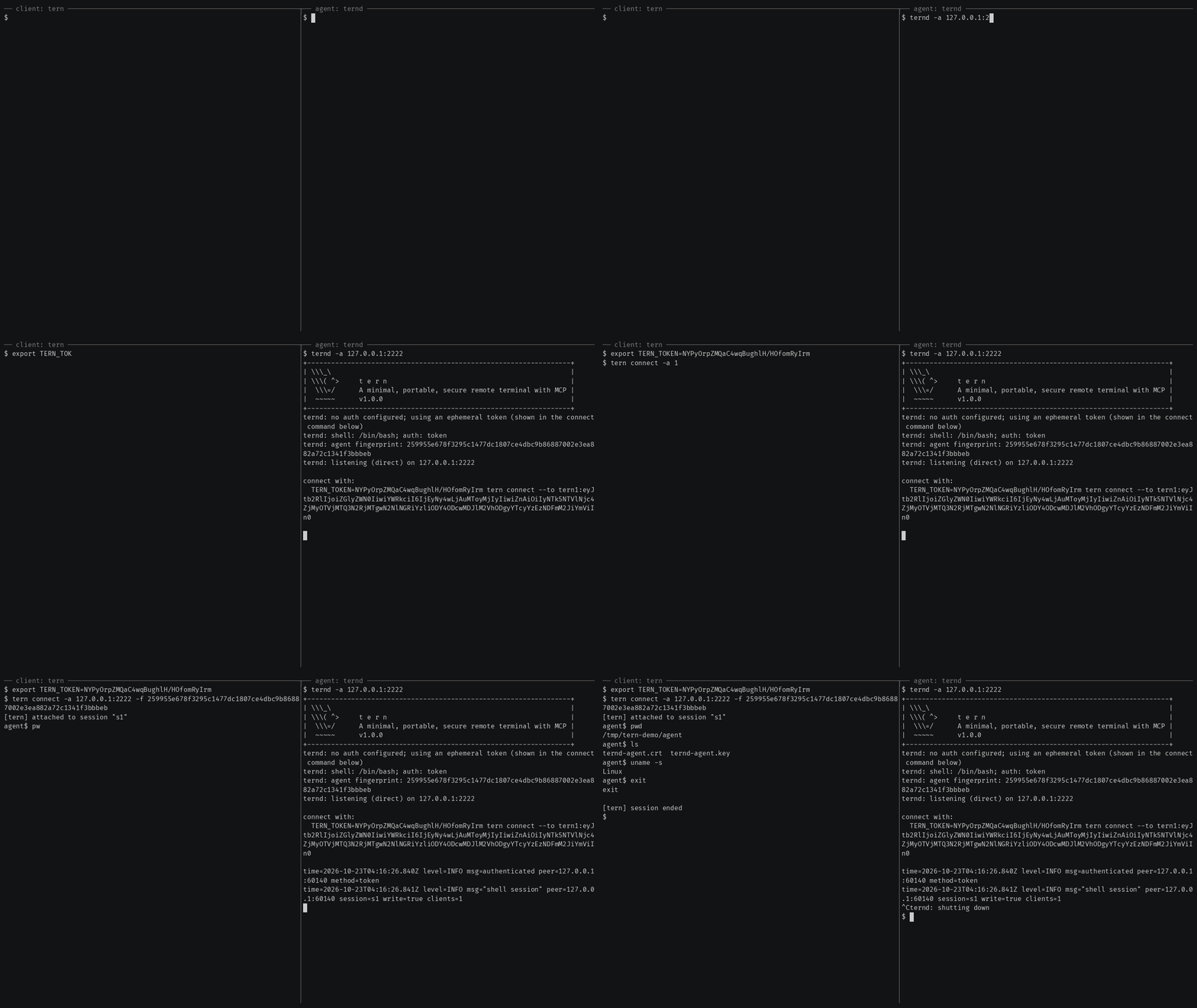
Getting started also covers reaching an agent
behind NAT through a relay, catching one with rtern and logging in with
OpenSSH keys instead of a token.
AI agents (tern mcp)
tern mcp lets an AI client such as Claude Code, Claude Desktop or Cursor work
on your agents through the
Model Context Protocol, under a policy you
set and with an audit log of every call. It is read-only by default, and asks
you before the actions you choose.
In Claude Code, install tern first, then the Ternimal plugin:
claude plugin marketplace add ternimal/tern
claude plugin install ternimal@ternimal
The plugin starts tern from your PATH and reads your hosts from a config
file, ~/.config/tern/mcp.json by default; its ternimal:setup skill walks
you through writing one. plugin/README.md says what it
runs and what it sends. Other clients, a one-line setup without a config
file, the tools and the safety model are in docs/mcp.md.
Features
- Direct or relay: reach an agent on your LAN directly, or reach one behind NAT through a relay, so that agent needs no inbound port.
- End-to-end encryption: TLS and authentication run between client and agent, so a relay only forwards ciphertext.
- Keys or tokens: OpenSSH public keys in
authorized_keysformat, or a shared token. - Resumable sessions:
tern connectreconnects on its own after a drop and resumes the session with scrollback replay; others can join it as read-only viewers. - One connection, many channels: one authenticated connection can carry a
shell,
exec, port forwards and file copy at once. - REST gateway and MCP server: run commands over HTTP, or let AI agents work under a policy.
- Recording: with
ternd --record-dir, the agent saves each session as an asciicast, playable withasciinema play. - Zero-config: run
terndwith no flags on a terminal and it mints a token and prints the line to connect with. - Portable: Linux, macOS, Windows and Android on amd64 and arm64.
All of them in detail: docs/features.md.
Documentation
- Getting started: direct, through a relay, with
rtern, with OpenSSH keys and the insecure flags for testing - Commands: every
terncommand, sharing and resuming sessions, copying files, port forwards - REST gateway: run commands on an agent over HTTP
- AI agents over MCP: the config file, profiles, tools, approvals and the audit log
- Install and build: checking a release, building from source, supported platforms
- Keys, tokens and files: the rules for the files tern reads
- Operating notes: listeners, shutdown, recordings and other details
- Security: the threat model, the dangerous flags and how to report a vulnerability
- Contributing: license terms, the CLA, development and the code layout
License
Ternimal is licensed under the GNU Affero General Public License v3.0 only (AGPL-3.0-only); see LICENSE. Running a modified version to provide a network service requires offering that version's source to its users.
A separate commercial license is available for uses that cannot comply with the AGPL, for example embedding Ternimal in a proprietary or hosted service; see NOTICE. Contributions are welcome; see CONTRIBUTING for the license terms and the CLA.
"Ternimal", the binary names (tern, ternd, ternr, rtern) and the
project logo are project trademarks and are not licensed under the AGPL; see
NOTICE.
Вопросы о Ternimal MCP
Как AI-агенты могут использовать Ternimal?
AI-клиенты, такие как Claude Code или Cursor, могут работать с вашими агентами через Model Context Protocol (MCP), используя команду tern mcp.
Безопасно ли соединение?
Да, трафик между клиентом и агентом защищен сквозным шифрованием TLS с обязательной аутентификацией, что гарантирует передачу через реле только непрозрачного зашифрованного текста.
Могу ли я использовать Ternimal для доступа к машине за NAT?
Да, вы можете подключиться к агенту за NAT, используя реле для создания моста соединения.
Какие права доступа по умолчанию у AI-агентов?
По умолчанию MCP server работает в режиме только для чтения и будет запрашивать ваше подтверждение перед выполнением выбранных действий.