
MCP server tty-table
Коммит 13 окт. 2026 г.Позволяет AI-клиентам отрисовывать данные в виде ASCII или Unicode таблиц для терминала для использования в README и других текстовых файлах.
Также известен как tecfu/tty-table
- Звёзды
- 311
- Инструменты
- 4
- Загрузки, 30 дней
- —
- Последняя версия
- —
- Последний коммит
- 13 окт. 2026 г.
- Лицензия
- MIT
Что такое tty-table MCP?
tty-table — это MCP server. Позволяет AI-клиентам отрисовывать данные в виде ASCII или Unicode таблиц для терминала для использования в README и других текстовых файлах. Он предоставляет 4 инструмента, например render_table, header, rows.
Сводка сгенерирована из README проекта
О tty-table MCP server
tty-table позволяет AI-клиентам преобразовывать необработанные данные в отформатированные ASCII или Unicode таблицы для терминала. Разработчики, использующие Claude, Cursor или другие агенты IDE, могут подключить этот сервер через stdio с помощью npx, чтобы превращать структурированную информацию в читаемые текстовые макеты. Это особенно полезно для генерации чистой документации, файлов README или отчетов, адаптированных для терминала, прямо в процессе общения с AI.
Инструмент render_table служит основным интерфейсом, позволяя пользователям передавать заголовки, строки и специфические параметры конфигурации, такие как width, borderStyle, align или compact mode. Сервер берет на себя сложную логику форматирования, включая расчет ширины символов Unicode и перенос текста, чтобы таблицы корректно отображались в терминальной среде. Для запуска реализации MCP требуется Node.js 22 или новее.
Взято из README проекта. Каждый вариант использования проверен на соответствие цитате из него.
Инструменты tty-table MCP 4
Определено из READMErender_tableheaderrowsoptions
| render_table | — | |
| header | — | |
| rows | — | |
| options | — |
Автоматические проверки
Запущено 13 нояб. 2026 г.Полный отчёт →Еще не проверено. Для сервера требуется оценка 80, отсутствие серьезных проблем и достаточно данных для нашей проверки. Как работают проверки · Что исправить, чтобы получить больше баллов

- Связанный и доступный исходный репозиторийtecfu/tty-table is public and reachablegithub.com/tecfu/tty-table ↗Пройдено
- Пакет указывает этот репозиторий как источникНе проверялось
- Происхождение сборки (аттестация Sigstore)Не проверялось
- Open source лицензия (OSI)MITspdx.org/licenses/MIT.html ↗Пройдено
- Коммит или релиз за последний годLast commit or release 2026-10-13github.com/tecfu/tty-table ↗Пройдено
- OpenSSF ScorecardOpenSSF Scorecard 4.8 / 10; weakest: Code-Review 0, Pinned-Dependencies 0, CII-Best-Practices 0scorecard.dev/viewer/?uri=github.com/tecfu/tty-table ↗Частично 7/15
- Имя пакета не похоже на популярный пакетНе проверялось
- Нет критических предупреждений в пакете или его зависимостяхНе проверялось
- Нет скрытых инструкций для модели4 tool descriptions and the README read; no override phrases, credential paths or hidden charactersПройдено
- Деструктивные инструменты помеченыNo tool named like delete, drop or execПройдено
- Удалённая конечная точка отвечает на рукопожатие MCPНе проверялось
README
Открыть на GitHubtty-table
A TypeScript-first terminal table renderer with a compatibility-oriented factory API.
Examples
See here for complete example list
To view all example output:
$ git clone https://github.com/tecfu/tty-table && cd tty-table && npm i
$ npm run view-examples
Terminal (Static)
examples/styles-and-formatting.js

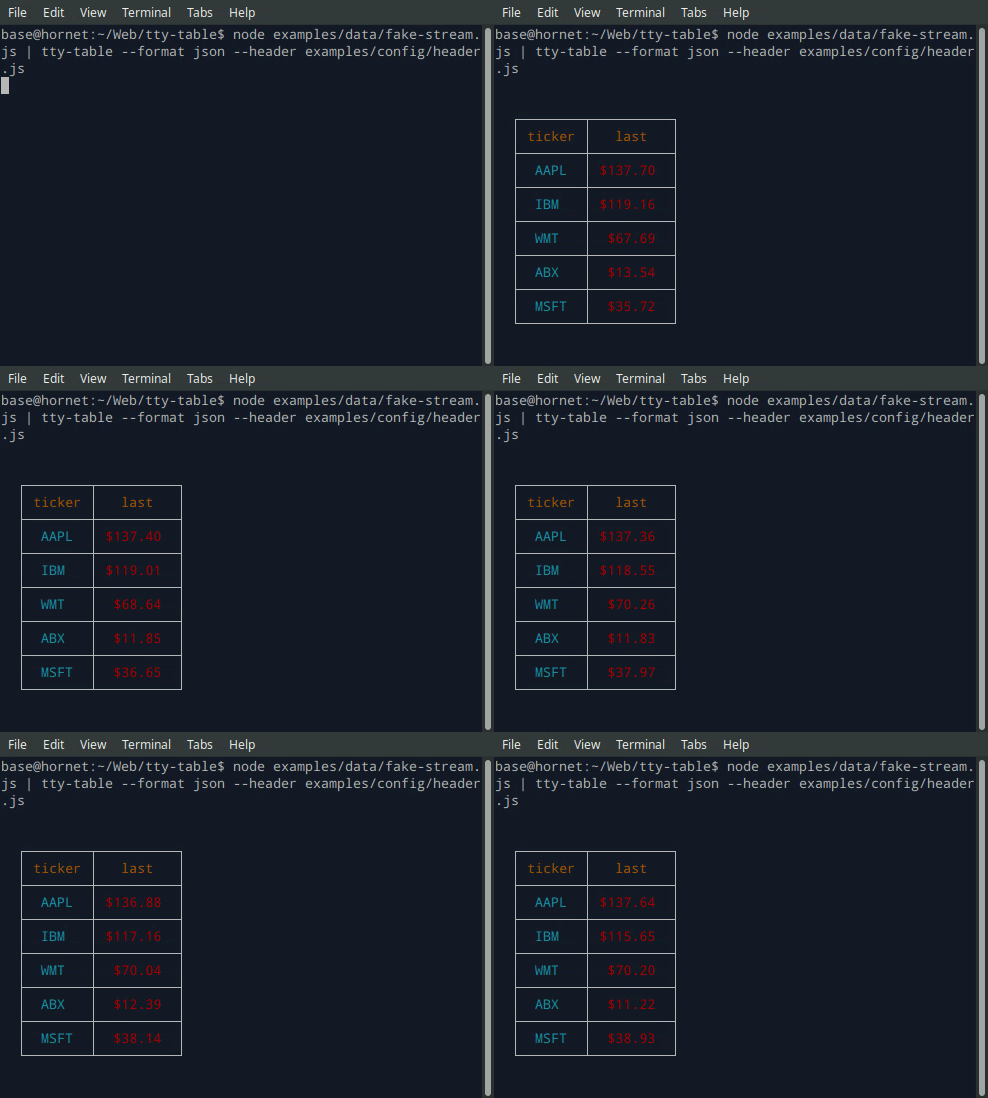
Terminal (Streaming)
$ node examples/data/fake-stream.js | tty-table --format json --header examples/config/header.js
- See the built-in help for the terminal version of tty-table with:
$ tty-table -h
MCP server
Expose tty-table to MCP clients (Claude, IDE agents, Cursor, etc.) over stdio.
Client configuration
{
  "mcpServers": {
    "tty-table": {
      "command": "npx",
      "args": ["-y", "--package=tty-table", "tty-table-mcp"]
    }
  }
}
Tools
| Tool | Description |
|---|---|
render_table |
Render data as an ASCII/Unicode terminal table. Accepts header, rows, and any tty-table options; returns the rendered table as text. |
Arguments for render_table:
| Name | Type | Required | Description |
|---|---|---|---|
header |
(string | {value, align?, width?})[] |
no | Column definitions |
rows |
(unknown[] | Record<string, unknown>)[] |
yes | Row data (arrays of cells, or objects keyed by column name) |
options |
object |
no | Any tty-table option (e.g. width, borderStyle, align, compact) |
Example tool call:
{
  "header": [{ "value": "name" }, { "value": "score", "align": "right" }],
  "rows": [["Ada", 100], ["Grace", 98]],
  "options": { "width": 40 }
}
Rendered result:
  ┌───────┬───────┐
  │ name  │ score │
  ├───────┼───────┤
  │  Ada  │   100 │
  ├───────┼───────┤
  │ Grace │    98 │
  └───────┴───────┘
Additional tools may be added in future releases under the same MCP server.
Browser & Browser Console
The published package ships a standalone IIFE bundle that exposes a TtyTable global. Load it directly from a CDN — no install or build step required:
<script src="https://cdn.jsdelivr.net/npm/tty-table@7/dist/browser/tty-table.global.js"></script>
<script>
  const Table = TtyTable.default
  console.log(Table([{ value: "name" }, { value: "score" }], [["Ada", 100]], null).render())
</script>
- Try it online before installing: live example on JSFiddle
- View the full example locally in Chrome or Chromium by opening examples/browser-example.html (e.g. served with
npx serve .or any static file server). - source: examples/browser-example.html

Compatibility
Node.js
Current releases require Node.js 22 or newer. This is a breaking change from the Node 20 baseline used by early v6 releases (and from the v5 line, which supported older Node.js releases). The floor was raised to match smartwrap@4 / breakword@2.1.0. If your application must remain on Node 20, stay on a prior tty-table release until you can upgrade.
The published package provides both ESM and CommonJS entry points for Node.js. The CLI requires Node.js 22+ as well.
API
import Table from "tty-table"

const table = Table(
  [{ value: "name" }, { value: "score", align: "right" }],
  [
    { name: "Ada", score: 100 },
    { name: "Grace", score: 98 }
  ],
  { borderStyle: "solid" }
)

console.log(table.render())
Legacy Table(header, rows, footer, options) and Table(rows, options) construction remains supported.
Formatter context
New code can use the explicit context form:
const formatter = (value: unknown) => String(value).toUpperCase()
The compatibility callback signature is still accepted. New integrations should prefer a formatter that accepts the documented context object and avoid relying on dynamic this mutation.
Width semantics
Widths are measured in terminal display columns, not JavaScript string length. ANSI escape sequences are ignored for measurement; Unicode code points are counted using breakword.width() (Unicode 18.0.0 East Asian Width + UAX #51 Emoji_Presentation). Wrapping and truncation operate on the same display-width semantics.
Compared with older releases that used wcwidth, some symbols that were previously treated as 1 cell are now 2 cells (for example ⚡ U+26A1). Tables containing those characters may reflow slightly; measurement is now aligned with the same library used for wrapping.
Development
npm install
npm run typecheck
npm run build
npm test
npm run test:unit
npm run lint
Вопросы о tty-table MCP
Какие инструменты предоставляет tty-table MCP?
Он предоставляет 4 инструмента, включая render_table, header, rows, options.
Как использовать tty-table с Claude или Cursor?
Вы можете предоставить доступ к нему MCP-клиентам, таким как Claude, агенты IDE или Cursor, через stdio, настроив mcpServers в конфигурации вашего клиента.
Какие инструменты доступны в MCP server?
Сервер предоставляет инструмент render_table, который принимает заголовки, строки и различные параметры tty-table для возврата отрисованной ASCII/Unicode таблицы.
Какая версия Node.js требуется?
Для текущих релизов требуется Node.js 22 или новее.