
Предоставляет агентам ИИ память репозитория на основе фактических данных для проверки утверждений, объяснения концепций и локального обнаружения архитектурных рисков.
Также известен как Shakargy/devtime, devtime-ei
- Звёзды
- 11
- Инструменты
- —
- Загрузки, 30 дней
- 532
- Последняя версия
- 0.7.0
- Последний коммит
- 24 сент. 2026 г.
- Лицензия
- Apache-2.0
Что такое DevTime MCP?
DevTime — это MCP server. Предоставляет агентам ИИ память репозитория на основе фактических данных для проверки утверждений, объяснения концепций и локального обнаружения архитектурных рисков.
Сводка сгенерирована из README проекта
О DevTime MCP server
DevTime предоставляет локальный слой памяти на основе фактических данных, который позволяет разработчикам и ИИ-агентам проверять утверждения о репозитории. Инструмент работает путем сканирования деталей реализации, тестов, конфигураций и записанных решений, чтобы определить, действительно ли кодовая база выполняет те функции, которые заявлены в её файлах. Этот инструмент предназначен для разработчиков, которые осваивают новые кодовые базы, проводят ревью pull request или поддерживают долгоживущие проекты, где обоснование проектных решений часто теряется.
Система работает полностью локально, используя базу данных SQLite в директории .devtime, что гарантирует отсутствие передачи кода или данных по сети. Она не выполняет код и не требует наличия ИИ-модели для работы. Пользователи взаимодействуют с ней через dtc CLI, который включает такие команды, как dtc scan, dtc verify и dtc explain. При использовании в качестве MCP server инструмент предоставляет кодинг-агентам инструменты только для чтения, такие как list_concepts и verify_claim, позволяя им опираться на проверенные факты и явную неопределенность вместо того, чтобы строить догадки.
Что вы можете с ним делать
- 1Проверка утверждений о реализацииПроверьте, действительно ли конкретный файл реализует поведение, подразумеваемое его названием, путем сравнения с наблюдаемыми доказательствами.
- 2Оценка архитектурных рисковОпределите, дестабилизируют ли новые изменения в коде существующие проверенные утверждения или не вносят ли они риски для основных концепций.
- 3Освоение новых кодовых базИспользуйте объяснения на основе доказательств, чтобы понять, как реализованы сложные функции, такие как биллинговые вебхуки или аутентификация.
- 4Предоставление контекста ИИ-агентамДайте ИИ-агенту для написания кода надежный источник истины, чтобы предотвратить его неверные предположения о репозитории.
Взято из README проекта. Каждый вариант использования проверен на соответствие цитате из него.
Как установить DevTime MCP
Форматы проверены 10 ноя 2026Добавить в CursorДобавить в GooseУстановка DevTime MCP в Claude Code
$ claude mcp add devtime -- uvx devtime-eiУстановка DevTime MCP в Cursor
~/.cursor/mcp.json
{
  "mcpServers": {
    "devtime": {
      "command": "uvx",
      "args": [
        "devtime-ei"
      ]
    }
  }
}Установка DevTime MCP в VS Code
.vscode/mcp.json
{
  "servers": {
    "devtime": {
      "type": "stdio",
      "command": "uvx",
      "args": [
        "devtime-ei"
      ]
    }
  }
}Установка DevTime MCP в VS Code CLI
$ code --add-mcp '{"name":"devtime","type":"stdio","command":"uvx","args":["devtime-ei"]}'Установка DevTime MCP в Claude Desktop
claude_desktop_config.json
{
  "mcpServers": {
    "devtime": {
      "command": "uvx",
      "args": [
        "devtime-ei"
      ]
    }
  }
}Установка DevTime MCP в Codex
$ codex mcp add devtime -- uvx devtime-eiУстановка DevTime MCP в Codex config.toml
~/.codex/config.toml
[mcp_servers.devtime]
command = "uvx"
args = ["devtime-ei"]
Установка DevTime MCP в Gemini CLI
$ gemini mcp add -s user devtime uvx -- devtime-eiУстановка DevTime MCP в Gemini settings.json
~/.gemini/settings.json
{
  "mcpServers": {
    "devtime": {
      "command": "uvx",
      "args": [
        "devtime-ei"
      ]
    }
  }
}Автоматические проверки
Запущено 14 нояб. 2026 г.Полный отчёт →Прошло наши автоматизированные проверки. Это не аудит безопасности: изучите код и предоставьте серверу минимально необходимый доступ. Как работают проверки

- Связанный и доступный исходный репозиторийshakargy/devtime is public and reachablegithub.com/shakargy/devtime ↗Пройдено
- Пакет указывает этот репозиторий как источникdevtime-ei names shakargy/devtime as sourcepypi.org/project/devtime-ei/ ↗Пройдено
- Происхождение сборки (аттестация Sigstore)No build attestation published for this releaseНе проверялось
- Open source лицензия (OSI)Apache-2.0spdx.org/licenses/Apache-2.0.html ↗Пройдено
- Коммит или релиз за последний годLast commit or release 2026-09-24github.com/shakargy/devtime ↗Пройдено
- OpenSSF ScorecardНе проверялось
- Имя пакета не похоже на популярный пакетNo popular package one edit away from devtime-eiПройдено
- Нет критических предупреждений в пакете или его зависимостях16 resolved dependencies checked; no critical advisoryosv.dev ↗Пройдено
- Нет скрытых инструкций для модели0 tool descriptions and the README read; no override phrases, credential paths or hidden charactersПройдено
- Деструктивные инструменты помеченыНе проверялось
- Удалённая конечная точка отвечает на рукопожатие MCPНе проверялось
README
Открыть на GitHubDevTime
DevTime verifies what your repository can actually prove.
A file named stripe/webhook.ts looks like proof that a repo handles Stripe
webhooks. It might be a handler that only returns 404. DevTime checks statements
about a repository against its implementation, tests, configuration, and recorded
decisions, then reports what is supported, what is contradicted, what is missing,
and what went stale.
No cloud. No telemetry. No code execution. No AI required.

Prefer video? Watch the 2-minute demo: DevTime scans a repo locally, explains concepts from evidence, surfaces uncertainty, catches a risky diff, and shows how a corroborated decision improves understanding.
Try DevTime in 60 seconds
pipx install devtime-ei
dtc demo init
cd devtime-demo-saas
dtc init
dtc scan
dtc verify
On the demo repo that ends with billing webhook signature verification SUPPORTED, JWT authentication SUPPORTED, and route test association WEAK, naming the routes with no test importing them. Point it at your own repository and the answers change:
cd your-repo
dtc init && dtc scan && dtc verify
The PyPI distribution is devtime-ei. The Python package remains devtime, and the
CLI command remains dtc. dtc demo init copies a small static example repo into
./devtime-demo-saas so you can try DevTime without cloning this repository.
From source
git clone https://github.com/Shakargy/devtime.git
cd devtime
python -m venv .venv
source .venv/bin/activate
pip install -e ".[dev]"
cd examples/demo-saas
dtc init
dtc scan
dtc concepts
dtc explain "Billing Webhooks"
On Windows PowerShell:
git clone https://github.com/Shakargy/devtime.git
cd devtime
python -m venv .venv
.venv\Scripts\Activate.ps1
pip install -e ".[dev]"
cd examples/demo-saas
dtc init
dtc scan
dtc concepts
dtc explain "Billing Webhooks"
You should see Billing Webhooks explained from evidence, including supported claims, file references, uncertainty, Understanding Score, and Understanding Debt.
To test risk review, make a local change first, then run:
dtc risk --diff
A full, copy-pasteable walkthrough (including the risk-diff and corroborated-decision steps) is in DEMO_SCRIPT.md.
Verify claims (experimental)
A claim is a statement about the repository. Verification answers it with a status and receipts, never with confidence the evidence cannot back.
Status: CONTRADICTED

Contradictions:
  - The billing webhook endpoint cannot verify signatures
    because it is a disabled stub.
      claimed:  pages/api/stripe/webhook.ts is named and routed
                as a billing webhook endpoint.
      observed: The handler's only behavior is a 404/501 response.
- SUPPORTED - required behavior evidence exists in the current scan
- WEAK - the surface exists, but the proving evidence is missing
- CONTRADICTED - credible evidence conflicts with the claim, both sides shown
- UNKNOWN - the surface exists but coverage cannot responsibly decide
- NOT_APPLICABLE - the repository has no surface this claim is about
Four built-in claims ship: route test association, admin authorization, billing
webhook signatures, and JWT authentication. dtc verify leads with what it can
actually verify in your repository, and when nothing applies it says what would
make a claim verifiable instead of dead-ending.
Truth and freshness are separate: when a file behind a verified claim changes, the claim goes STALE and names the file.
To review a change, compare claims at two commits:
dtc review --base origin/main
It reports what the change did to each claim (a regression, a claim that newly applies, evidence that changed under a claim that held) from isolated snapshots of both commits, without touching your working tree. It runs in GitHub Actions as an advisory job summary.
See VERIFICATION.md for the full model and its limits.
Why this exists
Git records what changed, but it does not preserve the reasoning behind those changes. When you return to a repository - or review one you did not write - you often have to reconstruct why a behavior exists, what evidence supports it, and what is still uncertain.
DevTime builds evidence-backed repository memory: a local layer that helps a codebase explain itself from code, tests, configs, routes, and recorded decisions. It shows what the repository can support with evidence - and, just as importantly, what it cannot support yet.
Who it is for
DevTime is for people who need to understand a repository from evidence rather than memory.
It is especially useful if you:
- are onboarding to an unfamiliar codebase and need to understand how a feature is implemented;
- are reviewing a pull request and want to see what evidence supports a behavior;
- are returning to a project after weeks or months and cannot remember why something exists;
- maintain a long-lived project where design decisions are easily lost;
- want repository understanding to be backed by code and recorded decisions instead of generated summaries.
Questions DevTime helps answer include:
- Can this repository actually prove the thing its file names imply?
- Where is authentication actually implemented?
- What files prove that Billing Webhooks exist?
- What is still uncertain?
- Did this diff touch a risky concept?
- Is there a decision explaining this behavior?
What DevTime does
- Verifies claims about a repository and reports status, evidence, and both sides of any contradiction.
- Tracks freshness, so a verified claim goes stale when the evidence behind it changes.
- Detects concepts from routes, tests, configs, dependencies, and docs.
- Explains from evidence by linking claims to files and signals.
- Surfaces uncertainty when evidence is missing or weak.
- Scores understanding with an Understanding Score and Understanding Debt label.
- Reviews narrow risky diffs with advisory findings, including which verified claims a diff destabilizes.
- Records decisions locally so rationale can reduce uncertainty when corroborated by code.
Supported concepts
Underneath verification is a scanner that builds local, evidence-backed memory:
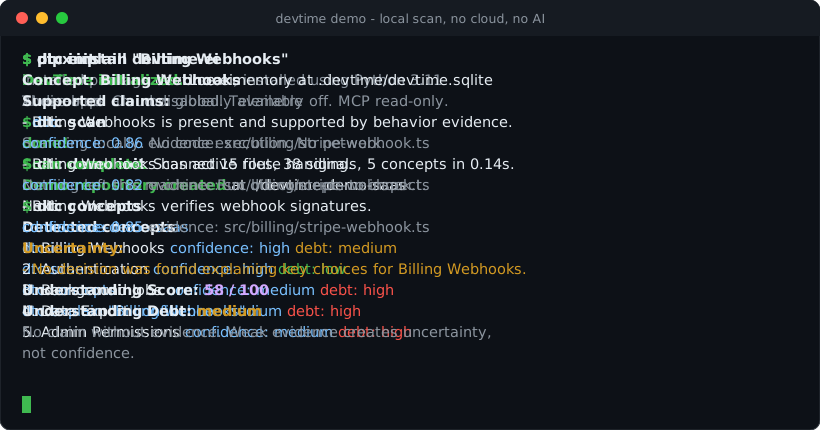
DevTime detects six supported concept families. It does not discover arbitrary domain concepts yet:
- Authentication
- Billing Webhooks
- Background Jobs
- Data Export
- Admin Permissions
- File Uploads
Anything outside these six is out of scope for now. See LIMITATIONS.md.
What DevTime does not do
- It does not execute your code.
- It does not send code or data over the network.
- It does not require or call an AI model.
- It does not guarantee correctness or safe changes.
- It does not replace code review or architecture decisions.
- It is not a documentation generator, a static analyzer, an observability tool, a productivity tracker, or an AI coding agent.
Trust model
- DevTime stores local repository memory in
.devtime/(a local SQLite database). - No network access during a scan.
- No code execution during a scan.
- Ignored directories are pruned before scanning; ignored files and secrets must never become evidence or claims.
- Every claim must link to evidence - no claim without evidence.
- Weak evidence produces uncertainty, not confidence.
- Usage is not decision: that a dependency is used does not mean someone decided why.
- Risk review is advisory by default - it does not block PRs.
Commands
| Command | Purpose |
|---|---|
dtc init |
Create local .devtime memory. |
dtc scan |
Scan the current repository and extract evidence-backed signals. |
dtc concepts |
List detected concepts with confidence and Understanding Debt. |
dtc explain <concept> |
Explain a concept: claims, evidence, confidence, uncertainty, Understanding Debt. |
dtc context <concept> |
Create a governed Context Pack for agents or humans. |
dtc risk --diff |
Review a git diff for risky changes using local evidence (advisory). |
dtc decision add |
Add a local decision record that can reduce uncertainty. |
dtc verify [claim] |
Verify repository claims against evidence: status, contradictions, freshness (experimental). |
dtc review --base <ref> |
Compare claims at two commits and report what the change did to them (advisory). |
(Also available: dtc evidence, dtc debt, dtc status, dtc doctor --privacy,
dtc export, dtc reset, dtc mcp start.)
Requires Python >= 3.11 and git. See QUICKSTART.md for a step-by-step first run and troubleshooting.
Use with coding agents (MCP)
Your coding agent starts every session amnesiac about your repository and then guesses, confidently. DevTime gives it memory it can trust: a local, read-only MCP server that answers only with claims the repository can prove, plus explicit uncertainty for what it cannot.
Install with MCP support and scan your repo:
pipx install "devtime-ei[mcp]"
cd your-repo
dtc init
dtc scan
Add DevTime to Claude Code:
claude mcp add devtime -- dtc mcp start
Or in any MCP client that reads .mcp.json:
{
  "mcpServers": {
    "devtime": {
      "command": "dtc",
      "args": ["mcp", "start"]
    }
  }
}
The agent gets four read-only tools: list_concepts, explain_concept,
get_context_pack (governed context with do-not-change-without-review paths, tests
to run, and agent guidance), and verify_claim (claim status, contradictions, and
missing evidence, computed fresh and never persisted). Local stdio only - no network listener, no write tools,
no source code returned, only evidence file paths.
DevTime is listed in the official MCP Registry as io.github.Shakargy/devtime.
Installation
Recommended: install from PyPI with pipx so the dtc
command is available on your PATH in an isolated environment:
pipx install devtime-ei
Or with pip:
pip install devtime-ei
The PyPI distribution is devtime-ei. The Python package remains devtime, and the
CLI command remains dtc. After installing, run dtc demo init to create a local
example repo to try it on.
From source
git clone https://github.com/Shakargy/devtime.git
cd devtime
python -m venv .venv
source .venv/bin/activate
pip install -e ".[dev]"
Windows PowerShell:
git clone https://github.com/Shakargy/devtime.git
cd devtime
python -m venv .venv
.venv\Scripts\Activate.ps1
pip install -e ".[dev]"
Example output
$ dtc explain "Billing Webhooks"
Concept: Billing Webhooks

Supported claims:
  - Billing Webhooks is present and supported by behavior evidence.
    type: concept  confidence: 0.86  evidence: src/billing/stripe-webhook.ts, tests/stripe-signature.test.ts
  - Billing Webhooks has active route handling.
    type: behavior  confidence: 0.82  evidence: src/billing/stripe-webhook.ts
  - Billing Webhooks verifies webhook signatures.
    type: behavior  confidence: 0.85  evidence: src/billing/stripe-webhook.ts

Uncertainty:
  - No decision was found explaining key choices for Billing Webhooks.

Understanding Score: 58 / 100
Understanding Debt: medium
causes:
  - missing or uncorroborated decision evidence
  - no confirmed owner
Understanding Score is higher = better understanding; Understanding Debt is a label (low/medium/high), not the same number.
Proof
DevTime runs on examples/demo-saas and on real repositories. During Reality
Validation it detected - and then learned from - real failures (Next.js App Router
blindness, a false Billing Webhooks detection on a generic webhook system, a DB
migration mis-counted as Background Jobs evidence, and more). Each failure became a
fixture so it cannot silently regress.
- Tests grew from 13 to 88 as real failures became fixtures.
- Scan time on a 355-file real repo dropped from ~27.3s to ~0.48s after ignored- directory pruning.
Full evidence, before/after examples, and the validation reports are in
PROOF.md and reports/reality-validation/.
Privacy and safety
- Runs entirely locally; nothing leaves your machine during a scan.
- No code execution and no network calls during scanning.
- Secrets and ignored files are excluded from evidence by design (
dtc doctor --privacyreports the boundaries). dtc resetdeletes local memory; your source code is never modified.
Known limitations
DevTime is a heuristic scanner, not a full compiler or semantic analyzer. It is currently strongest on TypeScript / Next.js / Express / FastAPI-style repositories that resemble its fixtures. False positives and false negatives are possible. Understanding Debt is a product signal, not an objective universal truth.
Read the full list - including framework coverage, risk-review scope, and what is intentionally not built yet - in LIMITATIONS.md.
Roadmap
This is an early, local-first V0 focused on being trustworthy before being large. Not yet built (intentionally): git-history signals, write-enabled MCP tools, an AI provider, a UI, and any cloud/team/enterprise features. See ROADMAP.md.
Contributing
The most valuable contribution is a fixture: a small repository pattern plus the expected concepts, allowed claims, forbidden claims, and required uncertainty. If DevTime gets something wrong on your code, that wrong output can become a fixture so it never regresses. See CONTRIBUTING.md.
License
Licensed under the Apache License 2.0. See LICENSE.
Вопросы о DevTime MCP
Как добавить DevTime MCP в Claude Code?
Выполните claude mcp add devtime -- uvx devtime-ei в терминале. Добавьте --scope user, чтобы сервер был доступен во всех проектах.
Как добавить DevTime MCP в Cursor?
Откройте ~/.cursor/mcp.json и добавьте сервер в mcpServers, используя конфигурацию Cursor из раздела установки выше.
Отправляет ли DevTime мой код в облако?
Нет, DevTime работает по принципу local-first: во время сканирования сетевой доступ отсутствует, телеметрия не собирается.
Какую информацию ИИ-агент может получить через MCP server?
Агенту доступны четыре инструмента только для чтения: список концепций, объяснение концепций, получение контекстных пакетов и проверка утверждений с использованием путей к файлам с доказательствами.
Выполняет ли DevTime мой код для проверки утверждений?
Нет, DevTime не выполняет ваш код во время сканирования.