
Превращает веб-страницы и документы в версионный контекст с цитированием, который ИИ-клиенты могут запрашивать, сравнивать и экспортировать.
Также известен как raintree-technology/docpull
- Звёзды
- 29
- Инструменты
- —
- Загрузки, 30 дней
- 762
- Последняя версия
- 6.10.0
- Последний коммит
- 13 нояб. 2026 г.
- Лицензия
- MIT
Что такое DocPull MCP?
DocPull — это MCP server. Превращает веб-страницы и документы в версионный контекст с цитированием, который ИИ-клиенты могут запрашивать, сравнивать и экспортировать.
Сводка сгенерирована из README проекта
О DocPull MCP server
DocPull позволяет преобразовывать веб-страницы и документы в контекст с цитированием и версионностью для ИИ-агентов. Он дает разработчикам возможность захватывать публичные веб-источники, такие как документация, репозитории GitHub или страницы политик, и превращать их в воспроизводимые архивы, которые ИИ может запрашивать с указанием точных фрагментов источника. Этот процесс помогает гарантировать, что ответы агента подкреплены конкретными, проверяемыми доказательствами, а не меняющимся веб-контентом.
Инструмент работает локально через Python stdio server и не требует платных аккаунтов или хостинговых сервисов. Пользователи могут управлять источниками через CLI или интегрировать этот функционал в приложения с помощью Python или TypeScript SDK. При подключении к MCP клиенту, такому как Claude Code, он предоставляет агенту инструменты для загрузки, синхронизации и сравнения контента. Система использует механизм lockfile для отслеживания хешей контента и URL-адресов источников, что позволяет легко обнаруживать расхождения в документации по сравнению с предыдущими версиями.
Что вы можете с ним делать
- 1Обнаружение изменений в документацииСравнивайте текущую веб-документацию с ранее сохраненными версиями, чтобы выявлять обновления или расхождения.
- 2Предоставление агентам контекста с цитированиемИзвлекайте конкретные, дедуплицированные фрагменты из защищенного архива для ответов на вопросы с точными цитатами.
- 3Экспорт контекста для инструментов разработкиПодготавливайте и переносите собранную документацию в специализированные форматы для использования в различных ИИ-средах.
- 4Автоматизация проверки качества документацииИспользуйте автоматизированные проверки, чтобы убедиться, что собранный контекст соответствует определенным стандартам полноты цитирования и актуальности.
Взято из README проекта. Каждый вариант использования проверен на соответствие цитате из него.
Как установить DocPull MCP
Форматы проверены 10 ноя 2026Добавить в CursorДобавить в GooseУстановка DocPull MCP в Claude Code
$ claude mcp add docpull -- uvx docpullУстановка DocPull MCP в Cursor
~/.cursor/mcp.json
{
  "mcpServers": {
    "docpull": {
      "command": "uvx",
      "args": [
        "docpull"
      ]
    }
  }
}Установка DocPull MCP в VS Code
.vscode/mcp.json
{
  "servers": {
    "docpull": {
      "type": "stdio",
      "command": "uvx",
      "args": [
        "docpull"
      ]
    }
  }
}Установка DocPull MCP в VS Code CLI
$ code --add-mcp '{"name":"docpull","type":"stdio","command":"uvx","args":["docpull"]}'Установка DocPull MCP в Claude Desktop
claude_desktop_config.json
{
  "mcpServers": {
    "docpull": {
      "command": "uvx",
      "args": [
        "docpull"
      ]
    }
  }
}Установка DocPull MCP в Codex
$ codex mcp add docpull -- uvx docpullУстановка DocPull MCP в Codex config.toml
~/.codex/config.toml
[mcp_servers.docpull]
command = "uvx"
args = ["docpull"]
Установка DocPull MCP в Gemini CLI
$ gemini mcp add -s user docpull uvx -- docpullУстановка DocPull MCP в Gemini settings.json
~/.gemini/settings.json
{
  "mcpServers": {
    "docpull": {
      "command": "uvx",
      "args": [
        "docpull"
      ]
    }
  }
}Автоматические проверки
Запущено 14 нояб. 2026 г.Полный отчёт →Прошло наши автоматизированные проверки. Это не аудит безопасности: изучите код и предоставьте серверу минимально необходимый доступ. Как работают проверки

- Связанный и доступный исходный репозиторийraintree-technology/docpull is public and reachablegithub.com/raintree-technology/docpull ↗Пройдено
- Пакет указывает этот репозиторий как источникdocpull names raintree-technology/docpull as sourcepypi.org/project/docpull/ ↗Пройдено
- Происхождение сборки (аттестация Sigstore)Sigstore attestation for docpullpypi.org/project/docpull/ ↗Пройдено
- Open source лицензия (OSI)MITspdx.org/licenses/MIT.html ↗Пройдено
- Коммит или релиз за последний годLast commit or release 2026-11-13github.com/raintree-technology/docpull ↗Пройдено
- OpenSSF ScorecardНе проверялось
- Имя пакета не похоже на популярный пакетNo popular package one edit away from docpullПройдено
- Нет критических предупреждений в пакете или его зависимостяхthe package checked; no critical advisoryosv.dev ↗Пройдено
- Нет скрытых инструкций для модели0 tool descriptions and the README read; no override phrases, credential paths or hidden charactersПройдено
- Деструктивные инструменты помеченыНе проверялось
- Удалённая конечная точка отвечает на рукопожатие MCPНе проверялось
README
Открыть на GitHubDocPull
Active open-source project · MIT License
DocPull turns changing public web sources into cited, reproducible context for AI agents and retrieval pipelines. Use it when your application needs to know which sources it used, whether they changed, and how to rebuild the same context later.


Install and sync your first source
pip install docpull
docpull init stripe-docs
docpull add https://docs.stripe.com
docpull sync
docpull query "retry policy" --max-tokens 4000
docpull diff
docpull export context-pack --target cursor
The project stores declared sources in docpull.yaml and resolved inputs in
.docpull/context.lock.json. Later syncs produce a hash-based diff while preserving
source URLs, content hashes, run IDs, citations, and export metadata.
docpull query retrieves deduplicated passages from locked archives with version
filters, a response budget, and exact source spans. The same query is available
through the Python SDK and MCP. See Query locked context
for budget semantics and queries across projects.
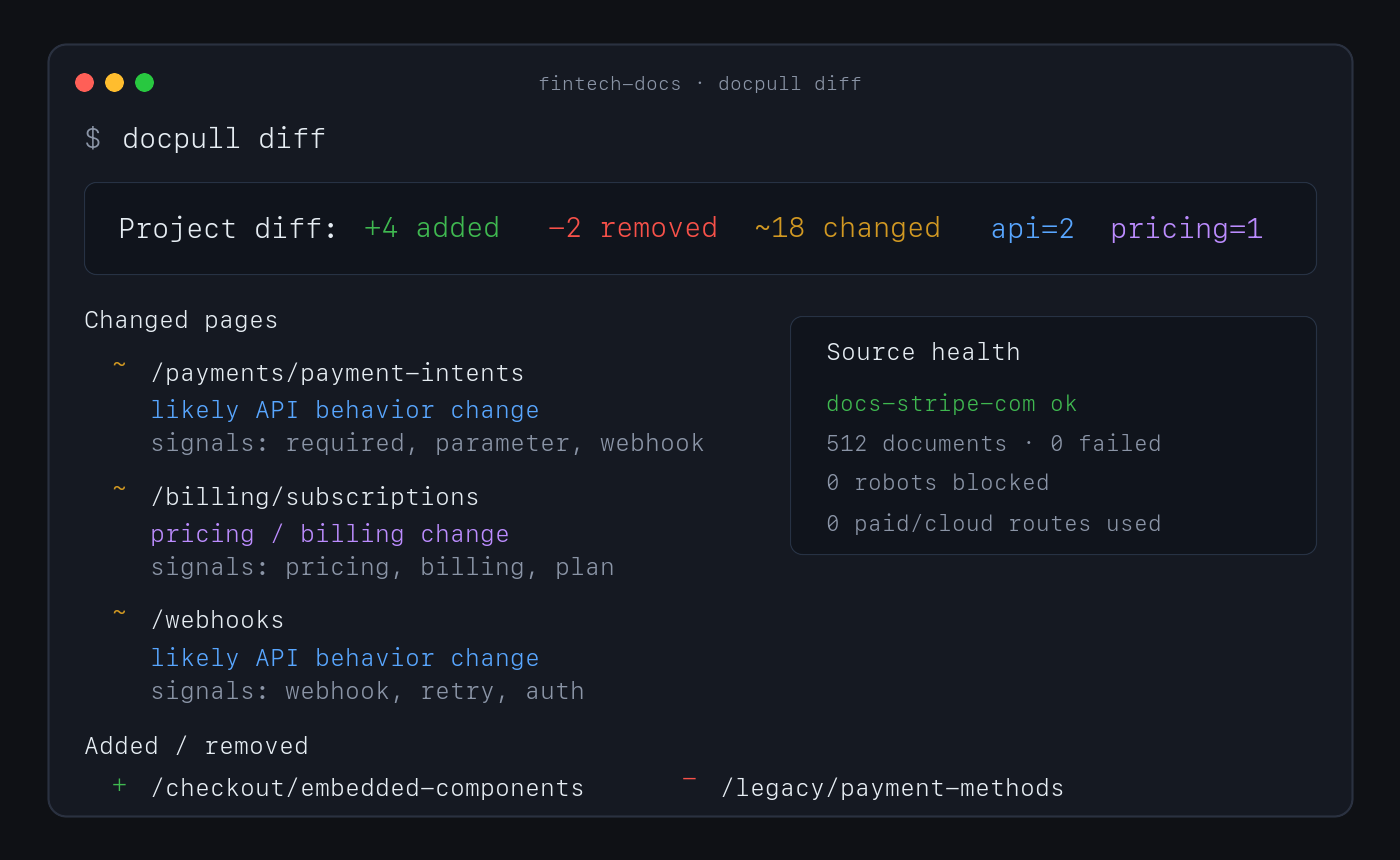
No account or paid API is required for this path. Direct fetching, discovery, extraction, indexing, pack analysis, and diffs run locally.
Why use DocPull
- Reproduce agent context. Stable IDs, hashes, manifests, and lockfiles show which source versions produced an answer or artifact.
- Detect source drift. Sync and diff documentation, product pages, policies, feeds, repositories, packages, standards, and local documents.
- Keep evidence inspectable. Markdown, NDJSON, SQLite, citations, and provenance sidecars remain readable without a hosted service.
- Choose the downstream surface. Export context for agent clients, vector import, data workflows, or a versioned context-pack release.
- Keep expensive routes explicit. Browser and cloud rendering require an explicit choice and can be blocked with a zero-dollar budget.
How it works
declared sources → local acquisition → versioned evidence → diff and validation → export
DocPull's v3 pack contract separates raw extraction, agent-ready context, and eval-grade evidence. Validate the level a downstream system requires:
docpull pack prepare packs/docs --eval-grade
docpull pack validate packs/docs --level eval
docpull ci --prepare
docpull ci checks freshness, citation coverage, pack quality, rights metadata, and
other configured gates. It writes context-ci.report.json and CONTEXT_CI.md, then
exits non-zero when a hard gate fails.
Supported surfaces
| Surface | Use it for | Start here |
|---|---|---|
| CLI | Fetch, sync, diff, validate, and export | docs/cli-recipes.md |
| Python SDK | Embed acquisition in Python applications | docs/surface-contract.md |
| MCP server | Give local agent clients source tools | MCP server |
| TypeScript SDK | Read local packs and invoke the CLI from Node or Bun | sdk/js/README.md |
| Agent plugin | Install the supported MCP workflow in an agent client | plugin/README.md |
Common source shapes include static and server-rendered websites, OpenAPI documents, feeds, papers, public GitHub repositories, npm and PyPI packages, standards, datasets, transcripts, Wikimedia pages, product and policy pages, and local PDF or office files. See context-pack workflows for the complete surface.
MCP server
pip install 'docpull[mcp]'
docpull mcp
Claude Code can register the same local server:
claude mcp add --transport stdio docpull -- docpull mcp
The Python stdio server is the supported MCP server.
Limits and security boundary
DocPull is an evidence-acquisition engine, not a hosted competitive-intelligence product. It owns fetching, explicit rendering adapters, versioning, citations, hashing, validation, replay, and export. Downstream products own scheduling, human review, approved claims, legal conclusions, accounts, and notifications.
The default path does not handle complex interactive browser workflows, CAPTCHAs, stealth scraping, or private dashboards. JavaScript rendering is explicit. Authenticated sources require environment-variable references; DocPull does not persist credential values in project artifacts.
Security defaults include HTTPS-only fetching, robots.txt compliance, SSRF and DNS rebinding protections, redirect guards, XXE protection, and path-traversal checks. Read the web-source boundary, security posture, and evidence-engine decision before extending acquisition behavior.
Documentation and evidence
- CLI recipes — Common commands and advanced workflows.
- Context dependencies — Project and lockfile model.
- Context Pack Contract v3 — Artifact levels and compatibility.
- Public contracts — Schemas and versioning rules.
- Alternatives — Browser automation and hosted extraction tradeoffs.
- JavaScript SDK and loaders — TypeScript client and LangChain/LlamaIndex loaders.
- Dependency security — Locked dependency sets and optional parser support.
- Evaluation lab — Reproducible methods, results, and claim boundaries.
- Changelog — Release history.
Raintree open-source system
DocPull owns evidence acquisition and reproducible agent context. It can be used independently; the sibling projects do not imply a required integration or shared release cycle.
| Project | Responsibility |
|---|---|
| Raintree Standards | Defines governed requirements and evidence. |
| Trellis | Enforces shared JavaScript and TypeScript code policy. |
| HIG Doctor | Audits interface source and provides HIG guidance. |
| PolicyStrata | Tests cross-layer policy behavior. |
See the Raintree open-source portfolio for current lifecycle and distribution links.
Raintree also builds BetterOff, which keeps a household's spending, investments, assets, debts, and net worth in one current record.
Project policies
Contributing · Code of Conduct · Security · Metrics and evidence limits · Source repository · MIT License
Вопросы о DocPull MCP
Как добавить DocPull MCP в Claude Code?
Выполните claude mcp add docpull -- uvx docpull в терминале. Добавьте --scope user, чтобы сервер был доступен во всех проектах.
Как добавить DocPull MCP в Cursor?
Откройте ~/.cursor/mcp.json и добавьте сервер в mcpServers, используя конфигурацию Cursor из раздела установки выше.
Как установить и запустить DocPull MCP server?
Установите расширение MCP через pip и запустите docpull mcp, чтобы запустить поддерживаемый локальный stdio server. Вы также можете зарегистрировать его в Claude Code с помощью команды claude mcp add.
Нужен ли DocPull аккаунт или платный API?
Нет. По умолчанию инструмент выполняет загрузку, извлечение, индексацию и сравнение (diff) локально, не требуя аккаунта или платного API.
Может ли DocPull отслеживать изменения в источниках?
Да. Повторная синхронизация создает diff на основе хешей, который показывает изменившиеся источники, сохраняя при этом URL, хеши контента, run ID и цитаты.
Какие меры безопасности использует DocPull?
По умолчанию используется только HTTPS-загрузка с соблюдением robots.txt, защитой от SSRF и DNS rebinding, защитой от редиректов, защитой от XXE и проверкой на path traversal.
Как обрабатываются аутентифицированные источники?
Учетные данные должны передаваться через переменные окружения и не сохраняются в артефактах проекта.