
Маршрутизирует вызовы LLM через более чем 20 провайдеров, используя метод round-robin и механизмы отката (fallback), чтобы минимизировать прерывания из-за лимитов запросов и снизить затраты.
Также известен как mrrlin-dev/external-agents, @mrrlin-dev/external-agents
- Звёзды
- 0
- Инструменты
- —
- Загрузки, 30 дней
- —
- Последняя версия
- —
- Последний коммит
- 16 окт. 2026 г.
- Лицензия
- MIT
Что такое external-agents MCP?
external-agents — это MCP server. Маршрутизирует вызовы LLM через более чем 20 провайдеров, используя метод round-robin и механизмы отката (fallback), чтобы минимизировать прерывания из-за лимитов запросов и снизить затраты.
Сводка сгенерирована из README проекта
О external-agents MCP server
Разработчики, использующие кодинг-агентов вроде Claude Code, Codex или Cursor, могут снизить расходы и избежать ограничений по количеству запросов, маршрутизируя вызовы LLM через разнообразный пул моделей. Этот MCP server объединяет более 20 провайдеров, включая Google AI Studio, Groq, OpenRouter и DeepSeek, в единый ресурс для диспетчеризации. Он работает локально, подключаясь к вашим существующим CLI-инструментам или через API-ключи, которыми вы управляете через локальную панель управления.
Вместо того чтобы полагаться на одну дорогую флагманскую модель для каждой задачи, вы можете использовать инструмент диспетчеризации для отправки более простых запросов дешевым моделям или моделям с бесплатным уровнем доступа. Сервер отслеживает заголовки ответов в реальном времени, чтобы контролировать оставшиеся токены и время сброса лимитов, автоматически переключая провайдеров при возникновении ошибки 429 (rate limit). Он также поддерживает инструмент pick_agents для выбора нескольких исправных моделей от разных провайдеров, что полезно для создания консенсус-панелей или экспертных групп для проверки изменений в коде.
Что вы можете с ним делать
- 1Снижение затрат на API для простых задачПередавайте рутинную работу, такую как суммаризация diff или переименование символов, более дешевым моделям из пула.
- 2Избежание прерываний из-за лимитов запросовАвтоматически переключайтесь на другого провайдера, когда текущий возвращает ошибку ограничения частоты запросов.
- 3Проведение многомодельного консенсусного ревьюЗапрашивайте нескольких агентов от разных провайдеров, чтобы они выступили в роли жюри для проверки ответов моделей.
- 4Проверка доступности моделей и ключейЗапускайте аудит, чтобы проверить, какие ключи провайдеров работают и какие модели доступны на вашем тарифном плане в данный момент.
Взято из README проекта. Каждый вариант использования проверен на соответствие цитате из него.
Как установить external-agents MCP
Форматы проверены 10 ноя 2026Добавить в CursorДобавить в GooseУстановка external-agents MCP в Claude Code
$ claude mcp add external-agents -- npx -y @mrrlin-dev/external-agentsУстановка external-agents MCP в Cursor
~/.cursor/mcp.json
{
  "mcpServers": {
    "external-agents": {
      "command": "npx",
      "args": [
        "-y",
        "@mrrlin-dev/external-agents"
      ]
    }
  }
}Установка external-agents MCP в VS Code
.vscode/mcp.json
{
  "servers": {
    "external-agents": {
      "type": "stdio",
      "command": "npx",
      "args": [
        "-y",
        "@mrrlin-dev/external-agents"
      ]
    }
  }
}Установка external-agents MCP в VS Code CLI
$ code --add-mcp '{"name":"external-agents","type":"stdio","command":"npx","args":["-y","@mrrlin-dev/external-agents"]}'Установка external-agents MCP в Claude Desktop
claude_desktop_config.json
{
  "mcpServers": {
    "external-agents": {
      "command": "npx",
      "args": [
        "-y",
        "@mrrlin-dev/external-agents"
      ]
    }
  }
}Установка external-agents MCP в Codex
$ codex mcp add external-agents -- npx -y @mrrlin-dev/external-agentsУстановка external-agents MCP в Codex config.toml
~/.codex/config.toml
[mcp_servers.external-agents]
command = "npx"
args = ["-y", "@mrrlin-dev/external-agents"]
Установка external-agents MCP в Gemini CLI
$ gemini mcp add -s user external-agents npx -- -y @mrrlin-dev/external-agentsУстановка external-agents MCP в Gemini settings.json
~/.gemini/settings.json
{
  "mcpServers": {
    "external-agents": {
      "command": "npx",
      "args": [
        "-y",
        "@mrrlin-dev/external-agents"
      ]
    }
  }
}Автоматические проверки
Запущено 15 нояб. 2026 г.Полный отчёт →Прошло наши автоматизированные проверки. Это не аудит безопасности: изучите код и предоставьте серверу минимально необходимый доступ. Как работают проверки

- Связанный и доступный исходный репозиторийmrrlin-dev/external-agents is public and reachablegithub.com/mrrlin-dev/external-agents ↗Пройдено
- Пакет указывает этот репозиторий как источник@mrrlin-dev/external-agents names mrrlin-dev/external-agents as sourcenpmjs.com/package/@mrrlin-dev/external-agents ↗Пройдено
- Происхождение сборки (аттестация Sigstore)Sigstore attestation for @mrrlin-dev/external-agentsnpmjs.com/package/@mrrlin-dev/external-agents/v/0.63.0#prove ↗Пройдено
- Open source лицензия (OSI)MITspdx.org/licenses/MIT.html ↗Пройдено
- Коммит или релиз за последний годLast commit or release 2026-10-16github.com/mrrlin-dev/external-agents ↗Пройдено
- OpenSSF ScorecardНе проверялось
- Имя пакета не похоже на популярный пакетNo popular package one edit away from @mrrlin-dev/external-agentsПройдено
- Нет критических предупреждений в пакете или его зависимостяхНе проверялось
- Нет скрытых инструкций для модели0 tool descriptions and the README read; no override phrases, credential paths or hidden charactersПройдено
- Деструктивные инструменты помеченыНе проверялось
- Удалённая конечная точка отвечает на рукопожатие MCPНе проверялось
README
Открыть на GitHub@mrrlin-dev/external-agents — Multi-LLM MCP Server



🔮 Part of Mrrlin (mrrlin.com) — The autonomous workspace for developers running AI coding agents. We extracted
external-agentsfrom Mrrlin so anyone using Claude Code, OpenAI Codex, or Cursor can leverage free-tier multi-model routing and adversarial review panels. Ships standalone under MIT.
Give your coding agent a pool of 40+ cheaper models to hand work off to. Cut your bill 10-100×.
Changelog: CHANGELOG.md
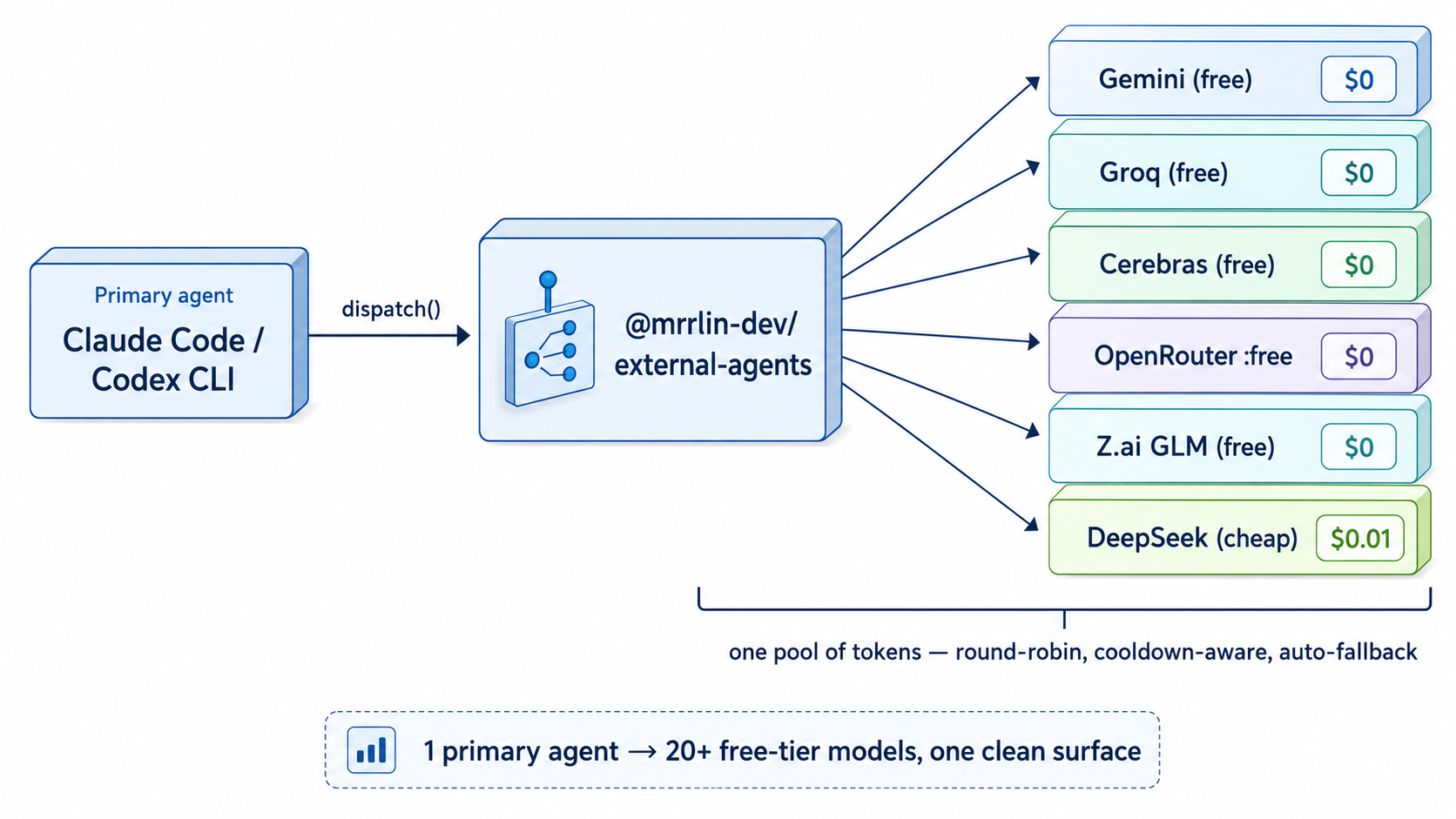
The problem this solves
You run Claude Code or Codex all day. Most of what it does — reading files to answer one question, running a test suite, renaming a symbol across 30 files, summarizing a diff — does not need a frontier model. But it all bills at frontier prices, on one account, against one rate limit.
Meanwhile you probably already have a handful of separate, mostly-free quota buckets sitting idle: a Google AI Studio key, a Groq key, OpenRouter's :free models, whatever agentic CLIs you're logged into.
external-agents turns those into one pool your primary agent can dispatch into. It picks a healthy provider per call, round-robins across buckets, and when one returns 429 it moves to a different provider and honors that provider's real reset time.
It's also a clean substrate for LLM-Council-style panels: one pick_agents call gives you N picks from N distinct providers, so a jury of models isn't secretly the same model four times.
What this is optimizing for
Every design decision in here answers to five goals. They are the reason the project exists, and they are measurable — when a change makes one of these numbers worse, that is a regression, whatever else it improved.
- A seat that gets handed out is alive.
pickreturning an agent is a claim that a dispatch to it can succeed right now. An agent that has never once answered must not be offered as though it might. - A prompt that gets sent fits. The chosen seat's real ceiling — context window, tokens per minute, whatever is left of the current window — has to hold the whole prompt before it goes out. An HTTP 413 or a token-limit 429 is a routing bug, not bad luck.
- More successes, fewer failures. A failed dispatch is a round of work thrown away, and inside a consensus panel it is a lost voice — the run gets a thinner verdict, not just a slower one.
- Load spreads across the live models of a tier. No key carries a whole tier while its siblings idle, and a broken agent must not be re-offered faster than a working one just because failing is quick.
- Provider limits get spent, not admired. A free tier that resets unused every night is tokens thrown in the bin. The pool should approach each bucket's ceiling rather than sit at one percent of it.
Goals 1, 2 and 5 all need the same thing, and it is worth stating plainly: the provider
tells you the answer on every single response. x-ratelimit-limit-tokens,
x-ratelimit-remaining-tokens, x-ratelimit-reset-* — the real ceiling for your key and
how much of it is left, on success as well as on failure. A registry entry is a guess about
that; a response header is a measurement. So the rule this codebase follows is: observation
beats declaration, and a limit discovered by being rejected is a limit that was recorded too
late.
These numbers are watched rather than asserted — see Watching the pool for regressions.
🚀 2-minute setup
curl -fsSL https://raw.githubusercontent.com/mrrlin-dev/external-agents/main/install.sh | bash
The script installs the package, registers the MCP server with Claude Code and/or Codex (whichever it finds), and opens a local dashboard where you paste provider keys inline:
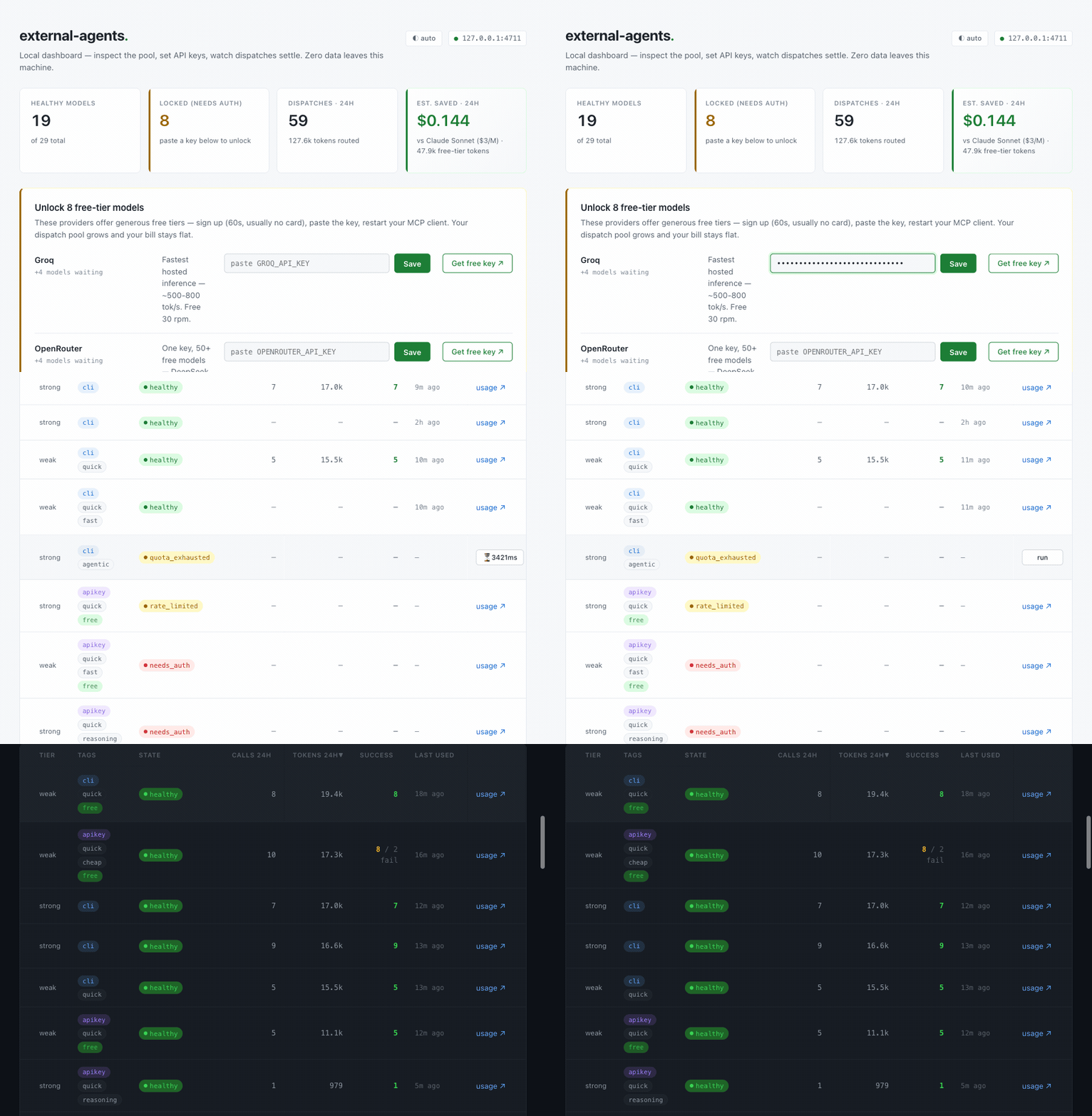
Then restart your MCP client. Your agent now has the tools.
npm install -g @mrrlin-dev/external-agents

# Register with whichever host(s) you use
claude mcp add external-agents external-agents-mcp
codex  mcp add external-agents -- external-agents-mcp

# Set up keys
external-agents ui        # opens http://127.0.0.1:4711
Requires Node ≥ 20. Works on macOS and Linux; Windows via WSL.
How much do I have to set up before this is useful?
Nothing, if you're already logged into an agentic CLI. Entries backed by a subscription you already have — claude, codex, cursor-agent, ollama, opencode, kiro-cli, agy — need no API key at all; they're usable the moment the binary is on your PATH and logged in.
Everything else is incremental. Each key you paste lights up more of the pool, and none of them are required:
| Paste this | Get | Cost |
|---|---|---|
GEMINI_API_KEY (Google AI Studio) |
Gemini Flash | Free tier, no card |
GROQ_API_KEY |
Llama 3.3 70B, gpt-oss 120B/20B, Llama 3.1 8B | Free tier, no card |
OPENROUTER_API_KEY |
5 :free models incl. Nemotron Ultra |
Free tier, no card |
DEEPSEEK_API_KEY |
DeepSeek v4 flash + v4 pro (reasoner) | Prepaid, needs a small top-up |
Signup for each is about a minute. The dashboard links straight to the right page and has a paste box next to it.
What your agent gets
Two MCP tools, available automatically after setup:
-
dispatch(agent_id, prompt)— run a prompt on a specific pool member. Auto-retries on a different provider if the first is rate-limited, and honors the provider's own reset time rather than a made-up 1-hour default.Pass
cwd(an existing directory — a git worktree, say) and a direct CLI will inspect and edit files in place.cwddoes not grant filesystem access to HTTP-based models; give those context withfilesinstead. Whencwdis a git repo, thefileslist that comes back is the git-changed set, not the whole tree.A
cwdthat is a git repo also gets a short provenance header prepended to the prompt — branch, commit and subject, drift versus upstream, whether the worktree is dirty — and the same facts come back to you asrepo. This is what stops a worker pointed at a stale checkout from producing an accurate report about code that is no longer there and having it read as a hallucination. It's read-only and never fetches. If you want that to be a hard precondition rather than a note,external-agents dispatch --require-base origin/mainrefuses to dispatch at all when the checkout doesn't contain that ref — exit 6 for a wrong checkout, 2 for a usage error. Being ahead of the ref is fine; the base is a floor, not an equality check. -
pick_agents(n, min_distinct_providers)— ask for N healthy agents from N different providers. This is the primitive for fan-out: jury-style review, self-consistency checks, your own consensus loop.
Both tools carry the routing guidance below in their descriptions, so any model reading the schema at runtime picks up the same bias.
Everything is also available from the terminal — external-agents pick, dispatch, status, stats, audit — if you'd rather script it than go through MCP. Run external-agents with no arguments for the full list.
What's in the pool
28 bundled entries, 25 enabled out of the box. The rest are paid upgrades that stay off until you opt in.
| Provider | Entries | What you need |
|---|---|---|
| Google AI Studio | Gemini 3.6 Flash; Gemini 3.1 Pro (off — no free tier) | GEMINI_API_KEY, free tier |
| Groq | gpt-oss 120B, gpt-oss 20B, Qwen3.6 27B | GROQ_API_KEY, free tier |
| OpenRouter | 5 :free models incl. Nemotron Ultra & Super, Gemma 4, gpt-oss 20B |
OPENROUTER_API_KEY, free tier |
| Antigravity | Gemini Flash/Pro, Claude Sonnet 4.6, Claude Opus 4.6, gpt-oss 120B | agy CLI, logged in |
| Anthropic | Claude Opus 4.8, Sonnet 5, Haiku 4.5 | claude CLI subscription |
| Codex | GPT-5.4 (CLI default) and GPT-5.4-mini | codex CLI subscription |
| Ollama Cloud | gpt-oss 20B, gpt-oss 120B | ollama CLI |
| DeepSeek | v4-flash, v4-pro (both off until you add a key) | DEEPSEEK_API_KEY, prepaid |
| cursor-agent / opencode / kiro-cli | one agentic CLI reviewer each | the respective CLI |
Got a second Google project? Google AI Studio can rate-limit an entire project at once, separately from each model's own per-minute limit — so a second key from the same account is a genuinely independent bucket, not a retry of the first. The dashboard's "+ Add another key" clones the provider's models under a new slug (google → google2 → google3…) and stores it in your local overlay, where it stays removable. The same applies to any key-based provider here.
Google's strong-tier model is the one bundled entry that's off by default: Gemini 3.1 Pro has a free-tier allowance of zero, so reaching it at all needs billing enabled. It stays bundled so you can flip it on if that's what you want. If you want a strong model for free instead, the pool has nine — Nemotron Ultra and Super on OpenRouter, gpt-oss 120B on Groq and Ollama, and Claude Opus / Gemini Pro through Antigravity.
DeepSeek ships disabled because its API is prepaid — with no key and no balance it can't answer anything, so it stays out of your pool until you add DEEPSEEK_API_KEY, at which point both entries turn themselves on.
Cerebras (removed in 0.13.0) and Z.ai (removed in 0.22.0) are no longer bundled — both need paid-provider setup. Add them back locally with add-model if you have a plan.
Missing a provider? Suggest it — the dashboard has a form that opens a pre-filled issue.
Keeping the pool honest
Providers deprecate models, free tiers rotate, keys expire. The bundled registry tells you what exists; only a real call tells you what your account can still reach.
external-agents audit                 # every enabled entry with an HTTP transport
external-agents audit --provider google   # just one bucket
external-agents audit --include-disabled  # include switched-off entries too
One round-trip per entry, concurrent per provider so you don't trip rate limits, and the verdicts are written to state.json — so the dashboard and dispatch immediately reflect ground truth:
✓ healthy— key works, model exists⚠ needs_auth— 401/403, paste or refresh the key✗ model_unavailable— key is fine, this model isn't on your tier⏳ rate_limited— hit the current limit, will recover? errored_transient— something went wrong once; expires by itself after 15 minutes! probe_error— the probe command couldn't run here at all (usuallyPATH). Says nothing about the agent, so nothing is written
audit also sweeps this package's own temp directories once it's done, reporting what went. Those directories hold each dispatch's generated.md — the model's full response, in plain text — and the OS only reclaims them after about a month. The window defaults to 3 days; EXTERNAL_AGENTS_TEMP_RETENTION_DAYS changes it, and a negative value turns the sweep off. Nothing outside this package's own prefixes is ever touched, symlinks are skipped rather than followed, anything sitting on a different filesystem (a mount point) is left alone, and nothing modified in the last 15 minutes is removed whatever the window says — so a dispatch running right now can't lose its workdir even if the window is set to zero.
Switched-off entries are skipped by default: they can't be dispatched anyway, and for a prepaid provider auditing one spends real money to learn nothing. external-agents status shows a use column so a green healthy next to a switched-off entry can't be misread as "available".
Day to day, external-agents ui is the same information as a page: live provider state, usage, and a paste box per provider. It binds to loopback only. Individual entries have an on/off switch (external-agents toggle <id> --disabled) if you want one out of rotation without deleting anything.
When something fails and you want to know why
external-agents stats keeps a 400-character preview of the last error per agent — enough for the dashboard, rarely enough to fix anything. The preview is a tail, so a CLI that prints a banner and then throws gets the banner clipped in and the exception clipped out.
The sidecar failure log is the other half. It is off by default and records nothing until you switch it on:
external-agents failures on
From then on every failed attempt is appended whole to ~/.local/state/external-agents/failures.jsonl — one JSON object per line:
- dispatch — full stdout, full stderr, the exact argv, the cwd, the HTTP request and the provider's untruncated response body
- audit and credential verify — the raw probe output the hint clips to 200 characters
- read-only probe — including the case where a declared read-only command wrote to the canary
- pre-dispatch refusals — unknown agent, disabled agent,
--require-basemismatch, no escalation candidate. These never reach the dispatch log at all, and they are the ones hardest to reconstruct later: nothing was spawned, so there is no exit code to find.
Each row also carries the classification drawn from that output (needs_auth, quota_exhausted, model_unavailable, harness_failure), so a model reading the file can tell "your key is wrong" from "this model no longer exists" from "your PATH is broken" without re-deriving it.
That is the intended use. The log is written to be pasted:
external-agents failures tail 50      # raw JSONL — hand it to a model and ask what to fix
external-agents failures status       # is it on, how big, which agents fail most
external-agents failures off
external-agents failures clear
The switch lives in ~/.local/state/external-agents/config.json, not in the package — so npm i -g @mrrlin-dev/external-agents@latest cannot silently turn it back off. EXTERNAL_AGENTS_FAILURE_LOG=1 (or =0) overrides the file for a single run; EXTERNAL_AGENTS_FAILURE_LOG_FILE points the sink somewhere else.
Everything stays on your disk — the file is 0600 and nothing is transmitted anywhere. Secrets are stripped on the way in: every key-shaped environment value this process is holding is blanked by exact match (in its escaped form too, for the pass that runs over the serialised line), plus a pattern pass for tokens it never held, plus a shape pass for a password embedded in a connection string, plus a final pass over the serialised line. Which names count as key-shaped is a list, and a list is only as complete as the conventions someone thought of — KEY, TOKEN, SECRET, AUTH, PAT, PSK and their neighbours are in it.
The tool does not write your prompt down — prompt_text is dropped and the prompt positional in the argv becomes a byte count; --with-prompts opts back in. That is not the same as a promise that no prompt text is in the file: many CLIs echo the prompt back on stdout, and raw.stdout is captured whole, which is the whole point of the sink. Read the file before you paste it somewhere you wouldn't paste the prompt.
The other log: dispatch-log.jsonl
Beside it sits a second, much smaller file — one ~300-byte row per dispatch, no prompt text, no raw streams, written whether the call succeeded or not. That one is always on, and it stays that way: it is where get_stats, doctor and the observed-limit ledger get their numbers, and every defect this pool has fixed in that area was found by reading it rather than by reading code. There is no switch, because a pool that has quietly stopped measuring itself looks exactly like a healthy one.
What it is not allowed to do is grow forever on your disk:
-
Retention is 30 days, and it is measured in days rather than bytes on purpose. Every question anyone asks this file is a question about time —
--since 24h,doctor's measured-allowance window — and a byte cap answers those only by coincidence of how busy you were: a quiet month keeps a year of dead rows, a busy week drops the far end of a window you were still asking about. Nothing errors in either direction, which is what makes bytes the wrong axis.EXTERNAL_AGENTS_DISPATCH_LOG_RETENTION_DAYSchanges the window;EXTERNAL_AGENTS_DISPATCH_LOG_MAX_BYTESis a 32 MiB backstop for a burst that outruns the age rule inside one window, and it says on stderr when it trims.Trimming happens when the oldest row is about a fifth of a window overdue, not the moment it crosses the line — so the file settles between 30 and 36 days and gets rewritten every few days instead of on every single dispatch. Only one process trims at a time. An abandoned lock is reclaimed by checking whether its holder is still running — never by how old it looks, because a lock's age cannot distinguish an abandoned prune from a slow one. In the one case liveness gets wrong (a recycled pid) the tool tells you, with the command to clear it, rather than guessing.
-
EXTERNAL_AGENTS_DISPATCH_LOG_FILEpoints it somewhere else — the same overridefailures.jsonlhas. -
The file is
0600(re-checked on every write, not only at creation), and the one free-text field in a row — the 400-character error preview kept on failures — goes through the same redaction as the sidecar.
Adding your own model
An internal endpoint, a beta model, anything not bundled:
external-agents add-model \
  --id kimi-k2-instruct \
  --provider groq \
  --model moonshotai/kimi-k2-instruct \
  --url https://api.groq.com/openai/v1/chat/completions \
  --env GROQ_API_KEY \
  --tags free,fast
That writes to ~/.local/state/external-agents/agents.local.yaml, layered over the bundled registry — same id replaces, new id appends. Package upgrades never clobber it. Full walkthrough: docs/adding-a-provider.md.
Watching the pool for regressions
The five goals above are checked, not assumed:
external-agents doctor                # last 24h
external-agents doctor --since 7d     # a wider window
external-agents doctor --json         # machine-readable, same checks
One check per goal, each carrying the evidence that lets you verify or dismiss it and the command that fixes it. Exit code is 1 only on a high-severity finding and 0 otherwise, so it is safe to run unattended and only shouts when something actually broke.
| Check | Goal | Means |
|---|---|---|
oversized_dispatch |
2 | An HTTP 413 happened. With measured ceilings this should be unreachable. |
unmeasured_seat |
2 | An enabled HTTP seat has no ceiling, declared or observed — nothing can protect it. |
never_answered |
1 | An agent was dispatched repeatedly and never once succeeded. |
success_rate |
3 | The window fell below the floor. |
tier_imbalance |
4 | One seat is taking far more than its share of a tier. |
idle_bucket |
5 | A known allowance is going unspent, and nothing says the family is capped elsewhere. |
Every day, without being asked
Point a scheduler at it. doctor is the tested half — thresholds, evidence, a
remedy per finding, an exit code — and whatever runs it on a timer is the other
half. A Claude Code scheduled task works well, because the interesting part of a
daily check is not running the command but deciding what in its output is worth
waking somebody for:
Run `external-agents audit` then `external-agents doctor --since 24h --json`.
Report only findings with severity "high", plus anything that changed since
yesterday. If nothing is high and nothing changed, reply with one line.
Run audit before doctor, and that order is the design: audit is one
max_tokens: 1 ping per HTTP entry, and the probe response carries the
provider's real rate-limit ceiling — so the measuring pass repairs the commonest
finding instead of merely reporting it. A watchdog that fixes what it can is
worth keeping; one that only complains gets muted.
Routing philosophy — be smart, not lavish
pick_agents defaults to tier: "weak" on purpose. Most tasks don't need a frontier model.
Single-file edits, refactors, glue code, summaries, format conversions, well-scoped bug fixes, docstrings, test cases — a Gemini Flash, Groq gpt-oss, DeepSeek, or OpenRouter :free model gets you the same correct answer as Claude Opus or Codex Pro, faster and for a fraction of the cost.
Reach for strong tier (Claude Opus, Codex, DeepSeek Reasoner, Nemotron Ultra) when the task is genuinely one of these:
- Multi-step debugging with an unclear root cause
- Architecture or API-shape decisions
- Novel algorithms, math-heavy transforms
- Ambiguous requirements the model has to disambiguate
If a weak-tier agent gets it wrong, the first move is to sharpen the spec, not escalate the tier. escalate_to_pro is a retry lever, not a default — reaching for a bigger model hides prompt-engineering failures behind expensive compute, and you'll pay for it on every subsequent call too.
Related: --effort <level> controls reasoning depth where the provider supports it. Use high for planning, design, and review; leave it off for mechanical edits. See docs/effort.md for the verified per-agent table.
🔮 Mrrlin uses this (and you can too)
Mrrlin (mrrlin.com) is the autonomous engineering workspace this engine was extracted from.
In Mrrlin, autonomous agents collaborate across software lifecycles under clear human oversight:
- 🛡️ 4-Model Consensus Panels: High-stakes architecture specs and PR diffs are reviewed by an adversarial panel: GPT + Gemini Pro alongside two dynamic free-tier terminal reviewers from this exact pool. Stacking free tiers keeps the incremental compute cost of cross-model verification near zero.
- 🌿 Ephemeral Worktrees: Coding agents run inside isolated Git worktrees (
~/.mrrlin/worktrees), significantly reducing branch interference and file conflicts during parallel execution. - ⚡ Autopilot & Triage: Background coordinators auto-triage incoming tasks, formulate execution plans, and assign the most cost-effective model tier for each step.
- 🎚️ Multi-Tier Autonomy: Tasks declare clear boundaries:
auto(hands-off),minimal_human(sign off only on sensitive actions), orhuman_only.
You don't need Mrrlin to use external-agents — this package is completely standalone. But if you are building multi-agent workflows or looking for a unified workspace, check out mrrlin.com.
Вопросы о external-agents MCP
Как добавить external-agents MCP в Claude Code?
Выполните claude mcp add external-agents -- npx -y @mrrlin-dev/external-agents в терминале. Добавьте --scope user, чтобы сервер был доступен во всех проектах.
Как добавить external-agents MCP в Cursor?
Откройте ~/.cursor/mcp.json и добавьте сервер в mcpServers, используя конфигурацию Cursor из раздела установки выше.
Как external-agents помогает снизить расходы?
Он позволяет вашему основному агенту передавать задачи пулу из более чем 40 дешевых или бесплатных моделей вместо того, чтобы использовать дорогие флагманские модели для каждой задачи.
Что произойдет, если провайдер исчерпает лимит запросов (rate limit)?
Сервер автоматически переключится на другого провайдера и будет учитывать специфическое время сброса лимитов этого провайдера.
Можно ли использовать это с существующими CLI-инструментами, такими как Claude Code или Cursor?
Да, инструмент разработан для работы с агентными CLI, такими как Claude Code, OpenAI Codex, Cursor и другими.
Как добавить новые API-ключи в пул?
Вы можете использовать локальную панель управления, предоставляемую при установке, чтобы вставить ключи провайдеров.