
MCP server Candor UI
Коммит 14 нояб. 2026 г.Предоставляет документацию и рекомендации по компонентам для создания честных пользовательских интерфейсов ИИ-агентов с помощью shadcn/ui.
Также известен как MethodicDev/candor, candor
- Звёзды
- 0
- Инструменты
- —
- Загрузки, 30 дней
- —
- Последняя версия
- 6.1.3
- Последний коммит
- 14 нояб. 2026 г.
- Лицензия
- MIT
Что такое Candor UI MCP?
Candor UI — это MCP server. Предоставляет документацию и рекомендации по компонентам для создания честных пользовательских интерфейсов ИИ-агентов с помощью shadcn/ui.
Сводка сгенерирована из README проекта
О Candor UI MCP server
Candor UI предлагает специализированный набор интерфейсных компонентов и документацию, разработанную для создания честных пользовательских интерфейсов для ИИ-агентов. Инструментарий создан для разработчиков, использующих shadcn/ui, и включает такие элементы, как ветки чатов, вызовы инструментов, отображение процесса рассуждений и запросы разрешений. Эти элементы спроектированы с соблюдением определенных правил честности — например, кнопки принятия решений (разрешить или отклонить) не имеют предустановленного выбора, а неизвестные данные помечаются как «не измерено», а не как «ноль».
Разработчики могут интегрировать эти инструменты в свои проекты через candor-ui CLI или установив пакет @candor-ui/react из npm. Сервер работает как MCP инструмент в режиме только для чтения, предоставляя документацию и рекомендации по компонентам без необходимости использования API key или платной подписки. Он совместим с различными фреймворками и включает адаптеры для Vercel AI SDK, Claude Agent SDK и AG-UI. Система также включает набор CLI инструментов для линтинга, аудита и проверки того, соответствует ли ваш интерфейс установленным принципам честности.
Что вы можете с ним делать
- 1Подбор честных UI-компонентовИИ-агент может использовать этот сервер, чтобы найти подходящий компонент для конкретной задачи, соблюдая правила честности.
- 2Аудит честности интерфейсаРазработчик может запустить команду, чтобы проверить, следует ли работающее приложение требуемым принципам дизайна.
Взято из README проекта. Каждый вариант использования проверен на соответствие цитате из него.
Как установить Candor UI MCP
Форматы проверены 10 ноя 2026Добавить в CursorДобавить в GooseУстановка Candor UI MCP в Claude Code
$ claude mcp add --transport http candor https://candor.themethodic.com/mcpУстановка Candor UI MCP в Cursor
~/.cursor/mcp.json
{
  "mcpServers": {
    "candor": {
      "url": "https://candor.themethodic.com/mcp"
    }
  }
}Установка Candor UI MCP в VS Code
.vscode/mcp.json
{
  "servers": {
    "candor": {
      "type": "http",
      "url": "https://candor.themethodic.com/mcp"
    }
  }
}Установка Candor UI MCP в VS Code CLI
$ code --add-mcp '{"name":"candor","type":"http","url":"https://candor.themethodic.com/mcp"}'Установка Candor UI MCP в Codex
$ codex mcp add candor --url https://candor.themethodic.com/mcpУстановка Candor UI MCP в Codex config.toml
~/.codex/config.toml
[mcp_servers.candor]
url = "https://candor.themethodic.com/mcp"
Установка Candor UI MCP в Gemini CLI
$ gemini mcp add -s user --transport http candor https://candor.themethodic.com/mcpУстановка Candor UI MCP в Gemini settings.json
~/.gemini/settings.json
{
  "mcpServers": {
    "candor": {
      "url": "https://candor.themethodic.com/mcp",
      "type": "http"
    }
  }
}Автоматические проверки
Запущено 15 нояб. 2026 г.Полный отчёт →Еще не проверено. Для сервера требуется оценка 80, отсутствие серьезных проблем и достаточно данных для нашей проверки. Как работают проверки · Что исправить, чтобы получить больше баллов

- Связанный и доступный исходный репозиторийmethodicdev/candor is public and reachablegithub.com/methodicdev/candor ↗Пройдено
- Пакет указывает этот репозиторий как источникНе проверялось
- Происхождение сборки (аттестация Sigstore)Не проверялось
- Open source лицензия (OSI)MITspdx.org/licenses/MIT.html ↗Пройдено
- Коммит или релиз за последний годLast commit or release 2026-11-14github.com/methodicdev/candor ↗Пройдено
- OpenSSF ScorecardНе проверялось
- Имя пакета не похоже на популярный пакетНе проверялось
- Нет критических предупреждений в пакете или его зависимостяхНе проверялось
- Нет скрытых инструкций для модели0 tool descriptions and the README read; no override phrases, credential paths or hidden charactersПройдено
- Деструктивные инструменты помеченыНе проверялось
- Удалённая конечная точка отвечает на рукопожатие MCPinitialize answered with protocol 2025-06-18 in 124 msПройдено
README
Открыть на GitHubCandor UI: the free tier
Honest agent UI for shadcn/ui: chat, tool calls and permission prompts that never overstate what an agent did. MIT.




Try the app demo · Honest against typical, side by side · Docs · Changelog
Interface components for agent apps: a thread, messages, a composer, tool calls, reasoning and citations, the
building blocks under them, a light, dark and high-contrast theme, and adapters for the Vercel AI SDK, the Claude
Agent SDK and AG-UI. For shadcn/ui projects, installed with the candor-ui CLI or shadcn's own, MIT licensed.
This repo is the source of Candor UI's 73 free items (version 4.0.2), the skill and plugins for coding agents and 3 starter apps. Docs and live examples: https://candor.themethodic.com.
The same free items are on npm as @candor-ui/react, for people who
would rather npm install than copy code in. That package changes only when a free item changes, so its version can be
behind the kit's after a release that changed only Pro items; the CLI, candor-ui, has a version of its own. The
changelog says which release changed what.
Try it in a minute, no key
npx degit MethodicDev/candor/starter-vite-ag-ui my-app
cd my-app
npm install
npm run dev
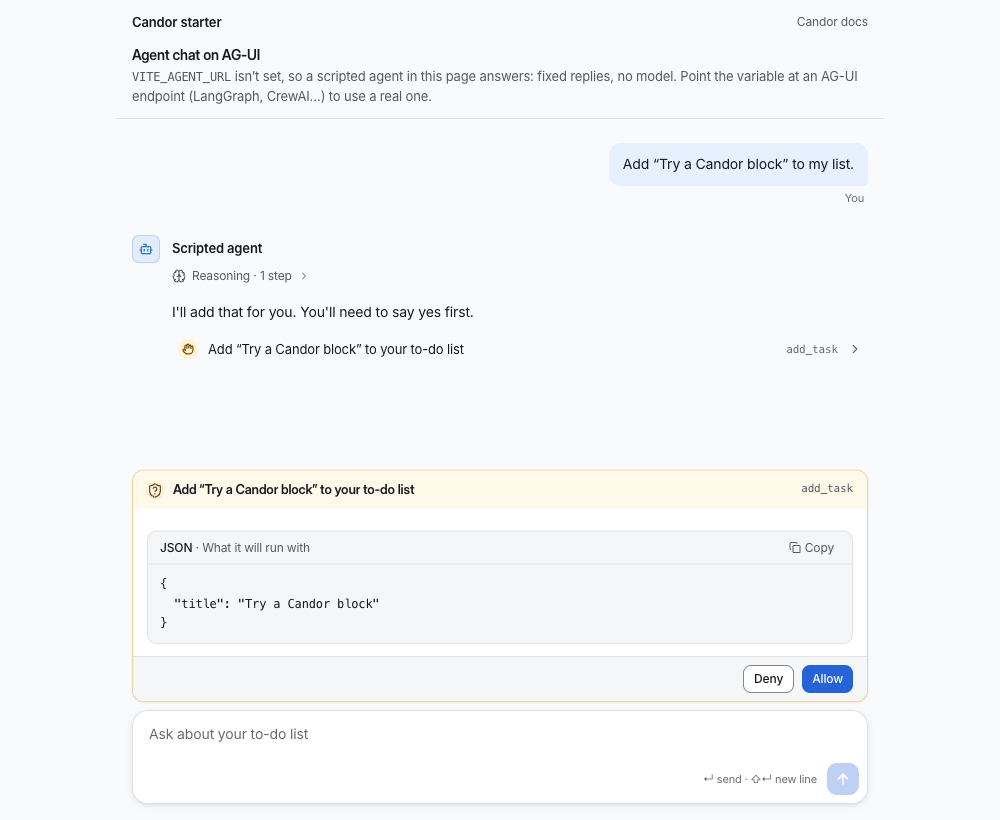
Open the address it prints. A scripted agent answers in the page: fixed replies, no model, no server and no API key,
and the page says so. Ask it to add "Try a Candor block" to your list and you'll see a line of its reasoning, a tool
call marked "Needs you", and a permission prompt that shows what it will run, with Deny and Allow and neither
chosen for you. That is what the image above shows. Point VITE_AGENT_URL at an AG-UI agent (LangGraph, CrewAI…)
when you want a real one.
Why Candor
An agent that acts on real systems can mislead without saying anything false: a spinner nobody has heard from, a total that treats a missing cost as zero, an approval that now applies to a different change. Candor's components keep these 9 rules. Where Honest against typical has a moment that shows one, the link goes to its Typical and Honest switch; the others go to Principles.
- Model output is text, never markup: Adapters read what a model writes as a small safe subset of markdown; a link becomes plain text with its address beside it.
- Unknown stays unknown: A cost or duration the service didn't report reads “not measured”, not zero, and an estimate says it is one.
- A control that can't be used says why: A control that can't be used carries its reason, on hover and focus and to screen readers.
- Nothing is pre-selected in a decision: Approve and reject, allow and deny start with neither chosen.
- Approve the exact change: A decision is tied to a hash of the change that was asked about; a change that moved since is refused.
- Reasoning is believed, not verified: Reasoning is shown as the model's own account and marked as unchecked; evidence is shown as evidence.
- The agent is always named, by the app: Every agent message names its agent from the app's data, never from model output.
- Say what can and can't be undone: Destructive actions say what they remove and whether it can be brought back.
- Motion follows the outcome: A success mark is drawn after the result settles; motion reports a change and never predicts one.
Install
npx candor-ui@latest init
npx candor-ui add thread message composer
candor-ui init adds the @candor registry to components.json and the theme to your CSS; in a project without
shadcn yet it runs shadcn's setup first (--yes sets it up with Base UI and shadcn's nova preset, no questions). Or add the registry by
hand: "@candor": "https://candor.themethodic.com/r/{name}.json". If shadcn asks to overwrite a primitive such as
ui/button.tsx, answer yes: Candor's button styles locked actions; without a terminal, pass --overwrite.
Or from npm
npm install @candor-ui/react
import { Thread, Message, Composer } from "@candor-ui/react"
Then @import "@candor-ui/react/styles.css" after Tailwind. The package holds the free tier only, and its version can be
behind the kit's; its README has the adapters and the entry points.
Tools
candor-ui also checks what you build, from the CLI's own docs:
lintchecks your.tsx,.ts,.jsxand.jsfiles against Candor's honesty rules and printspath:line:col rule messagefor each finding; it exits 1 on an error.auditislintplus a look at a running page:npx candor-ui audit http://localhost:3000runs axe and the honesty rules on it and writesAUDIT.md.updatemoves installed items to the latest version and keeps your changes: a file you edited gets a three-way merge, and where you and we changed the same lines it writes conflict markers.verifyis for CI: it checkscandor-lock.jsonagainst the registry's versioned snapshots and the files on disk.theme checkchecks your theme's colour contrast and its motion and sound values, and changes nothing.
candor-ui doctor explains an install that looks wrong. Every command is in the
CLI's README.
For coding agents
llms-install.md tells an agent how to set Candor up in a project by itself: the CLI, the docs MCP server, the skill
and the honesty rules to keep. The skill alone:
npx skills add MethodicDev/candor
installs two skills: skills/candor-ui (which component fits which job, the adapters, and the rules the components
keep, with a design-system reference read from the shipped CSS) and skills/candor-agent-ui (design fundamentals for
screens where an AI agent acts, with a review checklist to run after each screen; it works with or without Candor).
The plugins install the skill and the docs MCP server together. Claude Code: claude plugin marketplace add MethodicDev/candor, then claude plugin install candor-ui@candor (or, in a session,
/plugin install candor-ui --marketplace MethodicDev/candor). GitHub Copilot CLI: copilot plugin marketplace add MethodicDev/candor, then copilot plugin install candor-ui@candor. VS Code installs candor-ui from this repo's URL;
Cursor reads .cursor-plugin/marketplace.json; the Codex package is plugins/codex/candor-ui.
The MCP server at https://candor.themethodic.com/mcp serves docs and component suggestions only: read-only, no key,
never paid source. .mcp/server.json describes it for the MCP registry. Agents can also read
https://candor.themethodic.com/llms.txt.
Starters
Starter apps with a working agent chat built from these components (3 of them). Each installs and builds on its own:
| Folder | Stack | Agent |
|---|---|---|
starter-vite-ag-ui/ |
Vite and React, no server | a scripted one in the page (no key; see above), or any AG-UI agent (LangGraph, CrewAI…) |
starter/ |
Next.js 16 | Vercel AI SDK at /, Claude Agent SDK at /claude (needs an Anthropic API key) |
starter-tanstack-start-claude/ |
TanStack Start | Claude Agent SDK (needs an Anthropic API key) |
npx degit MethodicDev/candor/starter-vite-ag-ui my-agent-app
npx degit MethodicDev/candor/starter my-agent-app
npx degit MethodicDev/candor/starter-tanstack-start-claude my-agent-app
What's here
73 free items, each with a docs page that has its props and live examples. Install any of them by name:
npx candor-ui add <name>.
| Area | What it's for | Items |
|---|---|---|
| Chat (20) | A conversation with an agent: messages, the composer, tool calls, reasoning, citations. | agent-avatar, ai-disclosure, attachment-preview, card-registry, citation, composer, context-meter, entity-chip, folded-turns, message-actions, message-content, message, payload, permission-prompt, prompt-suggestions, reasoning, thread-divider, thread-event, thread, tool-call |
| Adapters (7) | Map an agent SDK's messages onto Candor's data: the Vercel AI SDK, the Claude Agent SDK and AG-UI. | ag-ui, ai-sdk, claude-agent-sdk, claude-agent-server, use-ag-ui, use-candor-chat, use-claude-agent |
| Building blocks (7) | Small pieces every screen uses: locked controls, status dots, step lists, relative times. | copy-field, degraded-panel, relative-time, status-dot, step-list, streaming-text, surface |
| App shell (2) | The app around the agent: layout, sidebar, command menu, sessions, notices. | page-header, page-state |
| Primitives (13) | The shadcn/ui primitives Candor's components are built on. | accordion, alert, button, checkbox, collapsible, label, locked, popover, progress, skeleton, slider, switch, tooltip |
| Themes (6) | The default theme and 5 gallery themes: colours, type, radius and motion as CSS variables, in light, dark and high contrast. | tokens, theme, theme-slate, theme-paper, theme-console, theme-signal |
Shared types and helpers (15): Types and pure functions the components share.
chat, fill-strings, format-elapsed, highlight, know, layer, locale, mcp-input, motion, safe-markdown, sound, status, use-copy, use-shortcut, use-virtual-list
Fonts (3): Self-hosted, and optional: without one the theme uses the system font.
font-inter, font-source-sans, font-ibm-plex
Pro, Premium and Team
One-time prices, no subscription. A licence includes every version Candor UI publishes, major ones included. You can ask for a full refund within 30 days of buying. The free tier here is MIT.
| Tier | Price | What's in it | Support |
|---|---|---|---|
| Free (this repo) | $0, MIT | 73 items: the chat core, building blocks, themes, adapters; 3 starters; the skill and plugins | public issues here |
| Pro | $149, one person | All 293 items, the free ones included: the app shell, plans, approvals, diffs, runs, evals and admin | none; the docs and examples |
| Premium | $249, one person | Pro, plus 11 full-stack blocks and 4 templates, each for the Vercel AI SDK and the Claude Agent SDK | email, best effort |
| Team | $999, up to 10 people in one company | Premium | email, a first reply within 2 business days |
Buy at https://candor.themethodic.com/#pricing. The terms are the Candor UI Commercial Licence; SUPPORT.md repeats the support each tier includes. Your key arrives in Polar's receipt email and customer portal; https://candor.themethodic.com/licence-key says where, and what a refund does to it. Then, in your project:
npx candor-ui key <your licence key>   # saves it to .env.local, checks it, and has the registry send it
npx candor-ui add approval-request     # a Pro item, installed like any other
In CI, set CANDOR_LICENSE_KEY as a secret, so installs and npx candor-ui verify can read paid items. Installed code
needs no key to run; the key is only for installing and updating. Never put a key in an issue, a pull request or a
repository.
How this repository works
- The source of truth is private. Candor UI's main repository holds the free items and the paid tiers together. This repository is generated from it on each release, so a change made here by hand would be overwritten.
- From 2.6.2, each release is a commit, a tag and a GitHub Release. The commit
Candor X.Y.Z, the tagvX.Y.Zand the release all carry that version's changelog section. - Issues are read. Use the forms. There is no promised reply time for the free tier; the support each paid tier includes is in SUPPORT.md. A vulnerability goes to SECURITY.md, not to an issue.
- A pull request isn't merged here. If it is accepted, it is applied upstream by hand, credited in that release's changelog entry, and closed with a link to the release that holds it. CONTRIBUTING.md has the rest.
- Every release is reviewed over its full diff by a separate review session that had no part in writing it, before the owner approves the merge. Most of the code is written with AI coding assistants, and the commits here say so in a Co-Authored-By line.
Licence
MIT, © Methodic LLC. See LICENSE. It covers this repository's free items; Candor UI's paid items are under the
Candor UI Commercial Licence.
Вопросы о Candor UI MCP
Как добавить Candor UI MCP в Claude Code?
Выполните claude mcp add --transport http candor https://candor.themethodic.com/mcp в терминале. Добавьте --scope user, чтобы сервер был доступен во всех проектах.
Как добавить Candor UI MCP в Cursor?
Откройте ~/.cursor/mcp.json и добавьте сервер в mcpServers, используя конфигурацию Cursor из раздела установки выше.
Что предоставляет MCP server Candor UI?
MCP server предоставляет документацию и рекомендации по компонентам библиотеки Candor UI.
Можно ли использовать Candor UI в существующем проекте на shadcn/ui?
Да, вы можете устанавливать компоненты Candor UI в проекты shadcn/ui с помощью candor-ui CLI.