
MCP server Element Node
Коммит 14 окт. 2026 г.Позволяет ИИ-агентам создавать и управлять целыми веб-сайтами через визуальную CMS с поддержкой ручного редактирования в редакторе типа Elementor.
Также известен как LorenzArtik/element-node, element-node-mcp
- Звёзды
- 0
- Инструменты
- —
- Загрузки, 30 дней
- —
- Последняя версия
- —
- Последний коммит
- 14 окт. 2026 г.
- Лицензия
- AGPL-3.0
Что такое Element Node MCP?
Element Node — это MCP server. Позволяет ИИ-агентам создавать и управлять целыми веб-сайтами через визуальную CMS с поддержкой ручного редактирования в редакторе типа Elementor.
Сводка сгенерирована из README проекта
О Element Node MCP server
Element Node — это self-hosted визуальная система управления контентом, разработанная для того, чтобы ИИ-агенты могли конструировать и управлять веб-сайтами. Используя стек Next.js 15, Prisma и MySQL, платформа позволяет агентам создавать полноценные сайты на основе брифов или клонирования существующих ресурсов. Как только агент завершает первичную сборку, управление может взять на себя нетехнический пользователь с помощью визуального редактора в стиле Elementor с трехпанельным интерфейсом и поддержкой drag-and-drop.
Разработчики могут подключаться к системе через MCP server, совместимый с такими клиентами, как Cursor и Windsurf, или используя официальный Claude Code skill. Сервер предоставляет инструменты для управления страницами, темами, медиафайлами, а также для полного импорта и экспорта Site Blueprint. Для работы требуется локальный или удаленный сервер с Node.js 20 или выше и база данных MySQL или MariaDB. Пользователи также могут взаимодействовать с системой через REST API, используя Bearer API ключи для определенных областей доступа, таких как импорт или экспорт сайта.
Что вы можете с ним делать
- 1Автоматизированное создание сайтовИИ-агент может построить полноценный веб-сайт на основе простого текстового брифа или путем клонирования существующего сайта.
- 2Визуальное редактирование контентаНетехнический клиент может вручную редактировать разделы сайта с помощью интерфейса drag-and-drop после того, как агент завершит работу.
- 3Миграция структуры сайтаРазработчики могут переносить структуру целых веб-сайтов между инстансами, используя функции импорта и экспорта JSON.
- 4Проверка визуального соответствияАгент может выполнять визуальное сравнение скриншота с построенным сайтом для проверки точности реализации.
Взято из README проекта. Каждый вариант использования проверен на соответствие цитате из него.
Как установить Element Node MCP
Форматы проверены 10 ноя 2026Добавить в CursorДобавить в GooseУстановка Element Node MCP в Claude Code
$ claude mcp add element-node -- npx -y element-node-mcpУстановка Element Node MCP в Cursor
~/.cursor/mcp.json
{
  "mcpServers": {
    "element-node": {
      "command": "npx",
      "args": [
        "-y",
        "element-node-mcp"
      ]
    }
  }
}Установка Element Node MCP в VS Code
.vscode/mcp.json
{
  "servers": {
    "element-node": {
      "type": "stdio",
      "command": "npx",
      "args": [
        "-y",
        "element-node-mcp"
      ]
    }
  }
}Установка Element Node MCP в VS Code CLI
$ code --add-mcp '{"name":"element-node","type":"stdio","command":"npx","args":["-y","element-node-mcp"]}'Установка Element Node MCP в Claude Desktop
claude_desktop_config.json
{
  "mcpServers": {
    "element-node": {
      "command": "npx",
      "args": [
        "-y",
        "element-node-mcp"
      ]
    }
  }
}Установка Element Node MCP в Codex
$ codex mcp add element-node -- npx -y element-node-mcpУстановка Element Node MCP в Codex config.toml
~/.codex/config.toml
[mcp_servers.element-node]
command = "npx"
args = ["-y", "element-node-mcp"]
Установка Element Node MCP в Gemini CLI
$ gemini mcp add -s user element-node npx -- -y element-node-mcpУстановка Element Node MCP в Gemini settings.json
~/.gemini/settings.json
{
  "mcpServers": {
    "element-node": {
      "command": "npx",
      "args": [
        "-y",
        "element-node-mcp"
      ]
    }
  }
}Автоматические проверки
Запущено 15 нояб. 2026 г.Полный отчёт →Еще не проверено. Для сервера требуется оценка 80, отсутствие серьезных проблем и достаточно данных для нашей проверки. Как работают проверки · Что исправить, чтобы получить больше баллов

- Связанный и доступный исходный репозиторийlorenzartik/element-node is public and reachablegithub.com/lorenzartik/element-node ↗Пройдено
- Пакет указывает этот репозиторий как источникelement-node-mcp names lorenzartik/element-node as sourcenpmjs.com/package/element-node-mcp ↗Пройдено
- Происхождение сборки (аттестация Sigstore)No build attestation published for this releaseНе проверялось
- Open source лицензия (OSI)AGPL-3.0spdx.org/licenses/AGPL-3.0.html ↗Пройдено
- Коммит или релиз за последний годLast commit or release 2026-10-14github.com/lorenzartik/element-node ↗Пройдено
- OpenSSF ScorecardНе проверялось
- Имя пакета не похоже на популярный пакетNo popular package one edit away from element-node-mcpПройдено
- Нет критических предупреждений в пакете или его зависимостяхНе проверялось
- Нет скрытых инструкций для модели0 tool descriptions and the README read; no override phrases, credential paths or hidden charactersПройдено
- Деструктивные инструменты помеченыНе проверялось
- Удалённая конечная точка отвечает на рукопожатие MCPНе проверялось
README
Открыть на GitHubElement Node
The AI-agent CMS your clients can still edit visually.
Element Node is an open-source visual CMS built on Next.js 15 + Prisma/MySQL. AI agents build entire sites on it — through the official Claude Code skill or the MCP server (Cursor, Windsurf, any MCP client) — and after the agent is done, the site stays in an Elementor-style visual editor that a non-technical client can safely use. Self-hosted: your server, your data.
🇮🇹 Documentazione in italiano: elementnode.cloud/it/docs
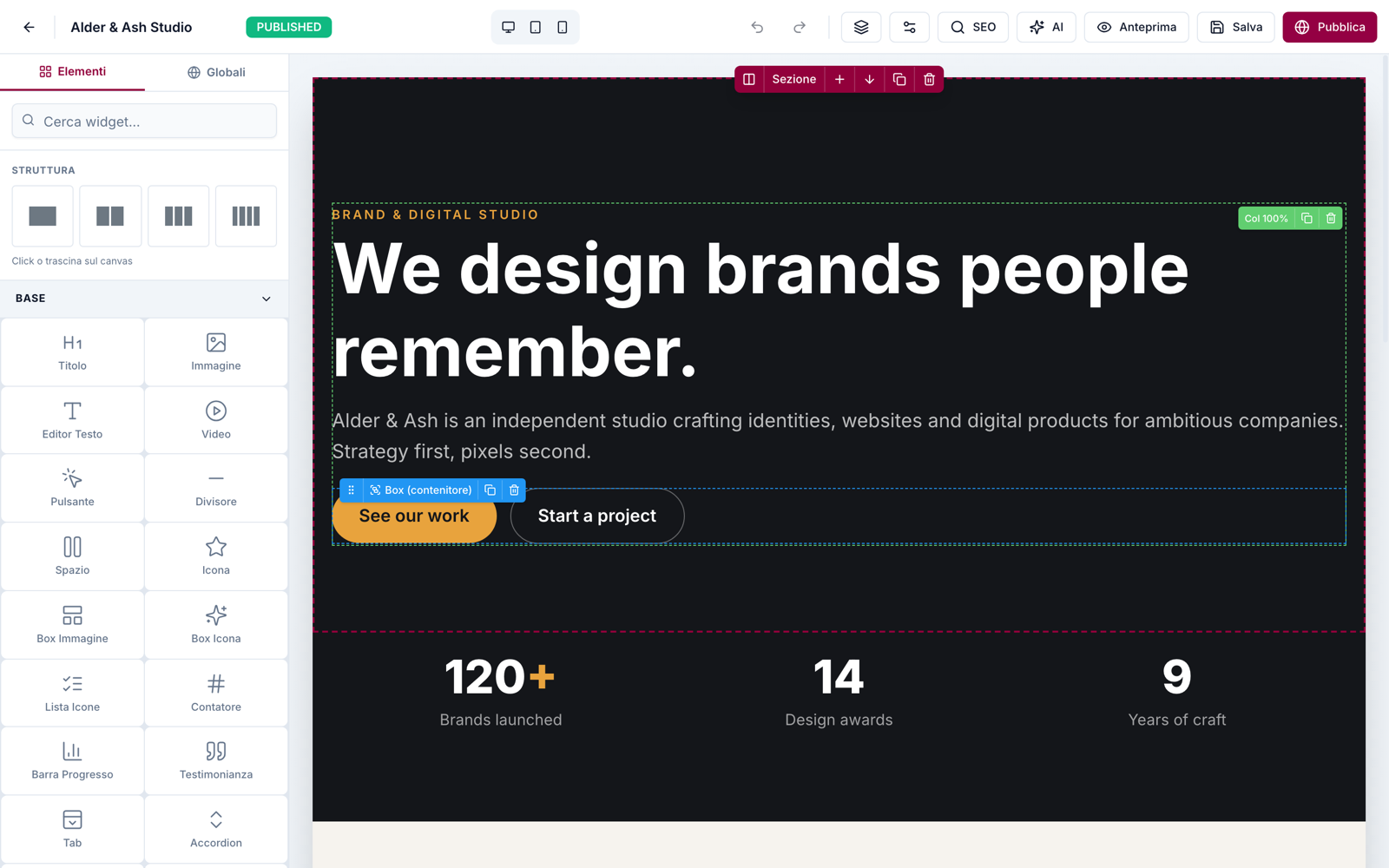

Quickstart
bash <(curl -fsSL https://elementnode.cloud/install.sh)
Requirements: Node.js ≥ 20, MySQL/MariaDB. The installer clones the repo, installs dependencies, creates .env and the DB schema, builds, and leaves you at the /install wizard (admin user, site, AI).
Non-interactive mode (for AI agents / provisioning): export DB_NAME, DB_USER, DB_PASS, SITE_URL (optional DB_HOST, DB_PORT) before running — no prompts. For Plesk see PLESK_DEPLOY.md.
One-prompt setup: the entire path — server, CMS, skill and first site — can be driven by a single prompt pasted into Claude Code. Template: elementnode.cloud/it/docs#prompt
Built for AI agents
| Integration | For | What it does |
|---|---|---|
| Official skill | Claude Code / Codex | Builds entire sites: from a brief, or pixel-perfect clones of existing sites verified by a visual-comparison agent (screenshot → diff → fix, until convergence) |
| MCP server | Cursor, Windsurf, any MCP client | Pages, theme, media, full Site Blueprint import/export, always-fresh widget docs |
| REST API | Anything else | Bearer API keys with scopes (site.import, site.export, …) |
Real production numbers (agent build time, human review on top): a 24-page WordPress migration in ~1 hour · a complete bilingual site in half a day · a React SPA cloned at 95/100 automated visual fidelity in ~2 hours. See showcase.
What's in the box
- Visual editor — 3-panel Elementor-style UI: widget library · canvas · properties. Drag & drop, inline text editing, undo/redo, revisions, responsive preview, style controls (spacing, borders, shadows, gradients)
- 51 native widgets — heading, text, button, image, video, icon-box, counters, tabs, accordion, gallery, contact form, posts grid, marquee, nav drawer, nested boxes…
- Theme blocks — global header/footer with display conditions + priority (per-URL-prefix → native multilingual sites)
- Content — pages (nested slugs), posts, custom post types + taxonomies, redirects, popups
- Forms — reusable form entities, submissions in DB, SMTP/Brevo delivery, GDPR consent fields
- Privacy — native cookie consent banner (variants per language, click-to-load embeds), site access modes (public / password / maintenance) with automatic noindex
- AI built in (bring your own Anthropic key) — editor chat that generates and edits sections, one-click SEO (title/description/keyword in the page's language)
- SEO — per-page meta, OG image, sitemap, robots, SEO score panel
- Media — local uploads, sharp-optimized thumbnails (WebP/AVIF), lazy loading
- Ops — 1-click self-update from the panel (with automatic pre-update DB backup), multi-user roles, API keys, health endpoint
- Performance — React Server Components, standalone output, HTTP cache + ISR. No plugin ecosystem needed: it's all native
Stack
Next.js 15 (App Router, standalone output) · Prisma + MySQL · NextAuth v5 · Tailwind · @dnd-kit · TipTap · sharp · Anthropic Claude (optional, BYO key)
Architecture notes
- Public pages render through
PageRenderer(RSC) with a responsive core (columns stack under 768px, opt-out per column) - Content is a JSON tree: sections → columns → widgets (see skill/element-node-builder/references/widget-reference.md)
- Site Blueprint import/export moves whole sites as JSON (merge or replace)
- License validation is fail-open: the CMS works without a license — a license activates managed updates, security patches and support (pricing)
License
- CMS core: AGPL-3.0 — free to use, self-host and modify. Building and running your own sites (or client sites) carries no obligations; the AGPL kicks in only if you modify the CMS and offer it to others as a service.
- Claude Code skill and MCP server: MIT — integrate freely.
Managed updates, security patches, priority support and the white-label agency tier are commercial: elementnode.cloud/en/pricing. For commercial licensing outside AGPL terms, get in touch.
Вопросы о Element Node MCP
Как добавить Element Node MCP в Claude Code?
Выполните claude mcp add element-node -- npx -y element-node-mcp в терминале. Добавьте --scope user, чтобы сервер был доступен во всех проектах.
Как добавить Element Node MCP в Cursor?
Откройте ~/.cursor/mcp.json и добавьте сервер в mcpServers, используя конфигурацию Cursor из раздела установки выше.
Могу ли я хостить систему самостоятельно?
Да, это self-hosted решение, при котором вы сами контролируете свой сервер и данные.
На каких технологиях построен проект?
CMS построена на стеке Next.js 15, Prisma, MySQL, NextAuth v5, Tailwind, @dnd-kit, TipTap и sharp.
Требуется ли лицензия для работы CMS?
Ядро CMS распространяется под лицензией AGPL-3.0 и работает без лицензии; лицензия требуется только для активации управляемых обновлений, патчей безопасности и поддержки.