
Оценивает ответы агентов на предмет качества, безопасности и стоимости с помощью детерминированных правил и опционального LLM judge.
Также известен как iris-eval/mcp-server, mcp-server, @iris-eval/mcp-server
- Звёзды
- 10
- Инструменты
- 17
- Загрузки, 30 дней
- 1 137
- Последняя версия
- 0.21.0
- Последний коммит
- 13 нояб. 2026 г.
- Лицензия
- MIT
Что такое Iris MCP?
Iris — это MCP server. Оценивает ответы агентов на предмет качества, безопасности и стоимости с помощью детерминированных правил и опционального LLM judge. Он предоставляет 17 инструментов, например log_trace, evaluate_output, get_traces.
Сводка сгенерирована из README проекта
О Iris MCP server
Iris предоставляет способ аудита производительности агентов путем оценки ответов на качество, безопасность и стоимость. Вместо того чтобы полагаться на ручные проверки, разработчики могут использовать 28 встроенных детерминированных правил для обнаружения таких проблем, как утечка PII, prompt injection, галлюцинации и превышение порога стоимости. Система сохраняет все запуски агентов в локальной базе данных SQLite на вашем устройстве, гарантируя конфиденциальность данных, если вы явно не включите OpenTelemetry endpoint, webhook или LLM judge.
Пользователи могут интегрировать Iris в различные MCP клиенты, включая Claude Desktop, Cursor, VS Code и Windsurf. В то время как детерминированные правила бесплатны и работают локально, вы можете опционально включить LLM judge, предоставив свой собственный API key для выполнения задач семантической оценки. Сервер также включает дашборд, доступный по адресу localhost:6920, для визуализации ошибок и сравнения различных запусков агентов. Он разработан для разработчиков, которым нужны проверяемые показатели, а не субъективные впечатления при оценке автономных агентов.
Что вы можете с ним делать
- 1Аудит безопасности и качества агентаПопросите вашего агента выполнить задачу и оцените полученный результат на предмет нарушения конкретных правил.
- 2Мониторинг стоимости и рисков галлюцинацийИспользуйте детерминированные правила, чтобы проверить, превышает ли агент пороги стоимости или генерирует ли он признаки галлюцинаций.
- 3Автоматизация сбора трассировок через HTTPОтправляйте трассировки агента напрямую на сервер с помощью POST-запроса, не вовлекая LLM в процесс.
Взято из README проекта. Каждый вариант использования проверен на соответствие цитате из него.
Как установить Iris MCP
Форматы проверены 10 ноя 2026Добавить в CursorДобавить в GooseУстановка Iris MCP в Claude Code
$ claude mcp add --env 'IRIS_ANTHROPIC_API_KEY=<YOUR_IRIS_ANTHROPIC_API_KEY>' --env 'IRIS_API_KEY=<YOUR_IRIS_API_KEY>' --env 'IRIS_OPENAI_API_KEY=<YOUR_IRIS_OPENAI_API_KEY>' --env 'IRIS_WEBHOOK_SECRET=<YOUR_IRIS_WEBHOOK_SECRET>' mcp-server -- npx -y @iris-eval/mcp-serverУстановка Iris MCP в Cursor
~/.cursor/mcp.json
{
  "mcpServers": {
    "mcp-server": {
      "command": "npx",
      "args": [
        "-y",
        "@iris-eval/mcp-server"
      ],
      "env": {
        "IRIS_ANTHROPIC_API_KEY": "<YOUR_IRIS_ANTHROPIC_API_KEY>",
        "IRIS_API_KEY": "<YOUR_IRIS_API_KEY>",
        "IRIS_OPENAI_API_KEY": "<YOUR_IRIS_OPENAI_API_KEY>",
        "IRIS_WEBHOOK_SECRET": "<YOUR_IRIS_WEBHOOK_SECRET>"
      }
    }
  }
}Установка Iris MCP в VS Code
.vscode/mcp.json
{
  "servers": {
    "mcp-server": {
      "type": "stdio",
      "command": "npx",
      "args": [
        "-y",
        "@iris-eval/mcp-server"
      ],
      "env": {
        "IRIS_ANTHROPIC_API_KEY": "<YOUR_IRIS_ANTHROPIC_API_KEY>",
        "IRIS_API_KEY": "<YOUR_IRIS_API_KEY>",
        "IRIS_OPENAI_API_KEY": "<YOUR_IRIS_OPENAI_API_KEY>",
        "IRIS_WEBHOOK_SECRET": "<YOUR_IRIS_WEBHOOK_SECRET>"
      }
    }
  }
}Установка Iris MCP в VS Code CLI
$ code --add-mcp '{"name":"mcp-server","type":"stdio","command":"npx","args":["-y","@iris-eval/mcp-server"],"env":{"IRIS_ANTHROPIC_API_KEY":"<YOUR_IRIS_ANTHROPIC_API_KEY>","IRIS_API_KEY":"<YOUR_IRIS_API_KEY>","IRIS_OPENAI_API_KEY":"<YOUR_IRIS_OPENAI_API_KEY>","IRIS_WEBHOOK_SECRET":"<YOUR_IRIS_WEBHOOK_SECRET>"}}'Установка Iris MCP в Claude Desktop
claude_desktop_config.json
{
  "mcpServers": {
    "mcp-server": {
      "command": "npx",
      "args": [
        "-y",
        "@iris-eval/mcp-server"
      ],
      "env": {
        "IRIS_ANTHROPIC_API_KEY": "<YOUR_IRIS_ANTHROPIC_API_KEY>",
        "IRIS_API_KEY": "<YOUR_IRIS_API_KEY>",
        "IRIS_OPENAI_API_KEY": "<YOUR_IRIS_OPENAI_API_KEY>",
        "IRIS_WEBHOOK_SECRET": "<YOUR_IRIS_WEBHOOK_SECRET>"
      }
    }
  }
}Установка Iris MCP в Codex
$ codex mcp add mcp-server --env 'IRIS_ANTHROPIC_API_KEY=<YOUR_IRIS_ANTHROPIC_API_KEY>' --env 'IRIS_API_KEY=<YOUR_IRIS_API_KEY>' --env 'IRIS_OPENAI_API_KEY=<YOUR_IRIS_OPENAI_API_KEY>' --env 'IRIS_WEBHOOK_SECRET=<YOUR_IRIS_WEBHOOK_SECRET>' -- npx -y @iris-eval/mcp-serverУстановка Iris MCP в Codex config.toml
~/.codex/config.toml
[mcp_servers.mcp-server]
command = "npx"
args = ["-y", "@iris-eval/mcp-server"]

[mcp_servers.mcp-server.env]
IRIS_ANTHROPIC_API_KEY = "<YOUR_IRIS_ANTHROPIC_API_KEY>"
IRIS_API_KEY = "<YOUR_IRIS_API_KEY>"
IRIS_OPENAI_API_KEY = "<YOUR_IRIS_OPENAI_API_KEY>"
IRIS_WEBHOOK_SECRET = "<YOUR_IRIS_WEBHOOK_SECRET>"
Установка Iris MCP в Gemini CLI
$ gemini mcp add -s user -e 'IRIS_ANTHROPIC_API_KEY=<YOUR_IRIS_ANTHROPIC_API_KEY>' -e 'IRIS_API_KEY=<YOUR_IRIS_API_KEY>' -e 'IRIS_OPENAI_API_KEY=<YOUR_IRIS_OPENAI_API_KEY>' -e 'IRIS_WEBHOOK_SECRET=<YOUR_IRIS_WEBHOOK_SECRET>' mcp-server npx -- -y @iris-eval/mcp-serverУстановка Iris MCP в Gemini settings.json
~/.gemini/settings.json
{
  "mcpServers": {
    "mcp-server": {
      "command": "npx",
      "args": [
        "-y",
        "@iris-eval/mcp-server"
      ],
      "env": {
        "IRIS_ANTHROPIC_API_KEY": "<YOUR_IRIS_ANTHROPIC_API_KEY>",
        "IRIS_API_KEY": "<YOUR_IRIS_API_KEY>",
        "IRIS_OPENAI_API_KEY": "<YOUR_IRIS_OPENAI_API_KEY>",
        "IRIS_WEBHOOK_SECRET": "<YOUR_IRIS_WEBHOOK_SECRET>"
      }
    }
  }
}Инструменты Iris MCP 17
Определено из READMElog_traceevaluate_outputget_traceslist_rulesdeploy_ruledelete_ruledelete_traceevaluate_with_llm_judgeverify_citationscompare_runscompare_tracesevaluate_runs
| log_trace | — | |
| evaluate_output | — | |
| get_traces | — | |
| list_rules | — | |
| deploy_rule | — | |
| delete_rule | — | |
| delete_trace | — | |
| evaluate_with_llm_judge | — | |
| verify_citations | — | |
| compare_runs | — | |
| compare_traces | — | |
| evaluate_runs | — |
Показать все 17 инструментовПоказать меньше инструментов
scorenametypeconfigweight
| score | — | |
| name | — | |
| type | — | |
| config | — | |
| weight | — |
Конфигурация
IRIS_ANTHROPIC_API_KEYСекретEnables evaluate_with_llm_judge and verify_citations with an Anthropic model. Optional: the deterministic rules never need a key
IRIS_API_KEYСекретAPI key for HTTP authentication. Required to bind the HTTP transport or the dashboard beyond loopback (0.0.0.0, a LAN address, a container): without it the server refuses to start
IRIS_OPENAI_API_KEYСекретEnables evaluate_with_llm_judge and verify_citations with an OpenAI model. Optional: the deterministic rules never need a key
IRIS_WEBHOOK_SECRETСекретThe signing key of that webhook (any string, or whsec_ + base64); the iris format refuses to run without one
IRIS_ALLOWED_ORIGINSComma-separated Origin allowlist for the HTTP transport and dashboard CORS (default http://localhost:*)
IRIS_ALLOW_UNAUTHENTICATEDSet to 1 to run a non-loopback bind with NO API key on purpose (lifts the startup refusal; the network is then your boundary)
IRIS_API_KEY_FILEPath to a file whose trimmed contents are the API key (the secret-file pattern Docker and Kubernetes mount). Set this or IRIS_API_KEY, not both; further keys and rotation are security.apiKeys in config.json
IRIS_CITATION_ALLOW_FETCHLet verify_citations fetch URLs (off by default); a tool argument can turn it off for a call, never on
IRIS_CITATION_DOMAINSComma-separated domain allowlist for verify_citations fetches (only consulted when IRIS_CITATION_ALLOW_FETCH is on); a tool argument can narrow it, never add to it
IRIS_CITATION_MAX_COST_USD_TOTALThe most one verify_citations call may spend on judge calls, in USD (default 1); max_cost_usd_total can lower it, never raise it
IRIS_DASHBOARDStart the dashboard alongside the server (same as --dashboard)
IRIS_DASHBOARD_HOSTBind host for the dashboard (default 127.0.0.1); same as --dashboard-host
IRIS_DASHBOARD_PORTDashboard port (default 6920); IRIS_PORT is the MCP HTTP transport port (default 3000)
IRIS_DB_PATHSQLite database path
IRIS_HOMEDirectory for the database, custom rules and preferences (default ~/.iris)
IRIS_HOSTBind host for the HTTP transport (default 127.0.0.1); only used with --transport http
IRIS_LLM_JUDGE_DAILY_BUDGET_USDWhat every judge call together may spend per UTC day, per tenant, in USD (default 1): the relevance judge, evaluate_with_llm_judge and verify_citations. Past it no judge call is made
IRIS_LLM_JUDGE_MAX_COST_USD_PER_EVALHard cap on the worst-case cost of one LLM judge call (default 0.25); max_cost_usd can lower it for a call, never raise it
IRIS_LOG_LEVELLog level: debug, info, warn, error
IRIS_MAX_INPUT_ELEMENTSThe most array elements and object keys one input may hold before it is validated (default 100000): a tool call's arguments, and a dashboard or OTLP JSON request body. A tool call over it gets an error result; a body, 413. OTLP protobuf has its own ceiling, one element per 5 bytes of the request size limit
IRIS_MAX_TOOL_INPUT_ELEMENTSThe name of IRIS_MAX_INPUT_ELEMENTS before 0.21.0, read when the new name is unset
IRIS_OTEL_ENDPOINTOTLP/HTTP collector URL; when set, every stored trace is also exported as OpenTelemetry spans (best-effort, asynchronous)
IRIS_OTEL_HEADERSComma-separated key=value headers sent with every OTLP export (for example an auth token for your collector)
IRIS_OTEL_SERVICE_NAMEservice.name resource attribute on exported spans (default iris-eval)
IRIS_OTEL_TIMEOUT_MSTimeout in milliseconds for each OTLP export request
IRIS_PORTMCP HTTP transport port (default 3000); only used with --transport http
IRIS_RELEVANCE_JUDGE_DAILY_BUDGET_USDThe name of IRIS_LLM_JUDGE_DAILY_BUDGET_USD before 0.21.0. Read when the new name is unset, and it then limits every judge call
IRIS_RELEVANCE_JUDGE_MAX_CALLS_PER_REQUESTRelevance judge calls one request may make (default 20)
IRIS_RELEVANCE_JUDGE_MODELA priced judge model; answers_the_ask then asks it on every evaluation with input, sending that input and output to the model's provider, and gates on its verdict (off by default)
IRIS_RELEVANCE_JUDGE_REDACTon (default) replaces the PII and credentials no_pii flags before the relevance judge sends input and output to its provider; off sends them as they are
IRIS_SEARCH_BUDGET_MSHow long one trace search may read before it answers with the matches found so far, in milliseconds (50-60000, default 1000)
IRIS_SEARCH_INDEXon (default) or off. off keeps no full-text index of the traces: writes are cheaper, and a search reads the traces within its time budget
IRIS_SQLITE_DRIVERWhich SQLite driver holds the database: native (better-sqlite3, the default) or node (Node's built-in node:sqlite, Node 22.13+). Unset: native, falling back to node when the native module cannot load
IRIS_TRANSPORTTransport: stdio (default) or http; same as --transport
IRIS_WEBHOOK_URLThe receiver of the webhook that fires on a moment (docs/webhooks.md); merged over notify.webhook in config.json
| Название | Описание | Тип |
|---|---|---|
| IRIS_ANTHROPIC_API_KEY | Enables evaluate_with_llm_judge and verify_citations with an Anthropic model. Optional: the deterministic rules never need a key | Секрет |
| IRIS_API_KEY | API key for HTTP authentication. Required to bind the HTTP transport or the dashboard beyond loopback (0.0.0.0, a LAN address, a container): without it the server refuses to start | Секрет |
| IRIS_OPENAI_API_KEY | Enables evaluate_with_llm_judge and verify_citations with an OpenAI model. Optional: the deterministic rules never need a key | Секрет |
| IRIS_WEBHOOK_SECRET | The signing key of that webhook (any string, or whsec_ + base64); the iris format refuses to run without one | Секрет |
| IRIS_ALLOWED_ORIGINS | Comma-separated Origin allowlist for the HTTP transport and dashboard CORS (default http://localhost:*) | |
| IRIS_ALLOW_UNAUTHENTICATED | Set to 1 to run a non-loopback bind with NO API key on purpose (lifts the startup refusal; the network is then your boundary) | |
| IRIS_API_KEY_FILE | Path to a file whose trimmed contents are the API key (the secret-file pattern Docker and Kubernetes mount). Set this or IRIS_API_KEY, not both; further keys and rotation are security.apiKeys in config.json | |
| IRIS_CITATION_ALLOW_FETCH | Let verify_citations fetch URLs (off by default); a tool argument can turn it off for a call, never on | |
| IRIS_CITATION_DOMAINS | Comma-separated domain allowlist for verify_citations fetches (only consulted when IRIS_CITATION_ALLOW_FETCH is on); a tool argument can narrow it, never add to it | |
| IRIS_CITATION_MAX_COST_USD_TOTAL | The most one verify_citations call may spend on judge calls, in USD (default 1); max_cost_usd_total can lower it, never raise it | |
| IRIS_DASHBOARD | Start the dashboard alongside the server (same as --dashboard) | |
| IRIS_DASHBOARD_HOST | Bind host for the dashboard (default 127.0.0.1); same as --dashboard-host | |
| IRIS_DASHBOARD_PORT | Dashboard port (default 6920); IRIS_PORT is the MCP HTTP transport port (default 3000) | |
| IRIS_DB_PATH | SQLite database path | |
| IRIS_HOME | Directory for the database, custom rules and preferences (default ~/.iris) | |
| IRIS_HOST | Bind host for the HTTP transport (default 127.0.0.1); only used with --transport http | |
| IRIS_LLM_JUDGE_DAILY_BUDGET_USD | What every judge call together may spend per UTC day, per tenant, in USD (default 1): the relevance judge, evaluate_with_llm_judge and verify_citations. Past it no judge call is made | |
| IRIS_LLM_JUDGE_MAX_COST_USD_PER_EVAL | Hard cap on the worst-case cost of one LLM judge call (default 0.25); max_cost_usd can lower it for a call, never raise it | |
| IRIS_LOG_LEVEL | Log level: debug, info, warn, error | |
| IRIS_MAX_INPUT_ELEMENTS | The most array elements and object keys one input may hold before it is validated (default 100000): a tool call's arguments, and a dashboard or OTLP JSON request body. A tool call over it gets an error result; a body, 413. OTLP protobuf has its own ceiling, one element per 5 bytes of the request size limit | |
| IRIS_MAX_TOOL_INPUT_ELEMENTS | The name of IRIS_MAX_INPUT_ELEMENTS before 0.21.0, read when the new name is unset | |
| IRIS_OTEL_ENDPOINT | OTLP/HTTP collector URL; when set, every stored trace is also exported as OpenTelemetry spans (best-effort, asynchronous) | |
| IRIS_OTEL_HEADERS | Comma-separated key=value headers sent with every OTLP export (for example an auth token for your collector) | |
| IRIS_OTEL_SERVICE_NAME | service.name resource attribute on exported spans (default iris-eval) | |
| IRIS_OTEL_TIMEOUT_MS | Timeout in milliseconds for each OTLP export request | |
| IRIS_PORT | MCP HTTP transport port (default 3000); only used with --transport http | |
| IRIS_RELEVANCE_JUDGE_DAILY_BUDGET_USD | The name of IRIS_LLM_JUDGE_DAILY_BUDGET_USD before 0.21.0. Read when the new name is unset, and it then limits every judge call | |
| IRIS_RELEVANCE_JUDGE_MAX_CALLS_PER_REQUEST | Relevance judge calls one request may make (default 20) | |
| IRIS_RELEVANCE_JUDGE_MODEL | A priced judge model; answers_the_ask then asks it on every evaluation with input, sending that input and output to the model's provider, and gates on its verdict (off by default) | |
| IRIS_RELEVANCE_JUDGE_REDACT | on (default) replaces the PII and credentials no_pii flags before the relevance judge sends input and output to its provider; off sends them as they are | |
| IRIS_SEARCH_BUDGET_MS | How long one trace search may read before it answers with the matches found so far, in milliseconds (50-60000, default 1000) | |
| IRIS_SEARCH_INDEX | on (default) or off. off keeps no full-text index of the traces: writes are cheaper, and a search reads the traces within its time budget | |
| IRIS_SQLITE_DRIVER | Which SQLite driver holds the database: native (better-sqlite3, the default) or node (Node's built-in node:sqlite, Node 22.13+). Unset: native, falling back to node when the native module cannot load | |
| IRIS_TRANSPORT | Transport: stdio (default) or http; same as --transport | |
| IRIS_WEBHOOK_URL | The receiver of the webhook that fires on a moment (docs/webhooks.md); merged over notify.webhook in config.json |
Автоматические проверки
Запущено 12 нояб. 2026 г.Полный отчёт →Прошло наши автоматизированные проверки. Это не аудит безопасности: изучите код и предоставьте серверу минимально необходимый доступ. Как работают проверки

- Связанный и доступный исходный репозиторийПройдено
- Open source лицензия (OSI)Пройдено
- Коммит или релиз за последний годПройдено
- Имя пакета не похоже на популярный пакетПройдено
- Удаленная конечная точка использует HTTPSНе проверялось
- Деструктивные инструменты помеченыНе проверялось
- Нет скрытых инструкций для моделиПройдено
- Нет критических предупреждений в пакете или его зависимостяхПройдено
README
Открыть на GitHubIris — stop shipping agents on vibes



Send Iris an agent run and ask for a verdict on its quality, safety, and cost — on your machine, with no SDK and no account. Most agent projects check quality by running a few remembered prompts and eyeballing the output. Iris replaces that with numbers you can audit: your agent's runs land in a SQLite database on your disk, 28 built-in rules score them deterministically — PII, prompt injection, hallucination markers, cost thresholds, and the agent's own tool calls — free, with no LLM calls, and an optional LLM judge with a hard per-eval cost cap handles the semantic questions. Every rule is inspectable and editable, because a judge you can't audit is just vibes with a number on it. MIT licensed, no telemetry. Nothing leaves your machine unless you turn one of these on: an OpenTelemetry endpoint (IRIS_OTEL_ENDPOINT), which exports traces to the collector you name; the LLM judge with your own key, which sends the text it judges to that provider, and whose citation check fetches the pages an output cites; or a webhook, which posts ids, the verdict and rule names, never the text, to the address you set.
Requires Node.js 22.13 or later. Check with node --version.
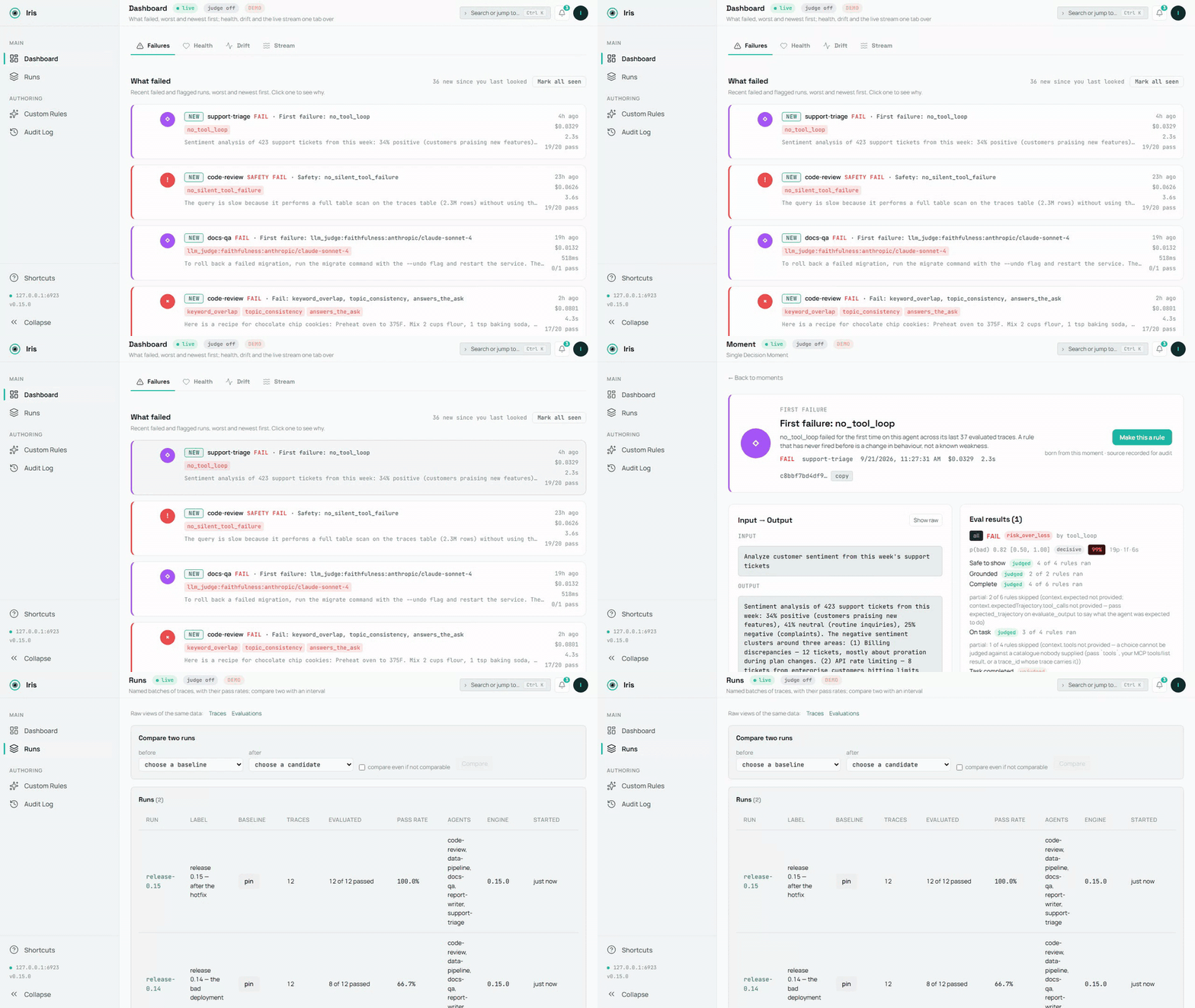
The demo database, recorded by scripts/demo-media.mts; the source is demo.mp4. A still: dashboard-overview.png.
A failure on screen in 60 seconds
No agent wiring, no config — one command:
npx @iris-eval/mcp-server --demo
This seeds a demo database — five small agents, two weeks of runs, every verdict the engine's own — and serves the dashboard against it at http://localhost:6920 (your browser opens automatically on first run). The dashboard lands on Failures: what failed, worst and newest first, each card naming the rule and its evidence. Worth clicking into — a PII leak caught by the safety rules, a hidden directive in a forum post that the summarizer complied with, a number the source document never said, two runs on the same twelve questions compared with an interval (Runs), a deployed custom rule and a paused one with their audit rows, and a failed LLM-judge score with its rationale.
Demo data lives in its own database (demo.db in your Iris home directory — ~/.iris on macOS/Linux, %USERPROFILE%\.iris on Windows) and never mixes with your real traces. Remove all of it with one command:
npx @iris-eval/mcp-server --demo-clear
Hook up your own agent
First, prove the install works on this machine — it runs offline and opens nothing of yours:
npx @iris-eval/mcp-server --self-test # exit 0 = healthy
Then add Iris to your MCP client. One command writes the client's own config file, keeps every other server in it, and pins the version you ran:
npx -y @iris-eval/mcp-server install claude-code
The clients: claude-code, claude-desktop, cursor, windsurf, continue, vscode, cline, zed, codex, gemini. install --list shows the ones found on this machine, the Iris each one runs and the file it reads; install <client> --uninstall takes Iris out again. Every client shares one database, so after an upgrade move them all at once with install --upgrade (Updating). Restart the client to load it.
Claude Desktop: one click. Each release from 0.20.0 on attaches iris-eval.mcpb, an MCP Bundle: download the latest, open it, and Claude Desktop shows an install dialog. Nothing on it is required — an Anthropic or OpenAI key for the LLM judge is optional, and the dashboard is a switch that starts off. The bundle holds the npm package and its dependencies, so nothing else needs installing: Claude Desktop runs it under the Node it ships when that Node is 22.13 or newer (Claude Desktop 1.1.6679 ships 24.13), and Iris stores traces with Node's built-in SQLite, in the same ~/.iris every other install uses. The release notes show how to verify its signature and build attestation.
It runs in any MCP client, and every client it names has a row saying how it is checked. Verified on every CI run: Claude Code, Gemini CLI — the real client starts Iris from the config the installer wrote and reports it connected (claude mcp list, gemini mcp list), on Linux, macOS and Windows; Claude Code's capture plugin hooks are driven through the real scripts too. Configured from each client's own MCP documentation — the installer writes the file each client documents, at its documented path and in its own format (an mcpServers block, VS Code's servers, Zed's context_servers, Codex's TOML), keeping comments and every other server, and unit tests hold each path and every format writer to that documentation: Claude Desktop, Cursor, Devin Desktop (Windsurf), Continue, VS Code, Cline, Zed, OpenAI Codex CLI. Every row with its source and the date it was read: https://iris-eval.com/clients. By hand instead, one block, dashboard included:
{
  "mcpServers": {
    "iris-eval": {
      "command": "npx",
      "args": ["-y", "@iris-eval/mcp-server", "--dashboard"]
    }
  }
}
Your client lists Iris's twelve tools on connect, and the dashboard serves at http://localhost:6920. Now paste this to your agent:
Log that last task to Iris and evaluate the output.
The trace lands on the dashboard with its scores. Prefer the MCP server headless? Drop --dashboard from the args — you can open the same dashboard any time with npx @iris-eval/mcp-server --dashboard.
One thing worth knowing up front: MCP tools are called when the model decides to call them. Iris doesn't intercept your agent, so traces are logged when your agent asks it to log them — either because you told it to, or because your code calls the tools directly. Ask your agent to "log this to Iris and evaluate it" and it will. If you want capture that doesn't depend on the model choosing, POST /api/v1/traces does exactly that — your code sends the trace over plain HTTP, no model in the loop (see docs/http-ingest.md). The CLI and host hooks on the roadmap will be thin clients over the same endpoint.
Capture over HTTP (no model in the loop)
The ingest endpoint lives on the dashboard port — 6920 by default, not the MCP transport port — and it exists only while the dashboard is running. Pass --dashboard (or set IRIS_DASHBOARD=true); --transport http on its own does not start it, and a request to the transport port returns 404. With the dashboard up, anything that can send an HTTP request can log a trace — and optionally run the deterministic evals in the same request. GET /api/v1/capabilities on the same port says what this server can judge, what each rule needs, the judge state with the steps that enable it, and the limits — the same object the MCP resource iris://capabilities serves — so an HTTP caller has the frame an MCP client gets at initialize:
curl -s -X POST "http://127.0.0.1:6920/api/v1/traces" \
  -H "Content-Type: application/json" \
  -d '{
    "agent_name": "support-bot",
    "input": "What is the refund policy?",
    "output": "Refunds are available within 30 days of purchase.",
    "evaluate": true,
    "eval_type": "safety"
  }'
Returns 201 with the stored trace_id and the evaluation result (in --demo mode the endpoint refuses writes with 403, so demo data never mixes with yours). The endpoint accepts the same body as the log_trace tool and sits behind the same middleware stack as the rest of the dashboard: loopback bind and the DNS-rebinding guard by default, plus Bearer auth when you set one. Two plain facts about it: it accepts unauthenticated writes unless Iris was started with --api-key (or IRIS_API_KEY) — the loopback bind is what keeps it to your machine by default, so set a key before binding beyond loopback; and what it stores is verbatim — input and output land in iris.db exactly as sent, including any text no_pii goes on to flag. Full contract, field reference, and error semantics: docs/http-ingest.md.
Capture every Claude Code turn (optional)
/plugin marketplace add iris-eval/mcp-server
/plugin install iris-eval-capture@iris-eval
A second, separately installed plugin: its hooks record each turn's prompt, tool calls (the failed ones included, with the error the agent received) and final answer, keyed on the prompt, so an interrupted turn's calls and a background sub-agent's are sent too, and hand them to iris-eval ingest, detached, with critical spans redacted in the stored evaluation text — capture that does not depend on the model deciding to call a tool. A turn that ended in an API error is stored without being judged; when the model logged the turn too, both traces are kept and the plugin's names the model's. It never prints, never blocks, never sends anything anywhere. Installing iris-eval alone changes nothing about your turn loop. Limits and removal: claude-plugin-capture/README.md.
Python
pip install iris-eval
from iris_eval import IrisClient
iris = IrisClient()                       # IRIS_URL, or the running dashboard's runtime.json
iris.evaluate_output("…", input="…", agent_name="support-bot")["verdict"]   # {"state": "pass", "basis": "clean", "by": []}
A thin client over the HTTP API of server 0.16.0 and later, versioned on its own — iris_eval.__version__ and the PyPI page carry its number, which is not the server's: log_trace(), evaluate_output(), get_traces(), get_trace(), health(), capabilities(), sync and async, typed answers, the server's own sentence on a refusal — and a pytest plugin: an iris fixture and assert_iris(output, expect="pass") that asserts on the verdict's state. packages/python/README.md.
Record every OpenAI and Anthropic call
from iris_eval import wrap_openai
client = wrap_openai(OpenAI(), agent_name="support-bot")   # every call: a GenAI span to POST /v1/traces, scored
import { wrapOpenAI } from '@iris-eval/sdk';
const openai = wrapOpenAI(new OpenAI(), { agentName: 'support-bot' });
Wrap the provider client once and each model call becomes one OpenTelemetry GenAI span sent to the OTLP door, stored with its input, output, token usage and tool calls, and scored: capture that does not depend on the model calling a tool. wrap_openai / wrap_anthropic in the Python client; wrapOpenAI, wrapAnthropic and irisMiddleware for the Vercel AI SDK in @iris-eval/sdk. Both are not yet published (the next iris-eval release on PyPI; @iris-eval/sdk is built from source until its first npm release). Streams, the SDKs' stream helpers and tool calls are covered, the original client is not changed, and Iris being down never breaks a call — packages/sdk/README.md, packages/python/README.md.
Score every LangChain and LangGraph run
from iris_eval.langchain import IrisCallbackHandler
graph.invoke(inputs, config={"callbacks": [IrisCallbackHandler(agent_name="support-bot")]})
Each top-level run becomes one trace (the run, its model calls, its tool calls and its graph nodes as GenAI spans) with its input, output, tool calls, token usage and a verdict. Python in the client (pip install iris-eval, 0.2.0 and later), JavaScript as @iris-eval/langchain (in this repository, not yet published to npm). Both are proven in CI against a real LangGraph app with a scripted model; LangSmith's own OpenTelemetry export is proven the same way — docs/otel-recipes.md.
A CI gate, no server needed
npx -y @iris-eval/mcp-server ingest --file traces.ndjson --evaluate --fail-on any
any fails the job on every verdict that is not a pass: a failure, and a verdict that was not checked. Name one basis instead (--fail-on detector_veto) to fail only on that one.
Or the GitHub Action (0.16.0), which fails the job on the verdicts you name, writes the receipt to the job summary and posts it as one pull-request comment updated in place: uses: iris-eval/mcp-server/.github/actions/gate@v0.21.0 with traces: traces.ndjson — docs/ci-gate.md.
A fourth door (0.15.0): POST /v1/traces on the dashboard port takes the OTLP/HTTP JSON or protobuf your OpenTelemetry instrumentation already emits (the Python SDK's exporter speaks protobuf only, so this is the Python door too), and each OTLP trace becomes an Iris trace with its spans — docs/otel-integration.md; one recipe per framework (Pydantic AI, Google ADK, LangGraph via LangSmith, CrewAI, the OpenAI Agents SDK in Python and JavaScript, LlamaIndex, AutoGen, Microsoft Agent Framework, Semantic Kernel, the Vercel AI SDK and Mastra), each proved by a fixture, in docs/otel-recipes.md. ingest reads one JSON trace (or NDJSON, one per line) from stdin or a file, stores it, evaluates it under exactly the rules evaluate_output runs, prints one JSON line per trace with the verdict and its basis, and exits 1 when a verdict matches --fail-on. --dataset <id|label> restricts that gate to the case keys in a dataset (POST /api/v1/datasets promotes a run's case keys into one), so a job fails only on the cases you chose. The full recipe, the exit codes and the eight bases are in docs/ci-gate.md.
Write a rule as code
eval.plugins in config.json loads rules you wrote — an ES module whose default export is { name, kind, mechanism, version, needs, evaluate(ctx) } — pinned by the sha256 of the file, so a file that changed since you pinned it refuses startup rather than running. A loaded plugin fires like a built-in and shows on list_rules under plugins. The contract, the hash recipe and what a plugin may return: docs/plugins.md.
Use the engine in your own process
The evaluation engine is importable — no server, no database, no model:
import { EvalEngine, defaultConfig } from '@iris-eval/mcp-server/engine';

const engine = new EvalEngine(defaultConfig.eval.defaultThreshold, defaultConfig.eval.ruleThresholds, defaultConfig.eval);
const result = await engine.evaluateAll({ output: answer, input: prompt, toolCalls, costUsd });
result.verdict.state;       // 'pass' | 'fail' | 'unknown', with result.verdict.basis and result.interpretations
The same engine, the same rules and the same composer the server runs; builtInRules(), createCustomRule(), compose() and the published-accuracy readers are exported beside it.
A typed client for the HTTP route
import { createClient } from '@iris-eval/mcp-server/client';

const iris = createClient({ baseUrl: 'http://127.0.0.1:6920', apiKey: process.env.IRIS_API_KEY });
const { trace_id, evaluation } = await iris.logTrace({ agent_name: 'support-bot', input, output, tool_calls, evaluate: true });
evaluation?.verdict?.state;  // the same object evaluate_output returns
One body on every door: it is what log_trace and iris-eval ingest accept. A refusal throws IrisClientError with the server's own sentence and status. Both subpaths are checked from a packed tarball on every build.
Verify your install
npx @iris-eval/mcp-server --self-test   # offline diagnostic; exit 0 = healthy, 1 = a check failed
npx @iris-eval/mcp-server --version     # prints the bare version, e.g. 1.2.3
--self-test first creates your Iris home if it is missing and checks that it is writable (exit 1, naming the path, if it is not), reports where your database's search index is (whole, how many traces a background build has indexed so far, or no FTS5 on this SQLite), reads your database's schema (exit 1, with the fix, when this version or an MCP client pinned to an older release cannot open it), then runs its checks — storage round-trip, a planted SSN and a planted injection caught by the safety rules, dashboard boot, the DNS-rebinding guard — inside an isolated temp home. Your real database is only read, never changed. Everything Iris writes lives under one directory, your Iris home: ~/.iris by default (%USERPROFILE%\.iris on Windows), or wherever IRIS_HOME points. That is where iris.db, config.json, custom-rules.json, audit.log, preferences.json and the demo files live; point IRIS_HOME at a scratch directory to try Iris without touching your real data.
| Client | Status | What that means | Read |
|---|---|---|---|
| Claude Code | verified | a test drives the real client on every CI run | 2026-09-25 |
| Claude Desktop | claimed | configured from the client's own MCP documentation; the installer's path and format for it are unit-tested | 2026-09-25 |
| Cursor | claimed | configured from the client's own MCP documentation; the installer's path and format for it are unit-tested | 2026-09-25 |
| Devin Desktop (Windsurf) | claimed | configured from the client's own MCP documentation; the installer's path and format for it are unit-tested | 2026-09-25 |
| Continue | claimed | configured from the client's own MCP documentation; the installer's path and format for it are unit-tested | 2026-09-25 |
| VS Code | claimed | configured from the client's own MCP documentation; the installer's path and format for it are unit-tested | 2026-09-25 |
| Cline | claimed | configured from the client's own MCP documentation; the installer's path and format for it are unit-tested | 2026-09-25 |
| Zed | claimed | configured from the client's own MCP documentation; the installer's path and format for it are unit-tested | 2026-09-25 |
| OpenAI Codex CLI | claimed | configured from the client's own MCP documentation; the installer's path and format for it are unit-tested | 2026-09-25 |
| Gemini CLI | verified | a test drives the real client on every CI run | 2026-09-25 |
Every row with what was checked: iris-eval.com/clients. No client is called supported without a row.
npx -y @iris-eval/mcp-server install <client> writes each of these for you. By hand, per client:
Claude Desktop
Edit your MCP config file:
- macOS:
~/Library/Application Support/Claude/claude_desktop_config.json - Windows:
%APPDATA%\Claude\claude_desktop_config.json
Add the JSON config above, then restart Claude Desktop.
Claude Code
claude mcp add --transport stdio iris-eval -- npx -y @iris-eval/mcp-server
Then restart the session (/clear or relaunch) for tools to load.
Windows note: Do not use
cmd /cwrapper — it causes path parsing issues. Thenpxcommand works directly.
Cursor
Add the JSON config above to ~/.cursor/mcp.json (every project) or .cursor/mcp.json in a workspace, with "type": "stdio" in the iris-eval entry — Cursor's docs mark it required.
Devin Desktop (Windsurf)
Add the JSON config above to mcp_config.json: ~/.config/devin/mcp_config.json on macOS and Linux, %APPDATA%\devin\mcp_config.json on Windows.
Continue
Save the JSON config above as its own file in Continue's mcpServers folder: ~/.continue/mcpServers/iris-eval.json (every workspace) or .continue/mcpServers/iris-eval.json in one.
VS Code (native MCP)
Add to .vscode/mcp.json in your workspace (note: VS Code uses servers, not mcpServers):
{
  "servers": {
    "iris-eval": {
      "command": "npx",
      "args": ["-y", "@iris-eval/mcp-server"]
    }
  }
}
Cline
Open Cline's MCP Servers panel → Configure MCP Servers, and add the mcpServers JSON config above to cline_mcp_settings.json (~/.cline/data/settings/cline_mcp_settings.json, shared by Cline in VS Code, JetBrains and the CLI).
Zed
Add to Zed settings.json:
{
  "context_servers": {
    "iris-eval": {
      "command": "npx",
      "args": ["-y", "@iris-eval/mcp-server"],
      "env": {}
    }
  }
}
OpenAI Codex CLI
Add to ~/.codex/config.toml:
[mcp_servers.iris-eval]
command = "npx"
args = ["-y", "@iris-eval/mcp-server"]
Gemini CLI
Add the mcpServers JSON config above to ~/.gemini/settings.json. Gemini CLI connects to MCP servers only in folders it trusts: if gemini mcp list shows iris-eval as Disabled, run /permissions in that folder.
Anything else that speaks MCP
Iris is a standard stdio MCP server — one npx @iris-eval/mcp-server command, no SDK, no code changes. If your client supports MCP, it supports Iris. Client config formats change; when in doubt, check your client's MCP docs and point it at that command.
Other Install Methods
# Global install (recommended for persistent data and faster startup)
npm install -g @iris-eval/mcp-server
iris-eval --dashboard

# Docker — two servers, two ports: 3000 = MCP HTTP transport,
# 6920 = dashboard (which also serves the POST /api/v1/traces ingest endpoint).
Вопросы о Iris MCP
Как добавить Iris MCP в Claude Code?
Выполните claude mcp add --env 'IRIS_ANTHROPIC_API_KEY=<YOUR_IRIS_ANTHROPIC_API_KEY>' --env 'IRIS_API_KEY=<YOUR_IRIS_API_KEY>' --env 'IRIS_OPENAI_API_KEY=<YOUR_IRIS_OPENAI_API_KEY>' --env 'IRIS_WEBHOOK_SECRET=<YOUR_IRIS_WEBHOOK_SECRET>' mcp-server -- npx -y @iris-eval/mcp-server в терминале. Добавьте --scope user, чтобы сервер был доступен во всех проектах.
Как добавить Iris MCP в Cursor?
Откройте ~/.cursor/mcp.json и добавьте сервер в mcpServers, используя конфигурацию Cursor из раздела установки выше.
Какие инструменты предоставляет Iris MCP?
Он предоставляет 17 инструментов, включая log_trace, evaluate_output, get_traces, list_rules, deploy_rule.
Нужен ли аккаунт или LLM для работы Iris?
Нет, вы можете запускать Iris локально без аккаунта и SDK. Он использует 28 встроенных детерминированных правил, которые не требуют вызовов LLM.
Где хранятся мои данные?
Запуски ваших агентов сохраняются в локальной базе данных SQLite на вашем диске.
Как можно собирать трассировки агента, если модель не вызывает инструмент?
Вы можете использовать endpoint для приема данных через HTTP, чтобы отправлять трассировки по обычному HTTP, или использовать специальный плагин захвата для Claude Code.
Отправляются ли мои данные в облако?
По умолчанию ничего не покидает вашу машину, если вы явно не включите OpenTelemetry endpoint, LLM judge или webhook.