
Обеспечивает соблюдение рамок тестирования на проникновение для AI-агентов, проверяя вызовы MCP-инструментов на соответствие утвержденным целям, методам и временным интервалам.
Также известен как IntegSec/agentic-pentest-proxy, @integsec/agentic-pentest-proxy
- Звёзды
- 9
- Инструменты
- —
- Загрузки, 30 дней
- 6 447
- Последняя версия
- —
- Последний коммит
- 10 нояб. 2026 г.
- Лицензия
- Apache-2.0
Что такое agentic-pentest-proxy MCP?
agentic-pentest-proxy — это MCP server. Обеспечивает соблюдение рамок тестирования на проникновение для AI-агентов, проверяя вызовы MCP-инструментов на соответствие утвержденным целям, методам и временным интервалам.
Сводка сгенерирована из README проекта
О agentic-pentest-proxy MCP server
Этот MCP-прокси выступает в роли защитного шлюза для задач по тестированию на проникновение с участием AI-агентов. Он располагается между MCP-клиентом (например, Claude Desktop или Claude Code) и вашими существующими инструментами, гарантируя, что каждый вызов инструмента соответствует заранее определенному манифесту области работ. Валидируя аргументы на соответствие утвержденным целям, конкретным методам и разрешенным временным окнам, прокси предотвращает выполнение агентами несанкционированных действий во время теста.
Разработчики могут развернуть решение с помощью Node.js 22 или новее через npm, Docker или образы GHCR. Система поддерживает различные типы соединений, включая stdio для локальных команд, SSE для таких апстримов, как Burp Suite, и HTTP-сервисы. В состав входит управляемый шлюз с веб-интерфейсом для администрирования командой и MCP workbench, который позволяет пользователям перехватывать, редактировать или сбрасывать запросы в режиме реального времени. Все решения записываются в локальный журнал аудита, который можно отслеживать через специализированный терминальный интерфейс (TUI).
Что вы можете с ним делать
- 1Соблюдение границ тестированияПредотвращение попыток AI-агента атаковать цели или использовать методы, выходящие за рамки утвержденного плана тестирования на проникновение.
- 2Ручная проверка и изменение запросовИспользование workbench для перехвата вызовов инструментов и изменения их аргументов до того, как они достигнут вышестоящего MCP server.
Взято из README проекта. Каждый вариант использования проверен на соответствие цитате из него.
Как установить agentic-pentest-proxy MCP
Форматы проверены 10 ноя 2026Добавить в CursorДобавить в GooseУстановка agentic-pentest-proxy MCP в Claude Code
$ claude mcp add agentic-pentest-proxy -- npx -y @integsec/agentic-pentest-proxyУстановка agentic-pentest-proxy MCP в Cursor
~/.cursor/mcp.json
{
  "mcpServers": {
    "agentic-pentest-proxy": {
      "command": "npx",
      "args": [
        "-y",
        "@integsec/agentic-pentest-proxy"
      ]
    }
  }
}Установка agentic-pentest-proxy MCP в VS Code
.vscode/mcp.json
{
  "servers": {
    "agentic-pentest-proxy": {
      "type": "stdio",
      "command": "npx",
      "args": [
        "-y",
        "@integsec/agentic-pentest-proxy"
      ]
    }
  }
}Установка agentic-pentest-proxy MCP в VS Code CLI
$ code --add-mcp '{"name":"agentic-pentest-proxy","type":"stdio","command":"npx","args":["-y","@integsec/agentic-pentest-proxy"]}'Установка agentic-pentest-proxy MCP в Claude Desktop
claude_desktop_config.json
{
  "mcpServers": {
    "agentic-pentest-proxy": {
      "command": "npx",
      "args": [
        "-y",
        "@integsec/agentic-pentest-proxy"
      ]
    }
  }
}Установка agentic-pentest-proxy MCP в Codex
$ codex mcp add agentic-pentest-proxy -- npx -y @integsec/agentic-pentest-proxyУстановка agentic-pentest-proxy MCP в Codex config.toml
~/.codex/config.toml
[mcp_servers.agentic-pentest-proxy]
command = "npx"
args = ["-y", "@integsec/agentic-pentest-proxy"]
Установка agentic-pentest-proxy MCP в Gemini CLI
$ gemini mcp add -s user agentic-pentest-proxy npx -- -y @integsec/agentic-pentest-proxyУстановка agentic-pentest-proxy MCP в Gemini settings.json
~/.gemini/settings.json
{
  "mcpServers": {
    "agentic-pentest-proxy": {
      "command": "npx",
      "args": [
        "-y",
        "@integsec/agentic-pentest-proxy"
      ]
    }
  }
}Конфигурация
AUDIT_LOG_PATHMCP_TRANSPORTSCOPE_MANIFEST_PATHUPSTREAM_MCP_ARGS_JSONUPSTREAM_MCP_COMMAND
| Название | Описание | Тип |
|---|---|---|
| AUDIT_LOG_PATH | — | |
| MCP_TRANSPORT | — | |
| SCOPE_MANIFEST_PATH | — | |
| UPSTREAM_MCP_ARGS_JSON | — | |
| UPSTREAM_MCP_COMMAND | — |
Автоматические проверки
Запущено 13 нояб. 2026 г.Полный отчёт →Прошло наши автоматизированные проверки. Это не аудит безопасности: изучите код и предоставьте серверу минимально необходимый доступ. Как работают проверки

- Связанный и доступный исходный репозиторийintegsec/agentic-pentest-proxy is public and reachablegithub.com/integsec/agentic-pentest-proxy ↗Пройдено
- Пакет указывает этот репозиторий как источник@integsec/agentic-pentest-proxy names integsec/agentic-pentest-proxy as sourcenpmjs.com/package/@integsec/agentic-pentest-proxy ↗Пройдено
- Происхождение сборки (аттестация Sigstore)Sigstore attestation for @integsec/agentic-pentest-proxynpmjs.com/package/@integsec/agentic-pentest-proxy/v/0.4.12#p ↗Пройдено
- Open source лицензия (OSI)Apache-2.0spdx.org/licenses/Apache-2.0.html ↗Пройдено
- Коммит или релиз за последний годLast commit or release 2026-11-10github.com/integsec/agentic-pentest-proxy ↗Пройдено
- OpenSSF ScorecardНе проверялось
- Имя пакета не похоже на популярный пакетNo popular package one edit away from @integsec/agentic-pentest-proxyПройдено
- Нет критических предупреждений в пакете или его зависимостяхНе проверялось
- Нет скрытых инструкций для модели0 tool descriptions and the README read; no override phrases, credential paths or hidden charactersПройдено
- Деструктивные инструменты помеченыНе проверялось
- Удалённая конечная точка отвечает на рукопожатие MCPНе проверялось
README
Открыть на GitHubAgentic Pentesting MCP Gateway
New to the gateway? The documentation site shows the local and hosted paths side by side, including where test traffic comes from. The full guides below are also available there after team sign-in.
An MCP proxy that checks tool calls against a pentest scope manifest before forwarding them to your MCP tools. It blocks calls it can identify as outside the targets, techniques, or time window you approved, and records decisions in a local audit log.
Requires Node.js 22 or newer. The proxy supports stdio tools, SSE upstreams such as Burp Suite, and HTTP upstreams.
Managing several tools? The managed gateway adds a browser UI with local MCP server presets, scope templates and technique checkboxes, JSON policy import and download, administrator approval and assignment, and a separate engagement choice for each user. It exposes scoped tools, an active engagement resource, PlexTrac reference resources, a TurboPentest knowledge-base catalog with search and controlled live reads, and guided pentest prompts. It supports one hosted MCP URL for ChatGPT and Claude and a local Burp route.
The MCP workbench shows your live tool calls and background jobs. Intercept requests, edit arguments before forwarding, or drop a call. Long calls return a job ID that you can inspect or cancel without waiting for one MCP request to stay open. The gateway checks scope again after any edit.
To keep the local gateway running after sign-in, use pentest-gateway service install; use pentest-gateway service remove to undo it. It binds to loopback only. See the local startup guide. The gateway cannot prevent an agent with a separate shell or network path from bypassing MCP checks; see the secure deployment guide.
Quick start: add an MCP tool
-
Install the proxy:
npm install -g @integsec/agentic-pentest-proxy -
Create a scope manifest with the guided wizard:
pentest-manifest new -o scope.jsonSet the real engagement targets and time window. Review the generated file with the engagement owner before using it.
-
Generate a client entry for each MCP tool. Put the tool's normal launch command after
--:pentest-setup --name scanner-scoped --manifest ./scope.json -- npx -y @example/scanner-mcpReplace
npx -y @example/scanner-mcpwith the command from your tool's own setup instructions. The command prints anmcpServersentry. Paste that entry into your MCP client's configuration and restart the client. To add another tool, run setup again with a new--name, then add its entry under the samemcpServersobject.For example, the generated entry has this shape (the setup command fills in your actual manifest and audit paths):
{
  "mcpServers": {
    "scanner-scoped": {
      "command": "pentest-proxy",
      "env": {
        "SCOPE_MANIFEST_PATH": "/path/to/scope.json",
        "MCP_TRANSPORT": "stdio",
        "AUDIT_LOG_PATH": "/path/to/audit",
        "UPSTREAM_MCP_COMMAND": "npx",
        "UPSTREAM_MCP_ARGS_JSON": "[\"-y\",\"@example/scanner-mcp\"]"
      }
    }
  }
}
Use the
mcpServersblock in Claude Desktop's MCP configuration or in your Claude Code project's.mcp.json. Other MCP clients may label the server settings differently; use the generated command and environment variables in their equivalent fields. The proxy starts when the client launches the tool. -
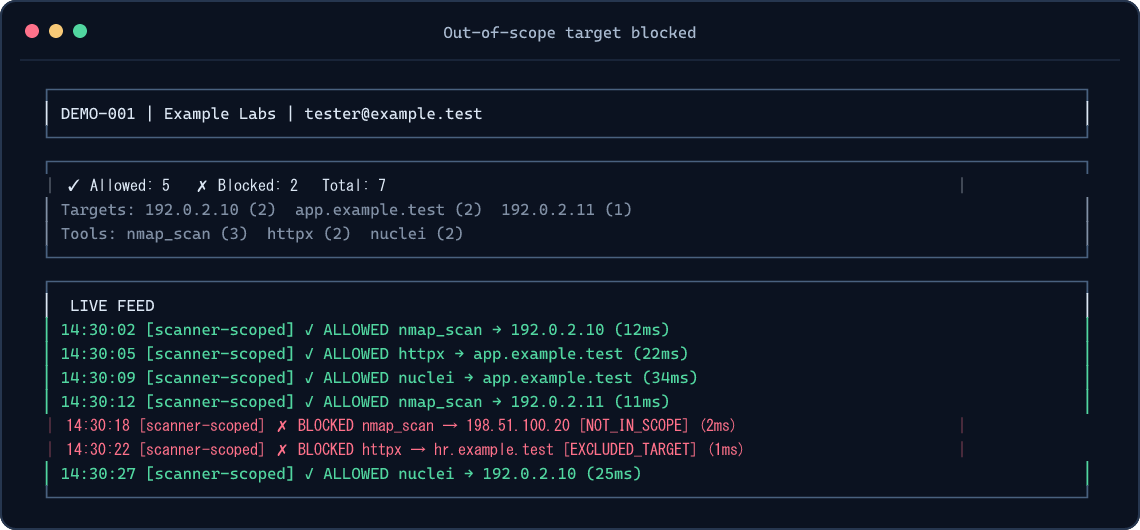
Watch decisions in another terminal:
pentest-tui --audit-path ./auditSetup prints the exact audit path to use. If your shell is in another directory, use that printed path. For a one-off TUI without a global install:
npm exec --yes --package=@integsec/agentic-pentest-proxy -- pentest-tui --audit-path ./auditThe TUI reads local audit files; it does not start the proxy. See TUI screenshots.
Other MCP tool types
| Tool connection | What to do |
|---|---|
| stdio tool launched by a command | Use the setup command above with -- <command> [args...]. |
| SSE upstream already listening, such as Burp Suite | Use pentest-setup --name burp-scoped --manifest ./scope.json --sse http://127.0.0.1:9876. |
| HTTP upstream | Run the proxy as an HTTP service and point your MCP client at it. HTTP and Docker guide. |
Use one generated client entry per upstream tool. A single scope manifest can be shared by several entries; each call still gets checked. More client examples.
What gets checked
The proxy checks MCP tools/call arguments it can inspect. It blocks unknown target-bearing arguments, out-of-scope targets, explicit exclusions, restricted techniques, expired engagement windows, and free-form commands by default. DNS names authorized through IP ranges must resolve entirely inside the allowed ranges. Local JSONL auditing is always on; cloud logging is optional.
The proxy cannot control destinations selected inside an upstream tool, HTTP redirects, targets read from files or encoded payloads, DNS changes after validation, or traffic that bypasses MCP. Use network egress controls and review each upstream tool's schema before relying on the proxy for an engagement. Security model.
Install and release options
| Option | Command or image |
|---|---|
| Global npm install | npm install -g @integsec/agentic-pentest-proxy |
| Project install | npm install @integsec/agentic-pentest-proxy |
| GHCR image | ghcr.io/integsec/agentic-pentest-proxy:latest |
| Docker Hub image | integsec/agentic-pentest-mcp-proxy:latest |
The npm package includes the gateway, proxy, manifest builder, setup helper, TUI, bridge, and scanner adapter. Run pentest-gateway version or pentest-gateway --version to check the installed release. The older integsec- command names still work for existing client configurations. To see the optional install welcome banner, add --foreground-scripts; npm hides package install-script output by default. You can always run pentest-gateway --help for the same next steps. The welcome script does not access the network or modify files.
Google Cloud logging and Secret Manager SDKs are opt-in to keep the default install lean and free of their deprecated transitive package. If you use either GCP backend, install the SDKs alongside the proxy:
npm install -g @integsec/agentic-pentest-proxy @google-cloud/logging @google-cloud/secret-manager
AWS and Azure SDKs are included as optional dependencies. See configuration and cloud setup for the required environment variables and Docker notes. If you use GCP and are upgrading from 0.2.6, install the GCP SDKs before restarting the proxy; it now reports a missing Cloud Logging SDK at startup.
Troubleshooting
| Symptom | Check |
|---|---|
| Tool does not appear in your MCP client | Paste the generated entry inside one mcpServers object, restart the client, and confirm the client can run pentest-proxy. |
| TUI shows no decisions | Start a tool call, then use the exact audit path printed by setup. The TUI and client may have different working directories. |
| Call is blocked | Check the decision and reason in the TUI or audit JSONL. Confirm the target, exclusions, technique, and window in your manifest. |
| GCP backend says its SDK is missing | Install the two GCP packages shown above alongside the proxy. |
| Need all CLI options | Run pentest-gateway --help, pentest-proxy --help, pentest-setup --help, pentest-manifest --help, or pentest-tui --help. |
Reference
- Configuration and manifest fields
- Client integrations, HTTP, and Docker
- TUI usage and screenshots
- Security model and limitations
- Contributing and development
License
Apache-2.0. See LICENSE.
Вопросы о agentic-pentest-proxy MCP
Как добавить agentic-pentest-proxy MCP в Claude Code?
Выполните claude mcp add agentic-pentest-proxy -- npx -y @integsec/agentic-pentest-proxy в терминале. Добавьте --scope user, чтобы сервер был доступен во всех проектах.
Как добавить agentic-pentest-proxy MCP в Cursor?
Откройте ~/.cursor/mcp.json и добавьте сервер в mcpServers, используя конфигурацию Cursor из раздела установки выше.
Что именно проверяет прокси?
Он анализирует аргументы вызовов MCP-инструментов, чтобы блокировать неизвестные целевые аргументы, цели вне рамок проекта, запрещенные методы и истекшие временные интервалы тестирования.
Может ли прокси предотвратить обход проверок агентом через отдельную оболочку (shell)?
Нет, шлюз не может помешать агенту, имеющему отдельную оболочку или сетевой путь, обойти проверки MCP.
Какие типы соединений с MCP-инструментами поддерживаются?
Прокси поддерживает инструменты через stdio, SSE-апстримы (например, Burp Suite) и HTTP-апстримы.