
Управляет локальной социальной CRM для контактов, отношений, обязательств и повторяющихся дат с использованием базы данных SQLite.
Также известен как GhostPawJS/affinity, affinity, @ghostpaw/affinity
- Звёзды
- 1
- Инструменты
- 12
- Загрузки, 30 дней
- 2 464
- Последняя версия
- 0.7.2
- Последний коммит
- 12 нояб. 2026 г.
- Лицензия
- MIT
Что такое GhostPaw Affinity MCP?
Управляет локальной социальной CRM для контактов, отношений, обязательств и повторяющихся дат с использованием базы данных SQLite. Он предоставляет 12 инструментов, например search_affinity, review_affinity, inspect_affinity_item.
Сводка сгенерирована из README проекта
О GhostPaw Affinity MCP server
GhostPaw Affinity представляет собой локальную социальную CRM, разработанную для помощи пользователям в управлении личными связями, обязательствами и важными повторяющимися датами. Он функционирует как MCP server, который организует контакты, личности, отношения, события в журнале и обещания в рамках единой базы данных SQLite. Этот инструмент создан для разработчиков и частных лиц, которые хотят вести структурированный учет своей социальной сети и отслеживать, с кем они могут терять связь, благодаря встроенной функции радара.
Сервер работает локально через stdio и может быть интегрирован в такие клиенты, как Claude Desktop, Cursor или Codex CLI. Пользователи могут установить его как автономный бинарный файл для Linux, macOS и Windows или запустить через npx. Для управления хранением данных можно указать пользовательский путь к базе данных с помощью переменной окружения GHOSTPAW_AFFINITY_DB или флага --db, что особенно полезно при работе в изолированных средах. Инструмент предоставляет структурированный способ взаимодействия AI агентов с вашими персональными социальными данными без использования внешних облачных сервисов.
Что вы можете с ним делать
- 1Отслеживание социальных обязательствПопросите AI записать новое обещание или обязательство, данное конкретному контакту.
- 2Мониторинг состояния отношенийЗапросите сводку по контактам, с которыми в последнее время не было взаимодействия, чтобы увидеть, кто выпадает из поля зрения.
- 3Поиск по истории контактовДайте клиенту команду найти конкретную информацию или детали о человеке в вашей базе данных.
Взято из README проекта. Каждый вариант использования проверен на соответствие цитате из него.
Как установить GhostPaw Affinity MCP
Форматы проверены 10 ноя 2026Добавить в CursorДобавить в GooseУстановка GhostPaw Affinity MCP в Claude Code
$ claude mcp add affinity -- npx -y @ghostpaw/affinityУстановка GhostPaw Affinity MCP в Cursor
~/.cursor/mcp.json
{
  "mcpServers": {
    "affinity": {
      "command": "npx",
      "args": [
        "-y",
        "@ghostpaw/affinity"
      ]
    }
  }
}Установка GhostPaw Affinity MCP в VS Code
.vscode/mcp.json
{
  "servers": {
    "affinity": {
      "type": "stdio",
      "command": "npx",
      "args": [
        "-y",
        "@ghostpaw/affinity"
      ]
    }
  }
}Установка GhostPaw Affinity MCP в VS Code CLI
$ code --add-mcp '{"name":"affinity","type":"stdio","command":"npx","args":["-y","@ghostpaw/affinity"]}'Установка GhostPaw Affinity MCP в Claude Desktop
claude_desktop_config.json
{
  "mcpServers": {
    "affinity": {
      "command": "npx",
      "args": [
        "-y",
        "@ghostpaw/affinity"
      ]
    }
  }
}Установка GhostPaw Affinity MCP в Codex
$ codex mcp add affinity -- npx -y @ghostpaw/affinityУстановка GhostPaw Affinity MCP в Codex config.toml
~/.codex/config.toml
[mcp_servers.affinity]
command = "npx"
args = ["-y", "@ghostpaw/affinity"]
Установка GhostPaw Affinity MCP в Gemini CLI
$ gemini mcp add -s user affinity npx -- -y @ghostpaw/affinityУстановка GhostPaw Affinity MCP в Gemini settings.json
~/.gemini/settings.json
{
  "mcpServers": {
    "affinity": {
      "command": "npx",
      "args": [
        "-y",
        "@ghostpaw/affinity"
      ]
    }
  }
}Инструменты GhostPaw Affinity MCP 12
Определено из READMEsearch_affinityreview_affinityinspect_affinity_itemmanage_contactmerge_contactsmanage_duplicate_dismissalmanage_identitymanage_relationshiprecord_eventmanage_commitmentmanage_date_anchormanage_attribute
| search_affinity | — | |
| review_affinity | — | |
| inspect_affinity_item | — | |
| manage_contact | — | |
| merge_contacts | — | |
| manage_duplicate_dismissal | — | |
| manage_identity | — | |
| manage_relationship | — | |
| record_event | — | |
| manage_commitment | — | |
| manage_date_anchor | — | |
| manage_attribute | — |
Конфигурация
GHOSTPAW_AFFINITY_DBSQLite database path (default: ~/.ghostpaw/affinity.db)
| Название | Описание | Тип |
|---|---|---|
| GHOSTPAW_AFFINITY_DB | SQLite database path (default: ~/.ghostpaw/affinity.db) |
Автоматические проверки
Запущено 12 нояб. 2026 г.Полный отчёт →Прошло наши автоматизированные проверки. Это не аудит безопасности: изучите код и предоставьте серверу минимально необходимый доступ. Как работают проверки

- Связанный и доступный исходный репозиторийПройдено
- Open source лицензия (OSI)Пройдено
- Коммит или релиз за последний годПройдено
- Имя пакета не похоже на популярный пакетПройдено
- Удаленная конечная точка использует HTTPSНе проверялось
- Деструктивные инструменты помеченыПройдено
- Нет скрытых инструкций для моделиПройдено
- Нет критических предупреждений в пакете или его зависимостяхПройдено
README
Открыть на GitHub@ghostpaw/affinity








Agent contacts: people, promises and yearly dates, with a radar for who is drifting.
A local social CRM: contacts, identities, relationships, journal events, commitments and recurring dates in one SQLite file. One self-contained binary per platform, an MCP server, and a zero-dependency TypeScript library.
Install
Each line downloads the latest release for one platform, checks it against
SHA256SUMS, puts ghostpaw-affinity on your PATH and prints the version.
Linux x64
cd "$(mktemp -d)" && T=linux-x64 && V=$(curl -fsSLI -o /dev/null -w '%{url_effective}' https://github.com/GhostPawJS/affinity/releases/latest | sed 's|.*/v||') && F=ghostpaw-affinity-$V-$T.tar.gz && U=https://github.com/GhostPawJS/affinity/releases/download/v$V && curl -fsSL -O "$U/$F" -O "$U/SHA256SUMS" && grep " $F\$" SHA256SUMS | sha256sum -c - && tar -xzf "$F" ghostpaw-affinity && mkdir -p ~/.local/bin && mv ghostpaw-affinity ~/.local/bin/ && { case ":$PATH:" in *":$HOME/.local/bin:"*) ;; *) echo 'export PATH="$HOME/.local/bin:$PATH"' >> ~/.profile; export PATH="$HOME/.local/bin:$PATH";; esac; } && ghostpaw-affinity --version
Linux arm64
cd "$(mktemp -d)" && T=linux-arm64 && V=$(curl -fsSLI -o /dev/null -w '%{url_effective}' https://github.com/GhostPawJS/affinity/releases/latest | sed 's|.*/v||') && F=ghostpaw-affinity-$V-$T.tar.gz && U=https://github.com/GhostPawJS/affinity/releases/download/v$V && curl -fsSL -O "$U/$F" -O "$U/SHA256SUMS" && grep " $F\$" SHA256SUMS | sha256sum -c - && tar -xzf "$F" ghostpaw-affinity && mkdir -p ~/.local/bin && mv ghostpaw-affinity ~/.local/bin/ && { case ":$PATH:" in *":$HOME/.local/bin:"*) ;; *) echo 'export PATH="$HOME/.local/bin:$PATH"' >> ~/.profile; export PATH="$HOME/.local/bin:$PATH";; esac; } && ghostpaw-affinity --version
macOS Apple silicon
cd "$(mktemp -d)" && T=darwin-arm64 && V=$(curl -fsSLI -o /dev/null -w '%{url_effective}' https://github.com/GhostPawJS/affinity/releases/latest | sed 's|.*/v||') && F=ghostpaw-affinity-$V-$T.tar.gz && U=https://github.com/GhostPawJS/affinity/releases/download/v$V && curl -fsSL -O "$U/$F" -O "$U/SHA256SUMS" && grep " $F\$" SHA256SUMS | shasum -a 256 -c - && tar -xzf "$F" ghostpaw-affinity && sudo mkdir -p /usr/local/bin && sudo mv ghostpaw-affinity /usr/local/bin/ && ghostpaw-affinity --version
macOS Intel
cd "$(mktemp -d)" && T=darwin-x64 && V=$(curl -fsSLI -o /dev/null -w '%{url_effective}' https://github.com/GhostPawJS/affinity/releases/latest | sed 's|.*/v||') && F=ghostpaw-affinity-$V-$T.tar.gz && U=https://github.com/GhostPawJS/affinity/releases/download/v$V && curl -fsSL -O "$U/$F" -O "$U/SHA256SUMS" && grep " $F\$" SHA256SUMS | shasum -a 256 -c - && tar -xzf "$F" ghostpaw-affinity && sudo mkdir -p /usr/local/bin && sudo mv ghostpaw-affinity /usr/local/bin/ && ghostpaw-affinity --version
Windows x64 (PowerShell)
$r='GhostPawJS/affinity'; $v=(irm "https://api.github.com/repos/$r/releases/latest").tag_name; $f="ghostpaw-affinity-$($v.TrimStart('v'))-windows-x64.zip"; $u="https://github.com/$r/releases/download/$v"; $t=(New-Item -ItemType Directory (Join-Path $env:TEMP ([guid]::NewGuid()))).FullName; iwr "$u/$f" -OutFile "$t\$f" -UseBasicParsing; iwr "$u/SHA256SUMS" -OutFile "$t\SHA256SUMS" -UseBasicParsing; $want=((Get-Content "$t\SHA256SUMS" | Where-Object { $_ -like "* $f" }) -split '\s+')[0]; if (-not $want -or (Get-FileHash "$t\$f" -Algorithm SHA256).Hash -ne $want) { throw "checksum mismatch for $f" }; $d=Join-Path $env:LOCALAPPDATA 'Programs\ghostpaw\bin'; Expand-Archive "$t\$f" $t -Force; New-Item -ItemType Directory -Force $d | Out-Null; Copy-Item "$t\ghostpaw-affinity.exe" $d -Force; $p=[Environment]::GetEnvironmentVariable('Path','User'); if (";$p;" -notlike "*;$d;*") { [Environment]::SetEnvironmentVariable('Path',"$p;$d",'User') }; $env:Path="$d;$env:Path"; ghostpaw-affinity --version
These commands install the latest release in ~/.local/bin on Linux, /usr/local/bin on macOS (asks for sudo), or %LOCALAPPDATA%\Programs\ghostpaw\bin on Windows; Linux adds it to PATH via ~/.profile only if missing, and Windows adds it to the user PATH (open a new terminal afterwards). To pin a version, set V=0.6.0 instead of resolving latest ($v='v0.6.0' in PowerShell).
For a pinned Linux/macOS download to the current directory with no profile or PATH edits, choose the matching T (linux-x64, linux-arm64, darwin-arm64, or darwin-x64):
V=0.6.0
T=linux-x64
F=ghostpaw-affinity-$V-$T.tar.gz
U=https://github.com/GhostPawJS/affinity/releases/download/v$V
curl -fsSL -O "$U/$F" -O "$U/SHA256SUMS" &&
  { case "$T" in darwin-*) grep " $F\$" SHA256SUMS | shasum -a 256 -c - ;; *) grep " $F\$" SHA256SUMS | sha256sum -c - ;; esac; } &&
  tar -xzf "$F" ghostpaw-affinity && ./ghostpaw-affinity --version
Then:
ghostpaw-affinity contact create '{"name":"Owner","kind":"agent"}' --bootstrap-owner
ghostpaw-affinity contact create '{"name":"Sam","kind":"human"}' --json | jq .id
ghostpaw-affinity search sam
ghostpaw-affinity skill            # cheat sheet and tool reference
Contacts live in ~/.ghostpaw/affinity.db unless --db <path> or the
GHOSTPAW_AFFINITY_DB environment variable says otherwise; relative paths
resolve against the current directory.
A session with the linux-x64 binary against a fresh database:
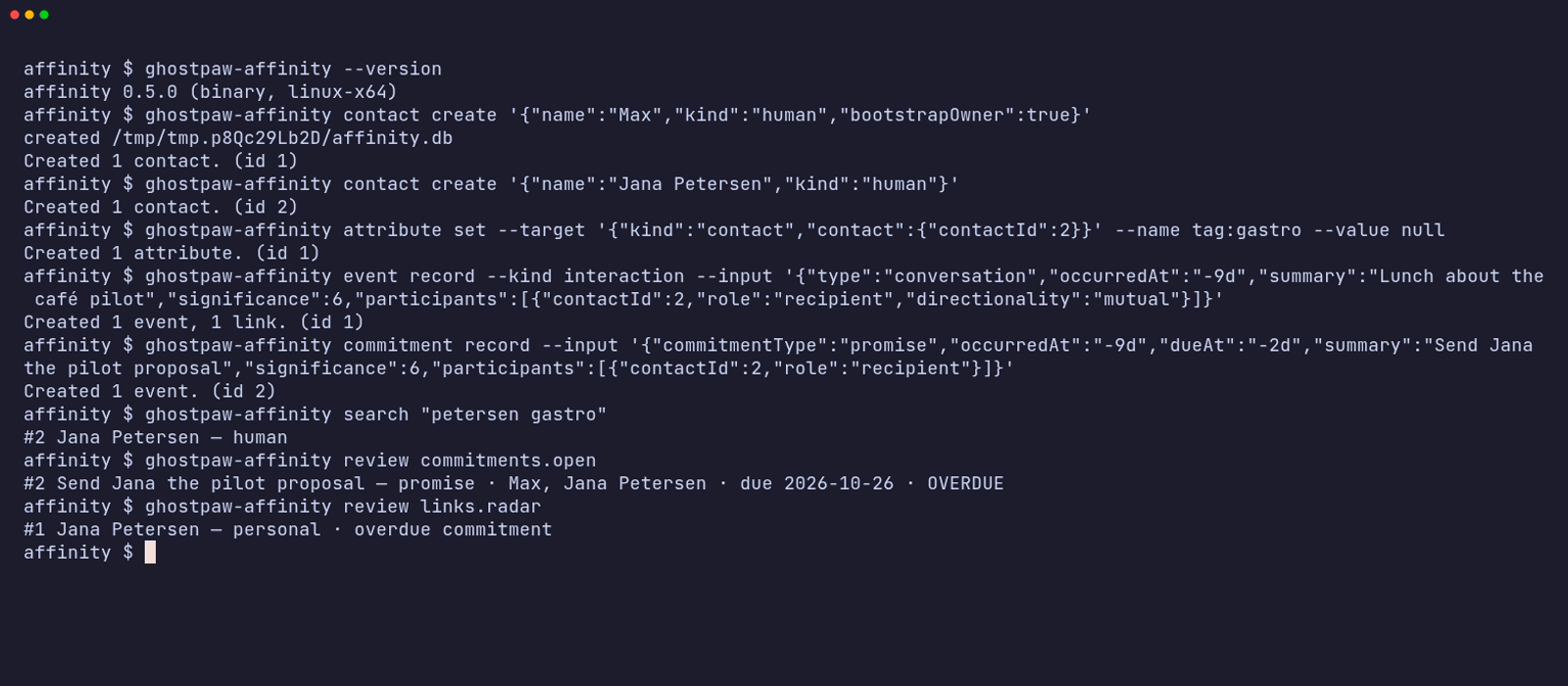
The same session as an animated GIF.
npx / npm (for npm-based environments)
The npm package needs Node 24+ and has zero runtime dependencies:
npx -y @ghostpaw/affinity --help
npm install -g @ghostpaw/affinity   # provides ghostpaw-affinity
Library (for harnesses)
npm install @ghostpaw/affinity
import { DatabaseSync } from "node:sqlite";
import { initAffinityTables, read, write, tools } from "@ghostpaw/affinity";
See Quick Start and docs/LLM.md for the tool facade.
Other installers and verification
Interactive installers (also verify SHA256SUMS):
curl -fsSL https://raw.githubusercontent.com/GhostPawJS/affinity/main/install.sh | sh
irm https://raw.githubusercontent.com/GhostPawJS/affinity/main/install.ps1 | iex
mise use -g github:GhostPawJS/affinity
ubi --project GhostPawJS/affinity --exe ghostpaw-affinity --in ~/.local/bin
eget GhostPawJS/affinity
For aqua, define a
github_release package in aqua.yaml:
registries:
  - name: affinity
    type: local
    path: affinity-registry.yaml
packages:
  - name: GhostPawJS/affinity@v<VERSION>
    registry: affinity
affinity-registry.yaml:
packages:
  - type: github_release
    repo_owner: GhostPawJS
    repo_name: affinity
    asset: ghostpaw-affinity-{{trimV .Version}}-{{.OS}}-{{.Arch}}.tar.gz
    format: tar.gz
    replacements: { amd64: x64 }
    overrides:
      - goos: windows
        asset: ghostpaw-affinity-{{trimV .Version}}-windows-{{.Arch}}.zip
        format: zip
    files:
      - name: ghostpaw-affinity
SHA256SUMS covers every archive and server.mcpb. To verify a downloaded
archive's build attestation:
gh attestation verify <archive> -R GhostPawJS/affinity
Set GHOSTPAW_VERIFY=attestation for attestation verification in install.sh.
Binaries are unsigned; macOS binaries carry an ad-hoc signature. For a browser
download on macOS, remove quarantine with
xattr -d com.apple.quarantine /path/to/ghostpaw-affinity.
Linux binaries require glibc 2.28+; use npx on Alpine.
See the binary build workflow.
Each archive is roughly 40-46 MB (the binary embeds the Node runtime, 105-150 MB unpacked); the npm package is about 2 MB unpacked. Every release, including the one-liners above, is installed and run on ubuntu-24.04, macos-15 and windows-2025 by the install check.
Running inside sandboxed agent harnesses
Inside a Codex CLI --sandbox workspace-write session, the database and its
parent directory must be inside a writable root, including SQLite's -wal and
-shm side files. A default DB under ~/.ghostpaw outside those roots can fail
with SQLITE_CANTOPEN or EPERM (often exit 70; directory creation failures
may exit 2), even when normal shell permissions allow access. Put the DB inside the workspace with --db ./state/affinity.db,
or set GHOSTPAW_AFFINITY_DB="$PWD/state/affinity.db" for CLI/MCP use.
To use an external DB directory, add it when starting the OpenAI Codex CLI
(replace <dir-with-db> with its absolute path):
codex exec --sandbox workspace-write --add-dir <dir-with-db> "Run the GhostPaw CLI"
Alternatively, set sandbox_workspace_write.writable_roots in
~/.codex/config.toml before starting the session:
[sandbox_workspace_write]
writable_roots = ["/absolute/dir-with-db"]
MCP server
Every client below starts the same stdio server: ghostpaw-affinity mcp.
Without the binary, use npx -y @ghostpaw/affinity mcp as the command instead.
Claude Code
claude mcp add ghostpaw-affinity -- ghostpaw-affinity mcp
or as a plugin, which also installs the skill:
/plugin marketplace add GhostPawJS/affinity
/plugin install ghostpaw-affinity@ghostpaw-affinity
Codex CLI (~/.codex/config.toml)
[mcp_servers.ghostpaw-affinity]
command = "ghostpaw-affinity"
args = ["mcp"]
Cursor (.cursor/mcp.json), Claude Desktop (claude_desktop_config.json)
or a project .mcp.json:
{
  "mcpServers": {
    "ghostpaw-affinity": {
      "command": "ghostpaw-affinity",
      "args": ["mcp"]
    }
  }
}
Claude Desktop users can also install server.mcpb from the
latest GitHub release.
A Dockerfile is included for container hosts:
docker build -t ghostpaw-affinity . && docker run -i --rm -v affinity:/data ghostpaw-affinity.
The server speaks MCP 2026-07-28 (stateless, server/discover) and the
initialize-based revisions 2025-11-25, 2025-06-18, 2025-03-26 and 2024-11-05.
Agent Skill
SKILL.md (repo root) and skills/affinity/SKILL.md follow the
Agent Skills format and ship in the npm package.
Copy skills/affinity/ into your agent's skills folder, or print it:
ghostpaw-affinity skill > SKILL.md
ghostpaw-affinity skill --list       # workflow guides
ghostpaw-affinity skill bootstrap-and-cold-start
Events
Record events and commitments with an optional externalRef: {source, id}.
Both values are trimmed and non-empty; source is lowercased. The pair is unique
across the database. Repeated intake returns the original event and no_op,
without creating rows or relationship effects.
content preserves text exactly, including whitespace, empty strings and NUL,
up to 1 MB (1,048,576 UTF-8 bytes). Supply a short summary, or omit it to derive
one from the first non-empty content line (at most 140 characters; empty text
becomes (no text)). Unknown event fields and moment kinds are validation errors.
Journal/timeline rows omit content by default; use {includeContent: true} in
library/tool options or CLI --with-content. Content appears once in review JSON.
Events support a free-text channel (trimmed, lowercased, at most 40 characters),
parentRef, parentEventId, and a root threadRef. Journal, timeline, moments,
and open commitment reviews accept a channel filter. Set event attributes with
write.setAttribute(db, {kind: "event", eventId}, name, value); unset and replace
use the same target and validation as contact/link attributes.
Read exact events with read.getEventById(db, eventId) or
read.getEventByExternalRef(db, source, id). read.searchEvents searches folded
summary, content, reference and channel text. The search tool's scope is
contacts by default, with additive events and all modes.
read.getEventThread(db, source, id) returns a root and its descendants in time
order, including parents imported after their children.
write.reviseEvent(db, eventIdOrTarget, patch) accepts summary, content,
occurredAt, significance, channel, type within the same event family, and an
externalRef only when absent. write.deleteEvent(db, eventIdOrTarget, {confirm: true}) removes evidence, participants, attributes and link effects,
then replays surviving effects and refreshes rollups. Targets can also be
{ref: {source, id}}. Existing 0.5.x databases migrate through
initAffinityTables. Historical affinity/trust/rank baselines are recovered
from saved deltas; historical cadence and state before evidence were not stored
and use the default cadence and active state during replay.
CLI
export GHOSTPAW_AFFINITY_DB=~/crm/affinity.db      # or --db <path>
ghostpaw-affinity contact create '{"name":"Fox","kind":"human","bootstrapOwner":true}'
ghostpaw-affinity search "jana"                     # names, identities, tags, attributes, roles, events
ghostpaw-affinity contact create '{"name":"Jana Petersen","kind":"human"}'
ghostpaw-affinity identity add --contact '{"contactId":2}' --input '{"type":"email","value":"jana@example.com"}'
ghostpaw-affinity event record --kind interaction --input '{"type":"conversation","occurredAt":"today","summary":"Call re pilot","significance":6,"participants":[{"contactId":2,"role":"recipient","directionality":"mutual"}]}'
ghostpaw-affinity commitment record --input '{"commitmentType":"promise","occurredAt":"today","dueAt":"+3d","summary":"Send proposal","significance":6,"participants":[{"contactId":2,"role":"recipient"}]}'
ghostpaw-affinity attribute set --target '{"kind":"contact","contact":{"contactId":2}}' --name tag:gastro --value null
ghostpaw-affinity review contacts.list --tag gastro
ghostpaw-affinity review contacts.list --attribute pipeline_stage=proposal
ghostpaw-affinity review commitments.open            # overdue promises are flagged
ghostpaw-affinity review links.radar                 # who is drifting, with reasons
ghostpaw-affinity show contact_profile --contact '{"contactId":2}'
ghostpaw-affinity contact export --contact '{"contactId":2}'   # omit --contact for the whole database
ghostpaw-affinity contact delete --contact '{"contactId":2}' --confirm
ghostpaw-affinity skill prints the full cheat sheet; skill --list and
skill <guide> print the workflow guides.
ghostpaw-affinity search <query> [--tag T] [--attribute name[=value]]
ghostpaw-affinity review <view> [--tag T] [--attribute name[=value]]
ghostpaw-affinity show <owner_profile|contact_profile|link> [--contact JSON --link JSON]
ghostpaw-affinity contact create|revise|lifecycle|export|delete|merge
ghostpaw-affinity identity add|revise|verify|remove [flags]
ghostpaw-affinity relationship add|bond|state|tie|untie [flags]
ghostpaw-affinity commitment record|resolve [flags]
ghostpaw-affinity attribute set|unset|replace [flags]
ghostpaw-affinity date add|revise|remove [flags]
ghostpaw-affinity event record [flags]
ghostpaw-affinity show event --event-id 12
ghostpaw-affinity show event --ref-source bluesky --ref-id at://record
ghostpaw-affinity search --scope events "text or record id"
ghostpaw-affinity review events.contact_journal --contact '{"contactId":2}' --with-content --channel bluesky
ghostpaw-affinity review events.thread --ref-source bluesky --ref-id at://root
ghostpaw-affinity event revise --event-id 12 --patch '{"summary":"Corrected"}'
ghostpaw-affinity event delete --event-id 12 --confirm
ghostpaw-affinity duplicate dismiss|undismiss [flags]
ghostpaw-affinity mcp|skill|tools|describe|call|completions|version|help
There are 29 domain commands. review accepts the existing view names,
including contacts.list, contacts.duplicates and dates.upcoming.
show selects an inspection kind; contact and link locators are JSON objects.
Use help contact or contact create --help for schema-derived help; a
mistyped command suggests the closest one. Nested payloads use JSON or @path
to read a file; repeated array flags accept JSON objects
(--entries '{"name":"a","value":"x"}') or one JSON array.
Every time field accepts epoch milliseconds, ISO 8601 with Z or an offset,
YYYY-MM-DD, DD.MM.YYYY, today, tomorrow, yesterday and signed day offsets
such as +3d or -2d, with the same grammar in CLI, MCP and direct tool calls.
Date-only values preserve their calendar day: timestamps use UTC midnight, or
23:59:59.999Z for dueAt. Keywords first resolve against the process local
calendar date; this is the only time-zone-dependent parsing step. occurredOn
and dueOn retain the input day (the written offset day for ISO inputs; UTC day
for epoch inputs). Existing rows derive these fields from their UTC timestamps.
Review rows for dates include occursOn, the anchor occurrence day; the library
keeps its numeric occursOn sorting key and adds occursOnDate.
The existing *Iso fields remain UTC. Overdue commitments compare the local
date to dueOn. Future events carry a future_event warning and do not count
as contact until their timestamp and day arrive. Commitments and their
resolutions do not reset recency or cadence. Radar marks drift after a gap
exceeds 1.5 times the expected cadence and explains its reasons in the snippet.
Global flags: --db <path>, --json, -q, --quiet, --compact,
--help/-h, --version/-V/-v, --no-color.
NO_COLOR is accepted. In a terminal, commands print a readable summary with
names and dates. With --json or piped stdout they print the tool result as
JSON with ISO date siblings and floats rounded to three decimals. Journal review rows
keep one summary and compact {id,name,role} participants. Radar rows keep one link
id, counterparty name, reasons and rounded scores; upcoming link dates omit radar
scores. Default piped writes and --compact keep primary and changed ids plus
warnings; explicit --json retains full mutation detail. --compact
removes indentation and empty receipt arrays. -q, --quiet suppresses stdout.
When a command opens the default database, the CLI prints using default db <path>
to stderr. Suppress this notice with -q, --quiet or GHOSTPAW_QUIET=1.
Writes list what changed in data.changes, and creates warn about likely
duplicates. Kebab-case flags map to schema properties. -- ends flags.
A positional -, or piped stdin when no other arguments are given, reads a
JSON object (echo '{"name":"Sam","kind":"human"}' | ghostpaw-affinity contact create).
Explicit flags override stdin fields.
Database selection uses --db, GHOSTPAW_AFFINITY_DB, then
~/.ghostpaw/affinity.db; relative paths resolve against the current
directory, and --help shows the resolved path. A new database is reported on
stderr. These commands work offline.
| Exit | Result |
|---|---|
| 0 | Success, including no_op |
| 1 | Other tool error |
| 2 | Usage, schema or invalid input |
| 3 | Clarification needed or not found |
| 4 | Conflict, already resolved or version mismatch |
| 70 | Internal error |
Errors go to stderr. With --json, errors also print to stdout.
--version names the variant: affinity 0.5.0 (binary, linux-x64),
(npm) or (library). Use --version --short in scripts for exact semver
matching. --version --json returns name, version, variant and target
(the target is null outside a binary). version --short and version --json
are equivalent.
Read commands (search, show, review and contact export, including direct tool
calls) exit 3 on a missing database without creating files:
Database not found: <path> (it is created by the first write).
The first write creates the database and reports created <path> on stderr.
Read commands open SQLite read-only: they never initialize or migrate the schema
or switch journal mode. Explicit :memory: stores retain transient initialization
and then enable query-only mode. This also applies to read-only facade tools over MCP.
Writes upgrade older schemas and print Affinity database schema upgraded. to
stderr when the schema changes. Run ghostpaw-affinity migrate --db <path> to
upgrade explicitly. Reads that require a newer schema suggest this command.
MCP opens the database per tool call; its first write creates the database.
String-valued flags such as --value Hamburg, --bond 'Warm lead' and
--reason 'Different people' accept plain strings or JSON strings/null.
Object and array flags still require JSON. Tag filters accept both
--tag gastro-radar and --tag tag:gastro-radar.
Per-command --help lists the fields used by that action. Unknown subcommands
suggest a valid command, including with --help: contact update suggests
contact revise, which accepts contact patches such as doNotContact.
Legacy tools [--json], describe <tool>,
call <tool> [JSON|-] and <tool_name> --parameter value remain available.
completions bash|zsh|fish prints shell scripts.
Quick Start
import { DatabaseSync } from "node:sqlite";
import { initAffinityTables, read, write } from "@ghostpaw/affinity";

const db = new DatabaseSync(":memory:");
db.exec("PRAGMA foreign_keys = ON");
initAffinityTables(db);

const { primary: owner } = write.createContact(db, {
  name: "Mika",
  kind: "human",
  bootstrapOwner: true,
});

const { primary: ada } = write.createContact(db, {
  name: "Ada Lovelace",
  kind: "human",
});

write.addIdentity(db, ada.id, {
  type: "email",
  value: "ada@example.com",
});

write.recordInteraction(db, {
  type: "conversation",
  occurredAt: Date.now(),
  summary: "Coffee together",
  significance: 6,
  participants: [
    { contactId: owner.id, role: "actor", directionality: "mutual" },
    { contactId: ada.id, role: "recipient", directionality: "mutual" },
  ],
});

const profile = read.getContactProfile(db, ada.id);
const radar = read.listRadar(db);
Вопросы о GhostPaw Affinity MCP
Как добавить GhostPaw Affinity MCP в Claude Code?
Выполните claude mcp add affinity -- npx -y @ghostpaw/affinity в терминале. Добавьте --scope user, чтобы сервер был доступен во всех проектах.
Как добавить GhostPaw Affinity MCP в Cursor?
Откройте ~/.cursor/mcp.json и добавьте сервер в mcpServers, используя конфигурацию Cursor из раздела установки выше.
Какие инструменты предоставляет GhostPaw Affinity MCP?
Он предоставляет 12 инструментов, включая search_affinity, review_affinity, inspect_affinity_item, manage_contact, merge_contacts.
Где хранятся данные?
Данные о контактах и отношениях хранятся в одном файле SQLite, который по умолчанию находится по пути ~/.ghostpaw/affinity.db.
Как запустить это как MCP server?
Вы можете запустить stdio server с помощью команды ghostpaw-affinity mcp или через npx, используя npx -y @ghostpaw/affinity mcp.
Можно ли использовать это в изолированной среде?
Да, но во избежание ошибок доступа вам следует разместить базу данных в доступном для записи корневом каталоге, используя флаг --db или установив переменную окружения GHOSTPAW_AFFINITY_DB.