
MCP server Rigor
Коммит 13 нояб. 2026 г.Позволяет QA-командам проводить детерминированное тестирование MCP tools, resources, prompts и контрактов на естественном языке без написания тестового кода.
Также известен как FusionOnePlatform/mcprigor
- Звёзды
- 3
- Инструменты
- —
- Загрузки, 30 дней
- —
- Последняя версия
- —
- Последний коммит
- 13 нояб. 2026 г.
- Лицензия
- Apache-2.0
Что такое Rigor MCP?
Позволяет QA-командам проводить детерминированное тестирование MCP tools, resources, prompts и контрактов на естественном языке без написания тестового кода.
Сводка сгенерирована из README проекта
О Rigor MCP server
QA-команды могут проводить детерминированное тестирование MCP tools, resources, prompts и контрактов на естественном языке, не прибегая к написанию традиционного тестового кода. Используя специализированный синтаксис, тестировщики могут определять ожидаемые результаты для вызовов инструментов, чтения ресурсов и вывода промптов. Такой подход гарантирует предсказуемость тестов, так как для интерпретации формулировок не используются AI-модели.
Пользователи могут запускать тесты для локальных stdio серверов, Python серверов или удаленных HTTP серверов, используя переменные окружения для аутентификации. Система поддерживает различные рабочие процессы, включая локальное QA-пространство в браузере, интерфейс командной строки (CLI) для интеграции в CI и интерактивный режим автора для генерации тестов на основе работающих серверов. Также предусмотрена команда parity для сравнения поведения в локальной и развернутой средах.
Разработчики могут управлять сложными сценариями тестирования с помощью data-driven подходов, используя адаптеры CSV, JSON или SQL. Инструмент включает расширенные функции, такие как аудит безопасности, контроль производительности с лимитами по перцентилям и проверку композиции для флотов из нескольких серверов. Он интегрируется в процессы разработки через расширение для VS Code и предоставляет подробные HTML-отчеты с интерактивной временной шкалой доказательств.
Что вы можете с ним делать
- 1Проверка точности вывода инструментовРазработчик может дать системе команду вызвать конкретный инструмент с определенными аргументами и проверить, соответствует ли возвращаемый структурированный контент ожидаемому значению.
- 2Сравнение локальной и удаленной средКоманды могут запускать одни и те же сценарии тестов как на локальном сервере разработки, так и на развернутом QA-сервере для выявления семантических различий.
- 3Автоматизация тестирования с внешними даннымиТестировщики могут выполнять один и тот же вызов инструмента для множества строк данных, импортированных из таких файлов, как Excel, или из SQL баз данных.
- 4Генерация тестов на основе работающих серверовВместо ручного написания файлов пользователи могут использовать пошаговый процесс для обнаружения операций и автоматического создания файлов тестов, готовых к проверке.
Взято из README проекта. Каждый вариант использования проверен на соответствие цитате из него.
Конфигурация
MCP_TOKEN
| Название | Описание | Тип |
|---|---|---|
| MCP_TOKEN | — |
Автоматические проверки
Запущено 14 нояб. 2026 г.Полный отчёт →Еще не проверено. Для сервера требуется оценка 80, отсутствие серьезных проблем и достаточно данных для нашей проверки. Как работают проверки · Что исправить, чтобы получить больше баллов

- Связанный и доступный исходный репозиторийfusiononeplatform/mcprigor is public and reachablegithub.com/fusiononeplatform/mcprigor ↗Пройдено
- Пакет указывает этот репозиторий как источникНе проверялось
- Происхождение сборки (аттестация Sigstore)Не проверялось
- Open source лицензия (OSI)Apache-2.0spdx.org/licenses/Apache-2.0.html ↗Пройдено
- Коммит или релиз за последний годLast commit or release 2026-11-13github.com/fusiononeplatform/mcprigor ↗Пройдено
- OpenSSF ScorecardНе проверялось
- Имя пакета не похоже на популярный пакетНе проверялось
- Нет критических предупреждений в пакете или его зависимостяхНе проверялось
- Нет скрытых инструкций для модели0 tool descriptions and the README read; no override phrases, credential paths or hidden charactersПройдено
- Деструктивные инструменты помеченыНе проверялось
- Удалённая конечная точка отвечает на рукопожатие MCPНе проверялось
README
Открыть на GitHubMCP Rigor







Natural-language testing for Model Context Protocol servers.
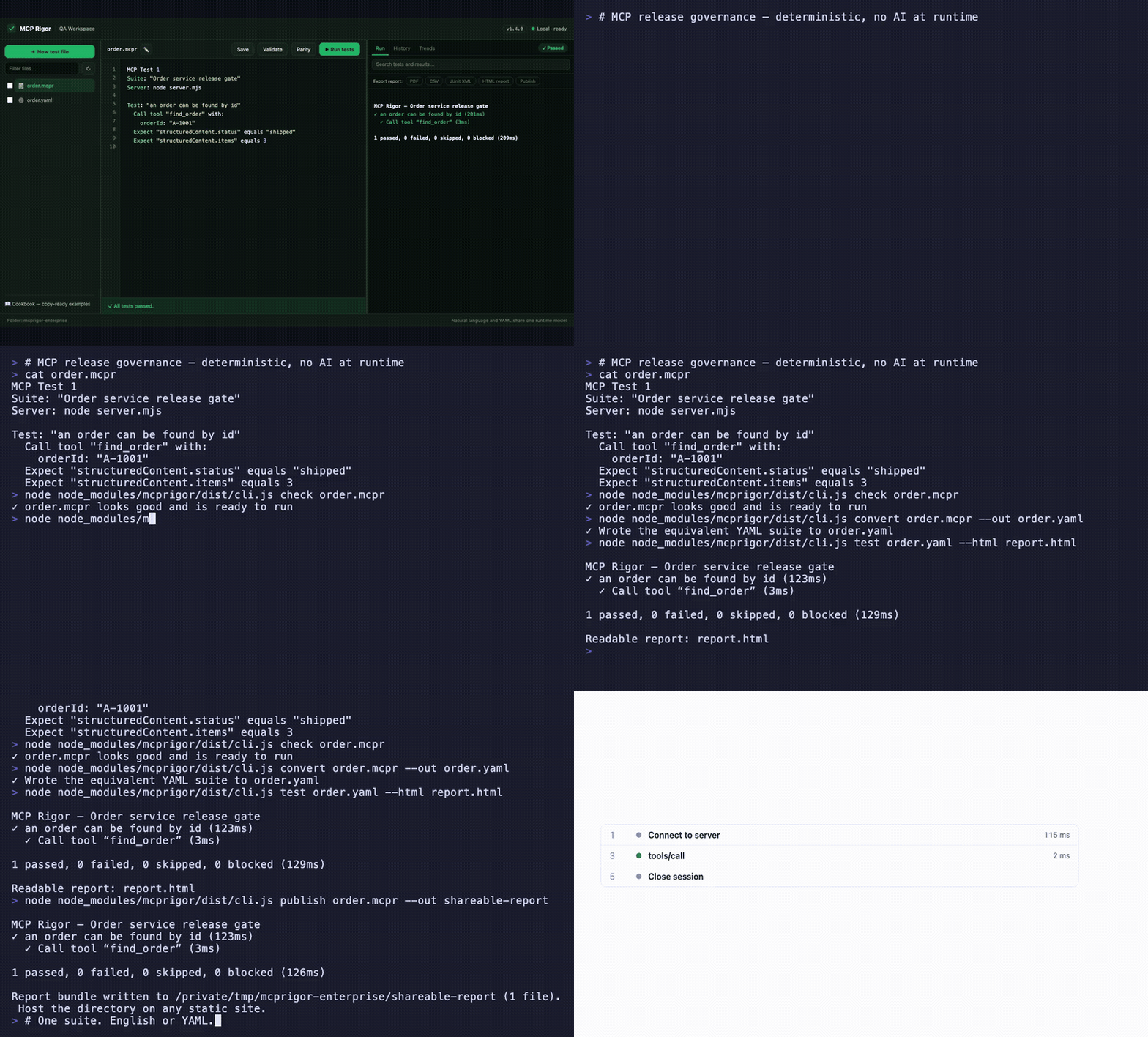
Visual QA workspace · English ⇄ YAML parity · interactive evidence timeline · CLI, CI, and shareable reports — watch the MP4
MCP Rigor lets QA teams test MCP tools, resources, prompts, contracts, and transports without writing test code. Tests are deterministic: no AI model interprets the wording.
Status:
1.5.0stable. Node.js 20 or 22 is required.
Install
MCP Rigor is published on npm as mcprigor. The package ships compiled code, ready to run:
npm install mcprigor
Or try it instantly without installing:
npx mcprigor@latest init tests/acceptance.mcpr
Use npx mcprigor in commands below, or install globally (npm install -g mcprigor) to use mcprigor directly. In a project where tests run only during development or CI, npm install --save-dev mcprigor keeps it out of production dependencies.
Install from source
Only needed if you want to modify MCP Rigor itself:
git clone https://github.com/FusionOnePlatform/mcprigor.git
cd mcprigor
npm ci
npm run check   # build + full test suite
npm link        # optional: use your local build as the global `mcprigor`
Write your first test
Create calculator.mcpr:
MCP Test 1

Suite: "Calculator acceptance tests"
Server: node dist/server.js

Test: "Adding 20 and 22 gives 42"
  Call tool "add" with:
    a: 20
    b: 22

  Expect "structuredContent.sum" equals 42
Check the wording, then run it:
npx mcprigor check calculator.mcpr
npx mcprigor test calculator.mcpr
Create a browser report:
npx mcprigor test calculator.mcpr --html report.html
Expected summary:
✓ Adding 20 and 22 gives 42

1 passed, 0 failed, 0 skipped, 0 blocked
Use the QA workspace
Start the local browser interface:
npx mcprigor workspace .
Or expose MCP Rigor to AI coding agents as an MCP server (docs):
npx mcprigor serve .
Open the printed http://127.0.0.1:... URL. You can select a suite, edit it, validate the wording, run tests, run transport parity, and review results.
The workspace is loopback-only and does not accept arbitrary commands from the browser.
Connect to an MCP server
Local stdio server:
Server: node dist/server.js
Python server:
Server: python -m my_mcp_server
Streamable HTTP server:
MCP URL: https://qa.example.com/mcp

Server options:
  headers:
    Authorization: "Bearer ${env.MCP_TOKEN}"
Run with an environment variable:
MCP_TOKEN="your-token" npx mcprigor test customer.mcpr
Do not place reusable credentials directly in test files.
Common test actions
Call tool "search" with:
  query: "red shoes"

Read resource "catalog://status"

Get prompt "write_summary" with:
  topic: "Release quality"

Expect it succeeds
Expect an error
Expect "structuredContent.total" equals 2
Expect "content[0].text" contains "complete"
Expect "items" has 3 items
See the natural-language cookbook for copy-ready examples.
Compare local and deployed behavior
MCP Test 1
Suite: "Calculator parity"

Compare target "Local": node dist/server.js
Compare target "QA": https://qa.example.com/mcp

Test: "Addition is consistent"
  Call tool "add" with:
    a: 20
    b: 22
  Expect "structuredContent.sum" equals 42
npx mcprigor parity calculator-parity.mcpr
MCP Rigor runs every scenario against both targets and reports semantic differences.
Create a test from a live server
Provide a small .mcpr file containing the target, then run:
npx mcprigor author server.mcpr --out search-customer.mcpr
The guided author discovers operations, asks for inputs, previews a response, and writes a reviewable natural-language test.
Use data-driven tests
Test: "Calculator examples"
  For each row:
    | caseId | a  | b  | expected |
    | basic  | 2  | 3  | 5        |
    | larger | 20 | 22 | 42       |

  Call tool "add" with:
    a: "${row.a}"
    b: "${row.b}"

  Expect "structuredContent.sum" equals "${row.expected}"
CSV, JSON, YAML, Excel, REST, Google Sheets, SQL adapters, typed columns, filters, joins, and deterministic sampling are also supported.
Use in CI
- uses: actions/setup-node@v4
  with:
    node-version: 20
- run: npm ci
- run: npx mcprigor check tests/acceptance.mcpr
- run: npx mcprigor test tests/acceptance.mcpr --junit reports/mcp.xml --evidence .mcprigor/ci-run
Exit codes:
| Code | Meaning |
|---|---|
0 |
Tests passed |
1 |
A test or comparison failed |
2 |
Usage, language, or configuration problem |
3 |
Server, transport, or internal failure |
Main commands
mcprigor workspace [DIRECTORY]        Start the local QA interface
mcprigor init FILE                    Create an example test
mcprigor check FILE                   Validate without connecting
mcprigor test FILE                    Run natural-language or YAML tests
mcprigor author TARGET --out FILE     Build a test interactively
mcprigor parity FILE                  Compare named targets
mcprigor audit FILE                   Run deterministic security probes
mcprigor composition-check FILE       Check a mounted server fleet
mcprigor composition-discover FILE    Save a combined fleet contract
mcprigor composition-drift FILE       Gate fleet contract drift
mcprigor discover FILE                Save the live MCP contract
mcprigor contract-check LOCK --target FILE
mcprigor evidence-show DIRECTORY
Performance and governance features new in 1.5.0:
Expect the call to finish within 800ms, percentile budgets, and--fail-on-regressionmcprigor auditdeterministic security probes with scored PDF/CSV/JSON reports- Multi-server test routing, collision checks, combined fleet locks, and composition drift
- GitHub Action with rich PR reports
- Live MCP surface and schema coverage with
--fail-under - Scheduled HTTP monitoring with failure/recovery webhooks
- Clickable HAR-style session timeline in HTML reports
- Contract drift markdown as a downloadable Action artifact
mcprigor publish— shareable static report URLs
See the complete CLI reference.
Editor support
The VS Code extension in editors/vscode adds syntax highlighting and inline mcprigor check diagnostics for .mcpr files. Package it with npx @vscode/vsce package from that directory, or install a release .vsix with code --install-extension.
Choose your next guide
- New QA user: Getting started
- Writing scenarios: Natural-language cookbook
- Using the browser UI: QA workspace
- Setting up targets and CI: Engineer setup
- Fixing failures: Troubleshooting
- All documentation: Documentation index
Scope and safety
MCP Rigor performs black-box behavior and contract testing. It complements MCP Inspector and official MCP Conformance; it does not provide certification.
Remote data and custom extensions are disabled unless explicitly enabled. Reports and evidence are sanitized, but business response data may still be sensitive. Review security and retention before storing CI artifacts.
Contributing
See CONTRIBUTING.md, then run:
npm ci
npm run check
Apache-2.0 licensed.
Вопросы о Rigor MCP
Можно ли использовать MCP Rigor для сравнения различных серверных сред?
Да, команда parity позволяет сравнить локальную цель с QA-целью для выявления семантических различий.
Поддерживает ли инструмент тестирование на основе данных?
Да, он поддерживает data-driven тесты с использованием различных адаптеров, включая CSV, JSON, YAML, Excel, REST, Google Sheets и SQL.