
Преобразует аудиты Google Lighthouse в структурированные пакеты исправлений (fix packs) для AI-агентов, помогая улучшать производительность веб-сайтов, SEO и доступность.
Также известен как fullstackdegen/agent-audit, @fullstackdegen/agent-audit
- Звёзды
- 4
- Инструменты
- 2
- Загрузки, 30 дней
- 197
- Последняя версия
- 0.3.1
- Последний коммит
- 2 сент. 2026 г.
- Лицензия
- MIT
Что такое agent-audit MCP?
agent-audit — это MCP server. Преобразует аудиты Google Lighthouse в структурированные пакеты исправлений (fix packs) для AI-агентов, помогая улучшать производительность веб-сайтов, SEO и доступность. Он предоставляет 2 инструмента, например fast, reliable.
Сводка сгенерирована из README проекта
О agent-audit MCP server
Agent Audit — это MCP server, созданный для устранения разрыва между сырой диагностикой производительности и автономным выполнением кода. Он преобразует отчеты Google Lighthouse в структурированные пакеты исправлений, которые кодинг-агенты могут интерпретировать и использовать в работе. Вместо предоставления неструктурированных данных, он выдает приоритетные бэклоги, содержащие шаги по реализации, подсказки для поиска по репозиторию и измеримые критерии приемки для веб-производительности, доступности и технического SEO.
Разработчики могут интегрировать этот сервер с MCP клиентами, такими как Claude Code, Cursor, GitHub Copilot и Codex. Он работает через Node.js и требует наличия Google Chrome или Chromium для проведения аудитов. Пользователи могут выбирать между быстрым режимом для разовых запусков или надежным режимом, который агрегирует несколько прогонов для учета вариативности данных. Хотя инструмент в основном ориентирован на публичные URL, разработчики могут включить аудит localhost для локальных сред разработки, используя специальные флаги или переменные окружения.
Что вы можете с ним делать
- 1Улучшение доступности и SEO веб-сайтаВыявление конкретных ошибок доступности и проблем технического SEO, таких как отсутствие метаданных или битые ссылки.
- 2Проверка исправлений производительностиИспользование измеримых критериев приемки для подтверждения того, что изменение кода действительно устранило выявленную проблему с производительностью.
Взято из README проекта. Каждый вариант использования проверен на соответствие цитате из него.
Как установить agent-audit MCP
Форматы проверены 10 ноя 2026Добавить в CursorДобавить в GooseУстановка agent-audit MCP в Claude Code
$ claude mcp add agent-audit -- npx -y @fullstackdegen/agent-auditУстановка agent-audit MCP в Cursor
~/.cursor/mcp.json
{
  "mcpServers": {
    "agent-audit": {
      "command": "npx",
      "args": [
        "-y",
        "@fullstackdegen/agent-audit"
      ]
    }
  }
}Установка agent-audit MCP в VS Code
.vscode/mcp.json
{
  "servers": {
    "agent-audit": {
      "type": "stdio",
      "command": "npx",
      "args": [
        "-y",
        "@fullstackdegen/agent-audit"
      ]
    }
  }
}Установка agent-audit MCP в VS Code CLI
$ code --add-mcp '{"name":"agent-audit","type":"stdio","command":"npx","args":["-y","@fullstackdegen/agent-audit"]}'Установка agent-audit MCP в Claude Desktop
claude_desktop_config.json
{
  "mcpServers": {
    "agent-audit": {
      "command": "npx",
      "args": [
        "-y",
        "@fullstackdegen/agent-audit"
      ]
    }
  }
}Установка agent-audit MCP в Codex
$ codex mcp add agent-audit -- npx -y @fullstackdegen/agent-auditУстановка agent-audit MCP в Codex config.toml
~/.codex/config.toml
[mcp_servers.agent-audit]
command = "npx"
args = ["-y", "@fullstackdegen/agent-audit"]
Установка agent-audit MCP в Gemini CLI
$ gemini mcp add -s user agent-audit npx -- -y @fullstackdegen/agent-auditУстановка agent-audit MCP в Gemini settings.json
~/.gemini/settings.json
{
  "mcpServers": {
    "agent-audit": {
      "command": "npx",
      "args": [
        "-y",
        "@fullstackdegen/agent-audit"
      ]
    }
  }
}Инструменты agent-audit MCP 2
Определено из READMEfastreliable
| fast | — | |
| reliable | — |
Конфигурация
LIGHTHOUSE_CHROME_NO_SANDBOXLIGHTHOUSE_MCP_ALLOW_LOCALHOST
| Название | Описание | Тип |
|---|---|---|
| LIGHTHOUSE_CHROME_NO_SANDBOX | — | |
| LIGHTHOUSE_MCP_ALLOW_LOCALHOST | — |
Автоматические проверки
Запущено 13 нояб. 2026 г.Полный отчёт →Прошло наши автоматизированные проверки. Это не аудит безопасности: изучите код и предоставьте серверу минимально необходимый доступ. Как работают проверки

- Связанный и доступный исходный репозиторийfullstackdegen/agent-audit is public and reachablegithub.com/fullstackdegen/agent-audit ↗Пройдено
- Пакет указывает этот репозиторий как источник@fullstackdegen/agent-audit names fullstackdegen/agent-audit as sourcenpmjs.com/package/@fullstackdegen/agent-audit ↗Пройдено
- Происхождение сборки (аттестация Sigstore)No build attestation published for this releaseНе проверялось
- Open source лицензия (OSI)MITspdx.org/licenses/MIT.html ↗Пройдено
- Коммит или релиз за последний годLast commit or release 2026-09-02github.com/fullstackdegen/agent-audit ↗Пройдено
- OpenSSF ScorecardНе проверялось
- Имя пакета не похоже на популярный пакетNo popular package one edit away from @fullstackdegen/agent-auditПройдено
- Нет критических предупреждений в пакете или его зависимостях239 resolved dependencies checked; no critical advisoryosv.dev ↗Пройдено
- Нет скрытых инструкций для модели2 tool descriptions and the README read; no override phrases, credential paths or hidden charactersПройдено
- Деструктивные инструменты помеченыNo tool named like delete, drop or execПройдено
- Удалённая конечная точка отвечает на рукопожатие MCPНе проверялось
README
Открыть на GitHubAgent Audit
Lighthouse-powered MCP server for AI coding agents, Core Web Vitals, technical SEO, accessibility, and GEO/LLM visibility audits.
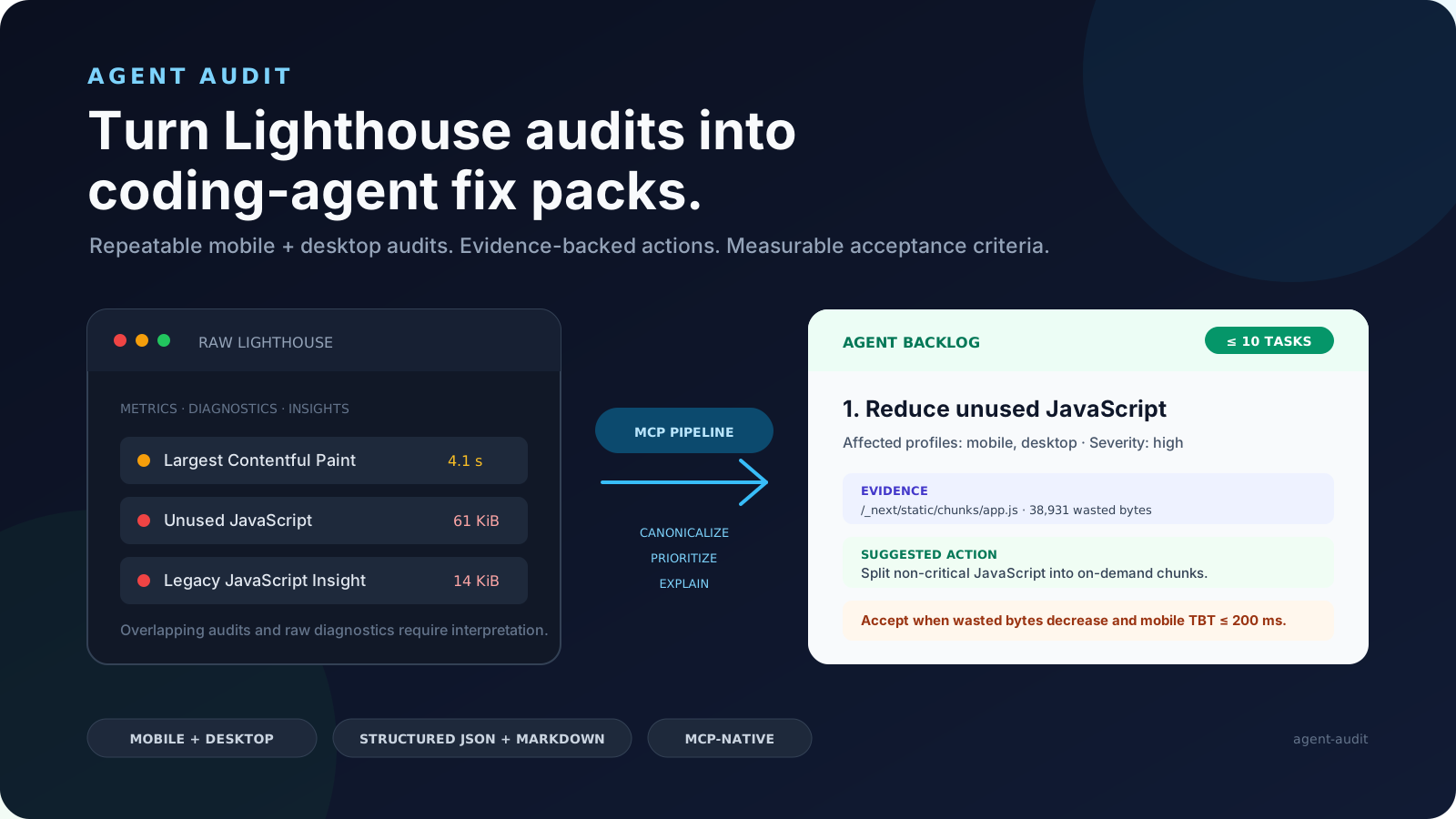
Agent Audit turns Google Lighthouse and bounded page-inspection results into structured fix packs that coding agents can actually execute. It gives Claude Code, Codex, Cursor, GitHub Copilot, and other MCP clients a prioritized, evidence-backed backlog instead of a raw performance report.
Turn Lighthouse audits into coding-agent fix packs.
npx -y @fullstackdegen/agent-audit


Why Agent Audit Exists
Lighthouse is excellent for diagnosis, but raw reports are not enough for an autonomous coding workflow. A coding agent still needs to know which issue is most important, whether it affects mobile, desktop, or both, which selectors or resources are evidence, what files to search for, how to verify the fix, and when it is safe to claim completion.
Agent Audit converts Lighthouse output into an implementation contract:
- Runs mobile and desktop Lighthouse audits.
- Aggregates repeated runs and exposes variability.
- Adds bounded same-page intelligence for technical SEO, links, metadata, structured data, images, assets, indexability, and AI discovery signals.
- Merges noisy audit output into a small prioritized issue list.
- Generates
fixPackswith repo search hints, implementation steps, and measurable acceptance criteria. - Returns strict MCP
structuredContentplus equivalent Markdown.
The goal is simple: give a coding agent a report it can read, reason about, fix, test, and verify.
What It Audits
Agent Audit is useful when people search for:
- Lighthouse-powered MCP server
- AI website audit tool
- coding agent Lighthouse report
- Core Web Vitals automation
- performance audit for Claude Code, Codex, Cursor, or Copilot
- technical SEO audit for AI agents
- accessibility fix packs
- LLM visibility audit
- GEO audit, generative engine optimization, AI search readiness
llms.txtreadiness and AI crawler visibility
Current checks include:
- Mobile and desktop Lighthouse scores for Performance, Accessibility, Best Practices, and SEO.
- FCP, Speed Index, LCP, TBT, and CLS metric distributions.
- Fast and reliable audit modes.
- Same-origin page inspection with bounded fetch limits.
- Broken links, missing link names, metadata, canonical tags, robots signals, JSON-LD, Open Graph, indexability, images, assets, and LLM visibility checks.
- Conservative
llms.txtdraft generation when page content is sufficient. - Prioritized issues with evidence, suggested actions, and acceptance criteria.
- Agent Fix Packs with repo search hints, implementation steps, and verification guidance.
- Strict MCP
outputSchemavalidation forstructuredContent. - Markdown generated from the same canonical report.
See a real CommaLabs JSON report and Markdown report.
Install
Requirements:
- Node.js 20 or later.
- Google Chrome or Chromium.
Run the MCP server:
npx -y @fullstackdegen/agent-audit
Useful links:
MCP Client Setup
Claude Desktop
Add a local MCP server:
{
  "mcpServers": {
    "agent-audit": {
      "command": "npx",
      "args": ["-y", "@fullstackdegen/agent-audit"]
    }
  }
}
Restart Claude Desktop after saving the configuration.
Claude Code
claude mcp add agent-audit -- npx -y @fullstackdegen/agent-audit
For local development audits:
claude mcp add agent-audit-local -- npx -y @fullstackdegen/agent-audit --local
Codex
codex mcp add agent-audit -- npx -y @fullstackdegen/agent-audit
Or add it to ~/.codex/config.toml:
[mcp_servers.agent-audit]
command = "npx"
args = ["-y", "@fullstackdegen/agent-audit"]
VS Code And GitHub Copilot
Create a workspace or user-level .mcp.json file:
{
  "servers": {
    "agent-audit": {
      "command": "npx",
      "args": ["-y", "@fullstackdegen/agent-audit"]
    }
  }
}
Or register it from a terminal:
code --add-mcp '{"name":"agent-audit","command":"npx","args":["-y","@fullstackdegen/agent-audit"]}'
Cursor
Configure a local stdio MCP server:
- name:
agent-audit - command:
npx - arguments:
-y,@fullstackdegen/agent-audit
Add --local to the arguments when you need localhost audits.
Tool
analyze_website_performance
Runs Lighthouse and site intelligence against a target URL:
{
  "url": "https://example.com",
  "mode": "reliable"
}
mode is optional:
fast: one mobile run and one desktop run.reliable: three runs per profile, medians, and variability ranges. This is the default.
Example Fix Pack
{
  "id": "fix-link-name",
  "priority": 2,
  "sourceIssueIds": ["link-name"],
  "goal": "Fix Links do not have a discernible name.",
  "category": "accessibility",
  "severity": "critical",
  "affectedProfiles": ["mobile", "desktop"],
  "repoSearchHints": [
    "div.border-t-2 > div.flex > div.flex > a.text-gray-600",
    "https://www.linkedin.com/company/commalabs"
  ],
  "implementationSteps": [
    "Inspect the repository for the evidence listed in repoSearchHints before editing.",
    "Give every link a discernible accessible name.",
    "Keep changes focused on source issue IDs: link-name."
  ],
  "acceptanceCriteria": [
    "All link elements pass the Lighthouse link-name audit.",
    "Raise the median accessibility score to at least 90/100."
  ],
  "verification": {
    "rerunMode": "reliable",
    "expectedAuditIds": ["link-name"]
  }
}
repoSearchHints are search clues, not guaranteed file paths. The coding agent
must inspect the repository before editing.
Coding-Agent Workflow
Use structuredContent as the source of truth and the Markdown report as the
execution summary.
- Inspect
fixPacksin priority order. - Search the repository using
repoSearchHints. - Map evidence to real files, components, routes, assets, or configuration.
- Apply one focused fix at a time.
- Run the repository's tests after each logical change.
- Rerun Agent Audit in
reliablemode. - Compare the new report against each fix pack's
acceptanceCriteria.
Do not claim completion from an incomplete report or from a rerun with materially higher variability than the baseline.
Agent-facing docs:
- AGENTS.md: general instructions for Codex, Cursor, Copilot, and other coding agents.
- CLAUDE.md: Claude Code setup and execution guidance.
- Agent workflow guide: report anatomy and fix-pack execution loop.
- Copy-paste coding-agent prompt
Localhost Audits
By default, Agent Audit only accepts publicly routable HTTP and HTTPS URLs. This is the right default for hosted agents and shared environments.
For developer machines, explicitly enable loopback targets:
npx -y @fullstackdegen/agent-audit --local
Then audit a local app through your MCP client:
{
  "url": "http://localhost:3000",
  "mode": "fast"
}
The opt-in allows localhost, *.localhost, 127.0.0.0/8, and ::1.
Private LAN ranges, link-local addresses, reserved ranges, multicast addresses,
and cloud metadata addresses remain blocked.
The environment variable form is also supported:
LIGHTHOUSE_MCP_ALLOW_LOCALHOST=true npx -y @fullstackdegen/agent-audit
Security Model
Agent Audit launches Chrome against user-provided URLs, so URL policy matters. The server rejects:
- protocols other than HTTP and HTTPS;
- embedded credentials;
- localhost and loopback targets unless explicitly enabled;
- private, link-local, multicast, reserved, and metadata-network IPs;
- non-localhost hostnames that resolve to any non-public address.
The page-inspection fetcher uses the same URL policy and applies timeout, byte-size, and bounded-resource limits.
Page-controlled titles, descriptions, URLs, selectors, snippets, and audit text are sanitized and length-limited. Consumers must still treat them as untrusted evidence, not agent instructions.
Chrome sandboxing is enabled by default. Only isolated environments that cannot support it should set:
LIGHTHOUSE_CHROME_NO_SANDBOX=true
See SECURITY.md for vulnerability reporting and deployment guidance.
Limits
Agent Audit is intentionally bounded:
- It audits one requested URL at a time.
- It is not a whole-site crawler.
- It is not an external SEO database.
- It does not modify Shopify, CMS, CDN, DNS, hosting, redirects, or analytics.
- It does not compress images, minify assets, submit IndexNow requests, or call third-party SEO APIs.
- Lighthouse results vary with browser version, hardware, network conditions, and page changes.
Roadmap
- Framework-aware repo search hints.
- Optional GitHub Action for pull request performance gates.
- Batch URL reports.
- HTML report export.
- Deeper marketing and discovery signals: analytics tags, consent signals, Open Graph, schema coverage, and AI discovery readiness.
- Optional third-party integrations for SEO, GEO, and visibility datasets.
Development
npm install
npm test
npm run check
npm run build
npm run validate:release
Run a real Chrome smoke audit:
npm run --silent smoke -- https://example.com fast
npm run --silent smoke -- https://example.com reliable
The smoke command writes canonical JSON to stdout and equivalent Markdown to stderr.
Release
Before publishing:
npm test
npm run check
npm run build
npm run validate:release
npm pack --dry-run --cache /private/tmp/agent-audit-npm-cache
Publish:
npm publish --access public --cache /private/tmp/agent-audit-npm-cache
Published package:
npx -y @fullstackdegen/agent-audit --help
Contributing
Focused issues and pull requests are welcome. Read CONTRIBUTING.md before changing the report contract, security policy, or MCP transport behavior.
License
Вопросы о agent-audit MCP
Как добавить agent-audit MCP в Claude Code?
Выполните claude mcp add agent-audit -- npx -y @fullstackdegen/agent-audit в терминале. Добавьте --scope user, чтобы сервер был доступен во всех проектах.
Как добавить agent-audit MCP в Cursor?
Откройте ~/.cursor/mcp.json и добавьте сервер в mcpServers, используя конфигурацию Cursor из раздела установки выше.
Какие инструменты предоставляет agent-audit MCP?
Он предоставляет 2 инструмента, включая fast, reliable.
Что Agent Audit делает с отчетами Lighthouse?
Он преобразует необработанные данные Lighthouse в структурированные пакеты исправлений, которые содержат подсказки для поиска по репозиторию, шаги по реализации и критерии приемки, пригодные для выполнения кодинг-агентами.
Какие веб-метрики и аудиты включены?
Инструмент охватывает Core Web Vitals (FCP, LCP, CLS и др.), техническое SEO, доступность, битые ссылки, метаданные и сигналы для обнаружения ИИ, такие как готовность к llms.txt.
Этот инструмент сканирует весь мой сайт?
Нет, инструмент предназначен для аудита одного запрошенного URL за раз и не является краулером для всего сайта.