
MCP server codesurface
✓ ПровереноИндексирует публичный API кодовой базы и предоставляет компактные результаты поиска, сигнатур и поиска классов AI-клиентам через инструменты MCP.
Также известен как Codeturion/codesurface
- Звёзды
- 21
- Инструменты
- 7
- Загрузки, 30 дней
- 275
- Последняя версия
- 0.8.0
- Последний коммит
- 28 июл. 2026 г.
- Лицензия
- MIT
Что такое codesurface MCP?
codesurface — это MCP server. Индексирует публичный API кодовой базы и предоставляет компактные результаты поиска, сигнатур и поиска классов AI-клиентам через инструменты MCP. Он предоставляет 7 инструментов, например search, get_signature, get_class.
Сводка сгенерирована из README проекта
О codesurface MCP server
codesurface позволяет индексировать публичный API кодовой базы, чтобы предоставлять компактные результаты поиска для AI-агентов. Он парсит исходные файлы для извлечения классов, методов, свойств, полей и событий, передавая эти данные через специализированные инструменты. Такой подход помогает снизить расход токенов по сравнению с чтением целых файлов, предоставляя целевую информацию, такую как сигнатуры и члены классов.
Разработчики могут использовать этот сервер с Claude Code, Cursor, Windsurf или любым другим MCP-совместимым клиентом. Он поддерживает множество языков, включая C#, C++, Go, Java, Python и TypeScript/JavaScript. Настройка заключается в указании директории проекта с помощью аргумента --project через uvx или pip. Сервер автоматически определяет языки и пропускает распространенные директории, такие как node_modules или .git, чтобы поддерживать эффективность индекса.
Для обеспечения точности сервер предоставляет инструменты для поиска по ключевым словам, получения точных сигнатур и просмотра полных списков членов классов. Он также включает команду reindex для инкрементального обновления при изменении файлов. Предоставляя конкретные номера строк для каждой записи, он позволяет AI-клиентам выполнять целевое чтение только необходимых сегментов кода.
Что вы можете с ним делать
- 1Поиск конкретных членов APIAI-агент может найти определенный сервис или класс, выполнив поиск по ключевому слову в кодовой базе.
- 2Получение точных сигнатур методовРазработчик может попросить AI найти точные параметры и типы возвращаемых значений для конкретной функции.
- 3Инспекция структур классовВы можете запросить полный список всех публичных членов, принадлежащих конкретному классу.
- 4Целевое чтение кодаВместо чтения всего файла AI может использовать номера строк из индекса, чтобы прочитать только релевантные строки.
Взято из README проекта. Каждый вариант использования проверен на соответствие цитате из него.
Как установить codesurface MCP
Форматы проверены 10 ноя 2026Добавить в CursorДобавить в GooseУстановка codesurface MCP в Claude Code
$ claude mcp add codesurface -- uvx codesurfaceУстановка codesurface MCP в Cursor
~/.cursor/mcp.json
{
  "mcpServers": {
    "codesurface": {
      "command": "uvx",
      "args": [
        "codesurface"
      ]
    }
  }
}Установка codesurface MCP в VS Code
.vscode/mcp.json
{
  "servers": {
    "codesurface": {
      "type": "stdio",
      "command": "uvx",
      "args": [
        "codesurface"
      ]
    }
  }
}Установка codesurface MCP в VS Code CLI
$ code --add-mcp '{"name":"codesurface","type":"stdio","command":"uvx","args":["codesurface"]}'Установка codesurface MCP в Claude Desktop
claude_desktop_config.json
{
  "mcpServers": {
    "codesurface": {
      "command": "uvx",
      "args": [
        "codesurface"
      ]
    }
  }
}Установка codesurface MCP в Codex
$ codex mcp add codesurface -- uvx codesurfaceУстановка codesurface MCP в Codex config.toml
~/.codex/config.toml
[mcp_servers.codesurface]
command = "uvx"
args = ["codesurface"]
Установка codesurface MCP в Gemini CLI
$ gemini mcp add -s user codesurface uvx -- codesurfaceУстановка codesurface MCP в Gemini settings.json
~/.gemini/settings.json
{
  "mcpServers": {
    "codesurface": {
      "command": "uvx",
      "args": [
        "codesurface"
      ]
    }
  }
}Инструменты codesurface MCP 7
Определено из READMEsearchget_signatureget_classget_statsreindexfile_pathinclude_tests
| search | — | |
| get_signature | — | |
| get_class | — | |
| get_stats | — | |
| reindex | — | |
| file_path | — | |
| include_tests | — |
Автоматические проверки
Запущено 14 нояб. 2026 г.Полный отчёт →Прошло наши автоматизированные проверки. Это не аудит безопасности: изучите код и предоставьте серверу минимально необходимый доступ. Как работают проверки

- Связанный и доступный исходный репозиторийcodeturion/codesurface is public and reachablegithub.com/codeturion/codesurface ↗Пройдено
- Пакет указывает этот репозиторий как источникcodesurface names codeturion/codesurface as sourcepypi.org/project/codesurface/ ↗Пройдено
- Происхождение сборки (аттестация Sigstore)Sigstore attestation for codesurfacepypi.org/project/codesurface/ ↗Пройдено
- Open source лицензия (OSI)MITspdx.org/licenses/MIT.html ↗Пройдено
- Коммит или релиз за последний годLast commit or release 2026-07-28github.com/codeturion/codesurface ↗Пройдено
- OpenSSF ScorecardНе проверялось
- Имя пакета не похоже на популярный пакетNo popular package one edit away from codesurfaceПройдено
- Нет критических предупреждений в пакете или его зависимостях37 resolved dependencies checked; no critical advisoryosv.dev ↗Пройдено
- Нет скрытых инструкций для модели7 tool descriptions and the README read; no override phrases, credential paths or hidden charactersПройдено
- Деструктивные инструменты помеченыNo tool named like delete, drop or execПройдено
- Удалённая конечная точка отвечает на рукопожатие MCPНе проверялось
README
Открыть на GitHubcodesurface







MCP server that indexes your codebase's public API at startup and serves it via compact tool responses, saving tokens vs reading source files.
Parses source files, extracts public classes/methods/properties/fields/events, and serves them through 5 MCP tools. Works with Claude Code, Cursor, Windsurf, or any MCP-compatible AI tool.
Supported languages: C# (.cs), C++ headers (.h, .hpp, .hxx, .h++), Go (.go), Java (.java), Python (.py), TypeScript/JavaScript (.ts, .tsx, .js, .jsx)
Quick Start
Add to your .mcp.json:
{
  "mcpServers": {
    "codesurface": {
      "command": "uvx",
      "args": ["codesurface", "--project", "/path/to/your/src"]
    }
  }
}
Point --project at any directory containing supported source files (a Unity Assets/Scripts folder, a Spring Boot project, a .NET src/ tree, a Node.js/React project, a Python package, etc.). Languages are auto-detected.
Restart your AI tool and ask: "What methods does MyService have?"
CLAUDE.md Snippet
Add this to your project's CLAUDE.md (or equivalent instructions file). This step is important. Without it, the AI has the tools but won't know when to reach for them.
## Codebase API Lookup (codesurface MCP)

Use codesurface MCP tools BEFORE Grep, Glob, Read, or Task (subagents) for any class/method/field lookup. This applies to you AND any subagents you spawn.

| Tool | Use when | Example |
|------|----------|---------|
| `search` | Find APIs by keyword | `search("MergeService")` |
| `get_signature` | Need exact signature | `get_signature("TryMerge")` |
| `get_class` | See all members on a class | `get_class("BlastBoardModel")` |
| `get_stats` | Codebase overview | `get_stats()` |

Every result includes file path + line numbers. Use them for targeted reads:
- `File: Service.cs:32` → `Read("Service.cs", offset=32, limit=15)`
- `File: Converter.java:504-506` → `Read("Converter.java", offset=504, limit=10)`

Never read a full file when you have a line number. Only fall back to Grep/Read for implementation details (method bodies, control flow).
Tools
| Tool | Purpose | Example |
|---|---|---|
search |
Find APIs by keyword | "MergeService", "BlastBoard", "GridCoord" |
get_signature |
Exact signature by name or FQN | "TryMerge", "CampGame.Services.IMergeService.TryMerge" |
get_class |
Full class reference card with all public members | "BlastBoardModel" → all methods/fields/properties |
get_stats |
Overview of indexed codebase | File count, record counts, namespace breakdown |
reindex |
Incremental index update (mtime-based) | Only re-parses changed/new/deleted files. Also runs automatically on query misses |
search, get_signature, and get_class accept two optional filters:
file_path: scope results to a directory prefix or exact file (e.g."src/services/"or"src/services/MergeService.ts")include_tests: include test files in results (defaultfalse). Detects__tests__/,tests/,test/,*.test.*,*.spec.*,*_test.*,test_*
Tested On
| Project | Language | Files | Records | Time |
|---|---|---|---|---|
| vscode | TypeScript | 6,611 | 88,293 | 9.3s |
| Paper | Java | 2,909 | 33,973 | 2.3s |
| client-go | Go | 219 | 2,760 | 0.4s |
| langchain | Python | 1,880 | 12,418 | 1.1s |
| pydantic | Python | 365 | 9,648 | 0.3s |
| guava | Java | 891 | 8,377 | 2.4s |
| immich | TypeScript | 919 | 7,957 | 0.6s |
| fastapi | Python | 881 | 5,713 | 0.5s |
| ant-design | TypeScript | 2,947 | 5,452 | 0.9s |
| dify | TypeScript | 4,903 | 5,038 | 1.9s |
| crawlee-python | Python | 386 | 2,473 | 0.3s |
| flask | Python | 63 | 872 | <0.1s |
| cobra | Go | 15 | 249 | <0.1s |
| gin | Go | 41 | 574 | <0.1s |
| Unity game (private) | C# | 129 | 1,018 | 0.1s |
Line Numbers for Targeted Reads
Every record includes line_start and line_end (1-indexed). Multi-line declarations span the full signature:
[METHOD] com.google.common.base.Converter.from
  Signature: static Converter<A, B> from(Function<...> forward, Function<...> backward)
  File: Converter.java:504-506          ← multi-line signature

[METHOD] server.AlbumController.createAlbum
  Signature: createAlbum(@Auth() auth: AuthDto, @Body() dto: CreateAlbumDto)
  File: album.controller.ts:46          ← single-line
This lets AI agents do targeted reads instead of reading full files:
# Instead of reading the entire 600-line file:
Read("Converter.java")                     # 600 lines, ~12k tokens

# Read just the method + context:
Read("Converter.java", offset=504, limit=10)  # 10 lines, ~200 tokens
Benchmarks
Measured across 5 real-world projects in 5 languages, each using a 10-step cross-cutting research workflow.
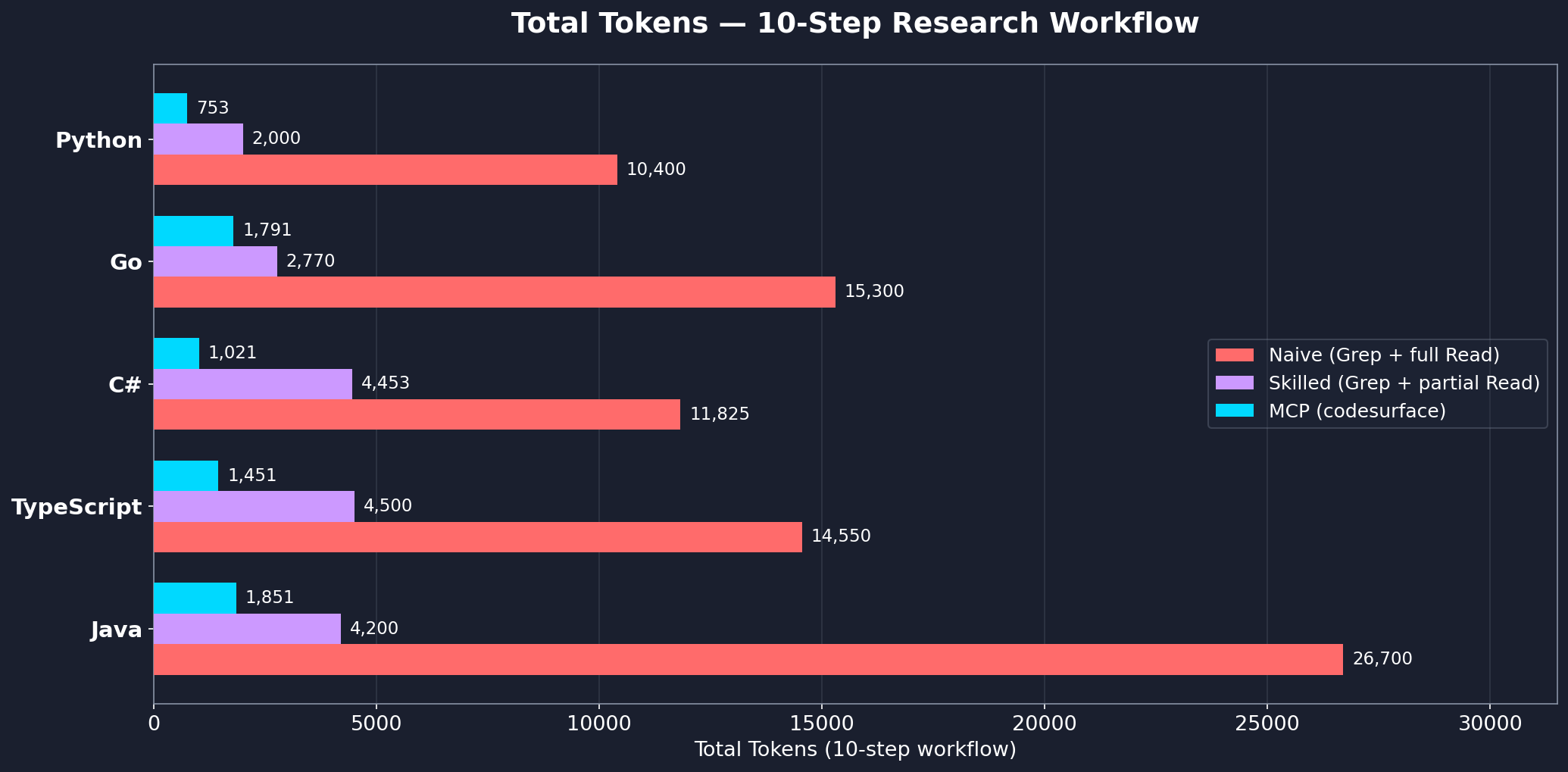
| Language | Project | Files | Records | MCP | Skilled | Naive | MCP vs Skilled |
|---|---|---|---|---|---|---|---|
| C# | Unity game | 129 | 1,034 | 1,021 | 4,453 | 11,825 | 77% fewer |
| TypeScript | immich | 694 | 8,344 | 1,451 | 4,500 | 14,550 | 68% fewer |
| Java | guava | 891 | 8,377 | 1,851 | 4,200 | 26,700 | 56% fewer |
| Go | gin | 38 | 534 | 1,791 | 2,770 | 15,300 | 35% fewer |
| Python | codesurface | 9 | 40 | 753 | 2,000 | 10,400 | 62% fewer |
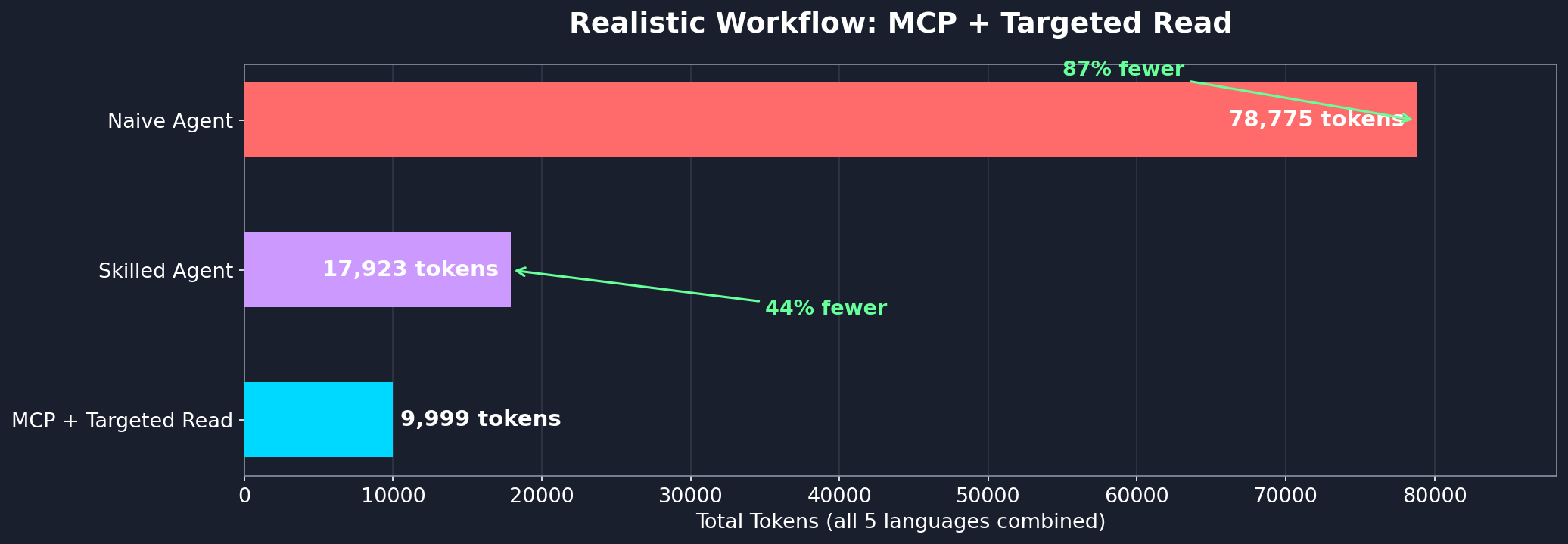
Even with follow-up reads for implementation detail, the hybrid MCP + targeted Read approach uses 44% fewer tokens than a skilled Grep+Read agent and 87% fewer than a naive agent:
Per-question breakdown
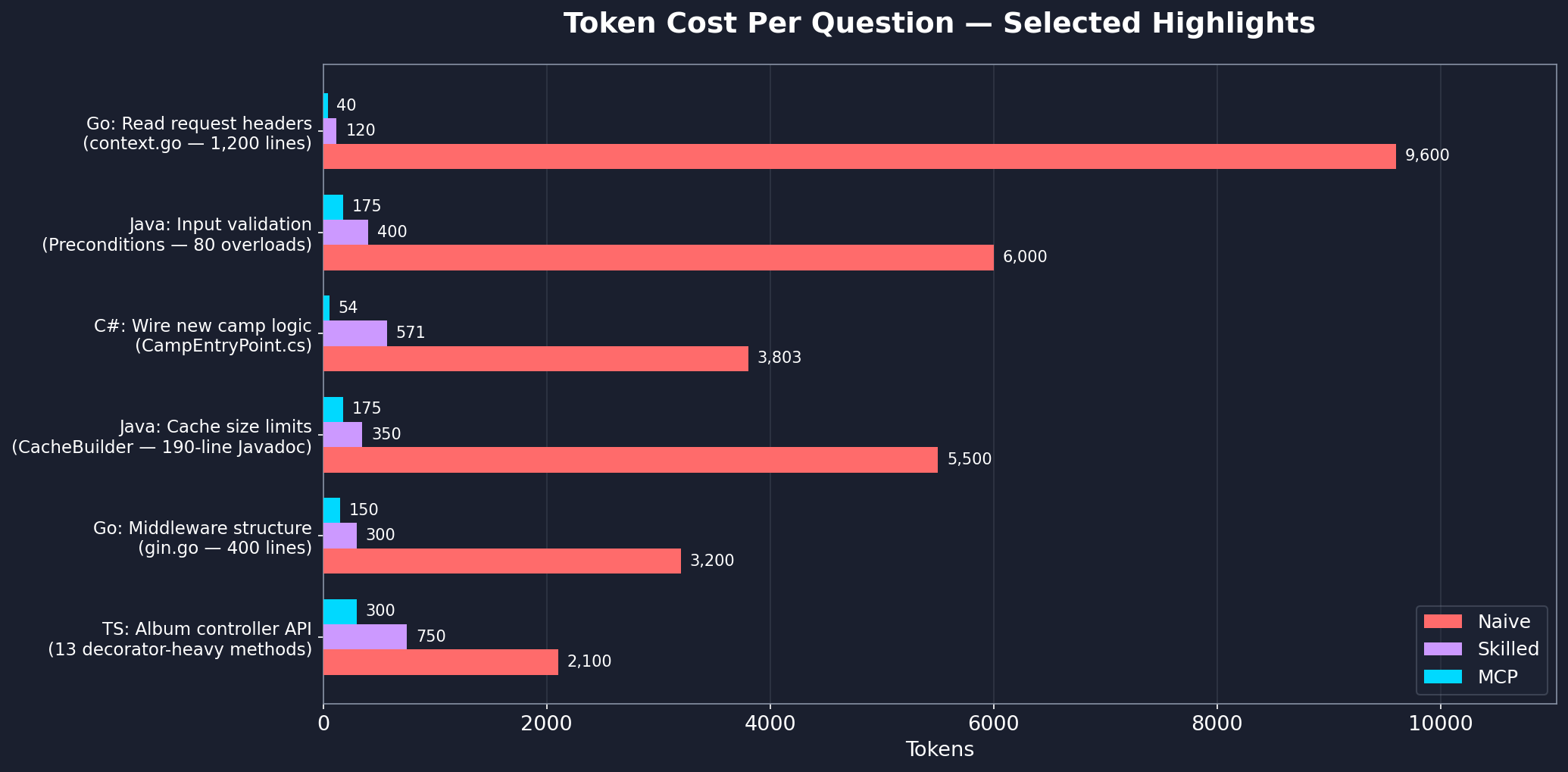
See workflow-benchmark.md for the full step-by-step analysis across all languages.
Filtering What Gets Indexed
By default, codesurface skips common vendored, build, and VCS directories: node_modules, vendor, bin, obj, dist, build, target, .git, .venv, __pycache__, and a few dozen others. Git worktrees and submodules are also skipped.
To exclude additional paths:
Project-level (committed): create a .codesurfaceignore file at your project root with one glob per line.
generated/**
docs/**
**/*.pb.go
Per-instance (CLI): pass --exclude with comma-separated globs.
{
  "command": "uvx",
  "args": ["codesurface", "--project", "src", "--exclude", "generated/**,vendor/**"]
}
Other indexing flags:
--include-submodules: index git submodules (skipped by default)--language <name>: pin to a single parser (e.g.--language cpp) instead of auto-detecting
Multiple Projects
Each --project flag indexes one directory. To index multiple codebases, run separate instances with different server names:
{
  "mcpServers": {
    "codesurface-backend": {
      "command": "uvx",
      "args": ["codesurface", "--project", "/path/to/backend/src"]
    },
    "codesurface-frontend": {
      "command": "uvx",
      "args": ["codesurface", "--project", "/path/to/frontend/src"]
    }
  }
}
Each instance gets its own in-memory index and tools. The AI agent sees both and can query across projects.
Setup Details
Using pip install:
pip install codesurface
{
  "mcpServers": {
    "codesurface": {
      "command": "codesurface",
      "args": ["--project", "/path/to/your/src"]
    }
  }
}
codesurface/
├── src/codesurface/
│   ├── server.py           # MCP server with 5 tools
│   ├── db.py               # SQLite + FTS5 database layer
│   ├── filters.py          # PathFilter (default exclusions, .codesurfaceignore, --exclude)
│   └── parsers/
│       ├── base.py         # BaseParser ABC
│       ├── cpp.py          # C++ header parser
│       ├── csharp.py       # C# parser
│       ├── go.py           # Go parser
│       ├── java.py         # Java parser
│       ├── python_parser.py # Python parser
│       └── typescript.py   # TypeScript/JavaScript parser
├── pyproject.toml
└── README.md
"No codebase indexed"
- Ensure
--projectpoints to a directory containing supported source files (.cs,.h,.hpp,.go,.java,.py,.ts,.tsx,.js,.jsx) - The server indexes at startup. Check stderr for
[codesurface] scanning N files...and[codesurface] done:lines
Server won't start
- Check Python version:
python --version(needs 3.10+) - Check
mcp[cli]is installed:pip install mcp[cli]
Stale results after editing source files
- The index auto-refreshes on query misses. If you add a new class and query it, the server reindexes and retries automatically
- You can also call
reindex()manually to force an incremental update
Contact
License
Вопросы о codesurface MCP
Как добавить codesurface MCP в Claude Code?
Выполните claude mcp add codesurface -- uvx codesurface в терминале. Добавьте --scope user, чтобы сервер был доступен во всех проектах.
Как добавить codesurface MCP в Cursor?
Откройте ~/.cursor/mcp.json и добавьте сервер в mcpServers, используя конфигурацию Cursor из раздела установки выше.
Какие инструменты предоставляет codesurface MCP?
Он предоставляет 7 инструментов, включая search, get_signature, get_class, get_stats, reindex.
Какие языки программирования поддерживает codesurface?
Поддерживаются C#, заголовочные файлы C++, Go, Java, Python, а также файлы TypeScript/JavaScript; языки в директории проекта определяются автоматически.
Как настроить codesurface в качестве MCP server?
Добавьте его в свой .mcp.json с помощью команды uvx, указав путь к директории с исходными файлами через флаг --project.
Какие инструменты MCP предоставляет codesurface?
Он предоставляет пять инструментов: search, get_signature, get_class, get_stats и reindex.
Обновляет ли codesurface индекс при изменении файлов?
Да, индекс обновляется автоматически при промахах в запросах, также вы можете вызвать reindex вручную для инкрементального обновления на основе mtime.
Можно ли исключить сгенерированные или сторонние директории из индексации?
Да, добавьте шаблоны globs в файл .codesurfaceignore в корне проекта или передайте их через запятую с флагом --exclude.