
Предоставляет локальный слой памяти и непрерывности, который позволяет различным AI-агентам для кодинга обмениваться контекстом и возобновлять работу с того места, где остановился другой агент.
Также известен как Coder8124/logos, @noeton/logos
- Звёзды
- 4
- Инструменты
- —
- Загрузки, 30 дней
- —
- Последняя версия
- —
- Последний коммит
- 9 нояб. 2026 г.
- Лицензия
- Apache-2.0
Что такое Logos MCP?
Logos — это MCP server. Предоставляет локальный слой памяти и непрерывности, который позволяет различным AI-агентам для кодинга обмениваться контекстом и возобновлять работу с того места, где остановился другой агент.
Сводка сгенерирована из README проекта
О Logos MCP server
Разработчики, использующие несколько AI-агентов для кодинга, могут применять logos для поддержания непрерывности работы между разными сессиями и инструментами. Он выступает в роли локального слоя памяти, где такие агенты, как Claude Code, Cursor и Codex, используют единое хранилище markdown-файлов. Такая конфигурация позволяет одному агенту фиксировать прогресс, чтобы другая модель или инструмент могли продолжить работу именно там, где остановился предыдущий.
Система полностью работает на вашем устройстве, обеспечивая конфиденциальность данных за счет локального хранения хранилища. Для кэширования используется индекс SQLite, который можно пересобрать с помощью команды logos index без потери данных. Пользователи могут установить его через Homebrew на macOS и Linux или через npm на Windows. Сервер поддерживает различные хосты, включая Claude Desktop, Cline, Devin и GitHub Copilot, а также предоставляет CLI для агентов, имеющих только доступ к shell.
Помимо простого возобновления работы, сервер помогает агентам не повторять неудачные подходы с помощью инструмента before_you_try. Он также позволяет разработчикам запрашивать обоснование конкретных изменений в коде с помощью команды why. Вы можете импортировать историю существующих проектов из таких источников, как git history, Cursor rules или CLAUDE.md, чтобы наполнить хранилище памяти.
Что вы можете с ним делать
- 1Возобновление прерванных задач по кодингуПередавайте проект от одного AI-агента другому, извлекая последнее известное состояние и список открытых задач.
- 2Предотвращение повторяющихся ошибок в кодеНе позволяйте новому агенту пытаться применить решение, которое уже было признано неудачным.
- 3Понимание истории принятых решений в кодеПросите AI объяснить логику текущей реализации конкретного файла.
- 4Миграция памяти существующих агентовПереносите ваше предыдущее хранилище знаний в новую систему logos.
Взято из README проекта. Каждый вариант использования проверен на соответствие цитате из него.
Как установить Logos MCP
Форматы проверены 10 ноя 2026Добавить в CursorДобавить в GooseУстановка Logos MCP в Claude Code
$ claude mcp add logos -- npx -y @noeton/logosУстановка Logos MCP в Cursor
~/.cursor/mcp.json
{
  "mcpServers": {
    "logos": {
      "command": "npx",
      "args": [
        "-y",
        "@noeton/logos"
      ]
    }
  }
}Установка Logos MCP в VS Code
.vscode/mcp.json
{
  "servers": {
    "logos": {
      "type": "stdio",
      "command": "npx",
      "args": [
        "-y",
        "@noeton/logos"
      ]
    }
  }
}Установка Logos MCP в VS Code CLI
$ code --add-mcp '{"name":"logos","type":"stdio","command":"npx","args":["-y","@noeton/logos"]}'Установка Logos MCP в Claude Desktop
claude_desktop_config.json
{
  "mcpServers": {
    "logos": {
      "command": "npx",
      "args": [
        "-y",
        "@noeton/logos"
      ]
    }
  }
}Установка Logos MCP в Codex
$ codex mcp add logos -- npx -y @noeton/logosУстановка Logos MCP в Codex config.toml
~/.codex/config.toml
[mcp_servers.logos]
command = "npx"
args = ["-y", "@noeton/logos"]
Установка Logos MCP в Gemini CLI
$ gemini mcp add -s user logos npx -- -y @noeton/logosУстановка Logos MCP в Gemini settings.json
~/.gemini/settings.json
{
  "mcpServers": {
    "logos": {
      "command": "npx",
      "args": [
        "-y",
        "@noeton/logos"
      ]
    }
  }
}Автоматические проверки
Запущено 14 нояб. 2026 г.Полный отчёт →Прошло наши автоматизированные проверки. Это не аудит безопасности: изучите код и предоставьте серверу минимально необходимый доступ. Как работают проверки

- Связанный и доступный исходный репозиторийcoder8124/logos is public and reachablegithub.com/coder8124/logos ↗Пройдено
- Пакет указывает этот репозиторий как источник@noeton/logos names coder8124/logos as sourcenpmjs.com/package/@noeton/logos ↗Пройдено
- Происхождение сборки (аттестация Sigstore)Sigstore attestation for @noeton/logosnpmjs.com/package/@noeton/logos/v/0.5.8#provenance ↗Пройдено
- Open source лицензия (OSI)Apache-2.0spdx.org/licenses/Apache-2.0.html ↗Пройдено
- Коммит или релиз за последний годLast commit or release 2026-11-09github.com/coder8124/logos ↗Пройдено
- OpenSSF ScorecardНе проверялось
- Имя пакета не похоже на популярный пакетNo popular package one edit away from @noeton/logosПройдено
- Нет критических предупреждений в пакете или его зависимостяхНе проверялось
- Нет скрытых инструкций для модели0 tool descriptions and the README read; no override phrases, credential paths or hidden charactersПройдено
- Деструктивные инструменты помеченыНе проверялось
- Удалённая конечная точка отвечает на рукопожатие MCPНе проверялось
README
Открыть на GitHubLogos
When one coding agent stops, the next one continues the work.











Docs · Quick Start · Benchmark · Site · Issues
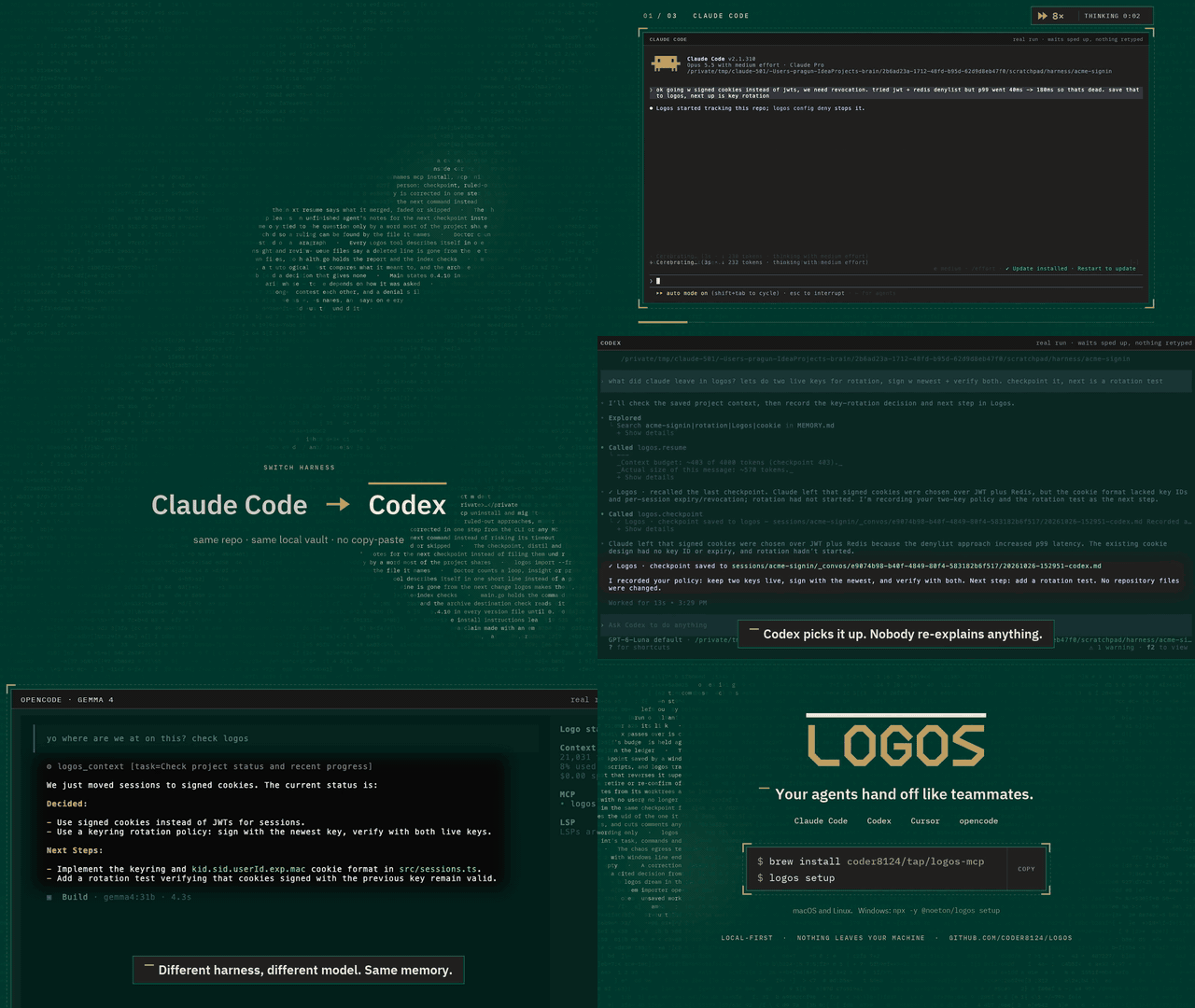
Logos is a local-first memory and continuity layer for coding agents. Claude Code, Codex, Cursor and your own agents share one vault over MCP. An agent checkpoints what it did, and the next one resumes where it stopped, even if it is a different model, in a different tool, on a different day.
Claude Code  ──▶  checkpoint  ──▶  Logos  ──▶  resume  ──▶  Cursor
                                (your vault)
The vault is a folder of markdown files on your machine. Nothing is uploaded,
and the SQLite index beside it is a cache: delete it, run logos index, and you
lose nothing.
Quick start
brew install coder8124/tap/logos-mcp && logos setup    # macOS and Linux
npm i -g @noeton/logos && logos setup                  # Windows
setup picks a vault, shows which agents it would wire, and asks before
touching any of them (--dry-run writes nothing). For Claude Code it also
installs the plugin, so the last handoff is in front of the model before it does
anything.
The formula is logos-mcp: a bare brew install logos installs Logos Bible
Software. Building from source, hand-wiring a host and the one-click buttons are
in Installation.
What it does
- Resume where the last agent stopped.
resumeshows what was done, what was verified and what is still open. - Stop the next agent repeating a dead end. Ruled-out approaches are their
own field, and
before_you_trychecks a plan against them. - Keep "verified" apart from "claimed". Resume marks another agent's verified items as its claim, and flags a command the activity log never saw.
- Answer "why is this code like this?"
why <path>shows what was being decided when a file was last worked on. - Remember what lasts. Decisions, constraints and procedures, reviewed before they become project memory.
- Bring your history. Import CLAUDE.md, AGENTS.md, Cursor rules, claude-mem, Claude Code's auto memory, transcripts or git history.
Every write returns a receipt, so you can see it working. The Handoff Loop shows how an agent uses it, step by step.
Works with
Claude Code, Codex, Cursor, Claude Desktop, Cline, Devin, GitHub Copilot, opencode, Amp, Grok Build, and anything else that speaks MCP. Agents with only a shell get a CLI command for every tool. See Agent Hosts.
Does it work?
On a handoff suite built for this (32 scenarios, nine memory systems, one machine), Logos passes 84.4%. The next best system passes 46.9%.
Every real system retrieves about equally well. What separates them is whether the agent that resumes gets the current answer, or gets it next to the stale one it replaced. Method, per-scenario scores and the cases Logos loses are in the benchmark.
Local, private and durable
- No model required. Search falls back from local embeddings (Ollama) to full-text search, and nothing breaks.
- Nothing is observed. Logos does not watch your screen, browser or files. The vault holds what agents wrote there, plus the Claude Code plugin's activity log, which you can turn off.
- Nothing leaves.
logos doctor --egresslists every address Logos can contact, and when. - Hard to break. It survives SIGKILL mid-write, a full disk, sync-client
conflict copies and two worktrees racing on one vault (
chaos/).
Exactly what is recorded, and every switch for it, is in Settings and Privacy.
Documentation
Everything lives in the wiki.
| Start | Use | Look up |
|---|---|---|
| Installation | The Handoff Loop | CLI Reference |
| Quick Start | Memory | MCP Tools Reference |
| Core Concepts | Importing History | Agent Hosts |
| Troubleshooting | The Vault | Embedding in Go |
Contributing
Contributions are welcome. CONTRIBUTING.md covers the build,
the test tiers and the two load-bearing conventions: the vault is the truth, and
every feature announces itself. Agents working here get the context-connect
and continuity skills from the plugin (plugin/skills/); this repository
dogfoods its own plugin.
Coming from brain? Since 0.5.0 the old names are not read. logos migrate
moves a ~/brain vault; see
Moving a 0.4 vault.
License
Apache 2.0. See LICENSE. Git history satisfies §4(b), so there are no change notices to add and no CLA (details). Prior work that shaped the ideas is in systemmd/CREDITS.md.
Вопросы о Logos MCP
Как добавить Logos MCP в Claude Code?
Выполните claude mcp add logos -- npx -y @noeton/logos в терминале. Добавьте --scope user, чтобы сервер был доступен во всех проектах.
Как добавить Logos MCP в Cursor?
Откройте ~/.cursor/mcp.json и добавьте сервер в mcpServers, используя конфигурацию Cursor из раздела установки выше.
Как Logos обеспечивает конфиденциальность данных?
Logos работает по принципу local-first; хранилище (vault) представляет собой папку с markdown-файлами на вашем устройстве, и никакие данные не загружаются в облако.
Могу ли я использовать Logos с разными AI-агентами?
Да, он работает с Claude Code, Codex, Cursor, Claude Desktop, Cline, Devin, GitHub Copilot и любым другим инструментом, поддерживающим MCP.
Что произойдет, если я удалю индексный файл?
Вы ничего не потеряете; вы можете просто запустить команду index, чтобы пересобрать его.
Требуется ли LLM для работы?
Для базовой функциональности модель не требуется; если локальные эмбеддинги недоступны, поиск переключается на полнотекстовый поиск.