
Предоставляет AI-агентам для написания кода релевантный контекст репозитория и пакеты файлов с подтвержденными данными для повышения точности и снижения расхода токенов.
Также известен как codeledgerECF/codeledger, @codeledger/cli
- Звёзды
- 8
- Инструменты
- —
- Загрузки, 30 дней
- 4 468
- Последняя версия
- 0.10.82
- Последний коммит
- 11 нояб. 2026 г.
- Лицензия
- —
Что такое CodeLedger MCP?
CodeLedger — это MCP server. Предоставляет AI-агентам для написания кода релевантный контекст репозитория и пакеты файлов с подтвержденными данными для повышения точности и снижения расхода токенов.
Сводка сгенерирована из README проекта
О CodeLedger MCP server
CodeLedger обеспечивает локальный контроль контекста для AI-агентов, что позволяет повысить точность работы и снизить потребление токенов. Инструмент сканирует репозиторий на наличие таких сигналов, как структура зависимостей и тестовые файлы, чтобы отобрать ограниченный набор файлов, относящихся к конкретной задаче. Эта информация записывается в специальный артефакт .codeledger/active-bundle.md, который такие агенты, как Claude Code, Cursor или GitHub Copilot, могут прочитать перед началом работы.
Разработчики используют CLI для инициализации репозиториев и подготовки к конкретным задачам с помощью команды ready. По умолчанию инструмент выполняет анализ локально и не отправляет исходный код через телеметрию. В состав входит MCP server, который можно запустить через командную строку для интеграции с совместимыми клиентами. Пользователи также могут использовать команду compare, чтобы измерить прирост производительности по таким метрикам, как расход токенов и процент успешных тестов.
Что вы можете с ним делать
- 1Подготовка контекста под конкретную задачуAI-агент может получить сфокусированный пакет файлов, относящихся к исправлению конкретного бага или реализации новой функции.
- 2Проверка изменений агентаПользователи могут просматривать внесенные агентом изменения с помощью сводок сессий и отчетов.
Взято из README проекта. Каждый вариант использования проверен на соответствие цитате из него.
Как установить CodeLedger MCP
Форматы проверены 10 ноя 2026Установка CodeLedger MCP в Claude Code
$ claude mcp add codeledger -- npx -y @codeledger/cliУстановка CodeLedger MCP в Cursor
~/.cursor/mcp.json
{
  "mcpServers": {
    "codeledger": {
      "command": "npx",
      "args": [
        "-y",
        "@codeledger/cli"
      ]
    }
  }
}Установка CodeLedger MCP в VS Code
.vscode/mcp.json
{
  "servers": {
    "codeledger": {
      "type": "stdio",
      "command": "npx",
      "args": [
        "-y",
        "@codeledger/cli"
      ]
    }
  }
}Установка CodeLedger MCP в Claude Desktop
claude_desktop_config.json
{
  "mcpServers": {
    "codeledger": {
      "command": "npx",
      "args": [
        "-y",
        "@codeledger/cli"
      ]
    }
  }
}Установка CodeLedger MCP в Codex
~/.codex/config.toml
[mcp_servers.codeledger]
command = "npx"
args = ["-y", "@codeledger/cli"]
Установка CodeLedger MCP в Gemini CLI
~/.gemini/settings.json
{
  "mcpServers": {
    "codeledger": {
      "command": "npx",
      "args": [
        "-y",
        "@codeledger/cli"
      ]
    }
  }
}Автоматические проверки
Запущено 14 нояб. 2026 г.Полный отчёт →Прошло наши автоматизированные проверки. Это не аудит безопасности: изучите код и предоставьте серверу минимально необходимый доступ. Как работают проверки

- Связанный и доступный исходный репозиторийcodeledgerecf/codeledger is public and reachablegithub.com/codeledgerecf/codeledger ↗Пройдено
- Пакет указывает этот репозиторий как источник@codeledger/cli names github:codeledgerECF/codeledger as its sourcenpmjs.com/package/@codeledger/cli ↗Проблема
- Происхождение сборки (аттестация Sigstore)No build attestation published for this releaseНе проверялось
- Open source лицензия (OSI)No licenseПроблема
- Коммит или релиз за последний годLast commit or release 2026-11-11github.com/codeledgerecf/codeledger ↗Пройдено
- OpenSSF ScorecardНе проверялось
- Имя пакета не похоже на популярный пакетNo popular package one edit away from @codeledger/cliПройдено
- Нет критических уязвимостей в пакете и зависимостях1 resolved dependencies checked; no critical advisoryosv.dev ↗Пройдено
- Нет скрытых инструкций для модели0 tool descriptions and the README read; no override phrases, credential paths or hidden charactersПройдено
- Деструктивные инструменты помеченыНе проверялось
- Удалённый endpoint отвечает на MCP handshakeНе проверялось
README
Открыть на GitHubCodeLedger
Give AI coding agents the right repo context before they start - then verify what changed.
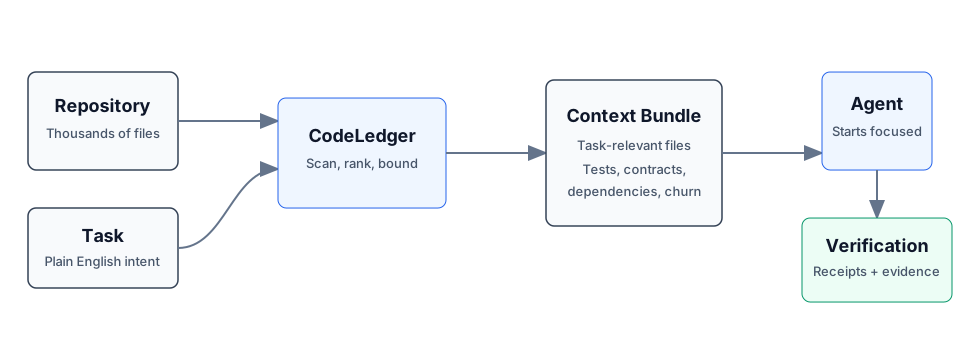
CodeLedger is local-first context control for AI coding agents. It scans a repository, selects a bounded task-relevant set of files, and writes an evidence-backed context bundle before the agent begins work.
Works with Claude Code, Codex, Cursor, GitHub Copilot, Gemini CLI, and other CLI or MCP-compatible coding agents.
Try It
npm install -g @codeledger/cli
cd your-project
codeledger ready --task "Fix null handling in user service"
CodeLedger initializes the repo if needed, refreshes the index, and creates the
task-specific bundle at .codeledger/active-bundle.md. Your agent reads that
artifact first so it starts with the files most relevant to the task.
Runtime analysis is local by default. Installing or updating may fetch packages or release artifacts from npm and GitHub Releases; CodeLedger runtime analysis does not send your source code through CodeLedger telemetry by default.
Example Benchmark
Example result from a mid-sized Node.js service. Results vary by repository, task, agent, and scenario.
| Metric | Without CodeLedger | With CodeLedger | Change |
|---|---|---|---|
| Tests Passed | 78% | 94% | +16% |
| Iterations | 4 | 2 | -50% |
| Files Changed | 17 | 9 | -47% |
| Time to Finish | 6m 12s | 3m 40s | -41% |
| Token Usage | 28k | 18k | -36% |
Do not take the benchmark on faith - measure CodeLedger on your own repo:
codeledger compare \
  --scenario .codeledger/harness/scenarios/auth-rate-limit.json \
  --guided
If CodeLedger improves your coding-agent workflow, star the repo to follow releases and help other developers discover it.
Start Here
- Getting Started
- CLI Reference
- How It Works
- MCP Server
- Feature Tiers
- Security
- Contributing
- Latest Release
- npm package
How It Works
- CodeLedger scans the repo for deterministic local signals such as dependency structure, churn, tests, contracts, and task keywords.
- It ranks and packs a bounded set of task-relevant files.
- It writes
.codeledger/active-bundle.mdfor your coding agent. - After work, verification, receipts, and session summaries help show what changed and whether the selected context was useful.
Same task plus same repo state produces the same file ranking behavior.
Core Capabilities
- Give agents the right context: deterministic file selection, scope inference, bounded budgets, blast-radius hints, and co-change context.
- Keep work continuous: session summaries, checkpoints, mid-session refine, and handoff/recovery commands.
- Keep agents inside the task: scope contracts, intent governance, loop detection, and multi-agent conflict checks.
- Prove what happened: review intelligence, receipts, provenance, audit exports, and release evidence.
For the full command surface, see the CLI Reference.
Agent Integration
Claude Code can use CodeLedger hooks after codeledger ready initializes the
repo. Cursor, Codex, GitHub Copilot, Gemini CLI, Aider, Windsurf, and other
agents can read CLAUDE.md plus .codeledger/active-bundle.md, or use the
repo-local wrappers when available.
CodeLedger also includes an MCP server for supported tiers:
codeledger mcp start
codeledger mcp status
See MCP Server and Feature Tiers for setup and tier details.
Trust And Verification
- Runtime source analysis runs locally by default.
- Source code is not sent through CodeLedger telemetry by default.
- No account is required for the local CLI flow.
- Public releases include
SHA256SUMSand release-evidence artifacts. codeledger doctorchecks the local install, hooks, config, index, and ledger health.- The public wrapper, docs, harness, and scanning surface are inspectable in
this repo; the protected hardened runtime is covered by
LICENSE-CORE.
Install
npm install -g @codeledger/cli
codeledger --version
Or use the release zip:
- Download the latest release.
- Extract it.
- Run
install.sh.
The installer uses the bundled package from the zip, so the installed wrapper version matches the release. The wrapper then fetches the matching hardened binary from the GitHub release unless your environment already provides it.
Everyday Flow
cd your-project
codeledger ready
codeledger ready --task "Fix null handling in user service"
Inside an initialized repo, you can also use:
codeledger activate --task "Fix null handling in user service"
codeledger doctor
Browser, cloud, and sandboxed environments can use the repo-local runtime
deployed under .codeledger/bin/ after initialization or vendoring.
Architecture
CodeLedger has an open public surface and a protected hardened runtime:
PUBLIC:    CLI wrapper, types, repo scanner, harness, reports, docs, hooks
PROTECTED: Scoring engine, selection algorithm, confidence internals
Use codeledger about, codeledger doctor, and command-specific --explain
output to inspect behavior and evidence without exposing protected
implementation internals.
Privacy
- Installation may use npm and GitHub Releases.
- Runtime analysis runs on your local machine by default.
- Runtime analysis makes zero source-code telemetry calls by default.
- Your source code is not required to leave your machine for the local CLI flow.
- Uninstall at any time.
License
- Public wrapper, types, repo scanning, harness, reports, docs, and examples: MIT
- Downloaded hardened binary: CodeLedger Core License
GitHub may classify the combined licensing structure as "Other" because the repo includes both MIT-covered public files and separately licensed protected runtime terms. Changing the license files should be a human legal decision.
Part Of ContextECF
CodeLedger applies Intelligent Context AI's context-control architecture to software engineering. For enterprise-wide governed context across applications and agents, see ContextECF.
CodeLedger is produced by Intelligent Context AI, Inc. See codeledger.dev.
Вопросы о CodeLedger MCP
Как добавить CodeLedger MCP в Claude Code?
Выполните claude mcp add codeledger -- npx -y @codeledger/cli в терминале. Добавьте --scope user, чтобы сервер был доступен во всех проектах.
Как добавить CodeLedger MCP в Cursor?
Откройте ~/.cursor/mcp.json и добавьте сервер в mcpServers, используя конфигурацию Cursor из раздела установки выше.
Отправляет ли CodeLedger мой исходный код на свои серверы?
Нет, по умолчанию анализ во время выполнения происходит локально, и ваш исходный код не передается через телеметрию CodeLedger.
С какими AI-агентами совместим CodeLedger?
Он работает с Claude Code, Codex, Cursor, GitHub Copilot, Gemini CLI, Aider, Windsurf и другими агентами через CLI или совместимыми с MCP.
Как CodeLedger улучшает процесс разработки?
Инструмент помогает выбирать файлы, релевантные текущей задаче, что позволяет повысить процент успешных тестов, сократить количество итераций и снизить расход токенов.
Нужна ли учетная запись для использования локального CLI?
Для работы через локальный CLI учетная запись не требуется.