
MCP server fusionwright
Коммит 27 окт. 2026 г.Подключает ИИ-ассистента к Autodesk Fusion для автоматизации 3D-моделирования, проверки, рендеринга и экспорта файлов через цикл валидации.
Также известен как Cocoloco20/fusionwright
- Звёзды
- 2
- Инструменты
- 10
- Загрузки, 30 дней
- —
- Последняя версия
- —
- Последний коммит
- 27 окт. 2026 г.
- Лицензия
- MIT
Что такое fusionwright MCP?
Подключает ИИ-ассистента к Autodesk Fusion для автоматизации 3D-моделирования, проверки, рендеринга и экспорта файлов через цикл валидации. Он предоставляет 10 инструментов, например fusion_status, fusion_api, fusion_run.
Сводка сгенерирована из README проекта
О fusionwright MCP server
fusionwright позволяет инженерам и дизайнерам автоматизировать 3D-моделирование и механическую проверку в Autodesk Fusion. Подключая ИИ-ассистента, такого как Claude или Cursor, к активной сессии Fusion, пользователи могут описывать сложные детали, а ассистент будет писать, выполнять и проверять необходимый Python-код. Эта связка работает на macOS или Windows через локальный аддон-мост и требует Python версии 3.10 или выше.
В отличие от простых инструментов для запуска скриптов, этот сервер реализует цикл валидации для обеспечения точности. Он использует такие инструменты, как fusion_run для выполнения кода, fusion_check для проверки объемов и коллизий через ядро Fusion, а также fusion_look для создания скриншотов под разными углами. Система также может выполнять фотореалистичный рендеринг через fusion_render и экспортировать файлы в таких форматах, как STEP, STL или OBJ. Такой подход позволяет ИИ находить и исправлять ошибки в геометрии до завершения финального проектирования.
Что вы можете с ним делать
- 1Генерация и экспорт корпусовПопросите ИИ создать корпус для конкретной печатной платы с вентиляционными отверстиями и экспортировать его в формате STEP.
- 2Проверка механической точностиПоручите ассистенту проверить деталь на наличие некорректных тел или пересечений и автоматически их исправить.
- 3Автоматизация эстетической отделкиЗапросите добавление скруглений (fillets) ко всем внешним ребрам и рендеринг с применением определенного материала.
- 4Валидация геометрии через расчетыУбедитесь, что созданный 3D-объем соответствует конкретному расчетному значению, используя ядро Fusion.
Взято из README проекта. Каждый вариант использования проверен на соответствие цитате из него.
Инструменты fusionwright MCP 10
Определено из READMEfusion_statusfusion_apifusion_runfusion_rollbackfusion_inspectfusion_checkfusion_lookfusion_renderfusion_exportfusion_ui_command
| fusion_status | — | |
| fusion_api | — | |
| fusion_run | — | |
| fusion_rollback | — | |
| fusion_inspect | — | |
| fusion_check | — | |
| fusion_look | — | |
| fusion_render | — | |
| fusion_export | — | |
| fusion_ui_command | — |
Автоматические проверки
Запущено 14 нояб. 2026 г.Полный отчёт →Еще не проверено. Для сервера требуется оценка 80, отсутствие серьезных проблем и достаточно данных для нашей проверки. Как работают проверки · Что исправить, чтобы получить больше баллов

- Связанный и доступный исходный репозиторийcocoloco20/fusionwright is public and reachablegithub.com/cocoloco20/fusionwright ↗Пройдено
- Пакет указывает этот репозиторий как источникНе проверялось
- Происхождение сборки (аттестация Sigstore)Не проверялось
- Open source лицензия (OSI)MITspdx.org/licenses/MIT.html ↗Пройдено
- Коммит или релиз за последний годLast commit or release 2026-10-27github.com/cocoloco20/fusionwright ↗Пройдено
- OpenSSF ScorecardНе проверялось
- Имя пакета не похоже на популярный пакетНе проверялось
- Нет критических предупреждений в пакете или его зависимостяхНе проверялось
- Нет скрытых инструкций для модели10 tool descriptions and the README read; no override phrases, credential paths or hidden charactersПройдено
- Деструктивные инструменты помеченыNo tool named like delete, drop or execПройдено
- Удалённая конечная точка отвечает на рукопожатие MCPНе проверялось
README
Открыть на GitHubfusionwright
Let an AI build in Autodesk Fusion for you.
An open-source MCP server that connects an AI assistant (Claude, ChatGPT, Cursor, anything that speaks MCP) to your live Fusion session. You describe what you want; the AI writes the Fusion code, looks at the result from several angles, measures and verifies it with Fusion's own kernel, fixes its mistakes, then renders it and exports files you can print, machine or send on. It is not tied to any kind of object: brackets, enclosures, gears, jigs, furniture, product mock-ups, anything solid.
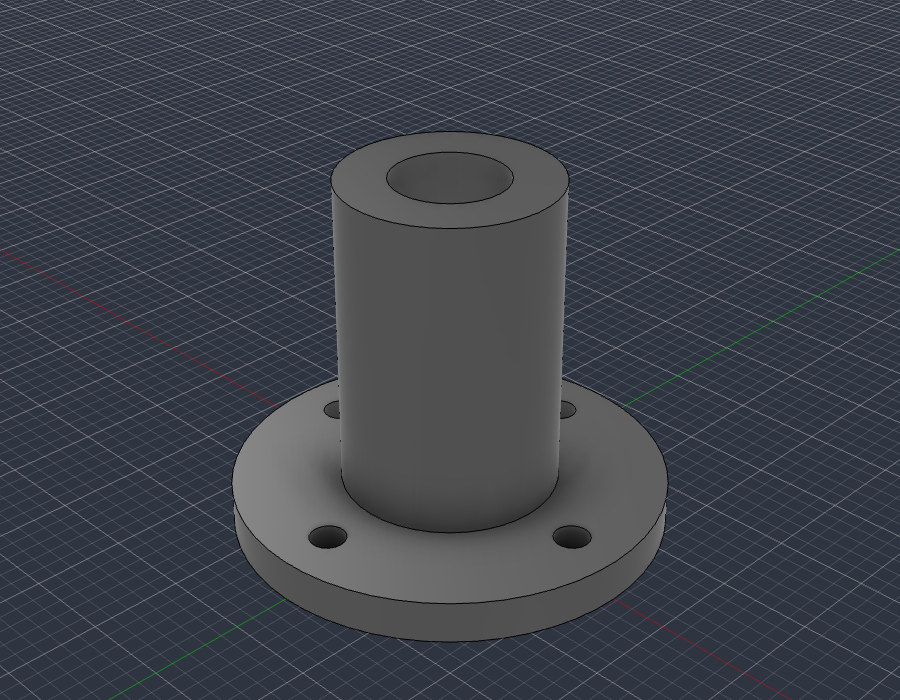
examples/flange_fusion_run.py, run through fusion_run in a live Fusion document: sketch, extrude, join, cut. The script checks Fusion's volume (37.542 cm3) against the hand-computed value (37.542 cm3), then fusion_look took this picture.
What you can ask for
- "Make an 80 x 50 x 25 mm enclosure for a PCB with four screw posts and vent slots, then export a STEP and an STL."
- "Model an M6 flange bracket with a 4-hole bolt circle, check it, and show me from the front."
- "Take the part open in Fusion, find any invalid bodies or interferences and fix them."
- "Add a 2 mm fillet to every outside edge and render it in brushed aluminium."
- "Build a 24-inch bookcase from 3/4 inch plywood and give me every part as its own component."
The loop that makes it dependable: write code, look at it, measure it against the arithmetic, repair, repeat. Executable CAD is often not correct CAD (research), and a validation loop sharply improves results, so the tools are built around checking the work.
Requirements
- Autodesk Fusion on macOS (tested) or Windows (untested). The free Personal-use tier works.
- Python 3.10+ and an MCP client.
It only uses Autodesk's documented public API and a legitimately licensed Fusion; it does not touch licensing.
Quick start
-
Install the bridge add-in (once): run
./scripts/install_addin.sh, then in Fusion pressShift+S, pick FusionBridge, click Run (tick Run on Startup to make it automatic). -
Register the server with your client.
Claude Desktop (
claude_desktop_config.json):{ "mcpServers": { "fusionwright": { "command": "uvx", "args": ["--from", "git+https://github.com/Cocoloco20/fusionwright", "fusionwright"] } } }Claude Code:
claude mcp add fusionwright -- uvx --from git+https://github.com/Cocoloco20/fusionwright fusionwright -
Ask. Exports land in
~/fusionwright-projects/(override withFUSIONWRIGHT_HOME).
Tools (10)
A small surface on purpose: fewer, higher-level tools beat dozens of thin wrappers.
| Tool | Purpose |
|---|---|
fusion_status |
Is Fusion reachable? Which document is open? |
fusion_api |
Look up the real Fusion API (class members with docs) before writing code |
fusion_run |
Run Python inside Fusion (helpers predefined); returns a rollback checkpoint |
fusion_rollback |
Undo everything after a checkpoint |
fusion_inspect |
Compact design state: sizes, volume, invalid bodies, timeline problems |
fusion_check |
Kernel validation: body validity, timeline health, interference, expected size |
fusion_look |
Screenshots from iso / front / back / left / right / top / bottom |
fusion_render |
Photoreal render with Fusion's local renderer |
fusion_export |
STEP, STL, F3D, OBJ, 3MF, IGES, SAT (local files only) |
fusion_ui_command |
Run any of Fusion's ~3,000 UI commands by id, or search them |
Inside fusion_run the names app, ui, design, root, adsk, P3, VI, FO, IN, coll() and board() are predefined; assign your answer to result. Fusion works in centimetres internally.
Examples
| File | What it shows |
|---|---|
examples/flange_fusion_run.py |
sketches, extrude / join / cut, picking profiles by area, checking against hand arithmetic |
Contributions of more examples (enclosures, gears, sheet metal, assemblies, anything) are welcome.
How it compares
- Autodesk's official Fusion MCP (announced May 2026) is a thin scripting bridge: read / screenshot, run a script, undo / redo. fusionwright adds a verification layer (kernel checks, multi-angle images, rollback checkpoints, an API lookup, UI-command access).
- Community Fusion MCPs expose dozens of low-level CAD operations (the biggest lists 89 tools) and mostly stop there. fusionwright is deliberately small and runs its bridge on an authenticated loopback port.
Safety
See SECURITY.md. In short: loopback only, bearer token (~/.fusion-bridge-token, mode 0600), Host-header guard, request-size cap; fusion_run blocks file deletion, network access and cloud saves by default and returns a rollback checkpoint. It is a safety net, not a sandbox: code you let an AI run inside Fusion is powerful. Save your work first.
What's tested
- 9 unit tests: the add-in's HTTP layer with a stubbed Fusion (token, host guard, size cap, error tracebacks) and a real stdio MCP round trip (tool list, safety guard, error messages).
- Live tests against a real Fusion (
pytest tests/integration): build a part and verify sizes, volume and interference with the kernel, views that must differ from each other, 5 export formats, a real render, rollback, API lookup, UI-command search, and a full MCP client round trip that returns images. - A 30-case capability suite (
tests/integration/capability_suite.py) covering sketches, constraints, extrude / cut / revolve / sweep / loft, fillet / shell / chamfer / hole, patterns, booleans, components and joints, parameters, timeline edits, materials, measurement, 8 export formats, STEP re-import, CAM setup creation, configurations, rendering and more.
See docs/COVERAGE.md for what the Fusion API can and cannot do and docs/GOTCHAS.md for API traps found along the way.
Known limitations
- Fusion-native drawings (
adsk.drawing) can only be created from a design saved to your Autodesk cloud, so they are not automated here. Verify every dimension before cutting, printing or machining. - "Everything a human can do in Fusion" is not literally achievable through its API.
fusion_ui_commandandfusion_runcover a great deal, but some interactions (some drag gestures, cloud workflows) remain manual.
Roadmap
Adapter for Autodesk's official Fusion MCP as an alternative transport · more verified examples · driving models from Fusion user parameters · MCP Apps live 3D preview · MCP Tasks for long renders · a cross-model evaluation suite.
Not affiliated
fusionwright is an independent project, not affiliated with or endorsed by Autodesk, Anthropic or OpenAI. "Autodesk" and "Fusion" are trademarks of Autodesk, Inc.
MIT licensed. Contributions welcome.
Вопросы о fusionwright MCP
Какие инструменты предоставляет fusionwright MCP?
Он предоставляет 10 инструментов, включая fusion_status, fusion_api, fusion_run, fusion_rollback, fusion_inspect.
Какие операционные системы поддерживаются?
Проект протестирован на macOS; поддержка Windows на данный момент не тестировалась.
Требуется ли платная подписка Autodesk?
Нет, этот MCP server работает и с бесплатной версией Autodesk Fusion для личного использования.
Как обеспечивается точность моделей, созданных ИИ?
Используется цикл валидации, который пишет код, проверяет модель с помощью ядра Fusion, сверяет параметры с арифметическими расчетами и исправляет ошибки.
Какие форматы файлов можно экспортировать?
Вы можете экспортировать файлы в форматах STEP, STL, F3D, OBJ, 3MF, IGES и SAT.