
Предоставляет обратную связь по UI Jetpack Compose и передает контекст исходного кода ИИ-агентам через локальный MCP server.
Также известен как beyondwin/FixThis, @beyondwin/fixthis
- Звёзды
- 5
- Инструменты
- —
- Загрузки, 30 дней
- 357
- Последняя версия
- 1.5.0
- Последний коммит
- 28 окт. 2026 г.
- Лицензия
- MIT
Что такое FixThis MCP?
FixThis — это MCP server. Предоставляет обратную связь по UI Jetpack Compose и передает контекст исходного кода ИИ-агентам через локальный MCP server.
Сводка сгенерирована из README проекта
О FixThis MCP server
Android-разработчики, работающие с Jetpack Compose, могут использовать FixThis, чтобы сократить разрыв между визуальными багами UI и контекстом исходного кода. Подключая отладочного помощника к приложению Compose, инструмент позволяет пользователям указывать на конкретные элементы UI в консоли локального браузера и аннотировать желаемые изменения. Этот процесс генерирует компактный пакет данных, содержащий границы скриншотов, семантику и подходящие варианты исходного кода, которые можно отправить напрямую кодинг-агентам.
Этот локальный MCP server работает через ADB и localhost, что гарантирует отсутствие передачи данных во внешние API. Он предназначен для работы с такими агентами, как Claude Code или Codex, которые могут автоматизировать установку Gradle-плагина и настройку MCP. Пользователи могут вручную копировать промпты для чат-интерфейсов или использовать функцию Save to MCP, чтобы прикреплять обезличенные диагностические данные Android к своим запросам. Система предоставляет специфические технические детали, такие как номера строк и подсказки editSurface, чтобы помочь агентам идентифицировать правильные composable-компоненты.
Что вы можете с ним делать
- 1Автоматическая установка агентаИИ-агент может автоматически настроить проект Jetpack Compose, выполнив команду install-agent и применив необходимый Gradle-плагин.
- 2Визуальная отладка UIРазработчики могут выбирать конкретные компоненты или выделять области в браузерной консоли, чтобы описать изменения макета или отступов.
- 3Контекстная передача кодаВместо простых скриншотов инструмент предоставляет агентам наиболее подходящие варианты исходного кода и номера строк для точного редактирования.
- 4Прикрепление диагностических данныхПользователи могут включать ограниченные и обезличенные диагностические данные Android при сохранении сессии в MCP client.
Взято из README проекта. Каждый вариант использования проверен на соответствие цитате из него.
Как установить FixThis MCP
Форматы проверены 10 ноя 2026Добавить в CursorДобавить в GooseУстановка FixThis MCP в Claude Code
$ claude mcp add fixthis -- npx -y @beyondwin/fixthisУстановка FixThis MCP в Cursor
~/.cursor/mcp.json
{
  "mcpServers": {
    "fixthis": {
      "command": "npx",
      "args": [
        "-y",
        "@beyondwin/fixthis"
      ]
    }
  }
}Установка FixThis MCP в VS Code
.vscode/mcp.json
{
  "servers": {
    "fixthis": {
      "type": "stdio",
      "command": "npx",
      "args": [
        "-y",
        "@beyondwin/fixthis"
      ]
    }
  }
}Установка FixThis MCP в VS Code CLI
$ code --add-mcp '{"name":"fixthis","type":"stdio","command":"npx","args":["-y","@beyondwin/fixthis"]}'Установка FixThis MCP в Claude Desktop
claude_desktop_config.json
{
  "mcpServers": {
    "fixthis": {
      "command": "npx",
      "args": [
        "-y",
        "@beyondwin/fixthis"
      ]
    }
  }
}Установка FixThis MCP в Codex
$ codex mcp add fixthis -- npx -y @beyondwin/fixthisУстановка FixThis MCP в Codex config.toml
~/.codex/config.toml
[mcp_servers.fixthis]
command = "npx"
args = ["-y", "@beyondwin/fixthis"]
Установка FixThis MCP в Gemini CLI
$ gemini mcp add -s user fixthis npx -- -y @beyondwin/fixthisУстановка FixThis MCP в Gemini settings.json
~/.gemini/settings.json
{
  "mcpServers": {
    "fixthis": {
      "command": "npx",
      "args": [
        "-y",
        "@beyondwin/fixthis"
      ]
    }
  }
}Автоматические проверки
Запущено 14 нояб. 2026 г.Полный отчёт →Прошло наши автоматизированные проверки. Это не аудит безопасности: изучите код и предоставьте серверу минимально необходимый доступ. Как работают проверки

- Связанный и доступный исходный репозиторийbeyondwin/fixthis is public and reachablegithub.com/beyondwin/fixthis ↗Пройдено
- Пакет указывает этот репозиторий как источник@beyondwin/fixthis names beyondwin/fixthis as sourcenpmjs.com/package/@beyondwin/fixthis ↗Пройдено
- Происхождение сборки (аттестация Sigstore)Sigstore attestation for @beyondwin/fixthisnpmjs.com/package/@beyondwin/fixthis/v/1.5.0#provenance ↗Пройдено
- Open source лицензия (OSI)MITspdx.org/licenses/MIT.html ↗Пройдено
- Коммит или релиз за последний годLast commit or release 2026-10-28github.com/beyondwin/fixthis ↗Пройдено
- OpenSSF ScorecardНе проверялось
- Имя пакета не похоже на популярный пакетNo popular package one edit away from @beyondwin/fixthisПройдено
- Нет критических предупреждений в пакете или его зависимостях1 resolved dependencies checked; no critical advisoryosv.dev ↗Пройдено
- Нет скрытых инструкций для модели0 tool descriptions and the README read; no override phrases, credential paths or hidden charactersПройдено
- Деструктивные инструменты помеченыНе проверялось
- Удалённая конечная точка отвечает на рукопожатие MCPНе проверялось
README
Открыть на GitHubFixThis for Android Compose


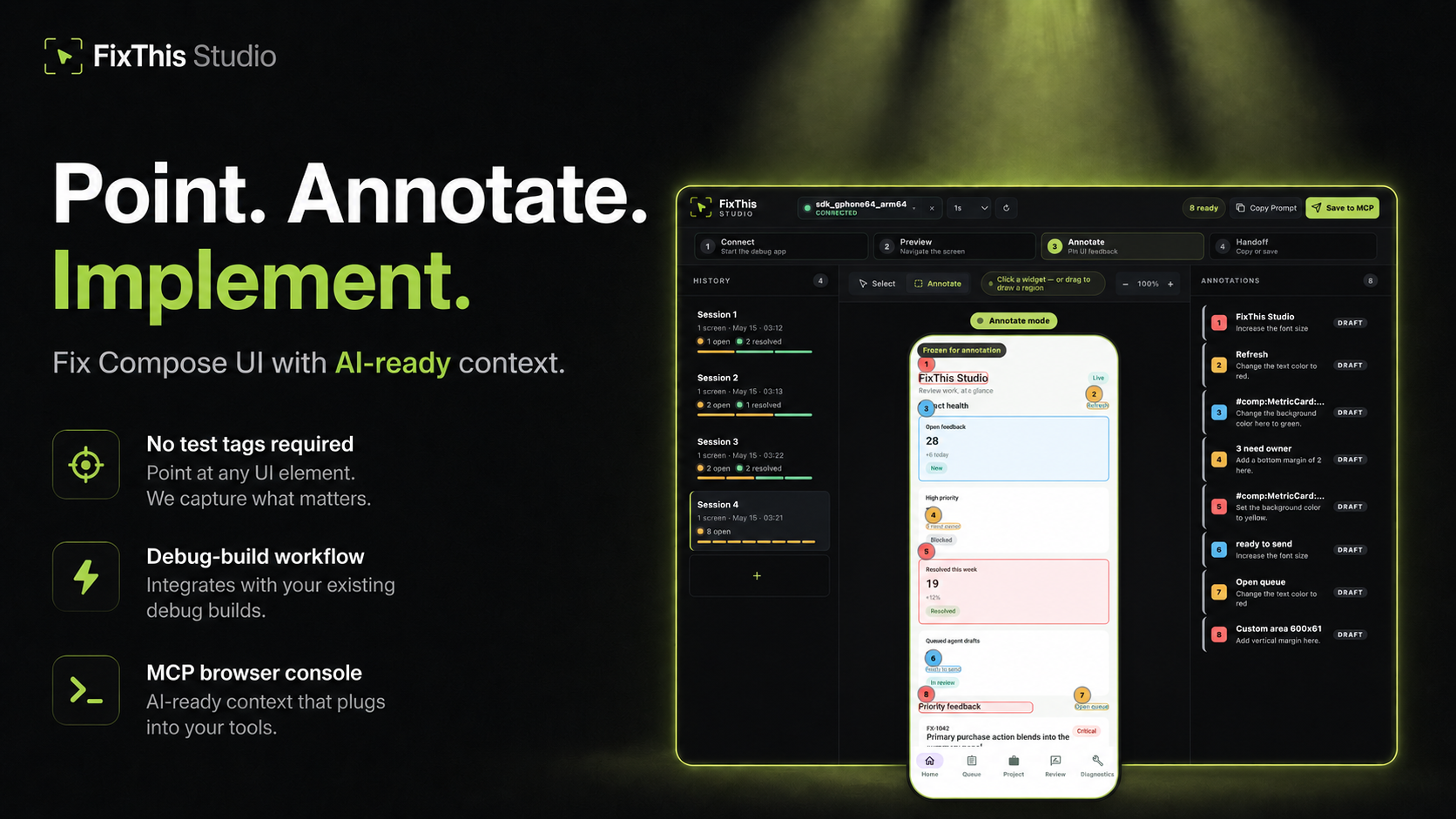
Point at a Jetpack Compose UI, write the change, and hand Claude, Codex, Cursor, or another coding agent the source context it needs.
FixThis is debug-only. It attaches a sidekick to a Compose debug app, mirrors the screen into a local browser console, and turns annotations into a compact handoff: screenshot bounds, semantics, source candidates, and confidence warnings.
Click a component to select it. Drag when the target is spacing, empty room, or something that is not a clean Compose node.
Works Today
- Try the sample app in about five minutes.
- Install the desktop CLI/MCP with Homebrew, npm, or GitHub Releases.
- Add it to an external app with the Gradle plugin
io.github.beyondwin.fixthis.compose. - Let Claude Code or Codex configure the sample with
./scripts/bootstrap-mcp.sh --sample. - Let an agent configure your app with
fixthis install-agent. - Use Copy Prompt with Cursor, ChatGPT, or any chat agent.
- Use Save to MCP with Claude Code or Codex.
- Save to MCP can attach a bounded, redacted Android diagnostics baseline. Switch the session to Manual or Off if you do not want that. Copy Prompt never starts collection.
- Runs locally over ADB and
127.0.0.1. No external API calls.
Quick Start: Agent Installs FixThis in Your App
Claude Code / Codex Bootstrap Prompt
Paste this into Claude Code or Codex from the root of a Jetpack Compose Android app:
Install FixThis in this project and configure it for this agent.

Use this order:
1. Run `fixthis install-agent --project-dir . --target all --verify --json`.
2. Use the JSON `readiness.state` and `actions[]` as the source of truth.
3. If `requiresUserAction` is true, tell me the exact blocking action.
4. Do not call `fixthis_open_feedback_console` until `readyForMcpTooling` is true, or until the report's `agent_after_restart` action is reached after restart.

Restart Claude Code or Codex if the report asks for it.
Do not configure release builds. Do not commit `.fixthis/`.
The agent should run:
# macOS
brew install beyondwin/tools/fixthis

# Node
npm install -g @beyondwin/fixthis

# macOS/Linux fallback
curl -fsSL https://raw.githubusercontent.com/beyondwin/FixThis/main/scripts/install-fixthis.sh \
  | bash -s -- --version v1.5.0

fixthis install-agent --project-dir . --target all --verify --json
If Homebrew already has it, run
brew update && brew upgrade beyondwin/tools/fixthis and check
fixthis --version.
fixthis install-agent applies the Gradle plugin, writes MCP config, and
writes .fixthis/project.json plus .fixthis/agent-setup.*. If doctor
reports NEEDS_INSTALL or metadata is missing, run ./gradlew fixthisSetup
and rerun fixthis install-agent --project-dir . --target all --verify --json.
Restart Claude Code or Codex when the report asks, then call
fixthis_open_feedback_console. For a manual check, use
fixthis doctor --project-dir . --json.
Published plugin:
plugins {
    id("io.github.beyondwin.fixthis.compose") version "1.5.0"
}
The plugin adds the debug-only sidekick and keeps release builds out.
Quick Start: Sample App to Agent Handoff
git clone <this-repo> && cd FixThis
./gradlew :fixthis-cli:installDist :fixthis-mcp:installDist
fixthis-cli/build/install/fixthis/bin/fixthis doctor --package io.github.beyondwin.fixthis.sample
fixthis-cli/build/install/fixthis/bin/fixthis run --package io.github.beyondwin.fixthis.sample
fixthis run installs the sample debug APK, launches it, and opens FixThis
Studio at http://127.0.0.1:<port>.
In the console:
- Click Annotate.
- Click a UI element, or drag an area.
- Type the change you want.
- Repeat for other spots on this screen.
- Copy Prompt for a chat agent, or Save to MCP for Claude Code / Codex.
You are done when a numbered annotation is visible and you have copied Markdown or saved a local MCP handoff.
Maintainers can prove that Copy Prompt path on a connected device:
npm run real-copy-prompt:smoke -- --strict
Pick Your Path
| Goal | Start here |
|---|---|
| Try it without touching your app | Sample quick start |
| Add it to your debug build | Add to your app |
| Connect an agent | Connect your agent |
| Bootstrap MCP from this repo | MCP.md |
| Use the console | Console tour |
| Understand the product | Product |
| Diagnose a failure | Troubleshooting |
| Inspect contracts | Docs index |
| Contribute | CONTRIBUTING.md |
| Reader | Start here |
|---|---|
| First-time user | Sample quick start |
| External app developer | Add to your app |
| Agent in this repo | AGENTS.md and project map |
| Maintainer | Docs index and project map |
| Contract or CLI change | Reference contracts |
Why not just a screenshot?
A screenshot is enough when the target is obvious. FixThis helps when the UI is dense, list-rendered, or named mostly by composable:
- Top-3 source candidates with line numbers and match reasons
editSurfacehints for call site vs component vs copy vs layout vs interop- Instance grouping so identical cards stay distinct
- Screen fingerprint so a rotated or changed screen cannot sneak into a save
- Honest confidence: visual-only, stale, or possible AndroidView/WebView
- Bounded runtime diagnostics on Save to MCP
- Retry-safe batches that do not duplicate work
Modules
| Module | Role |
|---|---|
:app (sample/) |
Validation sample |
:fixthis-compose-core |
Pure Kotlin domain |
:fixthis-compose-sidekick |
Debug Android runtime |
:fixthis-gradle-plugin |
Source index and debug wiring |
:fixthis-cli |
Desktop CLI |
:fixthis-mcp |
MCP server and local console |
More: Product, decisions, architecture.
Status
Public install paths:
- Gradle plugin
io.github.beyondwin.fixthis.compose - Maven
io.github.beyondwin:fixthis-compose-sidekickandfixthis-compose-core - Homebrew
brew install beyondwin/tools/fixthis - GitHub Release
fixthis-cli-mcp-vX.Y.Z.tar.gz - npm
@beyondwin/fixthis - MCP Registry
io.github.beyondwin/fixthis
Live dashboard: Release readiness.
main may be ahead of the latest tag. See CHANGELOG
and release notes.
Agents in this repo should read AGENTS.md.
Trust
FixThis stays on your machine. The sidekick talks over ADB, the console binds
to localhost, and Save to MCP writes under .fixthis/. Screenshots can
still contain sensitive pixels. Review them before sharing. Do not commit
.fixthis/.
Details: Privacy, Security, Threat model.
V1 stays narrow: Compose debug builds, local ADB, MCP-first handoff, best-effort source candidates, no cloud upload. See Roadmap.
License
Вопросы о FixThis MCP
Как добавить FixThis MCP в Claude Code?
Выполните claude mcp add fixthis -- npx -y @beyondwin/fixthis в терминале. Добавьте --scope user, чтобы сервер был доступен во всех проектах.
Как добавить FixThis MCP в Cursor?
Откройте ~/.cursor/mcp.json и добавьте сервер в mcpServers, используя конфигурацию Cursor из раздела установки выше.
Отправляет ли FixThis данные в облако?
Нет, он работает локально через ADB и localhost без каких-либо внешних API-вызовов.
Как использовать FixThis с Claude Code или Codex?
Вы можете воспользоваться функцией Save to MCP или использовать предоставленный bootstrap prompt для настройки агента.