
Позволяет агентам разработки использовать метод интервальных повторений, задавая вопросы с вариантами ответов по недавним изменениям в коде для закрепления знаний.
Также известен как atomicreps/cli, cli
- Звёзды
- 0
- Инструменты
- —
- Загрузки, 30 дней
- —
- Последняя версия
- 0.1.0
- Последний коммит
- 6 окт. 2026 г.
- Лицензия
- MIT
Что такое atomicreps MCP?
atomicreps — это MCP server. Позволяет агентам разработки использовать метод интервальных повторений, задавая вопросы с вариантами ответов по недавним изменениям в коде для закрепления знаний.
Сводка сгенерирована из README проекта
О atomicreps MCP server
Atomic Reps — это инструмент, разработанный для того, чтобы помочь разработчикам закреплять знания в программировании с помощью практики извлечения информации (retrieval practice). Он работает, предлагая пользователям вопросы с вариантами ответов сразу после того, как агент завершит задачу, связанную с изменением файлов. Этот процесс превращает сессии активной разработки в возможности для обучения, проверяя память о недавних модификациях кода.
Сервер интегрируется с различными MCP-клиентами, включая Claude Code, GitHub Copilot, Cursor, Windsurf и Codex. Пользователи настраивают сервер через терминальный мастер (требуется Node 24 или выше), что подразумевает создание бесплатного аккаунта и аутентификацию через веб-браузер. После подключения сервер управляет частотой, сложностью и конкретными темами вопросов, чтобы поддерживать контролируемый темп обучения.
Разработчики могут настраивать процесс под себя, используя такие команды, как rep, answer, me и settings. Система отслеживает прогресс с помощью серий (streaks) и сводок, позволяя при этом отключать определенные темы или регулировать интенсивность. Приоритет отдается конфиденциальности: вместо реального содержимого кода или промптов отправляются только идентификаторы каталогов и метаданные.
Что вы можете с ним делать
- 1Закрепление недавних изменений в кодеПопросите ИИ задать вопрос с вариантами ответов по только что исправленному багу или измененному фрагменту кода.
- 2Отслеживание прогресса обученияПросматривайте текущую серию занятий, навыки и сводки сессий, чтобы контролировать свой прогресс.
- 3Настройка тем для изученияОтключайте конкретные темы программирования или поднавыки, которые вы не хотите практиковать.
- 4Управление сложностью и частотойРегулируйте частоту появления вопросов и уровень сложности для практики извлечения знаний.
Взято из README проекта. Каждый вариант использования проверен на соответствие цитате из него.
Как установить atomicreps MCP
Форматы проверены 10 ноя 2026Добавить в CursorДобавить в GooseУстановка atomicreps MCP в Claude Code
$ claude mcp add cli -- npx -y atomicrepsУстановка atomicreps MCP в Cursor
~/.cursor/mcp.json
{
  "mcpServers": {
    "cli": {
      "command": "npx",
      "args": [
        "-y",
        "atomicreps"
      ]
    }
  }
}Установка atomicreps MCP в VS Code
.vscode/mcp.json
{
  "servers": {
    "cli": {
      "type": "stdio",
      "command": "npx",
      "args": [
        "-y",
        "atomicreps"
      ]
    }
  }
}Установка atomicreps MCP в VS Code CLI
$ code --add-mcp '{"name":"cli","type":"stdio","command":"npx","args":["-y","atomicreps"]}'Установка atomicreps MCP в Claude Desktop
claude_desktop_config.json
{
  "mcpServers": {
    "cli": {
      "command": "npx",
      "args": [
        "-y",
        "atomicreps"
      ]
    }
  }
}Установка atomicreps MCP в Codex
$ codex mcp add cli -- npx -y atomicrepsУстановка atomicreps MCP в Codex config.toml
~/.codex/config.toml
[mcp_servers.cli]
command = "npx"
args = ["-y", "atomicreps"]
Установка atomicreps MCP в Gemini CLI
$ gemini mcp add -s user cli npx -- -y atomicrepsУстановка atomicreps MCP в Gemini settings.json
~/.gemini/settings.json
{
  "mcpServers": {
    "cli": {
      "command": "npx",
      "args": [
        "-y",
        "atomicreps"
      ]
    }
  }
}Автоматические проверки
Запущено 15 нояб. 2026 г.Полный отчёт →Прошло наши автоматизированные проверки. Это не аудит безопасности: изучите код и предоставьте серверу минимально необходимый доступ. Как работают проверки

- Связанный и доступный исходный репозиторийatomicreps/cli is public and reachablegithub.com/atomicreps/cli ↗Пройдено
- Пакет указывает этот репозиторий как источникatomicreps names atomicreps/cli as sourcenpmjs.com/package/atomicreps ↗Пройдено
- Происхождение сборки (аттестация Sigstore)No build attestation published for this releaseНе проверялось
- Open source лицензия (OSI)MITspdx.org/licenses/MIT.html ↗Пройдено
- Коммит или релиз за последний годLast commit or release 2026-10-06github.com/atomicreps/cli ↗Пройдено
- OpenSSF ScorecardНе проверялось
- Имя пакета не похоже на популярный пакетNo popular package one edit away from atomicrepsПройдено
- Нет критических предупреждений в пакете или его зависимостях1 resolved dependencies checked; no critical advisoryosv.dev ↗Пройдено
- Нет скрытых инструкций для модели0 tool descriptions and the README read; no override phrases, credential paths or hidden charactersПройдено
- Деструктивные инструменты помеченыНе проверялось
- Удалённая конечная точка отвечает на рукопожатие MCPHTTPS endpoint answered 401 (sign-in required)Пройдено
README
Открыть на GitHubatomicreps


One short question about the thing you just built. Works inside Claude Code, GitHub Copilot, Cursor, Windsurf, Codex, or any MCP client.
You describe a bug, your coding agent changes the code, and Atomic Reps asks you one multiple-choice question about that change. You answer with a letter, from memory, and the server grades it.
The two-minute demo: four bugs fixed in Claude Code, one question after each.
https://github.com/user-attachments/assets/521c1bb3-9f75-4c25-8b71-ed763de7debc
Quick start
Requires Node 24+ and a free account. On an older Node, every command prints the version it needs instead of starting.
npx atomicreps
The first run is a setup wizard:
- Pick what to practise, how often, and how hard.
- Sign in: the terminal prints a code, and you type it at atomicreps.com/connect.
- Pick your editors.
connectwrites only the entries you tick.
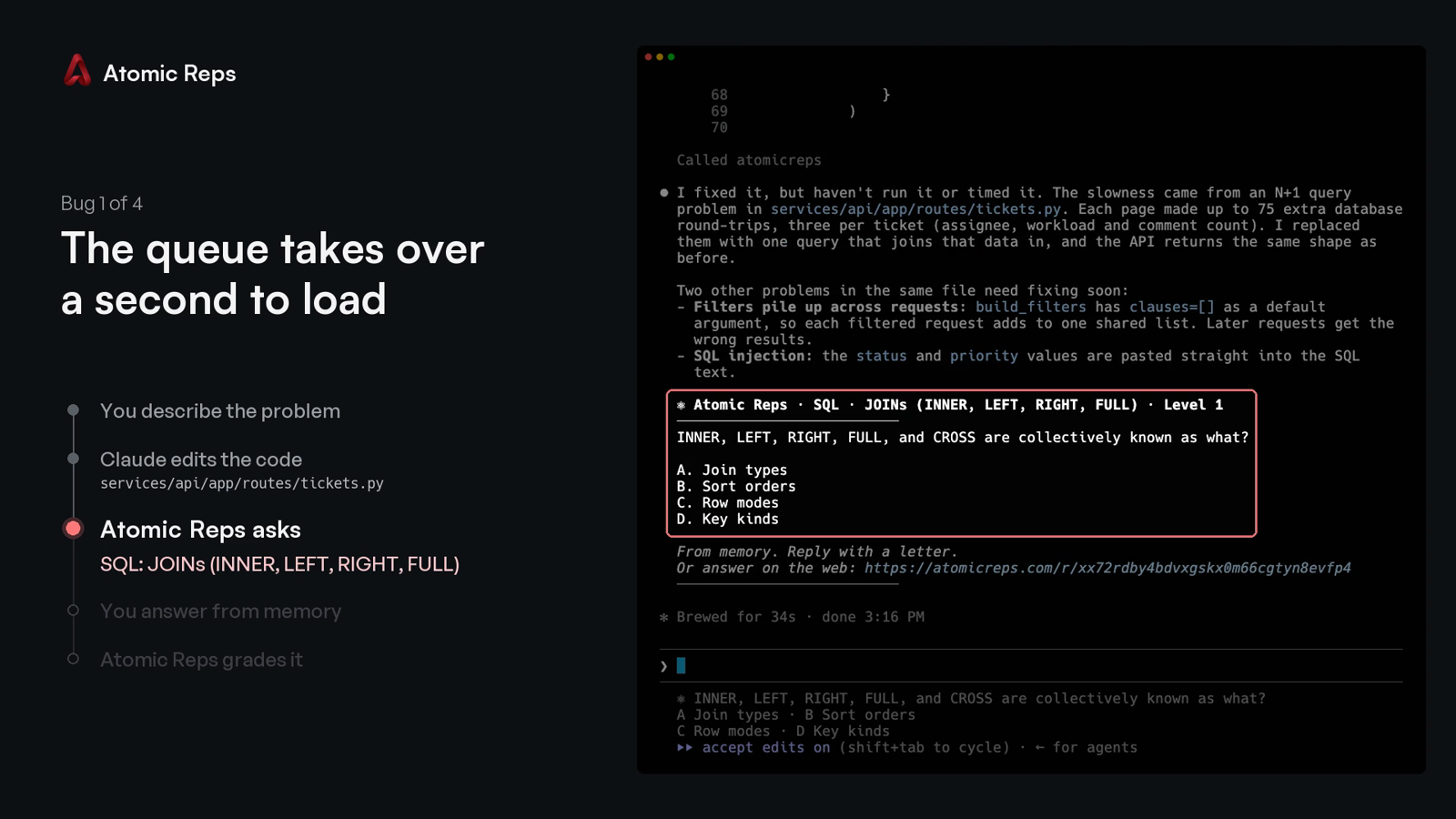
Then go back to work. When your agent finishes a task that changed files, the question appears after its answer:
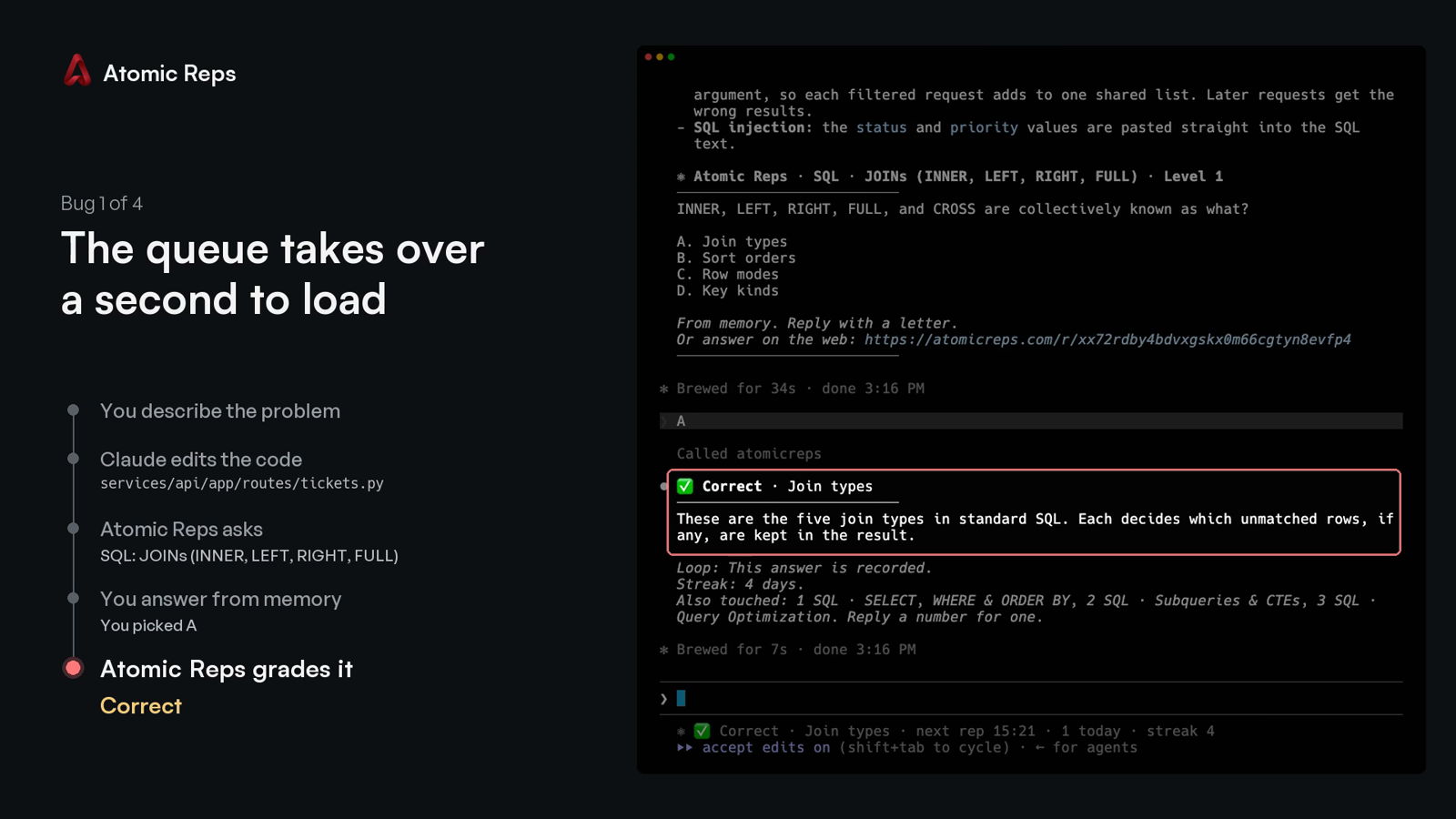
Type the letter. The verdict comes back with a one-line explanation, and the next line names up to three other topics the session touched:
Every run after the first opens the terminal screen: your streak, this session, your topics, mutes and rate.
Commands
npx atomicreps            the terminal screen; the setup wizard on the first run
npx atomicreps setup      the setup wizard again: areas, topics, how often, how hard
npx atomicreps login      sign in from a browser with a typed code
npx atomicreps connect    register the server with your editor
npx atomicreps connect --pin   pin the launch args to this installed version, for a command you can commit
npx atomicreps mcp        the stdio MCP server process (what the editor launches)
npx atomicreps doctor     token, server ping, version, when the next rep may come, allowlist
npx atomicreps why        the last ten times a question could have appeared, and why it did or did not
npx atomicreps logout     forget the token on this machine
npx atomicreps logout --purge   also forget your reps and status, and offer to undo connect
Add --alpha to any command to use staging. It keeps its own token and cache,
so you can be signed in to both staging and production at once.
Plain connect writes npx -y atomicreps mcp, which always resolves to
whatever is latest at launch. connect --pin writes npx -y atomicreps@<version> mcp instead, the version this CLI is running, so an
organisation can review one exact command and commit it rather than trusting
npx to fetch the same thing twice.
Claude Code
npx atomicreps connect offers four Claude Code rows:
- Claude Code registers the server at user scope.
- …and a question at the end of each turn adds a
Stophook and aUserPromptSubmithook to~/.claude/settings.json. When Claude finishes a turn that changed files, the question prints in your terminal without Claude taking an extra turn, and the letter you type next is graded. Hooks you already have stay. - …and allow its four tools adds
rep,answer,meandsettingstopermissions.allow, so the first question does not stop on a permission prompt. - …and a Claude Code status line shows the open question under the prompt. A status line you already have keeps printing first.
Without connect, the server alone:
claude mcp add --scope user atomicreps -- npx -y atomicreps mcp
GitHub Copilot
npx atomicreps connect offers VS Code and Copilot CLI as rows. Without it:
code --add-mcp '{"name":"atomicreps","type":"stdio","command":"npx","args":["-y","atomicreps","mcp"]}'
copilot mcp add atomicreps -- npx -y atomicreps mcp
Copilot in JetBrains, Visual Studio, Xcode and Eclipse reads the same entry
from its own mcp.json (Settings, then MCP). A team can
commit it as .vscode/mcp.json so every clone has it:
{
  "servers": {
    "atomicreps": { "type": "stdio", "command": "npx", "args": ["-y", "atomicreps", "mcp"] }
  }
}
Copilot reads the server's instructions and calls rep when a task ends,
the same as Cursor and Codex. Approve the four tools once and they stay
approved.
Cursor, Windsurf, Codex and other clients
connect adds one entry to ~/.cursor/mcp.json or
~/.codeium/windsurf/mcp_config.json, and runs codex mcp add for Codex.
Anything already in those files stays. By hand:
codex mcp add atomicreps -- npx -y atomicreps mcp
{
  "mcpServers": {
    "atomicreps": { "command": "npx", "args": ["-y", "atomicreps", "mcp"] }
  }
}
Any other MCP client takes the same command: npx -y atomicreps mcp. The
"I'll set it up myself" row in connect prints it and writes nothing.
How a rep is served
When your coding agent finishes a task, it calls rep once with a few words
for what changed. The server picks one question, or nothing, and your agent
shows it to you unchanged. Reply with a letter, or ignore it.
Under the verdict, one line names up to three other things the session touched. A number asks about one of them. "Never Swift" mutes a topic permanently. "Not this topic" mutes it for thirty days. "Unmute Swift" removes the mute. "How am I doing" prints your summary.
The server enforces the pace, not the agent. It sets a minimum gap between
automatic reps, a daily cap, and mute and off. It refuses an answer typed
within seconds of the question. It never includes the answer key in a rep.
Every failure returns no rep rather than an error; doctor says why.
Tools
| tool | what it does |
|---|---|
rep({ touched?, ask?, topic?, kind?, exclude? }) |
one question, one insight, or nothing; ask takes a handle from an offer |
answer({ pick, id? }) |
the verdict, the explanation, and the offer line |
me({ show? }) |
summary, skills, reps, streak or mutes |
settings({ intensity?, topics?, levels?, prefer?, mute?, muteMinutes?, days?, unmute?, dialog? }) |
the rate, the pinned topics, the difficulty range, the preferred areas, mutes, the dialog |
Handles are topic or topic.subskill (react.hooks_core). Fifty sub-skill
slugs repeat across topics, so the topic is always part of the name.
settings({ dialog: true }) asks for the letter in your editor's native
dialog instead of the chat. It blocks the turn, so it is a setting, never the
default.
Privacy
What leaves your machine on a rep call: catalog handles with small weights.
Also package, file extension and folder names the public catalog already
knows. Your agent's touched words are matched to handles on your machine;
the words themselves are never sent. An unknown package name is dropped. A
private name (@acme/react-internal) is sent as its public alias (react).
We never send your code, a file's contents, or a prompt. npx atomicreps setup prints the exact payload for your repo, before you sign in.
npx atomicreps mcp forwards each JSON-RPC message from your editor to the
Atomic Reps server with your token. The answer comes back the same way.
ATOMICREPS_API is honoured only for an Atomic Reps or loopback address,
since your token goes wherever it points. Anything else is ignored and
reported by doctor; set ATOMICREPS_UNSAFE_ORIGIN=1 to override.
Login
npx atomicreps prints a code. Type it at atomicreps.com/connect while
signed in; a forwarded link approves nothing. The token is saved in
~/.config/atomicreps/config.json (mode 0600), prefixed arep_ so secret
scanners find it. You can revoke it from your account page. logout forgets
it; logout --purge also deletes the reps and status this machine cached, then
lists every editor entry connect wrote (both channels) and removes the ones you
leave ticked.
The trust boundary, and how to report a vulnerability: SECURITY.md.
Check it yourself
dist/cli.js is built from these files and nothing else. The package has no
runtime dependencies.
npm install
npm run build    # writes dist/cli.js from src
npm test         # the behaviour described above, as tests
To compare with what npm serves: npm pack atomicreps, then read its
dist/cli.js beside the one you just built. Everything the client sends is in
src/api.ts. Everything it reads from your repository is in src/infer.ts.
MIT.
Вопросы о atomicreps MCP
Как добавить atomicreps MCP в Claude Code?
Выполните claude mcp add cli -- npx -y atomicreps в терминале. Добавьте --scope user, чтобы сервер был доступен во всех проектах.
Как добавить atomicreps MCP в Cursor?
Откройте ~/.cursor/mcp.json и добавьте сервер в mcpServers, используя конфигурацию Cursor из раздела установки выше.
Как Atomic Reps работает с моим ИИ-агентом?
Когда ваш агент вносит изменения в код, сервер задает вопрос с вариантами ответов по этому изменению. Вы отвечаете буквой по памяти, а сервер оценивает ваш ответ.
Отправляет ли сервер мой реальный код в сервис?
Нет, сервер никогда не отправляет ваш код, содержимое файлов или промпты. Он использует только идентификаторы каталогов и названия пакетов/папок для сопоставления тем.
Какие редакторы и ИИ-клиенты поддерживаются?
Инструмент работает с Claude Code, GitHub Copilot, Cursor, Windsurf, Codex и любым другим MCP-клиентом.
Как настроить Atomic Reps?
Вы можете начать с выполнения команды npx atomicreps, которая запустит мастер настройки для выбора областей практики, частоты и уровня сложности.