
Позволяет React-разработчикам открывать типизированный функционал приложений в виде WebMCP инструментов, которые AI-агенты могут обнаруживать и вызывать.
Также известен как agentcathq/webmcp-react
- Звёзды
- 92
- Инструменты
- —
- Загрузки, 30 дней
- —
- Последняя версия
- —
- Последний коммит
- 27 окт. 2026 г.
- Лицензия
- MIT
Что такое webmcp-react MCP?
webmcp-react — это MCP server. Позволяет React-разработчикам открывать типизированный функционал приложений в виде WebMCP инструментов, которые AI-агенты могут обнаруживать и вызывать.
Сводка сгенерирована из README проекта
О webmcp-react MCP server
webmcp-react позволяет открывать части React-приложения в качестве вызываемых инструментов для AI-агентов с помощью хуков, которые регистрируют каждый инструмент в document.modelContext. React-разработчики оборачивают свое приложение в WebMCPProvider и объявляют инструменты через useMcpTool, задавая каждому имя, описание, входные данные и асинхронный обработчик. Входные данные определяются с помощью Zod для вывода типов в обработчиках или через необработанную JSON Schema через inputSchema, если Zod не используется. Требуется React 18 или выше; если используется Zod, в качестве peer dependency требуется Zod 3.25 или выше или Zod 4.
Библиотека устанавливает легковесный полифилл, если в браузере нет нативной поддержки WebMCP, в противном случае она использует нативный API. Она безопасна для SSR и поставляется с пометкой "use client", поэтому Next.js и Remix не требуют дополнительной настройки; также библиотека защищает от дублирования регистраций в режиме StrictMode. Инструменты регистрируются при монтировании и отменяют регистрацию при размонтировании, поэтому условный рендеринг управляет тем, что видят агенты. useMcpTool возвращает состояние выполнения (isExecuting, lastResult, error), каждый вызов получает собственный AbortSignal, а колбэки onSuccess и onError выполняют побочные эффекты. Четыре аннотации (readOnlyHint, untrustedContentHint, consequentialHint, debugging) описывают поведение инструментов для агентов.
Агенты с нативной поддержкой WebMCP, такие как Codex, вызывают инструменты напрямую со страницы; Claude Code, Cursor и другие MCP-клиенты подключаются через расширение браузера Bridge. Песочница Wordle и Agent Skills, установленные с помощью CLI для навыков, демонстрируют возможности и помогают создавать инструменты.
Что вы можете с ним делать
- 1Инструмент поиска по каталогу для агентовЗарегистрируйте инструмент поиска, который принимает строку запроса и возвращает соответствующие результаты каталога для вызова AI-клиентом.
- 2Отменяемая загрузка отчетовПозвольте агенту загружать отчет по ID, передавая предоставленный AbortSignal в функцию fetch, чтобы отмененный вызов прекращал запрос.
- 3Подтверждение заказовПометьте инструмент оформления заказа специальной подсказкой, чтобы агенты знали, что нужно уточнить действие у пользователя перед выполнением операции, которую трудно отменить.
- 4Админские инструменты за условным рендерингомОткрывайте инструменты, доступные только администраторам, только когда текущий пользователь является админом, позволяя процессам монтирования и размонтирования управлять регистрацией.
- 5Состояние выполнения инструмента в UIУправляйте состоянием кнопки (например, disabled) и сообщениями, используя состояние выполнения, возвращаемое хуком инструмента перевода.
Взято из README проекта. Каждый вариант использования проверен на соответствие цитате из него.
Как установить webmcp-react MCP
Форматы проверены 10 ноя 2026Добавить в CursorДобавить в GooseУстановка webmcp-react MCP в Claude Code
$ claude mcp add webmcp-react -- npx -y webmcp-reactУстановка webmcp-react MCP в Cursor
~/.cursor/mcp.json
{
  "mcpServers": {
    "webmcp-react": {
      "command": "npx",
      "args": [
        "-y",
        "webmcp-react"
      ]
    }
  }
}Установка webmcp-react MCP в VS Code
.vscode/mcp.json
{
  "servers": {
    "webmcp-react": {
      "type": "stdio",
      "command": "npx",
      "args": [
        "-y",
        "webmcp-react"
      ]
    }
  }
}Установка webmcp-react MCP в VS Code CLI
$ code --add-mcp '{"name":"webmcp-react","type":"stdio","command":"npx","args":["-y","webmcp-react"]}'Установка webmcp-react MCP в Claude Desktop
claude_desktop_config.json
{
  "mcpServers": {
    "webmcp-react": {
      "command": "npx",
      "args": [
        "-y",
        "webmcp-react"
      ]
    }
  }
}Установка webmcp-react MCP в Codex
$ codex mcp add webmcp-react -- npx -y webmcp-reactУстановка webmcp-react MCP в Codex config.toml
~/.codex/config.toml
[mcp_servers.webmcp-react]
command = "npx"
args = ["-y", "webmcp-react"]
Установка webmcp-react MCP в Gemini CLI
$ gemini mcp add -s user webmcp-react npx -- -y webmcp-reactУстановка webmcp-react MCP в Gemini settings.json
~/.gemini/settings.json
{
  "mcpServers": {
    "webmcp-react": {
      "command": "npx",
      "args": [
        "-y",
        "webmcp-react"
      ]
    }
  }
}Автоматические проверки
Запущено 13 нояб. 2026 г.Полный отчёт →Прошло наши автоматизированные проверки. Это не аудит безопасности: изучите код и предоставьте серверу минимально необходимый доступ. Как работают проверки

- Связанный и доступный исходный репозиторийПройдено
- Open source лицензия (OSI)Пройдено
- Коммит или релиз за последний годПройдено
- Имя пакета не похоже на популярный пакетПройдено
- Удаленная конечная точка использует HTTPSНе проверялось
- Деструктивные инструменты помеченыНе проверялось
- Нет скрытых инструкций для моделиПройдено
- Нет критических предупреждений в пакете или его зависимостяхНе проверялось
README
Открыть на GitHubwebmcp-react
React hooks for exposing typed tools on document.modelContext, aligned with the current WebMCP specification.




- Zod-first. Define inputs with Zod and get full type inference in handlers
- JSON Schema support. Pass raw JSON Schema when you do not use Zod
- Built-in polyfill. Installs a lightweight polyfill when native WebMCP is unavailable
- SSR-safe. Works with Next.js, Remix, and other server-rendering frameworks
- StrictMode-safe. Prevents duplicate registrations and orphaned tools
- Spec-aligned. Tracks the WebMCP specification and native Chrome behavior release by release
Requirements
- React 18 or later
- Zod 3.25 or later, or Zod 4, as a peer dependency. Tools can also be defined with JSON Schema.
Install
npm install webmcp-react zod
Quick start
Wrap your app in <WebMCPProvider> and register tools with useMcpTool:
import { WebMCPProvider, useMcpTool } from "webmcp-react";
import { z } from "zod";

function SearchTool() {
  useMcpTool({
    name: "search",
    description: "Search the catalog",
    input: z.object({ query: z.string() }),
    handler: async ({ query }) => ({
      content: [{ type: "text", text: `Results for: ${query}` }],
    }),
  });
  return null;
}

export default function App() {
  return (
    <WebMCPProvider name="my-app" version="1.0">
      <SearchTool />
    </WebMCPProvider>
  );
}
The tool is now registered on document.modelContext and any WebMCP-compatible agent can call it.
Agent skills
This repository ships agent skills that install webmcp-react and scaffold tools for you. Install them with the skills CLI:
npx skills add agentcathq/webmcp-react
The skills work with Cursor, Claude Code, GitHub Copilot, Cline, and 18+ other agents.
Playground
Try it live: WebMCP Wordle Demo
The playground is a fully playable Wordle clone built on webmcp-react hooks. Tools register and unregister as the game moves through its phases (idle, playing, won, lost). You can make guesses with the keyboard or through an AI agent. A DevPanel shows the current tool state, and an easy-mode toggle enables a hint tool.
To play with an AI agent:
- Codex. Open the demo in Codex and ask it to play. Codex discovers and calls the page's WebMCP tools directly.
- Claude, Cursor, and other MCP clients. Install the WebMCP Bridge extension, open the demo in Chrome, and activate the extension for the page.
How it works
WebMCP is a proposed web standard from the W3C Web Machine Learning Community Group. It adds document.modelContext to the browser, an API that lets any page expose typed, callable tools to AI agents. Chrome ships the API in Early Preview.
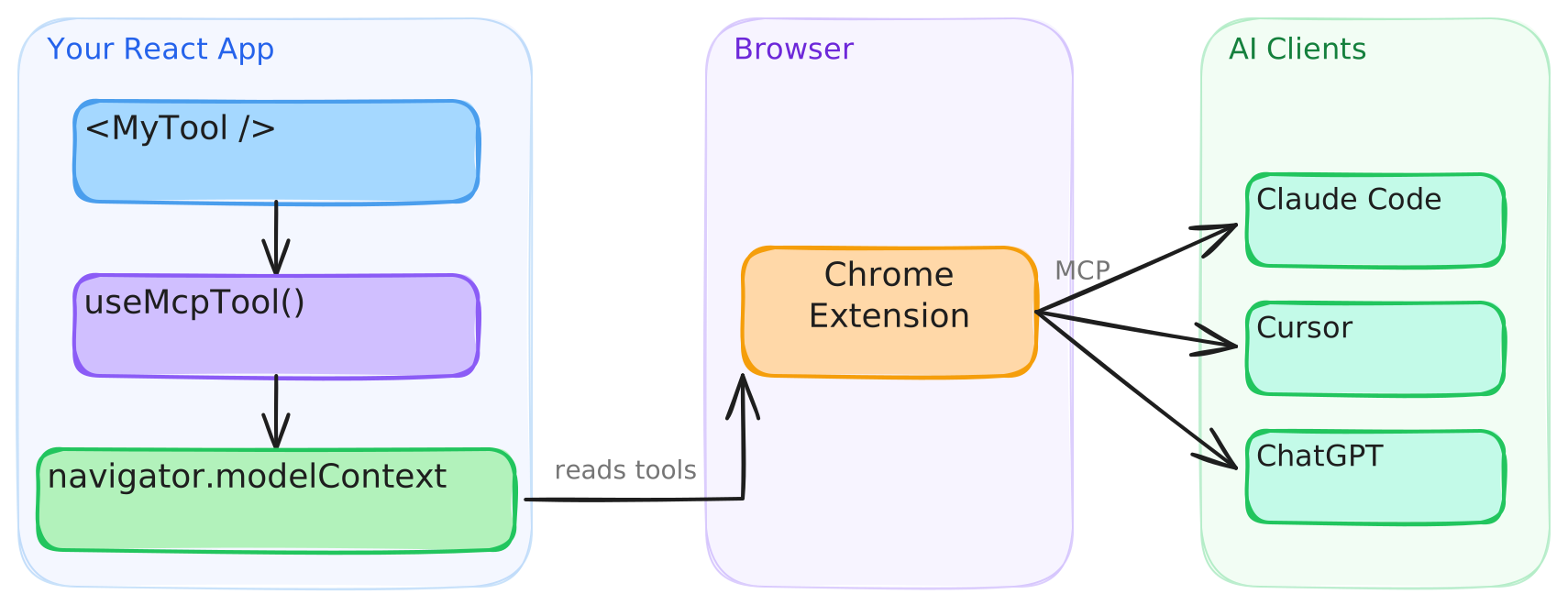
This library provides the React bindings for that API. <WebMCPProvider> installs a polyfill when native support is absent, and each useMcpTool call registers a tool that agents can discover and execute.
Connect to AI clients
Agents with built-in WebMCP browser support, such as Codex, discover and call tools directly from the page. Clients that cannot access document.modelContext directly, such as Claude Code and Cursor, connect through the WebMCP Bridge extension, which exposes your registered tools to any MCP client.
- Install the extension from the Chrome Web Store.
- Configure your MCP client. See the extension setup guide for details.
The extension will be deprecated when Chrome provides native bridging to desktop clients.
Testing in Chrome
Google's WebMCP extension lists a page's tools and runs an agent against them from a side panel, which is handy while building tools. It only sees tools registered through Chrome's native API, so on a page running the polyfill it finds nothing. Turn on chrome://flags/#enable-webmcp-testing (the extension needs Chrome 155 or newer) and <WebMCPProvider> will use the native API instead of the polyfill.
Usage
Execution state
useMcpTool returns reactive state you can use to build UI around tool execution:
function TranslateTool() {
  const { state, execute } = useMcpTool({
    name: "translate",
    description: "Translate text to Spanish",
    input: z.object({ text: z.string() }),
    handler: async ({ text }) => {
      const result = await translate(text, "es");
      return { content: [{ type: "text", text: result }] };
    },
  });

  return (
    <div>
      <button onClick={() => execute({ text: "Hello" })} disabled={state.isExecuting}>
        {state.isExecuting ? "Translating..." : "Translate"}
      </button>
      {state.lastResult && <p>{state.lastResult.content[0].text}</p>}
      {state.error && <p className="error">{state.error.message}</p>}
    </div>
  );
}
Cancellation
Each execution receives its own AbortSignal. Pass it to fetch and other cancellable work. Chrome 153+ aborts the signal when the agent cancels the call. On older browsers the library substitutes a never-aborting signal, so the second argument is always safe to use:
useMcpTool({
  name: "fetch_report",
  description: "Fetch a report by ID",
  input: z.object({ id: z.string() }),
  handler: async ({ id }, { signal }) => {
    const res = await fetch(`/api/reports/${id}`, { signal });
    return { content: [{ type: "text", text: await res.text() }] };
  },
});
Title and annotations
Give a tool a human-friendly display title, and describe its behavior to agents with annotations. The current WebMCP specification defines four annotations: readOnlyHint, untrustedContentHint, consequentialHint and debugging. Set consequentialHint on tools that do something hard to undo, like placing an order, so agents know to check with the user first.
useMcpTool({
  name: "search_users",
  title: "Search users",
  description: "Find users by name or email",
  input: z.object({ query: z.string() }),
  annotations: {
    readOnlyHint: true,
  },
  handler: async ({ query }) => { /* ... */ },
});
Dynamic tools
Tools register on mount and unregister on unmount. Render them conditionally like any React component:
function App({ user }) {
  return (
    <WebMCPProvider name="app" version="1.0">
      <PublicTools />
      {user.isAdmin && <AdminTools />}
    </WebMCPProvider>
  );
}
Callbacks
Run side effects on success or failure:
useMcpTool({
  name: "checkout",
  description: "Complete a purchase",
  input: z.object({ cartId: z.string() }),
  handler: async ({ cartId }) => { /* ... */ },
  onSuccess: (result) => analytics.track("checkout_complete"),
  onError: (error) => toast.error(error.message),
});
onError fires when the handler throws. A handler that returns { isError: true } on its own still counts as a success, so onSuccess fires for it.
JSON Schema
Pass inputSchema directly to define a tool without Zod:
useMcpTool({
  name: "calculate",
  description: "Basic arithmetic",
  inputSchema: {
    type: "object",
    properties: {
      a: { type: "number" },
      b: { type: "number" },
      op: { type: "string", enum: ["add", "subtract", "multiply", "divide"] },
    },
    required: ["a", "b", "op"],
  },
  handler: async (args) => {
    const { a, b, op } = args as { a: number; b: number; op: string };
    const result = { add: a + b, subtract: a - b, multiply: a * b, divide: a / b }[op];
    return { content: [{ type: "text", text: String(result) }] };
  },
});
TypeScript
webmcp-react already types document.modelContext, so theres no need to add Google's webmcp-types as well. The two packages declare the same global differently and clash if you install both, see TypeScript and webmcp-types for details and a workaround.
SSR
The library works with Next.js, Remix, and any server-rendering framework. The build includes a "use client" banner, so no extra configuration is needed.
Browser support
| Environment | Behavior |
|---|---|
Chrome with native document.modelContext |
The library uses the native API. The polyfill is not installed. |
| All other browsers | The library installs its polyfill, which implements the registration and consumer APIs. |
The polyfill follows native Chrome behavior. See the polyfill section of the API reference for the exact Chrome versions each behavior tracks.
Versioning and stability
webmcp-react follows Semantic Versioning. Breaking changes to the public API bump the major version. Every release is documented in the changelog, including the WebMCP specification and Chrome changes it tracks.
outputSchema and structuredContent are documented library extensions to the WebMCP specification. They are part of the public API and follow the same versioning policy.
API
See the full API reference.
Contributing
Bug reports, feature requests, and pull requests are welcome. Read the contributing guide before you open a pull request. This project follows the Contributor Covenant Code of Conduct.
License
Вопросы о webmcp-react MCP
Как добавить webmcp-react MCP в Claude Code?
Выполните claude mcp add webmcp-react -- npx -y webmcp-react в терминале. Добавьте --scope user, чтобы сервер был доступен во всех проектах.
Как добавить webmcp-react MCP в Cursor?
Откройте ~/.cursor/mcp.json и добавьте сервер в mcpServers, используя конфигурацию Cursor из раздела установки выше.
Для чего используется webmcp-react?
Он предоставляет React-хуки для регистрации типизированных инструментов в document.modelContext, чтобы AI-агенты могли вызывать функции вашего веб-приложения.
Работает ли webmcp-react без нативной поддержки WebMCP в браузере?
Да. Если нативная поддержка WebMCP отсутствует, библиотека устанавливает легковесный полифилл, а при наличии поддержки использует нативный API.
Можно ли определять инструменты с помощью JSON Schema вместо Zod?
Да, вы можете передать inputSchema напрямую, чтобы определить инструмент без использования Zod.
Безопасен ли webmcp-react для SSR?
Да, он работает с Next.js, Remix и другими фреймворками с серверным рендерингом, а сборка включает директиву "use client".
Как происходит отмена регистрации инструментов?
Инструменты регистрируются при монтировании и отменяют регистрацию при размонтировании, поэтому вы можете рендерить их условно, как и любые другие React-компоненты.