
MCP server fullstack-langgraph-nextjs-agent
Коммит 4 сент. 2026 г.Готовый к продакшену шаблон Next.js для создания AI-агентов с помощью LangGraph.js, поддерживающий интеграцию MCP и механизм подтверждения действий через human-in-the-loop.
Также известен как agentailor/fullstack-langgraph-nextjs-agent
- Звёзды
- 135
- Инструменты
- —
- Загрузки, 30 дней
- —
- Последняя версия
- —
- Последний коммит
- 4 сент. 2026 г.
- Лицензия
- MIT
Что такое fullstack-langgraph-nextjs-agent MCP?
fullstack-langgraph-nextjs-agent — это MCP server. Готовый к продакшену шаблон Next.js для создания AI-агентов с помощью LangGraph.js, поддерживающий интеграцию MCP и механизм подтверждения действий через human-in-the-loop.
Сводка сгенерирована из README проекта
О fullstack-langgraph-nextjs-agent MCP server
Разработчики, планирующие развертывание сложных AI-агентов, могут использовать этот шаблон Next.js для создания готовых к эксплуатации приложений на базе LangGraph.js. Он предоставляет полноценный каркас для разработки агентов с постоянной памятью диалогов через бэкенд на PostgreSQL и потоковой передачей ответов в реальном времени через Server-Sent Events. Архитектура спроектирована для обработки сложных рабочих процессов, включая мультимодальную загрузку изображений и PDF-файлов с использованием S3-совместимых хранилищ, таких как MinIO или AWS S3.
Ключевой особенностью является интеграция с Model Context Protocol, которая позволяет динамически управлять инструментами через веб-интерфейс без необходимости изменения кода. Это поддерживает как stdio, так и HTTP MCP servers. Для обеспечения безопасности в шаблоне реализован механизм human-in-the-loop, позволяющий пользователям одобрять, отклонять или изменять вызовы инструментов перед их выполнением. Система также интегрирована с Langfuse для сквозного мониторинга работы агентов, вызовов инструментов и использования токенов, что делает её подходящей для команд, создающих серьезные масштабируемые AI-сервисы.
Что вы можете с ним делать
- 1Управление динамическими инструментами агентаДобавляйте новые возможности вашему агенту через веб-интерфейс с помощью MCP без изменения исходного кода.
- 2Безопасное выполнение инструментовНастройте необходимость ручного вмешательства для проверки и редактирования параметров инструментов перед тем, как AI-агент совершит действие.
- 3Хранение длительной истории чатовОбеспечьте пользователям возможность продолжать диалоги в разных сессиях благодаря использованию постоянной базы данных.
Взято из README проекта. Каждый вариант использования проверен на соответствие цитате из него.
Конфигурация
ANTHROPIC_API_KEYDATABASE_URLDEFAULT_MODELGOOGLE_API_KEYOPENAI_API_KEY
| Название | Описание | Тип |
|---|---|---|
| ANTHROPIC_API_KEY | — | |
| DATABASE_URL | — | |
| DEFAULT_MODEL | — | |
| GOOGLE_API_KEY | — | |
| OPENAI_API_KEY | — |
Автоматические проверки
Запущено 14 нояб. 2026 г.Полный отчёт →Еще не проверено. Для сервера требуется оценка 80, отсутствие серьезных проблем и достаточно данных для нашей проверки. Как работают проверки · Что исправить, чтобы получить больше баллов

- Связанный и доступный исходный репозиторийagentailor/fullstack-langgraph-nextjs-agent is public and reachablegithub.com/agentailor/fullstack-langgraph-nextjs-agent ↗Пройдено
- Пакет указывает этот репозиторий как источникНе проверялось
- Происхождение сборки (аттестация Sigstore)Не проверялось
- Open source лицензия (OSI)MITspdx.org/licenses/MIT.html ↗Пройдено
- Коммит или релиз за последний годLast commit or release 2026-09-04github.com/agentailor/fullstack-langgraph-nextjs-agent ↗Пройдено
- OpenSSF ScorecardНе проверялось
- Имя пакета не похоже на популярный пакетНе проверялось
- Нет критических предупреждений в пакете или его зависимостяхНе проверялось
- Нет скрытых инструкций для модели0 tool descriptions and the README read; no override phrases, credential paths or hidden charactersПройдено
- Деструктивные инструменты помеченыНе проверялось
- Удалённая конечная точка отвечает на рукопожатие MCPНе проверялось
README
Открыть на GitHubLangGraph.js AI Agent Template
A production-ready Next.js template for building AI agents with LangGraph.js, featuring Model Context Protocol (MCP) integration, human-in-the-loop tool approval, and persistent memory.
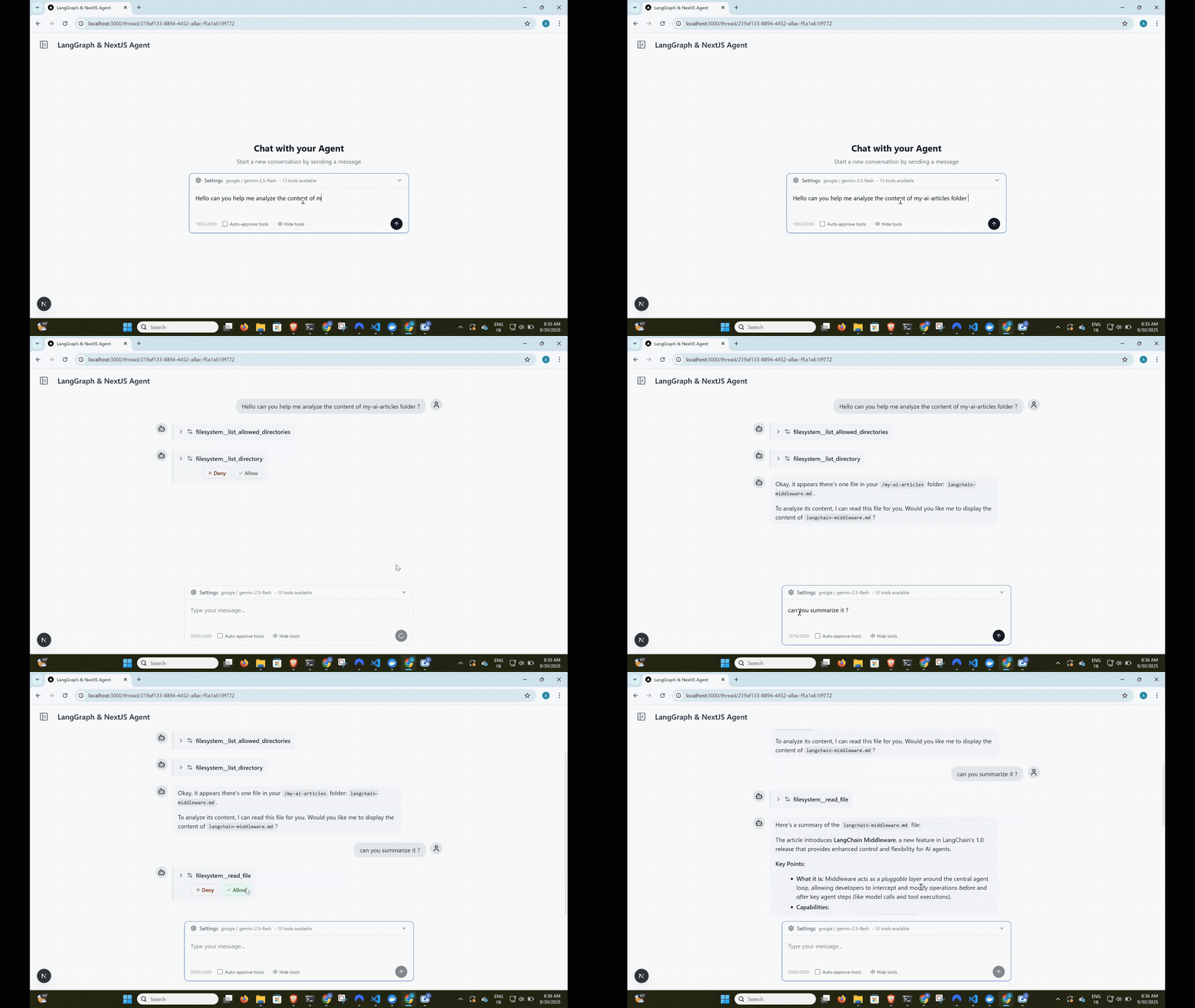
Complete agent workflow: user input → tool approval → execution → streaming response





Built with this template: Cameron
Cameron is a personal finance agent that started from this template and was built in public, one tagged release per article. If you want to see where this scaffold goes once it becomes a real agent — human-in-the-loop approval on every money-moving action, self-hosted data, a full LangGraph workflow — read its source as a worked example.
Need help taking this to production?
I help teams design and optimize LangGraph-based AI agents (RAG, memory, latency, architecture).
If you're building something serious on top of this template and want hands-on help:
Happy to jump on a short call.
Features
Dynamic Tool Loading with MCP
- Model Context Protocol integration for dynamic tool management
- Add tools via web UI - no code changes required
- Support for both stdio and HTTP MCP servers
- Tool name prefixing to prevent conflicts
Human-in-the-Loop Tool Approval
- Interactive tool call approval before execution
- Granular control with approve/deny/modify options
- Optional auto-approval mode for trusted environments
- Real-time streaming with tool execution pauses
Persistent Conversation Memory
- LangGraph checkpointer with PostgreSQL backend
- Full conversation history preservation
- Thread-based organization
- Seamless resume across sessions
Multimodal File Uploads
- Upload images, PDFs, and text files with messages
- S3-compatible storage (MinIO for development)
- Automatic file processing for AI consumption
- Production-ready with AWS S3, Cloudflare R2 support
Real-time Streaming Interface
- Server-Sent Events (SSE) for live responses
- Optimistic UI updates with React Query
- Type-safe message handling
- Error recovery and graceful degradation
Persistent Model Settings
- Provider and model selection saved to
localStorageautomatically - Settings survive page reloads and thread navigation
- No backend required — zero latency reads on startup
LLM Observability with Langfuse
- End-to-end tracing of agent runs, LLM calls, tool invocations, and token usage
- Works with Langfuse Cloud or a self-hosted instance
- Toggle via
LANGFUSE_ENABLEDenv var — zero overhead when disabled - See docs/OBSERVABILITY.md for setup instructions
Modern Tech Stack
- Frontend: Next.js 15, React 19, TypeScript, Tailwind CSS
- Backend: Node.js, Prisma ORM, PostgreSQL, MinIO/S3
- AI: LangGraph.js, OpenAI/Google/Anthropic models
- UI: shadcn/ui components, Lucide icons
Quick Start
Prerequisites
- Node.js 18+ and pnpm
- Docker (for PostgreSQL and MinIO)
- OpenAI API key, Google AI API key, or Anthropic API key
1. Clone and Install
git clone https://github.com/IBJunior/fullstack-langgraph-nextjs-agent.git
cd fullstack-langgraph-nextjs-agent
pnpm install
2. Environment Setup
cp .env.example .env.local
Edit .env.local with your configuration:
# Database
DATABASE_URL="postgresql://user:password@localhost:5434/agent_db"

# AI Models (choose one or more)
OPENAI_API_KEY="sk-..."
GOOGLE_API_KEY="..."
ANTHROPIC_API_KEY="sk-ant-..."

# Optional: Default model
DEFAULT_MODEL="gpt-4o-mini"  # or "gemini-1.5-flash" or "claude-sonnet-4-5"
3. Start Services
docker compose up -d # Starts PostgreSQL and MinIO
4. Database Setup
pnpm prisma:generate
pnpm prisma:migrate
5. Run Development Server
pnpm dev
# Or use custom port
pnpm dev --port=3005
Visit http://localhost:3000 to start chatting with your AI agent!
Screenshots
Usage Guide
Adding MCP Servers
- Navigate to Settings - Click the gear icon in the sidebar
- Add MCP Server - Click "Add MCP Server" button
- Configure Server:
- Name: Unique identifier (e.g., "filesystem")
- Type: Choose
stdioorhttp - Command: For stdio servers (e.g.,
npx @modelcontextprotocol/server-filesystem) - Args: Command arguments (e.g.,
["/path/to/allow"]) - URL: For HTTP servers
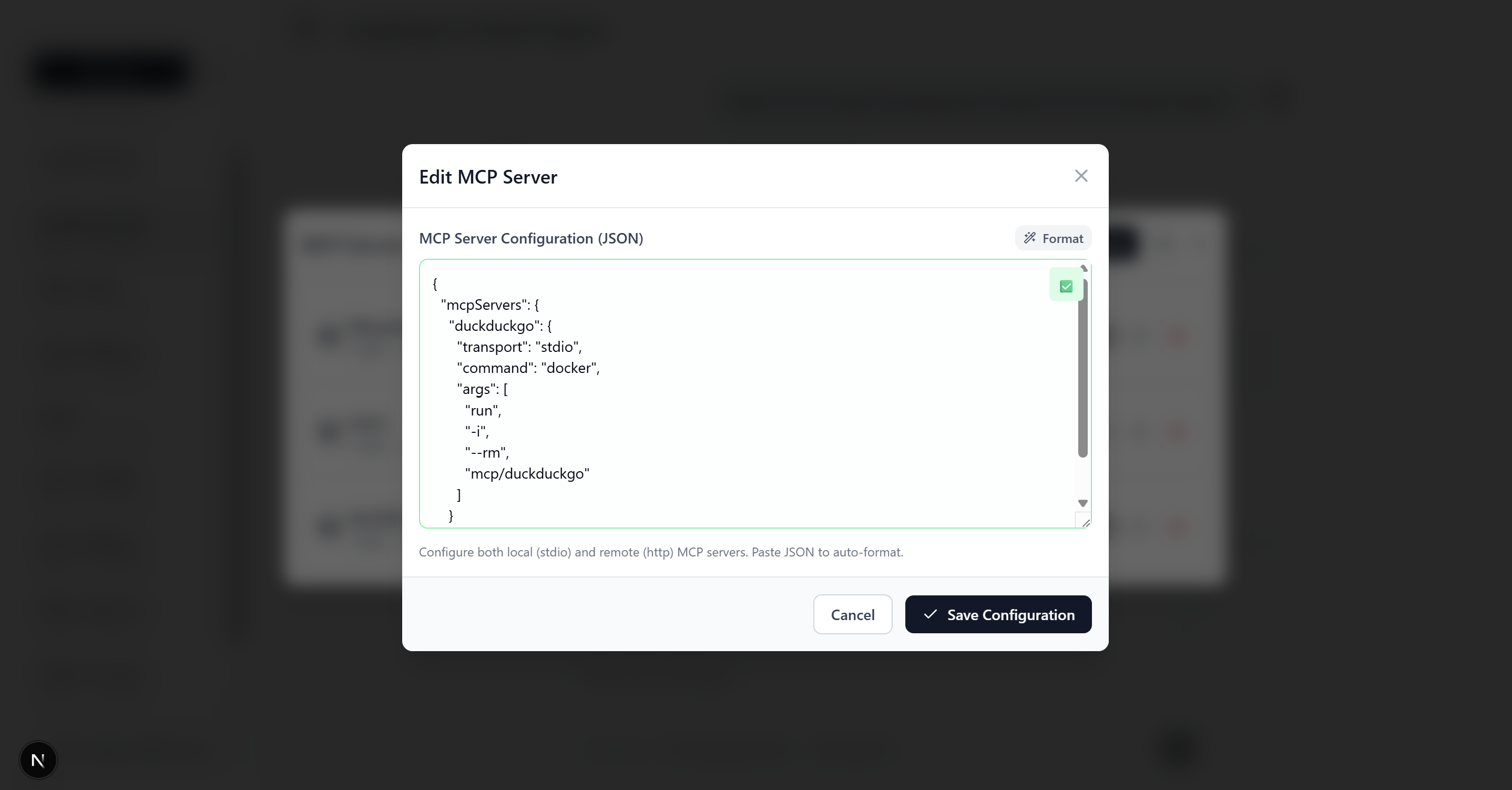 MCP server configuration form with example filesystem server setup
Want to build your own MCP server? Check out create-mcp-server - scaffold production-ready MCP servers in seconds with TypeScript, multiple frameworks (MCP SDK or FastMCP), and built-in debugging tools.
Example MCP Server Configurations
Filesystem Server (stdio)
{
  "name": "filesystem",
  "type": "stdio",
  "command": "npx",
  "args": ["@modelcontextprotocol/server-filesystem", "/Users/yourname/Documents"]
}
HTTP API Server
{
  "name": "web-api",
  "type": "http",
  "url": "http://localhost:8080/mcp",
  "headers": {
    "Authorization": "Bearer your-token"
  }
}
Note: Some HTTP MCP servers require OAuth 2.0 authentication. See OAuth Documentation for details.
Tool Approval Workflow
- Agent Requests Tool - AI suggests using a tool
- Approval Prompt - Interface shows tool details and asks for approval
- User Decision:
- ✅ Allow: Execute tool as requested
- ❌ Deny: Skip tool execution
- ✏️ Modify: Edit tool parameters before execution
- Continue Conversation - Agent responds with tool results
Architecture
High-Level Overview
┌─────────────────┐    ┌──────────────────┐    ┌─────────────────┐
│   Next.js UI   │◄──►│  Agent Service   │◄──►│  LangGraph.js   │
│   (React 19)   │    │  (SSE Streaming) │    │    Agent        │
└─────────────────┘    └──────────────────┘    └─────────────────┘
         │                       │                       │
         ▼                       ▼                       ▼
┌─────────────────┐    ┌──────────────────┐    ┌─────────────────┐
│   React Query   │    │     Prisma       │    │  MCP Clients    │
│   (State Mgmt)  │    │   (Database)     │    │   (Tools)       │
└─────────────────┘    └──────────────────┘    └─────────────────┘
                                │
                                ▼
                  ┌──────────────────────────────┐
                  │   PostgreSQL  │  MinIO/S3    │
                  │  (Persistence)│ (File Store) │
                  └──────────────────────────────┘
Core Components
Agent Builder (src/lib/agent/builder.ts)
- Creates StateGraph with agent→tool_approval→tools flow
- Handles tool approval interrupts
- Manages model binding and system prompts
MCP Integration (src/lib/agent/mcp.ts)
- Dynamic tool loading from database-stored MCP servers
- Support for stdio and HTTP transports
- Tool name prefixing for conflict prevention
Streaming Service (src/services/agentService.ts)
- Server-Sent Events for real-time responses
- Message processing and chunk aggregation
- Tool approval workflow handling
Chat Hook (src/hooks/useChatThread.ts)
- React Query integration for optimistic UI
- Stream management and error handling
- Tool approval user interface
File Storage (src/lib/storage/)
- S3-compatible storage with MinIO (development) or AWS S3 (production)
- File validation, upload, and content processing for AI
- Multimodal message building with base64 conversion
For detailed architecture documentation, see docs/ARCHITECTURE.md.
API Documentation
The app serves an interactive OpenAPI 3.1 explorer at /api-docs and the raw spec at
/api/openapi — generated from per-route Zod schemas. See docs/API.md for how
it works and how to document new routes.
Development
Available Scripts
pnpm dev                 # Start development server with Turbopack
pnpm build              # Production build
pnpm start              # Start production server
pnpm lint               # Run ESLint
pnpm format             # Format with Prettier
pnpm format:check       # Check formatting

# Database
pnpm prisma:generate    # Generate Prisma client (after schema changes)
pnpm prisma:migrate     # Create and apply migrations
pnpm prisma:studio      # Open Prisma Studio (database UI)
Agent Skills
This repo ships Agent Skills in .agents/skills/,
pinned by skills-lock.json. They give any skill-aware coding agent (Claude Code and friends) the
conventions for working on an agent codebase like this one:
| Skill | Use it when |
|---|---|
agent-prompt-engineering |
Writing or auditing the agent’s system prompt |
tool-design |
Adding or reviewing a tool / MCP server the agent calls |
agent-eval-cases |
Deciding what agent behavior deserves an eval case, and writing it |
Agent guidance for this repo lives in AGENTS.md (with CLAUDE.md pointing to it).
Project Structure
src/
├── app/                 # Next.js App Router
│   ├── api/            # API routes (stream, upload, mcp-servers)
│   └── thread/         # Thread-specific pages
├── components/         # React components
├── hooks/              # Custom React hooks
├── lib/                # Core utilities
│   ├── agent/          # Agent-related logic
│   └── storage/        # File upload & S3 utilities
├── services/           # Business logic
└── types/              # TypeScript definitions

prisma/
├── schema.prisma       # Database schema
└── migrations/         # Database migrations
Key Files
- Agent Configuration:
src/lib/agent/builder.ts,src/lib/agent/mcp.ts - API Endpoints:
src/app/api/agent/stream/route.ts,src/app/api/agent/upload/route.ts - File Storage:
src/lib/storage/(validation, upload, content processing) - Database Models:
prisma/schema.prisma - Main Chat Interface:
src/components/Thread.tsx,src/components/MessageInput.tsx - Streaming Logic:
src/hooks/useChatThread.ts
Contributing
We welcome contributions! This project is designed to be a community resource for LangGraph.js development.
Getting Started
- Fork the repository
- Create a feature branch:
git checkout -b feature/amazing-feature - Make your changes and add tests
- Commit:
git commit -m 'Add amazing feature' - Push:
git push origin feature/amazing-feature - Open a Pull Request
Development Guidelines
- Follow TypeScript strict mode
- Use Prettier for formatting
- Add JSDoc comments for public APIs
- Test MCP server integrations thoroughly
- Update documentation for new features
Learning Resources
LangGraph.js
Model Context Protocol (MCP)
Next.js & React
License
This project is licensed under the MIT License - see the LICENSE file for details.
Acknowledgments
- LangChain for the incredible AI framework
- Model Context Protocol for the tool integration standard
- Next.js team for the amazing React framework
Ready to build your next AI agent?
If this repo helped you and you’d like guidance implementing it in production, feel free to reach out on LinkedIn.
Вопросы о fullstack-langgraph-nextjs-agent MCP
Какие типы файлов может обрабатывать агент?
Агент поддерживает мультимодальную загрузку файлов, включая изображения, PDF и текстовые документы.