
Crie e edite fluxogramas, mapas mentais, wireframes e documentação diretamente no seu workspace do Whimsical usando um cliente de IA.
Também conhecido como WhimsicalCode/mcp-server-guide, mcp-server-guide
- Stars
- 11
- Ferramentas
- 14
- Downloads, 30 dias
- —
- Versão mais recente
- 1.1.0
- Último commit
- 14 de out. de 2026
- Licença
- MIT
O que é o MCP Whimsical?
Crie e edite fluxogramas, mapas mentais, wireframes e documentação diretamente no seu workspace do Whimsical usando um cliente de IA. Ele expõe 14 ferramentas, como search, fetch, file_tree.
Resumo gerado a partir do README do projeto
Sobre o MCP server de Whimsical
Gerar fluxogramas, mapas mentais e wireframes editáveis a partir de comandos em linguagem natural é o que este MCP server oficial do Whimsical permite. Em vez de receber imagens estáticas, os usuários obtêm arquivos reais e interativos dentro de seu workspace do Whimsical, que os membros da equipe podem abrir, editar e comentar. Esta ferramenta funciona com vários clientes de IA, incluindo Claude, ChatGPT, Cursor e VS Code com GitHub Copilot, conectando-se a um endpoint remoto hospedado pelo Whimsical.
Desenvolvedores e designers podem utilizá-lo para construir diagramas de arquitetura complexos, diagramas de sequência e documentação técnica. Além da criação, o servidor pode pesquisar em workspaces existentes, ler boards, mover arquivos entre pastas e gerenciar threads de comentários. Ele utiliza OAuth 2.1 com PKCE para autenticação, o que significa que não é necessário o gerenciamento manual de chaves de API. Enquanto o plano gratuito permite até 50 objetos de board por mês, os planos pagos oferecem criação ilimitada de objetos.
O que você pode fazer com ele
- 1Visualizar fluxos de autenticação de usuárioPeça ao seu cliente de IA para gerar um fluxograma detalhado representando um processo de login com nós de decisão e conectores rotulados.
- 2Projetar wireframes de UI interativosInstrua um agente a construir o layout de uma página de configurações usando containers, inputs e botões que sigam uma estrutura flexbox.
- 3Brainstorming de funcionalidades de projetoUse o servidor para criar um mapa mental estruturado para organizar as funcionalidades de um aplicativo móvel em ramos específicos.
- 4Gerenciar conteúdo existente no workspaceSolicite à IA que encontre informações específicas dentro de seus boards atuais e resuma os resultados encontrados.
Escrito a partir do README do projeto. Cada caso de uso é verificado com uma citação dele.
Como instalar o MCP Whimsical
Formatos verificados em 10 nov 2026Adicionar ao CursorAdicionar ao GooseInstalar o MCP Whimsical no Claude Code
$ claude mcp add --transport http mcp-server-guide https://mcp.whimsical.com/mcpInstalar o MCP Whimsical no Cursor
~/.cursor/mcp.json
{
  "mcpServers": {
    "mcp-server-guide": {
      "url": "https://mcp.whimsical.com/mcp"
    }
  }
}Instalar o MCP Whimsical no VS Code
.vscode/mcp.json
{
  "servers": {
    "mcp-server-guide": {
      "type": "http",
      "url": "https://mcp.whimsical.com/mcp"
    }
  }
}Instalar o MCP Whimsical no VS Code CLI
$ code --add-mcp '{"name":"mcp-server-guide","type":"http","url":"https://mcp.whimsical.com/mcp"}'Instalar o MCP Whimsical no Codex
$ codex mcp add mcp-server-guide --url https://mcp.whimsical.com/mcpInstalar o MCP Whimsical no Codex config.toml
~/.codex/config.toml
[mcp_servers.mcp-server-guide]
url = "https://mcp.whimsical.com/mcp"
Instalar o MCP Whimsical no Gemini CLI
$ gemini mcp add -s user --transport http mcp-server-guide https://mcp.whimsical.com/mcpInstalar o MCP Whimsical no Gemini settings.json
~/.gemini/settings.json
{
  "mcpServers": {
    "mcp-server-guide": {
      "url": "https://mcp.whimsical.com/mcp",
      "type": "http"
    }
  }
}Ferramentas do MCP Whimsical 14
Detectadas a partir do READMEsearchfetchfile_treehow_tocreate_fileadd_board_contentadd_doc_contenteditwireframe_editauto_layoutdeletemove
| search | — | |
| fetch | — | |
| file_tree | — | |
| how_to | — | |
| create_file | — | |
| add_board_content | — | |
| add_doc_content | — | |
| edit | — | |
| wireframe_edit | — | |
| auto_layout | — | |
| delete | — | |
| move | — |
Mostrar todas as 14 ferramentasMostrar menos ferramentas
comment_readcomment_edit
| comment_read | — | |
| comment_edit | — |
Verificações automatizadas
Executado em 13 de nov. de 2026Relatório completo →Passou em nossas verificações automatizadas. Isso não é uma auditoria de segurança: leia o código e dê ao servidor o acesso mais restrito de que ele precisa. Como as verificações funcionam

- Repositório de origem vinculado e acessívelPassou
- Licença de código aberto (OSI)Passou
- Commit ou release no último anoPassou
- Nome do pacote não é próximo a um pacote popularNão verificado
- O endpoint remoto usa HTTPSPassou
- Ferramentas destrutivas estão rotuladasNão verificado
- Sem instruções ocultas para o modeloPassou
- Nenhum aviso crítico no pacote ou em suas dependênciasNão verificado
README
Ver no GitHubWhimsical MCP Server
The official Whimsical MCP server. Ask Claude, ChatGPT, Cursor or any MCP client for a flowchart, mind map, sequence diagram, wireframe or architecture diagram, and it builds an editable Whimsical board in your workspace. You get a real file your team can open, edit and comment on, not a static image. The server can also search, read, edit and comment on the boards and docs you already have.
- Endpoint:
https://mcp.whimsical.com/mcp(hosted by Whimsical, Streamable HTTP, nothing to install) - Authentication: OAuth 2.1 with PKCE. There's no API key to manage.
- Plan: every tool works on the free plan, which includes up to 50 board objects a month. Paid plans have no object limit.
- Clients: Claude, Claude Code, ChatGPT, Cursor, VS Code with GitHub Copilot, Grok, Codex, and any client that supports remote MCP servers.

Quick start
In Claude Code:
claude mcp add --transport http whimsical https://mcp.whimsical.com/mcp
In other clients that support remote MCP servers, add a server with this URL and sign in to Whimsical when prompted:
https://mcp.whimsical.com/mcp
Then try: "Create a flowchart in Whimsical of our user signup flow." Setup steps for each client are below.
What you can build
Each example below is a prompt you can try. The agent creates the file in your Whimsical workspace and replies with a link. Clients that support it also show a preview in the chat.
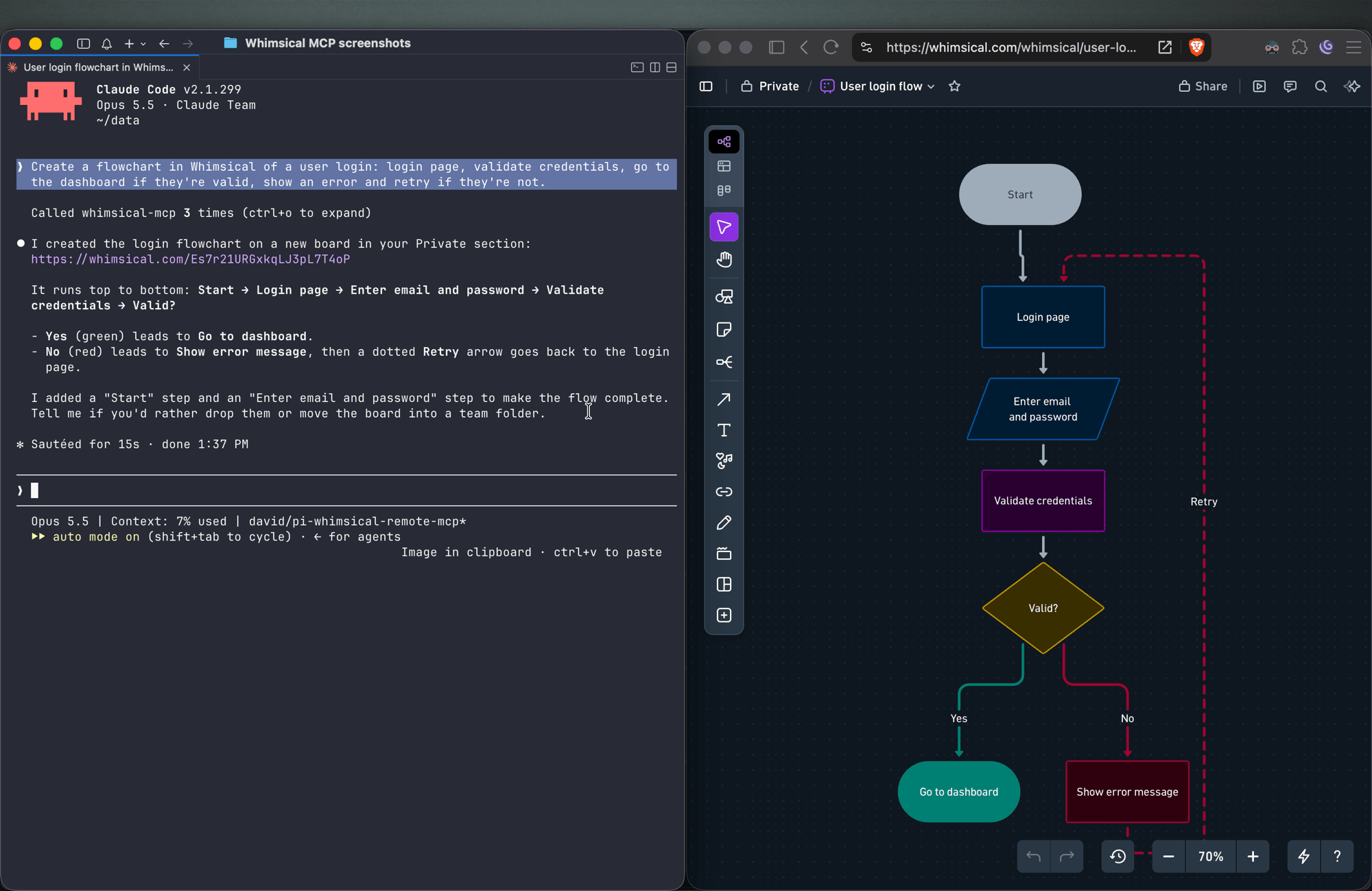
Flowcharts
Create a flowchart in Whimsical of a user login: login page, validate credentials, go to the dashboard if they're valid, show an error and retry if they're not.
You get an auto-laid-out flowchart with decision nodes, labeled connectors and a clean top-to-bottom layout. Ask for left-to-right and the agent re-runs the layout.
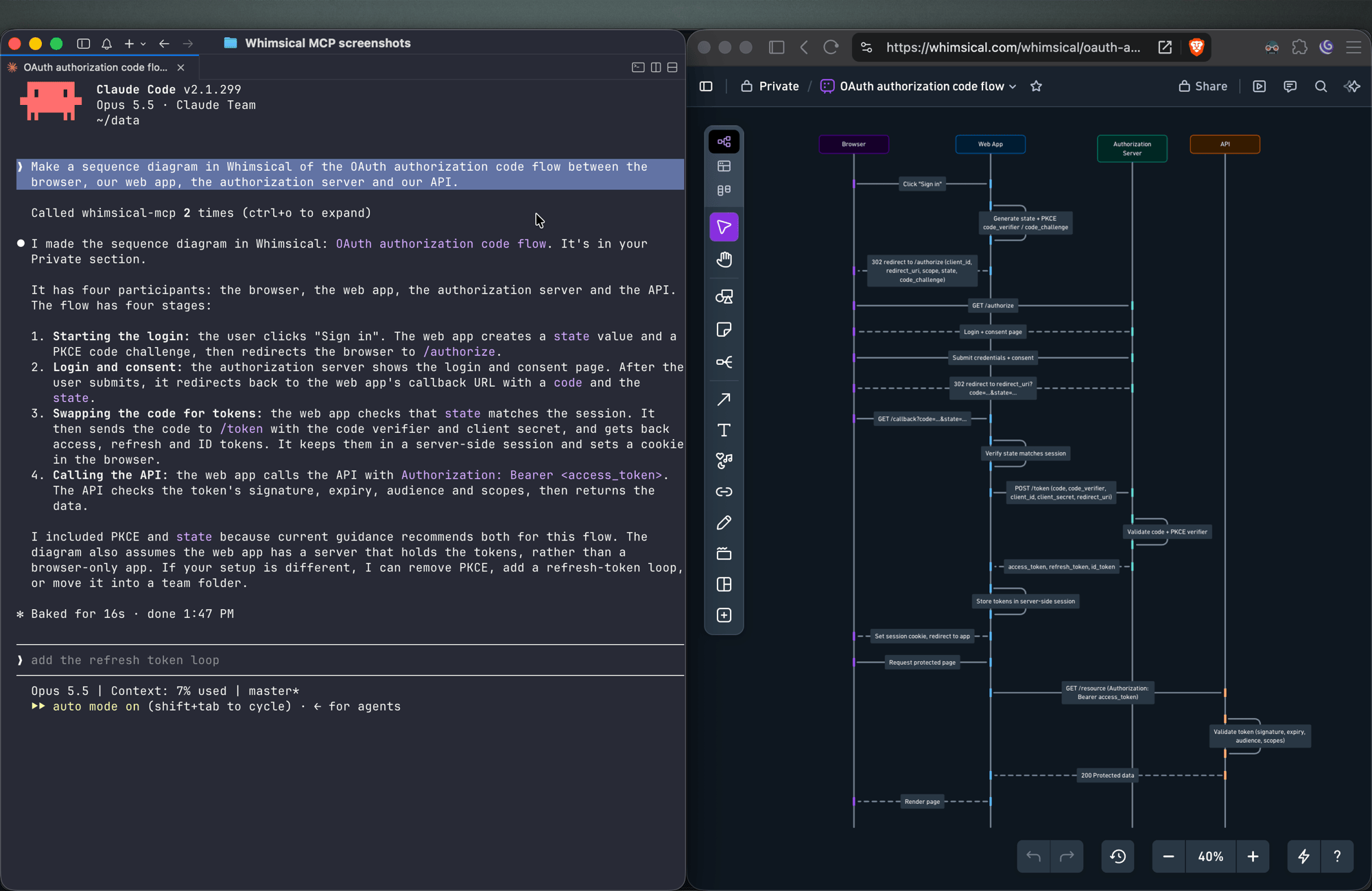
Sequence diagrams
Make a sequence diagram in Whimsical of the OAuth authorization code flow between the browser, our web app, the authorization server and our API.
The agent creates a sequence diagram with one lifeline per actor and the messages between them in order.
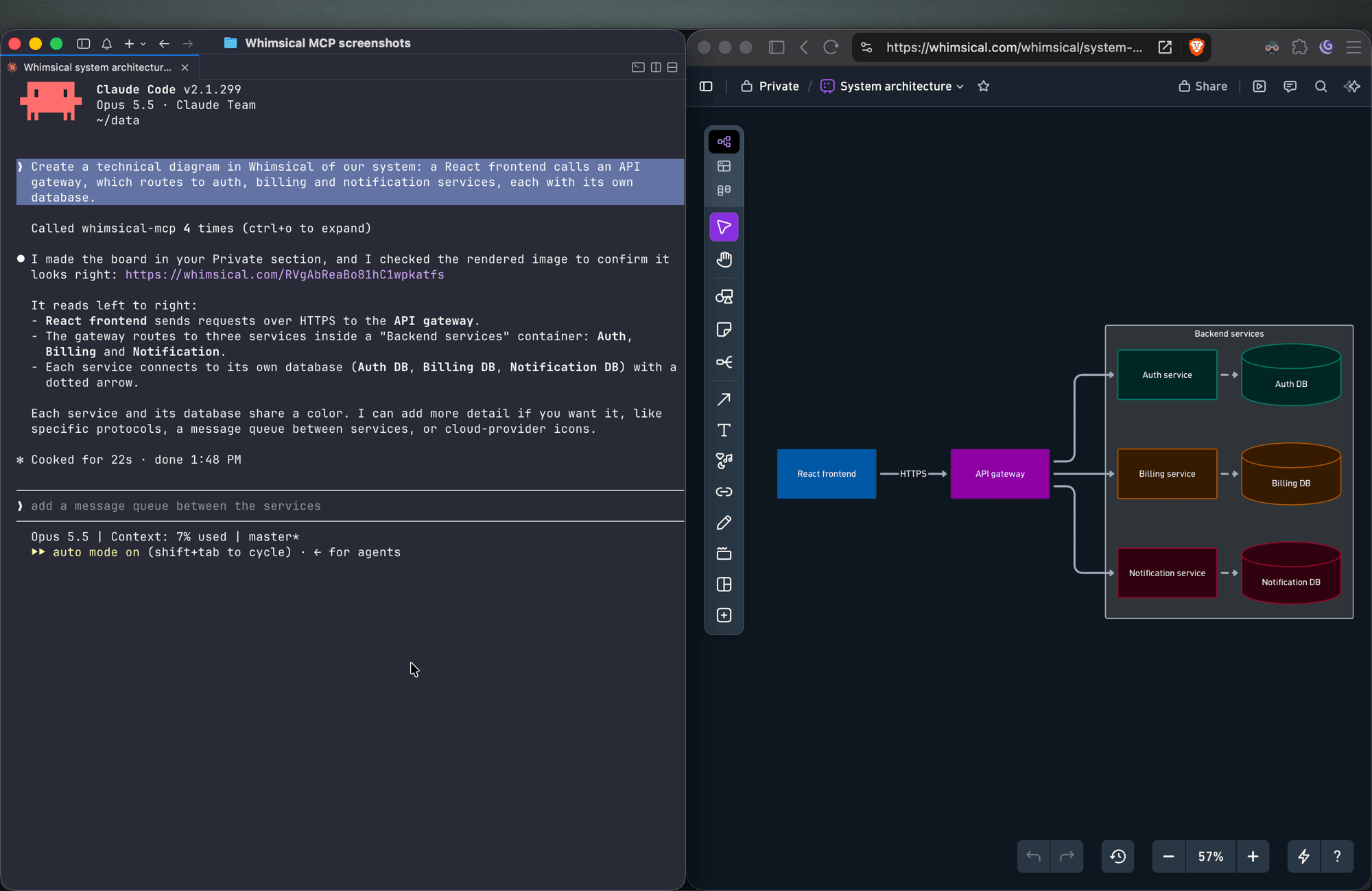
Architecture diagrams
Create a technical diagram in Whimsical of our system: a React frontend calls an API gateway, which routes to auth, billing and notification services, each with its own database.
The agent lays out the components on a board with service boundaries and connectors showing how requests and data move between them.
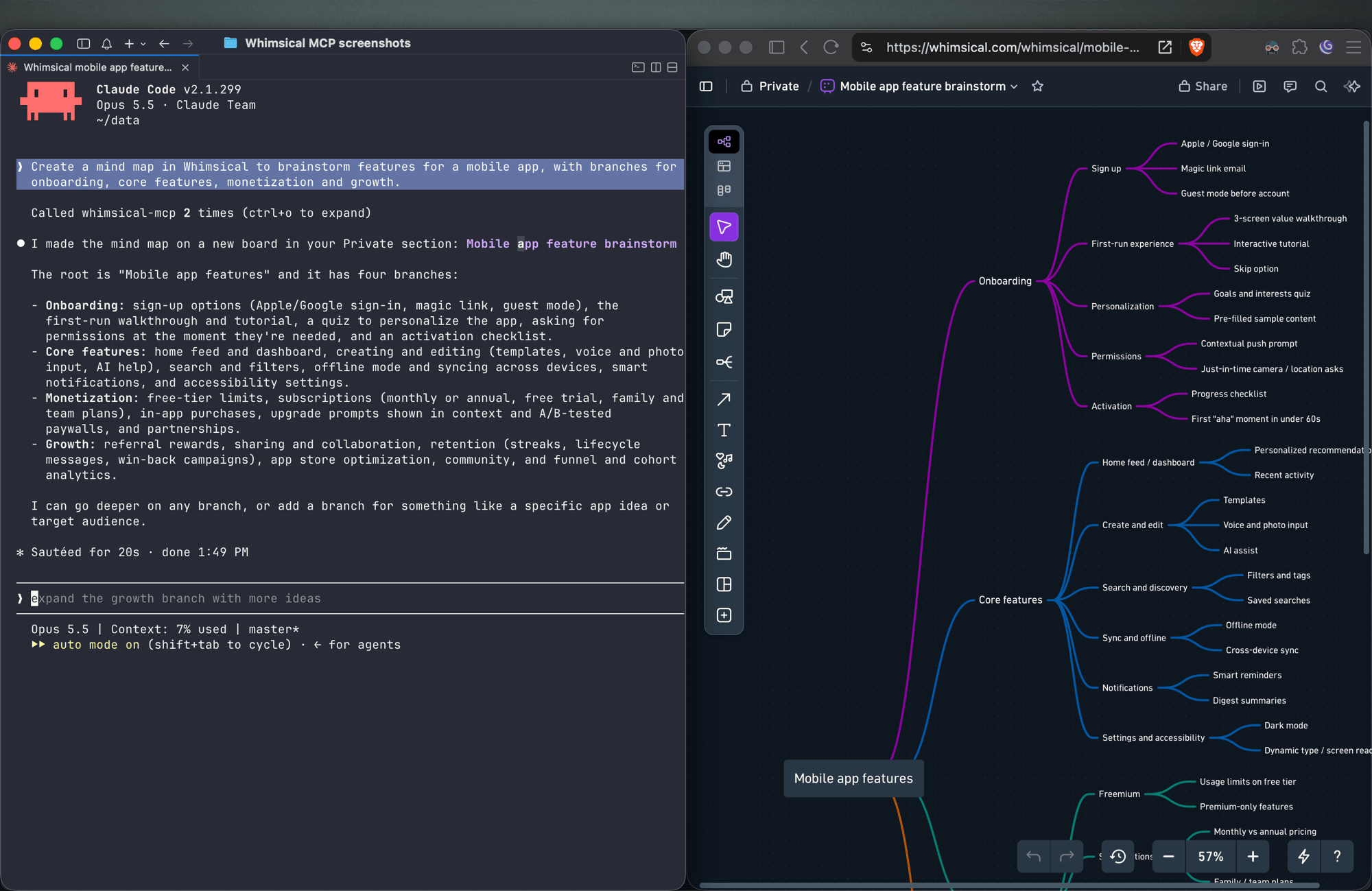
Mind maps
Create a mind map in Whimsical to brainstorm features for a mobile app, with branches for onboarding, core features, monetization and growth.
You get a mind map with the central topic and its branches, laid out horizontally. Ask for a vertical layout to get a top-down tree.
Wireframes
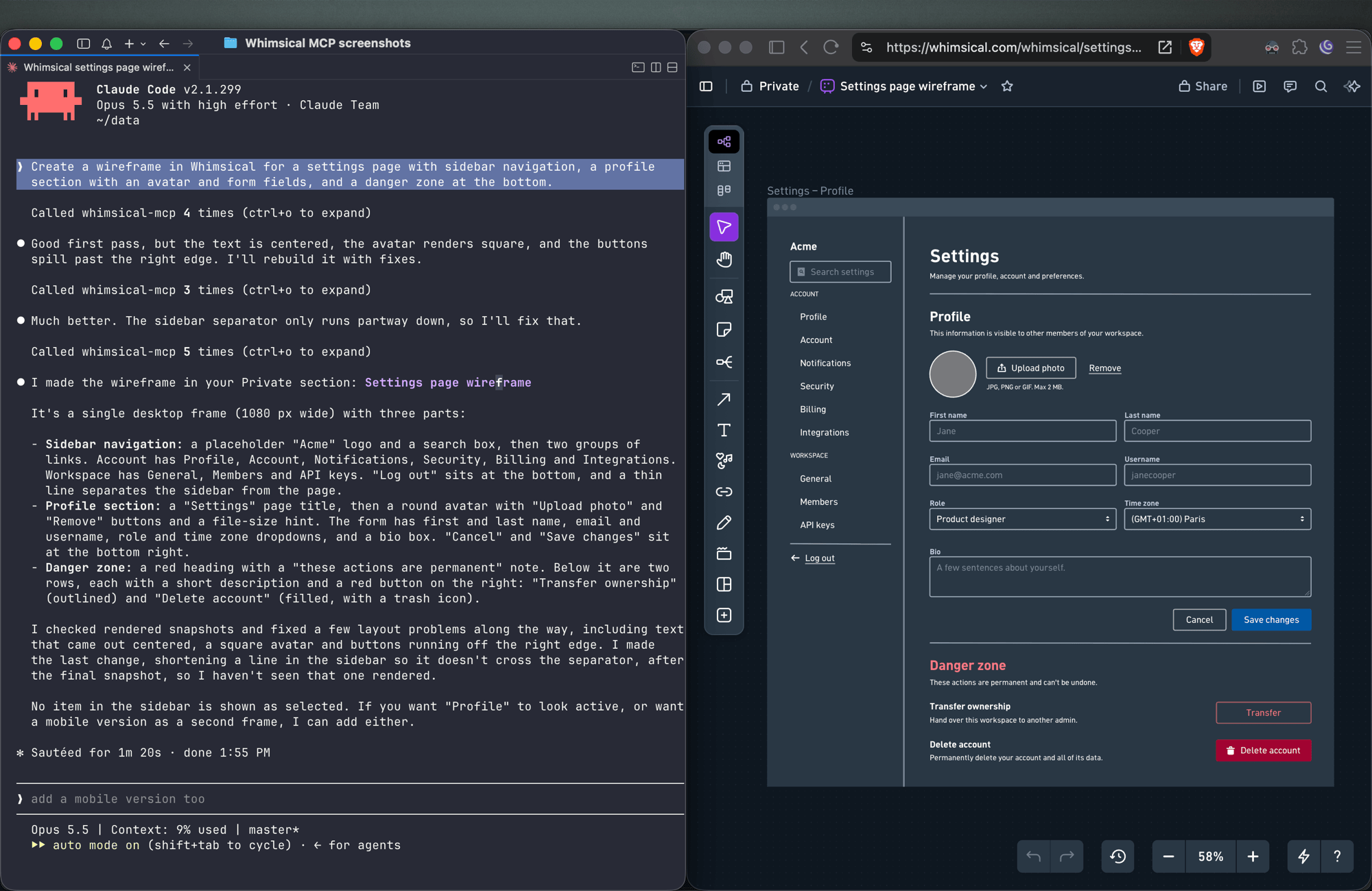
Create a wireframe in Whimsical for a settings page with sidebar navigation, a profile section with an avatar and form fields, and a danger zone at the bottom.
The agent builds the screen from wireframe elements (containers, inputs, buttons, icons) with a flexbox layout, so follow-ups like "make the primary button full width" keep everything aligned.
Sticky notes
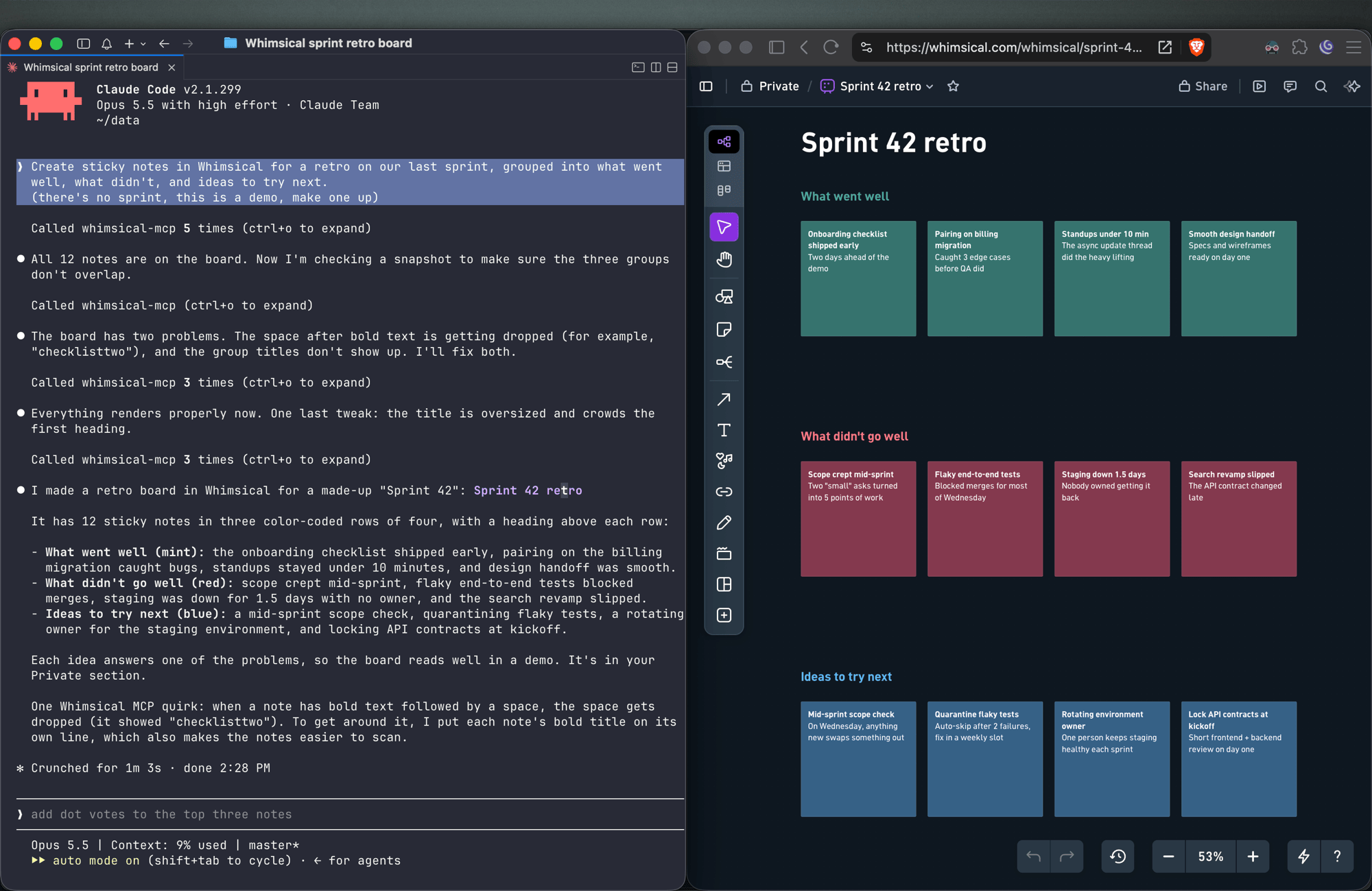
Create sticky notes in Whimsical for a retro on our last sprint, grouped into what went well, what didn't, and ideas to try next.
You get sticky notes on a board, grouped into the clusters you asked for and laid out automatically, ready for your team to add to and vote on.
Docs and tables
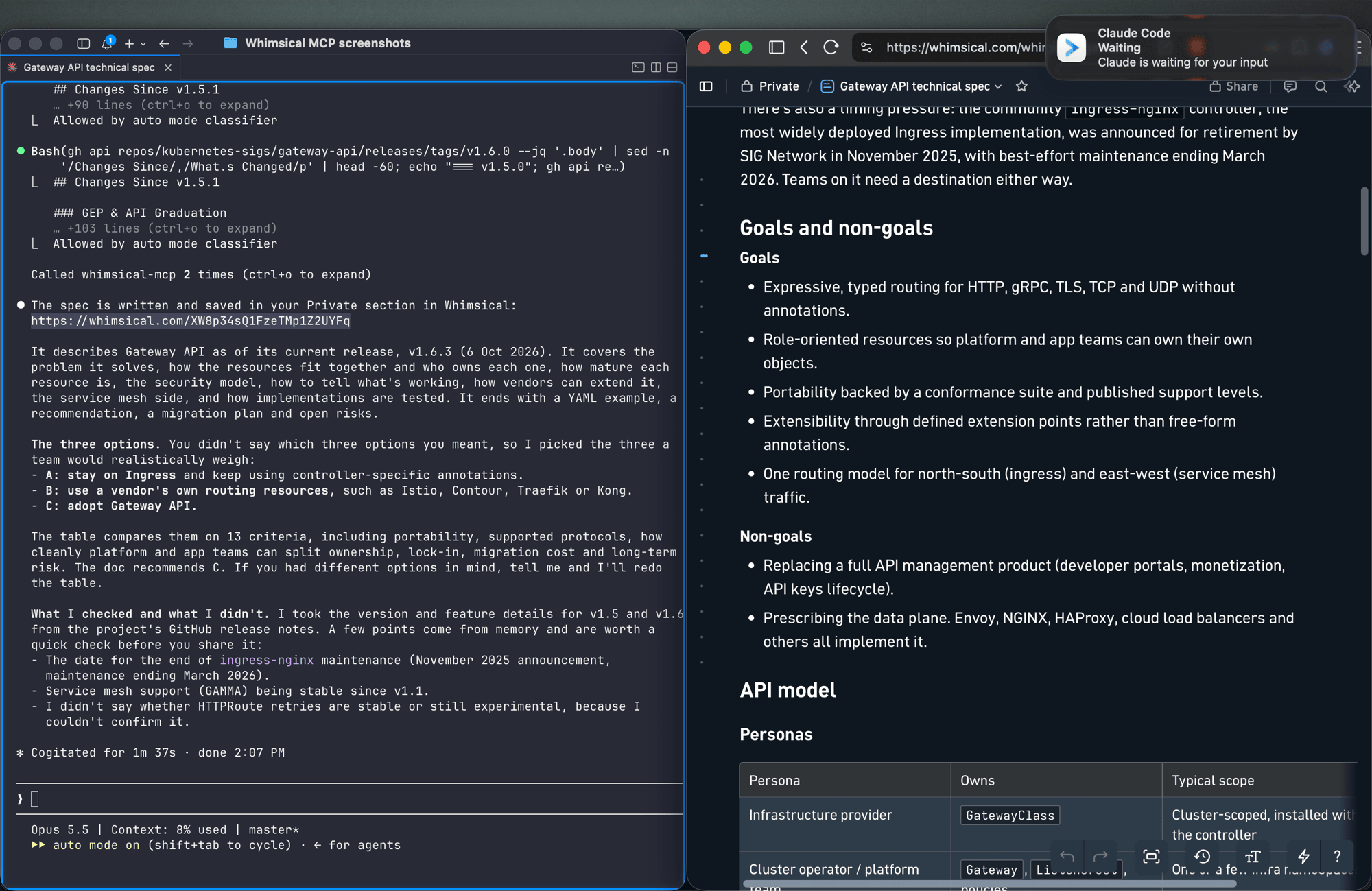
Write up the technical spec for the new API as a Whimsical doc, with a table comparing the three options we discussed.
Docs support headings, lists, links, code blocks and tables. Tables can also go on a board.
Work with what's already in your workspace
Search my Whimsical workspace for anything about "API design" and summarize what you find.
Add a rate limiting step to the API flow diagram, then leave a comment asking the team to review it.
The agent can search your workspace, read boards and docs (including a PNG snapshot of a board), edit existing diagrams, move files between folders, and read, write and resolve comment threads.
Tools
| Tool | What it does |
|---|---|
search |
Search the workspace by text, creation date or update date |
fetch |
Read a board, doc or folder by ID, or get a PNG snapshot of a board |
file_tree |
Browse the Private, Shared and team sections and the folders inside them |
how_to |
Look up Whimsical syntax guides before creating flowcharts or wireframes (agents call this on their own) |
create_file |
Create a board, doc or folder, in your Private section unless you choose a folder |
add_board_content |
Add a flowchart, mind map, sequence diagram, sticky notes, table or wireframe to a board |
add_doc_content |
Append markdown to a doc |
edit |
Add, update or delete shapes, text and connectors on a board, edit mind map and sequence diagram nodes, or change blocks in a doc |
wireframe_edit |
Reflow or edit the elements of a wireframe |
auto_layout |
Re-run automatic layout on a flowchart, top to bottom, left to right or other directions |
delete |
Move a file, folder or doc to the trash |
move |
Move a file, folder or doc into another folder |
comment_read |
Read comment threads on a board or doc |
comment_edit |
Create, reply to, edit, resolve, reopen or delete comments |
See the tool reference for details and more example prompts.
Setup
Claude
Whimsical is a verified connector in Claude's connector directory. Open the Whimsical connector, click Connect and sign in to Whimsical.
Claude Code
claude mcp add --transport http whimsical https://mcp.whimsical.com/mcp
Run /mcp in Claude Code to sign in.
ChatGPT
Use the Whimsical app for ChatGPT:
- In ChatGPT, open Settings → Plugins.
- Search for Whimsical, or use the link above.
- Click Connect and complete the authorization.
Then type @Whimsical in any chat. See the ChatGPT guide for more.
Cursor
Or install the Whimsical plugin from Cursor's plugin directory, or add it by hand: open Cursor → Settings → Cursor Settings → Tools & MCP, add a new MCP server, and save this configuration:
{
  "mcpServers": {
    "whimsical": {
      "url": "https://mcp.whimsical.com/mcp"
    }
  }
}
See Cursor's MCP documentation for more.
VS Code (GitHub Copilot)
- Press
⌘ Shift P(orCtrl Shift P) and runMCP: Add Server. - Select
HTTP. - Paste
https://mcp.whimsical.com/mcpand pressEnter. - When prompted for a server ID, enter
whimsical. - Choose whether to add the server globally or only for the current workspace.
Grok
- Go to grok.com/connectors.
- Click New Connector, then select Custom.
- Enter
https://mcp.whimsical.com/mcpand sign in to Whimsical.
See the Grok guide for more.
Other clients
Any client that supports remote MCP servers over Streamable HTTP can connect with this configuration:
{
  "mcpServers": {
    "whimsical": {
      "url": "https://mcp.whimsical.com/mcp"
    }
  }
}
Authentication
The server uses OAuth 2.1 with PKCE. The first time you connect, your client opens a browser window where you sign in to Whimsical and approve access to your workspace. The agent then works in Whimsical as you, using the access you approved.
Remote and desktop MCP
This repository covers the remote MCP server, which Whimsical hosts and recommends for most people. Whimsical also offers a desktop MCP server that runs inside the Whimsical desktop app and works on the file you have open. To set it up, contact support.
FAQ
Is this the official Whimsical MCP server?
Yes. Whimsical builds, hosts and maintains it, and it's listed in the official MCP Registry as com.whimsical/mcp. Community-built Whimsical MCP servers also exist; this is the one maintained by Whimsical.
Do I need to install or run anything?
No. The server runs at https://mcp.whimsical.com/mcp. You add the URL to your client and sign in.
Do I need an API key? No. Sign-in uses OAuth, so there are no keys to create, store or rotate.
Does it make images or editable diagrams?
Editable diagrams. Everything the agent creates is a normal Whimsical file in your workspace that you and your team can open, change and comment on. The fetch tool can also return a PNG snapshot of a board.
Can it read and update diagrams I already have? Yes. It can search your workspace, read boards and docs, edit them, re-run the layout and work with comments.
Troubleshooting
- Sign-in doesn't open or fails. Run
/mcpin Claude Code, or use your client's reconnect action, to sign in again. The browser redirects back to your client once you've signed in to Whimsical. - Tools don't appear after install. Run
/reload-pluginsin Claude Code, or restart your editor in other clients. 401or "Missing Bearer token". Your session has expired. Sign in again via/mcpor your client's reconnect action.- No Whimsical account. Create one for free at https://whimsical.com. The server signs you in to your existing workspace.
Links
- Overview: https://whimsical.com/mcp
- Setup guide: https://whimsical.com/learn/integrations/mcp
- Tool reference: https://whimsical.com/learn/ai/mcp-tools
- Support: help@whimsical.com
- Privacy policy: https://whimsical.com/terms/privacy
Perguntas sobre o MCP Whimsical
Como adiciono o MCP Whimsical ao Claude Code?
Execute claude mcp add --transport http mcp-server-guide https://mcp.whimsical.com/mcp no seu terminal. Adicione --scope user para torná-lo disponível em todos os projetos.
Como adiciono o MCP Whimsical ao Cursor?
Abra ~/.cursor/mcp.json e adicione o servidor em mcpServers, usando a configuração do Cursor mostrada na seção de instalação acima.
Quais ferramentas o MCP Whimsical oferece?
Ele expõe 14 ferramentas, incluindo search, fetch, file_tree, how_to, create_file.
Este é o MCP server oficial do Whimsical?
Sim, este é o servidor oficial construído, hospedado e mantido pelo Whimsical.
Preciso instalar ou executar algo?
Não, o servidor é hospedado pelo Whimsical e você só precisa adicionar a URL ao seu cliente MCP.
Preciso de uma chave de API?
Não, o servidor utiliza OAuth para autenticação, portanto não há chaves de API para gerenciar.
Ele gera imagens ou diagramas editáveis?
Ele cria diagramas editáveis que sua equipe pode abrir, editar e comentar, em vez de imagens estáticas.
Ele consegue ler e atualizar diagramas que eu já possuo?
Sim, o servidor pode pesquisar no seu workspace, ler boards e docs existentes, editá-los e gerenciar comentários.