
MCP server framesmith
Commit 13 de nov. de 2026Transforma agentes de codificação de IA em designers de UI ao fornecer um canvas visual, padrões de design validados e um gate de qualidade para designs em HTML/CSS.
Também conhecido como vicmaster/framesmith
- Stars
- 16
- Ferramentas
- 9
- Downloads, 30 dias
- —
- Versão mais recente
- —
- Último commit
- 13 de nov. de 2026
- Licença
- MIT
O que é o MCP framesmith?
framesmith é um MCP server. Transforma agentes de codificação de IA em designers de UI ao fornecer um canvas visual, padrões de design validados e um gate de qualidade para designs em HTML/CSS. Ele expõe 9 ferramentas, como dir, projects, name.
Resumo gerado a partir do README do projeto
Sobre o MCP server de framesmith
Transformar agentes de codificação de IA em designers de UI profissionais é o objetivo principal do framesmith. Ele fornece um canvas visual e uma biblioteca de 11 padrões de página validados, como dashboards, telas de autenticação e páginas de preços, para evitar os layouts genéricos frequentemente produzidos por LLMs. Em vez de escrever código de framework imediatamente, o agente utiliza ferramentas como generate_design_system para estabelecer uma linguagem visual baseada em uma cor semente e uma personalidade específica, como técnica ou suave.
Desenvolvedores utilizam este MCP server através de qualquer cliente compatível para gerenciar fluxos de trabalho de design localmente. O sistema inclui um rigoroso gate de qualidade via ferramenta canvas_evaluate, que verifica clichês, cobertura de estados e usabilidade antes de emitir uma diretiva READY. Você pode revisar esses designs em um visualizador de navegador independente, que permite inspecionar pontuações de qualidade e design tokens. Como o output é armazenado como JSON aberto no seu repositório, você mantém total propriedade dos ativos de design sem lock-in proprietário.
O que você pode fazer com ele
- 1Validar qualidade e usabilidade de UIPeça ao agente para executar uma verificação de qualidade para garantir que o design atenda a padrões específicos de craft e inclua estados de carregamento ou erro.
- 2Testar layouts com conteúdo realInstrua o agente a testar como um componente lida com comprimentos de texto extremos ou grandes conjuntos de dados para garantir a integridade estrutural.
Escrito a partir do README do projeto. Cada caso de uso é verificado com uma citação dele.
Ferramentas do MCP framesmith 9
Detectadas a partir do READMEdirprojectsnamewidthheighttypedevicestateoperations
| dir | — | |
| projects | — | |
| name | — | |
| width | — | |
| height | — | |
| type | — | |
| device | — | |
| state | — | |
| operations | — |
Verificações automatizadas
Executado em 14 de nov. de 2026Relatório completo →Ainda não verificado. Um servidor precisa de uma pontuação de 80, nenhum problema grave e dados suficientes para verificarmos. Como as verificações funcionam

- Repositório de origem vinculado e acessívelvicmaster/framesmith is public and reachablegithub.com/vicmaster/framesmith ↗Passou
- O pacote cita este repositório como fonteNão verificado
- Proveniência da build (atestação Sigstore)Não verificado
- Licença de código aberto (OSI)MITspdx.org/licenses/MIT.html ↗Passou
- Commit ou release no último anoLast commit or release 2026-11-13github.com/vicmaster/framesmith ↗Passou
- OpenSSF ScorecardNão verificado
- Nome do pacote não é próximo a um pacote popularNão verificado
- Nenhum alerta crítico no pacote ou nas dependênciasNão verificado
- Sem instruções ocultas para o modelo9 tool descriptions and the README read; no override phrases, credential paths or hidden charactersPassou
- Ferramentas destrutivas estão rotuladasNo tool named like delete, drop or execPassou
- O endpoint remoto responde ao handshake MCPNão verificado
README
Ver no GitHubframesmith




An open-source MCP server that turns your AI coding agent into a capable UI designer. It gives the agent a visual canvas, a library of vetted design patterns, and a quality bar it must clear before showing you anything — so you review a real, non-slop design in the browser and agree on it before any framework code is written.
Contents: What it does · Capabilities · Viewer · Installation · Tools · Usage Example · Workflow · Development
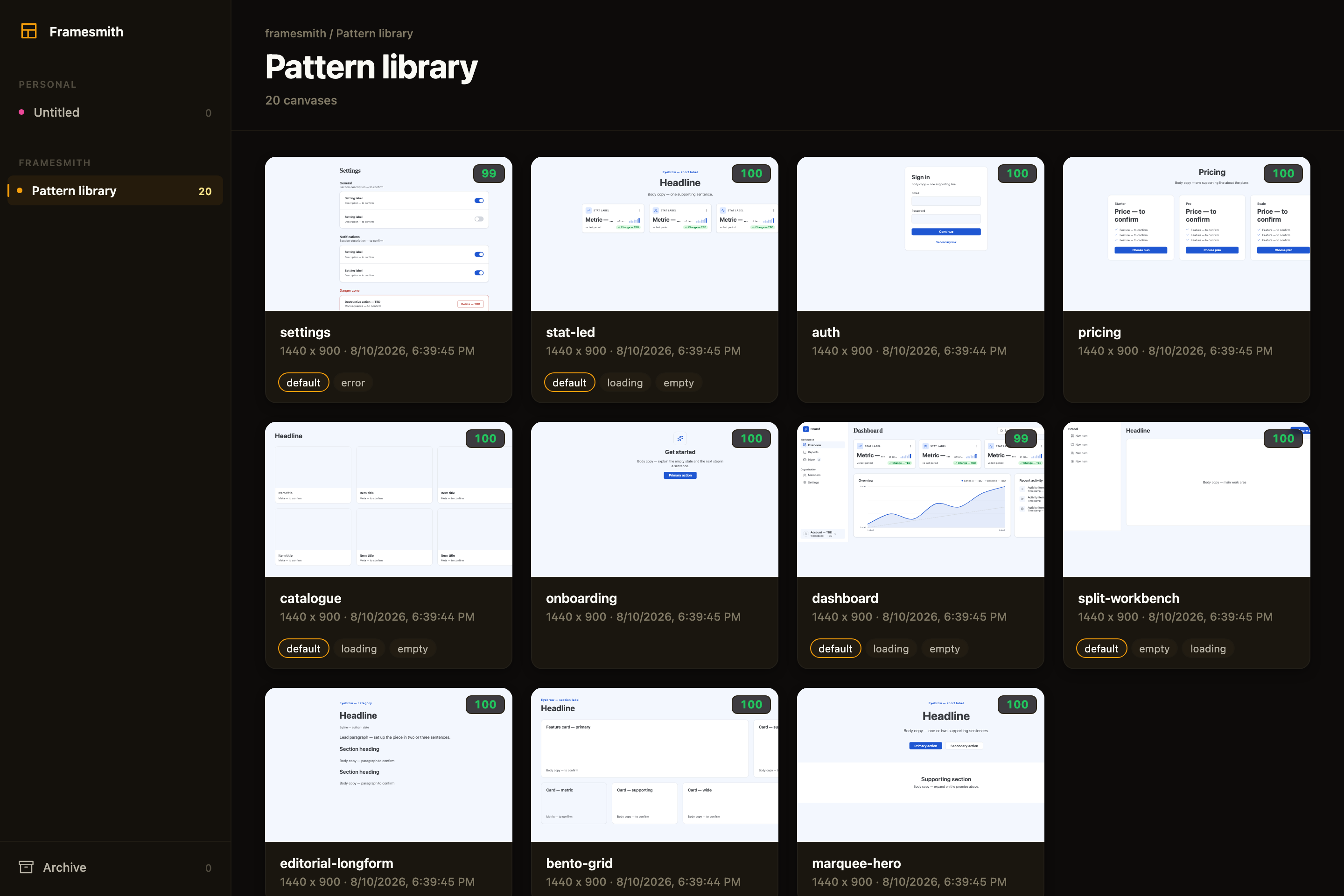
Above: the framesmith viewer, showing the built-in pattern library — 11 vetted page archetypes an agent starts from, each carrying its live quality score and its designed state variants. Workspaces and projects sit in the sidebar; you browse canvases like design files.
What an agent actually ships
Every screen below was built end-to-end by an agent with framesmith's own vocabulary — one generate_design_system call each (a seed color + a personality), stamped patterns, real controls, and every quality gate cleared (score ≥ 95, stress-tested, both themes, and every state the evaluator demands designed):
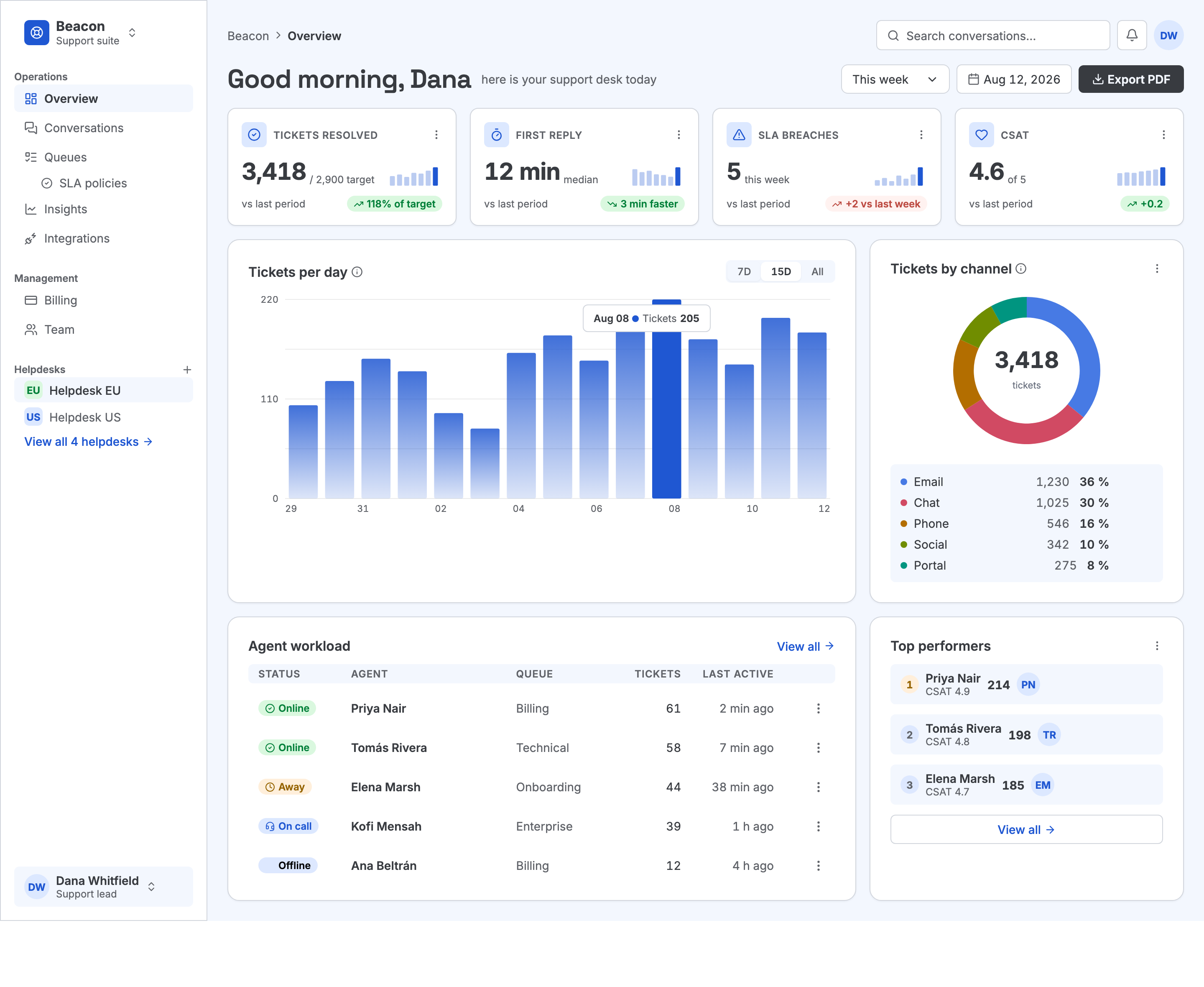
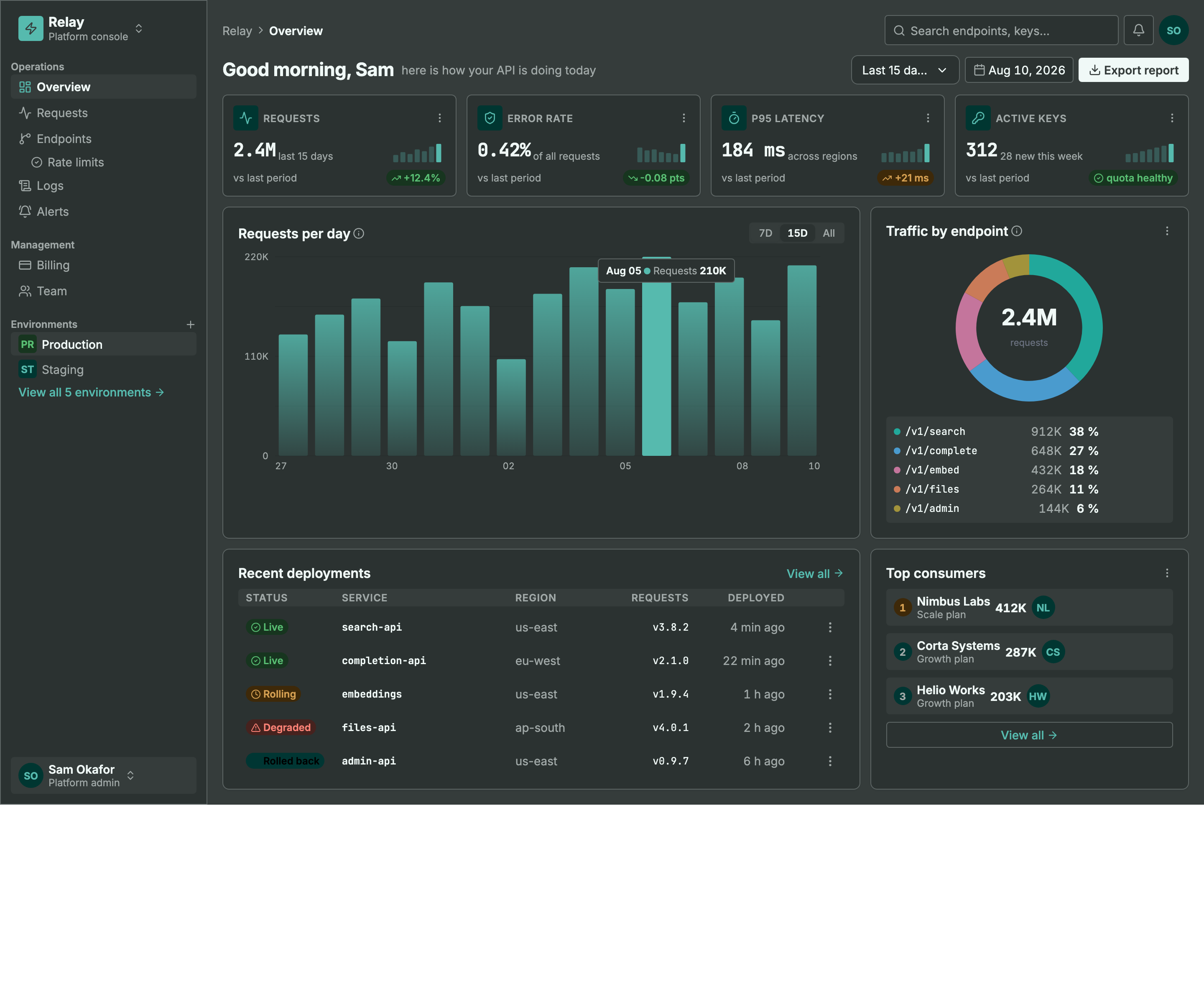
Same machinery, different seed + personality: a light ops dashboard and a dark API console. Every color pair is AA by construction, every chart is data-bound (edit a value, not an SVG path), and the dark theme is generated — not inverted.
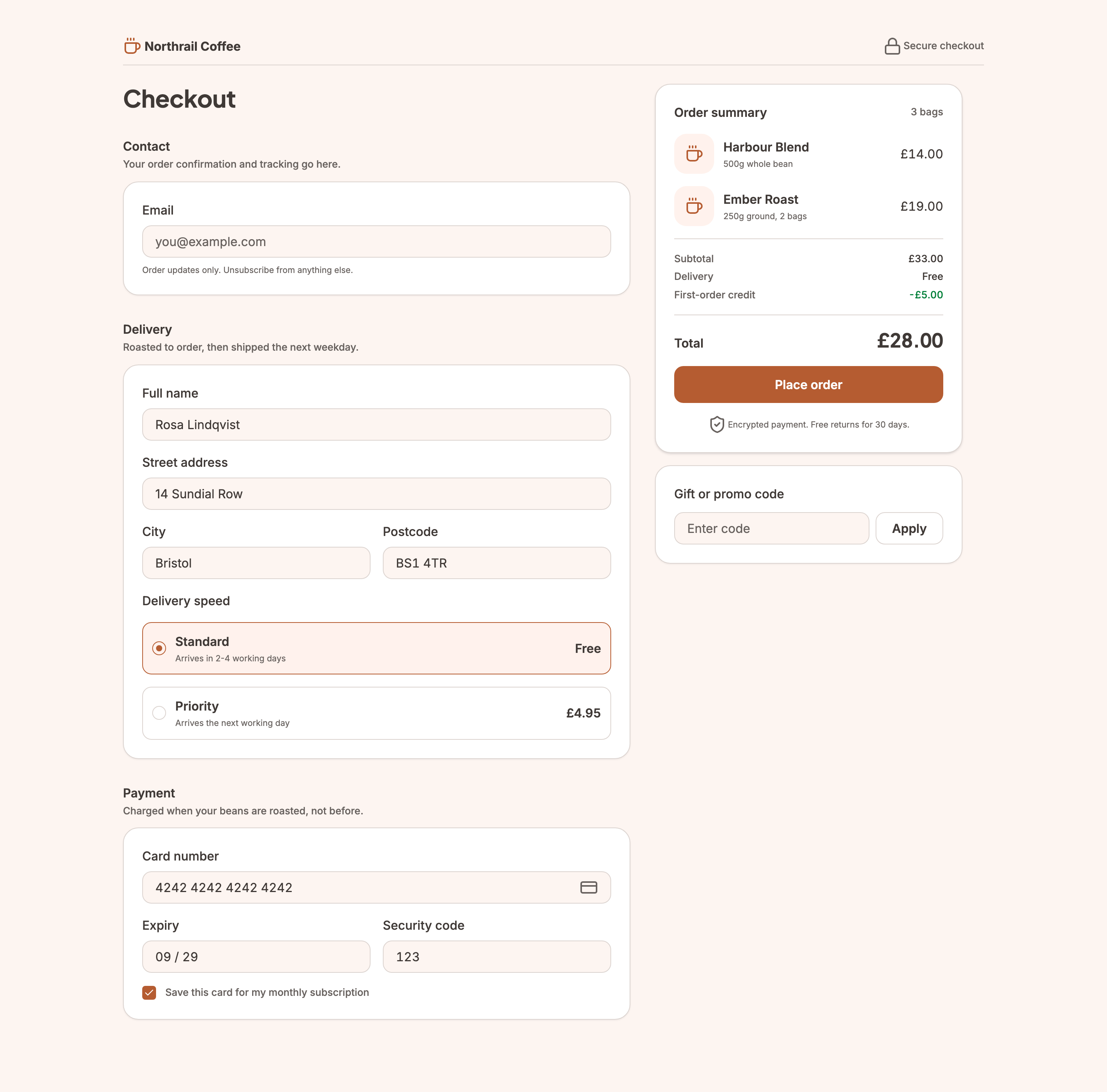
Not every screen is a dashboard. This checkout carries the
commercegenre — the transactional counterpart todata— so the evaluator reads its line prices and total as the design rather than as fabricated data. It still cleared the same bar as the two screens above, including designed empty-basket and loading states.
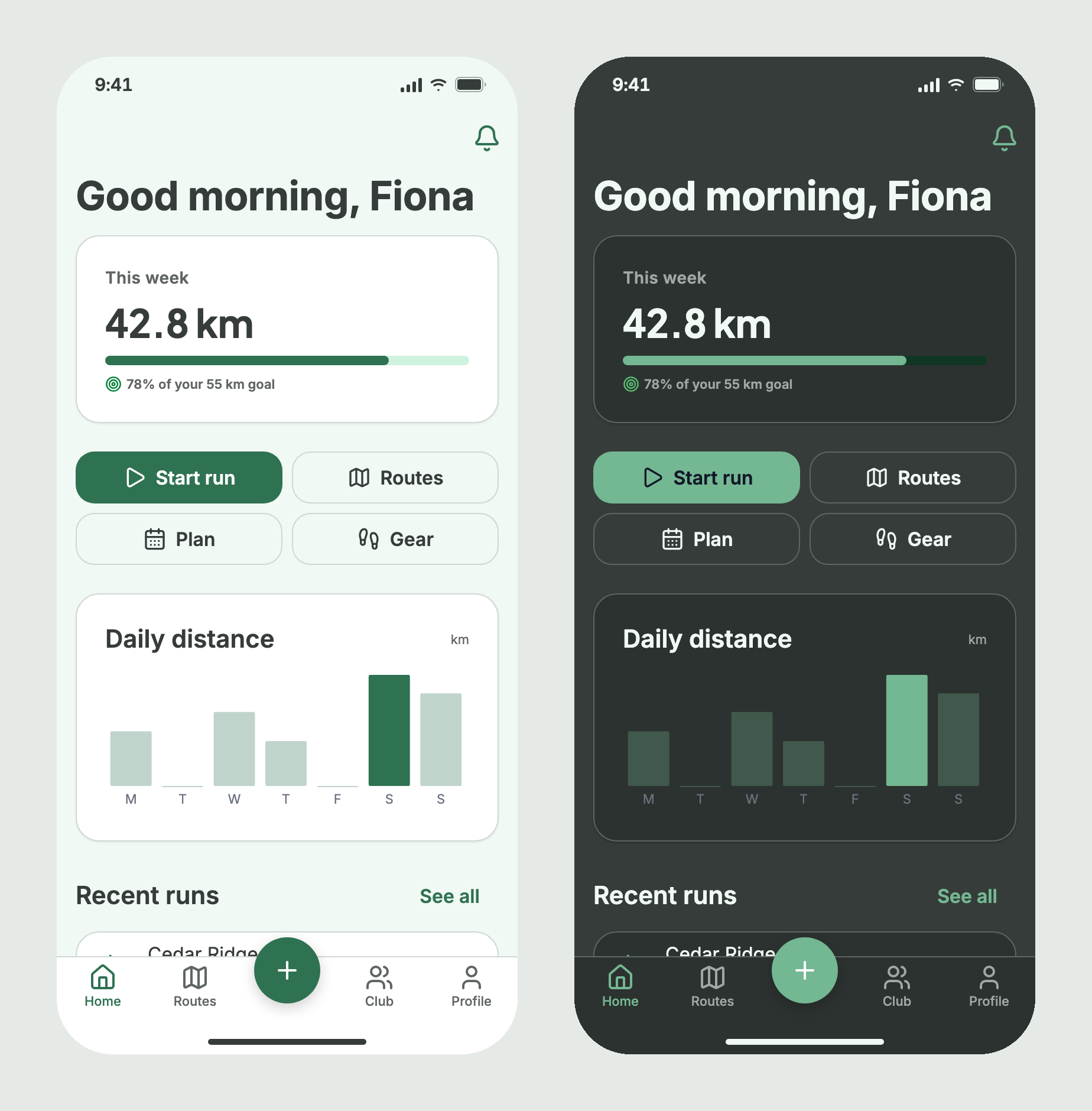
Not every screen is a web page either. This one is declared
type: "mobile", so it is judged as a phone screen: a 44px tap target on every button, row and tab, content clear of the status bar and home indicator, and a minimum body size. It started from thedashboardstructure, which stamps its phone version on a mobile canvas, and is built from the phone primitives (status bar, nav bar, buttons, list rows, tab bar) with no hand-built device chrome, in 33 nodes. framesmith's test suite rebuilds it on every run.
MCP Client → stdio → framesmith server
                        ↓
              Scene Graph (in-memory JSON tree)
                        ↓
              HTML/CSS Renderer (inline styles)
                        ↓
              Puppeteer (headless Chromium → PNG)
What framesmith does
Left to itself, an AI agent tends to produce UI that looks AI-generated — generic spacing, no icons, a purple gradient by default, placeholder text that reads like placeholder text. framesmith closes that gap by moving design before code and holding it to a bar:
- Start from taste, not a blank canvas. The agent stamps one of 11 vetted page patterns (dashboard, auth, pricing, settings, onboarding, and more), or on a phone canvas one of 6 mobile realisations built from the mobile primitives — each regression-tested to score > 95 with zero cliché tells under the neutral default theme and all four presets (a mobile realisation takes the presets' colours over a phone type scale, is also held to every personality's generated phone system, and raises no mobile-ruleset finding), and every structure (page and component alike) built entirely from type-role tokens so it re-voices under a generated design system instead of injecting stray pixel sizes, and hardened to survive hostile-length content (
canvas_stressCLEAN) — then adapts it. A blank canvas is where slop comes from; a pattern is a non-slop starting point. (list_structures/apply_structure) - Use the whole toolkit — like a real UI does. Real icons (Lucide + Material Symbols), fonts resolved by name, real input controls (
toggle/checkbox/radio/select), data-driven charts (line/bar/donut/sparkline, multi-series, bar emphasis), reusable components, and layered design tokens — never faked with Unicode glyphs, stray ellipses, or hand-drawn SVG paths standing in for a chart. - Evaluate, then self-correct.
canvas_evaluatescores the design across five craft categories plus a cliché-tell detector, a state-coverage check (a data screen without designed empty/loading states isn't done), and a usability layer (hit-target floor, label association, honest action copy), and returns aREADY/NOT READYdirective. The agent resolves every warning and tell and only presents once it'sREADY— polishing to the bar is the agent's job, not yours. - Review in the browser, own the output. You browse canvases like design files, with a live quality inspector and design-system panel. Designs persist as open JSON checked into your repo — no proprietary format, no lock-in — and can be re-imported from shipped HTML to keep the design honest.
Capabilities at a glance
| Area | What you get |
|---|---|
| Rendering | Scene graph → HTML/CSS → Puppeteer PNG · responsive breakpoints · real CSS grid (layout: "grid" + spans) for bento/editorial compositions · gradients, shadows, blur, glassmorphism · SVG paths · animations · data-driven charts (line/bar/donut/sparkline, multi-series, bar emphasis + in-SVG gradients) |
| Pattern library | 11 vetted page archetypes + 6 mobile realisations + 14 component scaffolds, all scoring > 95 with zero cliché tells, typography built from type-role tokens (not literal pixel sizes), and stress-hardened to survive hostile-length content; taxonomy axes + a diversification signal so successive screens vary |
| Quality & taste | canvas_evaluate (8 categories incl. cliché tells, state coverage + usability floors) with a READY/NOT READY directive · canvas_autofix (mechanical fixes) · optional vision-model rubric critique + canvas_revise · canvas_add_variant clones a screen into a linked empty/loading/error state · canvas_stress content-perturbation testing (long text, i18n, big numbers, empty/many rows) · project_evaluate rolls up a project's screens for cross-screen consistency (radius/accent drift, token adoption, hand-copied chrome, state coverage) plus an optional multi-screen flow critique — advisory, never a gate |
| Design systems | generate_design_system: one seed + one personality (technical / editorial / soft / data-dense) → the complete design language — colors, curated font pairing, typography roles, radius/density stances, $elevation depth tokens (dark-aware), $motion defaults · layered $tokens (workspace ▸ project ▸ canvas) · style presets · DESIGN.md import · generate_scale derives a modular type + spacing scale from a named ratio (optional fluid clamp() sizes) · generate_color_system turns one seed color into OKLCH ramps + AA-checked semantic tokens, a categorical chart palette, and a tint layer for chips/tiles/badges, dark theme included · dual-theme rendering + evaluation (theme: "dark" on screenshot/export, both-theme contrast in canvas_evaluate with APCA advisory) · token-detachment lint re-attaches literals that drift from a token |
| Primitives | Lucide + Material Symbols icons · Google Fonts by name · real form controls · components with instance overrides — create_component promotes existing work, copy_nodes carries subtrees (and their component defs) across canvases |
| Import from code | canvas_import_html / canvas_import_url — token-mapped, structure-reconstructed · canvas_sync_from_url pixel drift · canvas_check_drift structural drift · framesmith verify / check-drift CLI for CI/pre-commit gates, no MCP client needed |
| Viewer | Browser gallery + detail view · phone canvases in a device frame with a safe-area overlay · quality inspector (score, issues, click-to-highlight) · design-system token panel · point-and-tell feedback (Comment mode + Feedback tab) |
| Open by design | MIT · plain HTML/CSS · open JSON you own in your repo · content-hash versioning (canvas_version) so approvals reference an exact design, not just a name · works with any MCP-compatible client |
Viewer
Run npx -p framesmith framesmith-viewer to start the standalone browser viewer (it takes the first free port from 3001 up; pass a port to pin one). Open a web canvas to review it at multiple breakpoints and compare them side-by-side (a canvas declared desktop-app offers the narrower windows of its profile instead, 1024 and 1280 under a 1440 artboard); open any canvas to inspect its JSON, leave comments, or archive / delete it. Cards keep each artboard's proportions (between a phone held upright and 2:1; a longer page shows its top), so phone screens are portrait cards. A canvas declared mobile opens at 1:1 in a device frame instead of the breakpoint buttons, with a Safe area toggle that shades the status-bar and home-indicator insets (47 and 34 on the default iphone-390). The overlay is viewer-only: it never changes a screenshot.
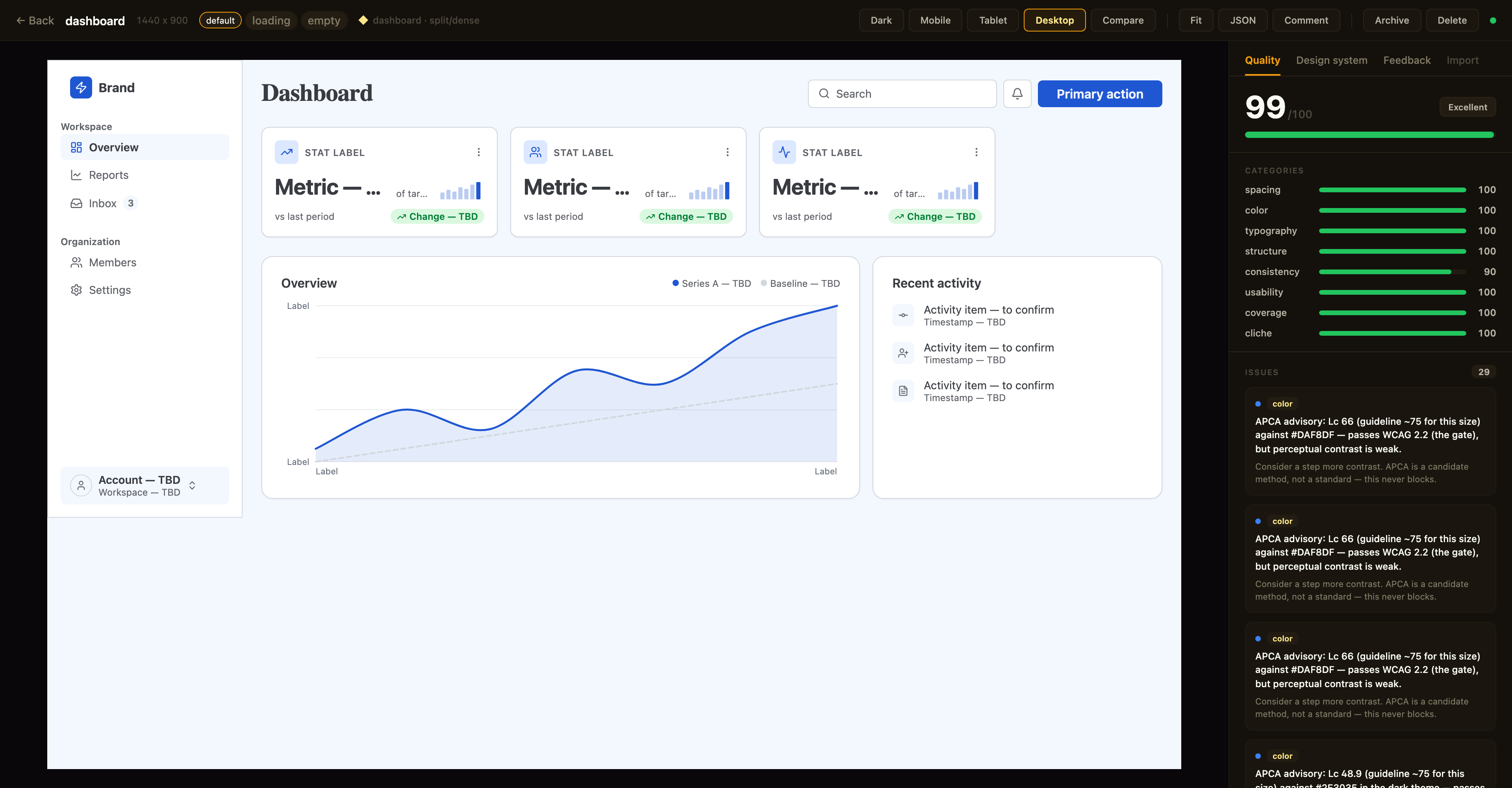
Above: a canvas in the detail view with the Quality inspector on the right — the same
canvas_evaluatescore the agent sees, with per-category bars and the issue list; the tabs along the top switch to the Design-system and Feedback panels. The toolbar exposes breakpoint previews, Compare, Fit, JSON, a Comment toggle for point-and-tell feedback, and lifecycle actions.
Quality panel. The canvas detail view shows a read-only quality inspector on the right: the heuristic canvas_evaluate score (0–100), per-category bars, and the issue list — each cliché tell with its category · tell badge, severity, and suggestion. Issues that canvas_autofix can resolve carry an auto-fixable tag, and clicking any issue highlights its node in the live preview. Every gallery card also shows a color-coded score badge so weak canvases stand out at a glance. The score matches what your agent sees over MCP (same fast-mode evaluation, relaxed by the canvas's stored genre and applied preset) — it's computed for display only and never written back.
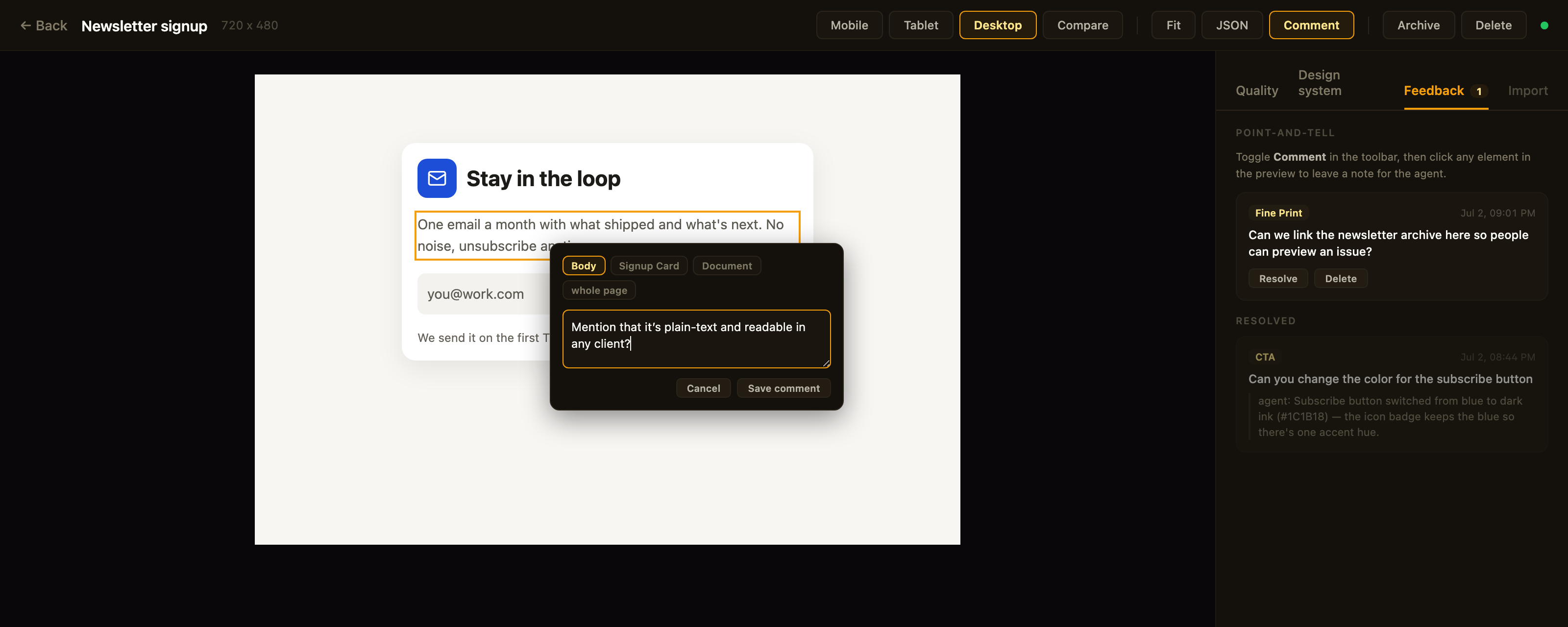
Above: point-and-tell in action — Comment mode is on, the clicked element is outlined, the popover's breadcrumb re-scopes the anchor, and the Feedback tab tracks open comments plus the agent's replies to resolved ones.
Feedback panel. Point-and-tell: toggle Comment in the toolbar and click any element in the preview to leave a note for the agent — a breadcrumb in the popover re-scopes the anchor from the exact element up to its card, section, or the whole page. The Feedback tab lists open comments (badge = open count) with click-to-highlight, lets you resolve or delete them, and shows the agent's resolution note as a reply once it has addressed the item. Comments persist on the canvas itself (metadata.feedback — git-diffable in bound repos) and the agent reads them over MCP via get_feedback; open feedback blocks the agent from presenting, same as open quality issues.
Design-system panel. A second inspector tab shows the canvas's effective design tokens — color swatches, type scale, spacing, and radius — resolved through the full workspace ▸ project ▸ canvas inheritance chain. Each section notes its dominant source layer, and any token resolving from a different layer is tagged (canvas / project / workspace) so you can see at a glance what a given canvas customized versus inherited.
Designs are authored through MCP tool calls from your AI assistant — in the viewer you review, comment, and manage lifecycle; you don't edit nodes. Unbound canvases persist to ~/.framesmith/canvases/ (canvases in a bound repo live in its .framesmith/ instead) so the viewer keeps showing them across sessions.
Installation
No clone or build needed — register framesmith with your MCP client via npx (requires Node 20+).
Claude Code
claude mcp add framesmith -- npx -y framesmith
Codex
Add to ~/.codex/config.toml:
[mcp_servers.framesmith]
command = "npx"
args = ["-y", "framesmith"]
Cursor
Add to ~/.cursor/mcp.json (or per-project .cursor/mcp.json):
{
  "mcpServers": {
    "framesmith": {
      "command": "npx",
      "args": ["-y", "framesmith"]
    }
  }
}
Windsurf
Add to ~/.codeium/windsurf/mcp_config.json:
{
  "mcpServers": {
    "framesmith": {
      "command": "npx",
      "args": ["-y", "framesmith"]
    }
  }
}
VS Code + MCP extension
Add to .vscode/mcp.json (project-scoped) or your global MCP settings:
{
  "servers": {
    "framesmith": {
      "command": "npx",
      "args": ["-y", "framesmith"]
    }
  }
}
Any other MCP-compatible client
framesmith speaks standard stdio MCP. Point your client at npx -y framesmith using whatever config shape your client expects.
Optional: set
FRAMESMITH_VIEWER_URL=http://localhost:3001in the MCP server env to pin it to a long-lived standalone viewer process — see Running the viewer.
Build from source (for development)
git clone https://github.com/vicmaster/framesmith.git
cd framesmith
npm install
npm run build
# then point your client at: node /path/to/framesmith/dist/index.js
Tools
init
One-call onboarding — the recommended first call each session, and safe to run repeatedly (idempotent). Binds the current repo if it isn't already (canvases become checked-in JSON under .framesmith/), ensures the convention projects exist, and returns the live state you need to start working.
| Param | Type | Description |
|---|---|---|
dir |
string? | Directory to bind / detect. Defaults to the nearest git repo root above the server working directory. |
workspaceName |
string? | Name for the workspace when binding fresh. Defaults to the repo folder name. |
projects |
string[]? | Projects to ensure exist (default: ["Foundations", "UI"]). Existing projects are never removed, so it's safe for adding feature/area projects like Onboarding. |
Returns the bound workspace + project IDs (binding re-keys workspace and project IDs to repo-* — use the ones init returns; canvas IDs are kept), the on-disk layout, the workspace-layer token count, a workflow cheatsheet, the current gotchas, the framesmith://guidelines URI, and the viewer URL. If any canvas in the workspace has open point-and-tell comments, the result also carries openFeedback: { total, note } — a nudge to run get_feedback before doing anything else. It does not seed design tokens — set those at the workspace layer with workspace_set_design_system. The default Foundations project is just a canvas that visualizes the workspace tokens (which is where the design system actually lives).
canvas_create
Create a new canvas. If projectId is omitted, it lands in the built-in Untitled project of the Personal workspace.
| Param | Type | Description |
|---|---|---|
name |
string? | Canvas name |
projectId |
string? | Target project. Defaults to the built-in Untitled project. See project_list. |
width |
number? | Artboard width in px, a positive integer (default 1440, or the device or window width for type: "mobile" / "desktop-app"). |
height |
number? | Artboard height in px, a positive integer (default 900, or the device or window height for type: "mobile" / "desktop-app"). Each dimension defaults on its own. |
type |
"web" | "mobile" | "desktop-app"? |
What medium the canvas is on. "desktop-app" declares an application screen, a tool you work in (an editor, an admin console, a file browser) in a browser tab or a native window: the artboard defaults to the window (1440×900), and it runs the desktop-app ruleset; a page you read and scroll stays "web". "mobile" declares a phone app screen: the artboard defaults to the device size and the root gets the device's safe-area insets as safeArea: { top, bottom }, which the renderer adds to the root's top and bottom padding. Omitted, the canvas is undeclared and judged as web. On a mobile canvas apply_structure stamps the mobile realisations (dashboard, settings, auth, onboarding, feed, detail). |
device |
string? | The type's profile: a phone for type: "mobile" (default "iphone-390", the only one today: 390×844, insets 47 top and 34 bottom) or a window for type: "desktop-app" (default "window-1440": 1440×900, no insets). Passing it without a type, with "web", or naming a profile from the other type's table, is an error. An explicit width/height overrides the profile's size for that side; the insets stay the profile's. |
The response also carries the artboard width/height, type, typeSource ("declared" or "default"), device and safeArea for a mobile canvas, and a diversification signal for the target project: the recently-built structures (newest first) and a hint to differ on at least one taxonomy axis, so successive canvases don't converge on the same layout. It's advisory — never blocking.
canvas_list
List canvases. Excludes archived canvases by default. A row carrying openFeedback: n has open point-and-tell comments waiting — read them with get_feedback before working on that canvas.
| Param | Type | Description |
|---|---|---|
projectId |
string? | Scope to one project |
includeArchived |
bool? | Include archived canvases (default false) |
Returns [{ id, name, createdAt, lastModified, versionHash, projectId, archived, openFeedback?, variant?, variants? }] — openFeedback (a count) is present only when > 0; versionHash is the design-content hash canvas_version checks approvals against. variant: { of, state } is present on a state-variant row; variants: [{ state, canvasId }] rolls the designed states onto a base row (see canvas_add_variant).
canvas_add_variant
Clone a screen into a linked state variant — the empty / loading / error version of a canvas, as its own sibling canvas. The clone gets re-keyed node IDs, the same project, copied tokens/components/fonts, and carries the provenance/genre stamp (feedback and critique stay behind); it's named <base> · <state> and linked via metadata.variant = { of, state }.
| Param | Type | Description |
|---|---|---|
canvasId |
string | The base canvas (a variant id also works — it resolves to the root base; variants never nest) |
state |
string | The state this variant designs — empty / loading / error recommended; free string accepted |
Returns { canvasId, name, state, of, idMap } — idMap maps every base node id to its clone, so follow-up edits target the right nodes immediately. One canvas per state per base (a duplicate state errors). The viewer shows a screen and its variants as one card with state chips; canvas_list rolls designed states onto the base row.
Perguntas sobre o MCP framesmith
Quais ferramentas o MCP framesmith oferece?
Ele expõe 9 ferramentas, incluindo dir, projects, name, width, height.
Quais formatos o framesmith utiliza para os designs?
Os designs são armazenados como arquivos JSON abertos que pertencem a você no seu repositório, e podem ser exportados como HTML/CSS puro.
Como funciona o gate de qualidade?
A ferramenta canvas_evaluate pontua os designs em cinco categorias de craft, incluindo um detector de clichês e uma verificação de cobertura de estados, retornando uma diretiva READY ou NOT READY.
Posso visualizar os designs em um navegador?
Sim, você pode executar um visualizador de navegador independente usando npx para revisar os canvases em múltiplos breakpoints.