
MCP server Ternimal
Commit 14 de nov. de 2026Fornece um terminal remoto seguro que permite que agentes de IA executem comandos e gerenciem arquivos em hosts remotos via Model Context Protocol.
Também conhecido como ternimal/tern
- Stars
- 1
- Ferramentas
- —
- Downloads, 30 dias
- —
- Versão mais recente
- —
- Último commit
- 14 de nov. de 2026
- Licença
- AGPL-3.0
O que é o MCP Ternimal?
Fornece um terminal remoto seguro que permite que agentes de IA executem comandos e gerenciem arquivos em hosts remotos via Model Context Protocol.
Resumo gerado a partir do README do projeto
Sobre o MCP server de Ternimal
Gerenciar servidores remotos por meio de uma interface de IA é possível com o Ternimal. Esta ferramenta fornece um terminal remoto seguro que permite que agentes de IA executem comandos e gerenciem arquivos em hosts remotos usando o Model Context Protocol. Ele foi projetado para administradores que precisam conceder acesso controlado de clientes de IA, como Claude Desktop, Claude Code ou Cursor, aos seus sistemas.
A configuração envolve a execução do agente ternd no host remoto e a conexão via cliente tern. Os usuários podem se conectar diretamente por uma rede local ou usar um relay ternr para atravessar o NAT sem a necessidade de portas de entrada. A segurança é mantida através de criptografia TLS de ponta a ponta e autenticação obrigatória usando chaves OpenSSH ou tokens compartilhados.
Para evitar ações não autorizadas, o MCP server opera sob uma política específica e é apenas de leitura por padrão. Ele mantém um log de auditoria de cada chamada e exige aprovação manual antes de realizar as ações escolhidas. Isso garante que, embora um agente de IA possa interagir com as ferramentas de shell, exec, port forwarding e cópia de arquivos, o usuário humano permaneça no controle do ambiente remoto.
O que você pode fazer com ele
- 1Executar comandos remotos via IAPeça a um agente de IA para executar comandos de shell específicos em um host remoto através da interface MCP.
- 2Auditar ações administrativas de IARevise um log completo de todos os comandos e interações realizados por um agente de IA em seu sistema.
Escrito a partir do README do projeto. Cada caso de uso é verificado com uma citação dele.
Configuração
TERN_TOKEN
| Nome | Descrição | Tipo |
|---|---|---|
| TERN_TOKEN | — |
Verificações automatizadas
Executado em 15 de nov. de 2026Relatório completo →Ainda não verificado. Um servidor precisa de uma pontuação de 80, nenhum problema grave e dados suficientes para verificarmos. Como as verificações funcionam · O que corrigir para ganhar mais pontos

- Repositório de origem vinculado e acessívelternimal/tern is public and reachablegithub.com/ternimal/tern ↗Passou
- O pacote indica este repositório como sua origemNão verificado
- Proveniência da build (atestação Sigstore)Não verificado
- Licença de código aberto (OSI)AGPL-3.0spdx.org/licenses/AGPL-3.0.html ↗Passou
- Commit ou release no último anoLast commit or release 2026-11-14github.com/ternimal/tern ↗Passou
- OpenSSF ScorecardNão verificado
- Nome do pacote não é próximo a um pacote popularNão verificado
- Nenhum aviso crítico no pacote ou em suas dependênciasNão verificado
- Sem instruções ocultas para o modelo0 tool descriptions and the README read; no override phrases, credential paths or hidden charactersPassou
- Ferramentas destrutivas estão rotuladasNão verificado
- O endpoint remoto responde ao handshake do MCPNão verificado
README
Ver no GitHubTernimal
+------------------------------------------------------------------+
| \\\_\                                                            |
| \\\( ^>     t e r n                                              |
|  \\\=/      A minimal, portable, secure remote terminal with MCP |
|  ~~~~~                                                           |
+------------------------------------------------------------------+


Ternimal (terminal + minimal) is a minimal, portable, secure remote terminal: SSH-style shells, command exec, port forwarding and file copy over end-to-end TLS, reached directly or through a relay for NAT traversal. One project, four small binaries:
| binary | role |
|---|---|
tern |
client: shells, exec, port forwarding, file copy, REST gateway, MCP server for AI agents |
ternd |
agent: hosts sessions for authenticated clients; listens directly or dials a relay |
ternr |
relay: bridges clients to agents behind NAT; a public rendezvous that only forwards opaque bytes |
rtern |
combined relay + client: catches an agent that dials in and drops you into its shell; one process instead of ternr + tern |
Client-to-agent traffic is end-to-end TLS (clients pin the agent's certificate) and authentication to the agent is mandatory. This is an administration tool, not a stealth tool: connections are logged and the agent has no unauthenticated mode. Only use it on systems you own or are authorized to access.
Installation
Download the zip for your OS and architecture from the
latest release, check it
against SHA256SUMS and, with the GitHub CLI, its
build provenance attestation, and put the four binaries on your PATH:
curl -LO https://github.com/ternimal/tern/releases/latest/download/ternimal-linux-amd64.zip
curl -LO https://github.com/ternimal/tern/releases/latest/download/SHA256SUMS
sha256sum --ignore-missing -c SHA256SUMS
gh attestation verify ternimal-linux-amd64.zip -R ternimal/tern
mkdir -p ~/.local/bin
unzip ternimal-linux-amd64.zip tern ternd ternr rtern -d ~/.local/bin
Or build them with Go 1.21 or later:
go install github.com/ternimal/tern/cmd/...@latest
Notes for macOS and Windows, building from source and the supported platforms are in docs/install.md.
Quick start
# agent: zero-config, listens on port 2222 on every IPv4 and IPv6 address,
# mints a token, prints its fingerprint
ternd

# client: connect by IP with the agent's fingerprint and token
TERN_TOKEN=<token> tern connect -a AGENT_IP:2222 -f <agent-fp>
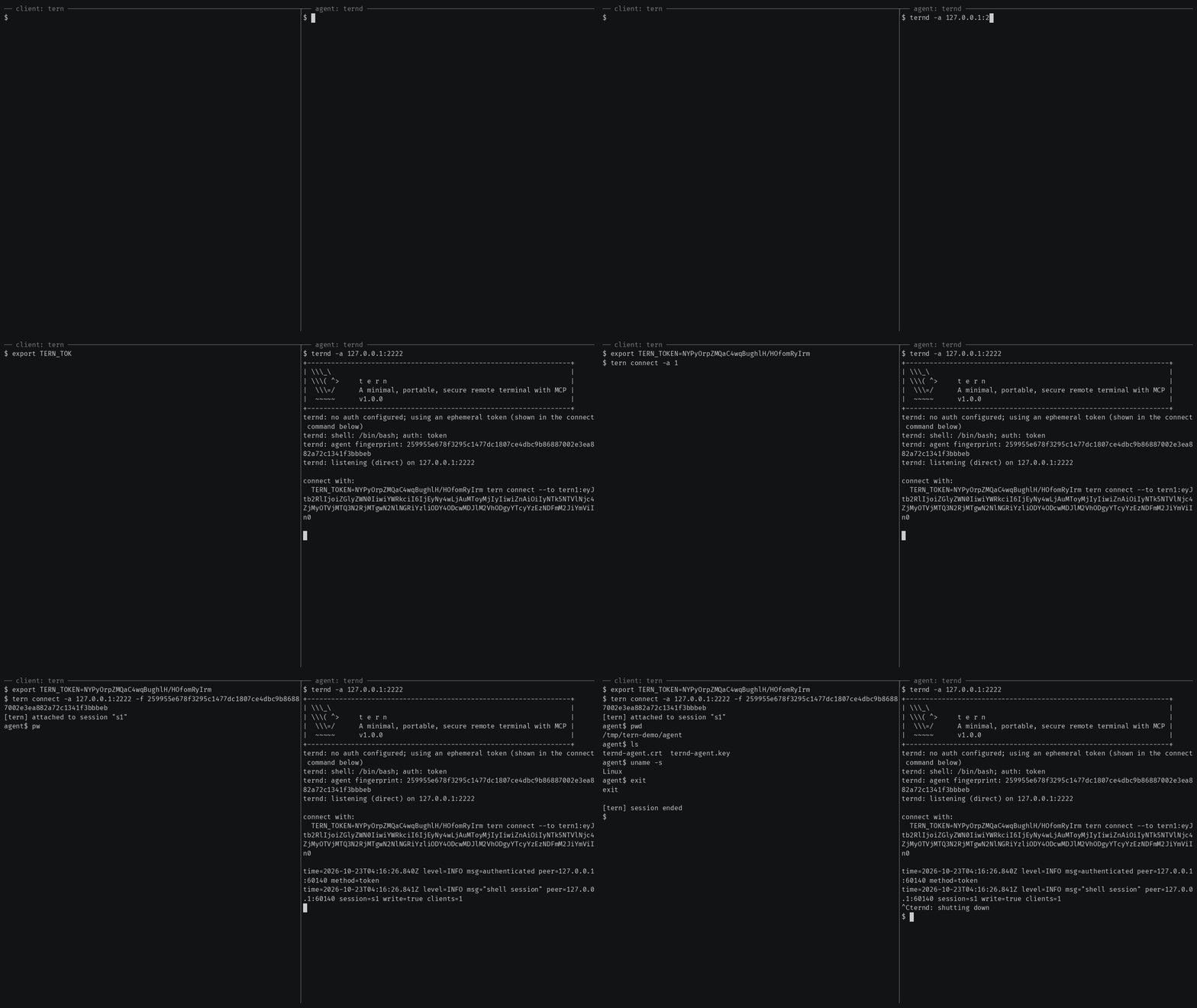
Getting started also covers reaching an agent
behind NAT through a relay, catching one with rtern and logging in with
OpenSSH keys instead of a token.
AI agents (tern mcp)
tern mcp lets an AI client such as Claude Code, Claude Desktop or Cursor work
on your agents through the
Model Context Protocol, under a policy you
set and with an audit log of every call. It is read-only by default, and asks
you before the actions you choose.
In Claude Code, install tern first, then the Ternimal plugin:
claude plugin marketplace add ternimal/tern
claude plugin install ternimal@ternimal
The plugin starts tern from your PATH and reads your hosts from a config
file, ~/.config/tern/mcp.json by default; its ternimal:setup skill walks
you through writing one. plugin/README.md says what it
runs and what it sends. Other clients, a one-line setup without a config
file, the tools and the safety model are in docs/mcp.md.
Features
- Direct or relay: reach an agent on your LAN directly, or reach one behind NAT through a relay, so that agent needs no inbound port.
- End-to-end encryption: TLS and authentication run between client and agent, so a relay only forwards ciphertext.
- Keys or tokens: OpenSSH public keys in
authorized_keysformat, or a shared token. - Resumable sessions:
tern connectreconnects on its own after a drop and resumes the session with scrollback replay; others can join it as read-only viewers. - One connection, many channels: one authenticated connection can carry a
shell,
exec, port forwards and file copy at once. - REST gateway and MCP server: run commands over HTTP, or let AI agents work under a policy.
- Recording: with
ternd --record-dir, the agent saves each session as an asciicast, playable withasciinema play. - Zero-config: run
terndwith no flags on a terminal and it mints a token and prints the line to connect with. - Portable: Linux, macOS, Windows and Android on amd64 and arm64.
All of them in detail: docs/features.md.
Documentation
- Getting started: direct, through a relay, with
rtern, with OpenSSH keys and the insecure flags for testing - Commands: every
terncommand, sharing and resuming sessions, copying files, port forwards - REST gateway: run commands on an agent over HTTP
- AI agents over MCP: the config file, profiles, tools, approvals and the audit log
- Install and build: checking a release, building from source, supported platforms
- Keys, tokens and files: the rules for the files tern reads
- Operating notes: listeners, shutdown, recordings and other details
- Security: the threat model, the dangerous flags and how to report a vulnerability
- Contributing: license terms, the CLA, development and the code layout
License
Ternimal is licensed under the GNU Affero General Public License v3.0 only (AGPL-3.0-only); see LICENSE. Running a modified version to provide a network service requires offering that version's source to its users.
A separate commercial license is available for uses that cannot comply with the AGPL, for example embedding Ternimal in a proprietary or hosted service; see NOTICE. Contributions are welcome; see CONTRIBUTING for the license terms and the CLA.
"Ternimal", the binary names (tern, ternd, ternr, rtern) and the
project logo are project trademarks and are not licensed under the AGPL; see
NOTICE.
Perguntas sobre o MCP Ternimal
Como os agentes de IA podem usar o Ternimal?
Clientes de IA como Claude Code ou Cursor podem trabalhar com seus agentes através do Model Context Protocol (MCP) usando o comando tern mcp.
A conexão é segura?
Sim, o tráfego entre cliente e agente utiliza TLS de ponta a ponta com autenticação obrigatória, garantindo que os relays apenas encaminhem texto cifrado opaco.
Posso usar o Ternimal para acessar uma máquina atrás de um NAT?
Sim, você pode acessar um agente atrás de um NAT usando um relay para fazer a ponte da conexão.
Quais são as permissões padrão para agentes de IA?
Por padrão, o MCP server é apenas de leitura e solicitará sua aprovação antes de realizar as ações escolhidas.