Permite que agentes de IA inspecionem, controlem e depurem aplicativos móveis, web, TV e desktop em dispositivos físicos, simuladores e emuladores.
Também conhecido como callstackincubator/agent-device
- Stars
- 5.403
- Ferramentas
- 62
- Downloads, 30 dias
- —
- Versão mais recente
- 0.16.9
- Último commit
- 15 de nov. de 2026
- Licença
- MIT
O que é o MCP agent-device?
Permite que agentes de IA inspecionem, controlem e depurem aplicativos móveis, web, TV e desktop em dispositivos físicos, simuladores e emuladores. Ele expõe 62 ferramentas, como action-button, alert, app-switcher.
Resumo gerado a partir do README do projeto
Sobre o MCP server de agent-device
O agent-device fornece uma camada especializada para que agentes de codificação de IA interajam com software em ambientes móveis, web, TV e desktop. Ele permite que os agentes inspecionem estados de aplicativos, controlem interfaces de usuário e depurem problemas em dispositivos físicos, simuladores ou emuladores. O sistema funciona localmente via CLI ou como uma conexão remota para nuvens de dispositivos como BrowserStack ou AWS Device Farm. Desenvolvedores podem integrá-lo aos seus fluxos de trabalho usando um MCP server integrado ou uma API Node.js tipada.
Em vez de depender apenas de capturas de tela visuais, a ferramenta fornece snapshots de acessibilidade com eficiência de tokens, permitindo que os agentes raciocinem por meio de rótulos, funções e seletores. Essa abordagem permite ações precisas como preencher campos de texto, pressionar botões e rolar a tela. Ele suporta uma ampla gama de plataformas, incluindo iOS, Android, HarmonyOS, tvOS, macOS e Linux. O servidor também gerencia o acesso a dispositivos em worktrees paralelas para evitar conflitos durante testes automatizados ou tarefas de desenvolvimento.
O que você pode fazer com ele
- 1Verificar mudanças de UIUm agente pode implementar uma nova tela e depois executá-la em um simulador iOS ou emulador Android para confirmar que funciona corretamente.
- 2Depurar falhas de aplicativosUm desenvolvedor pode atribuir a um agente a tarefa de reproduzir um crash específico e coletar os logs necessários para análise.
- 3Automatizar fluxos de trabalho repetitivosAgentes podem explorar um fluxo de usuário específico e salvar a sequência de etapas como um script de replay para uso futuro em CI.
- 4Analisar problemas de performanceA ferramenta ajuda os agentes a identificar se mudanças no código causam re-renders desnecessários em aplicativos React Native.
Escrito a partir do README do projeto. Cada caso de uso é verificado com uma citação dele.
Como instalar o MCP agent-device
Formatos verificados em 10 nov 2026Adicionar ao CursorAdicionar ao GooseInstalar o MCP agent-device no Claude Code
$ claude mcp add agent-device -- npx -y agent-device mcpInstalar o MCP agent-device no Cursor
~/.cursor/mcp.json
{
  "mcpServers": {
    "agent-device": {
      "command": "npx",
      "args": [
        "-y",
        "agent-device",
        "mcp"
      ]
    }
  }
}Instalar o MCP agent-device no VS Code
.vscode/mcp.json
{
  "servers": {
    "agent-device": {
      "type": "stdio",
      "command": "npx",
      "args": [
        "-y",
        "agent-device",
        "mcp"
      ]
    }
  }
}Instalar o MCP agent-device no VS Code CLI
$ code --add-mcp '{"name":"agent-device","type":"stdio","command":"npx","args":["-y","agent-device","mcp"]}'Instalar o MCP agent-device no Claude Desktop
claude_desktop_config.json
{
  "mcpServers": {
    "agent-device": {
      "command": "npx",
      "args": [
        "-y",
        "agent-device",
        "mcp"
      ]
    }
  }
}Instalar o MCP agent-device no Codex
$ codex mcp add agent-device -- npx -y agent-device mcpInstalar o MCP agent-device no Codex config.toml
~/.codex/config.toml
[mcp_servers.agent-device]
command = "npx"
args = ["-y", "agent-device", "mcp"]
Instalar o MCP agent-device no Gemini CLI
$ gemini mcp add -s user agent-device npx -- -y agent-device mcpInstalar o MCP agent-device no Gemini settings.json
~/.gemini/settings.json
{
  "mcpServers": {
    "agent-device": {
      "command": "npx",
      "args": [
        "-y",
        "agent-device",
        "mcp"
      ]
    }
  }
}Iniciado pela HostedMCP em 16 de nov. de 2026
Rodamos este comando para agent-device 0.21.37 em um contêiner isolado, sem rede e sem chaves. Ele respondeu e listou 62 ferramentas.
Ferramentas do MCP agent-device 62
Lido do servidor com tools/listaction-buttonPress the iPhone or iPad Action Button once. The press is dispatched without activating the session app and nothing is re-observed afterwards, so the app keeps the state the press found. What the system does with the press is not observed by this command: Simulators run no Shortcuts or App Intents, so delivery to an assigned Shortcut is verifiable only on a physical iPhone. Times out after 90s.
alertInspect, wait for, accept, or dismiss a platform alert. Use get before acting when the alert content matters; accept and dismiss change the active alert state. Each iOS XCTest execution activates once, then only observes. Apple XCTest and Limrun iOS choose recognized English labels by preference (Allow While Using App before Allow Once); on iOS simulators, including Limrun, the runner also recognizes the device's preferred languages' wording of those labels from the OS permission-prompt strings, on any alert; equal-ranked choices and unknown labels refuse, including a lone unknown button. Open, Done, and Confirm… accept; Keep Browsing, Deny, and Skip dismiss. On the Apple XCUITest runner, dismiss taps only a recognized decline label (Cancel, Don't Allow, Ask App Not to Track, and similar) or the close element of a popover whose accessibility marker reads exactly "dismiss popup"; when no button fits the action, accept and dismiss answer ALERT_BUTTON_NOT_FOUND having tapped nothing — read labels with alert get, then press the button by label. Inspect again after an unconfirmed action; never assume a timeout means nothing happened. Times out after 90s.
app-switcherOpen the device app switcher to inspect or change foreground apps. This changes the visible system UI and may move focus away from the current app. Times out after 90s.
appsList the apps installed on the selected device. Include system or OEM apps only when they are needed as automation targets. Times out after 90s.
appstateShow foreground app/activity (Android and HarmonyOS; iOS and macOS answer per session) Times out after 90s.
artifactsList daemon or cloud provider artifacts for an active or completed session. Times out after 90s.
audioMeasure browser or host-rendered simulator/emulator audio as compact dBFS buckets. Start a probe before requesting its status or stopping it. Times out after 90s.
backNavigate back in the app or through system navigation. Use in-app for the app navigation stack and system when the platform back behavior is required. On iOS both modes swipe from the left edge and succeed only when the app screen changes. Reason back_swipe_no_change: the swipe was sent and the screen did not change; press the visible back or close control. Reason back_swipe_unverified: the swipe may or may not have navigated, because the screen kept changing before it or could not be sampled after it; check with snapshot. Reason back_swipe_not_dispatched, or a screen that cannot be sampled before the swipe, means nothing was sent. An app with a left-edge drawer may open the drawer instead. Press a visible back or close control by its ref directly. Times out after 90s; a caller-supplied budget extends it.
batchExecute multiple commands in one daemon request. Times out after 90s.
bootBoot or prepare the selected device or simulator so later commands can target it. The device is chosen through the device-selection inputs, not by naming it here. On Limrun, allocate or reuse an instance. Existing-instance credentials attach without creating one. Times out after 90s; a caller-supplied budget extends it.
capabilitiesList the commands supported by the selected device or active session. Use device-selection inputs when checking support before a session is open. Times out after 90s.
clickActivate a UI target by snapshot ref, selector, or coordinates. Prefer a ref or selector after a snapshot; use coordinates only when semantic targeting is unavailable. This can change app state. Success means the click was dispatched, not that it landed: use settle or verify to confirm the result without a follow-up snapshot, or wait for the expected screen. A ref or selector target is re-checked for motion before dispatch when the session's previous action just animated the screen, and is dispatched at its resting position; one that has not stopped refuses with target_still_moving rather than acting where it was. Times out after 90s; a caller-supplied budget extends it.
| action-button | Press the iPhone or iPad Action Button once. The press is dispatched without activating the session app and nothing is re-observed afterwards, so the app keeps the state the press found. What the system does with the press is not observed by this command: Simulators run no Shortcuts or App Intents, so delivery to an assigned Shortcut is verifiable only on a physical iPhone. Times out after 90s. | |
| alert | Inspect, wait for, accept, or dismiss a platform alert. Use get before acting when the alert content matters; accept and dismiss change the active alert state. Each iOS XCTest execution activates once, then only observes. Apple XCTest and Limrun iOS choose recognized English labels by preference (Allow While Using App before Allow Once); on iOS simulators, including Limrun, the runner also recognizes the device's preferred languages' wording of those labels from the OS permission-prompt strings, on any alert; equal-ranked choices and unknown labels refuse, including a lone unknown button. Open, Done, and Confirm… accept; Keep Browsing, Deny, and Skip dismiss. On the Apple XCUITest runner, dismiss taps only a recognized decline label (Cancel, Don't Allow, Ask App Not to Track, and similar) or the close element of a popover whose accessibility marker reads exactly "dismiss popup"; when no button fits the action, accept and dismiss answer ALERT_BUTTON_NOT_FOUND having tapped nothing — read labels with alert get, then press the button by label. Inspect again after an unconfirmed action; never assume a timeout means nothing happened. Times out after 90s. | |
| app-switcher | Open the device app switcher to inspect or change foreground apps. This changes the visible system UI and may move focus away from the current app. Times out after 90s. | |
| apps | List the apps installed on the selected device. Include system or OEM apps only when they are needed as automation targets. Times out after 90s. | |
| appstate | Show foreground app/activity (Android and HarmonyOS; iOS and macOS answer per session) Times out after 90s. | |
| artifacts | List daemon or cloud provider artifacts for an active or completed session. Times out after 90s. | |
| audio | Measure browser or host-rendered simulator/emulator audio as compact dBFS buckets. Start a probe before requesting its status or stopping it. Times out after 90s. | |
| back | Navigate back in the app or through system navigation. Use in-app for the app navigation stack and system when the platform back behavior is required. On iOS both modes swipe from the left edge and succeed only when the app screen changes. Reason back_swipe_no_change: the swipe was sent and the screen did not change; press the visible back or close control. Reason back_swipe_unverified: the swipe may or may not have navigated, because the screen kept changing before it or could not be sampled after it; check with snapshot. Reason back_swipe_not_dispatched, or a screen that cannot be sampled before the swipe, means nothing was sent. An app with a left-edge drawer may open the drawer instead. Press a visible back or close control by its ref directly. Times out after 90s; a caller-supplied budget extends it. | |
| batch | Execute multiple commands in one daemon request. Times out after 90s. | |
| boot | Boot or prepare the selected device or simulator so later commands can target it. The device is chosen through the device-selection inputs, not by naming it here. On Limrun, allocate or reuse an instance. Existing-instance credentials attach without creating one. Times out after 90s; a caller-supplied budget extends it. | |
| capabilities | List the commands supported by the selected device or active session. Use device-selection inputs when checking support before a session is open. Times out after 90s. | |
| click | Activate a UI target by snapshot ref, selector, or coordinates. Prefer a ref or selector after a snapshot; use coordinates only when semantic targeting is unavailable. This can change app state. Success means the click was dispatched, not that it landed: use settle or verify to confirm the result without a follow-up snapshot, or wait for the expected screen. A ref or selector target is re-checked for motion before dispatch when the session's previous action just animated the screen, and is dispatched at its resting position; one that has not stopped refuses with target_still_moving rather than acting where it was. Times out after 90s; a caller-supplied budget extends it. |
Mostrar todas as 62 ferramentasMostrar menos ferramentas
clipboardRead the current device clipboard text, or replace its contents with the given text. Android runs both through the clipboard service shell command, and a build that implements none (Android 16 does not) refuses with UNSUPPORTED_OPERATION rather than reporting an empty clipboard. Times out after 90s.
closeClose the named app, or close the active session app when app is omitted. If the session booted a local simulator or emulator, add shutdown when you finish, unless the user asks to keep it running; close alone never stops the device. Android ADB close fails with android-app-close-timeout if the app stays foreground past 2s, a killed process does not exit within 10s, or a new process runs past 2s. It fails with android-process-probe-unavailable when adb pidof cannot list the app processes; if that happens before the force-stop, the app keeps running. If close cannot confirm its cleanup on a session that holds a device claim, the session and its claim stay; run close again with the same options to retry the cleanup, leaving out save-script once the script is published. Times out after 90s.
debugSymbolicate Apple crash artifacts with matching dSYM UUIDs. This debug namespace is intentionally narrow: use logs for app logs, network for HTTP evidence, perf for performance samples, record/trace for media and traces, and react-devtools for React Native components and render profiles. Times out after 90s.
devicesList available devices and simulators that can be selected for automation. Use platform, device, udid, or serial inputs on later commands to target one result. Times out after 90s.
diffCompare accessibility snapshots or screenshots to identify UI changes. Use snapshot comparisons for semantic tree changes and screenshot comparisons for pixel differences. Times out after 90s.
doctorDiagnose device, app, development-server, and React Native or Expo readiness issues. Returns compact evidence for local inventory, sessions, optional app discovery, toolchains, and server reachability. On iOS simulators it also warms the XCTest runner build cache in the background when missing, so run it before the first Apple snapshot or interaction of a session. Times out after 90s.
eventsRead the daemon-owned session event timeline as paged JSON-friendly entries Times out after 90s.
fillReplace text in a UI input selected by snapshot ref, selector, or coordinates. Pass an empty text to clear the field. Inspect unconfirmed evidence and assert the expected value or resulting screen before continuing. Prefer refs or selectors after snapshot; use recordAs to keep sensitive text out of a recorded replay while sending it to the live app. Times out after 90s; a caller-supplied budget extends it.
findFind by text/label/value/role/id and run action; the action defaults to click. The role locator matches snapshot kind vocabulary (button, text, text-field, switch, ...); pre-reconciliation leaf spellings (statictext, edittext, textview) stay accepted on the nodes that carried them during a deprecation window. The focus and type actions aim at a text field: the match or the field holding it, even beside other fields, or else the one enabled on-screen field inside the match. Several enabled on-screen fields inside the match refuse with AMBIGUOUS_MATCH and the field candidates, and a disabled target refuses with reason target_disabled. Web text boxes are not recognized as text fields. Times out after 90s.
focusMove input focus to explicit screen coordinates without entering text. Prefer semantic interactions when a snapshot ref or selector is available; use type or fill after focus. Times out after 90s.
foldFold or unfold a foldable iPhone simulator (iPhone Duo) or a foldable Android emulator into the closed, half-open, or open pose. iOS sends a simulator HID hinge event, then reads the hinge angle back inside the simulator to confirm it, and can follow timestamped angle keyframes; Android sets the emulator console posture, then confirms the device state the guest commits and reports the angle read from the hinge sensor, which can differ from the AVD profile's per-posture angles, and dismisses the lock screen a fold to the cover display can raise. On iOS a pose change moves the app to a different panel with a different point size; on Android a fold to or from closed moves the app between the cover and inner displays, and any pose change can reshape the app window, whose size the next snapshot reports. Either way every ref and coordinate from before it is stale: re-snapshot after this command. Taps, long presses, and scrolling target the app window on its current panel in closed, half-open, and open poses. Simulator and emulator only; iOS requires the iOS simulator SDK; Device Hub and host Accessibility permission are not required. An iOS simulator in a scoped simulator set folds the same way as one in the default set. Times out after 255s.
gesturePerform a structured pan, fling, swipe, pinch, rotate, transform, tap, or drag gesture. Select the gesture kind, then provide only the inputs that apply to that kind. A tap touches 2 to 5 points at once; repeat it with count and pauseMs. Times out after 90s.
getRead text or accessibility attributes from a snapshot ref or selector without changing the app. Use format text for visible content or attrs for the element attribute map. Times out after 90s.
hardware-buttonPress a phone hardware button once: volume-up, volume-down, power, mute, sleep, wake, media-play-pause, media-next, media-previous, media-rewind, or media-fast-forward. The press is dispatched without activating the session app and nothing is re-observed afterwards, so the OS decides what the key does — which audio stream a volume press moves, which media session a media key reaches, and whether the HUD shows, is device behavior this command does not claim. Power toggles the Android screen; sleep and wake are the explicit Android events that turn it off or on without toggling, and after a press that turns it off, later commands may hit a locked screen. Android (ADB-backed and Appium) presses all eleven on phones and tablets; a physical iPhone or iPad presses volume only through the local runner or Appium, never power, mute, sleep, wake, or media. iOS Simulators, Android TV and tvOS targets refuse: on TV targets use tv-remote. Times out after 90s.
homeSend the selected device to its home screen. This leaves the app session open but moves the foreground away from the app. Times out after 90s.
hoverMove the pointer over a UI target by snapshot ref, selector, or coordinates without pressing, to reveal hover-gated UI such as row toolbars or menus. Web only; touch platforms have no hover state. Use settle to observe what the hover revealed without a follow-up snapshot. Times out after 90s; a caller-supplied budget extends it.
installInstall an app binary from a local path. Provide an app identifier with the path when the target needs explicit app selection; use reinstall to replace an already installed app. Local Android and iOS install steps time out after 120s; the command allows 480s including device startup. Times out after 480s.
install-from-sourceInstall app builds from URLs, remote source specs, or CI artifacts resolved by a remote daemon. The command allows 600s, including up to 120s for the download; local Android and iOS install steps time out after 120s. Times out after 600s.
isCheck whether a selector satisfies a UI predicate such as visible, hidden, exists, absent, editable, selected, focused, or text. `absent` passes only when one readable, complete, settled, unscoped, full-depth accessibility capture has zero matches. Use wait when the condition may appear asynchronously. Times out after 90s.
keyboardInspect Android keyboard visibility/type or press/dismiss the device keyboard. To hide the keyboard, use keyboard dismiss. It taps the keyboard dismiss/hide key when one is exposed, verifies the keyboard closed, and reports UNSUPPORTED_OPERATION when no dismiss key exists — background taps are never attempted. Times out after 90s.
logsSession app log info, start/stop streaming, diagnostics, and markers Times out after 90s.
longpressHold a UI target by snapshot ref, selector, or coordinates to open a context menu or perform another hold gesture. Set durationMs when the default hold duration is unsuitable. Times out after 320s; a caller-supplied budget extends it.
metroPrepare a React Native development server or ask connected apps to reload, using the development server this session is bound to. Provide explicit runtime inputs only to override that binding for one call. The binding is cleared when the session closes, and a fresh open without runtime hints also clears any leftover binding from a previous same-name session. Times out after 90s.
networkDump recent HTTP(s) traffic parsed from the session app log Times out after 90s.
openBoot the selected device when needed, then open an app, deep link, or URL in a session. Use the app or URL inputs to choose what becomes the foreground automation target. Remote daemons refuse file: URLs in open targets and launch URLs with reason REMOTE_HOST_INPUT_DENIED. Serve local web content over HTTP(S) instead. metroHost, metroPort, and bundleUrl choose the app's Metro server and save its address for later reloads. launchUrl selects the app's launch URL and does not select the reload server. A fresh open without Metro hints clears an older same-name binding; close also clears it. Times out after 90s; a caller-supplied budget extends it.
orientationSet device orientation on iOS and Android. auto hands rotation back to the sensor on ADB-backed Android (local and Limrun); other backends refuse it. A foldable iPhone simulator (iPhone Duo) refuses portrait-upside-down, and refuses every rotation in a scoped simulator set. Times out after 90s.
perfCollect frame health, memory diagnostics, and platform profiling artifacts with compact agent-readable summaries. For CPU profiles, start and stop write the raw artifact while report writes a compact summary; request the report when the task needs readable native CPU evidence. Profiling output is evidence only: compact state, artifact path, and size. Times out after 90s.
pressShort-press a UI target by snapshot ref, selector, or coordinates. Use longpress instead when the target requires a context-menu or hold gesture. Success means the press was dispatched, not that it landed: use settle or verify to confirm the result, or wait for the expected screen. A ref or selector target is re-checked for motion before dispatch when the session's previous action just animated the screen, and is dispatched at its resting position; one that has not stopped refuses with target_still_moving rather than acting where it was. Times out after 90s; a caller-supplied budget extends it.
pushDeliver push notification payloads to an installed app. Times out after 90s.
react-nativeRun supported React Native automation helpers. Use dismiss-overlay to close a visible development error overlay before continuing normal UI automation. Times out after 90s.
recordStart or stop a screen recording for the active app session or, where supported, the selected device, or build a contact-sheet PNG from a recording already exported. Long Android recordings can return multiple video artifacts; HarmonyOS supports whole-screen recording on physical devices. Times out after 90s.
reinstallReplace an installed app with a binary from a local path. Use this when preserving the same app identity while installing a new build on the selected device. Local Android and iOS install steps time out after 120s; the command allows 480s including device startup and uninstall. Times out after 480s.
replayRun a recorded automation script, including compatible Maestro YAML flows. A script without a terminal close leaves its session active for subsequent automation. Times out after 90s; a caller-supplied budget extends it.
screenshotCapture a screenshot of the active app or web session. Choose the capture scope, density, size, or annotations through the corresponding input fields when needed. Times out after 90s.
scrollScroll in a direction, or toward the top/bottom edge of scrollable content. Set until to a selector to reach an off-screen target in one command rather than a scroll-and-check loop. The optional amount is the finger-path fraction of the viewport axis, honored up to 0.8 of it; directional scrolls reduce release momentum, while app scroll physics determine the final content offset. A visible keyboard shortens the swiped band instead of being dismissed; when too little is left, the command refuses with scroll_keyboard_occludes_surface. A directional scroll also reports the movement it observed as movement: moved, at-edge, unchanged, or unobserved when the two reads could not back a claim either way; an unchanged surface inside a container that still hides content in that direction refuses with scroll_no_progress rather than repeating the requested distance. The movement field is absent where a tier verifies per pass (top/bottom, until), where the runtime cannot read a screen, where a settle observation or a replay already owns that observation, or where the operator opted out of it. Times out after 90s; a caller-supplied budget extends it.
sessionList active sessions, print the effective daemon state directory, or publish an armed open-to-destination script without closing its session Times out after 90s.
settingsRead or change supported operating-system settings, animation scales, appearance, or app permissions on the selected target. Platform support varies by setting and action. Times out after 90s.
shutdownShutdown a selected simulator or emulator. On Limrun, delete a created instance or release an attachment. Apps and data on a deleted instance are lost. A Limrun connection without an instance fails with DEVICE_NOT_FOUND and details.reason provider_instance_unallocated and creates nothing. Times out after 90s.
snapshotCapture the accessibility tree or compare it with the previous session baseline. Use the returned refs for subsequent semantic interactions and the diff option to verify UI changes. Times out after 90s; a caller-supplied budget extends it.
swipeQuick coordinate fling with optional repeat pattern. Times out after 90s.
telephonySimulate an incoming phone call or SMS on an Android emulator through its console over adb: call rings from the number, accept answers, cancel ends the call, and sms delivers a text message. The call screen or notification can cover the app, so re-snapshot afterwards. Times out after 90s.
testRun one or more replay scripts as a serial test suite Streams progress; no fixed client timeout.
traceStart or stop trace-log capture and return the resulting artifact when capture ends. Without a path, start writes a timestamped trace log named after the session in the sessions directory of the daemon state; a path on stop moves the finished trace there. Times out after 90s.
trigger-app-eventAsk the app to handle an app-defined automation or test event, with an optional structured payload. Call this only for event names and payload shapes the app documents. Times out after 90s.
tv-remotePress or long-press a TV remote button on Android TV, tvOS, or Vega OS. Android TV also supports volume, power, media, channel, guide, captions, input, color keys, and android-keycode:N. tvOS and Vega OS support up, down, left, right, select, menu, home, and back. Phones and WebDriver sessions are unsupported. The aliases ok, center, and enter map to select. Times out after 90s.
typeAppend text to the currently focused input. Use fill when the existing field value should be replaced, and focus first when no input is active. Times out after 90s.
uninstallRemove an installed app from the selected device. A package name or bundle id that is not installed succeeds with wasInstalled: false. The command allows 480s including device startup. Times out after 480s.
viewportResize the active web viewport before taking snapshots or screenshots. Useful for fixed-layout or 100vh apps where changing the viewport reveals different content. Times out after 90s.
waitWait for a duration, text, snapshot ref, selector to appear, selector to be strictly absent, or stable UI. Text matches a label, identifier, or value; an editable field never matches by its current value or by a label that only repeats it, so text you typed does not satisfy it. Use the strict absence target when zero selector matches are required; stable waits until the UI stays quiet for the requested window. Times out after 90s; a caller-supplied budget extends it.
helpUsage guides. No topic: the root decision card. topic = one of commands, manual-qa, maestro, workflow, scripting, gestures, tv, debugging, react-devtools, cdp, react-native, physical-device, ios-system-ui, foldable, remote, macos, web, dogfood, validate for that guide, or a tool name for its complete flag reference. For specialized work or an unclear command shape only; not a startup step, not needed after an error that carries a hint.
| clipboard | Read the current device clipboard text, or replace its contents with the given text. Android runs both through the clipboard service shell command, and a build that implements none (Android 16 does not) refuses with UNSUPPORTED_OPERATION rather than reporting an empty clipboard. Times out after 90s. | |
| close | Close the named app, or close the active session app when app is omitted. If the session booted a local simulator or emulator, add shutdown when you finish, unless the user asks to keep it running; close alone never stops the device. Android ADB close fails with android-app-close-timeout if the app stays foreground past 2s, a killed process does not exit within 10s, or a new process runs past 2s. It fails with android-process-probe-unavailable when adb pidof cannot list the app processes; if that happens before the force-stop, the app keeps running. If close cannot confirm its cleanup on a session that holds a device claim, the session and its claim stay; run close again with the same options to retry the cleanup, leaving out save-script once the script is published. Times out after 90s. | |
| debug | Symbolicate Apple crash artifacts with matching dSYM UUIDs. This debug namespace is intentionally narrow: use logs for app logs, network for HTTP evidence, perf for performance samples, record/trace for media and traces, and react-devtools for React Native components and render profiles. Times out after 90s. | |
| devices | List available devices and simulators that can be selected for automation. Use platform, device, udid, or serial inputs on later commands to target one result. Times out after 90s. | |
| diff | Compare accessibility snapshots or screenshots to identify UI changes. Use snapshot comparisons for semantic tree changes and screenshot comparisons for pixel differences. Times out after 90s. | |
| doctor | Diagnose device, app, development-server, and React Native or Expo readiness issues. Returns compact evidence for local inventory, sessions, optional app discovery, toolchains, and server reachability. On iOS simulators it also warms the XCTest runner build cache in the background when missing, so run it before the first Apple snapshot or interaction of a session. Times out after 90s. | |
| events | Read the daemon-owned session event timeline as paged JSON-friendly entries Times out after 90s. | |
| fill | Replace text in a UI input selected by snapshot ref, selector, or coordinates. Pass an empty text to clear the field. Inspect unconfirmed evidence and assert the expected value or resulting screen before continuing. Prefer refs or selectors after snapshot; use recordAs to keep sensitive text out of a recorded replay while sending it to the live app. Times out after 90s; a caller-supplied budget extends it. | |
| find | Find by text/label/value/role/id and run action; the action defaults to click. The role locator matches snapshot kind vocabulary (button, text, text-field, switch, ...); pre-reconciliation leaf spellings (statictext, edittext, textview) stay accepted on the nodes that carried them during a deprecation window. The focus and type actions aim at a text field: the match or the field holding it, even beside other fields, or else the one enabled on-screen field inside the match. Several enabled on-screen fields inside the match refuse with AMBIGUOUS_MATCH and the field candidates, and a disabled target refuses with reason target_disabled. Web text boxes are not recognized as text fields. Times out after 90s. | |
| focus | Move input focus to explicit screen coordinates without entering text. Prefer semantic interactions when a snapshot ref or selector is available; use type or fill after focus. Times out after 90s. | |
| fold | Fold or unfold a foldable iPhone simulator (iPhone Duo) or a foldable Android emulator into the closed, half-open, or open pose. iOS sends a simulator HID hinge event, then reads the hinge angle back inside the simulator to confirm it, and can follow timestamped angle keyframes; Android sets the emulator console posture, then confirms the device state the guest commits and reports the angle read from the hinge sensor, which can differ from the AVD profile's per-posture angles, and dismisses the lock screen a fold to the cover display can raise. On iOS a pose change moves the app to a different panel with a different point size; on Android a fold to or from closed moves the app between the cover and inner displays, and any pose change can reshape the app window, whose size the next snapshot reports. Either way every ref and coordinate from before it is stale: re-snapshot after this command. Taps, long presses, and scrolling target the app window on its current panel in closed, half-open, and open poses. Simulator and emulator only; iOS requires the iOS simulator SDK; Device Hub and host Accessibility permission are not required. An iOS simulator in a scoped simulator set folds the same way as one in the default set. Times out after 255s. | |
| gesture | Perform a structured pan, fling, swipe, pinch, rotate, transform, tap, or drag gesture. Select the gesture kind, then provide only the inputs that apply to that kind. A tap touches 2 to 5 points at once; repeat it with count and pauseMs. Times out after 90s. | |
| get | Read text or accessibility attributes from a snapshot ref or selector without changing the app. Use format text for visible content or attrs for the element attribute map. Times out after 90s. | |
| hardware-button | Press a phone hardware button once: volume-up, volume-down, power, mute, sleep, wake, media-play-pause, media-next, media-previous, media-rewind, or media-fast-forward. The press is dispatched without activating the session app and nothing is re-observed afterwards, so the OS decides what the key does — which audio stream a volume press moves, which media session a media key reaches, and whether the HUD shows, is device behavior this command does not claim. Power toggles the Android screen; sleep and wake are the explicit Android events that turn it off or on without toggling, and after a press that turns it off, later commands may hit a locked screen. Android (ADB-backed and Appium) presses all eleven on phones and tablets; a physical iPhone or iPad presses volume only through the local runner or Appium, never power, mute, sleep, wake, or media. iOS Simulators, Android TV and tvOS targets refuse: on TV targets use tv-remote. Times out after 90s. | |
| home | Send the selected device to its home screen. This leaves the app session open but moves the foreground away from the app. Times out after 90s. | |
| hover | Move the pointer over a UI target by snapshot ref, selector, or coordinates without pressing, to reveal hover-gated UI such as row toolbars or menus. Web only; touch platforms have no hover state. Use settle to observe what the hover revealed without a follow-up snapshot. Times out after 90s; a caller-supplied budget extends it. | |
| install | Install an app binary from a local path. Provide an app identifier with the path when the target needs explicit app selection; use reinstall to replace an already installed app. Local Android and iOS install steps time out after 120s; the command allows 480s including device startup. Times out after 480s. | |
| install-from-source | Install app builds from URLs, remote source specs, or CI artifacts resolved by a remote daemon. The command allows 600s, including up to 120s for the download; local Android and iOS install steps time out after 120s. Times out after 600s. | |
| is | Check whether a selector satisfies a UI predicate such as visible, hidden, exists, absent, editable, selected, focused, or text. `absent` passes only when one readable, complete, settled, unscoped, full-depth accessibility capture has zero matches. Use wait when the condition may appear asynchronously. Times out after 90s. | |
| keyboard | Inspect Android keyboard visibility/type or press/dismiss the device keyboard. To hide the keyboard, use keyboard dismiss. It taps the keyboard dismiss/hide key when one is exposed, verifies the keyboard closed, and reports UNSUPPORTED_OPERATION when no dismiss key exists — background taps are never attempted. Times out after 90s. | |
| logs | Session app log info, start/stop streaming, diagnostics, and markers Times out after 90s. | |
| longpress | Hold a UI target by snapshot ref, selector, or coordinates to open a context menu or perform another hold gesture. Set durationMs when the default hold duration is unsuitable. Times out after 320s; a caller-supplied budget extends it. | |
| metro | Prepare a React Native development server or ask connected apps to reload, using the development server this session is bound to. Provide explicit runtime inputs only to override that binding for one call. The binding is cleared when the session closes, and a fresh open without runtime hints also clears any leftover binding from a previous same-name session. Times out after 90s. | |
| network | Dump recent HTTP(s) traffic parsed from the session app log Times out after 90s. | |
| open | Boot the selected device when needed, then open an app, deep link, or URL in a session. Use the app or URL inputs to choose what becomes the foreground automation target. Remote daemons refuse file: URLs in open targets and launch URLs with reason REMOTE_HOST_INPUT_DENIED. Serve local web content over HTTP(S) instead. metroHost, metroPort, and bundleUrl choose the app's Metro server and save its address for later reloads. launchUrl selects the app's launch URL and does not select the reload server. A fresh open without Metro hints clears an older same-name binding; close also clears it. Times out after 90s; a caller-supplied budget extends it. | |
| orientation | Set device orientation on iOS and Android. auto hands rotation back to the sensor on ADB-backed Android (local and Limrun); other backends refuse it. A foldable iPhone simulator (iPhone Duo) refuses portrait-upside-down, and refuses every rotation in a scoped simulator set. Times out after 90s. | |
| perf | Collect frame health, memory diagnostics, and platform profiling artifacts with compact agent-readable summaries. For CPU profiles, start and stop write the raw artifact while report writes a compact summary; request the report when the task needs readable native CPU evidence. Profiling output is evidence only: compact state, artifact path, and size. Times out after 90s. | |
| press | Short-press a UI target by snapshot ref, selector, or coordinates. Use longpress instead when the target requires a context-menu or hold gesture. Success means the press was dispatched, not that it landed: use settle or verify to confirm the result, or wait for the expected screen. A ref or selector target is re-checked for motion before dispatch when the session's previous action just animated the screen, and is dispatched at its resting position; one that has not stopped refuses with target_still_moving rather than acting where it was. Times out after 90s; a caller-supplied budget extends it. | |
| push | Deliver push notification payloads to an installed app. Times out after 90s. | |
| react-native | Run supported React Native automation helpers. Use dismiss-overlay to close a visible development error overlay before continuing normal UI automation. Times out after 90s. | |
| record | Start or stop a screen recording for the active app session or, where supported, the selected device, or build a contact-sheet PNG from a recording already exported. Long Android recordings can return multiple video artifacts; HarmonyOS supports whole-screen recording on physical devices. Times out after 90s. | |
| reinstall | Replace an installed app with a binary from a local path. Use this when preserving the same app identity while installing a new build on the selected device. Local Android and iOS install steps time out after 120s; the command allows 480s including device startup and uninstall. Times out after 480s. | |
| replay | Run a recorded automation script, including compatible Maestro YAML flows. A script without a terminal close leaves its session active for subsequent automation. Times out after 90s; a caller-supplied budget extends it. | |
| screenshot | Capture a screenshot of the active app or web session. Choose the capture scope, density, size, or annotations through the corresponding input fields when needed. Times out after 90s. | |
| scroll | Scroll in a direction, or toward the top/bottom edge of scrollable content. Set until to a selector to reach an off-screen target in one command rather than a scroll-and-check loop. The optional amount is the finger-path fraction of the viewport axis, honored up to 0.8 of it; directional scrolls reduce release momentum, while app scroll physics determine the final content offset. A visible keyboard shortens the swiped band instead of being dismissed; when too little is left, the command refuses with scroll_keyboard_occludes_surface. A directional scroll also reports the movement it observed as movement: moved, at-edge, unchanged, or unobserved when the two reads could not back a claim either way; an unchanged surface inside a container that still hides content in that direction refuses with scroll_no_progress rather than repeating the requested distance. The movement field is absent where a tier verifies per pass (top/bottom, until), where the runtime cannot read a screen, where a settle observation or a replay already owns that observation, or where the operator opted out of it. Times out after 90s; a caller-supplied budget extends it. | |
| session | List active sessions, print the effective daemon state directory, or publish an armed open-to-destination script without closing its session Times out after 90s. | |
| settings | Read or change supported operating-system settings, animation scales, appearance, or app permissions on the selected target. Platform support varies by setting and action. Times out after 90s. | |
| shutdown | Shutdown a selected simulator or emulator. On Limrun, delete a created instance or release an attachment. Apps and data on a deleted instance are lost. A Limrun connection without an instance fails with DEVICE_NOT_FOUND and details.reason provider_instance_unallocated and creates nothing. Times out after 90s. | |
| snapshot | Capture the accessibility tree or compare it with the previous session baseline. Use the returned refs for subsequent semantic interactions and the diff option to verify UI changes. Times out after 90s; a caller-supplied budget extends it. | |
| swipe | Quick coordinate fling with optional repeat pattern. Times out after 90s. | |
| telephony | Simulate an incoming phone call or SMS on an Android emulator through its console over adb: call rings from the number, accept answers, cancel ends the call, and sms delivers a text message. The call screen or notification can cover the app, so re-snapshot afterwards. Times out after 90s. | |
| test | Run one or more replay scripts as a serial test suite Streams progress; no fixed client timeout. | |
| trace | Start or stop trace-log capture and return the resulting artifact when capture ends. Without a path, start writes a timestamped trace log named after the session in the sessions directory of the daemon state; a path on stop moves the finished trace there. Times out after 90s. | |
| trigger-app-event | Ask the app to handle an app-defined automation or test event, with an optional structured payload. Call this only for event names and payload shapes the app documents. Times out after 90s. | |
| tv-remote | Press or long-press a TV remote button on Android TV, tvOS, or Vega OS. Android TV also supports volume, power, media, channel, guide, captions, input, color keys, and android-keycode:N. tvOS and Vega OS support up, down, left, right, select, menu, home, and back. Phones and WebDriver sessions are unsupported. The aliases ok, center, and enter map to select. Times out after 90s. | |
| type | Append text to the currently focused input. Use fill when the existing field value should be replaced, and focus first when no input is active. Times out after 90s. | |
| uninstall | Remove an installed app from the selected device. A package name or bundle id that is not installed succeeds with wasInstalled: false. The command allows 480s including device startup. Times out after 480s. | |
| viewport | Resize the active web viewport before taking snapshots or screenshots. Useful for fixed-layout or 100vh apps where changing the viewport reveals different content. Times out after 90s. | |
| wait | Wait for a duration, text, snapshot ref, selector to appear, selector to be strictly absent, or stable UI. Text matches a label, identifier, or value; an editable field never matches by its current value or by a label that only repeats it, so text you typed does not satisfy it. Use the strict absence target when zero selector matches are required; stable waits until the UI stays quiet for the requested window. Times out after 90s; a caller-supplied budget extends it. | |
| help | Usage guides. No topic: the root decision card. topic = one of commands, manual-qa, maestro, workflow, scripting, gestures, tv, debugging, react-devtools, cdp, react-native, physical-device, ios-system-ui, foldable, remote, macos, web, dogfood, validate for that guide, or a tool name for its complete flag reference. For specialized work or an unclear command shape only; not a startup step, not needed after an error that carries a hint. |
Verificações automatizadas
Executado em 16 de nov. de 2026Relatório completo →Passou em nossas verificações automatizadas. Isso não é uma auditoria de segurança: leia o código e dê ao servidor o acesso mais restrito de que ele precisa. Como as verificações funcionam

- Repositório de origem vinculado e acessívelcallstackincubator/agent-device is public and reachablegithub.com/callstackincubator/agent-device ↗Passou
- O pacote indica este repositório como sua origemagent-device names callstackincubator/agent-device as sourcenpmjs.com/package/agent-device ↗Passou
- Proveniência da build (atestação Sigstore)No build attestation published for this releaseNão verificado
- Licença de código aberto (OSI)MITspdx.org/licenses/MIT.html ↗Passou
- Commit ou release no último anoLast commit or release 2026-11-15github.com/callstackincubator/agent-device ↗Passou
- OpenSSF ScorecardNão verificado
- Nome do pacote não é próximo a um pacote popularNo popular package one edit away from agent-devicePassou
- Nenhum aviso crítico no pacote ou em suas dependências2 resolved dependencies checked; no critical advisoryosv.dev ↗Passou
- Sem instruções ocultas para o modelo62 tool descriptions and the README read; no override phrases, credential paths or hidden charactersPassou
- Ferramentas destrutivas estão rotuladasNo tool named like delete, drop or execPassou
- O endpoint remoto responde ao handshake do MCPNão verificado
README
Ver no GitHubagent-device


Open source device layer for AI coding agents. Let coding agents control mobile, web, TV, and desktop apps on devices and simulators, locally or in the cloud, through a CLI, built-in MCP server, or typed Node.js API.
Let your coding agent verify its changes in the running app. agent-device lets agents inspect, control, debug, and verify apps on iOS, Android, and HarmonyOS (simulators, emulators, and physical devices), plus tvOS, Android TV, Fire TV (Fire OS), Amazon Vega OS TV (Vega Virtual Device), web, macOS, and Linux. Agents read token-efficient accessibility snapshots instead of reasoning over screenshots alone, act through refs and selectors, and save evidence for review. It also coordinates device access across parallel agent worktrees and connects to remote device clouds.
Works with Claude Code, Codex, Cursor, Windsurf, Cline, Goose, and any agent that can run a CLI or connect over MCP, or as the runtime under agents you build with the AI SDK or Eve. Developers at Expensify, Shopify, and others use it to verify their apps.
Quick start
Install the CLI and check setup. It requires Node.js 22.12 or newer; web automation requires Node.js 24 or newer. See Installation for target requirements.
npm install -g agent-device@latest
agent-device doctor
agent-device help workflow
Run doctor yourself before you hand the CLI to an agent. help workflow links to the guides for debugging, replay, and profiling.
Drive an app from the CLI
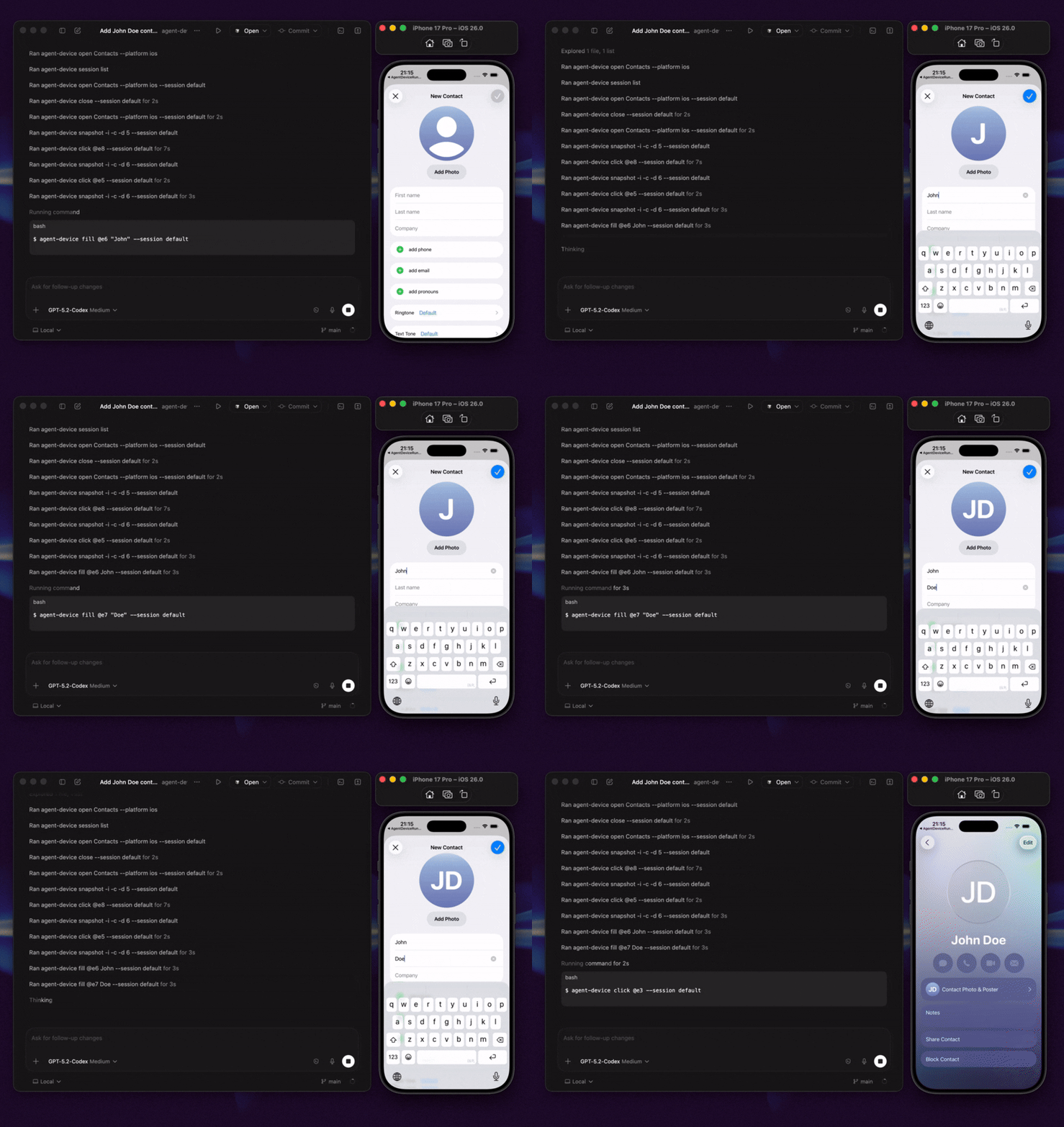
Add a contact in the built-in iOS Contacts app:
# Start a session.
agent-device open Contacts --platform ios

# Inspect the screen. The example below shows the output; refs vary.
agent-device snapshot -i
# @e2 [button] "Add"

# Use the ref and wait for the UI to settle.
agent-device press @e2 --settle
# The diff includes:
# + @e7 [text-field] "First name"

agent-device fill @e7 "Ada" --settle
# The next diff shows changed values and current refs:
# - @e7 [text-field] "First name"
# + @e14 [text-field] "Ada"
# = @e15 [text-field] "Last name"

# Capture evidence and close the session.
agent-device screenshot ./contact-form.png
agent-device close
Refs are valid only in the latest output: after a --settle command, use the refs in its diff, and take a new snapshot only if the diff omits what you need. Snapshots come from the app's accessibility tree, so clear labels, roles, and test IDs make agent runs more reliable; use screenshots and video as evidence or when accessibility data is poor.
Add MCP tools to your agent
agent-device mcp starts the official stdio MCP server, exposing the installed commands as structured tools over the same execution path as the CLI:
{
  "mcpServers": {
    "agent-device": {
      "command": "agent-device",
      "args": ["mcp"]
    }
  }
}
See AI agent setup for per-client setup and when to prefer plain CLI over MCP.
Script it from Node.js
createAgentDeviceClient() gives Node.js code typed access to the same commands, as model tools in your own agent or from orchestration code:
import { createAgentDeviceClient } from 'agent-device';

const client = createAgentDeviceClient({ session: 'qa-run' });
try {
  await client.apps.open({ app: 'com.apple.Preferences', platform: 'ios' });
  const snapshot = await client.capture.snapshot({ interactiveOnly: true });
  const button = snapshot.nodes.find((node) => node.role === 'button');
  if (button) await client.interactions.press({ ref: button.ref });
} finally {
  await client.sessions.close();
}
See the Node.js API, the runnable examples, and the AI SDK and Eve integration guides.
What agents can do
- Inspect app state through accessibility snapshots, refs, and selectors, and profile React Native renders to find what makes an interaction slow.
- Act on visible UI by tapping or pressing elements, filling fields, scrolling, making gestures, waiting, asserting state, and handling alerts.
- Diagnose failures with screenshots, video, logs, traces, network data, performance samples, crash details, and React profiles.
- Repeat workflows by saving working steps as
.adscripts for local use or CI. Export strict Maestro YAML when needed.
See Commands for the commands and evidence each target supports.

What to ask your agent
With the CLI installed, prompts like these work end to end:
- "Implement the onboarding screen, run it on the iOS simulator and Android emulator, and attach screenshots."
- "Reproduce this crash and capture the logs that lead up to it."
- "Check whether this change causes unnecessary React Native re-renders."
- "Explore the checkout flow once, save it as a replay script, and run it in CI."
- "Verify this pull request on a physical device and attach reviewable evidence."
Next steps
- AI agent setup: skills, project rules, and per-client setup for Cursor, Codex, Claude Code, Windsurf, and others.
- Quick start: open an app, read its UI, and interact with it from the command line.
- Replay and E2E testing and Debugging and profiling: repeatable tests and bug hunting.
Where to run agent-device
The same session and evidence model works at every step: the agent explores the app, captures evidence, saves a replay, runs it in CI, and moves onto remote devices.
| Path | Best for | Start with |
|---|---|---|
| Local | Trying commands and debugging apps on simulators, emulators, physical devices, macOS, and Linux. | Follow the Quick Start. |
| CI/CD | Automated pull request and merge validation with replay scripts and captured artifacts. | Try the EAS workflow template. |
| Cloud / remote | Linux runners, managed devices, and remote jobs. | Set up a remote proxy, connect a device cloud (BrowserStack, AWS Device Farm, TestMu AI, Limrun), or contact Callstack for team QA. |
How it works
agent-device keeps device state in sessions. It uses a local accessibility bridge for iOS Simulator snapshots and XCTest for iOS interactions, physical iOS, and tvOS; ADB and the snapshot helper on Android, Android TV, and Fire OS; HDC and ArkUI uitest on HarmonyOS; Vega CLI/VDA on the Vega Virtual Device; a local helper on macOS, including Electron and other Chromium-based apps through the accessibility tree; and AT-SPI on Linux.
Support depth varies by target. Some backends, such as HarmonyOS and Vega OS, cover a subset of commands; run agent-device capabilities --platform <platform> to see what a target supports. The capabilities matrix shows which commands each target, desktop, web, and cloud provider supports.
Sessions are scoped to the caller's git worktree, and host-local device claims stop parallel agents from taking over each other's simulators and emulators. Run agent-device device status to inspect ownership without a daemon, and agent-device device release --stale to release claims whose owner is provably no longer running. The same commands drive hosted devices on BrowserStack, AWS Device Farm, TestMu AI, and Limrun.
agent-device uses the inspect-act-verify process from Vercel's agent-browser for mobile, TV, and desktop apps. Basic --platform web support runs agent-browser in the same session and replay system.
FAQ
What is agent-device?
agent-device is a command-line tool and MCP server that lets AI coding agents inspect, control, and verify mobile apps and save evidence for review. It supports iOS, Android, HarmonyOS, TV, web, macOS, and Linux.
Is there an MCP server for mobile app automation?
Yes. agent-device mcp starts the official stdio MCP server. The Quick start above has the client config, and AI agent setup covers per-client details.
Does it work with React Native, Expo, Flutter, and native apps?
Yes. agent-device supports native iOS and Android apps, plus React Native, Expo, and Flutter apps on supported targets. The commands and evidence vary by target.
How is it different from mobile MCP servers?
The MCP server is one entry point to the same runtime used by the CLI and typed Node.js API. Sessions, device ownership, selectors, evidence, replay, CI workflows, and cloud routing stay consistent across all three.
Can I build my own agent or QA product on agent-device?
Yes. The typed Node.js client is a public surface over that same runtime, so an agent you build inherits everything above. Start from the Node.js API, AI SDK, or Eve guides.
How is it different from Appium, Detox, or Maestro?
With agent-device, an agent reads app state and chooses each command at run time. For stable, repeatable test suites, use e2e, a TypeScript testing framework for web and mobile apps. agent-device can also save its runs as .ad scripts or export them as strict Maestro YAML.
Can agent-device run in CI?
Yes. Record a run as an .ad script, replay it in CI, and keep the screenshots and logs as artifacts; the EAS workflow template is a working example.
Articles and videos
Articles
- Build an AI QA agent for Expo apps with EAS Workflows
- Agent Device: iOS & Android automation for AI agents
- Building mobile QA agents with Vercel Eve
- How we optimized Agent Device for mobile app automation
Videos
- Verifying mobile apps with agent-device
- Using agent-device in an AI coding workflow
- Cloud agents that test mobile apps on real devices
Who uses agent-device?
Teams and developers at Callstack, JPMorgan Chase, Expensify, Shopify, Kindred, Total Wine & More, LegendList, HerLyfe, App & Flow, and others use agent-device.
Documentation
Contributing
See CONTRIBUTING.md.
Made at Callstack
agent-device is open source under the MIT license. Visit agent-device.dev or contact Callstack.
Perguntas sobre o MCP agent-device
Como adiciono o MCP agent-device ao Claude Code?
Execute claude mcp add agent-device -- npx -y agent-device mcp no seu terminal. Adicione --scope user para torná-lo disponível em todos os projetos.
Como adiciono o MCP agent-device ao Cursor?
Abra ~/.cursor/mcp.json e adicione o servidor em mcpServers, usando a configuração do Cursor mostrada na seção de instalação acima.
Quais ferramentas o MCP agent-device oferece?
Ele expõe 62 ferramentas, incluindo action-button, alert, app-switcher, apps, appstate.
O que é o agent-device?
É uma ferramenta de linha de comando e um MCP server que permite que agentes de codificação de IA inspecionem, controlem e verifiquem aplicativos móveis enquanto salvam evidências para revisão.
Ele funciona com React Native, Expo, Flutter e aplicativos nativos?
Sim, ele suporta aplicativos nativos de iOS e Android, bem como aplicativos React Native, Expo e Flutter em alvos suportados.
Existe um MCP server para automação de aplicativos móveis?
Sim, executar 'agent-device mcp' inicia o MCP server oficial via stdio.
Posso construir meu próprio agente ou produto de QA com o agent-device?
Sim, você pode usar o cliente Node.js tipado para construir seu próprio agente ou código de orquestração.