
MCP server OpenCode
Commit 12 de nov. de 2026Delega tarefas pesadas de modelos orquestradores para subagentes OpenCode isolados para preservar a qualidade da janela de contexto e reduzir custos de tokens.
Também conhecido como alejandro-technology/opencode-mcp, mcp-server-opencode
- Stars
- 6
- Ferramentas
- 10
- Downloads, 30 dias
- —
- Versão mais recente
- —
- Último commit
- 12 de nov. de 2026
- Licença
- —
O que é o MCP OpenCode?
Delega tarefas pesadas de modelos orquestradores para subagentes OpenCode isolados para preservar a qualidade da janela de contexto e reduzir custos de tokens. Ele expõe 10 ferramentas, como opencode_start_server, opencode_stop_server, opencode_list_agents.
Resumo gerado a partir do README do projeto
Sobre o MCP server de OpenCode
Delegar tarefas computacionais pesadas de um orquestrador para subagentes isolados é o que o opencode-mcp permite para desenvolvedores que utilizam Claude Code, Codex, Cursor, Antigravity ou Pi. Ao transferir leituras de arquivos grandes, buscas extensas e loops repetitivos de testes para subagentes OpenCode em segundo plano, você evita o inchaço da janela de contexto e reduz os custos de tokens. Essa abordagem preserva a qualidade de raciocínio do seu agente principal, mantendo seu contexto enxuto e focado na orquestração.
Os usuários devem ter o Node.js 18+ e o OpenCode 1.x instalados e configurados no path do sistema para usar este servidor. O servidor gerencia tarefas assíncronas por meio de ferramentas específicas como opencode_start_task e opencode_wait_for_task, permitindo a execução paralela de múltiplas investigações. Ele suporta a execução de tarefas em um diretório compartilhado ou dentro de worktrees Git gerenciados e isolados para manter as alterações de código organizadas. O sistema fornece relatórios detalhados de uso, incluindo métricas divididas por provedor e modelo, para ajudar a acompanhar a economia das sessões delegadas.
O que você pode fazer com ele
- 1Execução de tarefas em paraleloEnvie múltiplas tarefas de investigação ou implementação em paralelo sem bloquear o orquestrador.
- 2Preservação da janela de contextoEvite poluir o contexto do seu agente principal com leituras de arquivos grandes ou saídas de buscas extensas.
- 3Depuração iterativa de subagentesEnvie prompts de acompanhamento para uma sessão de tarefa existente para realizar um trabalho iterativo de ida e volta com um subagente.
Escrito a partir do README do projeto. Cada caso de uso é verificado com uma citação dele.
Como instalar o MCP OpenCode
Formatos verificados em 10 nov 2026Adicionar ao CursorAdicionar ao GooseInstalar o MCP OpenCode no Claude Code
$ claude mcp add opencode-mcp -- npx -y mcp-server-opencodeInstalar o MCP OpenCode no Cursor
~/.cursor/mcp.json
{
  "mcpServers": {
    "opencode-mcp": {
      "command": "npx",
      "args": [
        "-y",
        "mcp-server-opencode"
      ]
    }
  }
}Instalar o MCP OpenCode no VS Code
.vscode/mcp.json
{
  "servers": {
    "opencode-mcp": {
      "type": "stdio",
      "command": "npx",
      "args": [
        "-y",
        "mcp-server-opencode"
      ]
    }
  }
}Instalar o MCP OpenCode no VS Code CLI
$ code --add-mcp '{"name":"opencode-mcp","type":"stdio","command":"npx","args":["-y","mcp-server-opencode"]}'Instalar o MCP OpenCode no Claude Desktop
claude_desktop_config.json
{
  "mcpServers": {
    "opencode-mcp": {
      "command": "npx",
      "args": [
        "-y",
        "mcp-server-opencode"
      ]
    }
  }
}Instalar o MCP OpenCode no Codex
$ codex mcp add opencode-mcp -- npx -y mcp-server-opencodeInstalar o MCP OpenCode no Codex config.toml
~/.codex/config.toml
[mcp_servers.opencode-mcp]
command = "npx"
args = ["-y", "mcp-server-opencode"]
Instalar o MCP OpenCode no Gemini CLI
$ gemini mcp add -s user opencode-mcp npx -- -y mcp-server-opencodeInstalar o MCP OpenCode no Gemini settings.json
~/.gemini/settings.json
{
  "mcpServers": {
    "opencode-mcp": {
      "command": "npx",
      "args": [
        "-y",
        "mcp-server-opencode"
      ]
    }
  }
}Ferramentas do MCP OpenCode 10
Detectadas a partir do READMEopencode_start_serveropencode_stop_serveropencode_list_agentsopencode_start_taskopencode_continue_taskopencode_cancel_taskopencode_cleanup_workspaceopencode_get_task_statusopencode_get_task_resultopencode_wait_for_task
| opencode_start_server | — | |
| opencode_stop_server | — | |
| opencode_list_agents | — | |
| opencode_start_task | — | |
| opencode_continue_task | — | |
| opencode_cancel_task | — | |
| opencode_cleanup_workspace | — | |
| opencode_get_task_status | — | |
| opencode_get_task_result | — | |
| opencode_wait_for_task | — |
Configuração
MCP_TOOL_TIMEOUTOPENCODE_MCP_SMOKE_MODEL
| Nome | Descrição | Tipo |
|---|---|---|
| MCP_TOOL_TIMEOUT | — | |
| OPENCODE_MCP_SMOKE_MODEL | — |
Verificações automatizadas
Executado em 13 de nov. de 2026Relatório completo →Ainda não verificado. Um servidor precisa de uma pontuação de 80, nenhum problema grave e dados suficientes para verificarmos. Como as verificações funcionam · O que corrigir para ganhar mais pontos

- Repositório de origem vinculado e acessívelalejandro-technology/opencode-mcp is public and reachablegithub.com/alejandro-technology/opencode-mcp ↗Passou
- O pacote indica este repositório como sua origemmcp-server-opencode names alejandro-technology/opencode-mcp as sourcenpmjs.com/package/mcp-server-opencode ↗Passou
- Proveniência da build (atestação Sigstore)No build attestation published for this releaseNão verificado
- Licença de código aberto (OSI)No licenseProblema encontrado
- Commit ou release no último anoLast commit or release 2026-11-12github.com/alejandro-technology/opencode-mcp ↗Passou
- OpenSSF ScorecardNão verificado
- Nome do pacote não é próximo a um pacote popularNo popular package one edit away from mcp-server-opencodePassou
- Nenhum aviso crítico no pacote ou em suas dependênciasNão verificado
- Sem instruções ocultas para o modelo10 tool descriptions and the README read; no override phrases, credential paths or hidden charactersPassou
- Ferramentas destrutivas estão rotuladasNo tool named like delete, drop or execPassou
- O endpoint remoto responde ao handshake do MCPNão verificado
README
Ver no GitHubopencode-mcp



Keep your lead agent lean and save tokens by delegating heavy tasks to background subagents.
opencode-mcp is a Model Context Protocol (MCP) server that connects orchestrator hosts (Claude Code, Codex, Cursor, Antigravity, Pi) with OpenCode subagents. Instead of polluting your orchestrator's context window with large file reads, extensive search outputs, and repetitive test runs, you delegate those tasks to isolated subagents and receive only concise, structured results.
Why this matters (Context Window Economics)
- 🧠 Prevent Context Rot & Bloat: Monolithic agents suffer reasoning degradation as the context fills up. Keeping your lead agent as an orchestrator preserves high reasoning quality.
- 💰 Slash Token Costs: Running large exploratory reads or test-fix loops directly inside your primary (Fable/Opus, Astra/Sol) session repeatedly bills for thousands of cached tokens on every follow-up turn. Subagents run in isolated sessions using optimal models.
- ⚡ Asynchronous Parallel Execution: Dispatch multiple investigation or implementation tasks in parallel without blocking the orchestrator.
Quick install
Requires Node.js 18+ and OpenCode 1.x installed and configured (opencode must be on your PATH, with at least one provider/model set up) — this server spawns and drives OpenCode instances.
For Claude Code:
claude mcp add opencode -- npx -y mcp-server-opencode
For Codex:
codex mcp add opencode -- npx -y mcp-server-opencode
See Installation for manual config, and from-source options.
Tools
| Tool | Description |
|---|---|
opencode_start_server |
Start a new OpenCode server instance in the MCP process working directory |
opencode_stop_server |
Stop a running OpenCode server instance |
opencode_list_agents |
List agents/models available on a server instance (optional directory selects a project) |
opencode_start_task |
Delegate a task to an agent by starting a new session and prompt (optional agent / model override) |
opencode_continue_task |
Send a follow-up prompt to an existing task's session for iterative back-and-forth with the subagent |
opencode_cancel_task |
Abort a running delegated task by cancelling its session |
opencode_cleanup_workspace |
Explicitly remove an owned Git worktree after task reports finalize; dirty worktrees require opt-in discard |
opencode_get_task_status |
Poll the status of a delegated task (pending / running / completed / failed / empty / cancelled); optional include_progress adds a partial output snippet and the currently running tool while it's still running |
opencode_get_task_result |
Fetch the final result of a completed task |
opencode_wait_for_task |
Long-poll one or more delegated tasks until they finish (mode: "all" or "any") or the timeout elapses; optional include_progress best-effort enriches unfinished tasks within the same deadline, falling back to the last observed status/progress when time runs out |
Delegation workflow and model-selection guidance are provided through the MCP server instructions.
How it works
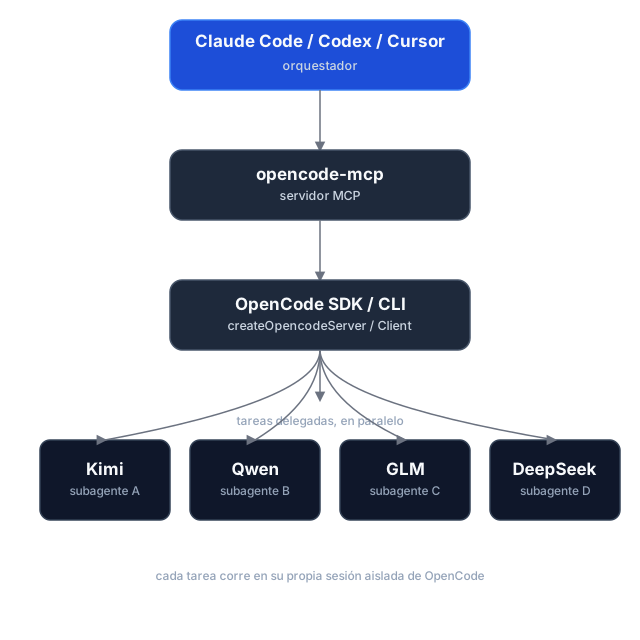
Task delegation is asynchronous: opencode_start_task returns a task_id and run_id without waiting, so hosts can start tasks in parallel. Tasks use the selected directory by default; managed Git worktrees are optional. Poll for status and retrieve results separately. If dispatch is uncertain, use the returned IDs to check or cancel the task instead of retrying it.
Execution reports and caller checks
Start and continuation calls can include expected_changes and checks. Status and result responses report workspace changes, verification, diagnostics, and evidence; pass a run_id to retrieve a historical run. Workspace changes are best-effort evidence, since concurrent writers can make attribution uncertain.
Shared directories and managed worktrees
Tasks run in the selected existing directory (shared, the default), or in an isolated managed Git worktree based on a commit. Worktrees are kept after execution; use opencode_cleanup_workspace with its workspace_id after reports are finalized. Cleanup only removes worktrees managed by this server, and dirty worktrees require explicit discard.
Usage reporting
Status, wait, and result responses include run and session usage snapshots, with metrics broken down by provider and model. Missing metrics remain unknown rather than zero, and cost is OpenCode-reported—not an invoice total. Finalized runs retain their snapshots for historical retrieval.
Task history and workspace ownership are held in memory for the lifetime of the MCP process. Restarting loses these records; retained worktrees are not automatically rediscovered.
Installation
Prerequisites
- Node.js 18+
- OpenCode 1.x installed and configured (
opencodemust be on yourPATH, with at least one provider/model set up) — this server spawns and drives OpenCode instances.
The current adapter uses the OpenCode v1 SDK/API and was validated against OpenCode 1.18.34 , 1.19.5. OpenCode 2.x is not yet supported.
Option 1 — npm (recommended)
The package is published as mcp-server-opencode. No cloning or building needed — point your MCP host at npx:
For Claude Code, one command does it:
claude mcp add opencode -- npx -y mcp-server-opencode
Or manually
{
  "mcpServers": {
    "opencode": {
      "command": "npx",
      "args": ["-y", "mcp-server-opencode"]
    }
  }
}
For Codex, add the server to ~/.codex/config.toml:
[mcp_servers.opencode]
command = "npx"
args = ["-y", "mcp-server-opencode"]
Or install it globally and use the binary directly:
npm install -g mcp-server-opencode
{
  "mcpServers": {
    "opencode": {
      "command": "opencode-mcp"
    }
  }
}
Option 2 — from source
git clone https://github.com/alejandro-technology/opencode-mcp.git
cd opencode-mcp
pnpm install
pnpm build
Then point your MCP host at the built entrypoint:
{
  "mcpServers": {
    "opencode": {
      "command": "node",
      "args": ["/path/to/opencode-mcp/build/src/index.js"]
    }
  }
}
Restart your MCP host after editing the config; the opencode_* tools should appear in its tool list.
Configuration
MCP_TOOL_TIMEOUT
opencode_wait_for_task accepts a timeout_ms input, but it's clamped to a server-side maximum so a single call stays inside the calling host's own MCP request timeout. That maximum defaults to 55000 ms and is configurable via MCP_TOOL_TIMEOUT.
The default is deliberately low: MCP hosts abort long tool requests with MCP error -32001: Request timed out before the tool can answer (observed on OpenCode hosts and the MCP Inspector at 100s+), so a graceful timed_out: true payload at 55s always beats a dead transport. Loop the wait — call opencode_wait_for_task again while timed_out is true — instead of raising timeout_ms. Raise this only when your host demonstrably tolerates longer tool requests.
MCP_TOOL_TIMEOUT can be set two ways:
-
Environment variable — set it in the MCP server config:
{ "mcpServers": { "opencode": { "command": "node", "args": ["/path/to/opencode-mcp/build/src/index.js"], "env": { "MCP_TOOL_TIMEOUT": "1200000" } } } } -
CLI argument — pass
MCP_TOOL_TIMEOUT=<ms>as an extra arg to the server process:{ "mcpServers": { "opencode": { "command": "node", "args": [ "/path/to/opencode-mcp/build/src/index.js", "MCP_TOOL_TIMEOUT=1200000" ] } } }
If both are present, the environment variable takes precedence over the CLI argument. Invalid or non-numeric values fall back to the 55000 ms default.
Permissions and trust
Headless tasks automatically answer permission prompts. Set OPENCODE_MCP_EXTERNAL_DIR to read-only (default), allow, or deny to control external-directory requests. An environment variable takes precedence over an OPENCODE_MCP_EXTERNAL_DIR=<policy> CLI argument; explicit OpenCode deny rules remain in effect.
Use this server only with trusted hosts and repositories. Git worktrees isolate source changes, not OS permissions: agents and caller-provided checks run as your local user, not in a security sandbox.
Development
Project structure
src/
├── index.ts                   # MCP server entrypoint (stdio transport, shutdown handlers)
└── modules/
    ├── tools/                 # One file per MCP tool, registered in index.ts
    └── shared/                # Cross-tool infrastructure (selected modules below)
        ├── server-registry.ts   # Tracks running OpenCode servers
        ├── task-registry.ts     # Task/session identity and per-run history
        ├── opencode-client.ts   # SDK clients, status derivation, and progress
        ├── run-observer.ts      # Background run finalization and result caching
        ├── execution-report.ts  # Workspace evidence and executable checks
        ├── execution-usage.ts   # Run/session usage aggregation
        ├── workspace-manager.ts # Managed Git worktree lifecycle
        ├── permissions.ts       # Headless permission decisions and responses
        ├── instructions.ts      # Delegation workflow and model-selection guidance
        ├── config.ts            # MCP_TOOL_TIMEOUT resolution
        └── mcp-result.ts        # JSON tool result helpers
Each module ships with a *.test.ts Vitest suite under the parallel tests/ tree mirroring src/.
Getting started
Use Node.js 22.18+ for development and smoke tests (native TypeScript execution); CI checks Node.js 22 and 24. The published server retains its Node.js 18+ runtime requirement.
pnpm install
pnpm dev     # runs the server through the MCP Inspector (tsx, no build needed)
Other scripts:
pnpm test           # vitest run
pnpm test:coverage  # vitest run --coverage
pnpm lint           # biome check
pnpm lint:write     # biome check --write
pnpm build          # clean tsc build to ./build (also the source typecheck)
Real OpenCode smoke tests
The opt-in smoke harness starts a real OpenCode server and removes its temporary fixtures afterward. It is not part of default CI.
pnpm smoke --message-id-only   # non-billable message-ID contract probe
pnpm smoke                     # full smoke; requires credentials and may incur model charges
The full smoke covers reports, usage, continuation, cancellation, isolated worktrees, and cleanup. Its default model is openai/gpt-6-luna; override it with an exact enabled model ID:
OPENCODE_MCP_SMOKE_MODEL=provider/model pnpm smoke
Perguntas sobre o MCP OpenCode
Como adiciono o MCP OpenCode ao Claude Code?
Execute claude mcp add opencode-mcp -- npx -y mcp-server-opencode no seu terminal. Adicione --scope user para torná-lo disponível em todos os projetos.
Como adiciono o MCP OpenCode ao Cursor?
Abra ~/.cursor/mcp.json e adicione o servidor em mcpServers, usando a configuração do Cursor mostrada na seção de instalação acima.
Quais ferramentas o MCP OpenCode oferece?
Ele expõe 10 ferramentas, incluindo opencode_start_server, opencode_stop_server, opencode_list_agents, opencode_start_task, opencode_continue_task.
Como este servidor ajuda no gerenciamento da janela de contexto?
Ele evita a degradação e o inchaço do contexto ao delegar leituras de arquivos grandes, buscas extensas e execuções repetitivas de testes para subagentes isolados, retornando apenas resultados concisos para o agente principal.
Posso executar várias tarefas ao mesmo tempo?
Sim, a delegação de tarefas é assíncrona, permitindo que você envie múltiplas tarefas de investigação ou implementação em paralelo sem bloquear o orquestrador.
Quais são os requisitos de sistema para instalação?
Você precisa ter o Node.js 18+ e o OpenCode 1.x instalados e configurados no seu PATH.