로컬 임베딩 모델을 사용하여 로컬, GitHub, Bitbucket 저장소 전체에서 시맨틱 검색을 수행할 수 있도록 코딩 에이전트의 기능을 확장합니다.
다른 이름 markdorof/delphi-code, delphi-code
- 스타
- 0
- Tools
- —
- 다운로드, 30일
- 1,332
- 최신 버전
- 0.3.4
- 마지막 커밋
- 2026년 10월 18일
- 라이선스
- Apache-2.0
Delphi Code MCP란?
Delphi Code은(는) MCP server입니다. 로컬 임베딩 모델을 사용하여 로컬, GitHub, Bitbucket 저장소 전체에서 시맨틱 검색을 수행할 수 있도록 코딩 에이전트의 기능을 확장합니다.
프로젝트 README에서 생성된 요약
Delphi Code MCP server 정보
Delphi Code는 로컬 디렉터리와 GitHub 및 Bitbucket 저장소를 함께 인덱싱하여 코딩 에이전트에게 시맨틱 검색 기능을 제공합니다. 정확한 키워드 매칭 대신 로컬 임베딩 모델을 사용하여 의미를 기반으로 관련 코드를 찾아냅니다. 이를 통해 개발자는 소스 파일에 특정 용어가 포함되어 있지 않더라도 여러 프로젝트에 걸쳐 로직을 찾아낼 수 있습니다. 서버가 사용자의 기기에서 완전히 실행되므로 코드는 로컬 환경을 벗어나지 않고 프라이버시가 보장됩니다.
Apple silicon을 사용하는 macOS 사용자를 위해 설계된 이 도구는 Claude Code, Cursor, VS Code, Gemini CLI 등 다양한 AI 클라이언트와 통합됩니다. 사용자는 CLI 또는 로컬 웹 UI를 통해 코드베이스를 관리할 수 있습니다. 설정 시 모델을 한 번 다운로드하면, 이후에는 GPU나 클라우드 제공업체 없이도 거의 즉시 검색이 가능합니다. 원격 저장소에 접근하려면 GITHUB_TOKEN 또는 Bitbucket 인증 정보가 필요하지만, 실제 인덱싱 및 검색 프로세스는 오프라인으로 유지됩니다.
활용 사례
- 1저장소 간 로직 탐색AI 에이전트에게 서로 다른 저장소에서 특정 백엔드 로직이 요청을 처리하는 위치를 찾아달라고 요청합니다.
- 2시맨틱 코드 검색특정 텍스트 문자열을 사용하는 대신 코드의 목적을 설명하여 코드 스니펫을 찾습니다.
- 3자동 프로젝트 인덱싱코딩 어시스턴트가 검색할 수 있도록 로컬 경로 또는 원격 Git 저장소를 인덱스에 추가합니다.
프로젝트의 README를 바탕으로 작성되었습니다. 모든 활용 사례는 해당 내용의 인용문과 대조하여 확인합니다.
Delphi Code MCP 설치 방법
형식 확인: 2026년 11월 10일Claude Code에 Delphi Code MCP 설치
$ claude mcp add delphi-code -- uvx delphi-codeCursor에 Delphi Code MCP 설치
~/.cursor/mcp.json
{
  "mcpServers": {
    "delphi-code": {
      "command": "uvx",
      "args": [
        "delphi-code"
      ]
    }
  }
}VS Code에 Delphi Code MCP 설치
.vscode/mcp.json
{
  "servers": {
    "delphi-code": {
      "type": "stdio",
      "command": "uvx",
      "args": [
        "delphi-code"
      ]
    }
  }
}Claude Desktop에 Delphi Code MCP 설치
claude_desktop_config.json
{
  "mcpServers": {
    "delphi-code": {
      "command": "uvx",
      "args": [
        "delphi-code"
      ]
    }
  }
}Codex에 Delphi Code MCP 설치
~/.codex/config.toml
[mcp_servers.delphi-code]
command = "uvx"
args = ["delphi-code"]
Gemini CLI에 Delphi Code MCP 설치
~/.gemini/settings.json
{
  "mcpServers": {
    "delphi-code": {
      "command": "uvx",
      "args": [
        "delphi-code"
      ]
    }
  }
}자동 검사
2026년 11월 13일에 실행됨전체 보고서 →자동 검사를 통과했습니다. 이는 보안 감사가 아닙니다. 코드를 직접 읽고 서버에 필요한 최소한의 권한만 부여하십시오. 검사 방식

- 소스 저장소 연결 및 접근 가능통과
- 오픈 소스 라이선스 (OSI)통과
- 최근 1년 내 커밋 또는 릴리스통과
- 패키지 이름이 인기 패키지와 유사하지 않음통과
- 원격 엔드포인트가 HTTPS 사용검사되지 않음
- 파괴적인 도구에 라벨 표시됨검사되지 않음
- 모델에 대한 숨겨진 지침 없음통과
- 패키지와 의존성에 심각한 보안 권고 없음통과
README
GitHub에서 보기Delphi Code
Let your coding agent browse code across all your repositories. Index local projects and GitHub or Bitbucket repositories, then ask "where does the backend handle the refund the web app requests?" and get the right files from every repository at once, even when no file contains those words.
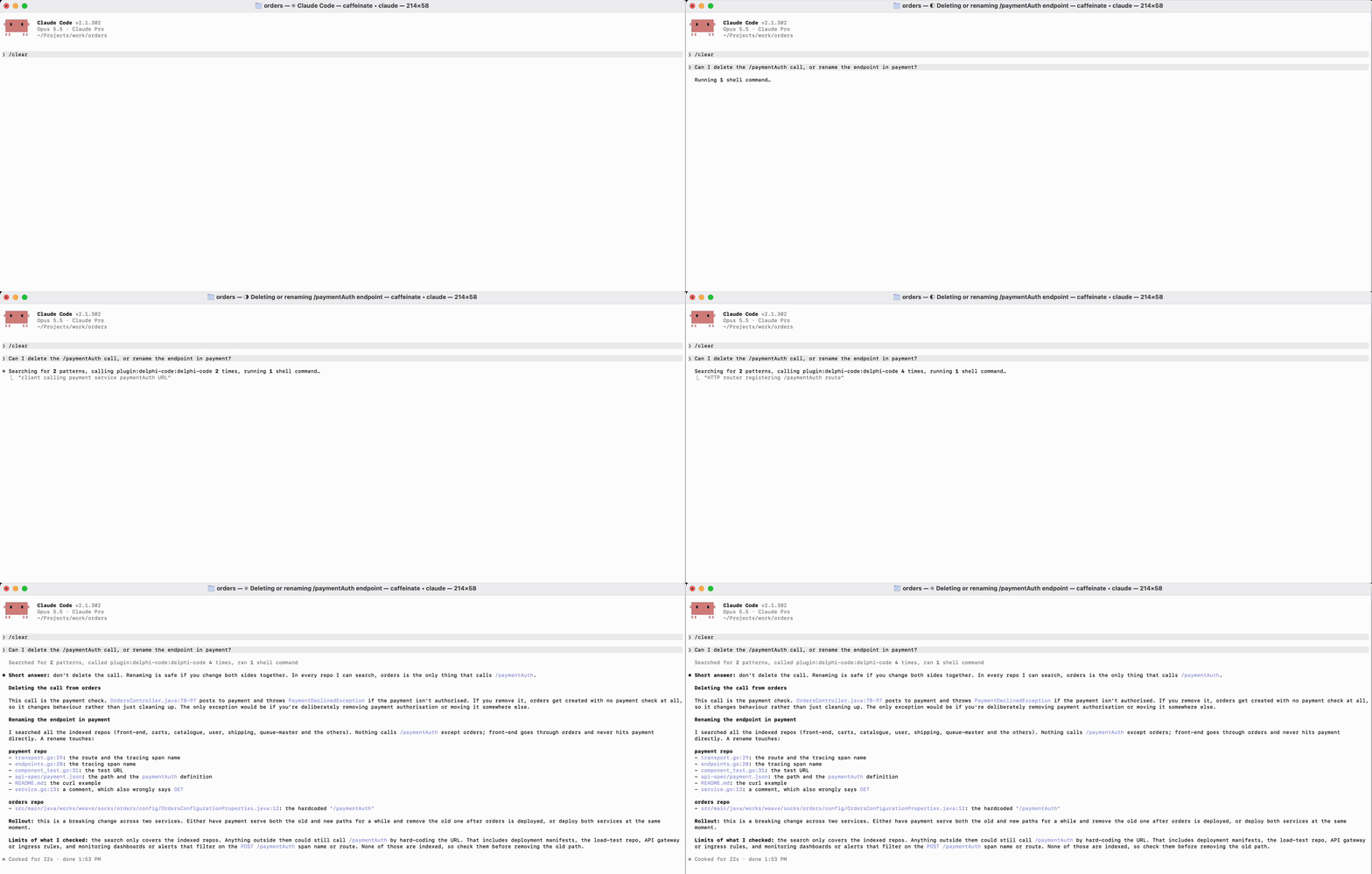
- Private: your code never leaves your machine. Indexing and search run offline with a local model; no account, cloud provider, or background daemon.
- Fast: the MCP server keeps the model loaded, so repeated searches are near-instant. No GPU needed.
- Works with your agents: Claude Code, Claude Desktop, Codex, Cursor, VS Code, Gemini CLI, and OpenCode.
Install
curl -LsSf https://github.com/markdorof/delphi-code/releases/latest/download/install.sh | sh
The script installs uv if needed, then runs setup, which downloads the embedding model once and connects every agent it finds. Options go after sh -s --: --no-setup, --no-connect, --version VERSION. With uv already installed:
uv tool install --managed-python --python 3.14 delphi-code
delphi-code setup
Requires macOS 14+ on Apple silicon (Linux is untested, Windows unsupported). delphi-code doctor checks the installation.
Use
delphi-code add ~/src/api github.com/octo/tools   # track and index projects
delphi-code search 'where are user passwords checked?'
delphi-code ui                                     # or do it all in the browser
Your agent calls the same search through MCP. After installing a new agent, run delphi-code connect. To connect one by hand:
| Agent | Setup |
|---|---|
| Claude Code | claude plugin marketplace add markdorof/delphi-code, then claude plugin install delphi-code@delphi-code |
| Codex | codex plugin marketplace add markdorof/delphi-code, then codex plugin add delphi-code@delphi-code |
| Cursor | Add {"mcpServers": {"delphi-code": {"type": "stdio", "command": "delphi-code", "args": ["mcp"]}}} to ~/.cursor/mcp.json |
| VS Code (Copilot) | code --add-mcp '{"name": "delphi-code", "command": "delphi-code", "args": ["mcp"]}' |
| Gemini CLI | gemini mcp add delphi-code delphi-code mcp |
| OpenCode | Add {"mcp": {"delphi-code": {"type": "local", "command": ["delphi-code", "mcp"]}}} to ~/.config/opencode/opencode.json |
For agents other than Claude Code and Codex, also copy the skill into the agent's skills folder so it knows when to search by meaning instead of grep.
Commands
| Command | What it does |
|---|---|
setup |
Downloads the model (or imports it with --from DIR on an offline machine) and connects agents. |
add [SOURCE ...] |
Tracks and indexes local paths or remote repositories (--ref picks a branch or tag). Without sources, picks repositories from your GitHub or Bitbucket account. |
sync [PROJECT ...] |
Updates tracked projects, re-embedding only what changed. |
index -p PATH |
Indexes a project once without tracking it. |
search QUERY |
Searches every index, or one with -p. Filter with --language, --path, --limit. |
list, status, remove NAME |
Show tracked projects, show a project's index, stop tracking a project. |
connect, disconnect |
Add or remove Delphi Code in your agents' configs. |
ui |
Opens a local web UI for search, projects, and setup checks. |
doctor |
Checks the model and storage. |
mcp |
Serves the commands as MCP tools over stdio. |
-p takes a path or an indexed project's name. index and add skip .gitignored files and accept --ignore, --path, and --language. Every command takes --help, and most take --json for scripts. Only setup, add, and sync use the network.
Settings
| Variable | Purpose |
|---|---|
GITHUB_TOKEN / GH_TOKEN |
GitHub access for remote repositories (falls back to gh auth token, then git's credentials) |
BITBUCKET_APP_PASSWORD with BITBUCKET_EMAIL or BITBUCKET_USERNAME |
Bitbucket access (an API token works) |
DELPHI_CODE_MODEL |
Use another local SentenceTransformers model instead of the default all-MiniLM-L6-v2 |
DELPHI_CODE_INDEX_ROOT, DELPHI_CODE_REGISTRY, DELPHI_CODE_LOG_FILE |
Move indexes, the tracked-project list, or the log |
DELPHI_CODE_LOG_LEVEL |
DEBUG, INFO, WARNING, ERROR, or OFF |
Data lives in ~/Library/Application Support/delphi-code on macOS and ~/.local/share/delphi-code on Linux.
Upgrade and uninstall
uv tool upgrade delphi-code
Your model and indexes are kept. If a command fails with index_incompatible, delete the index directory it names and run sync again. See releases for changes.
delphi-code disconnect
uv tool uninstall delphi-code
rm -rf ~/Library/Application\ Support/delphi-code
uv cache clean   # frees about 900 MB of downloaded packages
If the install script installed uv and you don't need it, uninstall uv and its Python too.
License
Apache-2.0. See THIRD_PARTY_NOTICES.md. To contribute, see CONTRIBUTING.md.
Delphi Code MCP 질문
Delphi Code MCP를 Claude Code에 추가하려면 어떻게 하나요?
터미널에서 claude mcp add delphi-code -- uvx delphi-code를 실행합니다. 모든 프로젝트에서 사용할 수 있게 하려면 --scope user를 추가합니다.
Delphi Code MCP를 Cursor에 추가하려면 어떻게 하나요?
~/.cursor/mcp.json를 열고 mcpServers 아래에 서버를 추가합니다. 위 설치 섹션에 표시된 Cursor 구성을 사용합니다.
코드가 비공개로 유지되나요?
네, 인덱싱과 검색이 로컬 모델을 통해 오프라인으로 실행되므로 코드가 기기를 벗어나지 않습니다.
Delphi Code와 호환되는 AI 에이전트는 무엇인가요?
Claude Code, Claude Desktop, Codex, Cursor, VS Code, Gemini CLI, OpenCode와 함께 사용할 수 있습니다.
지원되는 운영체제는 무엇인가요?
Apple silicon 기반의 macOS 14 이상 버전이 필요합니다. Linux는 현재 테스트되지 않았으며 Windows는 지원하지 않습니다.
인덱스에 새로운 저장소를 어떻게 추가하나요?
'add' 명령어를 사용하여 로컬 경로 또는 원격 저장소를 추적할 수 있습니다.