
AI 코딩 어시스턴트가 프로젝트 방향성과 의사결정 이력을 유지할 수 있도록 구조화된 계획, 빌드, 리뷰 및 릴리스 사이클을 제공합니다.
다른 이름 getpapi/papi, papi, @papi-ai/server
- 스타
- 11
- Tools
- 15
- 다운로드, 30일
- —
- 최신 버전
- 0.402.225
- 마지막 커밋
- 2026년 11월 5일
- 라이선스
- MIT
PAPI MCP란?
PAPI은(는) MCP server입니다. AI 코딩 어시스턴트가 프로젝트 방향성과 의사결정 이력을 유지할 수 있도록 구조화된 계획, 빌드, 리뷰 및 릴리스 사이클을 제공합니다. 15개 도구를 제공합니다. 예: orient, setup, plan.
프로젝트 README에서 생성된 요약
PAPI MCP server 정보
PAPI는 AI 코딩 어시스턴트가 프로젝트의 방향성과 의사결정 이력을 유지할 수 있도록 설계된 구조화된 관리 프레임워크를 제공합니다. 채팅창에서 컨텍스트를 잃어버리는 대신, 이 MCP server는 계획, 빌드, 리뷰, 릴리스 작업의 연속적인 루프를 구현합니다. 이 시스템을 통해 어시스턴트는 무엇을 선택했고 무엇을 거절했는지, 그리고 그 이유가 무엇인지 추적할 수 있어, 서로 다른 세션과 도구 사이에서도 유지되는 지속적인 의사결정 기록을 생성합니다.
사용자는 이 서버를 Cursor, Claude Code, Windsurf 또는 VS Code와 같은 MCP 클라이언트에 연결할 수 있습니다. 엔진은 호스팅되지만, @papi-ai/server 패키지는 로컬 런타임 역할을 합니다. 설정을 위해서는 getpapi.ai에서 무료 계정이 필요하며, 연결 토큰이나 브라우저 로그인을 통해 연동할 수 있습니다. 서비스는 최대 3개의 프로젝트까지 무료로 제공되며, 신용카드 등록 없이 초기 계획부터 최종 릴리스까지의 전체 라이프사이클을 지원합니다.
활용 사례
- 1세션 간 프로젝트 컨텍스트 유지AI 어시스턴트는 orient 도구를 사용하여 새로운 대화를 시작할 때 현재 사이클과 다음 단계를 즉시 파악할 수 있습니다.
- 2작업 관리 및 실행 자동화어시스턴트는 상위 목표를 구체적인 작업으로 분해하고 build handoffs를 사용하여 이를 실행할 수 있습니다.
- 3아키텍처 의사결정 및 추론 추적개발자는 논리 유실을 방지하기 위해 특정 기술적 경로를 선택하거나 포기한 이유를 기록하는 용도로 이 시스템을 사용할 수 있습니다.
- 4고수준 프로젝트 감사 수행strategy review 도구를 통해 AI는 단순히 작업 속도에만 집중하는 것이 아니라, 한 걸음 물러나 프로젝트의 전반적인 방향을 평가할 수 있습니다.
프로젝트의 README를 바탕으로 작성되었습니다. 모든 활용 사례는 해당 내용의 인용문과 대조하여 확인합니다.
PAPI MCP 설치 방법
형식 확인: 2026년 11월 10일Claude Code에 PAPI MCP 설치
$ claude mcp add papi -- npx -y @papi-ai/serverCursor에 PAPI MCP 설치
~/.cursor/mcp.json
{
  "mcpServers": {
    "papi": {
      "command": "npx",
      "args": [
        "-y",
        "@papi-ai/server"
      ]
    }
  }
}VS Code에 PAPI MCP 설치
.vscode/mcp.json
{
  "servers": {
    "papi": {
      "type": "stdio",
      "command": "npx",
      "args": [
        "-y",
        "@papi-ai/server"
      ]
    }
  }
}Claude Desktop에 PAPI MCP 설치
claude_desktop_config.json
{
  "mcpServers": {
    "papi": {
      "command": "npx",
      "args": [
        "-y",
        "@papi-ai/server"
      ]
    }
  }
}Codex에 PAPI MCP 설치
~/.codex/config.toml
[mcp_servers.papi]
command = "npx"
args = ["-y", "@papi-ai/server"]
Gemini CLI에 PAPI MCP 설치
~/.gemini/settings.json
{
  "mcpServers": {
    "papi": {
      "command": "npx",
      "args": [
        "-y",
        "@papi-ai/server"
      ]
    }
  }
}PAPI MCP 도구 15
README에서 감지됨orientsetupplanbuild_listbuild_executetutorial_modeboard_viewboard_editad_hocideabugstrategy_review
| orient | — | |
| setup | — | |
| plan | — | |
| build_list | — | |
| build_execute | — | |
| tutorial_mode | — | |
| board_view | — | |
| board_edit | — | |
| ad_hoc | — | |
| idea | — | |
| bug | — | |
| strategy_review | — |
도구 15개 모두 보기도구 수 줄이기
strategy_changezoom_outjoin
| strategy_change | — | |
| zoom_out | — | |
| join | — |
자동 검사
2026년 11월 12일에 실행됨전체 보고서 →자동 검사를 통과했습니다. 이는 보안 감사가 아닙니다. 코드를 직접 읽고 서버에 필요한 최소한의 권한만 부여하십시오. 검사 방식

- 소스 저장소 연결 및 접근 가능통과
- 오픈 소스 라이선스 (OSI)통과
- 최근 1년 내 커밋 또는 릴리스통과
- 패키지 이름이 인기 패키지와 유사하지 않음통과
- 원격 엔드포인트가 HTTPS 사용통과
- 파괴적인 도구에 라벨 표시됨통과
- 모델에 대한 숨겨진 지침 없음통과
- 패키지와 의존성에 심각한 보안 권고 없음통과
README
GitHub에서 보기PAPI





End-to-end project management for AI builders.
Your AI starts every session from zero. Your project stays on course.
AI coding tools are great at writing code and terrible at holding a direction. Scope grows, plans change, and the decisions behind them get made in a chat window and lost there. PAPI keeps the project on course. It gives your assistant structured plan, build, review and release cycles, plus a decision trail recording what was chosen, what was dropped, and why. Your assistant writes and reads it while it works, so it stays current without anyone maintaining it.
You connect it once. From then on, your assistant starts every session knowing which cycle you're on, what's in flight, and what to do next.
If PAPI is useful, star the repo. It's how other people building with AI assistants find it.
Free to start. The whole plan → build → review → release loop, on up to three projects, no card. Free runs a real project start to finish; it isn't a trial. Pricing.
What this repo is. Documentation, install guides, plugin and extension manifests, the PAPI agent skills, and the issue tracker. PAPI's engine is closed source and hosted — you connect to it, you don't build it from here. The
@papi-ai/serverpackage on npm is the supported local runtime. The contents of this repo are MIT.
Quick start
Let your AI install it. Paste this to your assistant — Cursor, Claude Code, Windsurf, Codex, VS Code, or any other MCP client:
Read https://getpapi.ai/llms.txt and set up PAPI
Your assistant reads the runbook and walks you through the whole first run: checking it's in the right project folder, connecting, setting up your project, planning your first cycle, and building your first task. It works in coding tools and in chat apps like claude.ai and ChatGPT, and you don't need to be a developer. (The same runbook lives in this repo as llms.txt and llms-install.md if your assistant can't fetch URLs.)
The one thing only you can do. You need a free account at getpapi.ai. After that there are two ways to connect:
- Connection token (default). Open the Connect panel on getpapi.ai, copy the project id and connection token under "This is your project", and hand them to your assistant. It puts them in your tool's config and PAPI works straight away, with no browser step.
- Browser sign-in. Your assistant adds the server and you approve it in the browser. No assistant can click through that screen for you, and until you do the server shows
Needs authentication.
Most tools only load a new connection when a conversation starts, so open a fresh conversation after connecting and ask your assistant to run orient.
Prefer to wire it up yourself?
In Claude Code, the shortest path is the plugin — two lines, nothing to copy or edit:
/plugin marketplace add getpapi/papi
/plugin install papi@papi
The plugin carries the server config and the PAPI skills for each phase of the cycle: planning, building, reviewing and releasing. It also includes check-mcp, which diagnoses a connection that isn't working, and papi-verify, which health-checks the current cycle.
Every tool also takes the same streamable-HTTP endpoint directly, https://mcp.getpapi.ai/mcp. In Claude Code that's:
claude mcp add --transport http papi https://mcp.getpapi.ai/mcp
Either way, finish with /mcp → papi → Authenticate. Or skip the browser step entirely with the connection token from the Connect panel:
claude mcp add --transport http papi https://mcp.getpapi.ai/mcp --header "Authorization: Bearer YOUR_CONNECTION_TOKEN" --header "x-papi-project-id: YOUR_PROJECT_ID"
The DeepSeek Harness bundle is in this repo but is not yet published to npm, so the command below won't resolve until it is. After creating a PAPI connection token, it will install with:
dsh plugin --profile web add @papi-ai/deepseek-harness
See PAPI for DeepSeek Harness for token handling, verification, compatibility, and removal.
Per-tool config for Cursor, VS Code, Windsurf, Codex, and any generic MCP client is in docs/install.md.
What you get
- plan breaks your goals into a cycle of right-sized tasks, each with a build handoff your assistant can execute directly.
- build tracks what was built, what surprised you, and what was discovered along the way.
- review and release close the loop, so every cycle feeds the next plan.
- strategy reviews every few cycles step back and check direction, not just velocity.
- A dashboard at getpapi.ai shows your cycles, board, and decisions, so you can see the state of the project without asking.
The methodology is the product: a plan, build, review, release loop your assistant runs with you, where each cycle's learnings feed the next plan. PAPI has been built with PAPI for every cycle in the badge above.
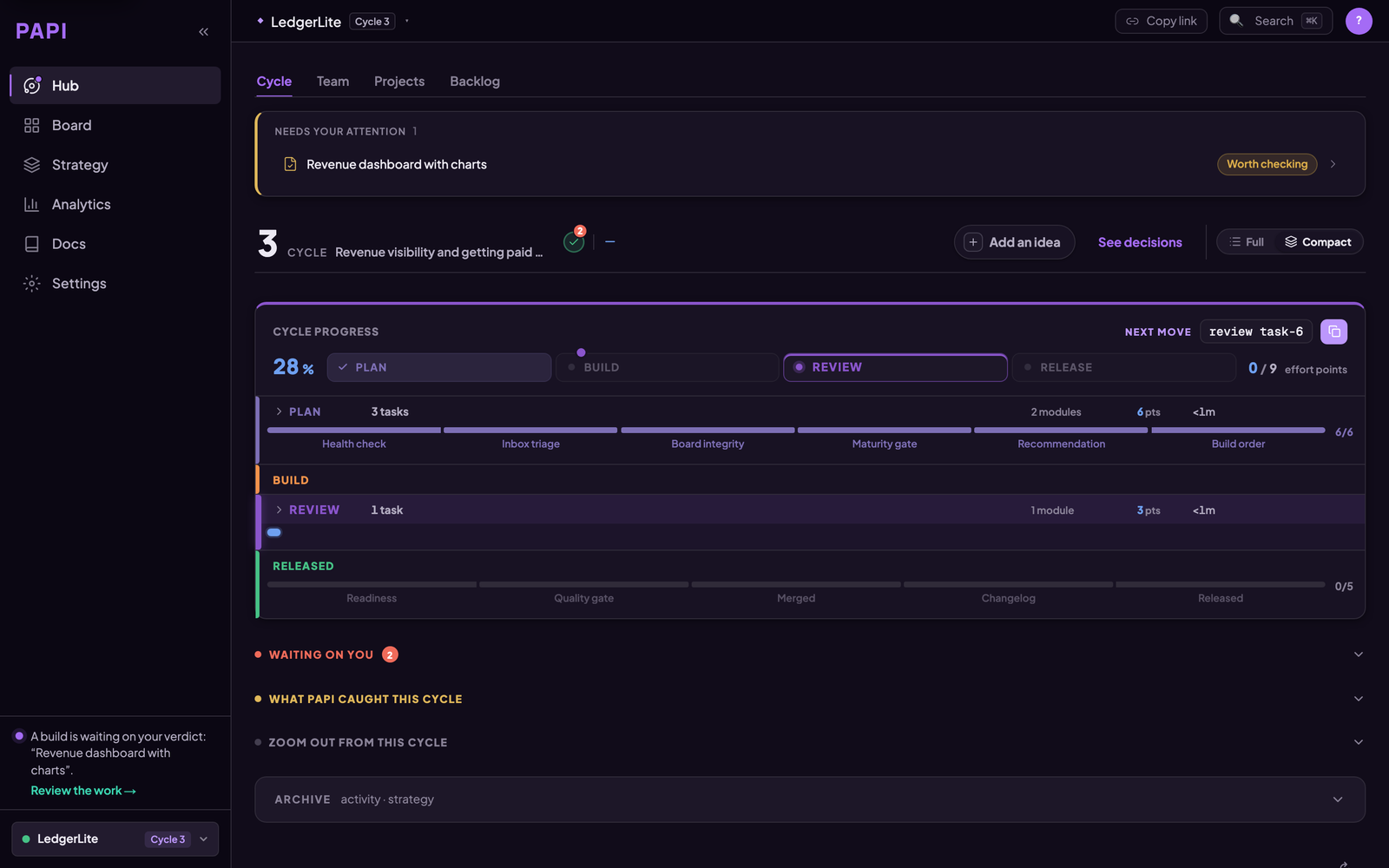
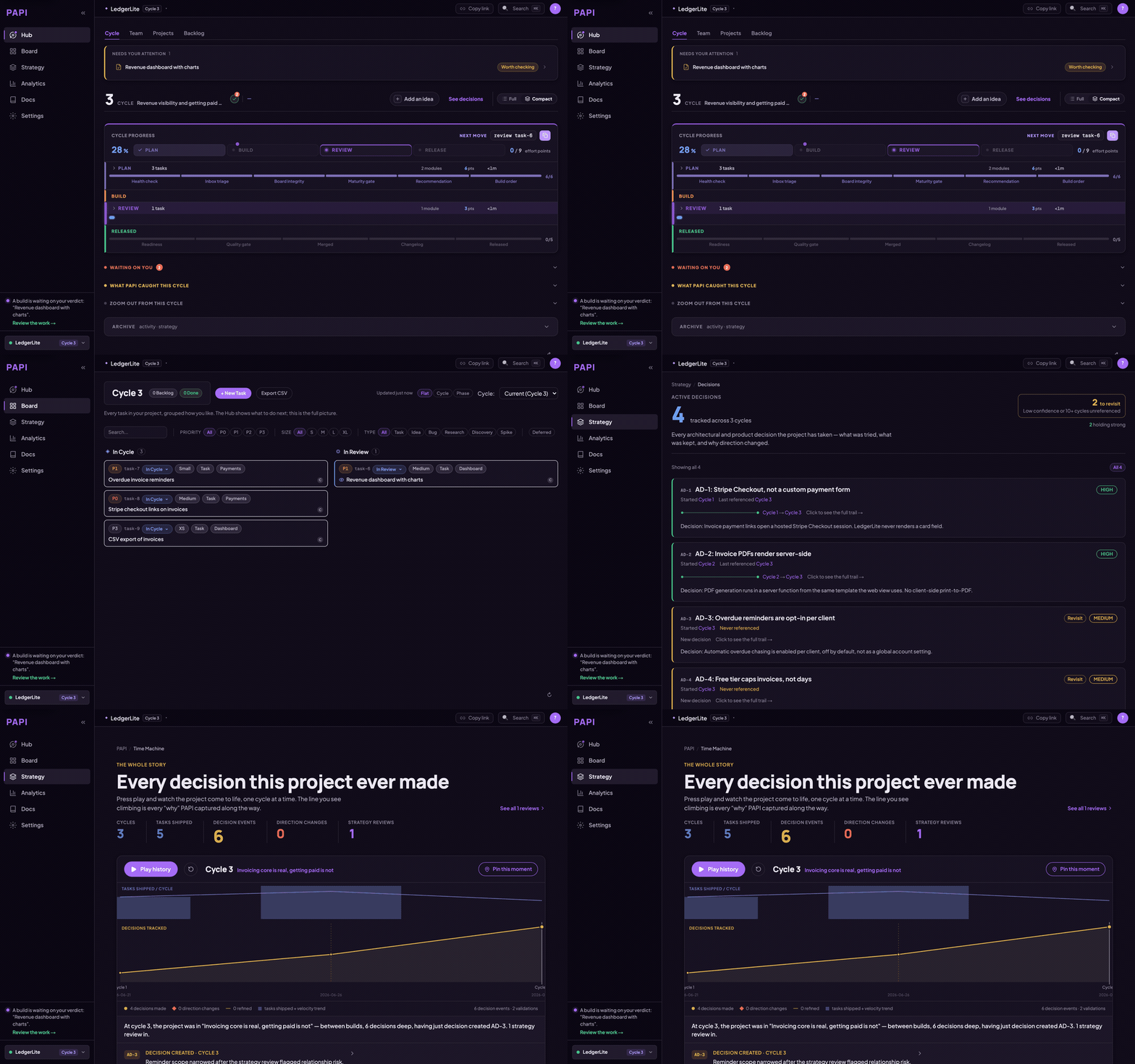
The hub opens on one question — what happens next. The cycle's progress through plan, build, review and release sits under it.
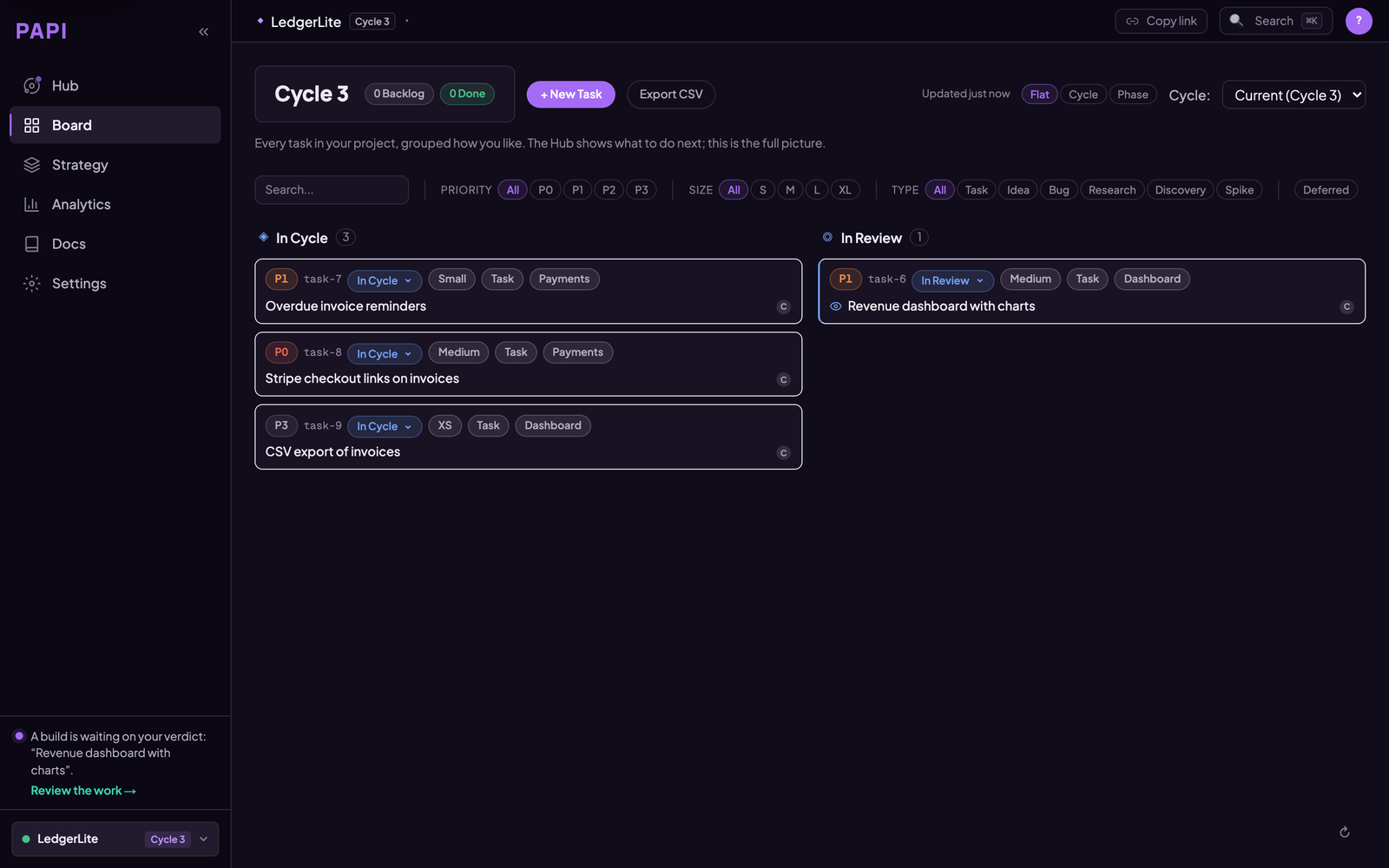
The board is the full picture. Your assistant writes to it as a side effect of working, so it is current without anyone maintaining it.
How PAPI differs from a tracker
Linear, Jira, Asana and Notion are built for people to write tickets and other people to read them. They suit that job well, and plenty of teams keep using them.
PAPI's board is written and read by your assistant as it works. Starting a build opens the task, finishing it files the report, and releasing closes the cycle. You approve the plan and sign off the review.
Taskmaster is a good way to break work into tasks inside a repo. PAPI adds state that lives outside the repo and persists across tools: cycles, build reports, review verdicts, and Active Decisions whose confidence changes as evidence arrives. The same project is available from Claude Code, Cursor, VS Code, Codex and the others, so switching tools doesn't reset it. Moving from Taskmaster? See PAPI vs Taskmaster.
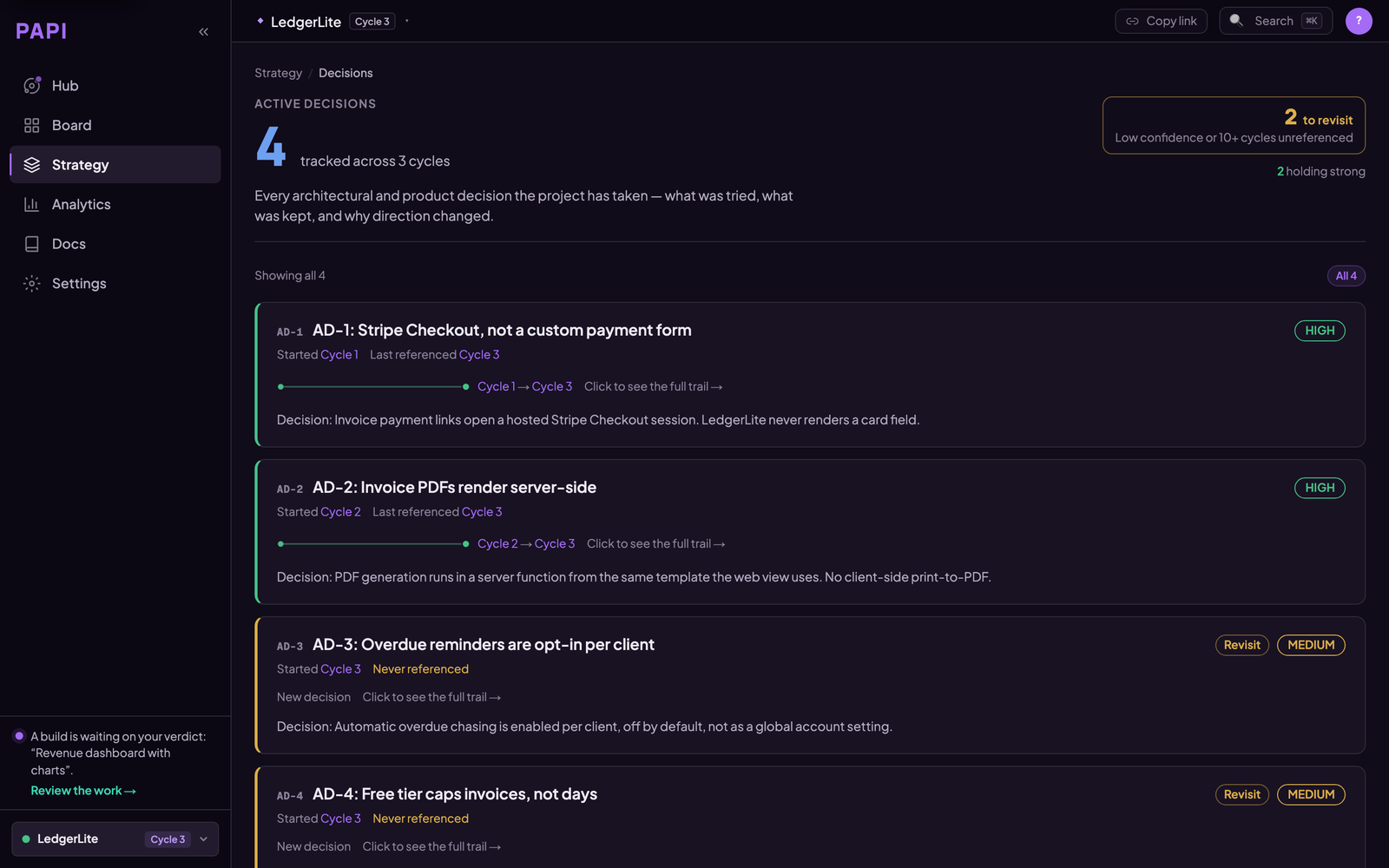
Active Decisions are the part a task tracker has no field for: what was decided, why, what was rejected, and when to revisit it. Confidence moves as evidence arrives.
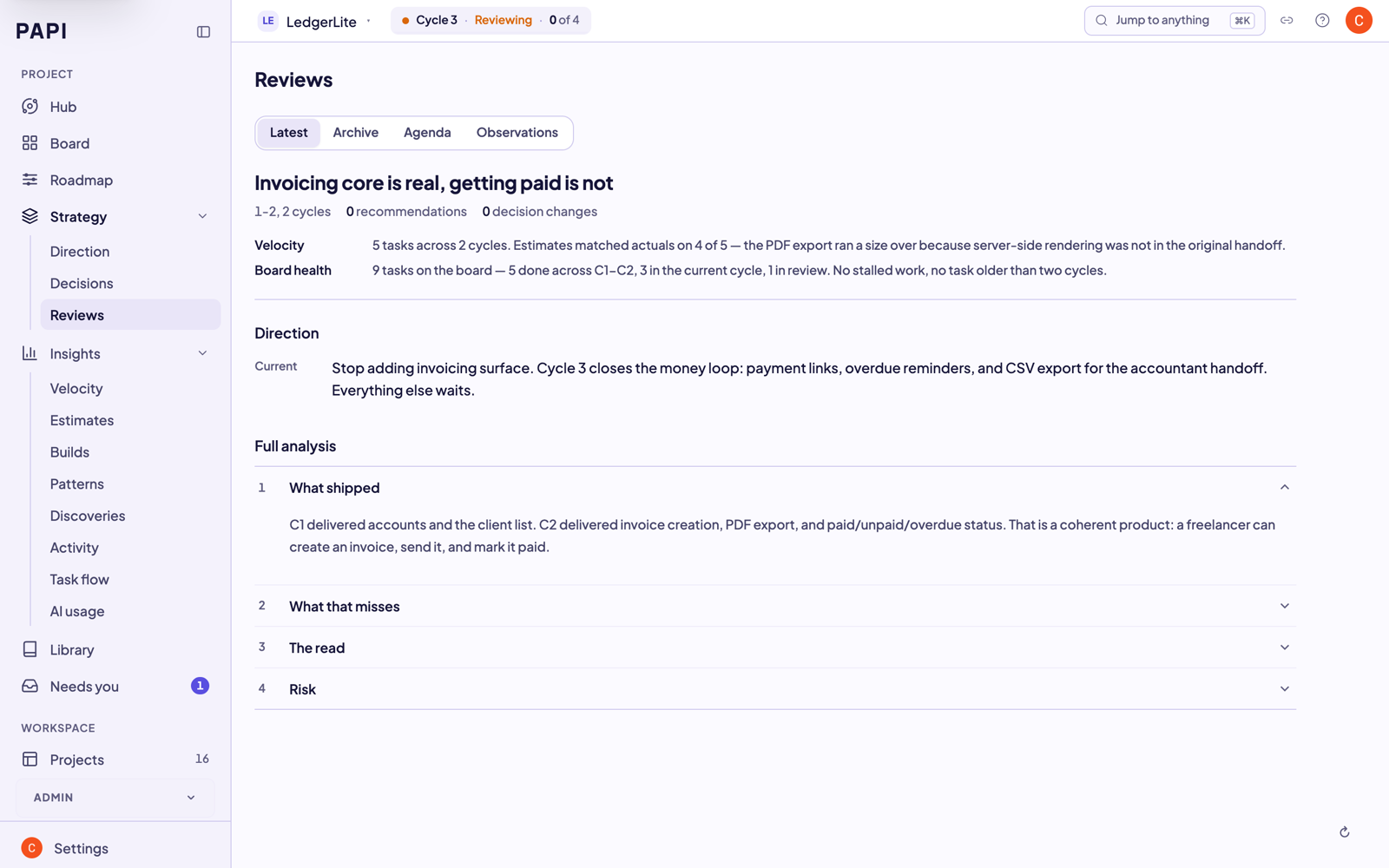
Every review leaves a trail, so the reasoning behind the project is still there months later, including for the assistant reading it back.
Tools
PAPI exposes these MCP tools to your assistant. The whole loop is a handful of calls. The server exposes more than these, including claims and sessions for teammates, conventions, document registration and project export. The Tool Reference lists all of them.
Core loop
- orient — one call returns the current cycle, what's in flight, and the recommended next action. Run it at the start of every session.
- setup — scaffold PAPI onto a new project.
- plan — break goals into a cycle of right-sized tasks, each with a build handoff your assistant can execute directly.
- build_list — list the current cycle's tasks and their handoffs.
- build_execute — start a task (creates a branch and handoff) and complete it (records the build report).
- review_list / review_submit — surface finished builds and record accept / request-changes / reject verdicts.
- release / close_cycle — finish the cycle, with a published version (
release) or without one (close_cycle). - tutorial_mode — turn on short explanations and one clear next step in every reply. Handy for your first few cycles.
Board and backlog
- board_view — read the project board and any task.
- board_edit — change a task's status, cycle, priority, or notes.
- ad_hoc — record quick work done outside the cycle so it shows in project history.
- idea — capture a feature, bug, or research note into the backlog.
- bug — file a bug against the board.
Strategy and intelligence
- strategy_review — step back every few cycles to check direction, not just velocity.
- strategy_change — record an Active Decision, with supersede history.
- zoom_out — a periodic retrospective across many cycles.
Docs and projects
- doc_register / doc_search — register and find project reference docs.
- project_list / project_switch / project_create — manage multiple PAPI projects.
Teams
- join — join a project a teammate invited you to.
- contributor_list / contributor_add — see and manage who works on the project.
Documentation
In this repo:
| Doc | What it covers |
|---|---|
| llms.txt | The agent runbook — point your AI at this (live version: getpapi.ai/llms.txt) |
| llms-install.md | Per-tool install instructions for AI assistants |
| docs/install.md | Install paths for every supported tool |
| docs/how-it-works.md | Cycles, handoffs, decisions, and how the pieces fit |
| docs/troubleshooting.md | Connection problems, project routing, common fixes |
Full documentation on the website — no account needed:
| Page | What it covers |
|---|---|
| Quick Start | Zero to your first cycle plan in under 5 minutes |
| Workflow | The full plan → build → review → release loop |
| Concepts | Cycles, handoffs, Active Decisions — the vocabulary |
| Cheat Sheet | Every command on one page |
| Tool Reference | Every PAPI MCP tool with parameters and use cases |
| Troubleshooting | Connection and auth first aid |
| Handbook | For teams: reading dashboards, cycle reports, review flow |
Community and support
Stuck, or something's broken? Open an issue — there are templates for each case, and the connection problem one is the one to reach for if PAPI won't connect or won't authenticate, which is where people get stuck most:
- Connection problem · Bug report · Question · Feature request
- Discord is faster for questions, and release notes land there first.
- CONTRIBUTING.md covers what a useful report looks like and what a docs PR can change.
- Found a vulnerability? Don't open an issue — SECURITY.md has the private channel.
Links
- Website and dashboard: getpapi.ai
- Pricing: getpapi.ai/pricing — free tier, no card
- What shipped in each cycle: getpapi.ai/changelog
- Data, access, and what PAPI doesn't have yet: getpapi.ai/trust
- Licence: the contents of this repo (docs, guides, config examples, Dockerfile) are MIT. That licence covers this repository only — not the PAPI engine, and not the PAPI name or logo, which are trademarks.
PAPI MCP 질문
PAPI MCP를 Claude Code에 추가하려면 어떻게 하나요?
터미널에서 claude mcp add papi -- npx -y @papi-ai/server를 실행합니다. 모든 프로젝트에서 사용할 수 있게 하려면 --scope user를 추가합니다.
PAPI MCP를 Cursor에 추가하려면 어떻게 하나요?
~/.cursor/mcp.json를 열고 mcpServers 아래에 서버를 추가합니다. 위 설치 섹션에 표시된 Cursor 구성을 사용합니다.
PAPI MCP는 어떤 도구를 제공하나요?
15개 도구를 제공합니다. 예: orient, setup, plan, build_list, build_execute.
PAPI가 AI 코딩 어시스턴트에 어떤 도움을 주나요?
구조화된 계획, 빌드, 리뷰, 릴리스 사이클을 제공하며, 무엇을 선택하고 무엇을 제외했는지, 그리고 그 이유는 무엇인지 기록하는 의사결정 추적 기능을 제공합니다.
PAPI 무료 버전이 있나요?
네, 신용카드 등록 없이 최대 3개의 프로젝트까지 전체 계획, 빌드, 리뷰, 릴리스 루프를 무료로 사용할 수 있습니다.
PAPI를 AI 어시스턴트에 어떻게 연결하나요?
getpapi.ai 대시보드에서 연결 토큰을 사용하거나 브라우저 로그인을 통해 서버 연결을 승인할 수 있습니다.