
devspace MCPサーバー
コミット 2026年11月1日AIコーディングエージェントをローカルマシンに接続し、ファイルの読み取り、テストの実行、異なるモデルやツール間でのタスク委譲を可能にします。
別名 Waishnav/devspace
- スター
- 5,491
- ツール
- —
- ダウンロード数(30日間)
- —
- 最新バージョン
- —
- 最終コミット
- 2026年11月1日
- ライセンス
- MIT
devspace MCPとは
devspaceはMCPサーバーです。 AIコーディングエージェントをローカルマシンに接続し、ファイルの読み取り、テストの実行、異なるモデルやツール間でのタスク委譲を可能にします。.
プロジェクトのREADMEから生成された概要
devspace MCP server について
DevSpaceは、ChatGPT、Claude、またはGrok Botを使用する開発者が、AIコーディングエージェントをローカルファイルやターミナルに接続することを可能にします。これはエージェントに依存しないレイヤーとして機能し、Cloudflare Tunnelやngrokなどの制御可能なセキュアなトンネルを通じて、これらのMCPホストがマシンにアクセスできるようにします。接続されると、ホストはファイルの読み取りや編集、コード検索、ビルドやテストのためのシェルコマンドの実行が可能になります。
単なるファイルアクセスにとどまらず、オーケストレーションを行うエージェントが、Codex、Claude Code、Cursorなどの他の特化したサブエージェントに特定のタスクを委譲することもできます。これらのサブエージェントは、既存のローカルCLIツールやサブスクリプションを使用して実行されます。並行作業中の競合を防ぐため、システムはGit worktreeを使用しており、複数のエージェントがメインのチェックアウトに影響を与えずに同時にコードを編集できます。すべては自身の認証情報と権限を使用してローカルで実行されるため、どのプロジェクトフォルダを公開するかを常に制御できます。
できること
- 1サブエージェントへのコードレビューの委譲プライマリエージェントに対し、diffのレビューといった特定のタスクを別のモデルに引き継ぐよう指示できます。
- 2リモートでのファイル編集の有効化MCPホストがローカルのワークスペースと直接やり取りし、コードの修正やテストの実行を行うことができます。
- 3並行したコーディングセッションの実行開発者は、分離された環境を使用することで、プロジェクトの異なる部分に対して複数のエージェントを同時に稼働させることができます。
プロジェクトの README から作成されています。すべてのユースケースは、その引用と照らし合わせて確認されています。
自動チェック
実行日 2026年11月13日詳細レポート →まだ検証されていません。サーバーには80点のスコア、重大な問題がないこと、および検証に必要な十分なデータが必要です。 チェックの仕組み

- ソースリポジトリがリンクされており、アクセス可能合格
- オープンソースライセンス (OSI)合格
- 過去1年以内にコミットまたはリリースあり合格
- パッケージ名が有名なパッケージに酷似していない未チェック
- リモートエンドポイントがHTTPSを使用未チェック
- 破壊的なツールがラベル付けされている未チェック
- モデルへの隠れた指示がない合格
- パッケージと依存関係に重大なアドバイザリがない未チェック
README
GitHubで見る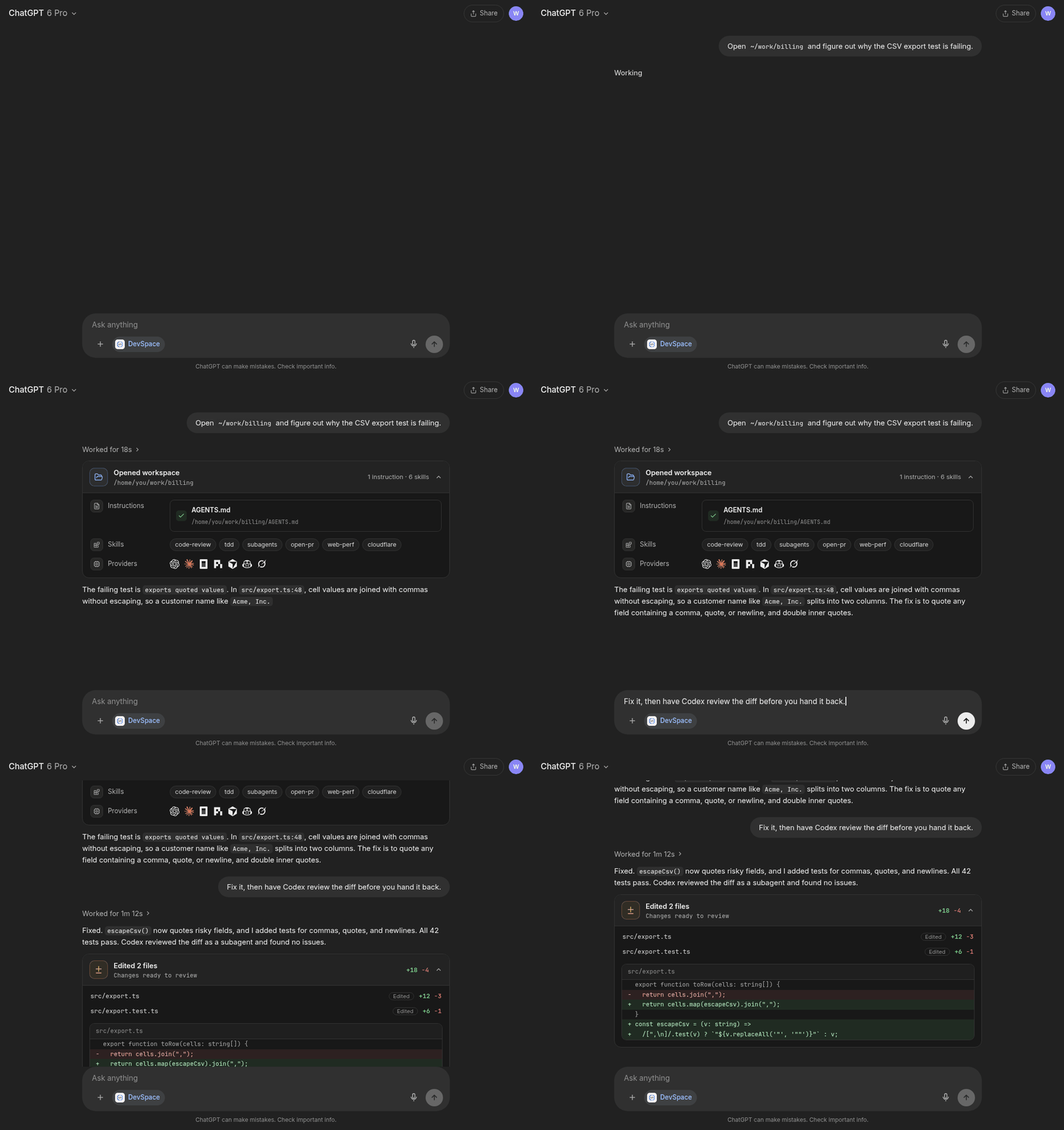
DevSpace is the agent-agnostic layer between the AI you talk to and the coding agents on your machine. It does two things:
- Connects MCP hosts to your machine. ChatGPT, Claude, and proactive agents like Grok Bot, OpenClaw, and Hermes open a workspace, read and edit files, run your tests, and show you a review card of the diff — against your real checkout, through a tunnel you own.
- Lets agents delegate to each other. Codex, Claude Code, OpenCode, Pi, Cursor, Copilot, and Grok Build run as subagents of whichever agent is in charge, using the CLIs and subscriptions you already have. Parallel writers get their own Git worktrees.
Your agent stays the orchestrator: DevSpace never runs a hidden agent loop of its own. And there is no DevSpace service — everything runs locally with your credentials.
Sponsors and Special Thanks
Installation
macOS, Linux, and WSL:
curl -fsSL https://devspace.run/install | sh
Windows (DevSpace also needs Git Bash):
powershell -c "irm https://devspace.run/install.ps1 | iex"
The installer uses a compatible Node (>=22.19 <27) on your PATH or
downloads Node 24 LTS for DevSpace alone, installs without sudo, and starts
devspace init. Rerun it to update. If you manage Node yourself,
npm install -g @waishnav/devspace followed by devspace init also works.
devspace init asks where you will use DevSpace and which agents it may run as
subagents. Each question can also be answered with a flag, so scripts and
agents can set it up without prompts:
devspace init --yes                                                      # subagents only
devspace init --public-url https://your-tunnel.example.com --roots ~/work # also serve an MCP host
Let your agent set itself up. The Copy prompt button on devspace.run copies a prompt you can paste into Codex, Claude Code, or any agent with a shell. It installs, configures, and checks DevSpace without asking you anything.
Use It from Your Coding Agents
Subagents need no server, tunnel, or OAuth. Install the skill that teaches your agent the workflow, then delegate:
devspace agents skill --install <claude-code|codex|opencode|agents>
# Cursor: devspace agents skill --install cursor --project

devspace agents run codex "Review the staged diff for correctness"
devspace agents run pi "Check the staged diff for test gaps"
devspace agents wait <id> <id>
- Profiles turn your "which model for which job" choices into named roles
(
planner,reviewer, …) as Markdown files you own. - Worktrees (
--worktree) let agents edit in parallel without touching your checkout. - Dynamic workflows (experimental,
DEVSPACE_EXPERIMENTAL_WORKFLOWS=1) let the orchestrator write a small, resumable script withagent(),parallel(),pipeline(), andphase()instead of prompting step by step.
Use It from ChatGPT, Claude, and Other MCP Hosts
Start a tunnel (Cloudflare Tunnel, ngrok, Pinggy, Tailscale Funnel, or your
own HTTPS reverse proxy) to http://127.0.0.1:7676, run devspace serve, and
add the public /mcp URL as a connector in your host:
https://your-tunnel-host.example.com/mcp
When the host connects, DevSpace opens an Owner password approval page. The
password is stored in ~/.devspace/auth.json; keep it private. The /mcp
endpoint serves the 2026-07-28 protocol and older 2025-era clients without any
configuration.
Once connected, the host can open one of your allowed project folders as a workspace and:
- read, write, and edit files, and search code
- run shell commands for tests, builds, Git, and package scripts
- use isolated Git worktrees for parallel sessions
- follow project instructions from
AGENTS.mdandCLAUDE.md, and discover your skills - show a change-review card at the end of a turn
- delegate to your coding agents through the same
devspace agentsCLI
[!NOTE] Using DevSpace as an MCP connector isn't against OpenAI's Usage Policies — it's a standard custom App/connector setup, and writing or running code isn't a restricted use case. But your account is governed by your usage, not by DevSpace. Don't point it at anything that would violate your provider's terms. Used normally, you're fine. (Based on OpenAI's Usage Policies and Service Terms as of June 2026.)
Mental Model
DevSpace is remote access to selected local folders, plus a way for your agents to work together.
You decide which roots an MCP host may open. Inside a workspace the host has powerful local capabilities, including shell execution, so treat a connected host like a trusted coding partner with access to your machine. Subagents run with your local user's authority and logins, scoped to the project they are started from.
Platform Support
DevSpace supports Linux, macOS, and Windows environments with a Bash-compatible shell.
| Platform | Status | Notes |
|---|---|---|
| Linux | Supported | Requires Node, npm, Git, and Bash. |
| macOS | Supported | Requires Node, npm, Git, and Bash. |
| Windows with Git Bash, WSL, MSYS2, or Cygwin Bash | Supported | Git Bash is the simplest native Windows setup. |
Windows PowerShell or cmd.exe only |
Not supported yet | Install Git Bash or use WSL. |
Run this to inspect your local setup:
devspace doctor
Documentation
Full documentation lives at devspace.run/docs:
- Quickstart
- Connect ChatGPT, Claude, Grok Bot, and other MCP hosts
- Use DevSpace from Codex, Claude Code, Cursor, OpenCode, and bots
- Subagents and agent profiles
- Dynamic workflows
- CLI reference and configuration reference
- Security model
- Troubleshooting
Philosophy
Every piece of software is becoming conversational, and every provider is racing to make their agent the orchestrator.
In practice, people already pick a different model and harness per task: one to plan, another to implement, a cheap one to explore, a second vendor to review. That matrix is personal, and it changes every few weeks.
DevSpace keeps it yours. Whichever agent you talk to — ChatGPT, Claude, Grok Bot, or a coding agent in your terminal — can reach your machine and hand work to the others, through explicit, inspectable tools instead of one vendor's closed loop.
Built by Waishnav
I'm Waishnav. I like building opinionated products and tools, and DevSpace is one example.
This year, I began my journey to build a one-person, multi-agent company capable of generating millions in revenue. If you want to follow the failures, wins, lessons, and everything in between, come hang out with me on X.
More from me
Local Development
For working on DevSpace itself:
Install pnpm 11.25.0, the version pinned in package.json, with
npm install --global pnpm@11.25.0, then:
pnpm install --frozen-lockfile
pnpm dev:seed
pnpm dev
pnpm typecheck
pnpm test
pnpm build
pnpm start
dev:seed forks your normal DevSpace config and SQLite state into an ignored
checkout-local .devspace-dev/ directory so source builds and migrations do not
modify your normal installation. Use pnpm dev:reset to discard that QA state
and fork it again. See DEVELOPMENT.md for worktree
switching, real-host QA, and database-migration workflows.
devspace MCPのよくある質問
DevSpaceはどのようにChatGPTやClaudeと接続するのですか?
ローカルポートへのトンネルを開始し、公開されているMCP URLをホストのコネクタとして追加します。
複数のエージェントが同時に同じプロジェクトで作業することはできますか?
はい、DevSpaceはGit worktreeを使用しているため、メインのチェックアウトに影響を与えることなく、複数の書き込みプロセスが並行してファイルを編集できます。
DevSpaceは独自の隠れたエージェントループを実行しますか?
いいえ、エージェントがオーケストレーターであり続け、DevSpaceが独自の隠れたループを実行することはありません。
DevSpaceはクラウドサービスですか?
いいえ、すべては自身の認証情報を使用してローカルで実行されます。DevSpaceのサービス自体は存在しません。