ローカルの埋め込みモデルを使用して、ローカル、GitHub、およびBitbucketのリポジトリを対象としたセマンティック検索をコーディングエージェントで実行できます。
別名 markdorof/delphi-code, delphi-code
- スター
- 0
- ツール
- —
- ダウンロード数(30日間)
- 1,332
- 最新バージョン
- 0.3.4
- 最終コミット
- 2026年10月18日
- ライセンス
- Apache-2.0
Delphi Code MCPとは
Delphi CodeはMCPサーバーです。 ローカルの埋め込みモデルを使用して、ローカル、GitHub、およびBitbucketのリポジトリを対象としたセマンティック検索をコーディングエージェントで実行できます。.
プロジェクトのREADMEから生成された概要
Delphi Code MCP server について
Delphi Codeは、ローカルディレクトリに加えてGitHubやBitbucketのリポジトリをインデックス化することで、コーディングエージェントにセマンティック検索機能を提供します。ローカルの埋め込みモデルを使用するため、正確なキーワード一致ではなく、意味に基づいて関連するコードを見つけることができます。これにより、ソースファイルに特定の用語が含まれていない場合でも、複数のプロジェクトにまたがってロジックを特定することが可能になります。サーバーは完全にローカルマシン上で動作するため、コードのプライバシーが確保され、ローカル環境から外部へ送信されることはありません。
Apple silicon搭載のmacOSユーザー向けに設計されており、Claude Code、Cursor、VS Code、Gemini CLIなどのさまざまなAIクライアントと統合できます。ユーザーはコマンドラインインターフェースまたはローカルのWeb UIを通じてコードベースを管理できます。セットアップではモデルを一度ダウンロードするだけで、その後はGPUやクラウドプロバイダーを必要とせず、ほぼ瞬時に検索を実行できます。リモートリポジトリにアクセスするには、GITHUB_TOKENまたはBitbucketの認証情報を提供する必要がありますが、実際のインデックス作成と検索プロセスはオフラインのまま維持されます。
できること
- 1リポジトリをまたいだロジックの発見異なるリポジトリ間で、特定のバックエンドロジックがリクエストをどのように処理しているかをAIエージェントに探させます。
- 2セマンティックなコード検索特定の文字列を使用する代わりに、コードの目的を記述することでコードスニペットを特定します。
- 3プロジェクトの自動インデックス化コーディングアシスタントが検索可能なインデックスに、ローカルパスやリモートのGitリポジトリを追加します。
プロジェクトの README から作成されています。すべてのユースケースは、その引用と照らし合わせて確認されています。
Delphi Code MCPのインストール方法
フォーマット検証日 2026年11月10日Claude CodeにDelphi Code MCPをインストール
$ claude mcp add delphi-code -- uvx delphi-codeCursorにDelphi Code MCPをインストール
~/.cursor/mcp.json
{
  "mcpServers": {
    "delphi-code": {
      "command": "uvx",
      "args": [
        "delphi-code"
      ]
    }
  }
}VS CodeにDelphi Code MCPをインストール
.vscode/mcp.json
{
  "servers": {
    "delphi-code": {
      "type": "stdio",
      "command": "uvx",
      "args": [
        "delphi-code"
      ]
    }
  }
}Claude DesktopにDelphi Code MCPをインストール
claude_desktop_config.json
{
  "mcpServers": {
    "delphi-code": {
      "command": "uvx",
      "args": [
        "delphi-code"
      ]
    }
  }
}CodexにDelphi Code MCPをインストール
~/.codex/config.toml
[mcp_servers.delphi-code]
command = "uvx"
args = ["delphi-code"]
Gemini CLIにDelphi Code MCPをインストール
~/.gemini/settings.json
{
  "mcpServers": {
    "delphi-code": {
      "command": "uvx",
      "args": [
        "delphi-code"
      ]
    }
  }
}自動チェック
実行日 2026年11月13日詳細レポート →自動チェックに合格しました。これはセキュリティ監査ではありません。コードを読み、サーバーに必要最小限のアクセス権を与えてください。 チェックの仕組み

- ソースリポジトリがリンクされており、アクセス可能合格
- オープンソースライセンス (OSI)合格
- 過去1年以内にコミットまたはリリースあり合格
- パッケージ名が有名なパッケージに酷似していない合格
- リモートエンドポイントがHTTPSを使用未チェック
- 破壊的なツールがラベル付けされている未チェック
- モデルへの隠れた指示がない合格
- パッケージと依存関係に重大なアドバイザリがない合格
README
GitHubで見るDelphi Code
Let your coding agent browse code across all your repositories. Index local projects and GitHub or Bitbucket repositories, then ask "where does the backend handle the refund the web app requests?" and get the right files from every repository at once, even when no file contains those words.
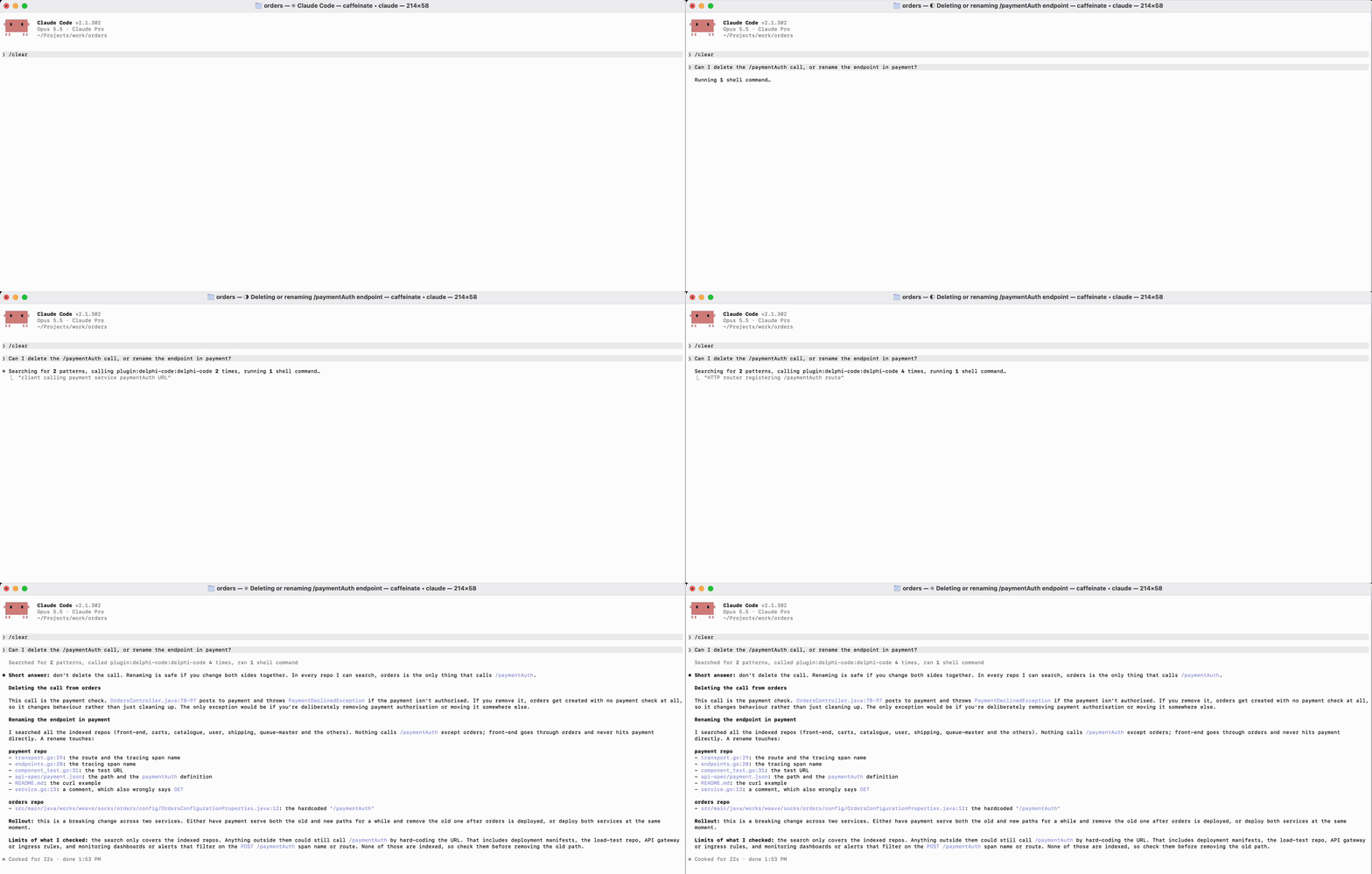
- Private: your code never leaves your machine. Indexing and search run offline with a local model; no account, cloud provider, or background daemon.
- Fast: the MCP server keeps the model loaded, so repeated searches are near-instant. No GPU needed.
- Works with your agents: Claude Code, Claude Desktop, Codex, Cursor, VS Code, Gemini CLI, and OpenCode.
Install
curl -LsSf https://github.com/markdorof/delphi-code/releases/latest/download/install.sh | sh
The script installs uv if needed, then runs setup, which downloads the embedding model once and connects every agent it finds. Options go after sh -s --: --no-setup, --no-connect, --version VERSION. With uv already installed:
uv tool install --managed-python --python 3.14 delphi-code
delphi-code setup
Requires macOS 14+ on Apple silicon (Linux is untested, Windows unsupported). delphi-code doctor checks the installation.
Use
delphi-code add ~/src/api github.com/octo/tools   # track and index projects
delphi-code search 'where are user passwords checked?'
delphi-code ui                                     # or do it all in the browser
Your agent calls the same search through MCP. After installing a new agent, run delphi-code connect. To connect one by hand:
| Agent | Setup |
|---|---|
| Claude Code | claude plugin marketplace add markdorof/delphi-code, then claude plugin install delphi-code@delphi-code |
| Codex | codex plugin marketplace add markdorof/delphi-code, then codex plugin add delphi-code@delphi-code |
| Cursor | Add {"mcpServers": {"delphi-code": {"type": "stdio", "command": "delphi-code", "args": ["mcp"]}}} to ~/.cursor/mcp.json |
| VS Code (Copilot) | code --add-mcp '{"name": "delphi-code", "command": "delphi-code", "args": ["mcp"]}' |
| Gemini CLI | gemini mcp add delphi-code delphi-code mcp |
| OpenCode | Add {"mcp": {"delphi-code": {"type": "local", "command": ["delphi-code", "mcp"]}}} to ~/.config/opencode/opencode.json |
For agents other than Claude Code and Codex, also copy the skill into the agent's skills folder so it knows when to search by meaning instead of grep.
Commands
| Command | What it does |
|---|---|
setup |
Downloads the model (or imports it with --from DIR on an offline machine) and connects agents. |
add [SOURCE ...] |
Tracks and indexes local paths or remote repositories (--ref picks a branch or tag). Without sources, picks repositories from your GitHub or Bitbucket account. |
sync [PROJECT ...] |
Updates tracked projects, re-embedding only what changed. |
index -p PATH |
Indexes a project once without tracking it. |
search QUERY |
Searches every index, or one with -p. Filter with --language, --path, --limit. |
list, status, remove NAME |
Show tracked projects, show a project's index, stop tracking a project. |
connect, disconnect |
Add or remove Delphi Code in your agents' configs. |
ui |
Opens a local web UI for search, projects, and setup checks. |
doctor |
Checks the model and storage. |
mcp |
Serves the commands as MCP tools over stdio. |
-p takes a path or an indexed project's name. index and add skip .gitignored files and accept --ignore, --path, and --language. Every command takes --help, and most take --json for scripts. Only setup, add, and sync use the network.
Settings
| Variable | Purpose |
|---|---|
GITHUB_TOKEN / GH_TOKEN |
GitHub access for remote repositories (falls back to gh auth token, then git's credentials) |
BITBUCKET_APP_PASSWORD with BITBUCKET_EMAIL or BITBUCKET_USERNAME |
Bitbucket access (an API token works) |
DELPHI_CODE_MODEL |
Use another local SentenceTransformers model instead of the default all-MiniLM-L6-v2 |
DELPHI_CODE_INDEX_ROOT, DELPHI_CODE_REGISTRY, DELPHI_CODE_LOG_FILE |
Move indexes, the tracked-project list, or the log |
DELPHI_CODE_LOG_LEVEL |
DEBUG, INFO, WARNING, ERROR, or OFF |
Data lives in ~/Library/Application Support/delphi-code on macOS and ~/.local/share/delphi-code on Linux.
Upgrade and uninstall
uv tool upgrade delphi-code
Your model and indexes are kept. If a command fails with index_incompatible, delete the index directory it names and run sync again. See releases for changes.
delphi-code disconnect
uv tool uninstall delphi-code
rm -rf ~/Library/Application\ Support/delphi-code
uv cache clean   # frees about 900 MB of downloaded packages
If the install script installed uv and you don't need it, uninstall uv and its Python too.
License
Apache-2.0. See THIRD_PARTY_NOTICES.md. To contribute, see CONTRIBUTING.md.
Delphi Code MCPのよくある質問
Delphi Code MCPをClaude Codeに追加するには
ターミナルでclaude mcp add delphi-code -- uvx delphi-codeを実行します。すべてのプロジェクトで利用するには--scope userを追加します。
Delphi Code MCPをCursorに追加するには
~/.cursor/mcp.jsonを開き、上記のインストールセクションに示すCursor設定を使ってmcpServersの下にサーバーを追加します。
コードのプライバシーは守られますか?
はい、インデックス作成と検索はローカルモデルを使用してオフラインで実行されるため、コードがマシンから外部に出ることはありません。
Delphi CodeはどのAIエージェントと互換性がありますか?
Claude Code、Claude Desktop、Codex、Cursor、VS Code、Gemini CLI、およびOpenCodeに対応しています。
サポートされているOSは何ですか?
Apple siliconを搭載したmacOS 14以降が必要です。Linuxは現在未テストであり、Windowsはサポートされていません。
新しいリポジトリをインデックスに追加するにはどうすればよいですか?
addコマンドを使用して、ローカルパスまたはリモートリポジトリを追跡できます。