
AIコーディングアシスタントがプロジェクトの方向性と決定履歴を維持するための、構造化された計画、構築、レビュー、およびリリースサイクルを提供します。
別名 getpapi/papi, papi, @papi-ai/server
- スター
- 11
- ツール
- 15
- ダウンロード数(30日間)
- —
- 最新バージョン
- 0.402.225
- 最終コミット
- 2026年11月5日
- ライセンス
- MIT
PAPI MCPとは
PAPIはMCPサーバーです。 AIコーディングアシスタントがプロジェクトの方向性と決定履歴を維持するための、構造化された計画、構築、レビュー、およびリリースサイクルを提供します。. 15個のツールを提供しており、orient, setup, planなどがあります。
プロジェクトのREADMEから生成された概要
PAPI MCP server について
PAPIは、AIコーディングアシスタントがプロジェクトの方向性と決定履歴を維持するために特別に設計された、構造化された管理フレームワークを提供します。チャットウィンドウ内でコンテキストが失われる代わりに、このサーバーは計画、構築、レビュー、およびタスクのリリースの継続的なループを実装します。このシステムにより、アシスタントは何が選択され、何が拒否され、その理由が何であるかを追跡でき、異なるセッションやツールをまたいで維持される永続的な決定履歴を作成できます。
ユーザーは、Cursor、Claude Code、Windsurf、またはVS CodeなどのMCPクライアントにサーバーを接続します。エンジンはホストされていますが、@papi-ai/serverパッケージがローカルランタイムとして機能します。セットアップにはgetpapi.aiでの無料アカウントが必要で、接続トークンまたはブラウザでのサインインを介してリンクできます。このサービスは最大3つのプロジェクトまで無料で、クレジットカードを必要とせずに、初期計画から最終リリースまでの完全なライフサイクルを提供します。
できること
- 1セッションをまたいだプロジェクトコンテキストの維持AIアシスタントはorientツールを使用することで、新しい会話を開始した際に現在のサイクルと次のステップを即座に理解できます。
- 2タスク管理と実行の自動化アシスタントは、ハイレベルな目標を具体的なタスクに分解し、build handoffsを使用してそれらを実行できます。
- 3アーキテクチャの決定と推論の追跡開発者はこのシステムを使用して、特定の技術的な経路がなぜ採用されたのか、あるいはなぜ断念されたのかを記録し、ロジックの喪失を防ぐことができます。
- 4ハイレベルなプロジェクト監査の実施strategy reviewツールを使用すると、AIは単なるタスクの速度ではなく、プロジェクト全体の方向性を一歩引いた視点から評価できます。
プロジェクトの README から作成されています。すべてのユースケースは、その引用と照らし合わせて確認されています。
PAPI MCPのインストール方法
フォーマット検証日 2026年11月10日Claude CodeにPAPI MCPをインストール
$ claude mcp add papi -- npx -y @papi-ai/serverCursorにPAPI MCPをインストール
~/.cursor/mcp.json
{
  "mcpServers": {
    "papi": {
      "command": "npx",
      "args": [
        "-y",
        "@papi-ai/server"
      ]
    }
  }
}VS CodeにPAPI MCPをインストール
.vscode/mcp.json
{
  "servers": {
    "papi": {
      "type": "stdio",
      "command": "npx",
      "args": [
        "-y",
        "@papi-ai/server"
      ]
    }
  }
}Claude DesktopにPAPI MCPをインストール
claude_desktop_config.json
{
  "mcpServers": {
    "papi": {
      "command": "npx",
      "args": [
        "-y",
        "@papi-ai/server"
      ]
    }
  }
}CodexにPAPI MCPをインストール
~/.codex/config.toml
[mcp_servers.papi]
command = "npx"
args = ["-y", "@papi-ai/server"]
Gemini CLIにPAPI MCPをインストール
~/.gemini/settings.json
{
  "mcpServers": {
    "papi": {
      "command": "npx",
      "args": [
        "-y",
        "@papi-ai/server"
      ]
    }
  }
}PAPI MCPツール 15
READMEから検出orientsetupplanbuild_listbuild_executetutorial_modeboard_viewboard_editad_hocideabugstrategy_review
| orient | — | |
| setup | — | |
| plan | — | |
| build_list | — | |
| build_execute | — | |
| tutorial_mode | — | |
| board_view | — | |
| board_edit | — | |
| ad_hoc | — | |
| idea | — | |
| bug | — | |
| strategy_review | — |
15個のツールをすべて表示ツールを折りたたむ
strategy_changezoom_outjoin
| strategy_change | — | |
| zoom_out | — | |
| join | — |
自動チェック
実行日 2026年11月12日詳細レポート →自動チェックに合格しました。これはセキュリティ監査ではありません。コードを読み、サーバーに必要最小限のアクセス権を与えてください。 チェックの仕組み

- ソースリポジトリがリンクされており、アクセス可能合格
- オープンソースライセンス (OSI)合格
- 過去1年以内にコミットまたはリリースあり合格
- パッケージ名が有名なパッケージに酷似していない合格
- リモートエンドポイントがHTTPSを使用合格
- 破壊的なツールがラベル付けされている合格
- モデルへの隠れた指示がない合格
- パッケージと依存関係に重大なアドバイザリがない合格
README
GitHubで見るPAPI





End-to-end project management for AI builders.
Your AI starts every session from zero. Your project stays on course.
AI coding tools are great at writing code and terrible at holding a direction. Scope grows, plans change, and the decisions behind them get made in a chat window and lost there. PAPI keeps the project on course. It gives your assistant structured plan, build, review and release cycles, plus a decision trail recording what was chosen, what was dropped, and why. Your assistant writes and reads it while it works, so it stays current without anyone maintaining it.
You connect it once. From then on, your assistant starts every session knowing which cycle you're on, what's in flight, and what to do next.
If PAPI is useful, star the repo. It's how other people building with AI assistants find it.
Free to start. The whole plan → build → review → release loop, on up to three projects, no card. Free runs a real project start to finish; it isn't a trial. Pricing.
What this repo is. Documentation, install guides, plugin and extension manifests, the PAPI agent skills, and the issue tracker. PAPI's engine is closed source and hosted — you connect to it, you don't build it from here. The
@papi-ai/serverpackage on npm is the supported local runtime. The contents of this repo are MIT.
Quick start
Let your AI install it. Paste this to your assistant — Cursor, Claude Code, Windsurf, Codex, VS Code, or any other MCP client:
Read https://getpapi.ai/llms.txt and set up PAPI
Your assistant reads the runbook and walks you through the whole first run: checking it's in the right project folder, connecting, setting up your project, planning your first cycle, and building your first task. It works in coding tools and in chat apps like claude.ai and ChatGPT, and you don't need to be a developer. (The same runbook lives in this repo as llms.txt and llms-install.md if your assistant can't fetch URLs.)
The one thing only you can do. You need a free account at getpapi.ai. After that there are two ways to connect:
- Connection token (default). Open the Connect panel on getpapi.ai, copy the project id and connection token under "This is your project", and hand them to your assistant. It puts them in your tool's config and PAPI works straight away, with no browser step.
- Browser sign-in. Your assistant adds the server and you approve it in the browser. No assistant can click through that screen for you, and until you do the server shows
Needs authentication.
Most tools only load a new connection when a conversation starts, so open a fresh conversation after connecting and ask your assistant to run orient.
Prefer to wire it up yourself?
In Claude Code, the shortest path is the plugin — two lines, nothing to copy or edit:
/plugin marketplace add getpapi/papi
/plugin install papi@papi
The plugin carries the server config and the PAPI skills for each phase of the cycle: planning, building, reviewing and releasing. It also includes check-mcp, which diagnoses a connection that isn't working, and papi-verify, which health-checks the current cycle.
Every tool also takes the same streamable-HTTP endpoint directly, https://mcp.getpapi.ai/mcp. In Claude Code that's:
claude mcp add --transport http papi https://mcp.getpapi.ai/mcp
Either way, finish with /mcp → papi → Authenticate. Or skip the browser step entirely with the connection token from the Connect panel:
claude mcp add --transport http papi https://mcp.getpapi.ai/mcp --header "Authorization: Bearer YOUR_CONNECTION_TOKEN" --header "x-papi-project-id: YOUR_PROJECT_ID"
The DeepSeek Harness bundle is in this repo but is not yet published to npm, so the command below won't resolve until it is. After creating a PAPI connection token, it will install with:
dsh plugin --profile web add @papi-ai/deepseek-harness
See PAPI for DeepSeek Harness for token handling, verification, compatibility, and removal.
Per-tool config for Cursor, VS Code, Windsurf, Codex, and any generic MCP client is in docs/install.md.
What you get
- plan breaks your goals into a cycle of right-sized tasks, each with a build handoff your assistant can execute directly.
- build tracks what was built, what surprised you, and what was discovered along the way.
- review and release close the loop, so every cycle feeds the next plan.
- strategy reviews every few cycles step back and check direction, not just velocity.
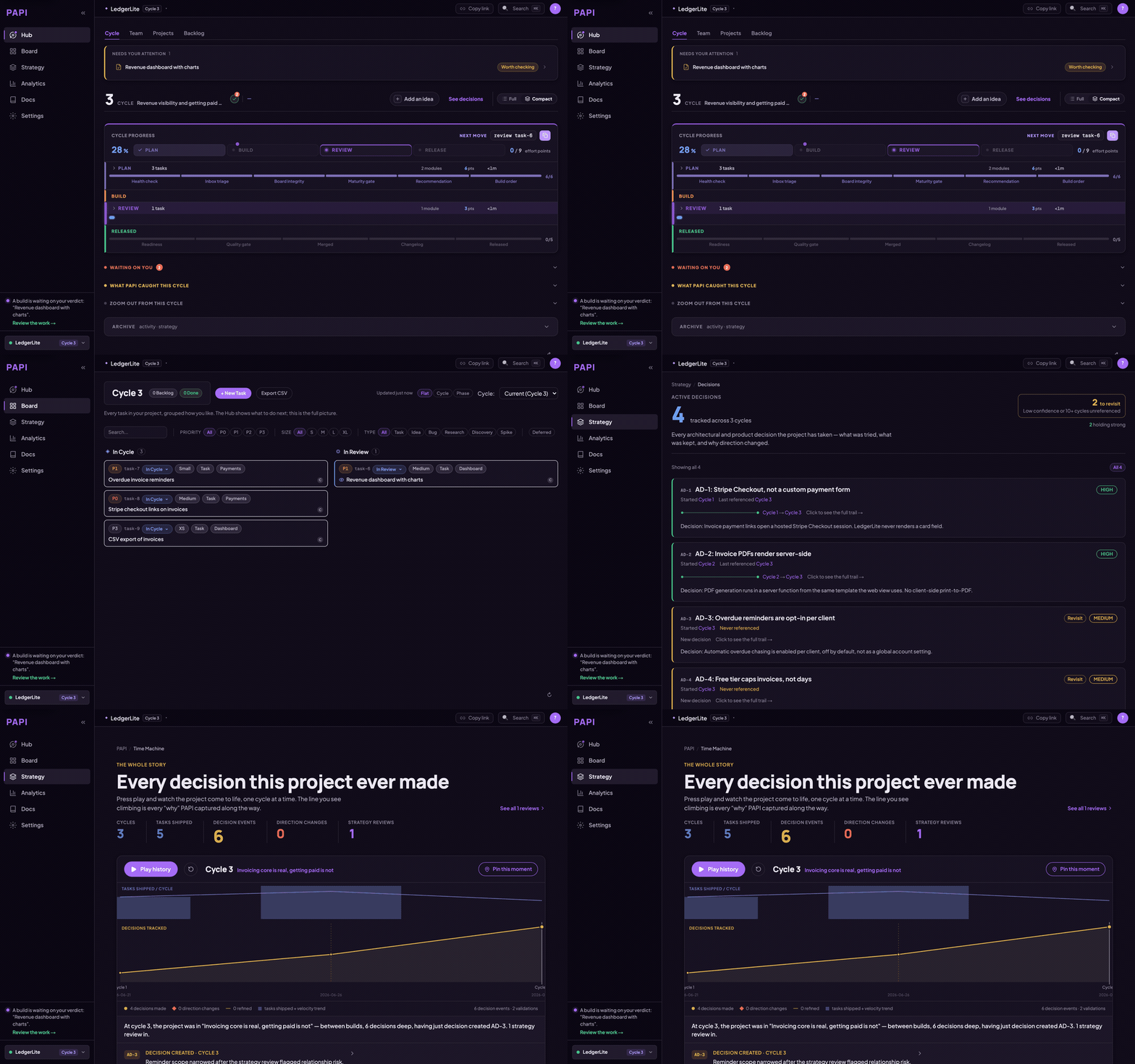
- A dashboard at getpapi.ai shows your cycles, board, and decisions, so you can see the state of the project without asking.
The methodology is the product: a plan, build, review, release loop your assistant runs with you, where each cycle's learnings feed the next plan. PAPI has been built with PAPI for every cycle in the badge above.
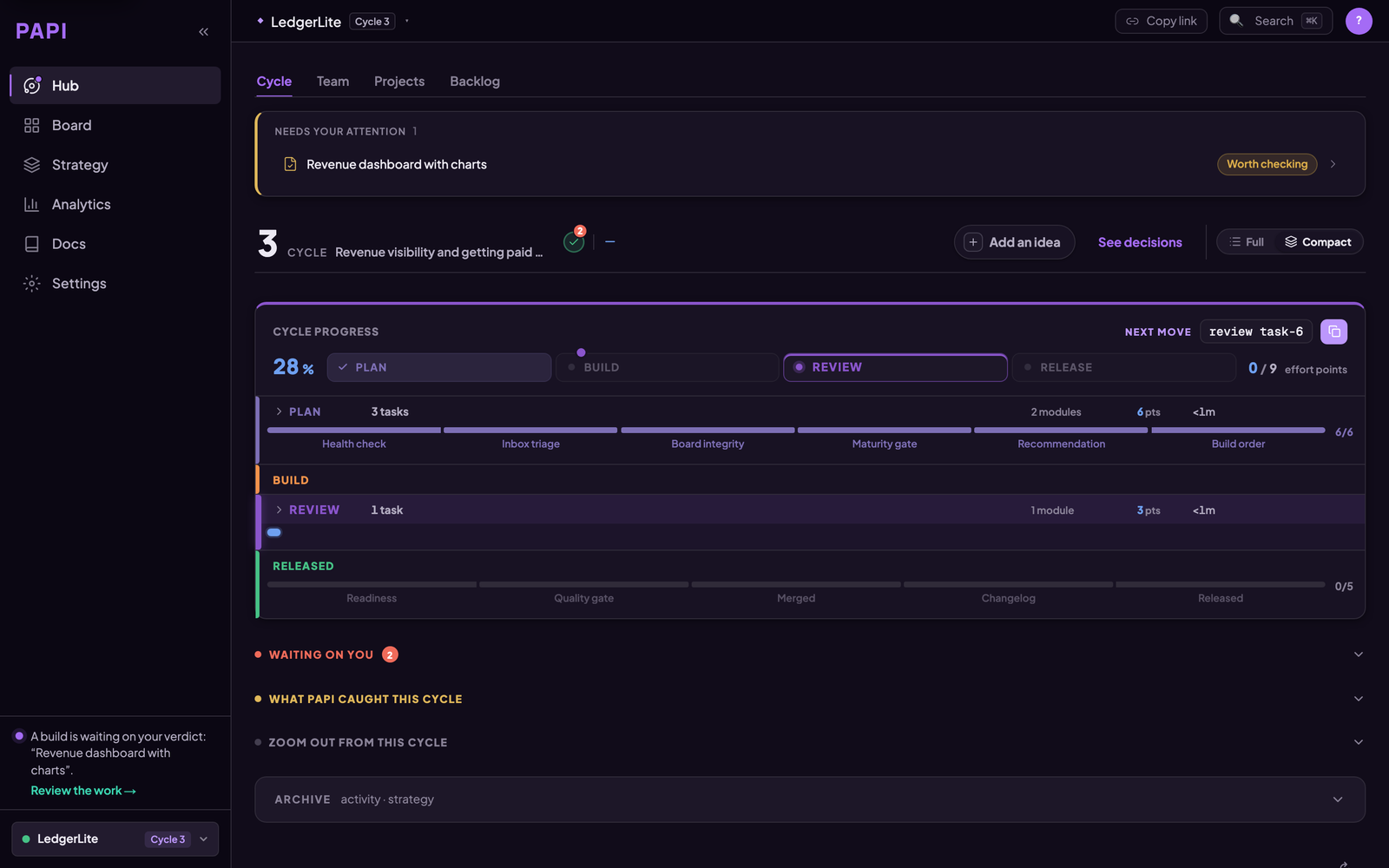
The hub opens on one question — what happens next. The cycle's progress through plan, build, review and release sits under it.
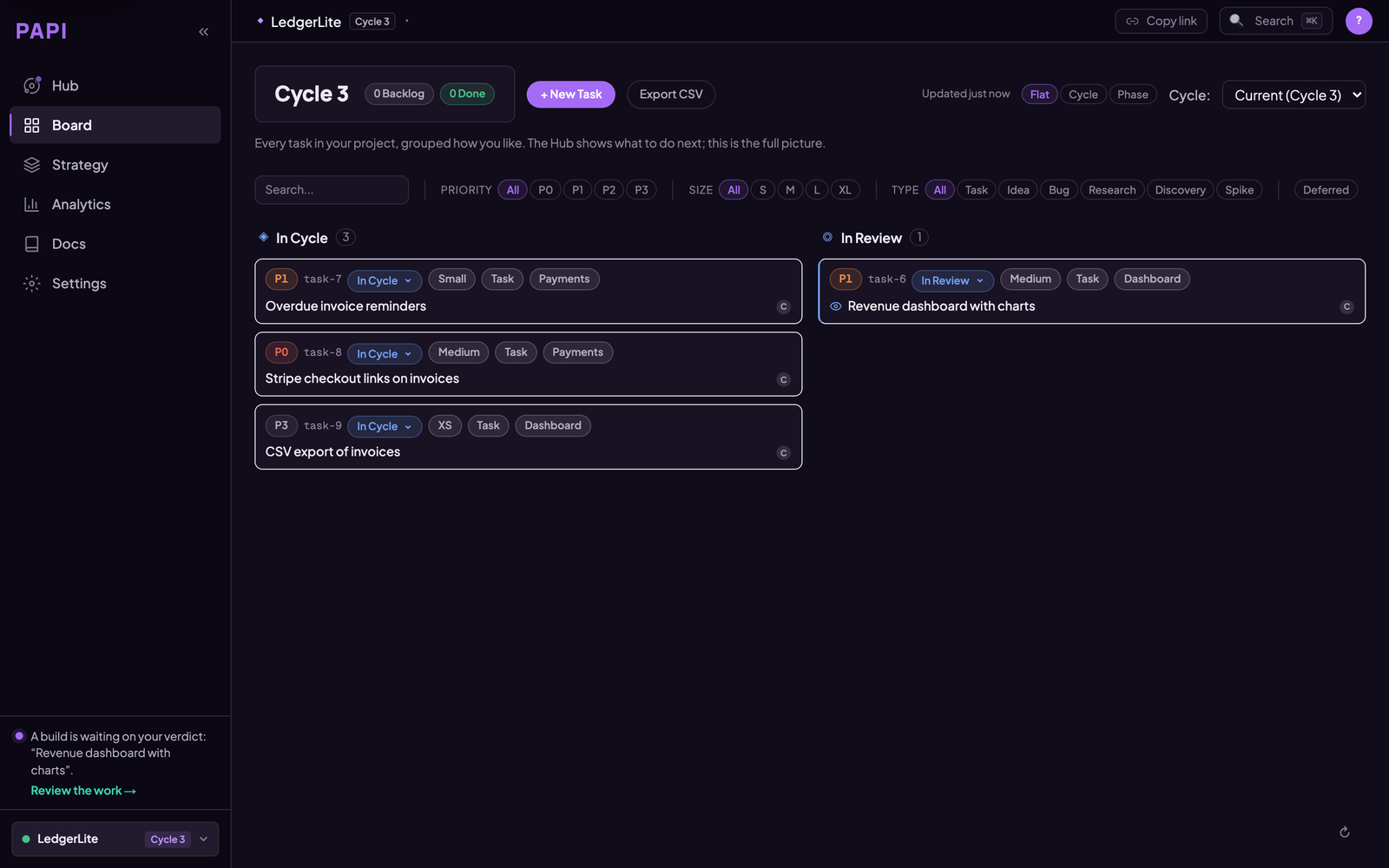
The board is the full picture. Your assistant writes to it as a side effect of working, so it is current without anyone maintaining it.
How PAPI differs from a tracker
Linear, Jira, Asana and Notion are built for people to write tickets and other people to read them. They suit that job well, and plenty of teams keep using them.
PAPI's board is written and read by your assistant as it works. Starting a build opens the task, finishing it files the report, and releasing closes the cycle. You approve the plan and sign off the review.
Taskmaster is a good way to break work into tasks inside a repo. PAPI adds state that lives outside the repo and persists across tools: cycles, build reports, review verdicts, and Active Decisions whose confidence changes as evidence arrives. The same project is available from Claude Code, Cursor, VS Code, Codex and the others, so switching tools doesn't reset it. Moving from Taskmaster? See PAPI vs Taskmaster.
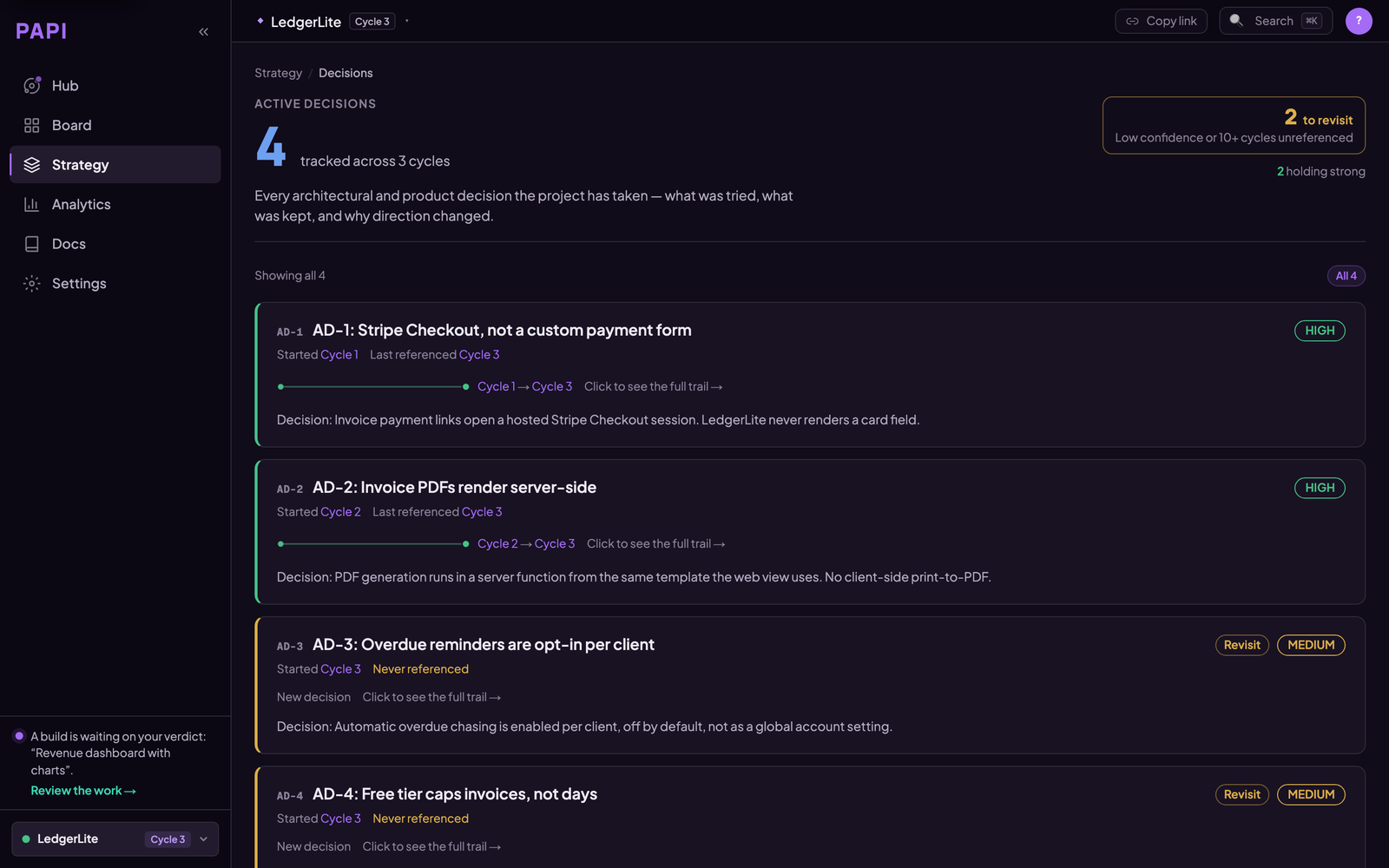
Active Decisions are the part a task tracker has no field for: what was decided, why, what was rejected, and when to revisit it. Confidence moves as evidence arrives.
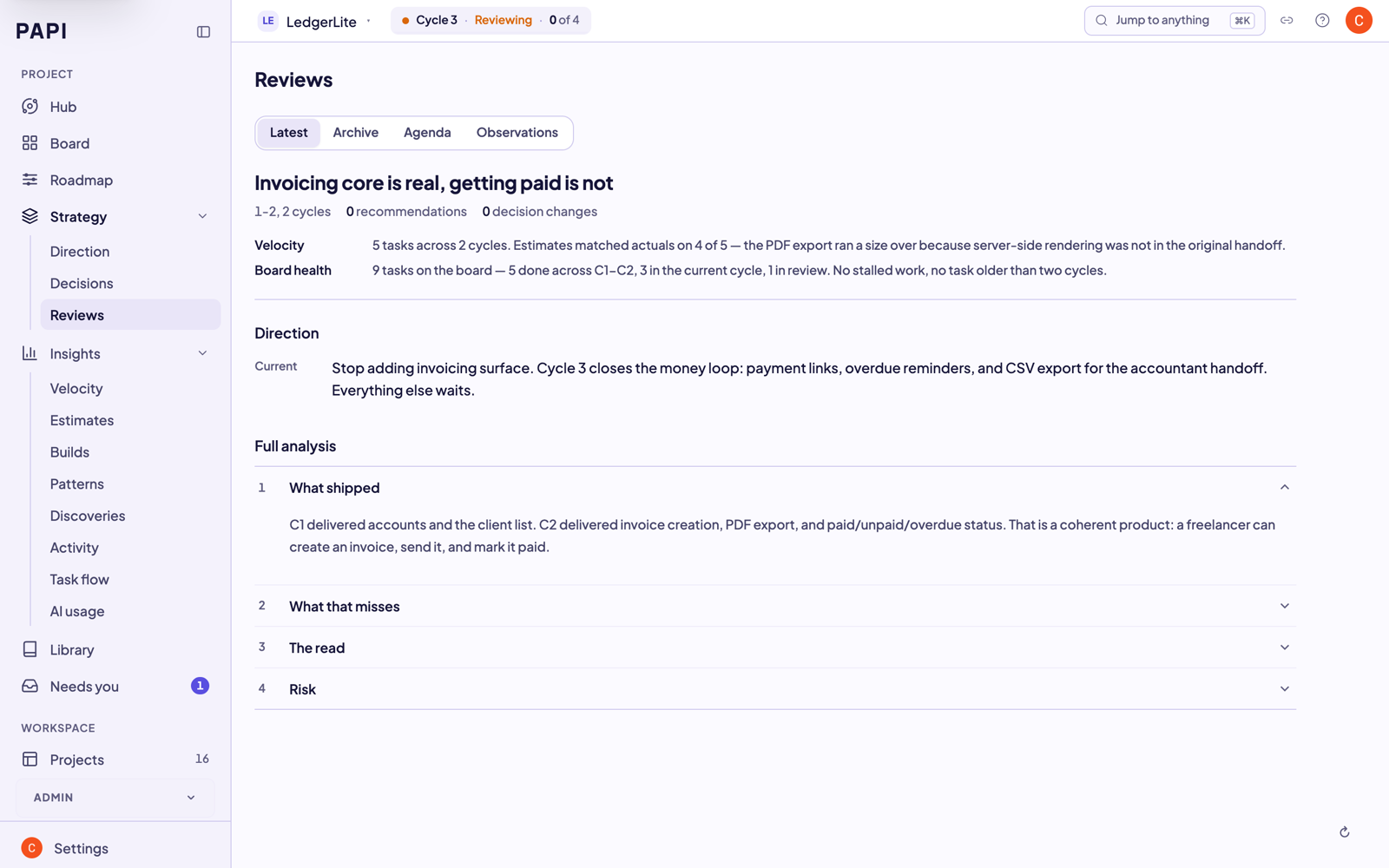
Every review leaves a trail, so the reasoning behind the project is still there months later, including for the assistant reading it back.
Tools
PAPI exposes these MCP tools to your assistant. The whole loop is a handful of calls. The server exposes more than these, including claims and sessions for teammates, conventions, document registration and project export. The Tool Reference lists all of them.
Core loop
- orient — one call returns the current cycle, what's in flight, and the recommended next action. Run it at the start of every session.
- setup — scaffold PAPI onto a new project.
- plan — break goals into a cycle of right-sized tasks, each with a build handoff your assistant can execute directly.
- build_list — list the current cycle's tasks and their handoffs.
- build_execute — start a task (creates a branch and handoff) and complete it (records the build report).
- review_list / review_submit — surface finished builds and record accept / request-changes / reject verdicts.
- release / close_cycle — finish the cycle, with a published version (
release) or without one (close_cycle). - tutorial_mode — turn on short explanations and one clear next step in every reply. Handy for your first few cycles.
Board and backlog
- board_view — read the project board and any task.
- board_edit — change a task's status, cycle, priority, or notes.
- ad_hoc — record quick work done outside the cycle so it shows in project history.
- idea — capture a feature, bug, or research note into the backlog.
- bug — file a bug against the board.
Strategy and intelligence
- strategy_review — step back every few cycles to check direction, not just velocity.
- strategy_change — record an Active Decision, with supersede history.
- zoom_out — a periodic retrospective across many cycles.
Docs and projects
- doc_register / doc_search — register and find project reference docs.
- project_list / project_switch / project_create — manage multiple PAPI projects.
Teams
- join — join a project a teammate invited you to.
- contributor_list / contributor_add — see and manage who works on the project.
Documentation
In this repo:
| Doc | What it covers |
|---|---|
| llms.txt | The agent runbook — point your AI at this (live version: getpapi.ai/llms.txt) |
| llms-install.md | Per-tool install instructions for AI assistants |
| docs/install.md | Install paths for every supported tool |
| docs/how-it-works.md | Cycles, handoffs, decisions, and how the pieces fit |
| docs/troubleshooting.md | Connection problems, project routing, common fixes |
Full documentation on the website — no account needed:
| Page | What it covers |
|---|---|
| Quick Start | Zero to your first cycle plan in under 5 minutes |
| Workflow | The full plan → build → review → release loop |
| Concepts | Cycles, handoffs, Active Decisions — the vocabulary |
| Cheat Sheet | Every command on one page |
| Tool Reference | Every PAPI MCP tool with parameters and use cases |
| Troubleshooting | Connection and auth first aid |
| Handbook | For teams: reading dashboards, cycle reports, review flow |
Community and support
Stuck, or something's broken? Open an issue — there are templates for each case, and the connection problem one is the one to reach for if PAPI won't connect or won't authenticate, which is where people get stuck most:
- Connection problem · Bug report · Question · Feature request
- Discord is faster for questions, and release notes land there first.
- CONTRIBUTING.md covers what a useful report looks like and what a docs PR can change.
- Found a vulnerability? Don't open an issue — SECURITY.md has the private channel.
Links
- Website and dashboard: getpapi.ai
- Pricing: getpapi.ai/pricing — free tier, no card
- What shipped in each cycle: getpapi.ai/changelog
- Data, access, and what PAPI doesn't have yet: getpapi.ai/trust
- Licence: the contents of this repo (docs, guides, config examples, Dockerfile) are MIT. That licence covers this repository only — not the PAPI engine, and not the PAPI name or logo, which are trademarks.
PAPI MCPのよくある質問
PAPI MCPをClaude Codeに追加するには
ターミナルでclaude mcp add papi -- npx -y @papi-ai/serverを実行します。すべてのプロジェクトで利用するには--scope userを追加します。
PAPI MCPをCursorに追加するには
~/.cursor/mcp.jsonを開き、上記のインストールセクションに示すCursor設定を使ってmcpServersの下にサーバーを追加します。
PAPI MCPが提供するツールは
15個のツールを提供しており、orient, setup, plan, build_list, build_executeなどがあります。
PAPIはAIコーディングアシスタントをどのように支援しますか?
構造化された計画、構築、レビュー、リリースのサイクルを提供するとともに、何が選択され、何が却下され、その理由が何であるかを記録する決定の履歴を提供します。
PAPIの無料版はありますか?
はい、クレジットカードの登録なしで、最大3つのプロジェクトまで計画、構築、レビュー、リリースの完全なループを無料で利用できます。
PAPIをAIアシスタントに接続するにはどうすればよいですか?
getpapi.aiのダッシュボードから接続トークンを使用するか、ブラウザでのサインインを使用してサーバー接続を承認できます。