
chatwatch MCP server
Commit 11 Nov 2026Memungkinkan AI agent untuk membaca dan merespons chat Microsoft Teams dengan menjalankan sesi Chrome lokal tanpa memerlukan Azure app registration atau admin consent.
Juga dikenal sebagai xxxxDev/chatwatch
- Stars
- 1
- Tools
- 11
- Unduhan, 30 hari
- —
- Versi terbaru
- —
- Commit terakhir
- 11 Nov 2026
- Lisensi
- MIT
Apa itu chatwatch MCP?
chatwatch adalah MCP server. Memungkinkan AI agent untuk membaca dan merespons chat Microsoft Teams dengan menjalankan sesi Chrome lokal tanpa memerlukan Azure app registration atau admin consent. Server ini menyediakan 11 tool, seperti teams_list_chats, teams_read_messages, teams_wait_for_messages.
Ringkasan dibuat dari README proyek
Tentang chatwatch MCP server
chatwatch memungkinkan otomatisasi interaksi chat Microsoft Teams dari dalam AI client dengan menjalankan sesi Chrome lokal. Alih-alih memerlukan Azure app registrations yang kompleks atau persetujuan administratif, tool ini menggunakan login web Teams Anda yang sudah ada untuk memungkinkan agent membaca dan merespons pesan. Tool ini berjalan secara lokal di komputer Anda dan kompatibel dengan MCP client seperti Claude Code, Codex, atau Cursor.
Pengguna dapat berinteraksi dengan chat melalui dua metode utama: menarik data via MCP tools atau menggunakan push handlers yang mengirimkan pesan baru ke command atau URL tertentu. Untuk menjaga kontrol, server ini menyertakan sistem send mode. Anda dapat mengatur chat ke mode draft, di mana balasan agent akan ditahan di halaman lokal untuk persetujuan manual Anda, atau mode auto untuk pengiriman instan. Sistem ini juga menyediakan tampilan live dari sesi Chrome, sehingga Anda dapat melakukan klik, scroll, atau mengetik secara manual untuk mengelola status sign-in Anda.
Apa yang bisa Anda lakukan dengannya
- 1Drafting chat repliesMinta AI agent untuk memantau pesan Anda dan menyiapkan draf balasan untuk Anda tinjau.
- 2Automating message monitoringInstruksikan agent untuk menunggu informasi spesifik yang masuk selama periode waktu tertentu.
- 3Integrating with external handlersMengarahkan pesan Teams yang masuk ke custom local command atau URL web untuk diproses lebih lanjut.
Ditulis berdasarkan README proyek. Setiap use case diperiksa terhadap kutipan dari README tersebut.
Tool chatwatch MCP 11
Terdeteksi dari READMEteams_list_chatsteams_read_messagesteams_wait_for_messagesteams_send_messageteams_get_attachmentsteams_list_draftssentdraftrefusednot_sentmaybe_sent
| teams_list_chats | — | |
| teams_read_messages | — | |
| teams_wait_for_messages | — | |
| teams_send_message | — | |
| teams_get_attachments | — | |
| teams_list_drafts | — | |
| sent | — | |
| draft | — | |
| refused | — | |
| not_sent | — | |
| maybe_sent | — |
Pengecekan otomatis
Berjalan 14 Nov 2026Laporan lengkap →Belum diverifikasi. Sebuah server memerlukan skor 80, tidak ada temuan serius, dan data yang cukup untuk kami periksa. Cara kerja checks · Yang perlu diperbaiki untuk menambah poin

- Source repository terhubung dan dapat dijangkauxxxxdev/chatwatch is public and reachablegithub.com/xxxxdev/chatwatch ↗Lolos
- Nama paket mencantumkan repositori ini sebagai sumbernyaTidak diperiksa
- Provenance build (atestasi Sigstore)Tidak diperiksa
- Lisensi open source (OSI)MITspdx.org/licenses/MIT.html ↗Lolos
- Ada commit atau release dalam satu tahun terakhirLast commit or release 2026-11-11github.com/xxxxdev/chatwatch ↗Lolos
- OpenSSF ScorecardTidak diperiksa
- Nama package tidak mirip dengan package populerTidak diperiksa
- Tidak ada advisory kritis pada paket atau dependensinyaTidak diperiksa
- Tidak ada instruksi tersembunyi untuk model11 tool descriptions and the README read; no override phrases, credential paths or hidden charactersLolos
- Tools yang bersifat destruktif telah diberi labelNo tool named like delete, drop or execLolos
- Endpoint remote merespons handshake MCPTidak diperiksa
README
Lihat di GitHubWhat it is
chatwatch runs on your own computer, as your user, with your Teams sign-in. Your agents work with your chats through MCP tools or push handlers, and every send passes the chat's send mode before anything reaches Teams.
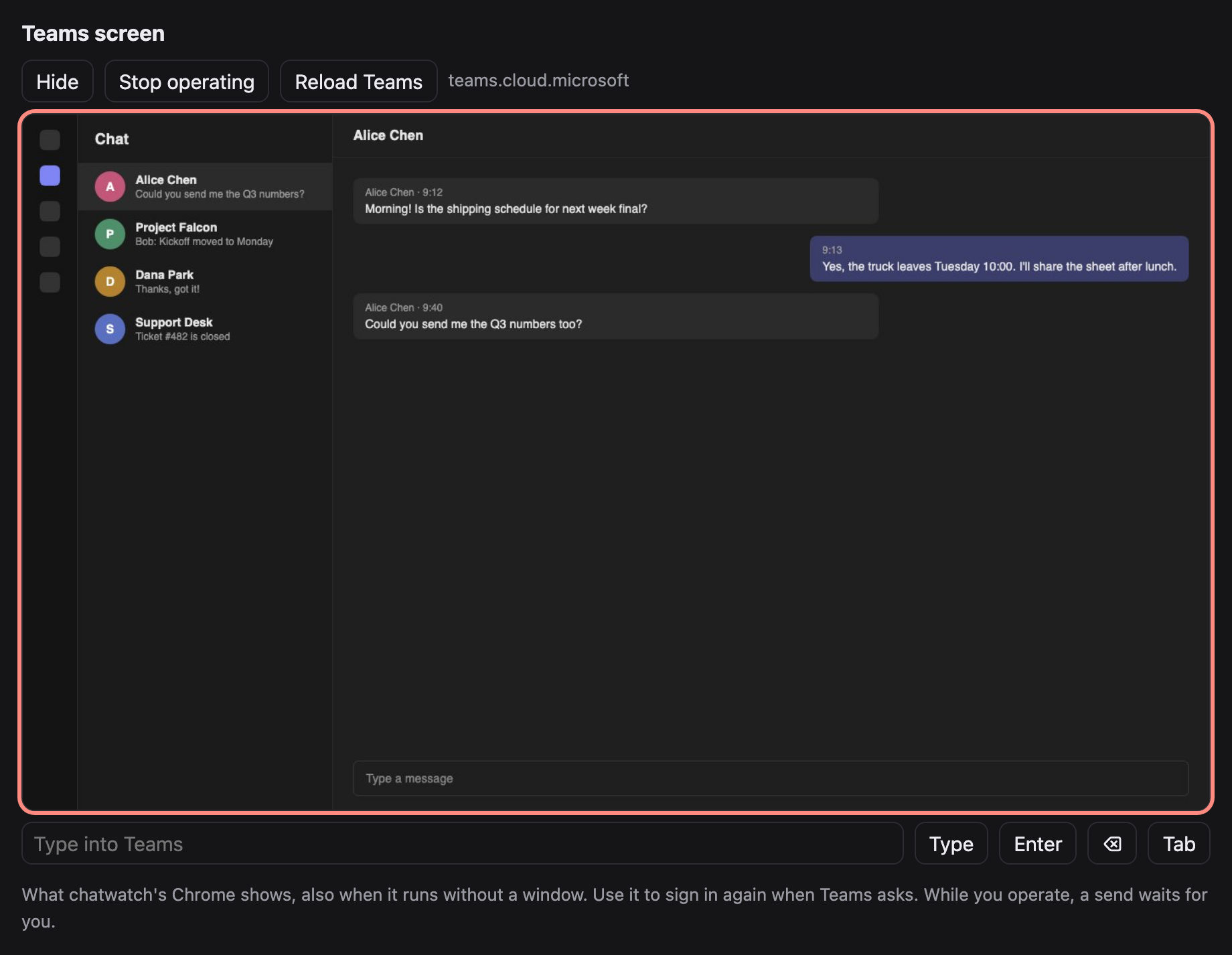
The Teams tab, seen on chatwatch's local page (made-up chats).
Features
- Pull (MCP): any MCP client (Claude Code, Codex, Cursor, …) gets tools to list chats, read messages, wait for new ones, fetch attachments and send.
- Push (handlers): each new batch of messages in a chat goes to a command or URL you choose; its answer is sent back to the chat.
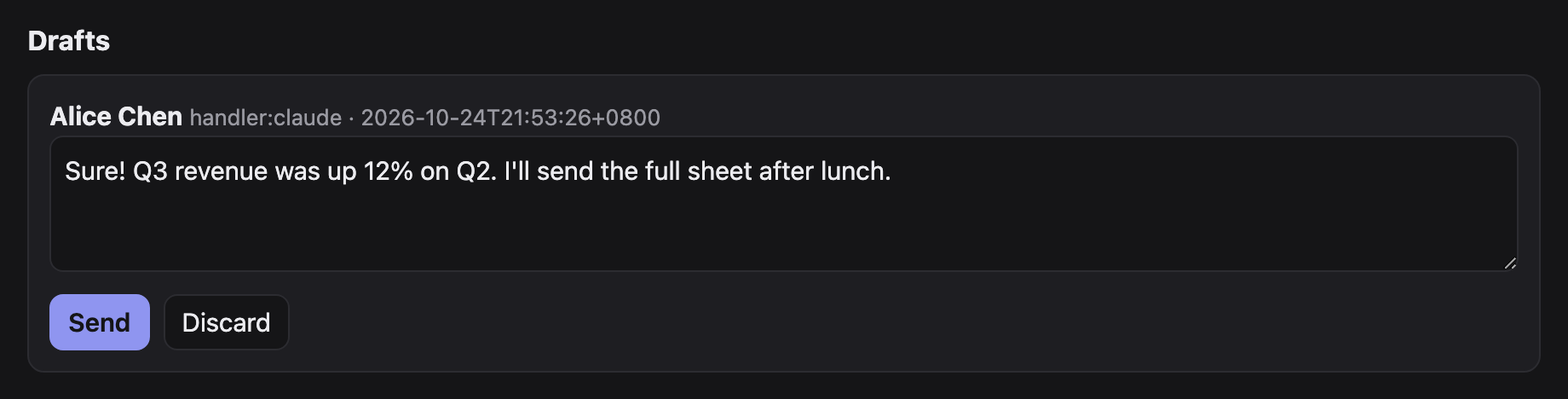
- You stay in control: every chat has a send mode.
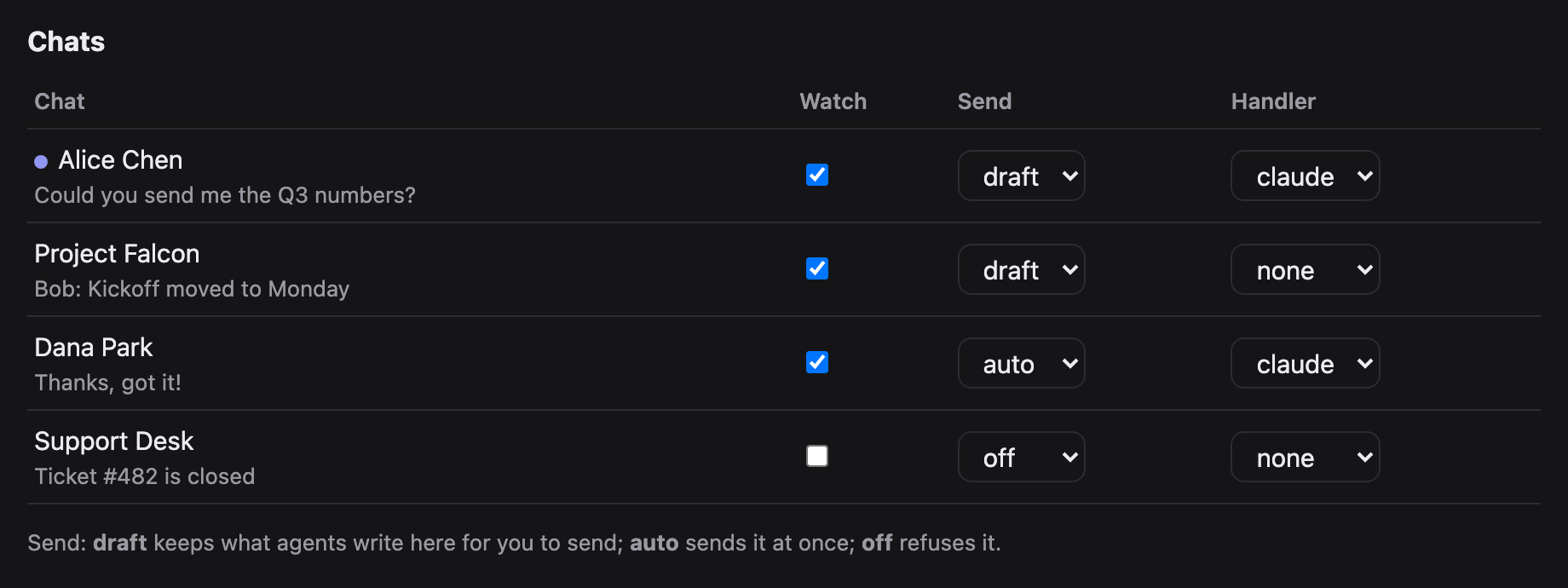
draft(the default) keeps what an agent writes on the local page until you send or discard it;autosends at once;offrefuses. - Nothing is marked read by watching. New messages are read through Teams' own chat service API from inside the tab, so chats stay unread. Sending opens the chat, which marks it read (Teams does that; it cannot be avoided).
- See Teams on the page. A live view of chatwatch's Chrome, also when it runs without a window: click, scroll and type in it to sign in again when Teams asks.
- The Teams token never leaves the tab. It is used inside the page and is never returned to Python, printed or saved.
Requirements
- Python 3.9 or later. chatwatch uses the standard library only, so there is nothing else to install.
- Chrome, Chromium or Edge. If chatwatch does not find it, set
CHATWATCH_CHROMEto its executable. - A Microsoft Teams account you can sign in to on the Teams web page.
- For the pull tools, an MCP client such as Claude Code, Codex or Cursor.
Quick start
git clone https://github.com/xxxxDev/chatwatch.git chatwatch && cd chatwatch
pip install .                    # or run python3 -m chatwatch from this folder

# 1. Sign in to Teams once, in chatwatch's own Chrome profile
chatwatch browser --show         # sign in, then close the window

# 2. Run the watcher (starts Chrome headless) and open the page
chatwatch serve
chatwatch open                   # prints http://127.0.0.1:8766/#key=...

# 3. Give your agent the tools
claude mcp add teams -- chatwatch mcp
How it fits together
flowchart LR
    agent["Your agent<br/>Claude Code, Codex,<br/>any MCP client"]
    handler["Your handler<br/>a command or URL"]
    mcp["chatwatch mcp"]
    serve["chatwatch serve"]
    mode{"Send mode<br/>of the chat"}
    page["Local page<br/>you send or discard"]
    tab["Teams tab in<br/>chatwatch's Chrome"]
    teams[("Microsoft Teams")]

    agent -- "MCP tools" --> mcp
    mcp -- "local API + key" --> serve
    serve -- "new messages" --> handler
    handler -- "reply" --> serve
    serve -- "read through the chat API,<br/>never marks read" --> tab
    serve -- "send" --> mode
    mode -- "auto" --> tab
    mode -- "draft" --> page
    page -- "you approve" --> tab
    mode -- "off" --> refused["refused"]
    page -. "live view" .- tab
    tab <--> teams
An agent works with chats in one of two ways. Through MCP it asks for chats and messages and sends when it decides to. Through a handler each new batch of messages is pushed to it, and its answer is sent back. Either way, every send passes the chat's send mode before anything reaches Teams.
The page
chatwatch open prints the page's address with its key; open it in your browser. It refreshes itself every few seconds.
- Pause / Resume (top): the emergency stop, see Push handlers.
- Teams screen: see below.
- Drafts: every reply waiting for you. Edit the text, then Send or Discard. A draft whose earlier send may have gone out asks you to tick I checked the chat first, so nothing is sent twice by mistake.
- Chats: each chat Teams lists, with a dot when unread. Per chat: Watch (record its new messages and pass them on), Send (
draft,autooroff;autoasks you to confirm) and Handler (where its new messages are pushed; handlers come fromconfig.json). - Recent: the last 30 events: new messages, sends, drafts, refusals and errors.
Teams screen
On the page, Show under Teams screen displays what the Teams tab shows. Start operating sends your clicks, scrolling and typing to it (on a phone, use the text box and the Enter, ⌫ and Tab buttons); Reload Teams reloads the tab. A send waits while you operate, and your input waits for a send in progress. Only the Teams tab (or the Microsoft sign-in page it goes to) is shown; there is no address bar.
MCP tools
| Tool | What it does |
|---|---|
teams_list_chats |
Chats with title, id, preview, unread flag and their settings |
teams_read_messages |
Last n messages of a chat, without marking it read |
teams_wait_for_messages |
New incoming messages after an event number, waiting up to 60 s |
teams_send_message |
Text and files to a chat, under its send mode |
teams_get_attachments |
Download the pictures and files of given messages |
teams_list_drafts |
Replies waiting for you on the page |
teams_send_message answers with a status:
sent: it is in the chat.draft: waiting for you on the page.refused: sending is off for this chat.not_sent: nothing went out; trying again is safe.maybe_sent: send was pressed but the message was not seen; do not resend before someone checks the chat.
A chat is named by its title, a part of the title that matches only one chat, or its id.
Push handlers
Define handlers in ~/.chatwatch/config.json and pick one per chat on the page:
{
  "handlers": {
    "claude": {"command": ["claude", "-p", "--output-format", "text",
                "Answer this Teams chat. The messages are JSON on stdin."]},
    "my-bot": {"url": "http://127.0.0.1:9000/teams", "timeout": 300}
  }
}
A command gets the batch as JSON on stdin; a URL gets it POSTed:
{"chat_id": "19:...", "chat": "Alice", "kind": "OneOnOneChat", "send": "draft",
 "messages": [{"mid": "...", "author": "Alice", "time": "...", "text": "Hi"}]}
It answers with plain text (the reply) or JSON {"text": "...", "files": ["/abs/path"]}. An empty answer sends nothing. The reply follows the chat's send mode. In auto, a send that certainly did not go is tried again after 20 s, 60 s and 180 s, then kept as a draft; one that may have gone is kept as a draft marked for checking, never resent by itself.
Two bots answering each other on auto never stop. Keep bot chats on draft. Pause on the page is the emergency stop: nothing is read, queued handler work is skipped, and while paused every auto chat behaves as draft. A reply that comes back after its chat was paused, unwatched or given another handler waits as a draft.
Using it with an agent
With the MCP tools added, ask your agent in plain words, for example:
Check my Teams chats for anything new from Alice and draft a reply.
Wait for new Teams messages for the next 10 minutes and answer the questions about the shipping schedule.
The agent lists chats, reads, waits and sends with the tools above. On a draft chat its replies wait on the page; switch a chat to auto only when you trust what it sends there.
Starting, stopping and signing in again
chatwatch serveruns in the foreground; stop it with Ctrl+C. Chrome keeps running;chatwatch browser stopcloses it.- When Teams signs you out, reading stops with
NO_TEAMS_TOKEN. Sign in again on the page's Teams screen, or close Chrome and runchatwatch browser --show. - Settings, drafts and the sign-in stay in
~/.chatwatchacross restarts. Messages that arrived while chatwatch was stopped are passed on when it starts again (up to the last 20 per chat); those that arrived while it was paused are not, so no late automatic reply goes out after a pause.
Troubleshooting
| Message | What to do |
|---|---|
chatwatch is not running at ... |
Start chatwatch serve. |
NO_TEAMS_TOKEN, CHAT_API_401 |
Teams signed out: sign in again (above). |
Chrome not found |
Set CHATWATCH_CHROME to Chrome's executable. |
no chat matches / several chats match |
Use the exact title or the chat id from teams_list_chats. |
DRAFT_NOT_EMPTY |
Someone left text in that chat's message box; clear it on the Teams screen. |
CHAT_NOT_FOUND, NO_COMPOSE_BOX, NO_SEND_BUTTON |
Teams is still loading or its page changed; look at the Teams screen, then try again. |
TYPED_TEXT_MISMATCH, SEND_NOT_TAKEN |
Nothing was sent; trying again is safe. |
maybe_sent |
Look at the chat before sending again. |
the Teams tab is busy sending |
Your input on the Teams screen waited for a send; try again. |
Command line
chatwatch chats
chatwatch read "Alice" 10
chatwatch send "Alice" "Hello" ./report.pdf     # sends now, whatever the mode: you are the person
chatwatch set "Alice" --watch on --send auto --handler claude
Settings
| Variable | Default | |
|---|---|---|
CHATWATCH_HOME |
~/.chatwatch |
config, state, events, drafts, API key, Chrome profile |
CHATWATCH_PORT |
8766 |
page and local API |
CHATWATCH_CDP_PORT |
9334 |
DevTools port of chatwatch's Chrome |
CHATWATCH_CDP |
use a Chrome you already run with --remote-debugging-port |
|
CHATWATCH_CHROME |
path to the Chrome executable | |
CHATWATCH_POLL |
4 |
seconds between checks |
CHATWATCH_URL |
http://127.0.0.1:8766 |
address of the running chatwatch serve that chatwatch mcp talks to; when unset, its port follows CHATWATCH_PORT |
How it works
teams.py reads through the chat service API inside the Teams tab and sends by pasting the whole text into the compose box (a synthetic paste keeps line breaks; typing key by key now and then lost a key), attaching files through the file chooser, pressing send, and waiting for the message to appear. service.py polls, records events, runs handlers and applies send modes. http_api.py serves the page and the local API; mcp.py is a stdio MCP server that talks to that API. cdp.py is a small DevTools client.
Teams changes its web page from time to time; the selectors in teams.py then need updating.
Limits
- Chats only, not channel posts.
- Chats are found among those Teams lists in its sidebar.
- Sending marks the chat read; watching does not.
- It depends on the Teams web page. When Teams changes it, reading or sending can stop until
teams.pyis updated; the error names the step that failed.
Security
The page and API listen on 127.0.0.1 only and need the key in ~/.chatwatch/api-key. Agents read what other people write to you, and in an auto chat what they write goes out at once. Read SECURITY.md before connecting an agent, and use it to report a problem.
Contributing
See CONTRIBUTING.md before you open an issue or a pull request. Changes are listed in CHANGELOG.md and ideas for later in docs/ROADMAP.md.
License
The code is under the MIT License.
chatwatch is an independent project. It is not made by, affiliated with or endorsed by Microsoft. Microsoft Teams is a trademark of Microsoft.
Made by V-AX.
Pertanyaan tentang chatwatch MCP
Tool apa yang disediakan chatwatch MCP?
Server ini menyediakan 11 tool, termasuk teams_list_chats, teams_read_messages, teams_wait_for_messages, teams_send_message, teams_get_attachments.
Apakah chatwatch memerlukan Azure app registration atau admin consent?
Tidak, tool ini menjalankan tab Chrome menggunakan sesi Teams Anda yang sudah ada, sehingga tidak memerlukan Azure app registration, admin consent, atau akun bot.
Bagaimana cara saya mengontrol apakah AI agent akan mengirim pesan secara otomatis?
Anda dapat mengatur send mode untuk setiap chat: 'draft' akan menyimpan pesan di halaman lokal untuk persetujuan Anda, 'auto' akan langsung mengirimnya, dan 'off' akan menolak pengiriman pesan.
Apakah memantau chat akan menandai pesan sebagai sudah dibaca di Microsoft Teams?
Tidak, pesan baru dibaca melalui API layanan chat Teams dari dalam tab, sehingga chat akan tetap berstatus belum dibaca sampai Anda benar-benar mengirimkan pesan.
Apa saja persyaratan sistem untuk menjalankan chatwatch?
Anda memerlukan Python 3.9 atau versi terbaru dan browser seperti Chrome, Chromium, atau Edge.