
Worktable MCP server
Commit 12 Nov 2026Memungkinkan AI agent untuk membuat dan merevisi dokumen, gambar, catatan terstruktur, serta tool HTML interaktif di dalam workspace kolaboratif.
Juga dikenal sebagai worktable/worktable-dev, worktable-dev
- Stars
- 8
- Tools
- —
- Unduhan, 30 hari
- —
- Versi terbaru
- 0.1.48
- Commit terakhir
- 12 Nov 2026
- Lisensi
- AGPL-3.0
Apa itu Worktable MCP?
Worktable adalah MCP server. Memungkinkan AI agent untuk membuat dan merevisi dokumen, gambar, catatan terstruktur, serta tool HTML interaktif di dalam workspace kolaboratif.
Ringkasan dibuat dari README proyek
Tentang Worktable MCP server
Kolaborasi dengan AI agent untuk membangun dokumen, gambar, dan tool interaktif dapat dilakukan melalui Worktable. Workspace ini memungkinkan Anda menghubungkan agent yang kompatibel dengan MCP untuk membuat dan merevisi catatan terstruktur atau tool berbasis HTML seperti kalkulator dan dashboard. Anda dapat mengelola pekerjaan melalui browser, aplikasi desktop untuk macOS, atau instalasi terminal pada macOS dan Linux.
Pengguna dapat memilih antara menjalankan instance lokal dengan file yang Anda kontrol, melakukan self-hosting lingkungan sendiri, atau menggunakan Worktable Cloud. Setup lokal tidak memerlukan akun, sementara opsi cloud akan mengelola hosting untuk Anda. Saat menggunakan agent, Anda harus menyediakan langganan atau kredensial API Anda sendiri sesuai kebutuhan dari penyedia agent terkait.
Lingkungan ini mendukung kontinuitas dengan memungkinkan berbagai agent mengakses riset dan data yang sama yang telah disimpan. Anda dapat mengedit hasil secara manual atau meninggalkan komentar untuk diikuti oleh agent. Sistem ini mendukung pemindahan workspace melalui fungsi export dan import antara versi lokal, self-hosted, dan cloud.
Apa yang bisa Anda lakukan dengannya
- 1Mengorganisir temuan risetMinta agent untuk mengumpulkan informasi dan menyimpan temuan tersebut ke dalam dokumen yang saling terhubung di dalam workspace.
- 2Membuat diagram visualMinta agent untuk membuat sketsa layout atau penjelasan visual yang nantinya dapat Anda revisi.
- 3Mengembangkan kalkulator kustomInstruksikan agent untuk membangun tool interaktif seperti dashboard atau cost explorer menggunakan data spesifik.
- 4Mengelola catatan data terstrukturGunakan agent untuk mengelola tugas dan feedback menggunakan field bersama dalam catatan yang terorganisir.
Ditulis berdasarkan README proyek. Setiap use case diperiksa terhadap kutipan dari README tersebut.
Cara menginstal Worktable MCP
Format diverifikasi 10 Nov 2026Instal Worktable MCP di Claude Code
$ claude mcp add --transport http worktable-dev https://app.worktable.cloud/api/mcpInstal Worktable MCP di Cursor
~/.cursor/mcp.json
{
  "mcpServers": {
    "worktable-dev": {
      "url": "https://app.worktable.cloud/api/mcp"
    }
  }
}Instal Worktable MCP di VS Code
.vscode/mcp.json
{
  "servers": {
    "worktable-dev": {
      "type": "http",
      "url": "https://app.worktable.cloud/api/mcp"
    }
  }
}Instal Worktable MCP di Codex
~/.codex/config.toml
[mcp_servers.worktable-dev]
url = "https://app.worktable.cloud/api/mcp"
Instal Worktable MCP di Gemini CLI
~/.gemini/settings.json
{
  "mcpServers": {
    "worktable-dev": {
      "httpUrl": "https://app.worktable.cloud/api/mcp"
    }
  }
}README
Lihat di GitHubWorktable
Worktable is an open-source workspace where you and your agents create and revise documents, drawings, structured records, and interactive tools. Connect an agent through MCP, then work together in the browser or Desktop app.
Run it locally with files you control, self-host it, or use Worktable Cloud.
Get started · Documentation · Worktable Cloud · Releases
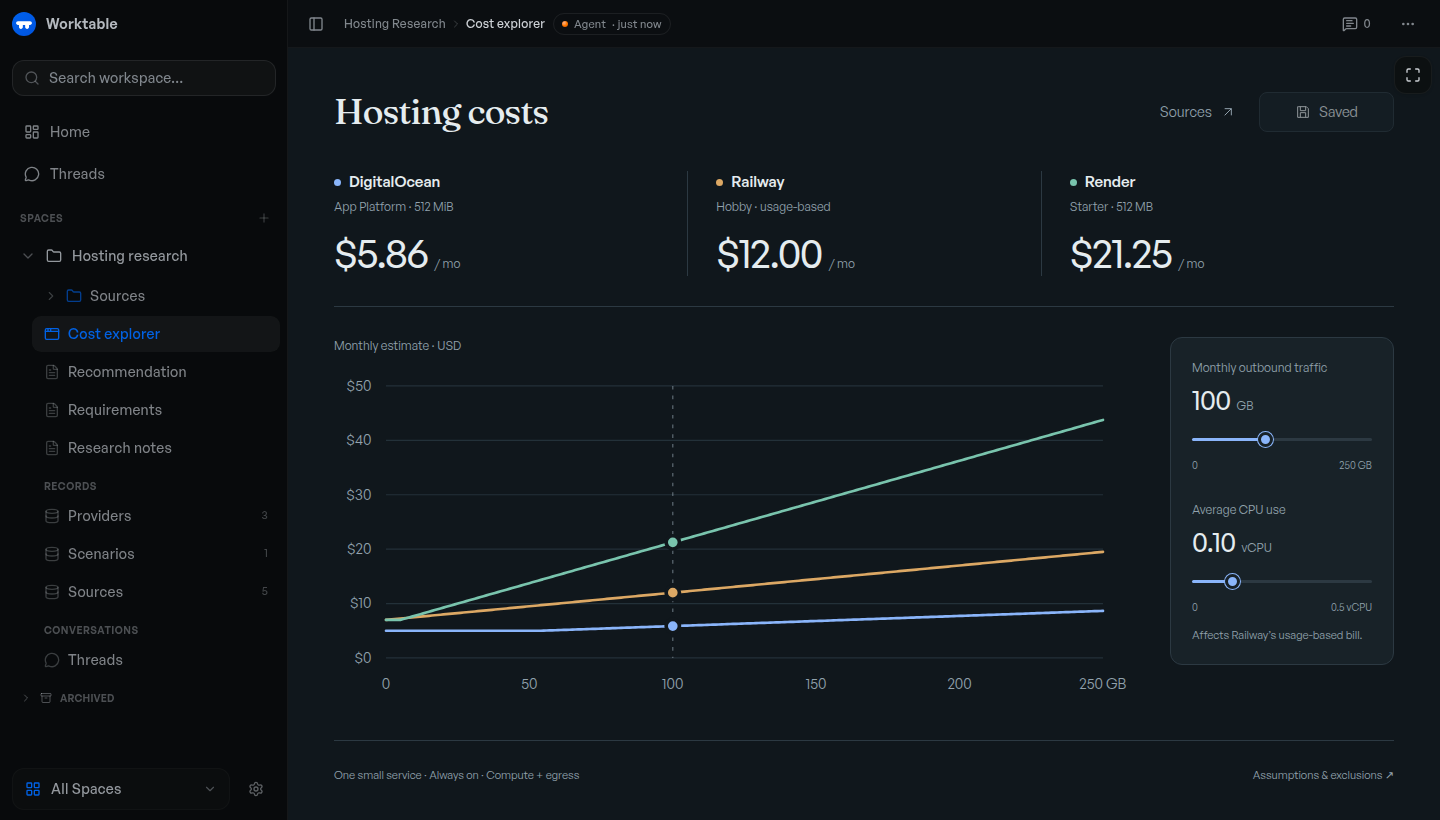
Example cost explorer backed by saved research and records. The displayed prices illustrate the tool; they are not current provider quotes.
Get started
Use an MCP-compatible agent, with its own subscription or API credentials where required.
macOS app: Download Worktable for Mac for Apple Silicon, macOS 13 or newer. Install and open the app, then choose This Mac.
Terminal: macOS or Linux, arm64 or x64. No separate runtime or source checkout needed.
curl -fsSL https://worktable.dev/install | sh
Open the browser address printed by the installer. Run worktable to open
it again later.
In either version, open Settings → Agents and connect your agent. Ask it to save research, organize records, or build a tool in Worktable.
Inspect the installer · Installation guide · First task
Cloud: Worktable Cloud manages hosting for you. For other setups, see self-hosting.
What to make
- Save your research. Keep findings, plans, and decisions in linked documents.
- Organize your data. Maintain tasks, sources, feedback, and other records with shared fields.
- Draw a plan. Sketch a layout, diagram, or visual explanation and revise it with an agent.
- Build interactive tools. Create a calculator, dashboard, or explorer. Use supplied data, or connect the tool to workspace records when needed.
For example, ask an agent to research hosting options, save the sources and pricing, and build a cost explorer for your expected usage. Recheck the rates or change the assumptions later; the research, data, and tool stay together.
Continue your work
Connected agents work with the same saved documents, records, and tools. Ask another agent to continue from what's already there. You can edit the results yourself or leave comments for an agent to act on.
Your data
- Keep work local. Local and self-hosted workspaces are backed by files you can inspect and back up. Local Worktable requires no account.
- Move your workspace. Export and import between Local, self-hosted Worktable, and Cloud.
Connected agent providers may process the content you give them under their own terms. See workspace storage for storage and portability details.
Documentation
Workflows · CLI and MCP reference · Changelog
Report a bug or ask a question. Remove private information from attachments. Report vulnerabilities privately through the security policy.
Contributing
Fixes and documentation improvements are welcome. Please discuss substantial features first. Read CONTRIBUTING.md for the contribution process, development to run from source, or building to create release artifacts.
License
The Worktable application is AGPL-3.0-only, copyright Reva Labs. See LICENSE. Some shared components and agent plugins have MIT licenses; NOTICE and the relevant package notices identify the exact exceptions and third-party terms.
Pertanyaan tentang Worktable MCP
Bagaimana cara menambahkan Worktable MCP ke Claude Code?
Jalankan claude mcp add --transport http worktable-dev https://app.worktable.cloud/api/mcp di terminal Anda. Tambahkan --scope user agar tersedia di semua proyek.
Bagaimana cara menambahkan Worktable MCP ke Cursor?
Buka ~/.cursor/mcp.json dan tambahkan server di bawah mcpServers, menggunakan config Cursor yang ditunjukkan di bagian instalasi di atas.
Jenis tool apa yang bisa dibangun agent di Worktable?
Agent dapat membangun tool interaktif seperti kalkulator, dashboard, atau explorer menggunakan data workspace.
Apakah saya perlu akun untuk menggunakan versi lokal?
Tidak, versi lokal Worktable tidak memerlukan akun.