
Buat dan edit flowchart, mind map, wireframe, serta dokumentasi langsung di dalam workspace Whimsical Anda menggunakan AI client.
Juga dikenal sebagai WhimsicalCode/mcp-server-guide, mcp-server-guide
- Stars
- 11
- Tools
- 14
- Unduhan, 30 hari
- —
- Versi terbaru
- 1.1.0
- Commit terakhir
- 14 Okt 2026
- Lisensi
- MIT
Apa itu Whimsical MCP?
Whimsical adalah MCP server. Buat dan edit flowchart, mind map, wireframe, serta dokumentasi langsung di dalam workspace Whimsical Anda menggunakan AI client. Server ini menyediakan 14 tool, seperti search, fetch, file_tree.
Ringkasan dibuat dari README proyek
Tentang Whimsical MCP server
Official Whimsical MCP server ini memungkinkan Anda membuat flowchart, mind map, dan wireframe yang dapat diedit hanya melalui prompt bahasa alami. Alih-alih menerima gambar statis, pengguna akan mendapatkan file interaktif nyata di dalam workspace Whimsical yang dapat dibuka, diedit, dan diberi komentar oleh anggota tim lainnya. Tool ini bekerja dengan berbagai AI client termasuk Claude, ChatGPT, Cursor, dan VS Code dengan GitHub Copilot melalui koneksi ke remote endpoint yang dihosting oleh Whimsical.
Developer dan desainer dapat menggunakannya untuk membangun diagram arsitektur yang kompleks, sequence diagram, dan dokumentasi teknis. Selain pembuatan konten, server ini juga dapat mencari workspace yang ada, membaca board, memindahkan file antar folder, dan mengelola thread komentar. Server ini menggunakan OAuth 2.1 dengan PKCE untuk autentikasi, sehingga tidak memerlukan manajemen API key secara manual. Meskipun paket gratis memungkinkan pembuatan hingga 50 objek board per bulan, paket berbayar menawarkan pembuatan objek tanpa batas.
Apa yang bisa Anda lakukan dengannya
- 1Visualisasi alur autentikasi penggunaMinta AI client Anda untuk membuat flowchart mendetail yang merepresentasikan proses login dengan node keputusan dan konektor berlabel.
- 2Desain wireframe UI interaktifInstruksikan agent untuk membangun layout halaman pengaturan menggunakan container, input, dan button yang mengikuti struktur flexbox.
- 3Brainstorming fitur proyekGunakan server ini untuk membuat mind map terstruktur guna mengorganisir fitur aplikasi mobile ke dalam cabang-cabang spesifik.
- 4Kelola konten workspace yang sudah adaMinta AI untuk mencari informasi spesifik di dalam board Anda saat ini dan merangkum temuan tersebut.
Ditulis berdasarkan README proyek. Setiap use case diperiksa terhadap kutipan dari README tersebut.
Cara menginstal Whimsical MCP
Format diverifikasi 10 Nov 2026Tambahkan ke CursorTambahkan ke GooseInstal Whimsical MCP di Claude Code
$ claude mcp add --transport http mcp-server-guide https://mcp.whimsical.com/mcpInstal Whimsical MCP di Cursor
~/.cursor/mcp.json
{
  "mcpServers": {
    "mcp-server-guide": {
      "url": "https://mcp.whimsical.com/mcp"
    }
  }
}Instal Whimsical MCP di VS Code
.vscode/mcp.json
{
  "servers": {
    "mcp-server-guide": {
      "type": "http",
      "url": "https://mcp.whimsical.com/mcp"
    }
  }
}Instal Whimsical MCP di VS Code CLI
$ code --add-mcp '{"name":"mcp-server-guide","type":"http","url":"https://mcp.whimsical.com/mcp"}'Instal Whimsical MCP di Codex
$ codex mcp add mcp-server-guide --url https://mcp.whimsical.com/mcpInstal Whimsical MCP di Codex config.toml
~/.codex/config.toml
[mcp_servers.mcp-server-guide]
url = "https://mcp.whimsical.com/mcp"
Instal Whimsical MCP di Gemini CLI
$ gemini mcp add -s user --transport http mcp-server-guide https://mcp.whimsical.com/mcpInstal Whimsical MCP di Gemini settings.json
~/.gemini/settings.json
{
  "mcpServers": {
    "mcp-server-guide": {
      "url": "https://mcp.whimsical.com/mcp",
      "type": "http"
    }
  }
}Tool Whimsical MCP 14
Terdeteksi dari READMEsearchfetchfile_treehow_tocreate_fileadd_board_contentadd_doc_contenteditwireframe_editauto_layoutdeletemove
| search | — | |
| fetch | — | |
| file_tree | — | |
| how_to | — | |
| create_file | — | |
| add_board_content | — | |
| add_doc_content | — | |
| edit | — | |
| wireframe_edit | — | |
| auto_layout | — | |
| delete | — | |
| move | — |
Tampilkan semua 14 toolTampilkan lebih sedikit tool
comment_readcomment_edit
| comment_read | — | |
| comment_edit | — |
Pengecekan otomatis
Berjalan 13 Nov 2026Laporan lengkap →Lolos checks otomatis kami. Ini bukan audit keamanan: baca kodenya dan berikan server akses paling terbatas yang dibutuhkannya. Cara kerja checks

- Source repository terhubung dan dapat dijangkauLolos
- Lisensi open source (OSI)Lolos
- Ada commit atau release dalam satu tahun terakhirLolos
- Nama package tidak mirip dengan package populerTidak diperiksa
- Remote endpoint menggunakan HTTPSLolos
- Tools yang bersifat destruktif telah diberi labelTidak diperiksa
- Tidak ada instruksi tersembunyi untuk modelLolos
- Tidak ada advisory kritis pada paket atau dependensinyaTidak diperiksa
README
Lihat di GitHubWhimsical MCP Server
The official Whimsical MCP server. Ask Claude, ChatGPT, Cursor or any MCP client for a flowchart, mind map, sequence diagram, wireframe or architecture diagram, and it builds an editable Whimsical board in your workspace. You get a real file your team can open, edit and comment on, not a static image. The server can also search, read, edit and comment on the boards and docs you already have.
- Endpoint:
https://mcp.whimsical.com/mcp(hosted by Whimsical, Streamable HTTP, nothing to install) - Authentication: OAuth 2.1 with PKCE. There's no API key to manage.
- Plan: every tool works on the free plan, which includes up to 50 board objects a month. Paid plans have no object limit.
- Clients: Claude, Claude Code, ChatGPT, Cursor, VS Code with GitHub Copilot, Grok, Codex, and any client that supports remote MCP servers.

Quick start
In Claude Code:
claude mcp add --transport http whimsical https://mcp.whimsical.com/mcp
In other clients that support remote MCP servers, add a server with this URL and sign in to Whimsical when prompted:
https://mcp.whimsical.com/mcp
Then try: "Create a flowchart in Whimsical of our user signup flow." Setup steps for each client are below.
What you can build
Each example below is a prompt you can try. The agent creates the file in your Whimsical workspace and replies with a link. Clients that support it also show a preview in the chat.
Flowcharts
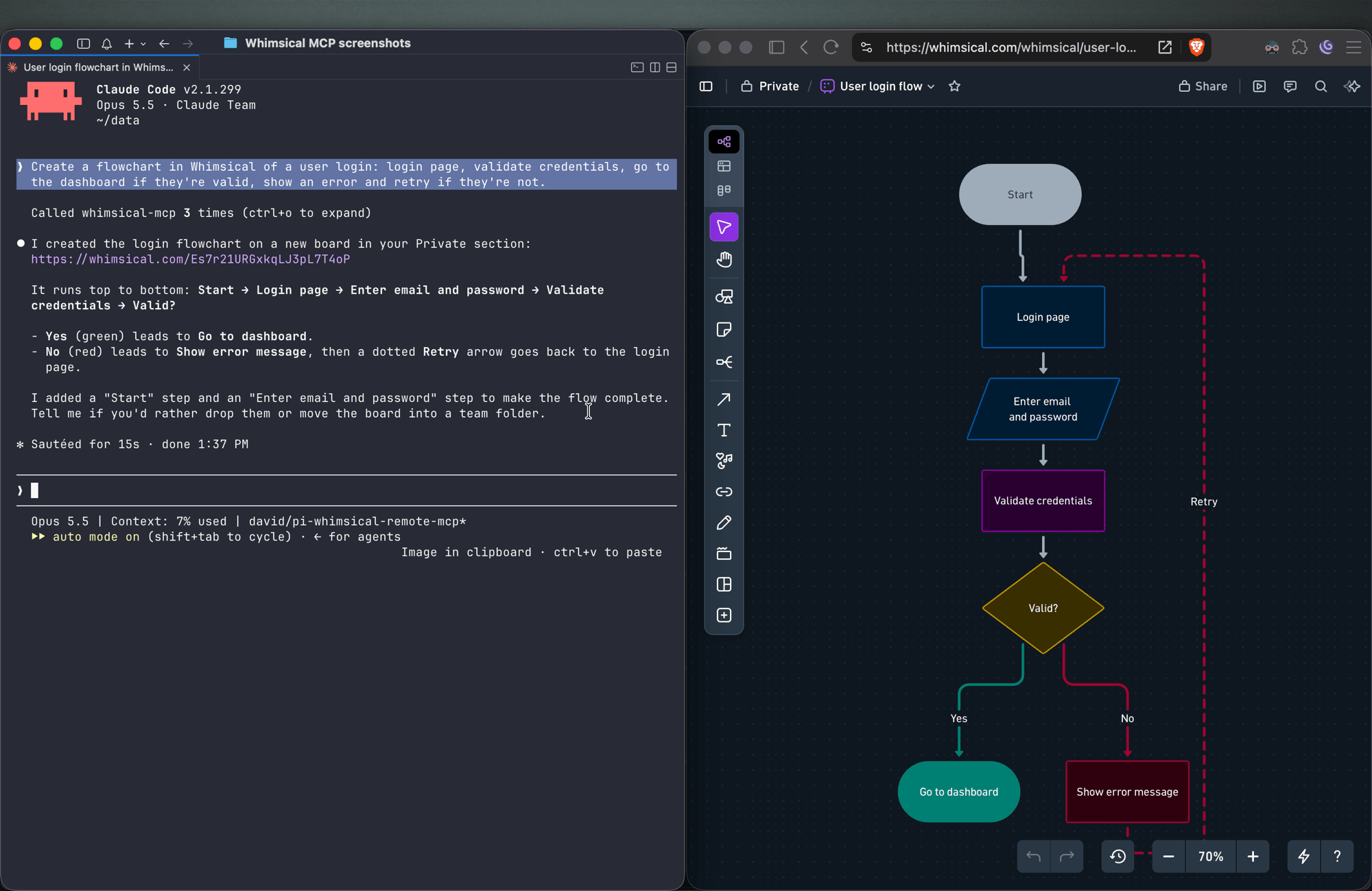
Create a flowchart in Whimsical of a user login: login page, validate credentials, go to the dashboard if they're valid, show an error and retry if they're not.
You get an auto-laid-out flowchart with decision nodes, labeled connectors and a clean top-to-bottom layout. Ask for left-to-right and the agent re-runs the layout.
Sequence diagrams
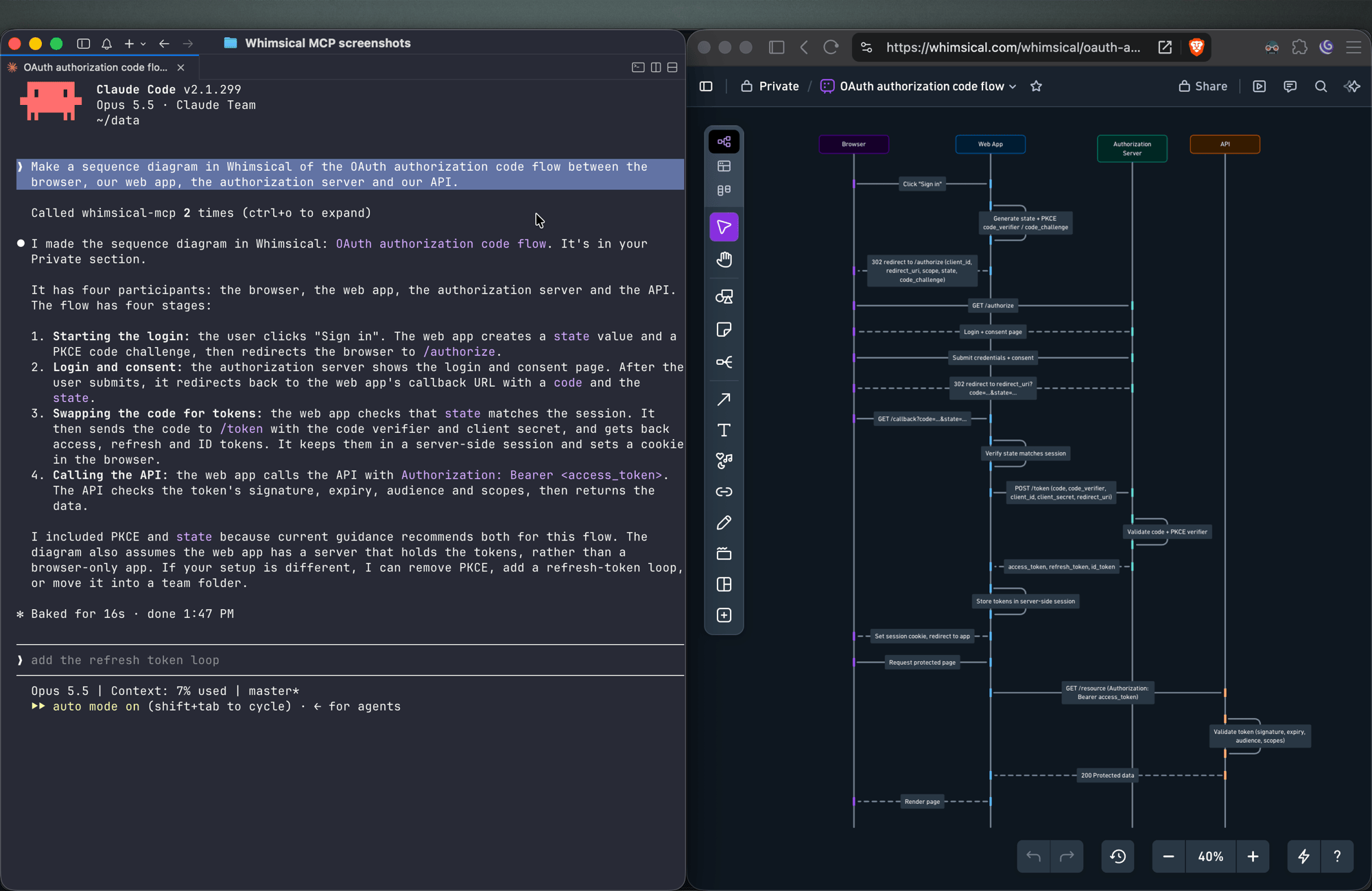
Make a sequence diagram in Whimsical of the OAuth authorization code flow between the browser, our web app, the authorization server and our API.
The agent creates a sequence diagram with one lifeline per actor and the messages between them in order.
Architecture diagrams
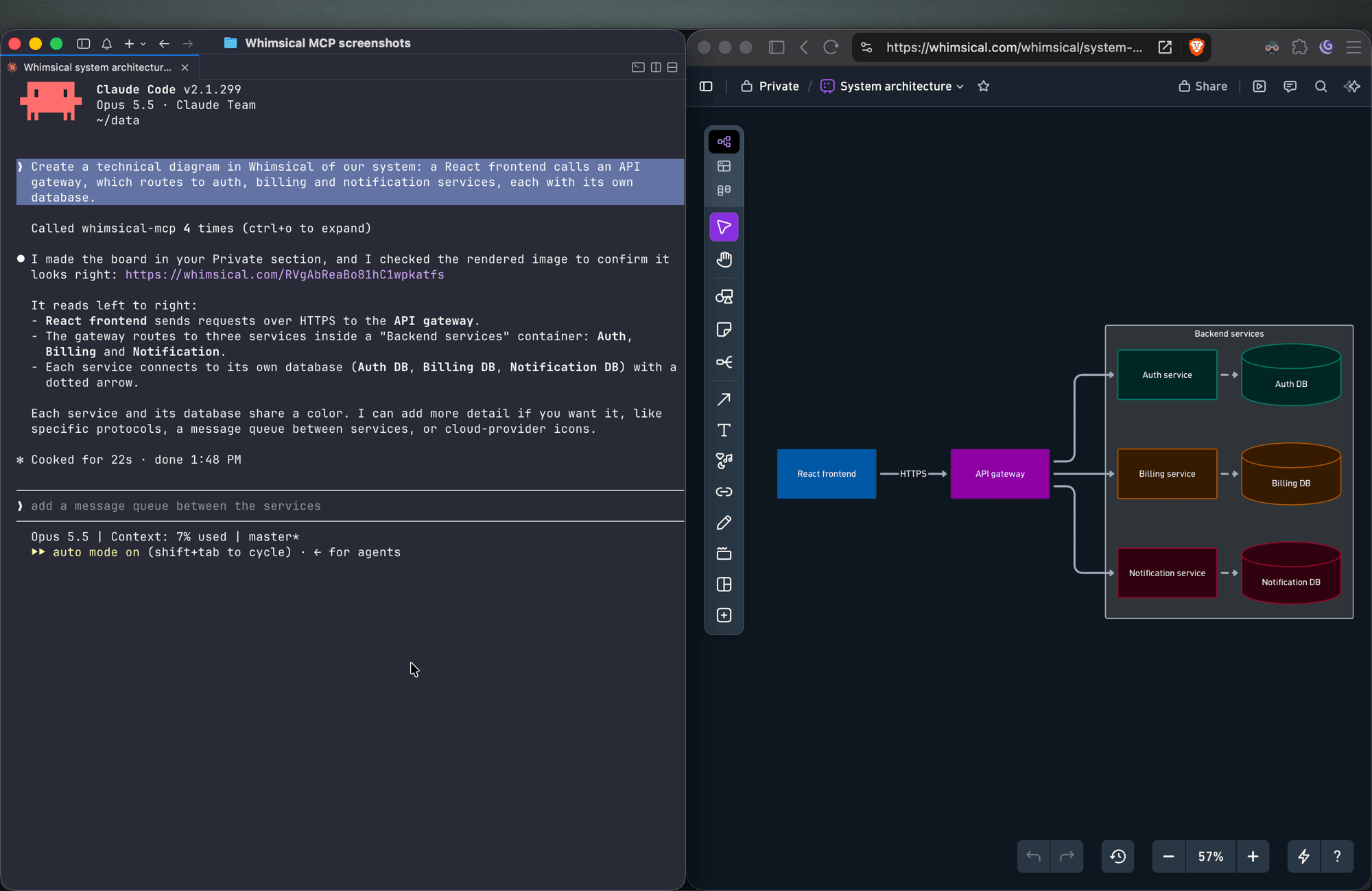
Create a technical diagram in Whimsical of our system: a React frontend calls an API gateway, which routes to auth, billing and notification services, each with its own database.
The agent lays out the components on a board with service boundaries and connectors showing how requests and data move between them.
Mind maps
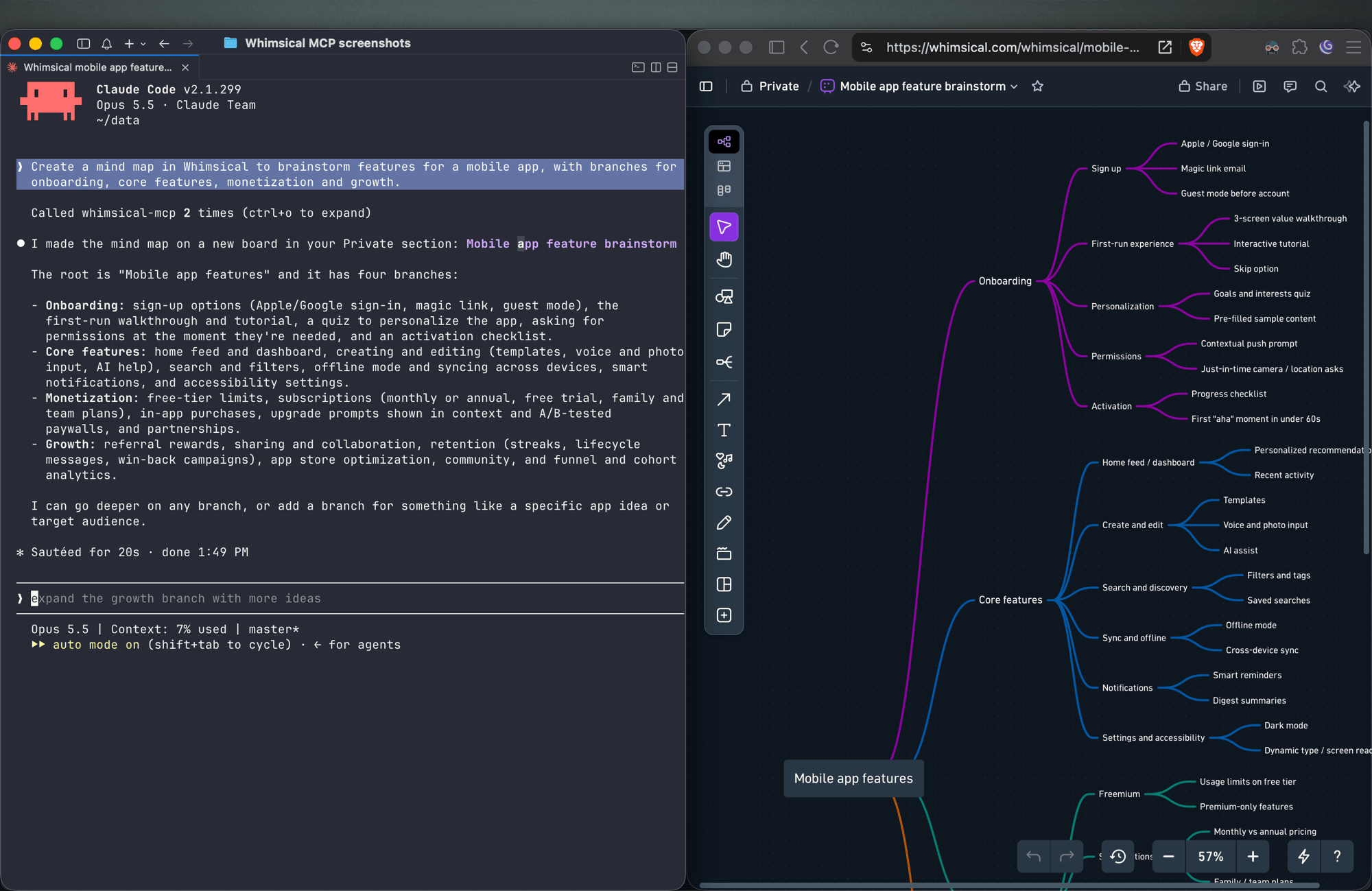
Create a mind map in Whimsical to brainstorm features for a mobile app, with branches for onboarding, core features, monetization and growth.
You get a mind map with the central topic and its branches, laid out horizontally. Ask for a vertical layout to get a top-down tree.
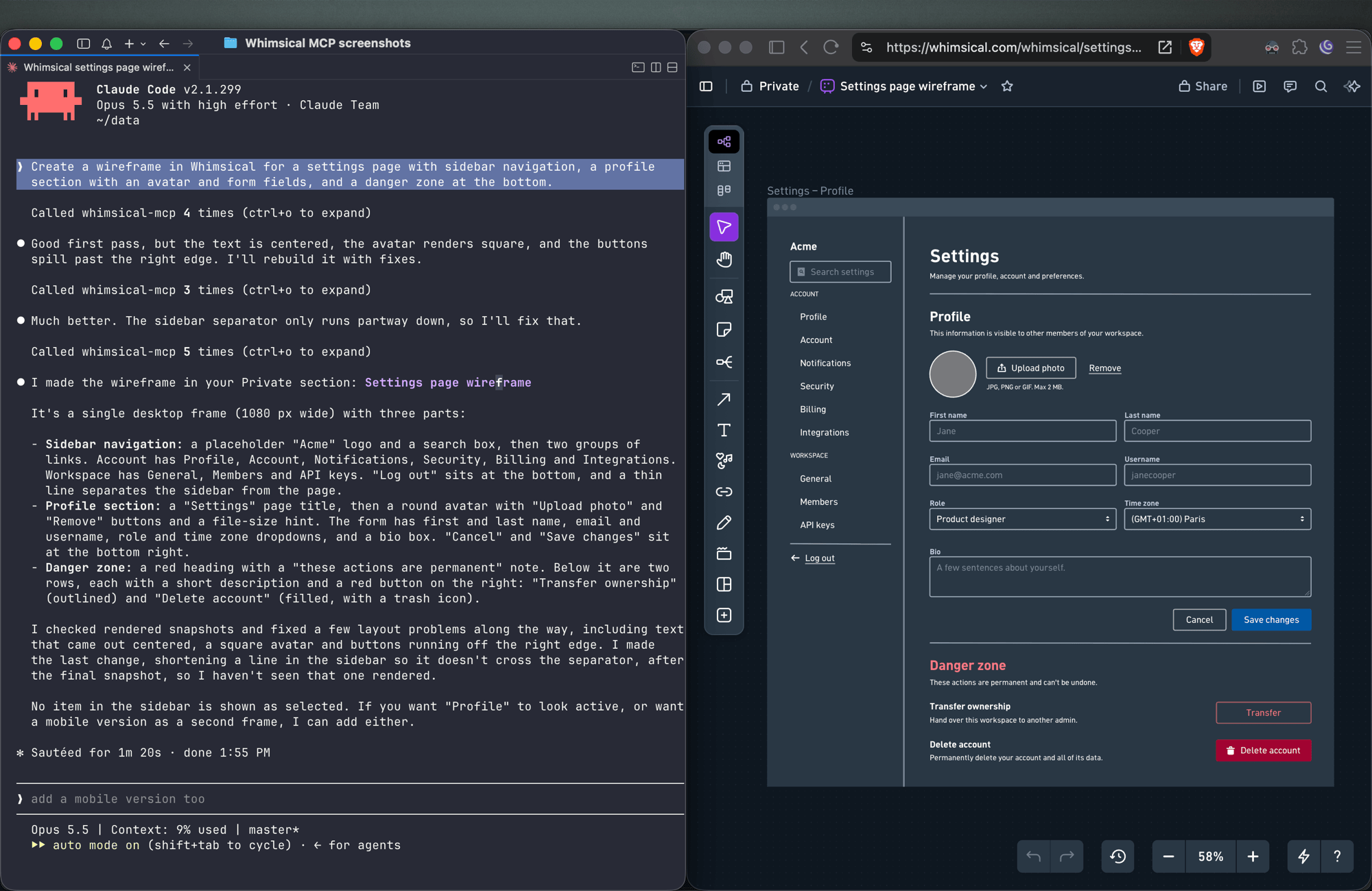
Wireframes
Create a wireframe in Whimsical for a settings page with sidebar navigation, a profile section with an avatar and form fields, and a danger zone at the bottom.
The agent builds the screen from wireframe elements (containers, inputs, buttons, icons) with a flexbox layout, so follow-ups like "make the primary button full width" keep everything aligned.
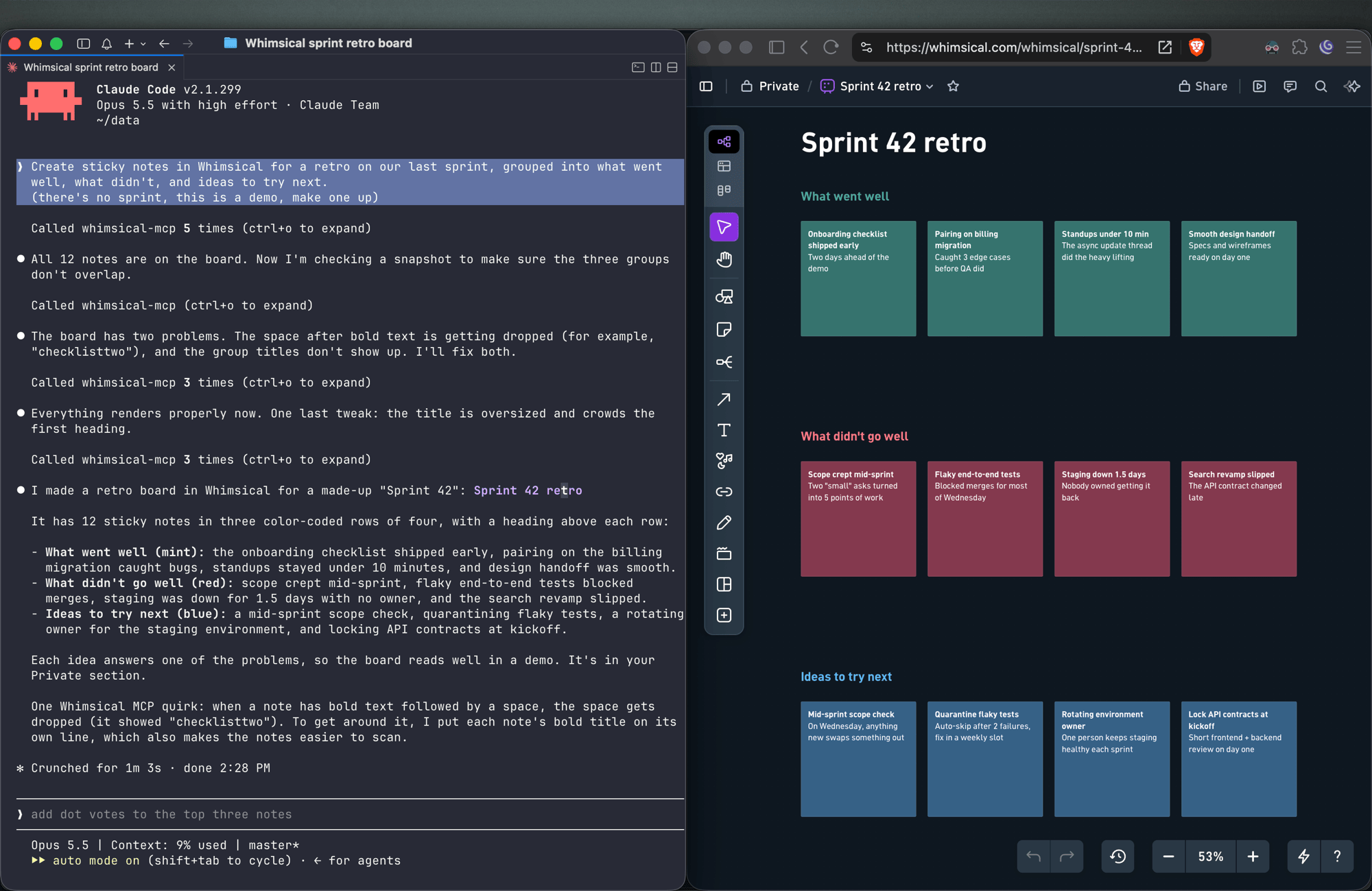
Sticky notes
Create sticky notes in Whimsical for a retro on our last sprint, grouped into what went well, what didn't, and ideas to try next.
You get sticky notes on a board, grouped into the clusters you asked for and laid out automatically, ready for your team to add to and vote on.
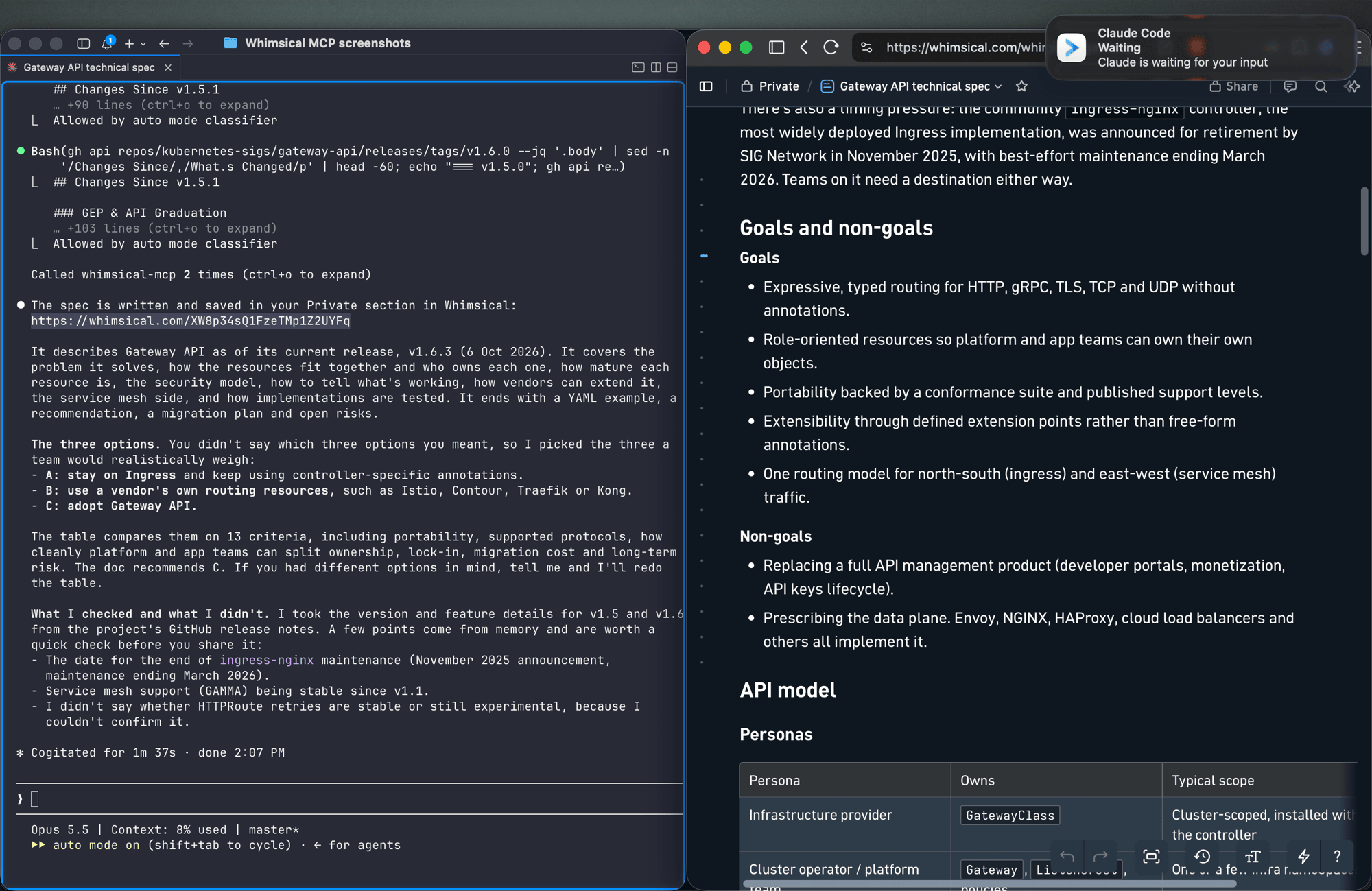
Docs and tables
Write up the technical spec for the new API as a Whimsical doc, with a table comparing the three options we discussed.
Docs support headings, lists, links, code blocks and tables. Tables can also go on a board.
Work with what's already in your workspace
Search my Whimsical workspace for anything about "API design" and summarize what you find.
Add a rate limiting step to the API flow diagram, then leave a comment asking the team to review it.
The agent can search your workspace, read boards and docs (including a PNG snapshot of a board), edit existing diagrams, move files between folders, and read, write and resolve comment threads.
Tools
| Tool | What it does |
|---|---|
search |
Search the workspace by text, creation date or update date |
fetch |
Read a board, doc or folder by ID, or get a PNG snapshot of a board |
file_tree |
Browse the Private, Shared and team sections and the folders inside them |
how_to |
Look up Whimsical syntax guides before creating flowcharts or wireframes (agents call this on their own) |
create_file |
Create a board, doc or folder, in your Private section unless you choose a folder |
add_board_content |
Add a flowchart, mind map, sequence diagram, sticky notes, table or wireframe to a board |
add_doc_content |
Append markdown to a doc |
edit |
Add, update or delete shapes, text and connectors on a board, edit mind map and sequence diagram nodes, or change blocks in a doc |
wireframe_edit |
Reflow or edit the elements of a wireframe |
auto_layout |
Re-run automatic layout on a flowchart, top to bottom, left to right or other directions |
delete |
Move a file, folder or doc to the trash |
move |
Move a file, folder or doc into another folder |
comment_read |
Read comment threads on a board or doc |
comment_edit |
Create, reply to, edit, resolve, reopen or delete comments |
See the tool reference for details and more example prompts.
Setup
Claude
Whimsical is a verified connector in Claude's connector directory. Open the Whimsical connector, click Connect and sign in to Whimsical.
Claude Code
claude mcp add --transport http whimsical https://mcp.whimsical.com/mcp
Run /mcp in Claude Code to sign in.
ChatGPT
Use the Whimsical app for ChatGPT:
- In ChatGPT, open Settings → Plugins.
- Search for Whimsical, or use the link above.
- Click Connect and complete the authorization.
Then type @Whimsical in any chat. See the ChatGPT guide for more.
Cursor
Or install the Whimsical plugin from Cursor's plugin directory, or add it by hand: open Cursor → Settings → Cursor Settings → Tools & MCP, add a new MCP server, and save this configuration:
{
  "mcpServers": {
    "whimsical": {
      "url": "https://mcp.whimsical.com/mcp"
    }
  }
}
See Cursor's MCP documentation for more.
VS Code (GitHub Copilot)
- Press
⌘ Shift P(orCtrl Shift P) and runMCP: Add Server. - Select
HTTP. - Paste
https://mcp.whimsical.com/mcpand pressEnter. - When prompted for a server ID, enter
whimsical. - Choose whether to add the server globally or only for the current workspace.
Grok
- Go to grok.com/connectors.
- Click New Connector, then select Custom.
- Enter
https://mcp.whimsical.com/mcpand sign in to Whimsical.
See the Grok guide for more.
Other clients
Any client that supports remote MCP servers over Streamable HTTP can connect with this configuration:
{
  "mcpServers": {
    "whimsical": {
      "url": "https://mcp.whimsical.com/mcp"
    }
  }
}
Authentication
The server uses OAuth 2.1 with PKCE. The first time you connect, your client opens a browser window where you sign in to Whimsical and approve access to your workspace. The agent then works in Whimsical as you, using the access you approved.
Remote and desktop MCP
This repository covers the remote MCP server, which Whimsical hosts and recommends for most people. Whimsical also offers a desktop MCP server that runs inside the Whimsical desktop app and works on the file you have open. To set it up, contact support.
FAQ
Is this the official Whimsical MCP server?
Yes. Whimsical builds, hosts and maintains it, and it's listed in the official MCP Registry as com.whimsical/mcp. Community-built Whimsical MCP servers also exist; this is the one maintained by Whimsical.
Do I need to install or run anything?
No. The server runs at https://mcp.whimsical.com/mcp. You add the URL to your client and sign in.
Do I need an API key? No. Sign-in uses OAuth, so there are no keys to create, store or rotate.
Does it make images or editable diagrams?
Editable diagrams. Everything the agent creates is a normal Whimsical file in your workspace that you and your team can open, change and comment on. The fetch tool can also return a PNG snapshot of a board.
Can it read and update diagrams I already have? Yes. It can search your workspace, read boards and docs, edit them, re-run the layout and work with comments.
Troubleshooting
- Sign-in doesn't open or fails. Run
/mcpin Claude Code, or use your client's reconnect action, to sign in again. The browser redirects back to your client once you've signed in to Whimsical. - Tools don't appear after install. Run
/reload-pluginsin Claude Code, or restart your editor in other clients. 401or "Missing Bearer token". Your session has expired. Sign in again via/mcpor your client's reconnect action.- No Whimsical account. Create one for free at https://whimsical.com. The server signs you in to your existing workspace.
Links
- Overview: https://whimsical.com/mcp
- Setup guide: https://whimsical.com/learn/integrations/mcp
- Tool reference: https://whimsical.com/learn/ai/mcp-tools
- Support: help@whimsical.com
- Privacy policy: https://whimsical.com/terms/privacy
Pertanyaan tentang Whimsical MCP
Bagaimana cara menambahkan Whimsical MCP ke Claude Code?
Jalankan claude mcp add --transport http mcp-server-guide https://mcp.whimsical.com/mcp di terminal Anda. Tambahkan --scope user agar tersedia di semua proyek.
Bagaimana cara menambahkan Whimsical MCP ke Cursor?
Buka ~/.cursor/mcp.json dan tambahkan server di bawah mcpServers, menggunakan config Cursor yang ditunjukkan di bagian instalasi di atas.
Tool apa yang disediakan Whimsical MCP?
Server ini menyediakan 14 tool, termasuk search, fetch, file_tree, how_to, create_file.
Apakah ini Whimsical MCP server resmi?
Ya, ini adalah server resmi yang dibangun, dihosting, dan dikelola oleh Whimsical.
Apakah saya perlu menginstal atau menjalankan sesuatu?
Tidak, server ini dihosting oleh Whimsical dan Anda cukup menambahkan URL ke MCP client Anda.
Apakah saya memerlukan API key?
Tidak, server ini menggunakan OAuth untuk autentikasi, jadi tidak ada API key yang perlu dikelola.
Apakah ini menghasilkan gambar atau diagram yang bisa diedit?
Ini menghasilkan diagram yang dapat diedit yang bisa dibuka, diedit, dan diberi komentar oleh tim Anda, bukan sekadar gambar statis.
Apakah bisa membaca dan memperbarui diagram yang sudah saya miliki?
Ya, server ini dapat mencari workspace Anda, membaca board dan dokumen yang ada, mengeditnya, serta mengelola komentar.