
Menghasilkan diagram terstruktur seperti peta IBIS, concept maps, dan causal loop diagrams dari teks Vithanco Graph Language.
Juga dikenal sebagai Vithanco/VGraph, vgraph, @vithanco/vgraph-mcp
- Stars
- 0
- Tools
- —
- Unduhan, 30 hari
- —
- Versi terbaru
- 1.0.9
- Commit terakhir
- 13 Nov 2026
- Lisensi
- Apache-2.0
Apa itu VGraph MCP?
VGraph adalah MCP server. Menghasilkan diagram terstruktur seperti peta IBIS, concept maps, dan causal loop diagrams dari teks Vithanco Graph Language.
Ringkasan dibuat dari README proyek
Tentang VGraph MCP server
vgraph-mcp memungkinkan developer dan pemikir untuk mengubah teks menjadi diagram visual yang terstruktur. Dengan menggunakan Vithanco Graph Language (VGL), pengguna dapat mendefinisikan typed network graphs di mana setiap node dan edge memiliki makna spesifik. Hal ini memungkinkan pembuatan tool penalaran yang kompleks seperti peta IBIS, causal loop diagrams, dan model C4 melalui format teks yang sederhana.
Pengguna dapat menjalankan server ini secara lokal menggunakan npx @vithanco/vgraph-mcp atau terhubung ke versi hosted. Engine ini merender definisi tersebut ke dalam format SVG, memastikan diagram tetap konsisten di berbagai environment yang berbeda. Tool ini mendukung berbagai notasi bawaan termasuk Impact Mapping, Decision Trees, Timeline, dan Attack-Defense Trees, serta memungkinkan deklarasi notasi kustom.
Apa yang bisa Anda lakukan dengannya
- 1Generate decision reasoning mapsBuat peta IBIS untuk memvisualisasikan pertanyaan, jawaban, pro, dan kontra untuk keputusan produk tertentu.
- 2Visualize system architecturesKonversi deskripsi teks menjadi diagram C4 untuk merepresentasikan arsitektur software.
- 3Model causal relationshipsPetakan feedback loops yang kompleks menggunakan causal loop diagrams.
Ditulis berdasarkan README proyek. Setiap use case diperiksa terhadap kutipan dari README tersebut.
Cara menginstal VGraph MCP
Format diverifikasi 10 Nov 2026Instal VGraph MCP di Claude Code
$ claude mcp add vgraph -- npx -y @vithanco/vgraph-mcpInstal VGraph MCP di Cursor
~/.cursor/mcp.json
{
  "mcpServers": {
    "vgraph": {
      "command": "npx",
      "args": [
        "-y",
        "@vithanco/vgraph-mcp"
      ]
    }
  }
}Instal VGraph MCP di VS Code
.vscode/mcp.json
{
  "servers": {
    "vgraph": {
      "type": "stdio",
      "command": "npx",
      "args": [
        "-y",
        "@vithanco/vgraph-mcp"
      ]
    }
  }
}Instal VGraph MCP di Claude Desktop
claude_desktop_config.json
{
  "mcpServers": {
    "vgraph": {
      "command": "npx",
      "args": [
        "-y",
        "@vithanco/vgraph-mcp"
      ]
    }
  }
}Instal VGraph MCP di Codex
~/.codex/config.toml
[mcp_servers.vgraph]
command = "npx"
args = ["-y", "@vithanco/vgraph-mcp"]
Instal VGraph MCP di Gemini CLI
~/.gemini/settings.json
{
  "mcpServers": {
    "vgraph": {
      "command": "npx",
      "args": [
        "-y",
        "@vithanco/vgraph-mcp"
      ]
    }
  }
}Pengecekan otomatis
Berjalan 14 Nov 2026Laporan lengkap →Lolos checks otomatis kami. Ini bukan audit keamanan: baca kodenya dan berikan server akses paling terbatas yang dibutuhkannya. Cara kerja checks

- Source repository terhubung dan dapat dijangkauvithanco/vgraph is public and reachablegithub.com/vithanco/vgraph ↗Lolos
- Paket menyebut repo ini sebagai sumbernya@vithanco/vgraph-mcp names vithanco/vgraph as sourcenpmjs.com/package/@vithanco/vgraph-mcp ↗Lolos
- Provenance build (atestasi Sigstore)No build attestation published for this releaseTidak diperiksa
- Lisensi open source (OSI)Apache-2.0spdx.org/licenses/Apache-2.0.html ↗Lolos
- Ada commit atau release dalam satu tahun terakhirLast commit or release 2026-11-13github.com/vithanco/vgraph ↗Lolos
- OpenSSF ScorecardTidak diperiksa
- Nama package tidak mirip dengan package populerNo popular package one edit away from @vithanco/vgraph-mcpLolos
- Tidak ada advisory kritis di paket maupun dependensinya101 resolved dependencies checked; no critical advisoryosv.dev ↗Lolos
- Tidak ada instruksi tersembunyi untuk model0 tool descriptions and the README read; no override phrases, credential paths or hidden charactersLolos
- Tools yang bersifat destruktif telah diberi labelTidak diperiksa
- Endpoint remote menjawab handshake MCPEndpoint did not answer initialize: HTTP 200Temuan
README
Lihat di GitHubVGraph
Vithanco stands for Visual Thinking and Communication. It helps you think in a structured way by drawing typed network graphs. In a typed graph every node and every edge has a meaning of its own: in an IBIS map a Question, an Answer, a Pro and a Con are different things, and the notation says how they may be connected. The drawing becomes a way of reasoning, and a way of explaining that reasoning to someone else.
VGraph is the open-source engine behind it. It lays a typed graph out and draws it as SVG. The Vithanco Graph Language (VGL) is only the how: a small text format in which these diagrams are written down, stored and shared. The same Swift code runs natively and, compiled to WebAssembly, in the browser, in Obsidian, in VS Code and behind an MCP server, so a diagram looks the same everywhere.
vgraph decision: IBIS "Should we ship the plugin?" {
  node q1: Question "Should we ship?";
  node a1: Answer "Yes, soon";
  node p1: Pro "Users have asked for it";
  node c1: Con "Docs are still thin";
  edge q1 -> a1;
  edge a1 -> p1;
  edge a1 -> c1;
}
A notation is the vocabulary of a diagram: it fixes the node and edge types and how they look. Every document names one. These ship with VGraph: IBIS, BBS, Impact Mapping, Concept Map, Current Reality Tree, Evaporating Cloud, Future Reality Tree, Prerequisite Tree, Transition Tree, Attack-Defense Tree, Goal Tree, Causal Loop Diagram, Decision Tree, Timeline, C4 and Arithmetic. A document can also declare notations of its own. The VGL guide has the whole language.
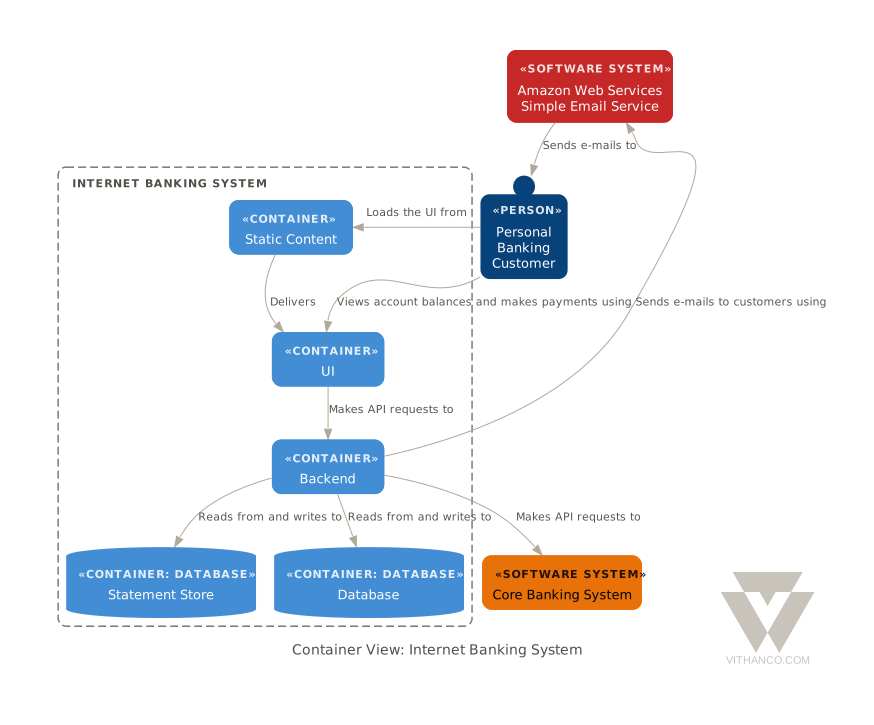
Ways to use it
| Web editor | vithanco.com/editor: write VGL, see the diagram, edit it on the canvas |
| Obsidian | obsidian-vithanco: a vgl code block becomes a diagram |
| VS Code | vscode-vithanco |
| MCP server | npx @vithanco/vgraph-mcp runs it locally; https://mcp.vithanco.com/mcp is hosted. Details |
| Command line | vgraph-cli, built from this repository |
| Swift package | the VGraph, VGLanguage and VGraphSVG libraries |
Building
Two tiers, so a parser fix does not send you through a toolchain install:
- Native only.
swift buildandswift testneed nothing but a Swift 6.4 toolchain. - With the wasm build.
just build,just test, the wasm smoke tests and the editor's browser tests also need Node,jq,binaryen,wabt,justand the Embedded Swift SDK that matches.swift-version.
Install the toolchain with swiftly, then
the SDK. One bundle holds both the plain and the -embedded SDK, and its version
must equal .swift-version. The checksum is per release; take it from
swift.org's WebAssembly guide.
V=$(cat .swift-version)
swiftly install "$V" && swiftly use "$V"
swift sdk install "https://download.swift.org/swift-$V-release/wasm-sdk/swift-$V-RELEASE/swift-$V-RELEASE_wasm.artifactbundle.tar.gz" \
    --checksum <checksum for $V from the guide>
just doctor lists what is missing; a missing SDK is reported but does not fail
it.
just build     # compile everything: wasm, command line, MCP server
just test      # build, then the full suite: Swift, wasm smoke tests, editor browser tests
just           # everything else
For most changes swift test is the quick loop. The Obsidian and VS Code
plugins are separate repositories; just plugins-setup clones them next to this
one, and the build and test recipes use them when they are there.
How it is organised
VGraph is built as hexagons: a pure domain at the centre, ports that name each conversation with the outside, and adapters at the edge. The parser, the SVG renderer and the Graphviz layout are separate targets that know only the core. Why it is shaped this way and where a change goes are written down, as are the decisions behind the design (ADRs) and the visual rules (design guide).
Contributing
Pull requests are welcome, and so are issues. Start with CONTRIBUTING.md.
Licence
Apache-2.0, see LICENSE. Third-party works, among them Graphviz and the DM Sans typeface, are listed in NOTICE. The Vithanco name and logo are not covered by the licence: the artwork is all rights reserved, and a fork should use a name and a logo of its own. See graphics/README.md for what is allowed.
Pertanyaan tentang VGraph MCP
Bagaimana cara menambahkan VGraph MCP ke Claude Code?
Jalankan claude mcp add vgraph -- npx -y @vithanco/vgraph-mcp di terminal Anda. Tambahkan --scope user agar tersedia di semua proyek.
Bagaimana cara menambahkan VGraph MCP ke Cursor?
Buka ~/.cursor/mcp.json dan tambahkan server di bawah mcpServers, menggunakan config Cursor yang ditunjukkan di bagian instalasi di atas.
Jenis diagram apa yang bisa dibuat oleh VGraph?
VGraph mendukung berbagai macam notasi termasuk IBIS, Concept Maps, Causal Loop Diagrams, Timelines, C4, dan Decision Trees.
Bagaimana struktur bahasa VGraph?
Vithanco Graph Language (VGL) adalah format teks ringkas yang digunakan untuk menulis, menyimpan, dan membagikan diagram.
Apakah saya bisa menjalankan VGraph secara lokal?
Ya, Anda bisa menjalankannya secara lokal melalui npx atau sebagai command line tool.