
Ternimal MCP server
Commit 14 Nov 2026Menyediakan terminal remote yang aman yang memungkinkan AI agent untuk mengeksekusi command dan mengelola file pada host remote melalui Model Context Protocol.
Juga dikenal sebagai ternimal/tern
- Stars
- 1
- Tools
- —
- Unduhan, 30 hari
- —
- Versi terbaru
- —
- Commit terakhir
- 14 Nov 2026
- Lisensi
- AGPL-3.0
Apa itu Ternimal MCP?
Ternimal adalah MCP server. Menyediakan terminal remote yang aman yang memungkinkan AI agent untuk mengeksekusi command dan mengelola file pada host remote melalui Model Context Protocol.
Ringkasan dibuat dari README proyek
Tentang Ternimal MCP server
Mengelola server remote melalui interface AI kini dimungkinkan dengan Ternimal. Tool ini menyediakan terminal remote yang aman yang memungkinkan AI agent untuk mengeksekusi command dan mengelola file pada host remote menggunakan Model Context Protocol. Tool ini dirancang untuk administrator yang perlu memberikan akses terkendali kepada client AI seperti Claude Desktop, Claude Code, atau Cursor ke sistem mereka.
Setup melibatkan menjalankan ternd agent pada host remote dan terhubung melalui tern client. Pengguna dapat terhubung secara langsung melalui jaringan lokal atau menggunakan ternr relay untuk menembus NAT tanpa memerlukan inbound ports. Keamanan dijaga melalui enkripsi TLS end-to-end dan autentikasi wajib menggunakan OpenSSH keys atau shared tokens.
Untuk mencegah tindakan yang tidak sah, MCP server beroperasi di bawah kebijakan tertentu dan bersifat read-only secara default. Server ini menyimpan audit log dari setiap panggilan dan memerlukan persetujuan manual sebelum melakukan tindakan yang dipilih. Hal ini memastikan bahwa meskipun AI agent dapat berinteraksi dengan tool shell, exec, port forwarding, dan file copy, pengguna manusia tetap memegang kendali penuh atas lingkungan remote tersebut.
Apa yang bisa Anda lakukan dengannya
- 1Eksekusi command remote via AIMinta AI agent untuk menjalankan shell command tertentu pada host remote melalui interface MCP.
- 2Audit tindakan administratif AITinjau log lengkap dari semua command dan interaksi yang dilakukan oleh AI agent pada sistem Anda.
Ditulis berdasarkan README proyek. Setiap use case diperiksa terhadap kutipan dari README tersebut.
Konfigurasi
TERN_TOKEN
| Nama | Deskripsi | Tipe |
|---|---|---|
| TERN_TOKEN | — |
Pengecekan otomatis
Berjalan 15 Nov 2026Laporan lengkap →Belum diverifikasi. Sebuah server memerlukan skor 80, tidak ada temuan serius, dan data yang cukup untuk kami periksa. Cara kerja checks · Yang perlu diperbaiki untuk menambah poin

- Source repository terhubung dan dapat dijangkauternimal/tern is public and reachablegithub.com/ternimal/tern ↗Lolos
- Nama paket mencantumkan repositori ini sebagai sumbernyaTidak diperiksa
- Provenance build (atestasi Sigstore)Tidak diperiksa
- Lisensi open source (OSI)AGPL-3.0spdx.org/licenses/AGPL-3.0.html ↗Lolos
- Ada commit atau release dalam satu tahun terakhirLast commit or release 2026-11-14github.com/ternimal/tern ↗Lolos
- OpenSSF ScorecardTidak diperiksa
- Nama package tidak mirip dengan package populerTidak diperiksa
- Tidak ada advisory kritis pada paket atau dependensinyaTidak diperiksa
- Tidak ada instruksi tersembunyi untuk model0 tool descriptions and the README read; no override phrases, credential paths or hidden charactersLolos
- Tools yang bersifat destruktif telah diberi labelTidak diperiksa
- Endpoint remote merespons handshake MCPTidak diperiksa
README
Lihat di GitHubTernimal
+------------------------------------------------------------------+
| \\\_\                                                            |
| \\\( ^>     t e r n                                              |
|  \\\=/      A minimal, portable, secure remote terminal with MCP |
|  ~~~~~                                                           |
+------------------------------------------------------------------+


Ternimal (terminal + minimal) is a minimal, portable, secure remote terminal: SSH-style shells, command exec, port forwarding and file copy over end-to-end TLS, reached directly or through a relay for NAT traversal. One project, four small binaries:
| binary | role |
|---|---|
tern |
client: shells, exec, port forwarding, file copy, REST gateway, MCP server for AI agents |
ternd |
agent: hosts sessions for authenticated clients; listens directly or dials a relay |
ternr |
relay: bridges clients to agents behind NAT; a public rendezvous that only forwards opaque bytes |
rtern |
combined relay + client: catches an agent that dials in and drops you into its shell; one process instead of ternr + tern |
Client-to-agent traffic is end-to-end TLS (clients pin the agent's certificate) and authentication to the agent is mandatory. This is an administration tool, not a stealth tool: connections are logged and the agent has no unauthenticated mode. Only use it on systems you own or are authorized to access.
Installation
Download the zip for your OS and architecture from the
latest release, check it
against SHA256SUMS and, with the GitHub CLI, its
build provenance attestation, and put the four binaries on your PATH:
curl -LO https://github.com/ternimal/tern/releases/latest/download/ternimal-linux-amd64.zip
curl -LO https://github.com/ternimal/tern/releases/latest/download/SHA256SUMS
sha256sum --ignore-missing -c SHA256SUMS
gh attestation verify ternimal-linux-amd64.zip -R ternimal/tern
mkdir -p ~/.local/bin
unzip ternimal-linux-amd64.zip tern ternd ternr rtern -d ~/.local/bin
Or build them with Go 1.21 or later:
go install github.com/ternimal/tern/cmd/...@latest
Notes for macOS and Windows, building from source and the supported platforms are in docs/install.md.
Quick start
# agent: zero-config, listens on port 2222 on every IPv4 and IPv6 address,
# mints a token, prints its fingerprint
ternd

# client: connect by IP with the agent's fingerprint and token
TERN_TOKEN=<token> tern connect -a AGENT_IP:2222 -f <agent-fp>
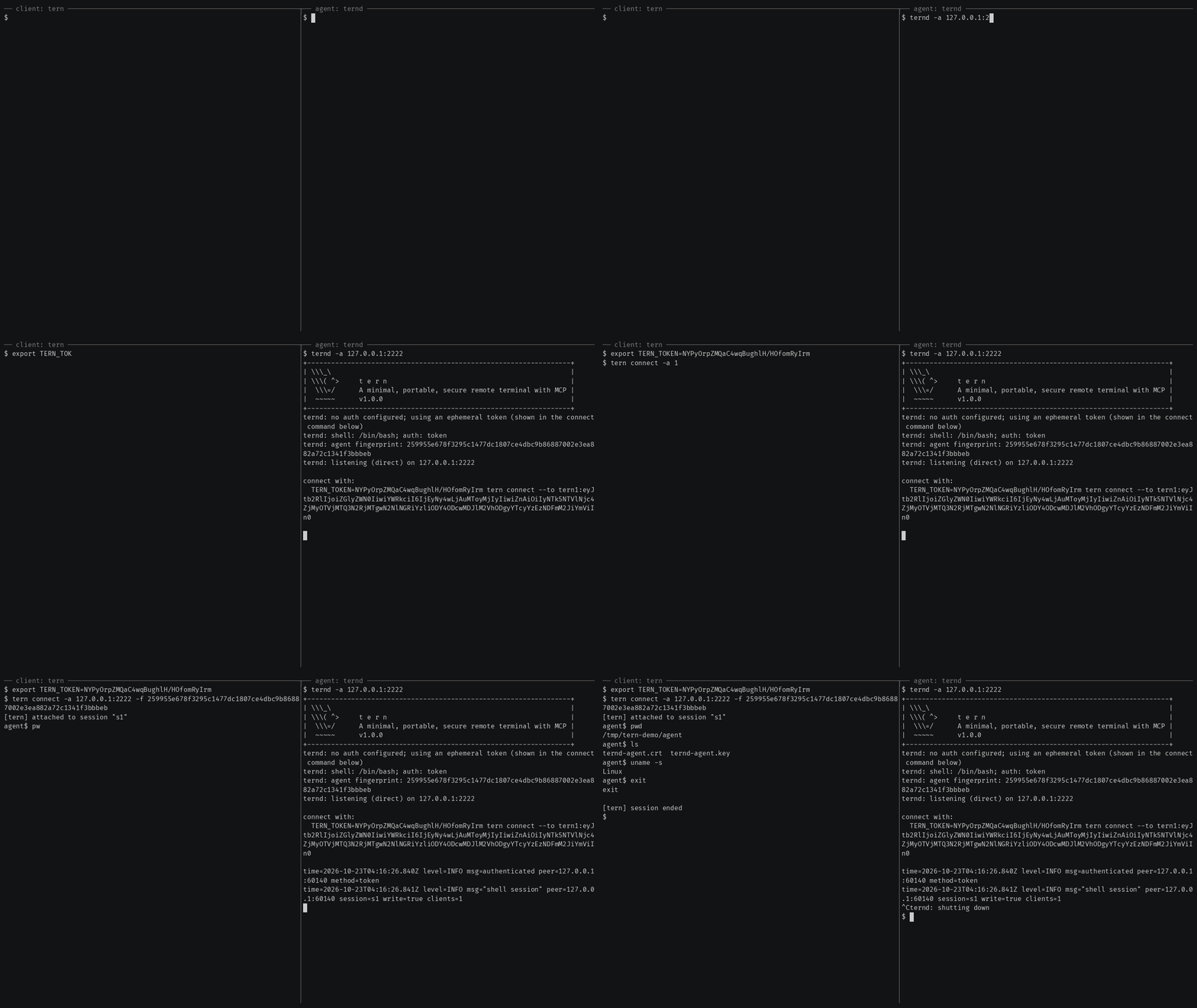
Getting started also covers reaching an agent
behind NAT through a relay, catching one with rtern and logging in with
OpenSSH keys instead of a token.
AI agents (tern mcp)
tern mcp lets an AI client such as Claude Code, Claude Desktop or Cursor work
on your agents through the
Model Context Protocol, under a policy you
set and with an audit log of every call. It is read-only by default, and asks
you before the actions you choose.
In Claude Code, install tern first, then the Ternimal plugin:
claude plugin marketplace add ternimal/tern
claude plugin install ternimal@ternimal
The plugin starts tern from your PATH and reads your hosts from a config
file, ~/.config/tern/mcp.json by default; its ternimal:setup skill walks
you through writing one. plugin/README.md says what it
runs and what it sends. Other clients, a one-line setup without a config
file, the tools and the safety model are in docs/mcp.md.
Features
- Direct or relay: reach an agent on your LAN directly, or reach one behind NAT through a relay, so that agent needs no inbound port.
- End-to-end encryption: TLS and authentication run between client and agent, so a relay only forwards ciphertext.
- Keys or tokens: OpenSSH public keys in
authorized_keysformat, or a shared token. - Resumable sessions:
tern connectreconnects on its own after a drop and resumes the session with scrollback replay; others can join it as read-only viewers. - One connection, many channels: one authenticated connection can carry a
shell,
exec, port forwards and file copy at once. - REST gateway and MCP server: run commands over HTTP, or let AI agents work under a policy.
- Recording: with
ternd --record-dir, the agent saves each session as an asciicast, playable withasciinema play. - Zero-config: run
terndwith no flags on a terminal and it mints a token and prints the line to connect with. - Portable: Linux, macOS, Windows and Android on amd64 and arm64.
All of them in detail: docs/features.md.
Documentation
- Getting started: direct, through a relay, with
rtern, with OpenSSH keys and the insecure flags for testing - Commands: every
terncommand, sharing and resuming sessions, copying files, port forwards - REST gateway: run commands on an agent over HTTP
- AI agents over MCP: the config file, profiles, tools, approvals and the audit log
- Install and build: checking a release, building from source, supported platforms
- Keys, tokens and files: the rules for the files tern reads
- Operating notes: listeners, shutdown, recordings and other details
- Security: the threat model, the dangerous flags and how to report a vulnerability
- Contributing: license terms, the CLA, development and the code layout
License
Ternimal is licensed under the GNU Affero General Public License v3.0 only (AGPL-3.0-only); see LICENSE. Running a modified version to provide a network service requires offering that version's source to its users.
A separate commercial license is available for uses that cannot comply with the AGPL, for example embedding Ternimal in a proprietary or hosted service; see NOTICE. Contributions are welcome; see CONTRIBUTING for the license terms and the CLA.
"Ternimal", the binary names (tern, ternd, ternr, rtern) and the
project logo are project trademarks and are not licensed under the AGPL; see
NOTICE.
Pertanyaan tentang Ternimal MCP
Bagaimana cara AI agent menggunakan Ternimal?
Client AI seperti Claude Code atau Cursor dapat bekerja pada agent Anda melalui Model Context Protocol (MCP) menggunakan command tern mcp.
Apakah koneksinya aman?
Ya, traffic client-ke-agent menggunakan TLS end-to-end dengan autentikasi wajib, memastikan relay hanya meneruskan ciphertext yang opaque.
Bisakah saya menggunakan Ternimal untuk menjangkau mesin di balik NAT?
Ya, Anda dapat menjangkau agent di balik NAT dengan menggunakan relay untuk menjembatani koneksi tersebut.
Apa izin default untuk AI agent?
Secara default, MCP server bersifat read-only dan akan meminta persetujuan Anda sebelum melakukan tindakan yang dipilih.