
tty-table MCP server
Commit 13 Okt 2026Memungkinkan AI client untuk merender data sebagai tabel terminal ASCII atau Unicode untuk digunakan dalam README dan file teks lainnya.
Juga dikenal sebagai tecfu/tty-table
- Stars
- 311
- Tools
- 4
- Unduhan, 30 hari
- —
- Versi terbaru
- —
- Commit terakhir
- 13 Okt 2026
- Lisensi
- MIT
Apa itu tty-table MCP?
tty-table adalah MCP server. Memungkinkan AI client untuk merender data sebagai tabel terminal ASCII atau Unicode untuk digunakan dalam README dan file teks lainnya. Server ini menyediakan 4 tool, seperti render_table, header, rows.
Ringkasan dibuat dari README proyek
Tentang tty-table MCP server
tty-table memungkinkan AI client untuk mengubah data mentah menjadi tabel terminal ASCII atau Unicode yang terformat. Developer yang menggunakan Claude, Cursor, atau IDE agent lainnya dapat menghubungkan server ini via stdio menggunakan npx untuk mentransformasi informasi terstruktur menjadi layout teks yang mudah dibaca. Ini sangat berguna untuk membuat dokumentasi yang rapi, file README, atau laporan ramah terminal secara langsung dari percakapan AI.
Tool render_table berfungsi sebagai interface utama, yang memungkinkan pengguna untuk memasukkan headers, rows, dan opsi konfigurasi spesifik seperti width, borderStyle, align, atau compact mode. Server ini menangani logika formatting yang kompleks, termasuk pengukuran lebar Unicode dan text wrapping, untuk memastikan tabel terlihat benar di lingkungan terminal. Implementasi MCP ini membutuhkan Node.js versi 22 atau yang lebih baru untuk menjalankannya.
Ditulis berdasarkan README proyek. Setiap use case diperiksa terhadap kutipan dari README tersebut.
Tool tty-table MCP 4
Terdeteksi dari READMErender_tableheaderrowsoptions
| render_table | — | |
| header | — | |
| rows | — | |
| options | — |
Pengecekan otomatis
Berjalan 13 Nov 2026Laporan lengkap →Belum diverifikasi. Sebuah server memerlukan skor 80, tidak ada temuan serius, dan data yang cukup untuk kami periksa. Cara kerja checks · Yang perlu diperbaiki untuk menambah poin

- Source repository terhubung dan dapat dijangkautecfu/tty-table is public and reachablegithub.com/tecfu/tty-table ↗Lolos
- Nama paket mencantumkan repositori ini sebagai sumbernyaTidak diperiksa
- Provenance build (atestasi Sigstore)Tidak diperiksa
- Lisensi open source (OSI)MITspdx.org/licenses/MIT.html ↗Lolos
- Ada commit atau release dalam satu tahun terakhirLast commit or release 2026-10-13github.com/tecfu/tty-table ↗Lolos
- OpenSSF ScorecardOpenSSF Scorecard 4.8 / 10; weakest: Code-Review 0, Pinned-Dependencies 0, CII-Best-Practices 0scorecard.dev/viewer/?uri=github.com/tecfu/tty-table ↗Parsial 7/15
- Nama package tidak mirip dengan package populerTidak diperiksa
- Tidak ada advisory kritis pada paket atau dependensinyaTidak diperiksa
- Tidak ada instruksi tersembunyi untuk model4 tool descriptions and the README read; no override phrases, credential paths or hidden charactersLolos
- Tools yang bersifat destruktif telah diberi labelNo tool named like delete, drop or execLolos
- Endpoint remote merespons handshake MCPTidak diperiksa
README
Lihat di GitHubtty-table
A TypeScript-first terminal table renderer with a compatibility-oriented factory API.
Examples
See here for complete example list
To view all example output:
$ git clone https://github.com/tecfu/tty-table && cd tty-table && npm i
$ npm run view-examples
Terminal (Static)
examples/styles-and-formatting.js

Terminal (Streaming)
$ node examples/data/fake-stream.js | tty-table --format json --header examples/config/header.js
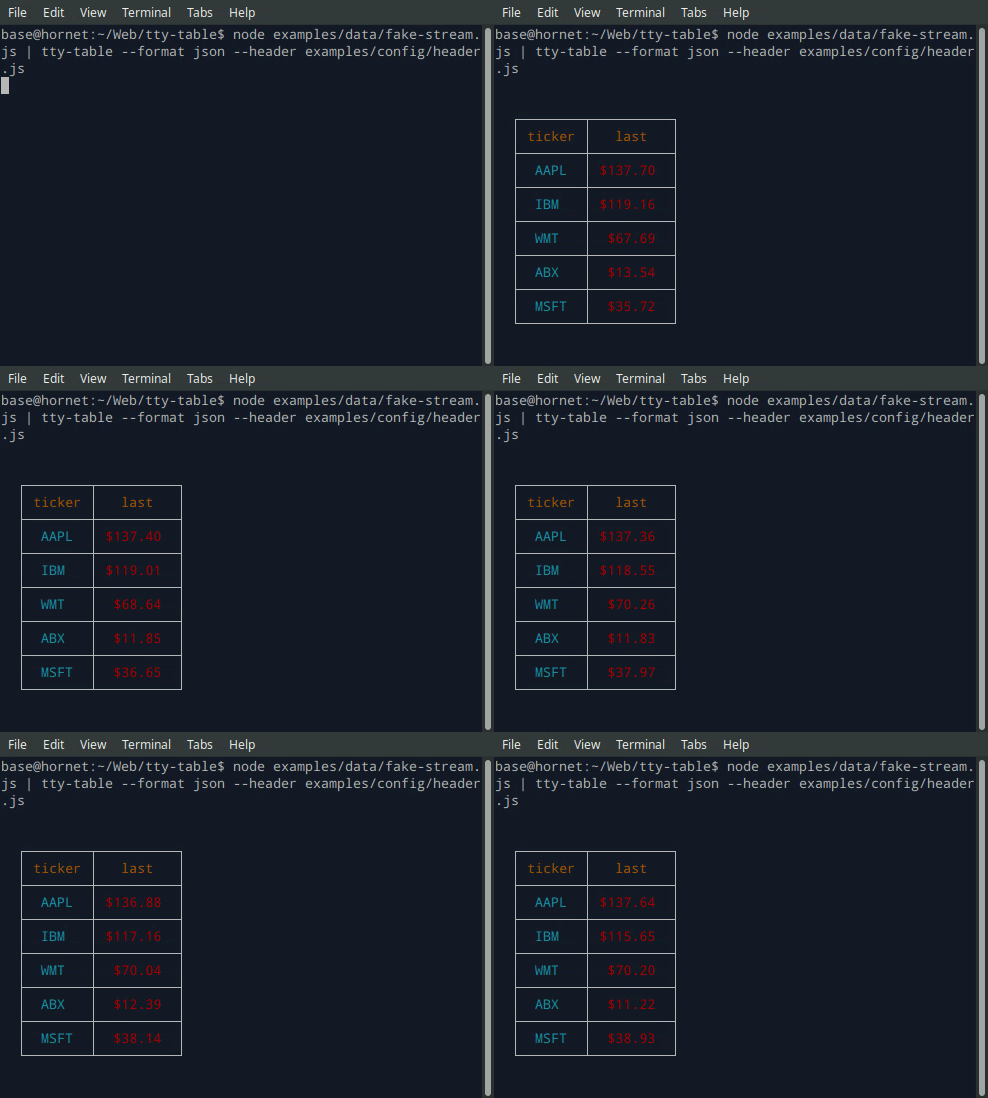
- See the built-in help for the terminal version of tty-table with:
$ tty-table -h
MCP server
Expose tty-table to MCP clients (Claude, IDE agents, Cursor, etc.) over stdio.
Client configuration
{
  "mcpServers": {
    "tty-table": {
      "command": "npx",
      "args": ["-y", "--package=tty-table", "tty-table-mcp"]
    }
  }
}
Tools
| Tool | Description |
|---|---|
render_table |
Render data as an ASCII/Unicode terminal table. Accepts header, rows, and any tty-table options; returns the rendered table as text. |
Arguments for render_table:
| Name | Type | Required | Description |
|---|---|---|---|
header |
(string | {value, align?, width?})[] |
no | Column definitions |
rows |
(unknown[] | Record<string, unknown>)[] |
yes | Row data (arrays of cells, or objects keyed by column name) |
options |
object |
no | Any tty-table option (e.g. width, borderStyle, align, compact) |
Example tool call:
{
  "header": [{ "value": "name" }, { "value": "score", "align": "right" }],
  "rows": [["Ada", 100], ["Grace", 98]],
  "options": { "width": 40 }
}
Rendered result:
  ┌───────┬───────┐
  │ name  │ score │
  ├───────┼───────┤
  │  Ada  │   100 │
  ├───────┼───────┤
  │ Grace │    98 │
  └───────┴───────┘
Additional tools may be added in future releases under the same MCP server.
Browser & Browser Console
The published package ships a standalone IIFE bundle that exposes a TtyTable global. Load it directly from a CDN — no install or build step required:
<script src="https://cdn.jsdelivr.net/npm/tty-table@7/dist/browser/tty-table.global.js"></script>
<script>
  const Table = TtyTable.default
  console.log(Table([{ value: "name" }, { value: "score" }], [["Ada", 100]], null).render())
</script>
- Try it online before installing: live example on JSFiddle
- View the full example locally in Chrome or Chromium by opening examples/browser-example.html (e.g. served with
npx serve .or any static file server). - source: examples/browser-example.html

Compatibility
Node.js
Current releases require Node.js 22 or newer. This is a breaking change from the Node 20 baseline used by early v6 releases (and from the v5 line, which supported older Node.js releases). The floor was raised to match smartwrap@4 / breakword@2.1.0. If your application must remain on Node 20, stay on a prior tty-table release until you can upgrade.
The published package provides both ESM and CommonJS entry points for Node.js. The CLI requires Node.js 22+ as well.
API
import Table from "tty-table"

const table = Table(
  [{ value: "name" }, { value: "score", align: "right" }],
  [
    { name: "Ada", score: 100 },
    { name: "Grace", score: 98 }
  ],
  { borderStyle: "solid" }
)

console.log(table.render())
Legacy Table(header, rows, footer, options) and Table(rows, options) construction remains supported.
Formatter context
New code can use the explicit context form:
const formatter = (value: unknown) => String(value).toUpperCase()
The compatibility callback signature is still accepted. New integrations should prefer a formatter that accepts the documented context object and avoid relying on dynamic this mutation.
Width semantics
Widths are measured in terminal display columns, not JavaScript string length. ANSI escape sequences are ignored for measurement; Unicode code points are counted using breakword.width() (Unicode 18.0.0 East Asian Width + UAX #51 Emoji_Presentation). Wrapping and truncation operate on the same display-width semantics.
Compared with older releases that used wcwidth, some symbols that were previously treated as 1 cell are now 2 cells (for example ⚡ U+26A1). Tables containing those characters may reflow slightly; measurement is now aligned with the same library used for wrapping.
Development
npm install
npm run typecheck
npm run build
npm test
npm run test:unit
npm run lint
Pertanyaan tentang tty-table MCP
Tool apa yang disediakan tty-table MCP?
Server ini menyediakan 4 tool, termasuk render_table, header, rows, options.
Bagaimana cara menggunakan tty-table dengan Claude atau Cursor?
Anda dapat mengeksposnya ke MCP client seperti Claude, IDE agent, atau Cursor melalui stdio dengan mengonfigurasi mcpServers di dalam konfigurasi client Anda.
Tool apa saja yang tersedia di MCP server ini?
Server ini menyediakan tool render_table, yang menerima headers, rows, dan berbagai opsi tty-table untuk mengembalikan tabel ASCII/Unicode yang sudah dirender.
Versi Node.js berapa yang dibutuhkan?
Rilis saat ini membutuhkan Node.js versi 22 atau yang lebih baru.